Forum Replies Created
-
AuthorPosts
-
 Moderator
Is the numbering in the schematic the same as my numbering? I know there must be a convention, but I don’t know it.
I don’t know, but from inspection you can probably work out ground, and maybe find the 12V (or 14V) using a multimeter and then have an educated guess for the remainder!
Out of curiosity, is the Avant wired the same as a BV11?
Looks the same in the service manual – this calls the connector a ‘MicroFit 4-pin’, if that’s any help.
Location: Warwickshire, UK
My B&O Icons:


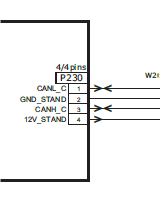
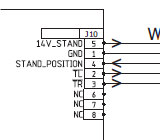
Normally I’d refer you to the service manuals (avail to Silver & Gold members), but here are screenshots from the relevant sections. I am not convinced that it is straightforward but if you can get it to work please come back and let us know how!
BV11:

BV10:

Location: Warwickshire, UK
My B&O Icons:
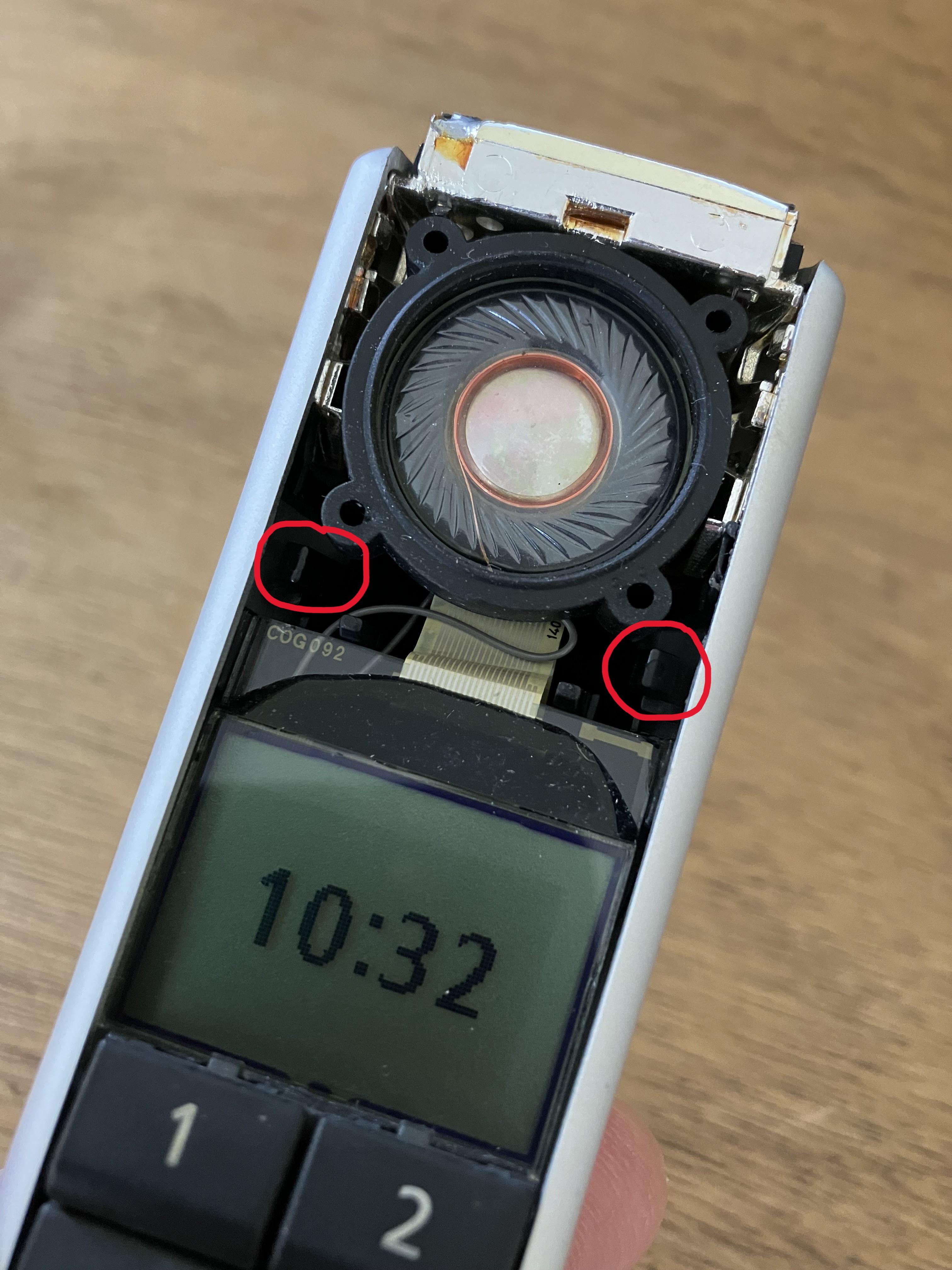
A photo of the back of the display frame would be helpful so that we know what the retaining lugs look like.
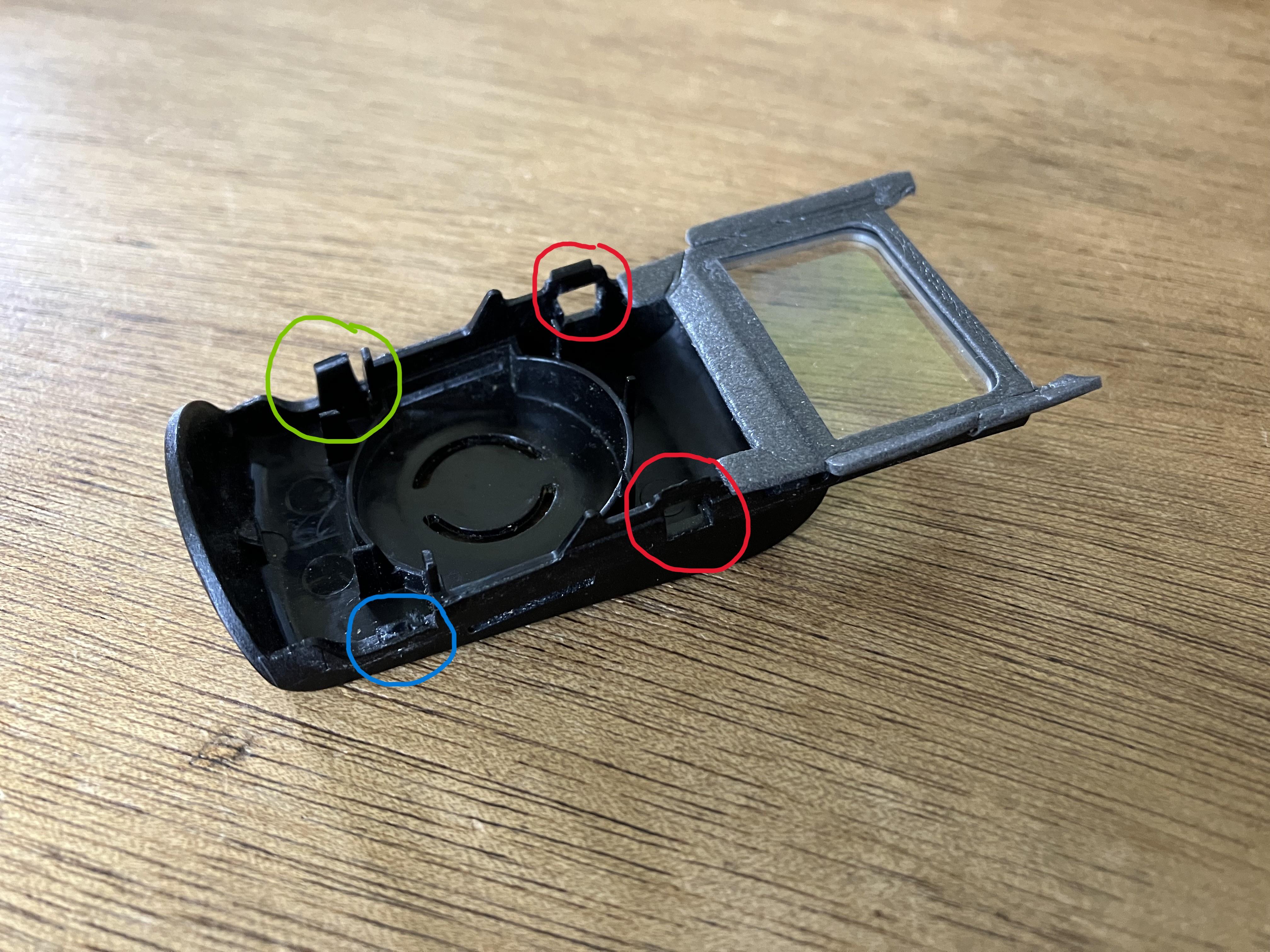
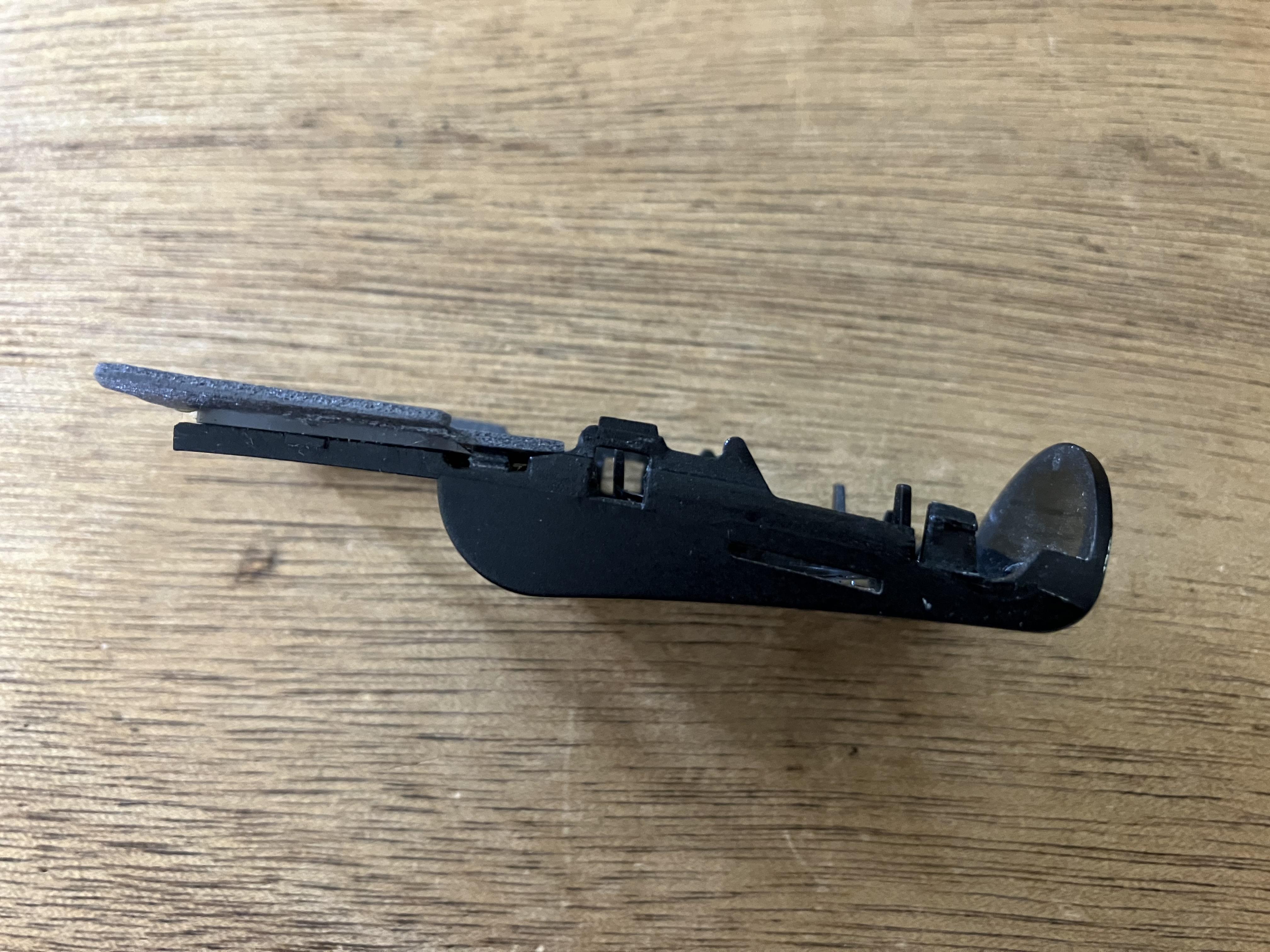
I just removed it again to take a couple of photos. I noticed that one of my clips is indeed missing (blue circle), but it still seems to hold together well. The red circles show where the clips in red in the bottom photo hold.
EDIT: There are some very small clips just above the keyboard no 1 and 2 buttons. The cover pivots away from these as you remove it; there is no need to apply any tools in this area.


Location: Warwickshire, UK
My B&O Icons:
Please can you tell me where this Plectrums are from, can’t find it anywhere. Thanks Manfred
Like these, from any music shop or Amazon: https://www.amazon.co.uk/Different-Thickness-Non-slip-Plectrums-Electric/dp/B09Y1VXHK4
Location: Warwickshire, UK
My B&O Icons:
The guitar plectrums were very thin plastic. You could also use the corners of bank or credit cards but they may be too thick.
Location: Warwickshire, UK
My B&O Icons:
I used two thin guitar plectrums, and slid them down each side of the display cover from the top. There are actually four little clips on the display cover, two at the top and two at the bottom. The display cover then lifts up away from the LCD. (You don’t have to remove any of the keyboard buttons, as the display cover is not clipped in this area).
Co-incidentally I took mine to pieces again yesterday to fit that new pointer. It works, but for some reason the LCD display fades and disappears after several hours. I can refresh the screen by turning off and on again, but there is obviously still something wrong. Perhaps the LCD itself is faulty.
Location: Warwickshire, UK
My B&O Icons:
Great news – glad that you got it working and the display of station names on the BS4 is an added bonus – I don’t think they display on BL3500.
I think that you can add many more favourites than four. Each of the coloured buttons represents a List, and in each list you can have up to 99 stations. From memory, I think you then access favourites by pressing (eg) RED 6, BLUE 4 etc. You can store N.MUSIC playlists in a similar manner. You may want to look for a Beoplayer rather than a Beoport user manual to see how to use.
Location: Warwickshire, UK
My B&O Icons:
Correct text is in pdf file attached:
Attachments:
You must be logged in to view attached files.Location: Warwickshire, UK
My B&O Icons:
A thousand apologies but the Registry Update text that I posted earlier was corrupted. Each time I paste the text it converts the ” sign to unicode ” for some annoying reason!
The server URL in the Registry Editor should read:
https://nradio.beoplayer.com/nradiodata.asp
And should be enclosed with ” symbol at start and finish!!
Location: Warwickshire, UK
My B&O Icons:
I might try a fresh install of Beoplayer on a Virtual Machine and see what happens.
I just tried a fresh install on a Windows 7 VM.
I ran the registry updater and no radio stations appeared. I then tried the other trick from that other thread as follows:
Navigate to C:\Program Files\Bang & Olufsen\BeoPlayer and look for a file called UpdateNotifier.exe
Double click to run a database update, whereupon you get this message: (Yours should say ‘Beoport’ rather than ‘Beoplayer’)

And all the radio stations rapidly downloaded.
EDIT: I noticed that no BBC radio stations were downloaded, so I checked the registry of the Virtual Machine and the downloaded radio database was last updated on 14 Jul 2023. I think B&O must have removed the BBC stations at this last update because they were no longer compatible.
Location: Warwickshire, UK
My B&O Icons:
Thanks – I successfully updated the registry using those instructions but it doesn’t seem to have made any difference – still says ‘Not Registered’ when I try to use N.Radio. I’m not too bothered about N.Radio but it is nice to get things working, if you can.
I suspect that the ‘ServerURL’ link within that Registry Editor file is no longer supported by B&O. I don’t want to corrupt my installation, so I might try a fresh install of Beoplayer on a Virtual Machine and see what happens.
Location: Warwickshire, UK
My B&O Icons:
I took apart an old SkyHD decoder about a year ago and tried connecting the Hard Drive to my PC. I couldn’t read any files, but downloaded some software called ExPVR to decode the files – this worked and I could view the contents, but it was tricky to use and I am always a bit suspicious of free software.
Once you know the file type (and possibly the make of the innards if not B&O), you may be able to find similar software for decoding purposes.
Location: Warwickshire, UK
My B&O Icons:
One inconvenience though – it means that if I want to use my PC for other purposes (playing games for example), I have to switch the audio outputs on my PC, so audio plays through my PC speakers. Not terribly convenient – it’s as if B&O thought That if you had a Beolink PC2 or Beoport, this would become the only thing you would use your PC for!
Perhaps there’s a PC setting that will allow both audio outputs at once?
Otherwise, you could experiment with connecting the Beoport’s audio out socket (3.5mm socket possibly covered with a sticker) to your PCs sound card input – @Patcherley posted about such a setup here: https://forum.beoworld.org/forums/topic/beoport-beoplayer/page/3/#post-39482
EDIT: Perhaps you can simply plug your PC speakers into the Beoport’s audio out socket?
Location: Warwickshire, UK
My B&O Icons:
I’ve only just seen this thread – for some reason Beoworld wasn’t refreshing on my desktop today.
Have you yet tried that registry file to get the n.radio stations updated? Details are within the thread that @madskp linked, but I thought I would replicate here for other users:
You simply open a text editor such as Notepad and cut/paste the following text into it. (EDIT: The link in the text is incorrect due to the forum replacing ” with unicode text of &~8221 – see later in thread for correction)
Windows Registry Editor Version 5.00
[HKEY_CURRENT_USER\Software\Bang & Olufsen\BeoPlayer\N.Radio]
“ViewSelection”=hex:00,01,02,03,04
“BufferTime”=dword:00000005
“ServerURL”=”https://nradio.beoplayer.com/nradiodata.asp”
“UserId”=”60B1D8994C224AC69B91931AE710521A”
“SoundIcons”=dword:00000001
“EnableDebug”=dword:00000000Then save the file as N.Radio.reg You can then right-click the .reg file, open with: Registry editor. Once it has been run, radio stations should download.
You may also want to open the Windows volume mixer and check that the ‘BeoNetRadio’ application is not muting – I have found this to be a problem when changing radio stations.
Location: Warwickshire, UK
My B&O Icons:
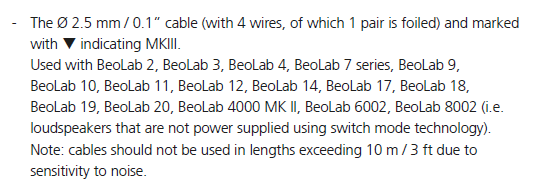
Is it required that I should use a PL Mk3 for the wire between the BS3000 and the Beolab 2?
Yes, according to the ML Handbook:

Location: Warwickshire, UK
My B&O Icons:
No. The 7-40 bracket (the bit that actually supports the TV) is much wider – you can see that it has levers going into each of the two support poles.
The BV6-26 brackets will support the BV7-32 (but won’t necessarily have the bracket mount below the TV for a Beolab).
Location: Warwickshire, UK
My B&O Icons:
It’s amazing what can be done with ML.
Indeed – in many ways it’s the ‘sweet spot’ of B&O connectivity! Great to see SCART being used also – it’s often overlooked as a potential audio input in such setups. 😀
Location: Warwickshire, UK
My B&O Icons:
Ah – turns out I already had the right cable for that (I never throw a cable out) and you’re right, it works. It would mean I could not have my BV8 TV as part of the ML network but I’m not really all that bothered about that – I don’t use it much anyway. Also means I can get the WIIM Pro to play on the BL3500 of course, so it’s a good solution, thanks!
Great news – it just goes to show what a versatile piece of kit the BL1611 is!
And you could possibly add the BV8 instead of the BL1611. Just use a suitable lead to connect the WIIM Pro to one of the BV’s SCART inputs, setup the input accordingly in the BV8 menu and the ML system should distribute the audio as a video source. With the correct TV option setting, when accessed from the BL3500 or BS4 it should just turn on with a muted screen when distributing the SCART audio over ML.
EDIT: I just checked the BV8 manual – you may be able to use the BV8’s AV3 composite input for the WIIM Pro (just the L&R audio phono socket inputs) in which case you would not need an adaptor. I can’t be 100% sure that this input is distributed over ML, but I see not reason why not.
Location: Warwickshire, UK
My B&O Icons:
Not sure I know how to achieve the above to be honest – how would I get it to recognise my WIIM Pro as a video source? Also would this mean re-wiring the DIN socket?
It should just work. The BL1611 automatically configures itself as a videomaster because there is no other video product on the ML network. Selecting any video source (on the BL3500 or BS4) will then select the BL1611’s AAL socket as the active (sound) input. Although I said that the AAL input uses DIN pins 3&5 as the input, this is a standard used elsewhere in the hifi (incl B&O) world and leads such as this are readily available.
Using such a setup, you should be able to solve the other problem by having your Beogram connected to the BS4 (activated with A.AUX, albeit a bit of a faff from the BL3500), and the WIIM Pro connected to the BL1611’s AAL socket, activated using any video source button.
Location: Warwickshire, UK
My B&O Icons:
Sorry but I don’t know the answer, hence will let Multicare respond.
However, in the meantime, you can use your normal search engine (eg Google) and type in the search bar as follows:
For earliest forum: ‘Beosound 3000 site:archivedforum.beoworld.org’
For later forum: ‘Beosound 3000 site:archivedforum2.beoworld.org’
Obviously replace ‘Beosound 3000’ with your specific search!
I hope this helps in the meantime.
Location: Warwickshire, UK
My B&O Icons:
-
AuthorPosts