Forum Replies Created
-
AuthorPosts
-
 Moderator
The only way I have found to get the BL3500 into A.Aux mode is to switch the BS4 to A.Aux mode, then switch the BL3500 on using the physical Mute button next to the display. I can then mute the BS4 if I only want the sound from the BL3500. It works, but it’s not very practical!
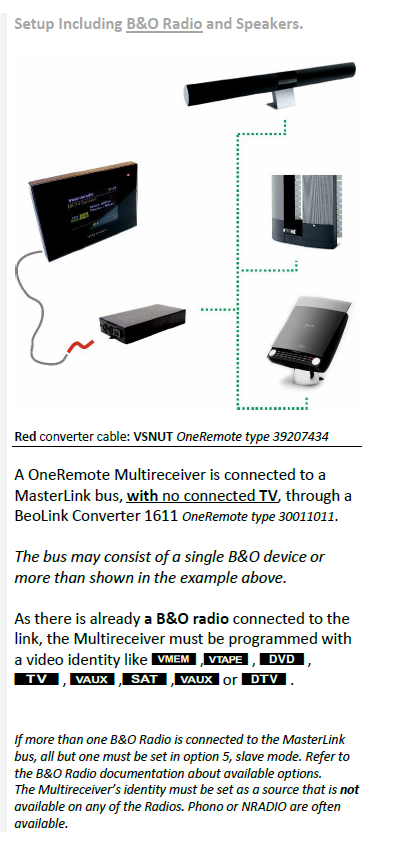
You could try adding your BL1611 to the same ML network as the BL3500 and BS4. Connect your WIIM Pro streamer to the BL1611’s AAL input (audio must be to pins 3 & 5), and then try to select it using a Video source on either the BL3500 or BS4 (again BS4 should be in A.OPT 2).
EDIT: What I am proposing is a bit like this OneRemote setup:

Location: Warwickshire, UK
My B&O Icons:

Another though – can you clarify exactly what other B&O devices are connected to the same ML network as the BL3500? If there are no video products, can’t you just put the BC8500 in A.OPT 2 and then trigger the aux input with LINK then a video source such as A.TAPE?
Location: Warwickshire, UK
My B&O Icons:
I would probably look for a later DTV Beo4 (not the navi version) so you can put it in permanent link mode.
I can use my Beolink 1000 for that (Link>Shift>Radio) but my Beolink 1000 does not belong in that room, and it has other limitations when using it with a Beolab 3500.
What limitations?
So, would a Beoremote 1 work for this?
Do you mean the early Beo1 like this? (In which case the answer is no!) Or the later more modern Beoremote One, which according to the manual (page 16) has a Beo4 LINK mode.
Beo5 or 6 would also work for LINK, but can be quite complicated to set up.
Location: Warwickshire, UK
My B&O Icons:
Ypou’re rifght – it doenslt work. I donlt yet have the adadter to connect my BG3000, but I didn connect the BG3000 to the 1614 via A.Aux link plug, then to my BS4 via Masterlink, just to test if there was any Datalink compatibility. There was not – if I pressed Phono on the Beo4 the BS4 came on (but in N.Radio, of course), but the turntable did not activate.
There is a further complication with datalink, but I don’t think it affected your experiment in this case: Tape and CD use pin 7, whereas Phono uses pin 6, unless RIAA is built in (to the Beogram) in which case it uses pin 7 also. (As an aside, the OneRemote RIAA must therefore swap datalink from pin 6 to 7). So your BG3000 probably expects datalink on pin 6, which corresponds to the AAL ‘data’ also on pin 6, albeit not able to control you Beogram in your test.
Out of interest, when you tested this did you try putting the BeoSound in A.OPT 2 and then pressing DVD on the Beo4 – at the very least you should then get Beogram sound, but try controlling the Beogram also. Also, with the Beogram and Beosound running, try a long press on the Beo4 power button to see if it turns both BeoSound and Beogram off – if it does so then at least some data messages are getting through.
As for th alternarive possible MCL2AV solution you give – I did have an MCL2AV only recently but had to return it to the seller as it failed after a short while. Madskp’s diagram does have a note bottom-right though saying this solution would not work if a Beosound was used as the audio master, soi I assume Madskp means that my Beosound 4 is not an alternative to a Beoport in this case.
I think that a Beosound cannot directly replace the Beoport because in his example the BL1611 is acting as the audiomaster (only a BL1611 can do this, not a BL1614), and effectively the Beoport is a link product. There may be a work around but I will have to defer to madskp’s greater experience of such setups!
Location: Warwickshire, UK
My B&O Icons:
That Oneremote preamp has given me an idea but I’d be surprised if it works. The Beosound 4 has one disappointing feature – it only has standard RCA aux input, so no Beolink/Audio Aux Link. I do have a 1614 converter going spare though. Do you think if connected my BG3000 to the Oneremote device, then to the 1614 converter via A.Aux link cable, then to the BS4 via Masterlink, then I would be able to control my BG3000 via remote control?
No I am pretty sure that this wouldn’t work – the problem being that the BL1614 (or 1611) uses Audio Aux Link rather than the datalink that is needed to control the Beogram.
There may be a (messy) solution using an MCL2AV – something like this but with your BS4 instead of Beoport: https://forum.beoworld.org/wp-content/uploads/2023/12/Beolik-Converter-Usecases-5.pdf
The diagram is madskp’s work – hopefully he can comment further!
Location: Warwickshire, UK
My B&O Icons:
The most recently posts from this thread seems to have disappeared? Anyway, in one of those missing posts one of you (can’t remember who sorry) mentioned the datalink-compatible phono stage available from Oneremote (https://shop.oneremote.dk/shop/69068-riaa-amplifier/).
I think that you may be getting confused with your turntable thread here! https://forum.beoworld.org/forums/topic/beogram-turntables-which-have-preamp/
Location: Warwickshire, UK
My B&O Icons:
Welcome to Beoworld!
I am guessing a bit here, but it looks very similar to the BC9500 decoder board. Have a look a the BC9500 service manual, which includes CD decoder circuit diagram and component list.
EDIT: BC9500 CD decoder was board discussed here – maybe swap notes! https://forum.beoworld.org/forums/topic/beocenter-9500-cd-decoder-board-repair/
Location: Warwickshire, UK
My B&O Icons:
The BeoGram 3500, BeoGram 4500, BeoGram 6500 and BeoGram 7000 all had RIAAs fitted as standard.
And although not fitted as standard, RIAA may have been retro-fitted into the following:
BeoGram 3000, BeoGram 3300, BeoGram 5005, BeoGram 5500, BeoGram 8500, BeoGram 9000, BeoGram 9500, BeoGram TX
EDIT: And further research shows that a RIAA Pre-Amp module could also be fitted to BeoGram 1000, 1200 and 1800 (BeoParts (now: Danish Sound Parts) sell kit replicas of the original modules)
EDIT 2: I also just noticed that OneRemote sell an RIAA pre-amp that passes the datalink through, useful for datalink era non-RIAA Beograms such as BG9500: https://shop.oneremote.dk/shop/69068-riaa-amplifier/
Location: Warwickshire, UK
My B&O Icons:
I was able to switch my BL3500 to A.Aux using Link>Shift>Phono.
Are you sure it wasn’t LINK>SHIFT>RADIO?
Location: Warwickshire, UK
My B&O Icons:
This arrived in the post today!

Location: Warwickshire, UK
My B&O Icons:
The Beolab 3500 will probably not support the A.AUX command. according to this thread https://archivedforum.beoworld.org/forums/t/36474.aspx this is first supported from SW ver. 3.33 in the BL3500
My BL3500 is at SW2.0 and supports A.AUX (whereas my BL2000 at SW1.1 doesn’t). I think Keith’s post in that linked thread is a bit confusing – there were a few other anomalies spotted when we were testing BL3500 with BL1611.
Location: Warwickshire, UK
My B&O Icons:
One annoying thing though – the Beo4 does not seem to have ‘L-A.Aux’ available as an extra button, so I would not be able to select that source using my Beo4 on my Beolab 3500. It has L-V.Aux but not L-A.Aux. What a strange omission!
If using link commands (L-etc) frequently, you could put a Beo4 in permanent link mode and then simply use A.AUX.
To set in permanent LINK mode:
- Standby + List together
- Press List till CONFIG appears
- Enter 2002, the display should read LINK ON
- Press Exit
Repeat the above process to return the Beo4 to normal mode.
EDIT: The later Beo4 NAVI (with the little joystick) may well have L-A.AUX as an option – it is listed in the Lexicon.
Location: Warwickshire, UK
My B&O Icons:
Thanks for testing those voltages. My Essence doesn’t seem to be supplying any voltage to a disconnected IR wire, so perhaps there is a Firmware problem (hopefully not a hardware problem, but we’ll see).
I am still waiting to hear back from B&O Tech support, and will post back here when I do.
Location: Warwickshire, UK
My B&O Icons:
I think it’s actually a 1500 not a 1401, I just assumed it was a 1401 but the eBay seller didn’t specify the model and it doesn’t have the model number on it. The buttons are a bit different that a 1401. This may explain why I was unable to find the location of the batteries in the 1401 user manual. That’s my excuse anyway.
The BeoCom 1400 and 1500 look very similar (similar small keyboards), the difference being that the 1500 has a memory facility, and a volume control for the handset itself. The BeoCom 1401 followed the Beocom 1400 and 1500, and has a much larger, easier to use keyboard with memory and handset volume also. Of similar form factor is the BeoTalk 1400, with built in answerphone.
I love having volume controls to hand, right there on my desk. Using them every day – so useful.
Yes, I think that the AV volume controls are far better placed on the ‘base’ rather than the handset – with the latter you have to move them away from your ear to operate which defeats the object. Nevertheless, they were moved to the handset for the BeoCom 5000 (analogue cordless), BC6000 and BC2.
Location: Warwickshire, UK
My B&O Icons:
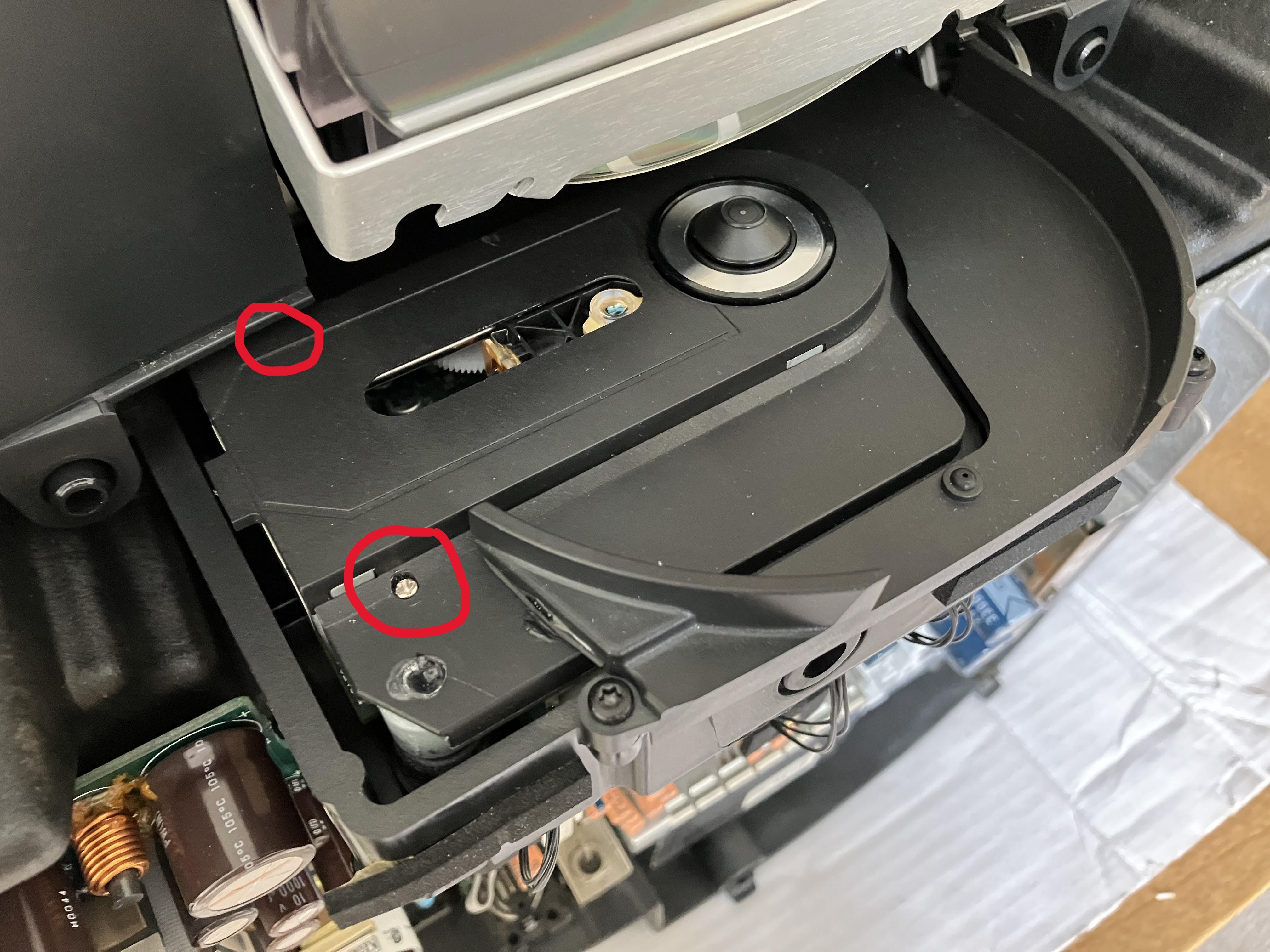
I re-fitted the dust cover today, using small dabs of super glue gel at the right hand end (other side from laser) and found two small screws to hold down the left hand side where it had previously been sitting proud and rubbing the CD. Screws circled in red below (only one visible) – these weren’t there before, I think by design because the rubber suspension mounts should actually hold the cover down if they hadn’t been cut off too short. You can also see the glue below from a previous owner’s repair, in the hole from which the rubber suspension mounts should extend:

All is re-assembled now and CD plays nicely without rubbing.
Location: Warwickshire, UK
My B&O Icons:
Many thanks for checking with the NL/ML converter – it’s useful to know that works with the ML eye and just the three wires connected.
The instructions for IR with Essence only mention that it requires A.OPT 1. It’s explained here: https://support.bang-olufsen.com/hc/en-us/articles/360041742571-How-do-I-activate-sources-using-BeoRemote-One-or-Beo4
Option setting is one of my concerns. As we know, when Option setting is done with the Beo4, a B&O product is usually in ‘stand-by’ (powered up but not turned on). I can’t be totally sure what state the Essence should be in when setting options. It can either be ‘off’ (but powered), at ‘network standby’, or ‘on’. I am guessing that ‘network standby’ is right for option setting, but have tried all three states just to check. It would be far easier if there were a drop down A.OPT menu in the settings like your NL/ML converter.
Anyway, I am hoping that there’s a bug with the current firmware; I sent a query to B&O last night and they have responded to say that it has been forwarded to their technical team.
Location: Warwickshire, UK
My B&O Icons:
The new laser arrived a few days ago while I was distracted with my ‘new’ BeoSound Essence.
Here’s the one that I ordered – one of the cheapest on Amazon and when I ordered I was given a further £2.62 discount for some reason, hence total of £30.12 with free postage from deepest China. It arrived in just six days.
https://www.amazon.co.uk/dp/B0D2D47SR8
I have just fitted it, using the helpful guide here: https://encosystems.net/instructions/cd-pro-2-with-opu2-vau-125411-31-31lf/
I put the re-assembled CD module back in the freshly cleaned ‘donor’ BeoSound 1 shown above and … it works perfectly!
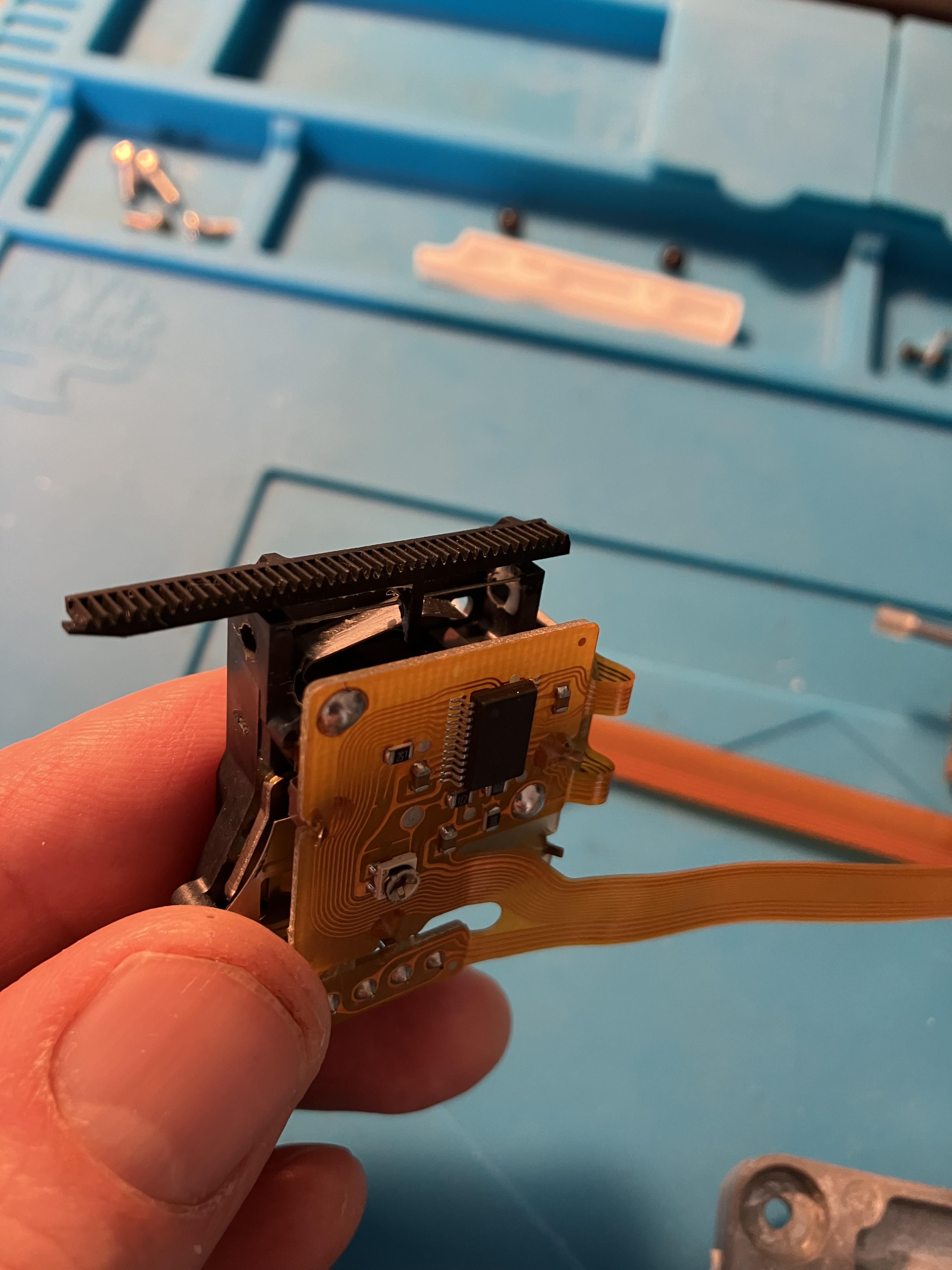
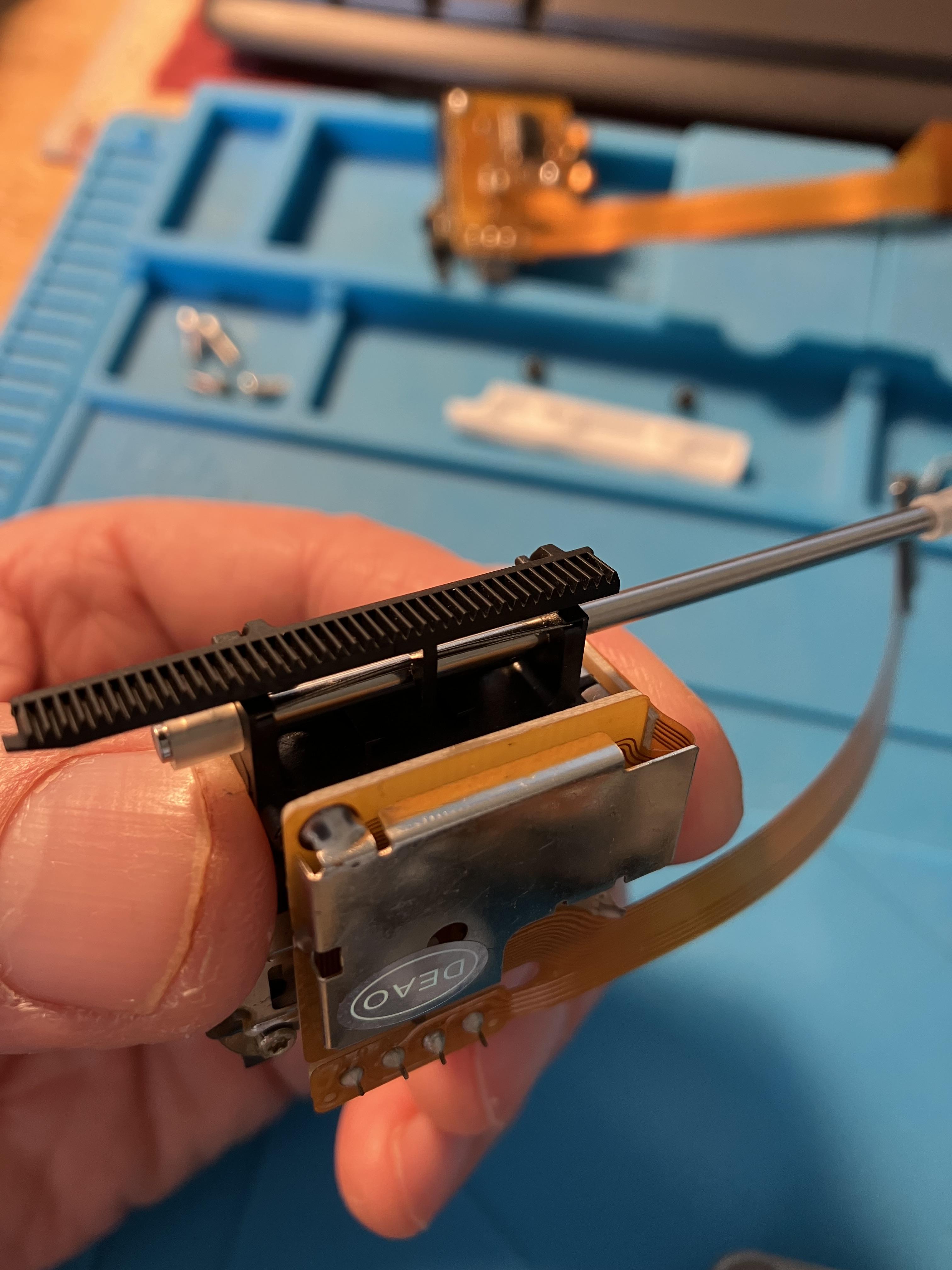
Fitting was straightforward, only two things of note: Firstly, the two small screws holding the white nylon sledge guidance plan had stripped threads – luckily I manage to find some suitable replacements in the garage. This re-confirms a previous badly executed repair. Secondly I noticed a slight difference in the new laser module. The faulty module has a small metal spring that is designed to press against the metal sledge guidance shaft. You can make out the spring in this picture:

Whereas the new module has no such spring – picture shows sledge guidance shaft inserted:
The anomaly doesn’t seem to effect CD playback so far but I will test and monitor. By the way, I didn’t lubricate either guidance shaft or cog mechanism – just left it all as it was.
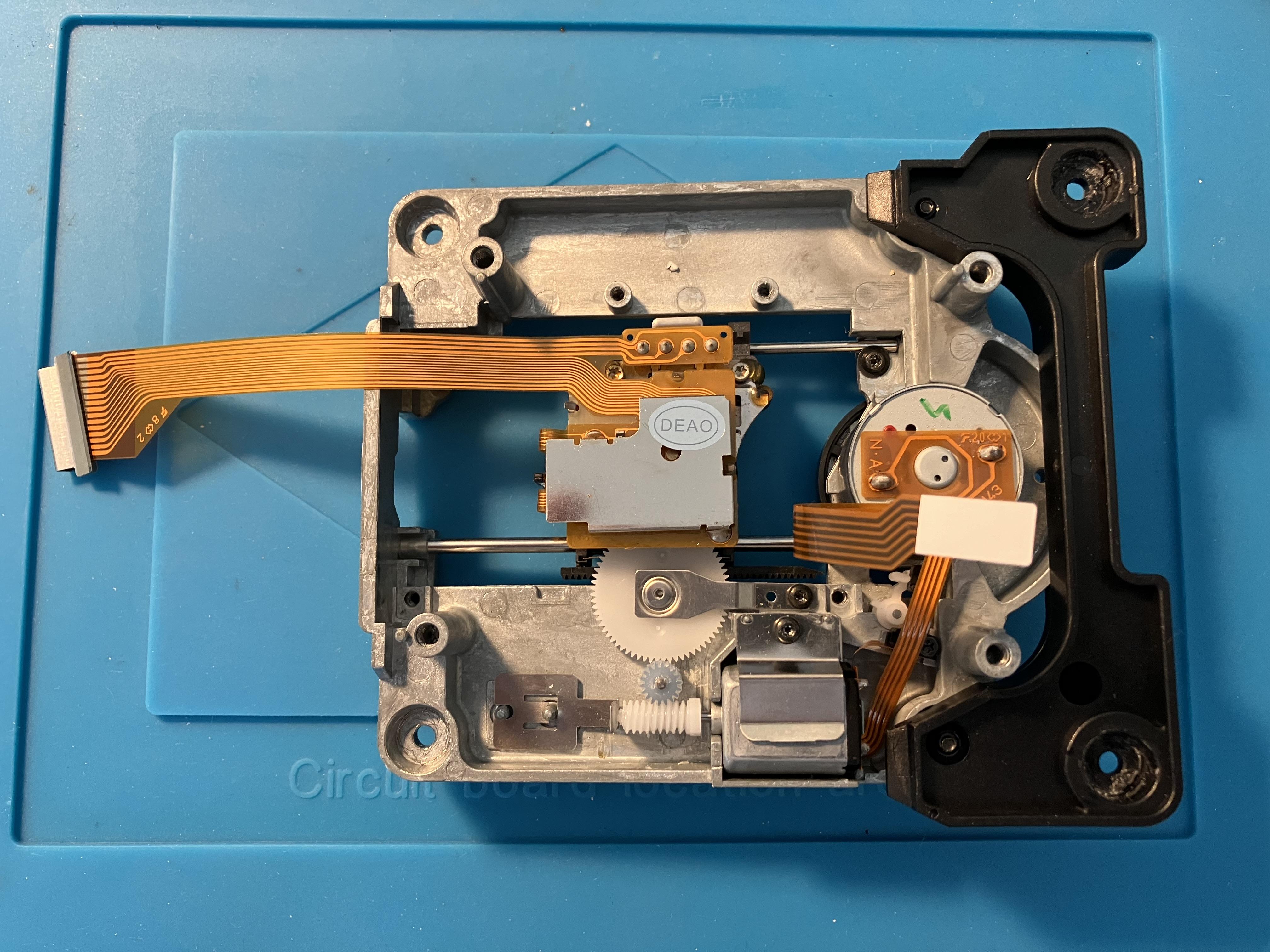
A final picture showing the laser module in place before I replaced the retaining clips:

I still haven’t replaced the CD dust cover to I need to find a way to fix that securely to the top of the CD mechanism, and the CD module suspension is still not secure, so unless I can find a fix I will have to be careful to keep the Beosound upright at all times.
Location: Warwickshire, UK
My B&O Icons:
Ah that is interesting. I already have 2 of those older rectangular IR receivers which came with MCL2A and MCL2AV. Of course they have bare wires rather than a DIN connection that the 1657 requires, but it’d be easy enough to fit one and I think I can see how I would wire it up on other thread you posted a link to!
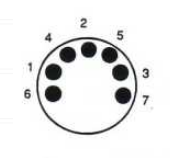
You just need a 7-pin DIN plug. Here are the pin numbers from the soldering side:

Then the IR transceiver cables need soldering as follows:
Brown – Ground – pin 2
Green – 5v – pin 6
White – IR data – pin 7
Leave the yellow and grey wires unconnected.
Location: Warwickshire, UK
My B&O Icons:
As madskp said above, many of the sensor are interchangeable – I did a few tests here to show the limitations of each: https://forum.beoworld.org/forums/topic/beolink-passive-ir-eye/page/2/#post-45813
Tests were done with a BL Active, but connection to a Passive would be similar.
Location: Warwickshire, UK
My B&O Icons:
If I recall correctly Beocenter 9000 has a 12v ‘relay’ output, designed to be used to switch on auxiliary devices. It wouldn’t take much to use this 12V output, reduced to 5V, to trigger the Beolab speakers over powerlink. Perhaps this has been done before.
Alternatively, something like this would work to trigger powerlink speakers with a line-level input: https://shop.oneremote.dk/shop/69116-powerlink-aux-adaptor/4154-powerlink-aux-expander/
EDIT: A second hand Playmaker (or even Beosound Essence) would also work if set to fixed volume output and with IR disabled. Playmaker/Essence both have an auto-sensing 3.5mm aux input (twin phono input for Essence) and powerlink output, albeit you’d need to convert the latter from RJ45 to normal powerlink with adaptor cables.
Location: Warwickshire, UK
My B&O Icons:
-
AuthorPosts