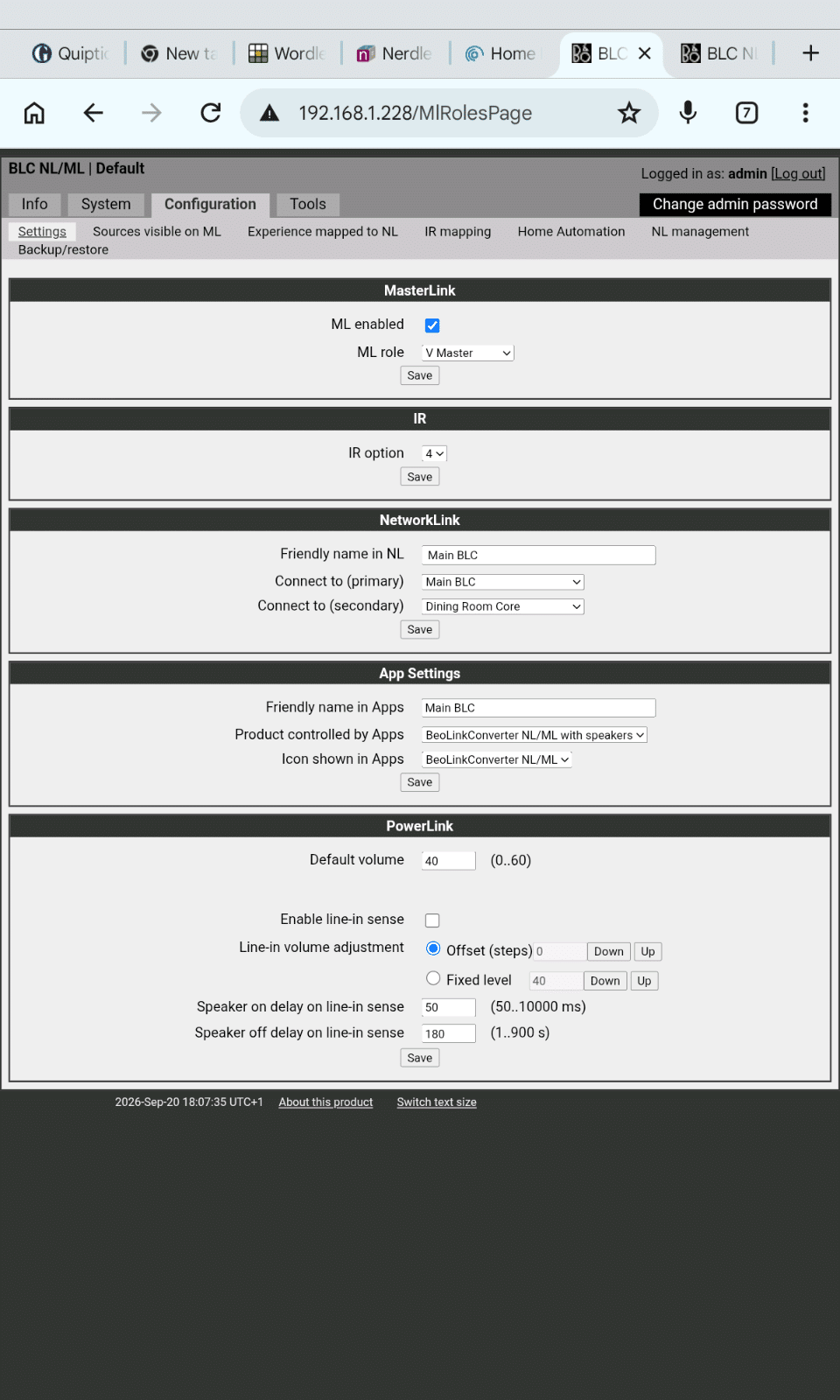
BLC – ML connected to T1611 – PL/DL connected to BM7000
BLC set as VMaster – IR option 2 – Friendly in NL to “BS7000 BLC” (just to identify)
Check the boxes of the CD, A.Mem, N.Radio in “Experience mapped to NL” – you can rename f.e. CD to cd7000 and N.Radio to ph7000 (if existing in your setup).
BLC with PL speakers connected (instead of the Ouverture) – ML connected – BS Ouverture
BLC set as ASlave – IR option 2 – Friendly in NL to “Ouverture BLC”
Connect the/a IR eye
Check the boxes of the CD, A.Mem in “Experience mapped to NL” – you can rename f.e. CD to cd3000 and A.Mem to tape3000 (if existing in your setup).
I presume you have a Beosound Core (black) ant NOT the Beoconnect Core (white).
open the B&o app – select the Beosound Core – select Settings; Configure; Settings; Beolink; Link to other products; “connect to primay” set to the BS7000 BLC; the secundary to the BS3000 BLC (dont forget the Connect button with both)
go 3 pages back – select Your Content; sources; in local list; check the boxes of all sources to be visible on the Beosound Core; Save
Now the sources are integrated as sources of the Beosound Core and can be started on the Beosound Core. Then they can be expanded to the BV Eclipse and the BS3000 BLC.
Note:
To expand to the BS3000 BLC, I’m not sure but I expect you need an additional IR-eye connected to this BLC, to join the sources of the Eclipse and the Beosound Core (try without first though).
The use of a IR remote can be tricky (Beo4 / BR1 in IR mode). You have two CD players as sources, but the IR gives the CD command but is not clear which CD it should start. So if you want to use a BR1 to controll everything be aware that you only can have 1 programmed as CD, 1 as ATape (=AMem), 1 as Phono (=N.Radio), 1 as ATape2 (=N.Music) and 1 as A.Aux.
when you solemnly use the app or a Halo or you have the BR1 bluetooth connected to the Beosound Core it should be fine. You will get all the Beosound Core sources available (also the onces set from the BLC’s).
Do you use a Beo4 with the Eclipse? Does it realy work or do you have actually a Beoremote One?
I have a Beoremote One.
The JOIN command is equeal to the overlapping squares.
On the Core I get the overlapping squares.
What
Eclipse (with Beolabs/speakers connected)
Yes
Beosound Core (with speakers connected) is one or both BLC set as primary en secundairy products set? Or not at all?
This is the original BLC set up
Beolink NL/ML converter (BLC) and ML connected to a T1611 converter PL/DL connected to a Beomaster 7000; speakers connected to the BM7000 or Core?)
Speakers connect ed to the Eclipse
BLC with Ouverture ML connected; speakers connected to the BLC or Ouverture?
Overture
Note: the BM7000 and Ouverture Radio in principle will not be working anymore in the NL.
I don’t understand this, I can play NL sources, if mapped, on both the BM7000 and the Overture.
But do I understand this correctly you want to listen to an Ouverture source on the BM7000?
I mainly want to listen to a BM7000 source in the Overture. When I started this I hoped I could do both, but would by happy with he BM7000 sources on the Overture.
When I first got my Beovision Eclipse I was told by B&O that the only way to play BM7000 sources on the Eclipse was to physically connect the Eclipse and the BM7000 which I did for a while. Then @millemissen pointed Eclipse is an NL product and it should just work.
It did but not the way expected, if I select Radio via the Beo4 the Eclipse just plays the Radio. I do not see the 2 overlapping squares and Radio on the Beoremote. I have since added a Beosound Core to the system and that works as expected.
Do you use a Beo4 with the Eclipse? Does it realy work or do you have actually a Beoremote One?
The JOIN command is equeal to the overlapping squares.
Well that was the case until I added another NL/ML converter, thanks to Multicare who repaired it for me. Now pressing Radio on the Beo4 switches the radio on but it doesn’t play through the Eclipse. I have to Join the Eclipse and it works fine. The second converter is connected to a Beosound Overture.
I have some more queries about the setup of the second converter which I shall post separately.
Any ideas what has happened. I did earlier in the week have problems with the Sound centre disconnecting from the LG TV twice and needing to power down and back to restore the connection
Regards Paul
So your setup is
Eclipse (with Beolabs/speakers connected)
Beosound Core (with speakers connected) is one or both BLC set as primary en secundairy products set? Or not at all?
Beolink NL/ML converter (BLC) and ML connected to a T1611 converter PL/DL connected to a Beomaster 7000; speakers connected to the BM7000 or Core?)
BLC with Ouverture ML connected; speakers connected to the BLC or Ouverture?
Please answer the questions to get a appropiate advice in your second post.
Note: the BM7000 and Ouverture Radio in principle will not be working anymore in the NL.
When I first got my Beovision Eclipse I was told by B&O that the only way to play BM7000 sources on the Eclipse was to physically connect the Eclipse and the BM7000 which I did for a while. Then @millemissen pointed Eclipse is an NL product and it should just work.
It did but not the way expected, if I select Radio via the Beo4 the Eclipse just plays the Radio. I do not see the 2 overlapping squares and Radio on the Beoremote. I have since added a Beosound Core to the system and that works as expected.
Well that was the case until I added another NL/ML converter, thanks to Multicare who repaired it for me. Now pressing Radio on the Beo4 switches the radio on but it doesn’t play through the Eclipse. I have to Join the Eclipse and it works fine. The second converter is connected to a Beosound Overture.
I have some more queries about the setup of the second converter which I shall post separately.
Any ideas what has happened. I did earlier in the week have problems with the Sound centre disconnecting from the LG TV twice and needing to power down and back to restore the connection
Hello, I have a 1st Gen Eclipse. The grommets that hold the front front speaker have decomposed and have become hard and brittle. Can you get any replacement parts?
To be fair nothing so far, but still considering doing it. I was offered 33.000dkk for the eclipse now and offered the premiere for 22.000dkk ex screen and remote
STB brackets have a kit to swap out the Eclipse screen for a newer LG panel. The instructions talk about where those cables plug in. Check out this page and either watch the video (cables shown at 0:56) or download the instructions for a diagram of where they go.
I suspect you’re right about needing to plug into the soundbar part first before putting the screen on. Removing and replacing the screen shouldn’t be too difficult and the instructions will help guide you.
This reply was modified 3 months ago by David Honner.
Since no-one has chimed in with any experience of applying this update, I’ll provide my impressions as I go along.
I received the STB order within a few days, quite remarkable since it came from the other side of the world. Well packed and included a paper copy of instructions; these are available on their website but it is helpful to be able to have something with you on the floor. The individual pieces all have more than adequate protection within the package.
There are no instructions about routing an antenna cable from the side of the new screen to the bottom centre where all my cables enter the Eclipse. I think this would be a worthwhile addition to the STB kit, especially being able to provide specific correct length cables and connectors, and perhaps a hole cutout in the centre may be useful to allow the cable to exit. For my own conversion I shall try routing a cable alongside the two cables connecting the screen to the B&O part, then along the bottom underneath the black plastic parts to the centre, where I think I can squeeze through the existing cutouts around the steel bracket to connect to the existing antenna cable. There is very little space and it requires small radius turns so a standard TV antenna cable will not work. I ordered the following from Amazon to do this:
Techradar.com recommends the Near Black setting to be tweaked to -1 from a default of 0
My impression of the screen compared to the existing Eclipse Mk.1 is that they are almost the same. Supposedly the recent LG screens are brighter but I haven’t noticed that. There are way more apps available than the 2017 original, as the engine driving the screen is 10 years more modern.
My current Eclipse screen has no burnout and no problems with picture quality after 5,000 hours. So why did I upgrade? I wanted to ensure that I could get another 10 years at least out of the Eclipse, and I wanted the latest smart TV access to apps that are not available with the original Eclipse.
So if you are in Australia and need a replacement screen for your Mk.1 Eclipse, let me know.
My next step is to recruit a couple of helpers to mount the new screen. It’s not heavy but it is too large and bulky for one person. I shall update once that is done.
We moved our Eclipse Gen 1 65″ to another apartment and when the movers removed the Eclipse from the wall, they removed the LCD panel from the sounds center, but didn’t take any photos of the cable connections! Can anyone tell me what cable connects from the sound center to the LCD so they communicate? I can’t find any documentation no matter where I look and all the youtube videos seem to skip this detail.
I want to be able to send audio from my Beovision Eclipse (2nd edition) to an external non-B&O amplifier. I understand I cannot use any of the LG TV outputs, and in the audio settings in the TV, a few of the audio options seems to be disabled.
Can I simply use a RJ45 to RCA adapter from one of the PL1-4 sockets in the soundbar to the amplifier? Or do I need to use a Beosound Core device? I am looking for the least costly way of doing it.
I have ordered the screen adapter from STB and a new LG C6 (on sale 30% off) and will install over the next week. Would appreciate any tips from someone who has done it before.
I’m not fond of the exposed back–seems very non-B&O. I wonder if the cover of the Eclipse Mk3 could be used to cover it up, if ordered separately? Has anyone explored this idea? Since it is the back of the TV I’ll probably just live with it in the end but it would be nice to clean it up a bit…
Selling my BeoVision Eclipse 55″ – a genuinely well-cared-for example with a clean history. Photos below.
The details:
• 55″ Gen 1 BeoVision Eclipse (purchased new in 2018)
• Panel replaced by Bang & Olufsen under warranty in 2022 – so the OLED is effectively a few years old, not seven
• Non-motorized B&O wall mount included
• BeoRemote One in excellent condition – rarely used
• Original boxes and packaging – all of it
• Overall condition: very good – cared for in a private home
The warranty panel replacement is the headline detail here – it’s a meaningful part of the value story and worth knowing if you care about OLED longevity.
Location: Austin, TX USA. Local pickup welcome. Happy to ship – buyer covers actual shipping costs based on your preferred carrier/method.
More photos available on request – happy to send additional angles or close-ups.
Asking $4,000. Open to reasonable offers from genuine buyers. Not in a hurry – happy to wait for the right person.
This topic was modified 4 months, 2 weeks ago by Brett Collinson. Reason: HTML pasted into original post
Probably my final entry in this thread. By working backwards and undoing the changes that I recently implemented in my setup, I found that the problem is when I have a wired back haul between the nodes. I switched the back haul back to wifi, and bob’s your uncle, it all works. Hat tip to the site Dong Knows Tech for mentioning problems with wired back haul in his review.
Now, I wait and watch, and see how reliable my configuration is with all the B&O on 2.4GHz (except the Eclipse). Otherwise, I’m heading to Unifi.
It turns out if I first go into “troubleshooting” and select the software re-start – a little easier than unplugging – it will now upgrade successfully. As timing goes, I have 2 Essences and a BS2 that upgraded in October, but didn’t get the upgrade indication on the Eclipse, M3 and BS1 until recently. Might be a US, thing.
It seems there’s a new 6.5 release for some of the older products. Is anyone else having issues upgrading? After about 4 tries, my BS1 (2nd Gen) upgraded, but my M3, Eclipse (gen1) either give me a failure message or complete, but don’t update the software. Trying to figure out if it’s a problem with my network or with B&O somewhere.
I’ve recently observed some strange behavior with my beoremote one paired to my 1st gen Eclipse. After it has been idle for a while (like all day), when I first pick it up at night, it seems dead. I press some buttons, and I see the “bang and olufsen” logo like it is booting up. After a few seconds, it operates normally.
I don’t think it’s the batteries because I recently changed them, and usually, I get a low battery warning when the batteries are low… and it also works fine for the few hours I watch it.
I’ve searched the menus and the internet and don’t see anything about this.