






Home › Forums › General Discussion & Questions › General Discussion & Questions › Added additional NL/ML converter to system – Part 1
- This topic has 10 replies, 2 voices, and was last updated 2 weeks, 5 days ago by
 patcherley.

-
AuthorPosts
-
20 September 2026 at 17:49 #125605
 patcherleyGOLD Member
When I first got my Beovision Eclipse I was told by B&O that the only way to play BM7000 sources on the Eclipse was to physically connect the Eclipse and the BM7000 which I did for a while. Then @millemissen pointed Eclipse is an NL product and it should just work.
It did but not the way expected, if I select Radio via the Beo4 the Eclipse just plays the Radio. I do not see the 2 overlapping squares and Radio on the Beoremote. I have since added a Beosound Core to the system and that works as expected.
Well that was the case until I added another NL/ML converter, thanks to Multicare who repaired it for me. Now pressing Radio on the Beo4 switches the radio on but it doesn’t play through the Eclipse. I have to Join the Eclipse and it works fine. The second converter is connected to a Beosound Overture.
I have some more queries about the setup of the second converter which I shall post separately.
Any ideas what has happened. I did earlier in the week have problems with the Sound centre disconnecting from the LG TV twice and needing to power down and back to restore the connection
Regards Paul
Location: Hampshire
Favourite Product: Beolink 7000
My B&O Icons:
 21 September 2026 at 16:31 #125621
When I first got my Beovision Eclipse I was told by B&O that the only way to play BM7000 sources on the Eclipse was to physically connect the Eclipse and the BM7000 which I did for a while. Then @millemissen pointed Eclipse is an NL product and it should just work.
It did but not the way expected, if I select Radio via the Beo4 the Eclipse just plays the Radio. I do not see the 2 overlapping squares and Radio on the Beoremote. I have since added a Beosound Core to the system and that works as expected.
Do you use a Beo4 with the Eclipse? Does it realy work or do you have actually a Beoremote One?
The JOIN command is equeal to the overlapping squares.Well that was the case until I added another NL/ML converter, thanks to Multicare who repaired it for me. Now pressing Radio on the Beo4 switches the radio on but it doesn’t play through the Eclipse. I have to Join the Eclipse and it works fine. The second converter is connected to a Beosound Overture.
I have some more queries about the setup of the second converter which I shall post separately.
Any ideas what has happened. I did earlier in the week have problems with the Sound centre disconnecting from the LG TV twice and needing to power down and back to restore the connection
Regards Paul
So your setup is
- Eclipse (with Beolabs/speakers connected)
- Beosound Core (with speakers connected) is one or both BLC set as primary en secundairy products set? Or not at all?
- Beolink NL/ML converter (BLC) and ML connected to a T1611 converter PL/DL connected to a Beomaster 7000; speakers connected to the BM7000 or Core?)
- BLC with Ouverture ML connected; speakers connected to the BLC or Ouverture?
Please answer the questions to get a appropiate advice in your second post.
Note: the BM7000 and Ouverture Radio in principle will not be working anymore in the NL.
22 September 2026 at 17:27 #125628patcherleyGOLD MemberI hope these answers give you enough information.
Do you use a Beo4 with the Eclipse? Does it realy work or do you have actually a Beoremote One?
I have a Beoremote One.
The JOIN command is equeal to the overlapping squares.
On the Core I get the overlapping squares.
What
- Eclipse (with Beolabs/speakers connected)
Yes
- Beosound Core (with speakers connected) is one or both BLC set as primary en secundairy products set? Or not at all?
This is the original BLC set up
- Beolink NL/ML converter (BLC) and ML connected to a T1611 converter PL/DL connected to a Beomaster 7000; speakers connected to the BM7000 or Core?)
Speakers connect ed to the Eclipse
- BLC with Ouverture ML connected; speakers connected to the BLC or Ouverture?
Overture
Note: the BM7000 and Ouverture Radio in principle will not be working anymore in the NL.
I don’t understand this, I can play NL sources, if mapped, on both the BM7000 and the Overture.
But do I understand this correctly you want to listen to an Ouverture source on the BM7000?
I mainly want to listen to a BM7000 source in the Overture. When I started this I hoped I could do both, but would by happy with he BM7000 sources on the Overture.
Thanks Paul
Location: Hampshire
Favourite Product: Beolink 7000
My B&O Icons:
22 September 2026 at 18:34 #125629I would set your system as follow:
- Beovision Eclipse with speakers
- BLC – ML connected to T1611 – PL/DL connected to BM7000
BLC set as VMaster – IR option 2 – Friendly in NL to “BS7000 BLC” (just to identify)
Check the boxes of the CD, A.Mem, N.Radio in “Experience mapped to NL” – you can rename f.e. CD to cd7000 and N.Radio to ph7000 (if existing in your setup). - BLC with PL speakers connected (instead of the Ouverture) – ML connected – BS Ouverture
BLC set as ASlave – IR option 2 – Friendly in NL to “Ouverture BLC”
Connect the/a IR eye
Check the boxes of the CD, A.Mem in “Experience mapped to NL” – you can rename f.e. CD to cd3000 and A.Mem to tape3000 (if existing in your setup). - I presume you have a Beosound Core (black) ant NOT the Beoconnect Core (white).
open the B&o app – select the Beosound Core – select Settings; Configure; Settings; Beolink; Link to other products; “connect to primay” set to the BS7000 BLC; the secundary to the BS3000 BLC (dont forget the Connect button with both)
go 3 pages back – select Your Content; sources; in local list; check the boxes of all sources to be visible on the Beosound Core; Save - Now the sources are integrated as sources of the Beosound Core and can be started on the Beosound Core. Then they can be expanded to the BV Eclipse and the BS3000 BLC.
Note:
- To expand to the BS3000 BLC, I’m not sure but I expect you need an additional IR-eye connected to this BLC, to join the sources of the Eclipse and the Beosound Core (try without first though).
- The use of a IR remote can be tricky (Beo4 / BR1 in IR mode). You have two CD players as sources, but the IR gives the CD command but is not clear which CD it should start. So if you want to use a BR1 to controll everything be aware that you only can have 1 programmed as CD, 1 as ATape (=AMem), 1 as Phono (=N.Radio), 1 as ATape2 (=N.Music) and 1 as A.Aux.
- when you solemnly use the app or a Halo or you have the BR1 bluetooth connected to the Beosound Core it should be fine. You will get all the Beosound Core sources available (also the onces set from the BLC’s).
22 September 2026 at 19:00 #125630patcherleyGOLD MemberThanks very much I will go and try. Paul
Location: Hampshire
Favourite Product: Beolink 7000
My B&O Icons:
25 September 2026 at 16:41 #125660patcherleyGOLD MemberI don’t have any IR-eyes connected to the BLCs.
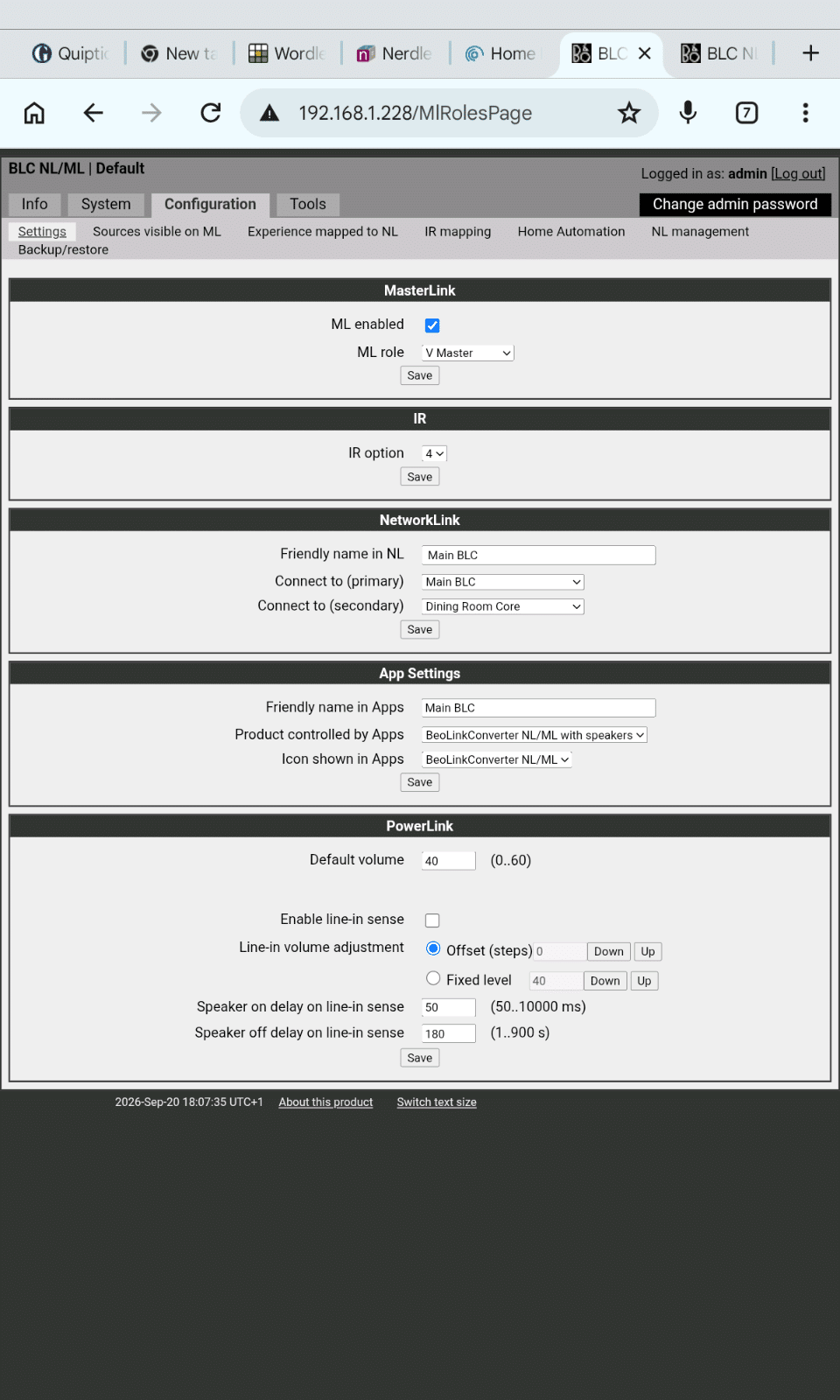
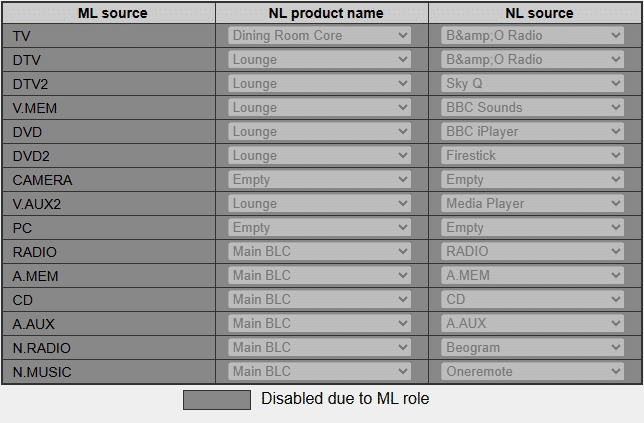
I tried ASLAVE and got this
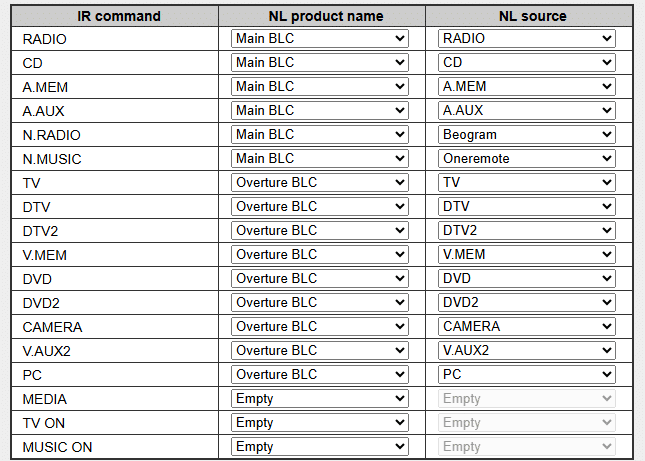
and this for the IR mapping.
Nothing linked at all. I modified the TX mapping to what it should be from the other BLC and still nothing worked. So I reverted to VMASTER and all the NL sources could bplayed.
If I play a source from the Core and then via the App change what the core is playing to a BM7000 source that then plays on the Overture, with the only drawback that it is then audible on the speaker attached to the Core. So I can achieve what I need via this workaround.
Thanks for you help.
Paul
Location: Hampshire
Favourite Product: Beolink 7000
My B&O Icons:
25 September 2026 at 18:03 #125663I don’t have any IR-eyes connected to the BLCs.
I tried ASLAVE and got this
and this for the IR mapping.Nothing linked at all. I modified the TX mapping to what it should be from the other BLC and still nothing worked. So I reverted to VMASTER and all the NL sources could bplayed.
If I play a source from the Core and then via the App change what the core is playing to a BM7000 source that then plays on the Overture, with the only drawback that it is then audible on the speaker attached to the Core. So I can achieve what I need via this workaround.
Thanks for you help.
Paul
Just to be sure: the speakers are connected to the Ouverture BLC and not the Ouverture itself?
You want to listen to the Main BLC connected BM7000 on the Ouverture. If the Ouverture BLC is set as V.Master AND the speakers are connected to the Ouverture the CD command will introduce a conflict. Which one should be started, the Ouverture CD or the CD connection to the BM7000?That’s why I propose to set the Ouverture BLC as ASlave. This mean that on the NL-side the ML connected sources can be played. On the ML-side NOTHING from NL can be played!
But if you want to listen in this setup to NL sources or BM7000 sources, THAN you must have the speakers connected to the Ouvertuere BLC and NOT the Ouverture itself.The “problem” is how can this Ouverture BLC JOIN the BS Core. For sure this is possible if an IR-eye (the appropiate one) is connected to the Ouverture BLC. The other way: expanding the BS Core to the Ouverture BLC should work (but this I’m not sure will work}.
So it should work this way:
- you have setup the Main BLC as proposed (please confirm)
- you have setup the Beosound Core as proposed (please confirm)
- you have setup the Ouverture BLC as proposed and discussed above.
- start a ML source of the BM7000 on the BS Core (BR1 BT or B&o app)
- expand the BS Core to the Ouverture BLC or JOIN the Ouverture BLC
25 September 2026 at 19:46 #125665patcherleyGOLD MemberNo to the Overture. If I connected to the BLC Overture how would I listen to local Overture sources? Paul
-
This reply was modified 2 weeks, 6 days ago by patcherley.
Location: Hampshire
Favourite Product: Beolink 7000
My B&O Icons:
26 September 2026 at 04:52 #125670No to the Overture. If I connected to the BLC Overture how would I listen to local Overture sources? Paul
goto the app select the Ouverture BLC, start a source of the Ouverture in the app.
But this is presumably also a reason for the need of an IR-eye.or
start Ouverture source on Core and expand/join the Ouverture BLC
Note: the best way to use the BLC’s to connect ML-devices to NL is if one does not connect any speakers on the ML side. Then one can add several ML-systems to ones NL-system (that is what I do (5 ML-systems), with one exception and that is a BV10-32 with BL8000 connected).
NEW idea:
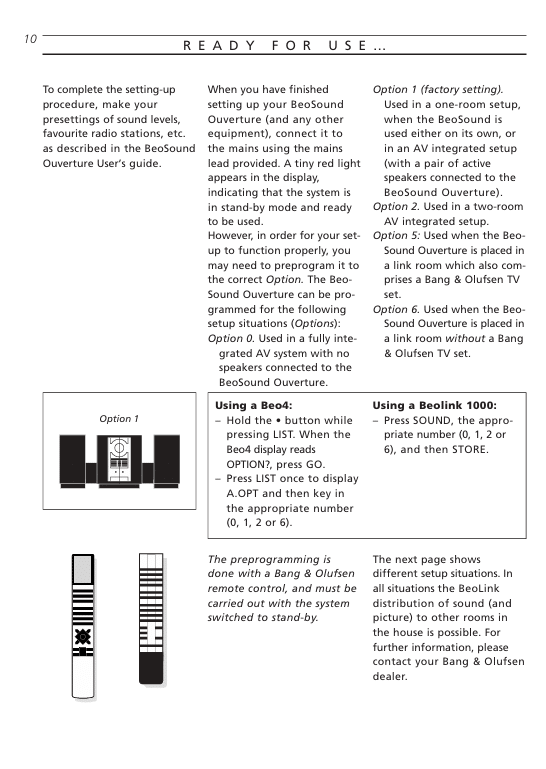
I presume the Ouverture is in a different room: connect the speakers to the Ouverture, if possible put the Ouverture in option 6, set the BLC in option VMaster (or leave it as ASlave). Than it should be possible to start the CD (f.e.) with the remote.
To start the a source of the BM7000 on the Ouverture: start this source on the Core and expand to the Ouverture or give a JOIN command to the Ouverture.26 September 2026 at 11:46 #125674I think your new idea is a variation on what I found and looks good.
Thanks for all your hard work in helping.
Paul
-
This reply was modified 2 weeks, 5 days ago by patcherley.
Location: Hampshire
Favourite Product: Beolink 7000
My B&O Icons:
-
AuthorPosts


- You must be logged in to reply to this topic.