Forum Replies Created
-
AuthorPosts
-
 MadskpGOLD Member
if the 1615 can translate ML audio into more digestible DL/AAL formats, couldn’t we attach an AD converter with AUX in to it and use it as a poor man’s “stream any ML source to modern speakers” device?
This hasn’t been tested in this thread as the focus was more on audio the other way into the ML network. Looking at the diagram for the 1615 there isn’t the same switching circitry as in the 1611, so the sound might just drain through from the ML to the AAL connector without any control needed.
@Guy: did you have a 1615? then maybe it can be tested with your Beovision or your beoport if you are up for it?
Location: Denmark
MadskpGOLD Member- usabilty: In general I don’t like these types of online book. Most times I struggle with zoom functions not beeing great, and fast scrooling is just easier with the mouse wheel than with screen buttons in my opinion.
- I don’t think it’s better than PDF primarily because of the above
- No added value for me, but I’m ok with it if it’s also possible to open the PDF file (it’s not possible with all of the 4 you have uploaded).
But great Idea with easy access to manuals from the forums. Keep up the good work 🙂
Location: Denmark
MadskpGOLD MemberInteresting – so if I wanted to connect a BeoGram record player to my ML network (I don’t have any product that can control the BeoGram anymore, would I be able to remote control it via the 1611/1615? Or would a 1611/14 converter be insufficient as it still needs a beomaster talking properly to the turntable?
Just to clarify my earlier quick answers: The 1611, 1614 and 1615 beolink converteres are 3 different products. The 1611 is confirmed in this thread to work as a converter between a link speaker on ML and AAL input without any Audio- or videomaster in the system.
The 1614 I don’t know a lot about, but it’s mostly the same, but without the capability to works as a audiomaster in the ML network according to the ML handbook. So you would probably need a real audimaster as well in the system going against the idea of using the BEogram without an audiomaster.
The 1615 is only for connection a link room Beovision without ML connection to a ML network and recieve audi signals from the audio and or videomaster in the ML network, and therfor as describe earlier only on way audio from the ML network to the Beovision, and therefor not useable for your case.
The MCL2AV will work as a “light” audiomaster and can convert the AAL control signals from the 1611 to AL signals that can control the Beogram via the ML netwrok. Further the MCL2AV can have a IR eye and speakers connected for local control and listening if that makes sense in you setup.
Also, in that linked thread the Beogram was a ‘local source’ but I would hope that the BL1611 would make if available across the whole system.
I am pretty confident that it should make it available on the ML network as my test with my Beocord 3500 has shown I can control it from a BC6 via the 1611 and MCL2AV.
Location: Denmark
MadskpGOLD MemberIf you dont want a beomaster you can use the MCL2AV to convert AAL from the 1611 to AL to control the record player. The chain would look like this:
ML-1611-MCL2AV-Beogram
The MCL2AVdont support the phone command, but for its inputs, but CD can be used
Location: Denmark
MadskpGOLD MemberQuick question for the “1611 creative use SWAT team”
 I can get my hand on a 1615. Now this box obviously only has the AUX port. But other than that: would this box allow my similar stunts to what you guys are pulling with the 1611? cheers Torsten
It hasnt been tested in this thread, but Guy concluded based on the servicemanual that it is only One way ML->AAL
https://forum.beoworld.org/forums/topic/beolab-3500-and-1611-converter-settings/page/9/#post-14356
So I guess you better look out for the 1611
Location: Denmark
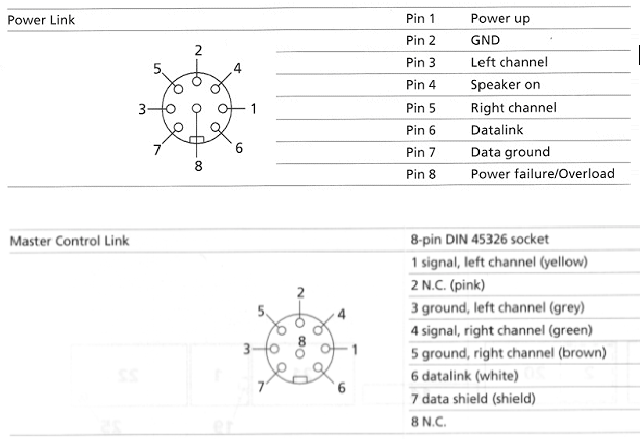
MadskpGOLD MemberOne little update regarding the MCL/PL connector in the BL3500.
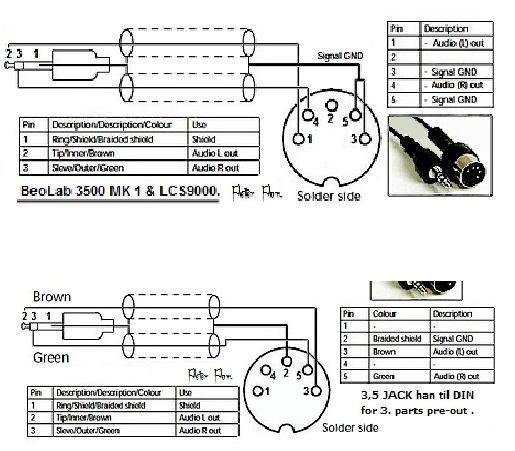
I have been a little confused since Keithe mentioend that the PCB’s wasn’t changed when the MK2 version was made. Especially the pinout differences between the MCL connector and a PL connector was illogical where the signal and GND pins are different

Also Peter Pans drawings indicated that (MKI top MKII bottom):

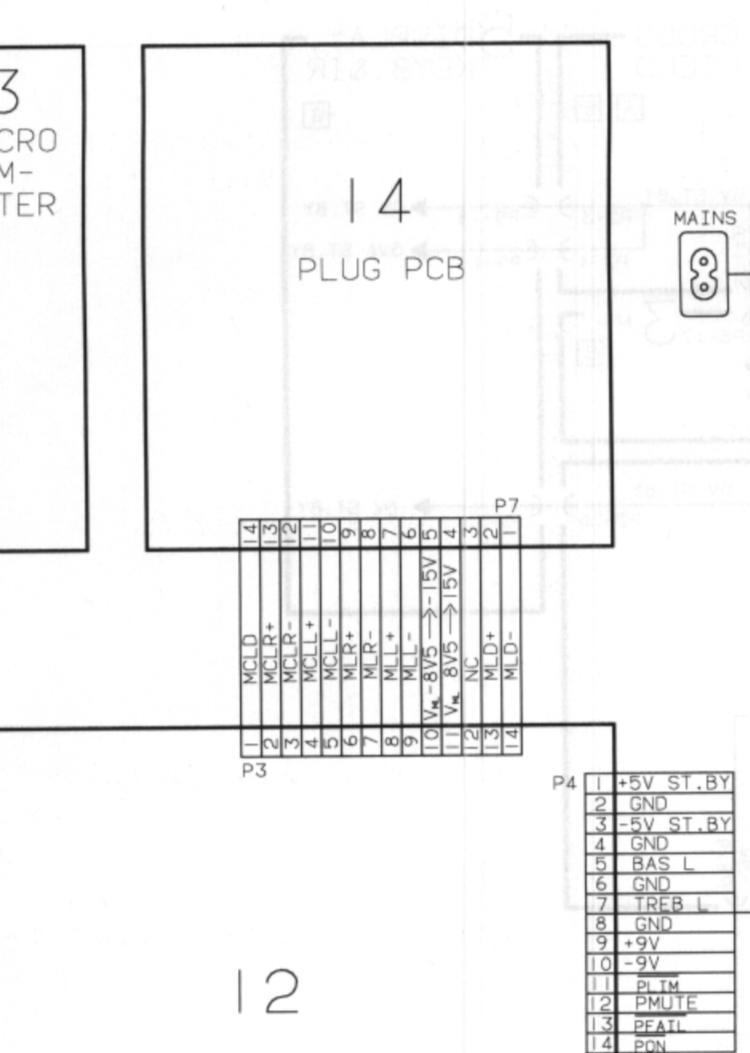
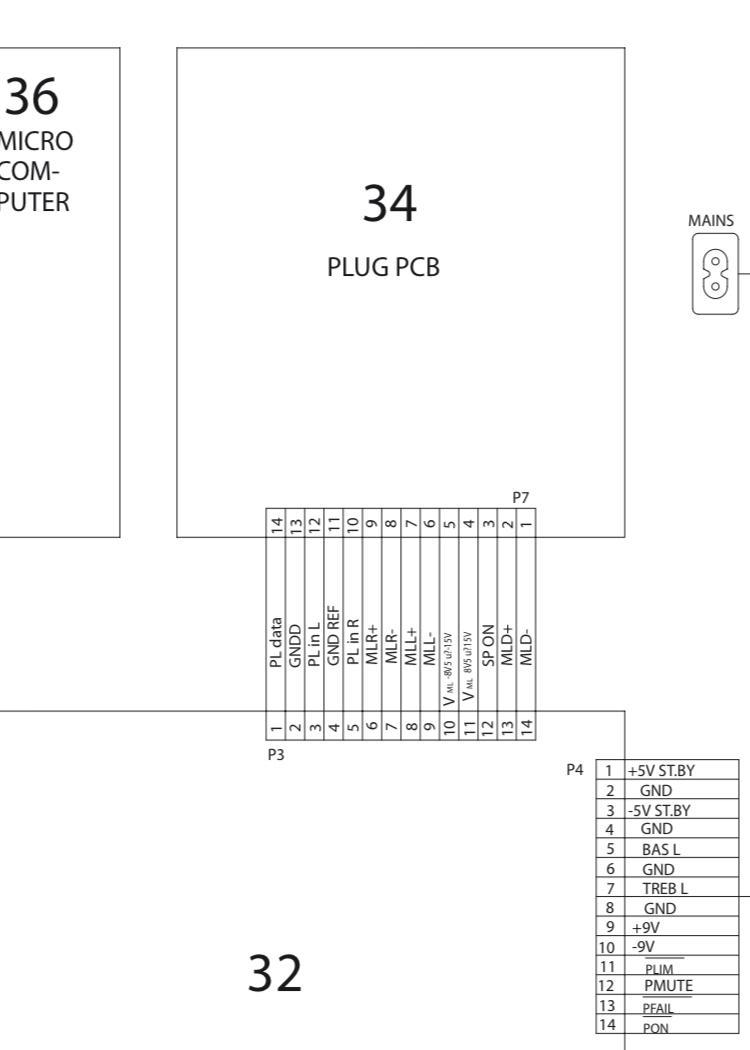
I looked at the wiriring diagrams in the servicmanuals for both the MKI and MKII several times and notices that also here the signal pins and the GND pins is reversed (MK1 top, MKI bottom):


So I thought if the PCB’s are not changed can the pinouts be reversed. I had earlier made a mini jack to DIN conenctor like the Peter Pan one for the MK1. So I tried to switch the pins and put the signal lines on pin 3 and 5 and the GND on pin 1 and 4. Activating the BL3500 with the Menu+0+4+GO and the sound is comming through and I can’t hear a difference between that pinout and the pinout I had before.
So as for signal lines this suddely makes it very similar to the powerlink conenctor. It doesn’t make us wiser on the 5V power on thing, but it might be a piece of the puzzle
Location: Denmark
MadskpGOLD MemberI agree with Guy that you might need to go the ML ->1611 way to get an input with some kin of datalink that you might be able to communicate with.
A couple of source regarding datalink:
1.
Article on the Beotech section on this site: https://beoworld.org/beotech/datalink.htm
The linked datalink manual linked to on that site is not availebale there, but can be found in the manuals section if you upgrade your membership.
2.
A readme file for some Github projects regarding datalink. https://github.com/toresbe/datalink
he refers to it as datalink 80 and datalink 86. As far as I have found out datalink 80 is also what B&O call Audio Link which is the communication used between a Beomaster and tape/CD/phone. Datalink 86 is then what’s called Audio Aux Link which is the communication between Beomasters and Beovisions or in this case the 1611 converter.
As for how the inner workings of the communications work I have no idea, but hope you can get something out of these sources.
Location: Denmark
MadskpGOLD MemberIf you still need to connect airplay/cromecast as you mention in your first post you could always try if the 1611 coverter will give you an extra input or two
The Beosound Ouverture in the cabinet as since then be replaced by a Playmaker for streaming, including radios. It drives the BL8000 but also a Beolink Passive and a pair of C40 in the back. The Ouverture you see in the pictures is just there for when/if I need to listen to a tape or a CD. And also because I have no other place to store it!
Ahh then you are all covered with all sources in this setup 🙂
Location: Denmark
MadskpGOLD MemberVery nice looking setup. I like the detail with the lamellas on the cabinet.
If you still need to connect airplay/cromecast as you mention in your first post you could always try if the 1611 coverter will give you an extra input or two
Location: Denmark
MadskpGOLD MemberDid we have other combinations in play?
Have you tried these pins with ML both ‘off’ and ‘on’, using MENU MENU 0 9 GO and up/down arrow? I suppose it could make a difference (not that I noticed any with mine, but mine is SW2.0, and your SW1.2).
just tried that with the three same combinations. No luck again.
just a note I have no sound source connected, but Iexpect that the display should show something if its on?also checked the SW version in the service menu, and it is indeed 1.2
One thing we havent considered is that the guy who succeded with this might actually have a modified unit without knowing it.
At some point I will try to open my BL3500 up and see if I notice anything we cant decode from the service manual
Location: Denmark
MadskpGOLD MemberCongratulations too. First thing to try would be the 5v trick on the MCL port. Once Again, they guy on reddit swear it works but we have yet to see!
I most certanly will try various combinations of this
ok so just troed to apply 5V to the following pin combinations on the BL3500’s MCL connector
Pin 1 and 7
Pin 3 and 6
Pin 6 and 7
No reaction at all on any of these. Did we have other combinations in play?
Location: Denmark
MadskpGOLD MemberAnd there you go. an extra input that can be chosen by any audio command that is not used for a datalink unit connected to the DIN inputs.
That’s useful! So as a ‘stand-alone’ the MCL2AV can have 4 selectable inputs if you include the AUX/TV socket (using ‘AV TV’). And the MCL input is a one-button-press selection. Does your test above have the AUX/TV socket connected to BL1611 etc, or is that to follow?
this was tested with the entire chain, MCL2AV – 1611 – BC6. Of course Ill also have to test it with my new BL3500 when I have a little more time for testing.As I see it the total number of inputs for a BL3500 could be five with this setup:– 1 MCL input on MCL on MCL2AV selectable with any audio command not used for other inputs– 2 DIN inputs on MCL2AV selectable with shift+radio+6/7 or a.tape/CD if its data link products.– 1 Din splitter input on the 1611 selectable with any video command– 1 MCL/PL input on the BL3500 selectable with (menu) + menu + 0 + 4 +GOLocation: Denmark
MadskpGOLD Member…
The setup would look something like this: BM5 -ML- 1611 -7 pin Datalink- MCL2AV – Beogram/Beocord
Yeah, I’ve been following this thread with a mixture of amusement, fascination and sheer respect for the amount of knowledge present in this community. I have started to put out searches in ebay classifieds to see whether I can source the components at reasonable prices to also build such a setup.
great to hear that orhers are also following our little black box adventure ? let us know if you needany input.
one buying advice for the MCL2AV is try to get one with the original power supply to be sure it has the right polarity on the power connector
Location: Denmark
MadskpGOLD MemberMadskp wrote:
Thanks for testing this. So the fifth audio input for the BL3500 is not an option. Might also have been overkillI already tested the BL3500 with a minijack to MCL connector special cable, and its working fine so probably ready to go into the testing setup.
Got a crazy idea. If the MCL input on the BL3500 can be used with line level signals the MCL input of the MCL2AV’s could probably also do that?
Quick testing with some cable with phone plugs, and connected my iPhone for sound input

And there you go. an extra input that can be chosen by any audio command that is not used for a datalink unit connected to the DIN inputs.
The other inputs can still be used with shift+radio+6/7 or the respective audio command if it’s a datalink unit.
Im not sure if the sound is a little lower, but didn’t have time to make a head to head comparison with the same source on other inputs right now.
will followup on this at a later point
Location: Denmark
MadskpGOLD MemberRight! However, the easiest way would be to use one of these
I agree with Millemissen that it is probably a simpler solution, as my solution is untested. Also if you only need one input and only ocassionally need the other unit my solution might be overkill
Location: Denmark
MadskpGOLD Member- I still have an old BeoGram and TapeDeck that I would like to connect to the BM 5. How does that work. The manual is kinda fluffy about the USB Adapter needed. Anyone out there can shed some light on this?
Not knowing the USB another idea comes to mind when you want both a Beogram and a tape deck connected. In this lengthy thread https://forum.beoworld.org/forums/topic/beolab-3500-and-1611-converter-settings/page/12/#post-15630 we are experimenting with alternative use of some of B&O’s “black boxes”. We have confirmed that a combination of the 1611 Beolink converter and the MCL2AV can give access to two inputs (tape and CD) on the MCL2AV from a Beolab 2000, Beolab 3500 and from a masterlinked TV. However we haven’t had the chance to confirm if this also will work from a Masterlinked Beosound/Beomaster.
The setup would look something like this:
BM5 -ML- 1611 -7 pin Datalink- MCL2AV – Beogram/Beocord
Location: Denmark
MadskpGOLD MemberCongratulations too. First thing to try would be the 5v trick on the MCL port. Once Again, they guy on reddit swear it works but we have yet to see!
I most certanly will try various combinations of this
Location: Denmark
MadskpGOLD MemberExcellent purchase – and a long ML cable as well which will help with two-room setups. Looking forward to seeing some test results!
yes the long ML cable was an added bonus as well as a bunch of PL cables and the 2 BEO4’s.
I wont have time for testing the comming weekend, so it might take a little while before the results are rolling in
Location: Denmark
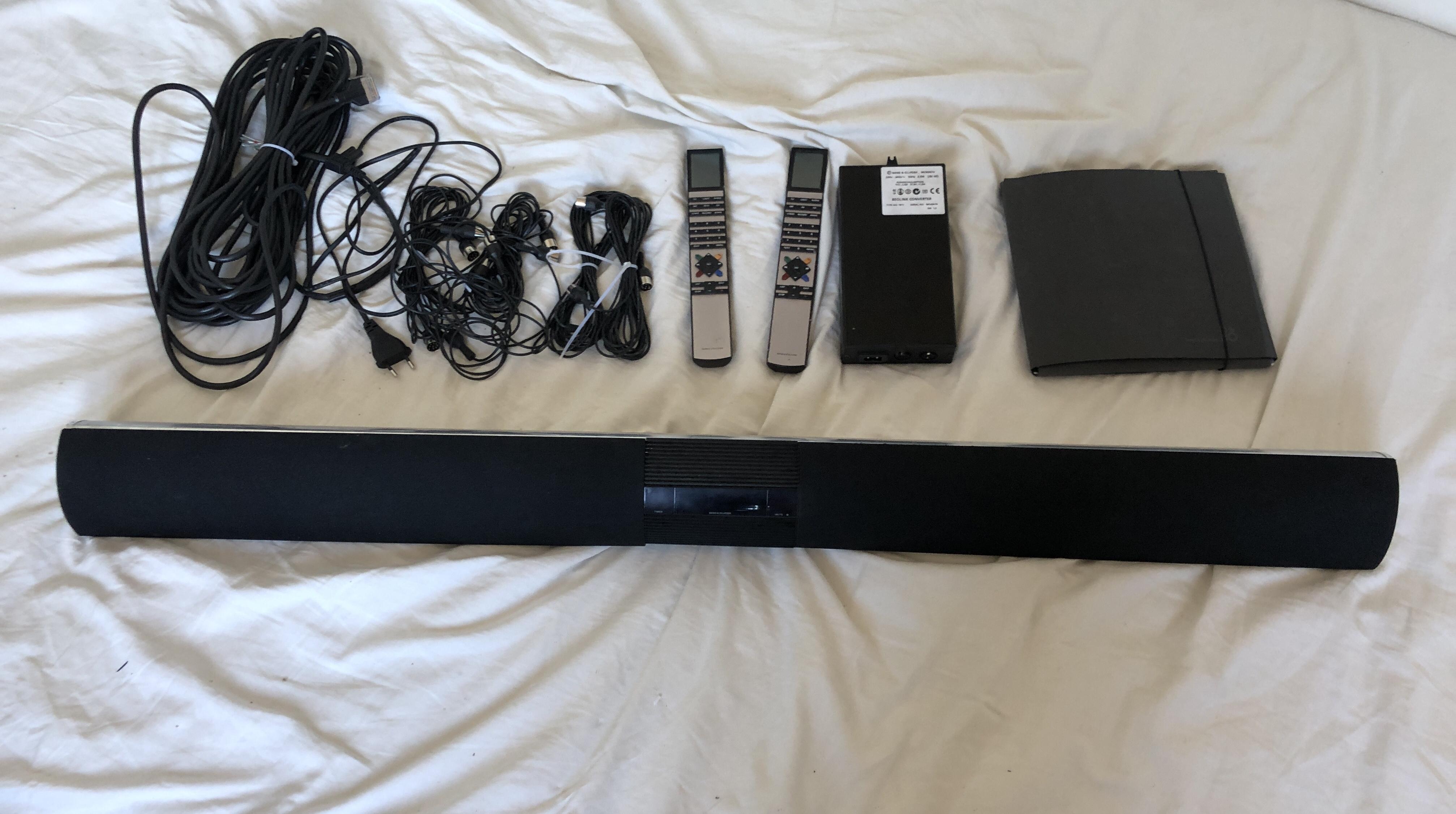
MadskpGOLD MemberA little more info on my purchase.
The BL3500 is an MK1 with the MCL connector and SW 1.2.
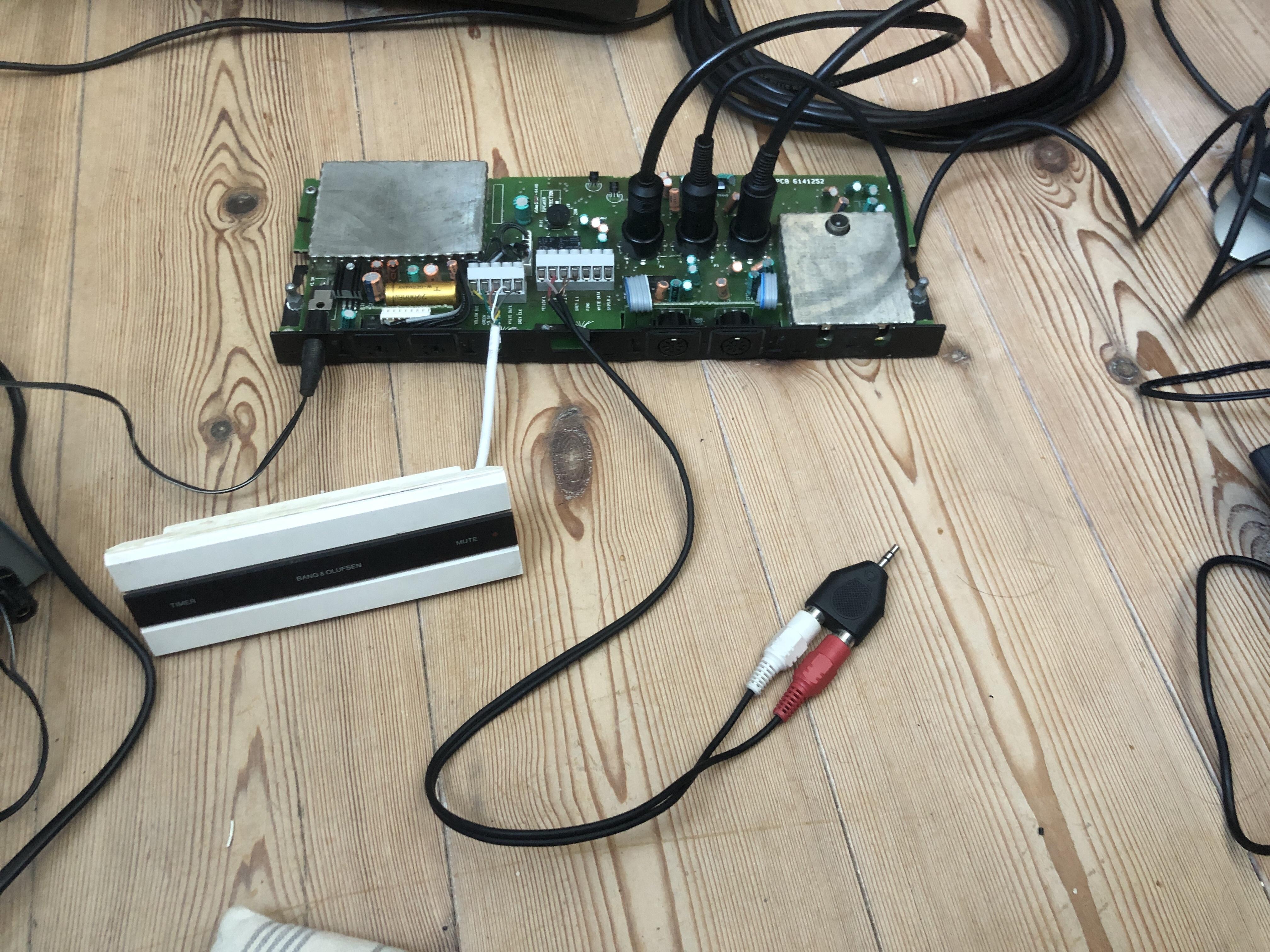
The black box is another 1611 converter
I already tested the BL3500 with a minijack to MCL connector special cable, and its working fine so probably ready to go into the testing setup.
I dont think I realised before how the function with the Menu 0 4 GO is so easily aborted with any button press, so I really understand how its not an optimal way to use it.
Location: Denmark
MadskpGOLD MemberAnd then a package with this content arrived:

Stay tuned…..
Location: Denmark
-
AuthorPosts
 I can get my hand on a 1615. Now this box obviously only has the AUX port. But other than that: would this box allow my similar stunts to what you guys are pulling with the 1611? cheers Torsten