Forum Replies Created
-
AuthorPosts
-
 MadskpGOLD Member
B3OHACK3R wrote: Madskp wrote: Also I can activate CD and Radio and get a Beogram CD 4500 playing and controlled via an MCL2AV. Interesting. Was the BS5 set up with the audio master (AM) option enabled? Yes it was. I don’t think I can do it when it’s not, bit I will have to test that again to be sure.
I tried to redo this test, and for some reason I can’t replicate it.
With just the 1611 converter connected to the BM5 (A master = yes, opt. 2) I can select the TV source (which shows on the BS5 display) and get the sound from that input on the 1611.
However for some reason the BM5 is very slow to execute the command, and the text on the display changes to V.MEM which doesn’t make much difference when I only have the 1611 connected, but still weird.
The CD command does not give any reaction from the BM5 at all now. I Have tried both in option 2 and 6.
If I choose Audio master = No I cannot use the remote control at all to control the BS5.
Location: Denmark
MadskpGOLD MemberIs it possible that it has to do with the possibility to ‘rename’ the BeoSound 5’s N.MUSIC to CD or A.MEM?
Yes I guess thats it. I will have to try if I can somehow free up the tape command, but then the CD command probably will be used by an internal source instead.
Though you say that it is possible to use CD and RADIO? That would make my suggestion at least inconsistent. Anyway, maybe it helps in finding the answer. Regards, Johan
It’s always great to have some inputs and pointers for the things you do not think about yourself, so thank you for the input.
Location: Denmark
MadskpGOLD MemberMadskp wrote: Also I can activate CD and Radio and get a Beogram CD 4500 playing and controlled via an MCL2AV. Interesting. Was the BS5 set up with the audio master (AM) option enabled?
Yes it was. I don’t think I can do it when it’s not, bit I will have to test that again to be sure.
What I still have on my list of things to test: If the internal BS5 sources are set to CD and Radio (also AM = yes) – will it forward N.Radio and N.Music “source center” requests to ML like a BS9000 / BC2 etc would do? If yes, that would be cool but I have some doubts that they enabled that in software.
I guess I could try to do a test where I set the BS5 up to have the CD command for internal music, and the Radio command for internet radio. Then if I have a Beoport connected via masterlink I should be able to test if the BS5 can fetch the source from that
Location: Denmark
MadskpGOLD MemberNext issue the sticky black coating []
Hi Madskp, I managed to rub off the sticky coating with methylated spirit (the blue smelly stuff), and found a gloss black paint underneath. My original idea was to have the housing sandblasted and powdercoated, but I abandoned that and am happy enough with the original black (undercoating) paint. Saves quite a bit of (dis)assembly. Maybe worth a try? Regards, Johan
I have tried that now and also IPA (not the beer) and both seems to do the job. It requires a bit of rubbing but eventually the sticky stuff will come of.
The surfaces tædo have some scratches to the metal in a few spots where the rubber had melted back over the scracth so might need a repaint at some point in the future. But it is not tha visible at is on the backside and now it is at least not sticky anymore 🙂
Location: Denmark
MadskpGOLD MemberWasn’t A.MEM used for Spotify when it was still working? If you haven’t set it up (which you can’t nowadays) it will probably just ignore that source command.
Of course, thats probably it. Could be great if it could be redirected to ML though
Location: Denmark
MadskpGOLD MemberI managed to get hold of another motherboard for the BM5, the 1,5Ghz version for aaround 40€ including shipment and another mini itx motherboard.
I have installed the replacement motherboard, updated the BIOS and done a restore.
Although it took some boot loops and manuel restarts it now seems like it is running like it should.
Next issue the sticky black coating, and a broken glass on the BS5 head unit.
Location: Denmark
MadskpGOLD MemberPretty straight forward to make that available as the N.Radio / Phono source on ML then.
Nice. I guess that it could also be served to NL devices as well?
Unlike the “Univeral Link Adapter” project the MDT does not have a built-in RIAA equalizer. So it either needs a BeoGram with normal line-out or an external RIAA.
That I think is ok. Then people can choose which price/quality they want, and people who already has a RIAA or a turntable with a built in RIAA do not have to pay extra for that feature
Location: Denmark
MadskpGOLD MemberAnother idea for a usecase for this adapter:
As systems like BC2, BS3000/3200, BS4 and BS9000 does not have datalink control of the Aux connection the adapter could be used to have tape2 and phono available via Masterlink and control connected record and tape players.
This would require the use of datalin80 on the datalink connection, but I gues that is not a limitation hardware vise
Location: Denmark
3 February 2024 at 18:34 in reply to: Remote – Using Multiple B&O Devices (only) in Same Room #52592MadskpGOLD MemberJust to complete the list: a MasterLink Gateway is also an option (if
Even though I am not sure of the capabilities of the MLGW it will not be able to do anything for the BS1 and the Century
Location: Denmark
3 February 2024 at 17:01 in reply to: Remote – Using Multiple B&O Devices (only) in Same Room #52588MadskpGOLD MemberThats a tough one.
The BS9000 (and maybe the BS2500) can probably be set to option 4 where it only accept commands when Link is pressed before the command.
Also if acceptable some units could be set to option 0 where they do not react to the remote and therefor only have local control.
Another option is a plastic cower (I dont know what the real naming gor it is) to reduce the IR signal strenght of the BEO4
Location: Denmark
2 February 2024 at 13:52 in reply to: Stored/Unused B&O Equipment – Potential Deterioration of Components #52295MadskpGOLD MemberAs the Beolink passive also use pin 1 for powering up I would expect the same result for that, but interesting to hear what you are going to find out when testing it.
I tried the BeoLink Passive with the BC2300 today, and there is indeed no muting.
Even though it seems a little odd I think I know why the Bc2300 (and probably other) works this way with Pin 1.

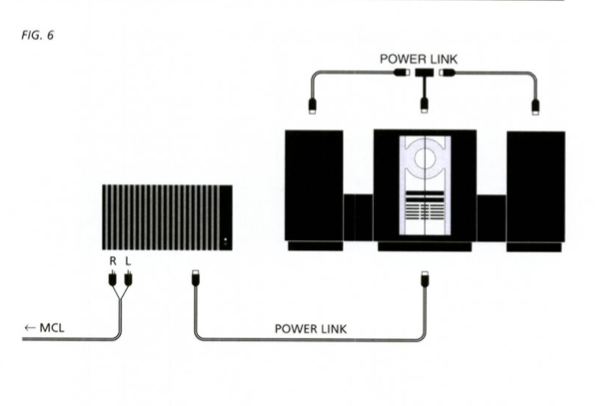
To be able to work as a master unit in a MCL2 network (as shown in the above picture) the amplifier for the MCL2 network cannot be muted even though the local speakers are. as listening in link rooms should still be possible.
Location: Denmark
MadskpGOLD Memberand a new CR2450 battery will arrive with the capacitors!
Where is this CR2450 battery located? I don’t think I have noticed one while working on my Ouverture.
Location: Denmark
MadskpGOLD MemberThanks for commenting.
Do you happen to know any system model numbers they are used in?
Location: Denmark
MadskpGOLD MemberI can chime in on the brittle plastic. I think I have damage on at least 3 screw post on my ouverture.
I also think Matador has mentioned this as an issue with these systems beforeLocation: Denmark
MadskpGOLD MemberI take it that you replaced with standard (non-SMD) caps?
Actually I bought SMD caps, but they where a little difficult to source, and also not that easy to solder on the board. So if there is space enough I would recommend standard caps.
Location: Denmark
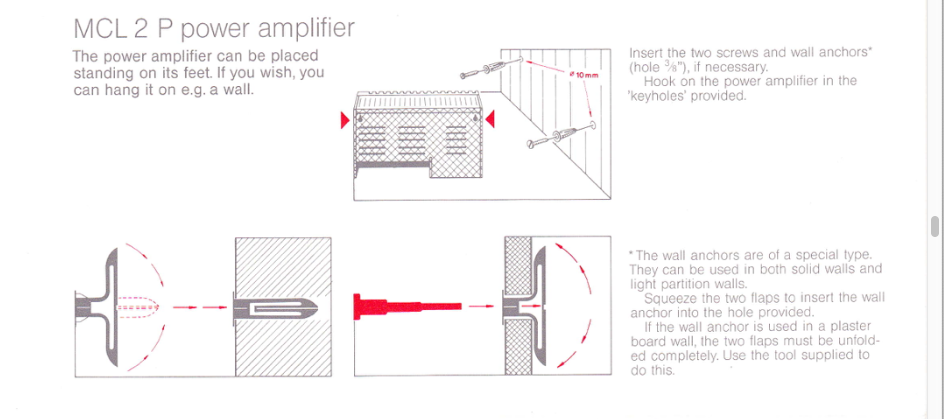
1 February 2024 at 12:33 in reply to: Stored/Unused B&O Equipment – Potential Deterioration of Components #52293MadskpGOLD MemberAlways read the manual Was looking for some other MCL2 related stuff and came upon this in the MCL2 installation manual Is seems to have a very specific purpose for the wall anchors supplied with the MCL2P
Ah, brilliant – thanks for that! I will sleep easier tonight!?
you are welcome 🙂
Location: Denmark
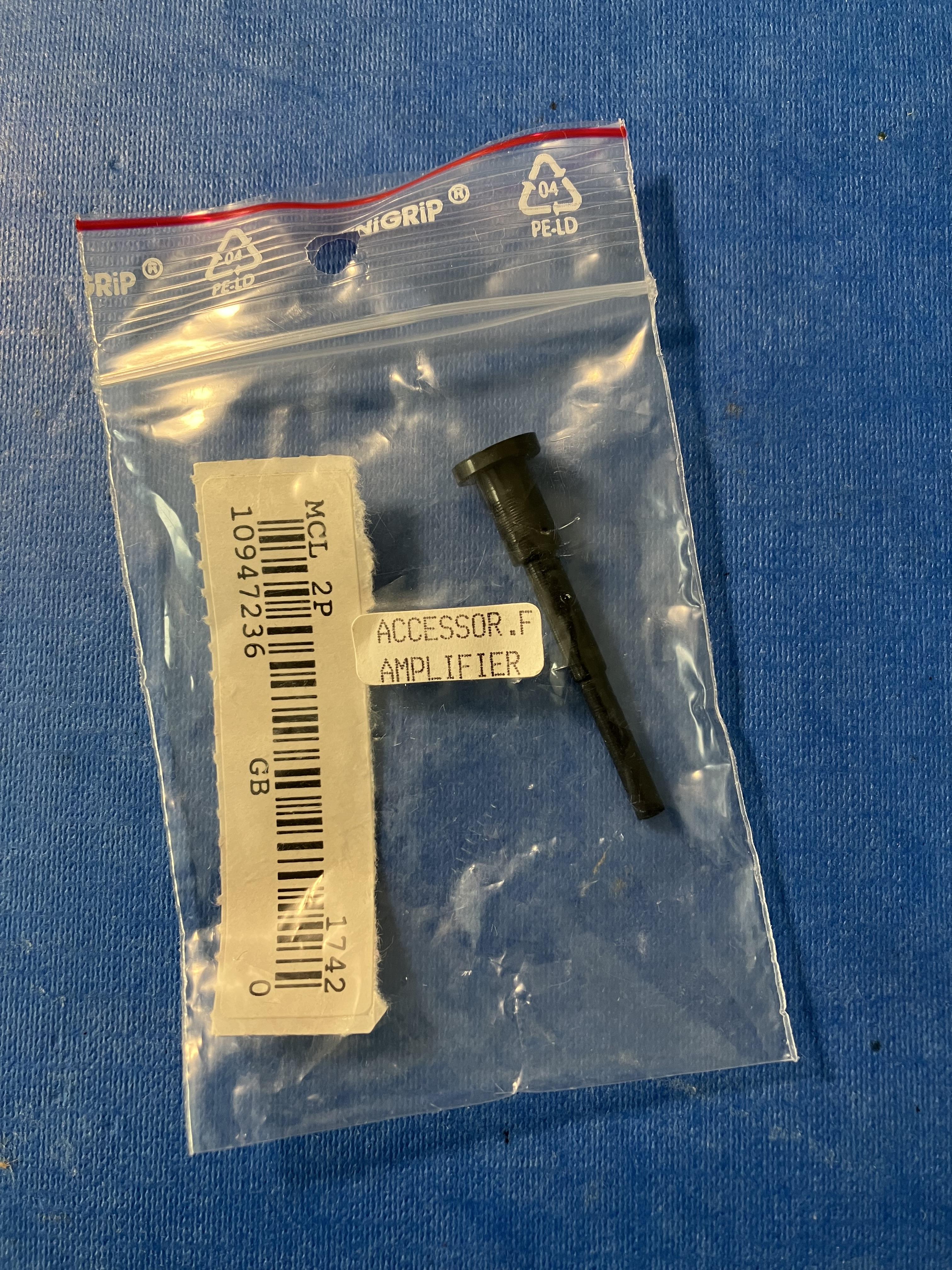
1 February 2024 at 11:26 in reply to: Stored/Unused B&O Equipment – Potential Deterioration of Components #52291MadskpGOLD MemberAlso in the MCL2P box – solid plastic plug 42mm long. Any ideas what for?
 Perhaps the unused type number label is the MCL2P ‘accessory’, and the plug from elsewhere – the BC2300 perhaps?
Always read the manual 😉
Was looking for some other MCL2 related stuff and came upon this in the MCL2 installation manual

Is seems to have a very specific purpose for the wall anchors supplied with the MCL2P
Location: Denmark
MadskpGOLD MemberThanks for the info. very good pointsAs far as I know the pin code is stored in the socket unit. I have two BC2 here. One with pin code enabled, the other came disabled. I remember connecting the “pin code” head unit to the other socket unit (several un-powered hours in-between). It then didn’t ask for the pin code, so…
Ok that is indeed worth to know. Funny enough the one seller who is selling a socket unit also sells a head unit separatly and tells that he has the pin code for that. But Of course if you don’t know it it would make more sense that the pin cpde was in the head unit.
Watch out for sticky soft touch paint on the head unit.
Did not even think about that. But that is an issue with a lot of products from that era. I also have a sticky Beolab 7.1 and Beomaster 5.
Also worth checking the display for signs of wear. The VFD technology used has a limited life-time. If people let it running 24/7 or enabled the standby clock some pixels will be worn out heavily and pretty dim while other will still be bright. While it still functions then it will just look bad.
Yes this might be a deal breaker. And for the sellers who only sells the head unit this will not be possible to check before buying.
The wing mechanism tends to stop working properly. Usually caused by a slowly failing rubber belt.
This I was expecting as I can see that the Beoparts shop has the belts for it.
Anyone knows what to expect about laser durability?
Location: Denmark
MadskpGOLD MemberInteresting 🙂 looking forward to your results with this project.
The decoder/servo board looks much like that in my Ouverture. At least the caps are the same values.
I removed the old capacitor holding them with pliers, pushing down and twisting them back and forth. This method is described a lot of places, and seems to be a very safe vay to remove the caps without damaging the PCB traces. After the removal the component legs has to be desoldered, but that is quite easy, maybe with some added solder.
Location: Denmark
MadskpGOLD MemberI also got a bargain for a Beogram 2000 some time ago. 200 Danish kroner which equals arround 23 punds at the time. It was in working condition but without a pickup an scratches on almost every aluminimum part and the dust cover.
Last week I found another Beogram 2000 for the same price which is in much better cosmetical condition, but where the pickup arm i broken off.
I now hope I can combine the best from these 2 decks and get a decent Beogram out of it for almost the same bargain price that you got yours for
Location: Denmark
-
AuthorPosts