Forum Replies Created
-
AuthorPosts
-
 Moderator
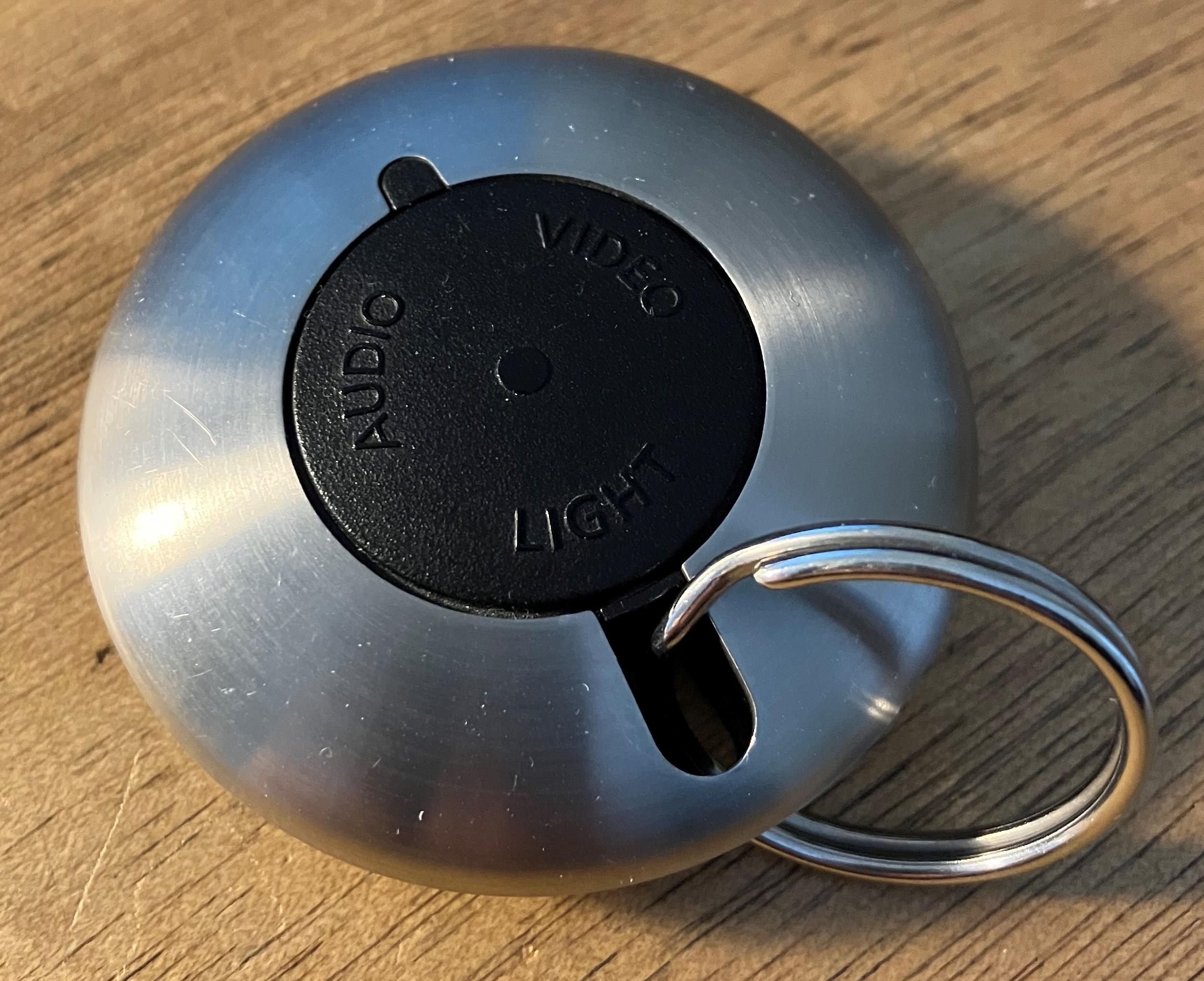
Just a thought – this device is now actually quite useful with the ‘dual-source’ BL1611/BL3500 combo!
Location: Warwickshire, UK
My B&O Icons:


Further to the above, it would seem that the PC input was designed to be used with BeoLink PC Office (not the later Beolink PC2 or Beoport). I would think that the extra pins in the PC socket actually gave this Beolink PC Office all the functionality of being connected to ML (and PL), without being connected to ML (or PL)! Clearly none of this was needed when the Beolink PC2 was introduced with its own ML/PL sockets.
EDIT: This from the Beolink PC Office User Manual – it’s the box nearest the computer:

Location: Warwickshire, UK
My B&O Icons:
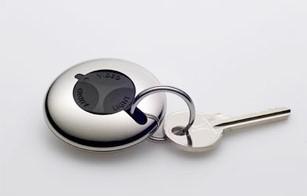
Mine works exactly as explained – yes I was thinking it would be good for a streaming/airplay source such as Airport Express. I think that the newer version is a bit easier to use because the control surface is a better shape and the ‘all off’ function has moved to the edge. Details here: https://www.beoworld.org/prod_details.asp?pid=734

I meant to add: With my LightManager Pro the long and short press of the LIGHT button on the A9 is a selectable input, hence I can decide how I wish the lights to respond, with different scenes for ‘Keyring Short’ and ‘Keyring Long’.
Location: Warwickshire, UK
My B&O Icons:
Thanks for the link to Soundheavenly for the necessary cable, but it shows they do not ship outside the UK. I live in Belgium.
They usually ship overseas and I am sure that Steve will respond. Royal Mail can’t ship parcels overseas at the moment (due to a cyber attack!), so perhaps he is constrained by that.
Location: Warwickshire, UK
My B&O Icons:
But think about the combination of 1611,1636 and a pair of speakers will give you three easy remote controlable sources (Audio, video and PC).
nearly the dream scenario for the BL3500
Agreed, I was running that setup earlier!
Location: Warwickshire, UK
My B&O Icons:
What if this Curios Dreamer misinterperted the pin numbers and had reversed them? Then it Would be pin 3 Ground left channel and pin 6 Datalink which would make more sense in my head. Note that Pin 3 ground is not directly connected to ground but through a resistor and a capacitor, so not quite the same as pin 7.
Don’t know if you already tried that combination Guy or are willing to try it, but here is the idea
No, on the BL3500 MCL socket I only tried pin 7 ground. If I am feeling brave I will try that next time I have all the eqpt out!
Location: Warwickshire, UK
My B&O Icons:
Thanks for the clarification. Looks like I need to talk to somebody who said:
“1611 where replaced by 1636, same with added features”….Yes I was a bit confused by that! Unless those other PC pins do something special! We could do with a circuit diagram for the Mk2 Active …
Location: Warwickshire, UK
My B&O Icons:
If you think about the planned usage of the BL Active, the local source makes perfect sense. In the ML-era, people wanted to extend their ML system into their study. Once Beoport was no longer produced, the Mk2 Beolink Active enabled them to add their PC as a local source in the study. However, unlike the Beoport, you are unable to mix the ML sound with the PC sound (eg to get audio ‘notifications’ from your PC whilst listening to music from elsewhere in the ML system.)
Location: Warwickshire, UK
My B&O Icons:
Hi Guy. Does it means it work the same way the 1611 converter but just limited to the PC input ? (meaning, remote control working to start the speaker, set volume and adjust sound parameters, all through the Link Speaker sensor only.)
In short, no!
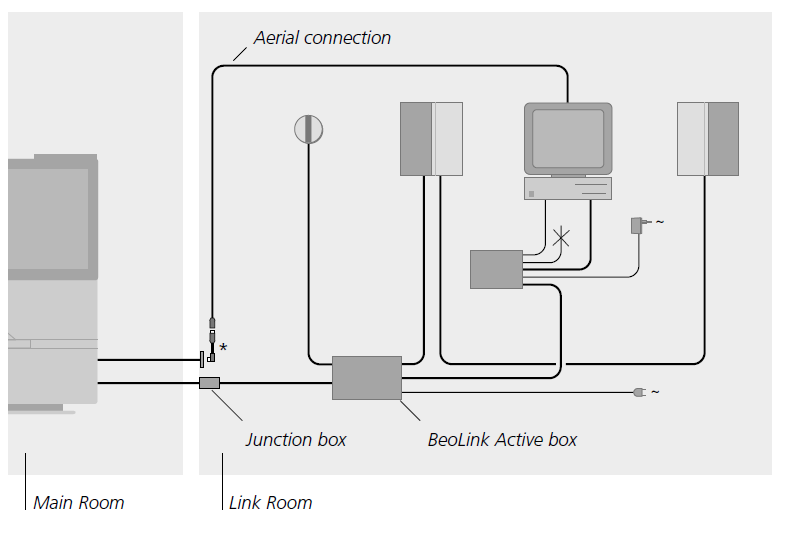
BL Active can receive audio over ML, and can select/control sources from audio/videomasters elsewhere in the ML system. But it can only control volume etc of the speaker connected to its PL output. And a source connected to the BL Active’s PC input can only be played over the PL output alongside.
Why would you disconnect ML since it’s the only way to drive a Link Speaker?
I just wanted to check if it would work in a stand-alone mode: i.e with PC input, PL output and IR-sensor connected. It didn’t!
EDIT: And as far as I am aware there’s is no datalink/AAL on the Active’s PC input socket. (Mind you, I had a quick look inside and most of the other PC pins seems to be connected …)
Location: Warwickshire, UK
My B&O Icons:
has there been different versions of this product?
Type 1616 (and 1618 for USA) is the first version with 2 x PL output sockets – that is the service manual that is in the Service Manual database.
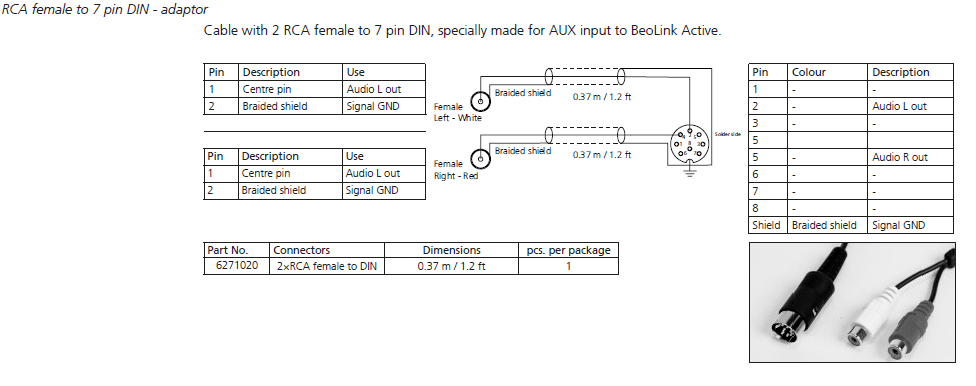
Type 1636 is the later model with one of the PL sockets replaced with a PC input socket. I think that this version was introduced as the Beoport was phased out, hence the naming of the input. The input pins are definitely 4, 2 and 7 – I have it playing at the moment.
The connections are mentioned in the Beolink handbook on page 116: (although it states to use the shield as ground – I used pin 7 as shown in some of Peter Pan’s diagrams)

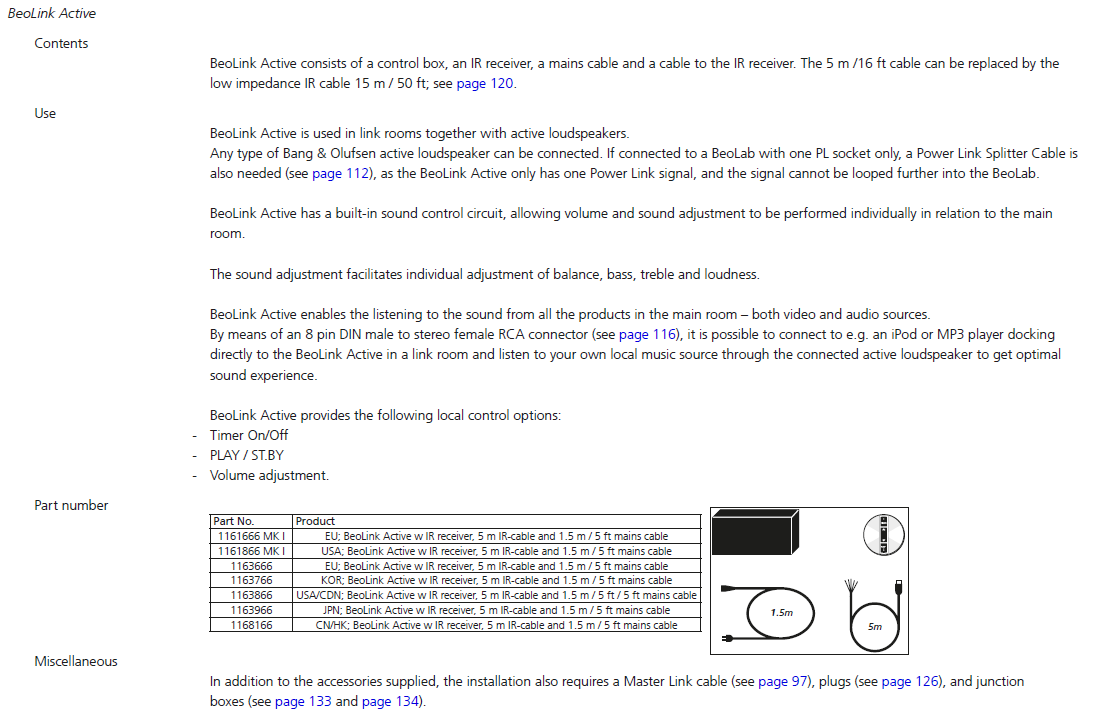
EDIT: Here is the product page from the same handbook, although it doesn’t mention the Mk1 v Mk2 differences.

Location: Warwickshire, UK
My B&O Icons:
Final (?) version of Test Schedule attached.
I entered a few final notes (in blue) about my attempts to trigger BL3500 using 5v into the MCL socket. I also made up a lead to test the PC input of the BL Active, only because I had never tried that before. The PC input worked fine using pins 2, 4, and 7 for Left, Right and Gnd respectively. I could select using ‘PC’ on Beo4 and it worked as a local source, but as soon as I disconnected the ML it stopped working – so there is no simple BL Active standalone option.
I have finished testing setups for now, but am now on the lookout for a BL3500 PCB36 with SW 2.1 or later.
Attachments:
You must be logged in to view attached files.Location: Warwickshire, UK
My B&O Icons:
Even better would be a device I can stream over AirPlay. Any?
I recommend looking for a second hand Airport Express, the later A1392 version with Airplay 2.
And our site sponsor (at the foot of the page) can supply the correct cable for connecting an airport express to the BS9000 AUX socket – this one: https://soundsheavenly.com/bang-olufsen/67-298-minijack-to-aux-in-ipod-to-beosound-beomaster-beocenter-using-aux-din-socket.html#/2-length-1m
Location: Warwickshire, UK
My B&O Icons:
there is no AUX-button on its control stick and neither my Beo4 remote control has anything called AUX. The remote has ATAPE and AV, no idea if that can help.
You should be able to add A.AUX to the LIST button on your Beo4 (if it is not already there).
To add it, on the Beo4:
– Press Power (Red Dot) and LIST together, the display should read ADD?
– Press GO.
– Press LIST until the display shows A.AUX. then GO.
– A.AUX should then be listed under LIST.But be aware that the SW version of your BL2000 may not allow it to respond to the A.AUX command (mine doesn’t). I think it needs minimum SW1.5 – this may be noted on the label on the rear.
However, you may be able to access the BS9000 aux input by pressing A.TAPE or A.MEM (and the same on the BL2000).
(The AV button on your remote is for another purpose, not AUX selection.)
Location: Warwickshire, UK
My B&O Icons:
I came around to try this test, but the Beocord keept playing even though i tried various lengths of long presses.
Forgot to ask, did you connect the BeoCord’s datalink to the AAL pin 6, rather than the usual Beocord pin 7?
Location: Warwickshire, UK
My B&O Icons:
I came around to try this test, but the Beocord keept playing even though i tried various lengths of long presses. Might be the difference between AAL an AL.
That makes perfect sense. It also explains …
- … why my modified DVD1 turned off after a long press. DVD1 had full control when connected to AUX/TV socket of BC9500, because the BC9500’s AUX/TV socket must have AAL at Pin 6. Given that I used a modified SCART lead, the data within SCART must be AAL rather than Datalink.
- … why my OneRemote has to be programmed to a strange number (starting with 4XX) when connected to either BL1611 or a TV’s SCART socket. This makes it use AAL rather than Datalink.
Location: Warwickshire, UK
My B&O Icons:
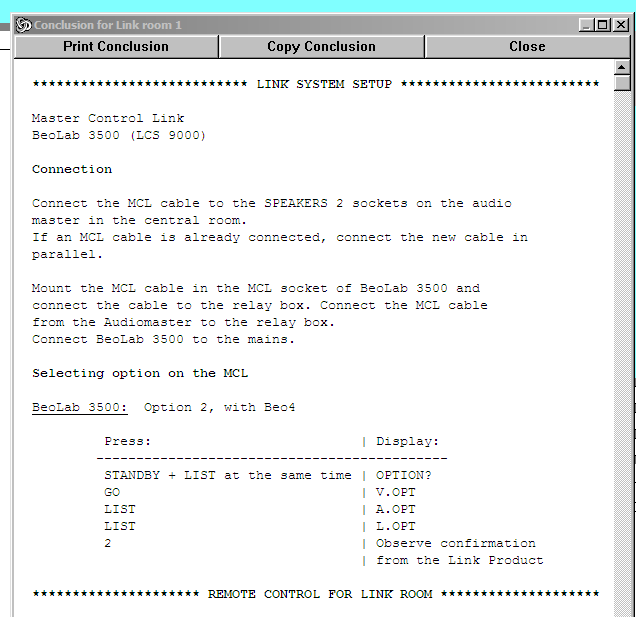
A setup with BC9500 in the main room and connected by MCL to LCS9000 in link room has no complications, as follows: (I presume that a relay box is just a connection box?)

Note that the above states Option 2 rather than L.OPT 6. I did try L.OPT 2 on my BL3500 when I was trying to trigger with 5V.
Location: Warwickshire, UK
My B&O Icons:
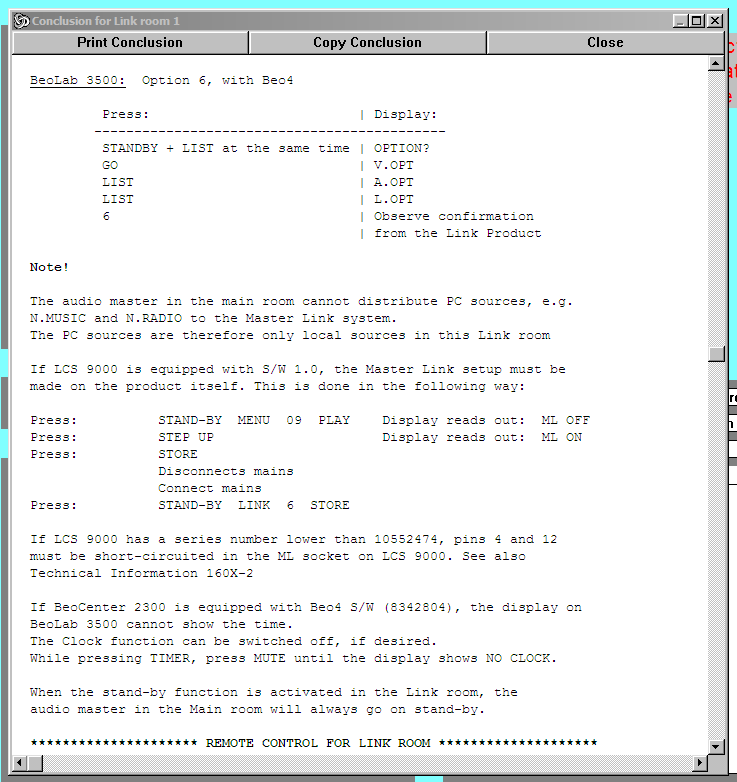
I am not sure if it’s relevant, but if I run the PCG with a BC2300 and BL1611 in the main room and LCS9000 in the link room (connected by ML) then I get the following:

Perhaps the shorting (or otherwise) of ML pins 4 and 12 in early model BL3500s is relevant to our investigations?
Location: Warwickshire, UK
My B&O Icons:
Or maybe the BL3500 manual is not showing all the connectors on the W1
I am fairly sure that I have a broken Wireless 1 in one of my boxes, but can’t find it unfortunately – which is a shame because I could have looked inside!
Location: Warwickshire, UK
My B&O Icons:
Out of curiosity: Did you try the combination +5V on pin 6 (datalink) and -5V on pin 7 (datalink shield)? I have had some thought about this and cam to the conclusion that the rest of the pins are either not conencted or used for the sound part. Furthermore one of the olde manuals regarding datalink signals mentions high signals in the voltage range 2.1 to 5.5V. But again it is just a thought.
Great minds think alike! I came to the same conclusion about pin 6 and did try 5v to that with pin 7 as ground (not -5V). I was actually using 4.5V (3 x 1.5v cells). Mine is SW2.0 whereas Matador’s picture from the one that worked says SW1.1 – perhaps that’s the problem?
Location: Warwickshire, UK
My B&O Icons:
Just a quick note about triggering the BL3500 with 5V. I did tentatively try 5V to various pins whilst I had a 7-pin cable attached to the MCL socket (ML was disconnected). I tried all voltage injections variations that have been mentioned with ML turned both on and off. BL3500 did not turn on. Given that we now have BL1611 working well, I give up!
However, whilst searching for something else, I just noticed a Peter Pan diagram showing BL3500 attached to Wireless 1 by Powerlink. The thread is here: https://www.hifi4all.dk/forum/forum_posts.asp?TID=20679&PN=1&TPN=149
I found the following Note interesting:
The combination Wierless 1, version no. 1780 and BeoLab 3500 version no. 1601 must not be connected to a separate IR-Sensor, here the IR sensor that is built into BeoLab 3500 works.
Installation of a separate IR-Sensor therefore only applies to the first version of Wireless 1.So (if the note is correct!) then with the later version of Wireless 1 (1780), there would have been no ‘trigger’ because the BL3500 was turned on with its own IR sensor. The trigger only came from the early version of Wireless 1, which perhaps required a corresponding early software version in BL3500.
It’s a pity that the Product Configuration Guide doesn’t include Wireless 1, because it often points out minimum SW levels for various combinations.
Location: Warwickshire, UK
My B&O Icons:
-
AuthorPosts