Forum Replies Created
-
AuthorPosts
-
24 September 2024 at 12:08 in reply to: Service Manual for low floor standing rotating tv stand #59340
 Moderator
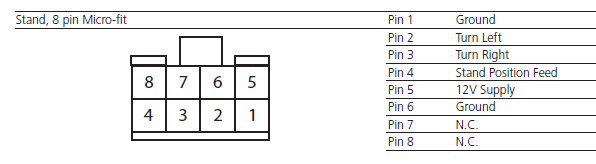
This from the service manual:

And an old post here talks about stand cable colours BUT it actually refers to the older round (DIN) stand connector – B&O may have kept the same colours scheme.
Location: Warwickshire, UK
My B&O Icons:
 24 September 2024 at 10:03 in reply to: Service Manual for low floor standing rotating tv stand #59337
If you just want to replace the aluminium disc then I think you should be able to do so without disturbing any of the wiring. Have you tried removing the moving bracket parts at the top of the stand (allen key required) and then simply lifting the disc up over the pole. The cables should just tuck into the cable gap in the pole while you do this.
Failing this, you can go under the stand base and unbolt the vertical pole, then feed the cable down through the pole as you remove it – again no requirement for any wiring to be disturbed. I am not sure about the 10-40, but many B&O motorised TV stands also have a DIN connector within the pole for easy disconnection.
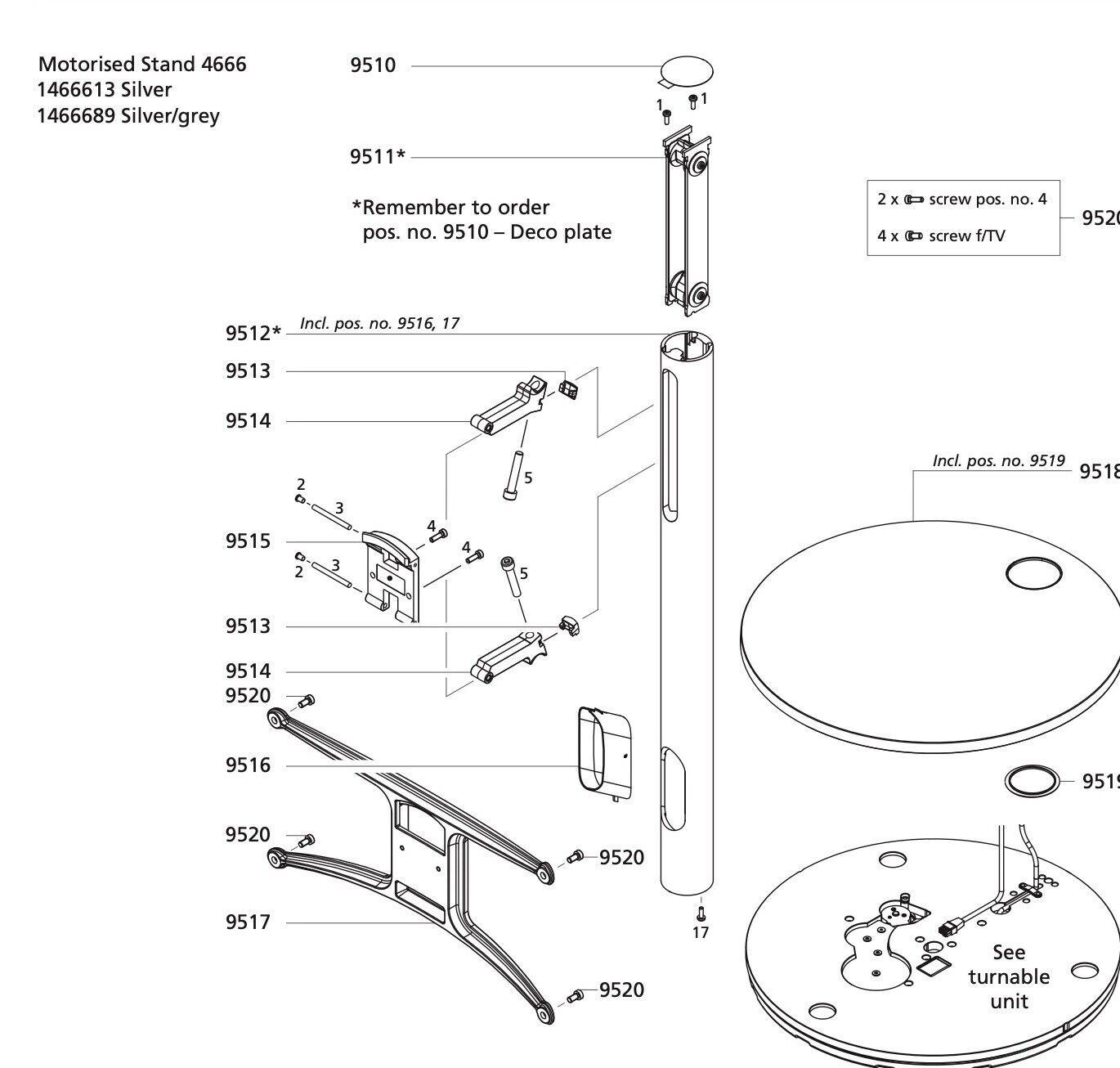
This may help: (You should be able to remove parts 9515 and then 9514 quite easily)

Location: Warwickshire, UK
My B&O Icons:
Hi John and welcome to Beoworld!
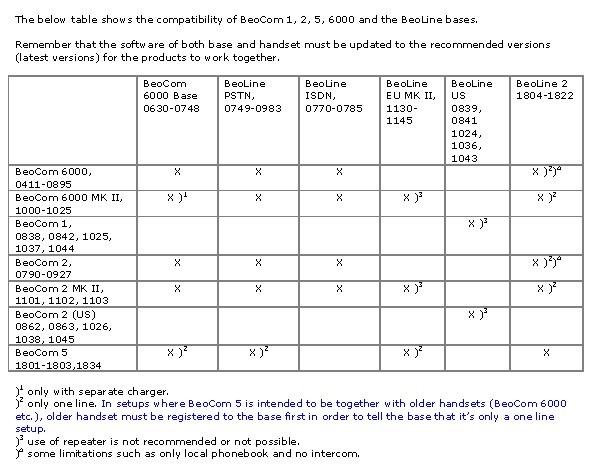
Have a look at the following compatibility table so you can work out compatibility between the various handsets and bases:

Assuming that you are using a BeoLine US with your BeoCom 1s, you should already be able to connect up to 8 handsets. Perhaps you have other older/unused phones registered to the base, in which case you should delete them to release space for others.
If you do have the BeoLine US, then you should be able to connect a BeoCom 2 (US) with the type numbers listed above.
With regard to ‘refurbishment’ of your existing BeoComs, there is little that you can do other than fitting new batteries – this often solves problems with the phone or display and would be my approach in the first instance.
Ref speakerphone, I am not aware of any easy options, although some of the older ‘cabled’ BeoComs have built in speakerphone – BeoCom 2000 for instance. You’d have to be careful to get one compatible with the US phone network.
I hope this helps – come back and ask if you have further questions.
Location: Warwickshire, UK
My B&O Icons:
Looking for Option to delete old Handsets in INT Menue. Thanks
Go to ‘Setup Menu’, then ‘Advanced Menu’, then ‘Base …’, then ‘Remove the handset’ then chose the one(s) that you wish to remove.
Location: Warwickshire, UK
My B&O Icons:
Does SHIFT have to display on the screen throughout the full 90258 code?
No it doesn’t. (I just checked to enter Test Mode on my old Beosound 1)
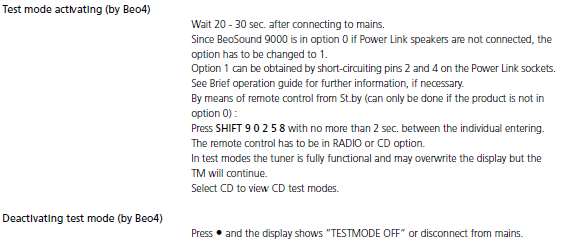
I wasn’t sure if you have the service manual, but here’s what it says – worth following to the letter if you haven’t already – especially the note about A.Opt 1:

You could also try pressing GO when SHIFT is displayed on the screen, and then press 9 0 2 5 8. This works for me also with BS1.
Location: Warwickshire, UK
My B&O Icons:
Every time I press SHIFT + 9, it goes out of the shift mode to CD. I cannot input the full 90258 code in SHIFT mode.
I can’t help with the other BS9000 questions but have experimented a bit with the Beo4 and SHIFT. Try cycling through the LIST functions prior to trying to enter Test Mode, so that SHIFT is freshly displayed on the Beo4 screen, then press 9. Then 0 2 5 8. From my experiments, the only ‘novel’ IR code is SHIFT 9, and the following number presses are ‘normal’ IR numerics.
EDIT: And of course have the system at stand-by before trying to enter Test Mode.
Location: Warwickshire, UK
My B&O Icons:
Morning all! I am quite busy with other stuff at the moment but trying to follow this thread – I don;t have an NL.ML converter so I can’t really help with the overall aim.
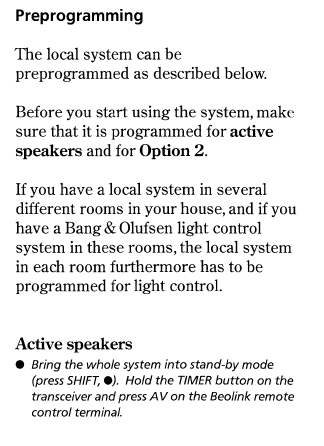
However, I have noticed that one of the problems is the PL output (trigger) of MCL2AV. I did notice the following paragraphs in the ‘extra active speaker kit’ (MCL2AV) setup manual – I just wondered if the last little bit about holding the sensor timer button and pressing AV has any effect on what you are trying to achieve? Possibly not, but worth a try?

Location: Warwickshire, UK
My B&O Icons:
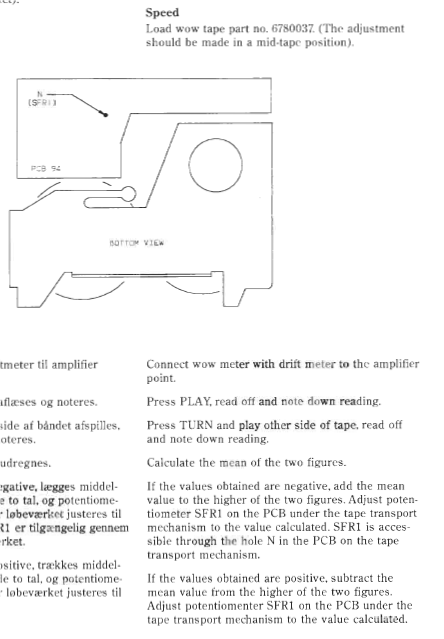
11 September 2024 at 12:31 in reply to: Beoystem 2500 – Cassette Deck Plays Too Fast and Sliding Door Issues #59002I am assuming that I will have to also have to disassemble the large green circuit board covering most of the back panel to access the SFR1.
I would assume so. Have a look at this excellent thread from matador – your will have to click on the photos attached to each post. I think that you can see the hole through which SFR1 is accessed in IMG_2798.
I am not sure what tools to use for adjustment but avoid distorting figures by grounding through your body – don’t hold metal screwdriver directly.
Upper and lower door runners can be cleaned with something like window cleaner sprayed onto qtip, then lubricate very lightly with silicon spray lubricant (again via qtip).
BUT, I agree with @billbriscoe that incorrect/old belts are more likely to cause problems for both door and tape speed.
Location: Warwickshire, UK
My B&O Icons:
Willkommen bei Beoworld!
Maybe have a look here: https://shop.oneremote.dk/shop/69094-digital-radio-solutions-for-bo/
Location: Warwickshire, UK
My B&O Icons:
10 September 2024 at 13:27 in reply to: Beoystem 2500 – Cassette Deck Plays Too Fast and Sliding Door Issues #58981Hi and welcome to Beoworld!
Firstly, do you have the service manual? This is available on this site to Silver and Gold members.
Here’s a snippet from the manual regarding tape speed adjustment:

With regard to the doors, again the manual shows the correct routing of the wire cable that moves the doors, so it is worth checking that first because you have the system disassembled. It could also be worth cleaning and maybe lubricating the door runners. If there is still a problem, I would replace the door motor belt – however new it looks you cannot be sure of its age, or whether an incorrect belt has been fitted.
Personally I would fit new belts for doors, tape and CD mechanism, all available from here: https://www.dksoundparts.com/product-category/beosound/beosound-2500/
Location: Warwickshire, UK
My B&O Icons:
In answer to your questions: Yes and Yes.
Or you can buy replacement screens from https://www.avaservices.co.uk/
There was a post in the old forum explaining how to replace. I’ll try to find it later.
EDIT: Here: https://archivedforum2.beoworld.org/forums/p/21827/180453.aspx#180453
Location: Warwickshire, UK
My B&O Icons:
Hi and welcome to Beoworld!
On one of the working phones, go to ‘Settings’, then ‘Base’ then ‘Remove Handset’. Then scroll through to find the handset you with to remove and select.
Location: Warwickshire, UK
My B&O Icons:
Thanks for the interesting info Peter – I presume that you mean the one described and pictured on the site at this link: https://beoworld.org/beogram-4001/
Location: Warwickshire, UK
My B&O Icons:
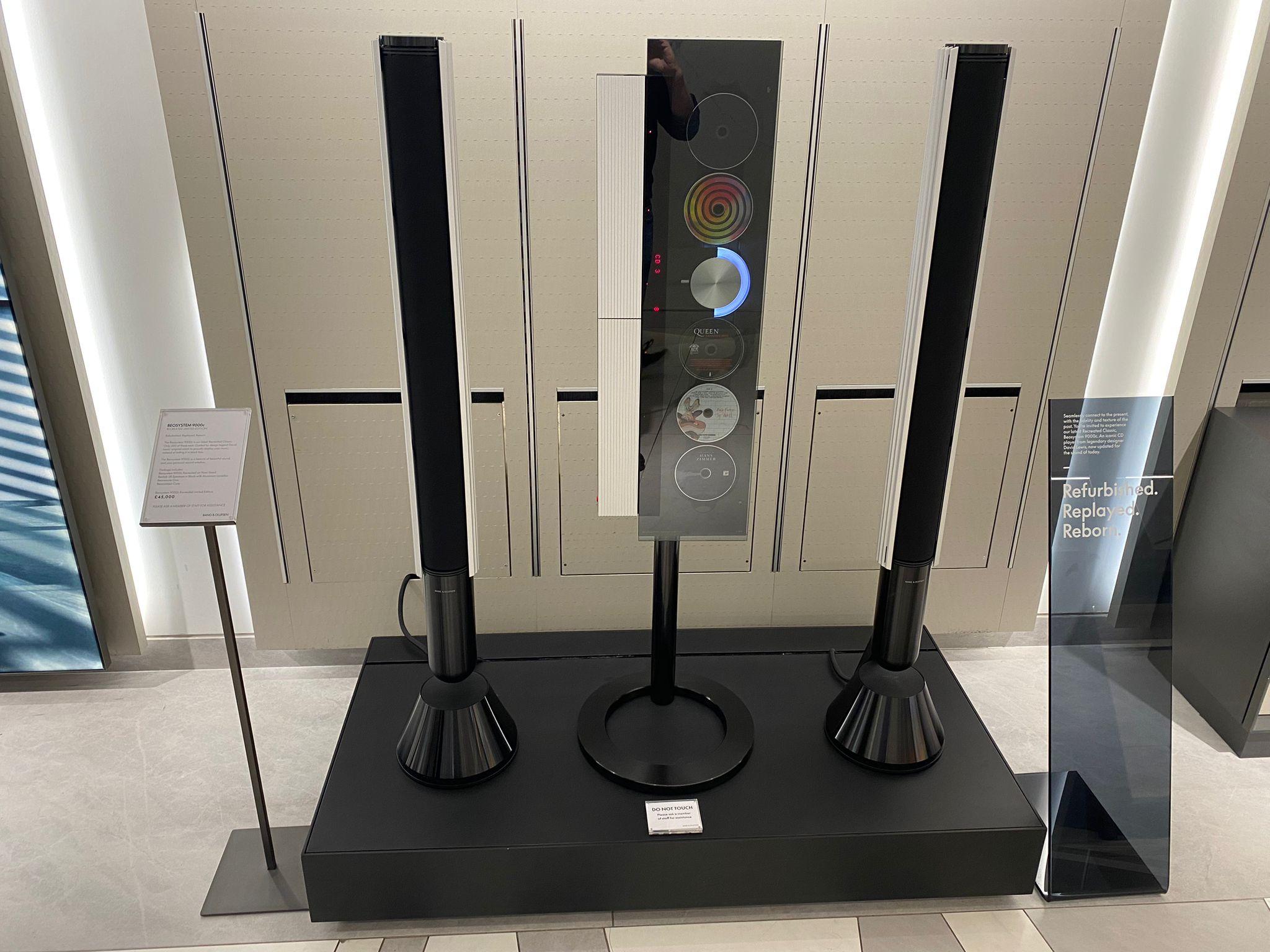
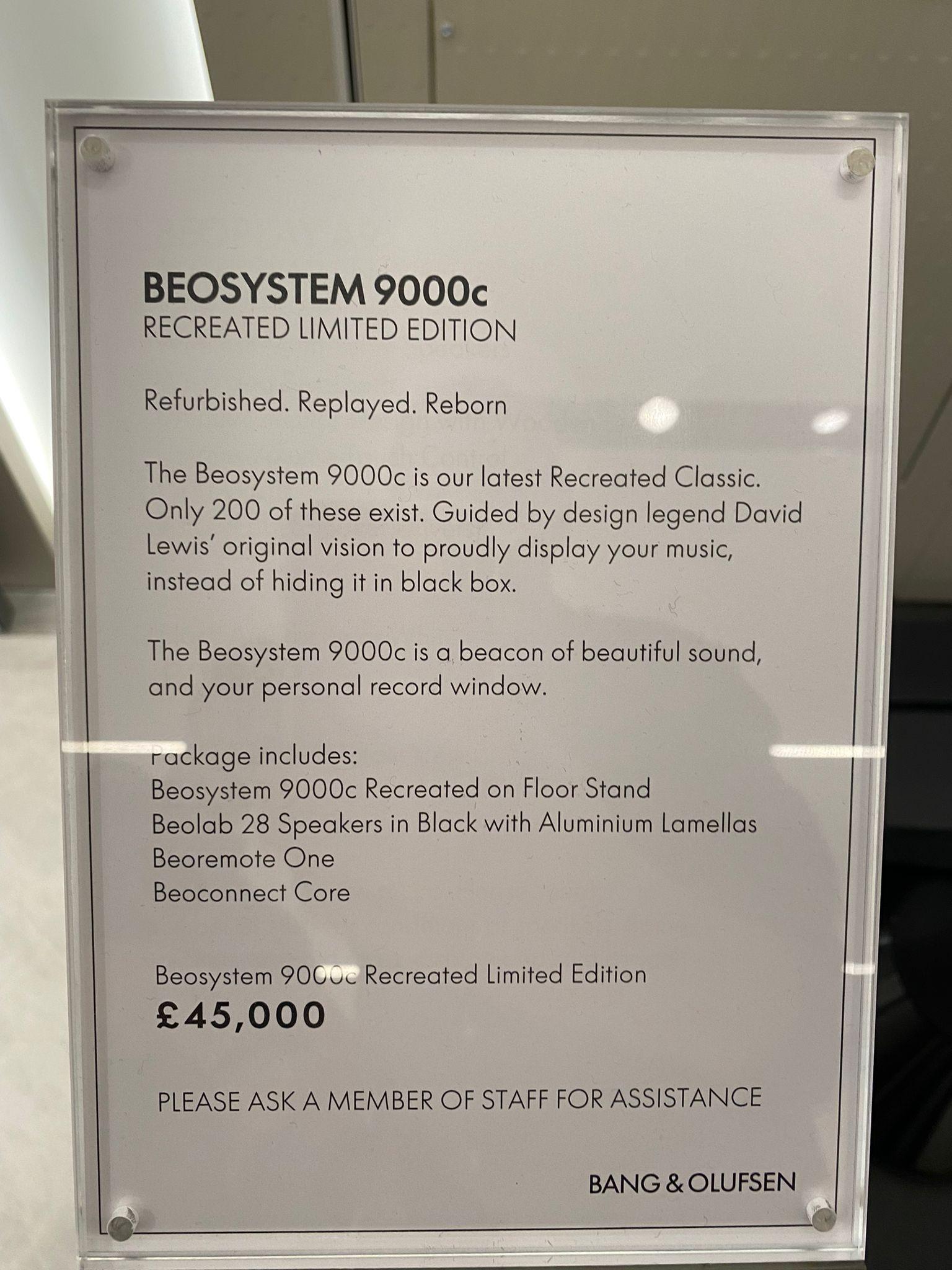
+1 for Harrods. Co-incidentally a friend of mine is there today, knows my interest and just sent these photos:


Location: Warwickshire, UK
My B&O Icons:
It will not work. The “old” and “new” datalink systems are not compatible. Martin
Thanks @Dillen (and everyone else). I agree despite my earlier incorrect post!
I have just been revisiting my Chrome history to try to work out why I thought otherwise. I did see a paragraph taken from a ‘Beolink’ article the old forum which stated: The idea of electronic sensi-touch controls did away with old-fashioned buttons and other mechanical ways of controlling your equipment and paved the way for the first true ‘Datalink’ product: Beogram 4004. Clearly I took this too literally and didn’t investigate further, or even read fully the ‘datalink’ page that I linked – many apologies.
@Peter – no need to run the test! 😀
Location: Warwickshire, UK
My B&O Icons:
Hi and welcome to Beoworld! The BC9500 is a great first purchase.
First thing to check is simple: Are you sure that there isn’t a 3.5mm to 1/4 inch adaptor in the headphone socket? Sounds silly but this mistake has been made many times in the past!
EDIT: But if the headphone output has the same problem this is unlikely – apologies!
Location: Warwickshire, UK
My B&O Icons:
As far as I know it would work with both. I have had a read of this and cannot see any limitations for either of those setups mentioned: https://beoworld.org/datalink/
Location: Warwickshire, UK
My B&O Icons:
There’s lots of advice about Bs3 versions in ArchivedForum2 so it’s well worth having a search – threads like this: https://archivedforum2.beoworld.org/forums/p/38155/290365.aspx
Location: Warwickshire, UK
My B&O Icons:
While I knew there were different versions of the BS3 I did not realise they might have different connection types for the IR eye, so I’ll keep that in mind while looking for one – thanks.
This link shows both SCART and component versions, and would appear to have IR-in connections for both types that I mentioned: https://thegogglesdonothing.com/images/beosystem3.jpg
Location: Warwickshire, UK
My B&O Icons:
As far as I know there are two versions of IR eye for the BS3 (neither has lettering):
- Auto-contrast version has 7 connectors inside and is fitted with a 9-pin serial plug for connection to BS3
- Non-auto-contrast version has 5 connectors inside, only three of which are used and connect to the BS3 via a 3.5mm ‘headphone type’ plug.
I’m guessing that different versions of the BS3 need (or work with) different versions of IR eye.
Location: Warwickshire, UK
My B&O Icons:
-
AuthorPosts