Forum Replies Created
-
AuthorPosts
-
9 October 2024 at 17:33 in reply to: App Control of Masterlink Products Using Beolink Converter NL/ML #59975
 Moderator
And so I re-confirmed that even if you only have one device connected to the BLC, you can’t get the app to display an icon of the BS5, even if you so set it on the BLC’s settings.
Many thanks for that confirmation.
This, plus the concern raised months ago that the C’s poor old memory is constantly being rewritten to with useless failure log messages —thus condemning the device to an early, unnecessary death— tells us that the C is probably not long for this world.
I must have missed this concern because I didn’t have a BLC when it was raised. It’s not ideal but can’t you just go into the BLC’s ‘Tools’ menu occasionally and clear the system log? (Having said that, the only entries in my BLC system log are from today and I don’t remember clearing it after my experiments last week)
Location: Warwickshire, UK
My B&O Icons:
 9 October 2024 at 17:25 in reply to: App Control of Masterlink Products Using Beolink Converter NL/ML #59973
workaround: if you add the Essence mkII to the setup, you could add the ML sources of the BC2300 as Essence mkII sources (In the Essence configuration: Link to other products; Connect to primary Beolink product; check the boxes for the available sources in Content-Sources-Local) Then it is possible to start the BC2300 Radio on the Essence mkII
That works – many thanks indeed @Carolpa
FM Radio from the BC2300 is now playing on the speaker connected to the Essence, and I am able to use the app to change stations and play/control the CD player too.
Just one anomaly, even after selecting (what I have named) ‘FM RADIO BC2300’ as a source for the Essence mkII in the app, the app then shows the source as ‘B&O Radio’ (with the station logo blank, obviously).
Location: Warwickshire, UK
My B&O Icons:
6 October 2024 at 19:21 in reply to: App Control of Masterlink Products Using Beolink Converter NL/ML #59929Thanks @patcherley – being very new to the NL/ML Converter setup pages I was convinced that I was doing something wrong, but it would appear to be normal behaviour.
Many thanks also @Carolpa
It’s useful to hear that Radio sources seem to have been skipped – understandable when you consider Encore/9000c. I will set up the system later this week, re-connect the Essence and try the helpful workaround in your last paragraph. I will report back, hopefully with positive results! 😀
Location: Warwickshire, UK
My B&O Icons:
Seriously, just connect the pins 6 and 7 on the DIN plug and you will get remote control through the Aux channel.
I don’t think this will work, because being an RIAA equipped deck the datalink will already be on pin 7 and he already tried Tape 2. I think that when plugged into Tape 2 his Beogram 4500 will be controlled only after selecting PHONO on the remote, but of course the audio is not then connected.
EDIT: Peter, you must be experiencing a little ‘deja vu’ 😀 – see https://archivedforum.beoworld.org/forums/t/32271.aspx
Location: Warwickshire, UK
My B&O Icons:
I can’t vouch for the audio quality (I suspect it would be poor), but if you don’t want to modify the BG4500 you could always feed it’s output through something like this and then in to the PHONO input: https://www.ebay.co.uk/itm/154567034473
But you would have to convert DIN to Phono plugs (and reverse) and feed the datalink connect from DIN pin 7 of the input to DIN pin 6 of the output.
Location: Warwickshire, UK
My B&O Icons:
Do you know the way how to bypass the preamp of the Beogram 4500, please?
As a Silver Member you are able to download the Service Manual here: https://beoworld.org/?a=download&key=cae6a88b27cd8dd84ce21c7a01e06b95
As you can see, many Beograms of that era (both with and without RIAA) share the same service manual because they are similar internally. Basically, you want to disconnect/bypass PCB4 totally, and reconnect with the ‘non-RIAA’ muting circuitry as shown on page 2-1 in the little dotted area labelled ‘in versions without RIAA’. The circuit diagram also shows that the datalink connection should be moved from pin 7 to pin 6 as I mentioned earlier. I haven’t attempted this myself, but if you are confident with hifi electronics it should be no problem.
EDIT: There’s a photo attached to McGruse post here that shows a BG4500 with RIAA removed – it may be some help! https://archivedforum2.beoworld.org/forums/p/26480/211502.aspx#211502
Location: Warwickshire, UK
My B&O Icons:
If bypassing the RIAA to use the BC9500’s PHONO input, you will also need to move the Beogram’s datalink connection from DIN pin 7 to DIN pin 6. Non-RIAA-equipped Beograms use pin 6 for datalink, whereas RIAA-equipped use pin 7 (the same as Tape). The Tape 2 input socket on BC9500 expects datalink on pin 7, and the PHONO input socket expects datalink on pin 6..
Location: Warwickshire, UK
My B&O Icons:
4 October 2024 at 11:41 in reply to: App Control of Masterlink Products Using Beolink Converter NL/ML #59786I assume there is some sort of conflict between ML RADIO (which I want to be the BC2300 FM radio) and the B&O RADIO (effectively internet radio) that is part of the app. Anyone know if I can change settings to access the BC2300’s FM RADIO via the B&O app? EDIT: I have tried putting the BC2300 in A.OPT 0, and then adding an IR sensor to the NL/ML Converter – I have IR mapped the ML sources. I can select all mapped BC2300 sources (including RADIO) using the Beo4, but the RADIO source still does not appear in the app.
Not really sure, but what if you map Radio to another source in the NL/ML converter?
I have tried that – or at least I think I set up up to try that! I think the problem is that under ‘App Settings’ I have to set ‘Product Controlled by Apps’ to ‘BeolinkConverter NL/ML with speakers’, otherwise I am unable to control anything on the BC2300 with the app, even CD and A.AUX. I think this is the problem/conflict because the NL/ML Converter expects RADIO to be ‘B&O radio’, but still looks for (and selects) CD or AUX on the ML network. With the IR sensor attached to the Converter, if I open the B&O app on my phone, and then use the Beo4 to select RADIO (or an alternative mapped command), then the BC2300 does switch to FM RADIO, but the app on my phone changes source to ‘B&O Radio’. The other thing I an unable to do is control the BC2300 volume using the app, whereas I could do this when the Converter was attached to my BV10-32.
If I change the ‘Product Controlled by Apps’ to the logical option of ‘ML Audiomaster’ I have no control whatsoever over the BC2300. This could well be a limitation* of using a BL1611, which is effectively being the ML Audiomaster for the BC2300. I still don’t have a true ML Audiomaster (with FM RADIO such as Ouverture) with which to experiment.
Anyway, it’s not a big deal but it was fun experimenting with the control possibilities across several decades of B&O equipment! 😀
* I have attached a NL/ML Compatible B&O Products list which sadly gives little detail of BL1611 limitations but suggests I was lucky to get any control!
Attachments:
You must be logged in to view attached files.Location: Warwickshire, UK
My B&O Icons:
4 October 2024 at 09:40 in reply to: App Control of Masterlink Products Using Beolink Converter NL/ML #59780Hello, I have an side question on this topic. My converter is placed in the study and connected to speakers, it is used as a link room device AND to connect ML sources to NL units and reverse. So it’s set as Source center. Everything works fine with remote control, but unfortunately I cannot choose the converter as device controlled by app in it’s settings. Any idea?
If I set mine as Source Centre I cannot chose the converter as ‘device controlled by app’.
In your ML network, do you have a ML Videomaster and/or Audiomaster? If there is no other ML Videomaster, you should be able to set the NL/ML converter as V.Master which will then allow you to select the converter as ‘device controlled …’. Likewise for A.Master.
EDIT: If you do already have V.Master and A.Master on your ML network, then I think setting your converter as A.Slave will allow you to choose the converter as ‘device controlled by app’, but I am unsure what effect this will have on the rest of your system control!
Location: Warwickshire, UK
My B&O Icons:
3 October 2024 at 14:56 in reply to: App Control of Masterlink Products Using Beolink Converter NL/ML #59739So today I am trying the NL/ML converter connected just to my BC2300 via a BL1611. I have removed my Essence Mk2 from the setup (and B&O app) to avoid conflicts.
The converter is set as a V Master and I have ‘experience mapped to NL’ the three BC2300 sources RADIO, CD and A.AUX.
I can use the B&O App to select the BC2300’s CD (which starts playing) and can also select A.AUX which switches the BC2300 to AUX. I can also power-down the BC2300 using the app.
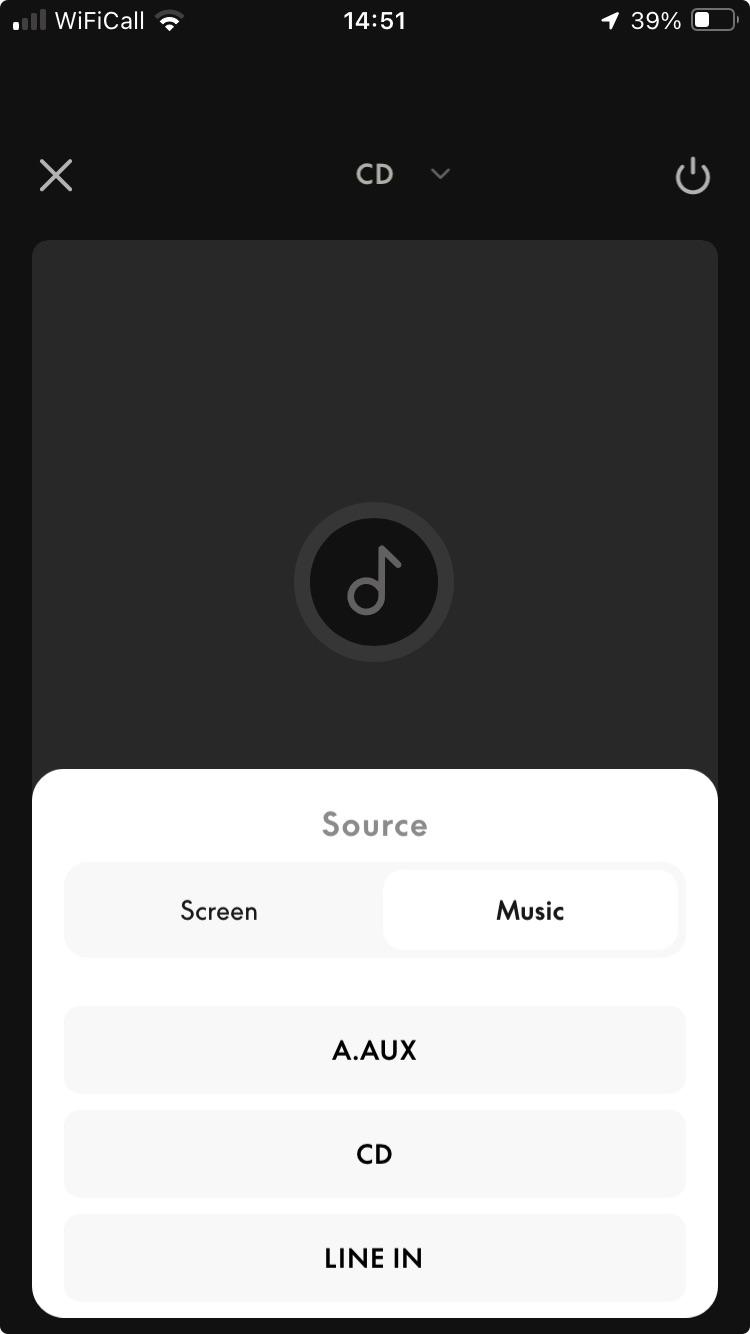
What I can’t do is select RADIO (the BC2300’s FM radio) using the App – as you can see below it doesn’t even show up as a Music source.

I assume there is some sort of conflict between ML RADIO (which I want to be the BC2300 FM radio) and the B&O RADIO (effectively internet radio) that is part of the app. Anyone know if I can change settings to access the BC2300’s FM RADIO via the B&O app?
EDIT: I have tried putting the BC2300 in A.OPT 0, and then adding an IR sensor to the NL/ML Converter – I have IR mapped the ML sources. I can select all mapped BC2300 sources (including RADIO) using the Beo4, but the RADIO source still does not appear in the app.
Location: Warwickshire, UK
My B&O Icons:
3 October 2024 at 09:57 in reply to: App Control of Masterlink Products Using Beolink Converter NL/ML #59722In the old BeoMusic App the BV 10 is displayed as an icon. In the new app this functionality seems to be no longer active, as I, as well, get only the BLC on display. I have not set up my BLGW properly for all my rooms, yet. However, for those I did, I get e. g. the BS 9000 icon in the respective room, either in the BeoLink 2 or in the BeoLiving app. So I guess, it is likely to get the BV 10 icon as well in both of them. Kind regards, Rolf
Thanks Rolf – that’s useful to know and as I suspected.
Location: Warwickshire, UK
My B&O Icons:
A quick update …
I now have an NL/ML converter, so I today connected my round ‘Timer version’ IR sensor and it controlled the converter perfectly, hence I have proved that there is nothing wrong with my IR sensor or RJ45 wiring. I tried the IR sensor again connected to the Essence and it still didn’t work, despite yesterday’s Essence SW update.
It might be time to delve inside the Essence as @madskp suggested a couple of posts ago. I have limited time at present and need to prepare my motorbike for its MOT tomorrow, so I will report back here when I have news.
Location: Warwickshire, UK
My B&O Icons:
What extra pins are we talking about?
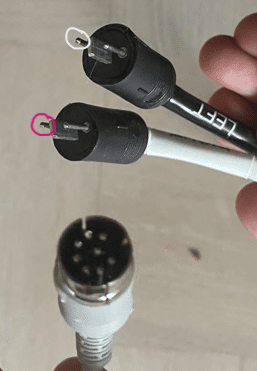
Annotated on the attached photo:
Pink carries power for the MCL system – 7V dc
White carries data – allowing the BL3500 to control the BC2500.

You could use a multimeter to check continuity according to the wiring diagram that I linked earlier. (Eg pink should go to Pin 2 of the MCL plug, and White to pin 6). You could also open up the plugs to check that the correct colours are soldered to the correct pins at both ends.
Location: Warwickshire, UK
My B&O Icons:
Like I said earlier, when pressing different buttons on the remote control, the red text on the display of the BeoLab 3500 gets brighter for a short period of time, but no input is working (for example: I can’t change the volume on the BeoLab 3500 even though the display gets brighter red when pressing the volume button on the remote control).
So did you try disconnecting the MCL cable from the BL3500 and then pressing LINK 2 STORE on the remote? I am wondering if an incorrectly wired MCL cable (see below) causes the BL3500 to suppress IR reception.
The cable was cut into two pieces when I got it, so I had to solder the cables together. I’m not sure that left is left and right is right. But then I wonder, how can the two systems talk to each other if the cable is not connected in a correct way? Because when pressing buttons on the BeoLab 3500, the BeoSystem 2500 responds, but there is no sound coming from the BeoLab.
Whilst swapping L and R speaker channels would not be a problem, it’s important that the extra pins on the speaker connections are going to the correct L or R socket on the MCL2P – one carries power, the other data. It is possible that getting these incorrect will cause the BC2500 to respond in some way but cause problems elsewhere.
EDIT: Correct MCL2 cable wiring is shown here (second diagram) – colour coding may be different but you may wish to check yours with a multimeter: https://beoworld.org/wiring-diagrams/
Location: Warwickshire, UK
My B&O Icons:
Does the BL3500 respond to any IR commands if the only connection to it is its mains/power cable? Eg: LINK 2 STORE
Are you 100% sure that the Left/Right cables were connected to the correct speaker sockets on the MCL2P? (I can see that one cable has ‘Left’ printed on it, but no harm in double checking!)
Location: Warwickshire, UK
My B&O Icons:
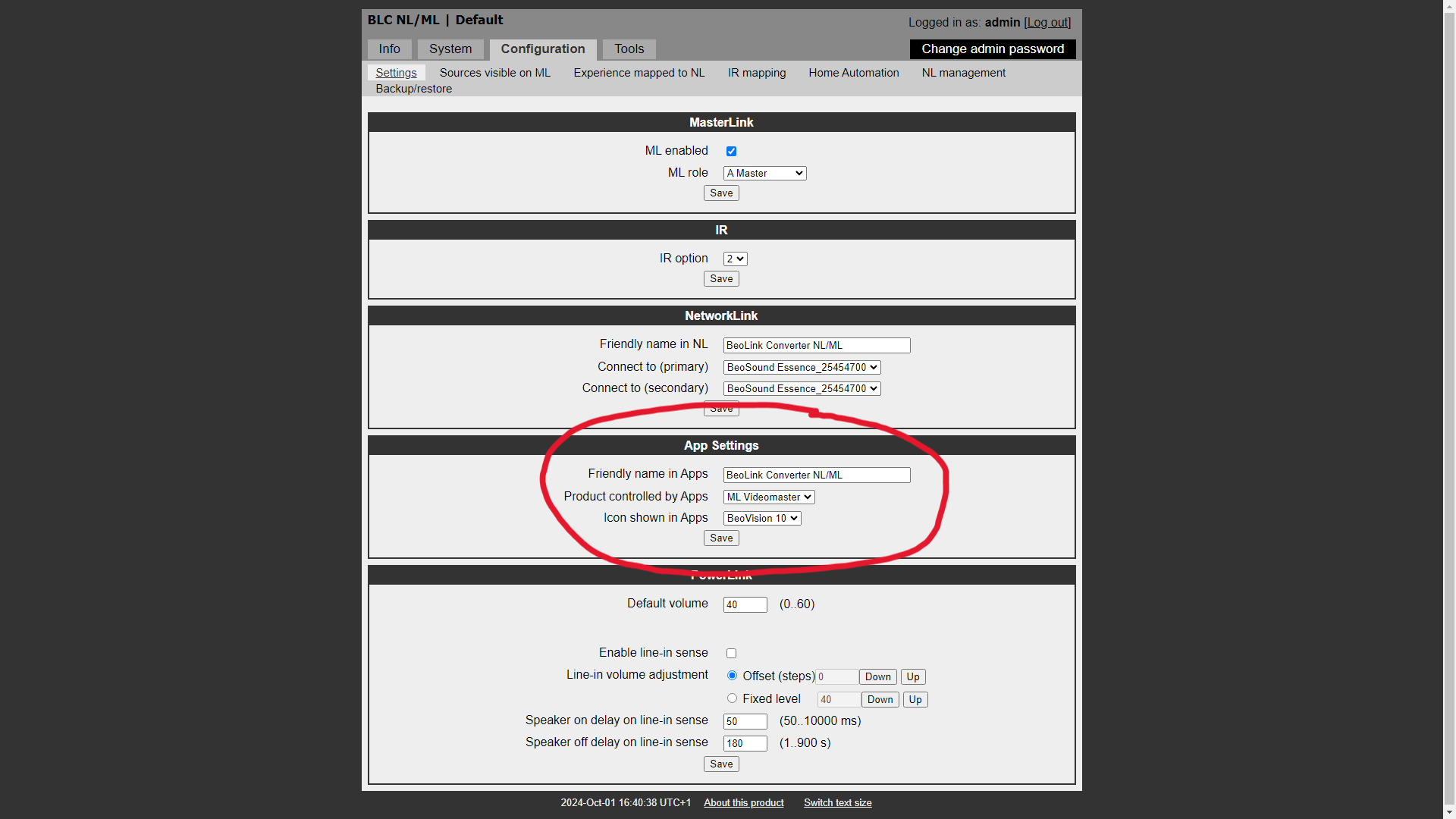
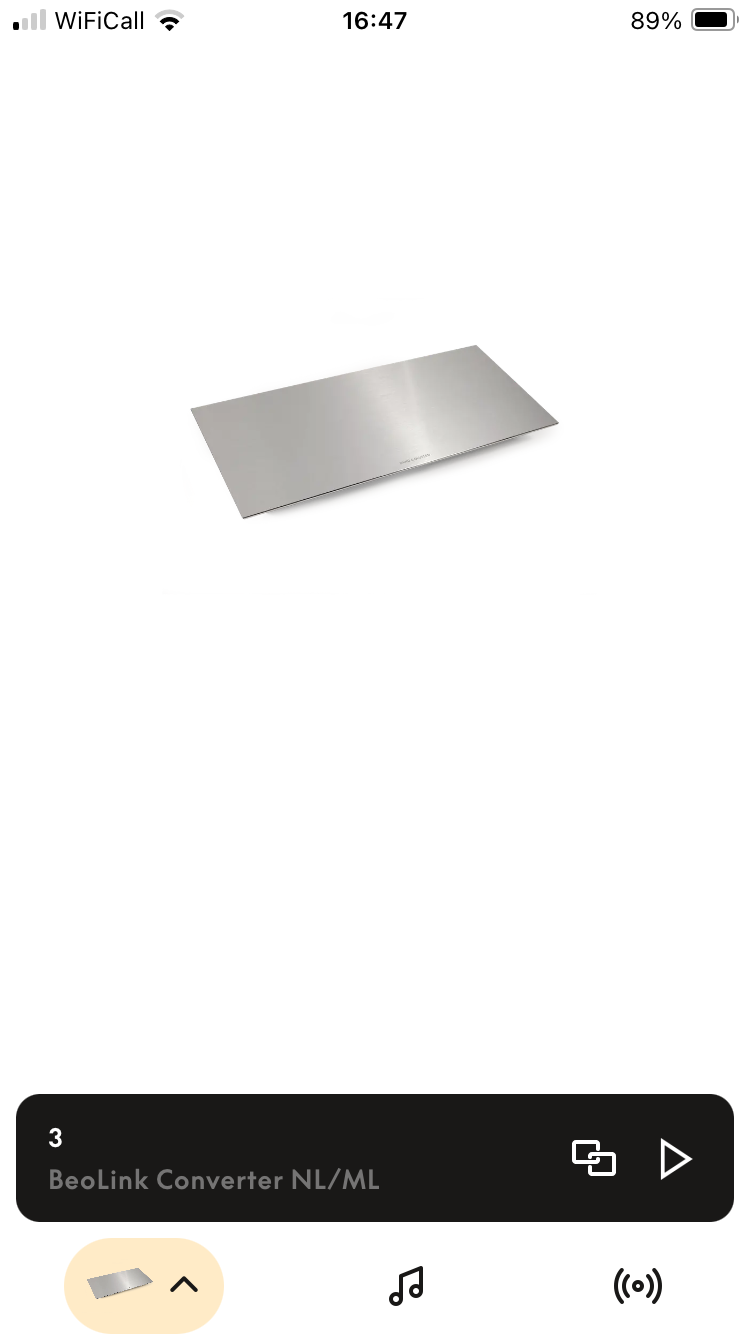
1 October 2024 at 21:59 in reply to: App Control of Masterlink Products Using Beolink Converter NL/ML #59672I have one question that isn’t covered in the NL/ML Installation Guide (version 1.4). Half way down the settings page there are ‘App Settings’. I have set the ‘Icon Shown in Apps’ to Beovision 10 as you can see below: (the other icon options are Beovisions 9, 8, 7 and 3) But I am unclear as to where to expect to see that BeoVision 10 icon. All I get when using the B&O app to control the TV (via Beolink Converter) is a picture of the Beolink Converter, as you can see below:
I have noticed this setting, but did not pay much attention to it for my test use of the converter. I think mine is set to Beovision 10, and in the App only the BLC NL/ML is shown as you have also noticed. Maybe more extensive users of the BLC NL/ML have more knowledge about this functionality.
Thanks for that confirmation. I had a look through the Beolink Handbook v1.9 and ‘icons’ are mentioned with regard to the NL/ML converter (at the top of page 42). I think the setting refers to the simple icons (rather than photos) that were displayed within the old (?) BeoMusic App when using Beolink Multiroom. Perhaps the same icons are in the Beolink Gateway’s Beolink 2 app that was mentioned by Gregg above.
Anyway it’s not important. Overall I am very impressed with the NL/ML Converter so far and look forward to experimenting further with some of my older equipment!
Location: Warwickshire, UK
My B&O Icons:
1 October 2024 at 18:29 in reply to: BeoSound Essence Mk2 final sw version number? 2.5.55678(170713653) ? #59659I set up my Essence Mk2 for the first time for a few weeks today, and noticed that another software update was available – namely 2.6.56379.258833281
Details are shown here (and unusually for the site it shows the date of release as 30 Sep 24): https://update.bang-olufsen.com/products/58ba6c9e15524870a403957cdfbee6ab#version-2.6.56379.258833281
When I have time I will see if the update makes any difference to my IR reception problems.
Location: Warwickshire, UK
My B&O Icons:
1 October 2024 at 16:55 in reply to: App Control of Masterlink Products Using Beolink Converter NL/ML #59656I recently got hold of a NL/ML Converter and have been having a play.
Currently it’s connected as an Audiomaster between my BV10-32 and Essence Mk2 (There are no other ML or NL devices attached, and no speakers or IR sensors connected to Essence). It seems to work well and I have Beo4 control of the Essence (through the TV) and limited B&O app control of the TV – quite impressed that I can also control the TV volume using my phone.
I have one question that isn’t covered in the NL/ML Installation Guide (version 1.4). Half way down the settings page there are ‘App Settings’. I have set the ‘Icon Shown in Apps’ to Beovision 10 as you can see below: (the other icon options are Beovisions 9, 8, 7 and 3)

But I am unclear as to where to expect to see that BeoVision 10 icon. All I get when using the B&O app to control the TV (via Beolink Converter) is a picture of the Beolink Converter, as you can see below:

Am I doing something wrong, or is this a bug in the B&O app?
Location: Warwickshire, UK
My B&O Icons:
so only room one is now individual from the others
I think that this is the best that you can hope for with only two ‘Passives’. Two amplifiers = two volume levels.
There are ways to separate out the rooms so that each has a discrete volume, but you would need to add either extra Passives, or Beolab (active) speakers. As madskp has already said, a good solution would be to replace the entire system with one that is ML (rather than ML/MCL) based. To do so, you would simply need a Passive in each room, each controlled by one of the newer round IR sensors, plus lots of ML cable (or equivalent).
Location: Warwickshire, UK
My B&O Icons:
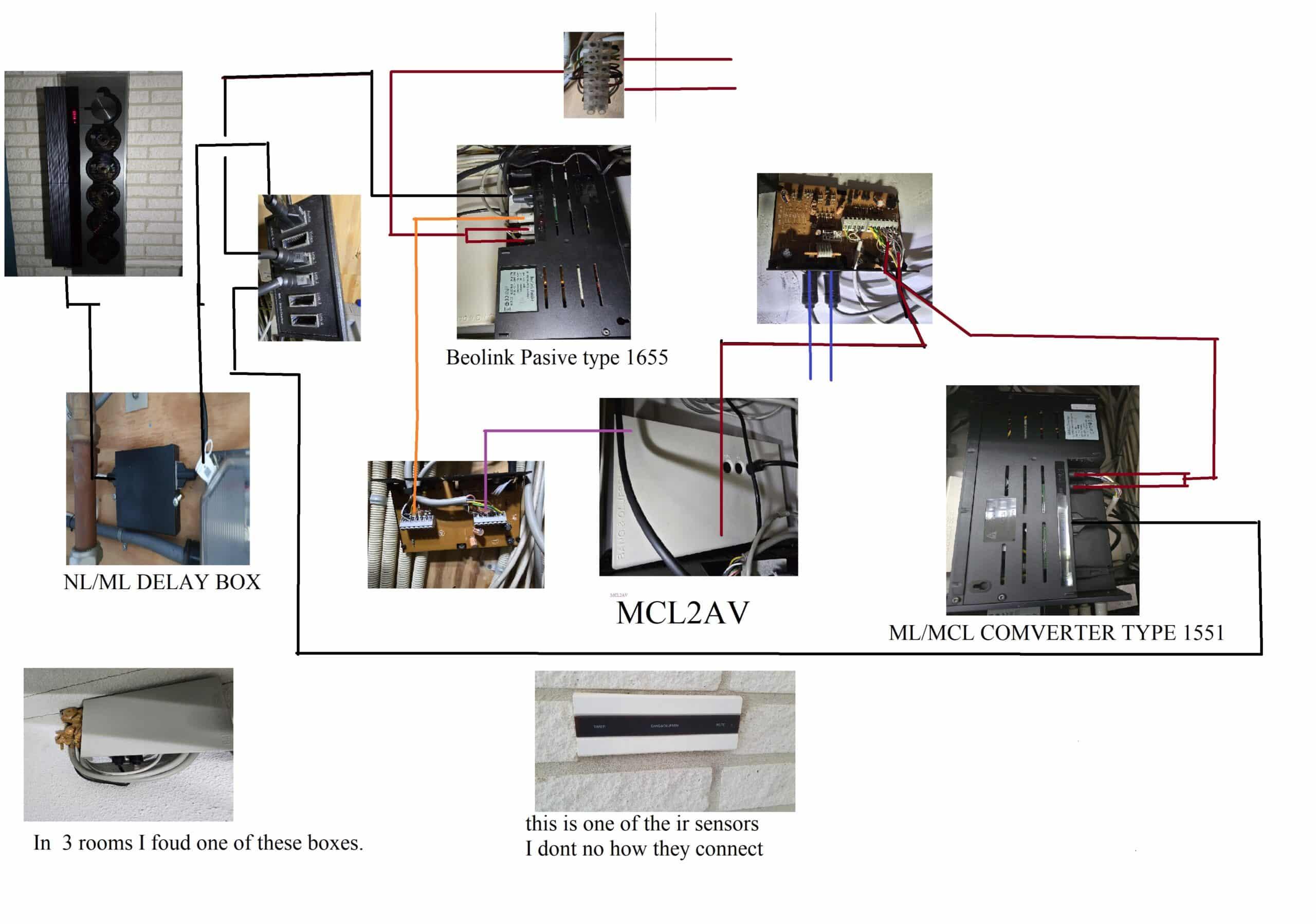
In your diagram, one thing that really doesn’t make sense is that the Beolink Passive 1655 appears to have both a masterlink connection (black wire) and a powerlink connection (orange wire). For the passive, both of these are ‘inputs’ and only one should be connected. Also, in your diagram the orange wire seems to comes from the box below, which I assume is an MCL2E (designed to extend the MCL system). However, the orange connection from the MCL2E would be an MCL cable, rather than powerlink.
I would try disconnecting the Powerlink connection from the Beolink Passive 1655 and see how the system behaves.
If it then works, what you would have is effectively two MCL systems, each with its own ‘independent volume control. (The Beolink Passive 1655 would be acting as a second ML/MCL converter)
EDIT: I have incorporated your diagram into my post to avoid having to click to open:

Location: Warwickshire, UK
My B&O Icons:
-
AuthorPosts