Forum Replies Created
-
AuthorPosts
-
23 August 2025 at 12:51 in reply to: SOLVED !! Beomaster 7000 has suddenly become very silent #69039
 GOLD Member
Have you tried plugging your CX50s into the Speakers 2 outputs instead of Speakers 1? Let us know if they work that way.
Location: Liverpool
My B&O Icons:

They do still work (I used to have one until only last year), but they are limited. I used it to play digital music from my PC, but have got a Beosound 5 for that now, so no longer needed it. You could probably get about 50 Euro for it if you sell it.
It will play music from your PC just fine, and it can be connected into a Masterlink network – that’s how I used mine. This post Beoport/Beoplayer – BeoWorld Forum was very useful to me when I was setting mine up.
The application, which docks to the right of your PC screen and floats out when you hover over it (if using PC – haven’t seen it on a Mac), is very nice and very useful, despite its old age.
Location: Liverpool
My B&O Icons:
Strange – the MCP6500 will control basic functions on my Beocenter 9500 (but without 2-way communication), but not on my Beomaster 4500. My Beomaster 4500 is SW2.2 so it should support 2-way remotes, but I get nothing when trying to control it with the MCP6500.
The 4500 is still responding fine to my Beolink 1000, Beo4 and Beo6 remotes. I’m assuming there’s some different software/compatibility issue in play then, or maybe my 4500 has a fault that I’m not aware of.
It’s not my intention to use the MCP6500 with either my 9500 or 4500 systems, I was just curious really.
Also thanks for the advice on the Beolink 5000’s Rolf, but I didn’t keep hold of either of my faulty ones, as I believed they were not repairable.
I’ve seen working BL5000s for sale for about £350 on eBay, but that seems a lot to spend just to satisfy my curiosity.
Location: Liverpool
My B&O Icons:
Yes my 6500 is also a recent acquisition, picked ot up yesterday in fact! It was a good price because the Beomaster is not working. I think the MCP is working but I can’t check it with the Beomaster not working at all. I will try it with my Beomaster 4500 and Beocenter 9500 when I get home later, see if anything works.
Location: Liverpool
My B&O Icons:
Thank you. I haven’t decided which of my systems to keep, but I may keep the 4500 and if I do, it would be nice to wall mount it.
I went a bit nuts on eBay over the last couple of years and now have a full system of each – 4500, 8500, 6500, 9500, plus BS4, BS5, BS Moment, BS9000 (sadly beyond repair), 8 pairs of speakers and a load of converters and so on. I would love to keep it all but I live in a 2 bed bungalow! Some of it will have to go, sadly.
Location: Liverpool
My B&O Icons:
I used a strong double-sided tape made by 3M. It’s about 1/2mm thick however, so the glass panel won’t sit quite as flush as it did before. Be sure to remove all the old glue first. Removing it from the back of the glass panel is difficult as if you’re not careful, you can take the paint off the back off the glass too. You have to be very patient. I did actually take a couple of mm of the paint off mine by mistake, but was able to touch it up with black model paint, and the repair is invisible.
I had also tried some thinner tape first so the glass would sit flush, but it wasn’t strong enough. This one seems to be good and strong:
PS – Great to see it on the wall – I would love to wall-mount mine, but you can’t buy those wall mounts anywhere!
Location: Liverpool
My B&O Icons:
I’ve had this problem with two Beo6s. As Matador says, I don’t think it’s a very common issue, but not unknown. I’ve seen replacement screens come up on eBay every now and again, but you can buy a whole working Beo6 for less.
I stripped them both down and checked al the connections inside, but I couldn’t fix them. I think the screen itself is faulty and beyond repair.
Location: Liverpool
My B&O Icons:
Ah well, that’s what I thought to be honest, but it was worth asking.
One of the BL5000s I’ve had in the past didn’t work at all, the other worked but only one-way communication, and it did also have a lot of dead pixels. I did send that one off to see if it could be repaired, but I was told the parts weren’t available and that the PCB was too damaged.
Two BL7000s came up on eBay recently (from the same seller), they both went for about £500 each. I just think that’s a bit pricey, but maybe I’ll give in one day soon. I have never been able to enjoy 2-way control with my 9500 or 4500 systems, and I’d just like to see how it works.
Location: Liverpool
My B&O Icons:
Yes my Beo4 is the joystick version and it works great with the Beosystem 3. My Beosound 4 also supports the joystick control. What I like about the Beoremote One is the ability to rename the sources that show in the display, so I can have ‘Google TV’ instead of ‘DTV2’ and ‘Switch’ instead of ‘DVD2’, and so on.
Also, I think I’ve now mastered the art of replacing a battery in the Beo6 and have restored a few, and kept 2 for myself. I have had some with a dead touchscreen though – I believe that’s a reasonably common issue.
I like the Beo6 because I can reprogram it myself, and in fact I often do.
Location: Liverpool
My B&O Icons:
My Beosound 9000 (Mk1) suffered a power supply failure, and unfortunately that also fried a lot of the other internals. I had a few items off for repair and service recently and that was included, but they told me it could not be repaired – too much damage internally. It’s a shame as it’s cosmetically in excellent condition.
I’m on the lookout for another, but they do go for a high price, especially if you want one that has been professionally serviced. I also want to make sure I get a Mk3 next time.
If anyone (in the UK) is thinking of selling one, let me know!
Location: Liverpool
My B&O Icons:
All very interesting, thanks. They do go on eBay for a bit less than £200, which is half the price of a new one.
I’ll think about it then. Curiosity will probably get the better of me and I’ll buy one when one comes up on eBay in the right kind of condition. If I don’t find I’m using it, I’ll just sell it.
And yes, I still have two Beolink 1000, which I use for me older music systems (Beosystem 9500 and 4500). The best design.
Location: Liverpool
My B&O Icons:
Excellent – it’s working!
First I tried the Beosound 4 in Opt.1 and the Beosound 5 set so it was not the Audio Master, and I connected a pair of my Beolabs direct to the Beosound 4. That worked fine.
I then connected the Beosystem 3 into the same ML network via a junction box, changed the Beosound 4 to Opt.0, and the Beosystem 3 remained in Opt.2. It all works fine, and I’m also impressed with the fact that my Beosound 4 display show the metadata for the digital music that is playing.
I’ve also figured out how to get 2-way communication between the Beosound 5 and my Beo6 remote. It only worked briefly before it ran the battery down, but it worked!
So, I cannot use the Beosound 5 for Spotify as that only works if it is an Audio Master, but that’s fine – I can live without that. I wouldn’t mind getting N.Radio working but I have still not figured out how to get the BS5 connected online, even though it is successfully connected into my home network (wired). I’ll figure it out eventually though.
As ever, thanks for all the invaluable help, Madskp.
Location: Liverpool
My B&O Icons:
I got it working – it must be my ML wiring, which is a bit complicated behind all the furniture! I connected the Beosound 4 direct to the Beosystem 3 with an ML cable, and they work fine together in Opt.0 and Opt.2 respoectively.
So, if I sort out my ML cabling and junction boxes, I think I should be able to have the Beosound 5 in the ML network too, as an A.Slave.
I’ll miss being able to control my Beogram 9500 by remote, but I think the BS4 and BS5 look good together, so I think I’ll connect the BG9500 to the BS4 using my phone stage. I have a phono stage that can also be switched between phono and another aux line level input, so I think I’ll plug my old Chromecast Audio into that too, then I can use that for Deezer (rather than Spotify – I use Deezer because I also have a BS Moment).
Too late tonight to do all the wiring, but I’ll let you know if it works when I try it!
Location: Liverpool
My B&O Icons:
I don’t understand why, but my Beosound 4 isn’t not working in Opt.0 at all. I have had it working like that before, but now, it’s not happening! I disconnected the Beosound 5 altogether just to test the Beosound 4, but with that in Opt.0 and my Beosystem 3 in Opt.2, I get no result from selecting audio sources on my Beo4. If I select sources direct on the Beosound 4, it reacts, but I get no sound and my speakers remain in standby.
I plugged the Beosound 5 back in, set it to A Master in Opt.0, and that works fine, so I don’t understand what’s going wrong with my Beosound 4.
Location: Liverpool
My B&O Icons:
I connected my Beosound 4 instead of the Beocenter 9500 to test it. The Beosound 4 does not in fact have a choice a A.Opt 4. It looks like it has 0, 1, 2, 5, or 6 available.
So, I tried putting the Beosound 5 into Audio Slave mode and putting the Beosound 4 into A.Opt 0, with my Beosystem 3 in V.Opt 2, but then no audio source worked at all – only video sources worked via my Beo4 or Beo6 remotes. It I played a CD direct from the BS4’s CD button, it played, but no sound.
Location: Liverpool
My B&O Icons:
That’s what I thought. I do have one NL/ML converter but I’m reluctant to have two.
I think my best solution in the short term is to turn the Beosound 5 off at the mains when I’m using the Boecenter 9500, and turn the 1611 Converter off at the mains when I’m using the Beosound 5.
The other alternative is to use my Beosound 4 instead of the Beocenter 9500, as I believe the Beosound 4 will work in Opt. 4, but then I lose the ability to control my Beogram 9500 with remote control, and I would miss that.
Location: Liverpool
My B&O Icons:
Thanks for the info. I think I had misunderstood how to use the service tool. I had hit the 3 buttons to update the firmware, btu I had not realised I also had to hit ‘Clone Entire HDD’ in order to install the latest software (and also reset it to factory settings).
I now have 7.00.00.0511, and I see there are several updated features, including Music Services (for Spotify), and the option to use my NAS for music storage, which is really useful as my music collection is already on there.
I have been researching how to connect it to the internet via a secure subnet, and if I can figure that out, I’ll have Spotify on be BS5!
Inevitably however – I have another question!
I have my speaker connected to my Beosystem 3, and I also have my Beocenter 9500 connected to that same ML network (via a 1611 converter). I know that Spotify will only work on the BS5 if it is set as the Audio Master, so does anyone know, is there any way to set my BC9500 so it can still be used, in the same room as the BS5? It’s important to me as I like playing vinyl, and my BG9500 is connected to my BC9500.
Location: Liverpool
My B&O Icons:
I know this is an older post now but I wonder if anyone can still help me. I am a B&O collector but only recently acquired my first Beosound 5. It works, but the software had never been updated, so I have used the Service Tool described here to update it.
It has worked, but the software has been updated only to version 3.15.02.0659, but Rendboell’s guide indicates it should be updated to version 7.00.00.0569.
Does anyone know how to update to later versions?
What I’d really like to do is get Spotify to work, which I know was possible on later versions of the software. Before anyone warns me, I know that there BS5 works on WinXP and that this is not considered safe for online connection, but I am told there are ways to achieve it via a secure subnet!
Location: Liverpool
My B&O Icons:
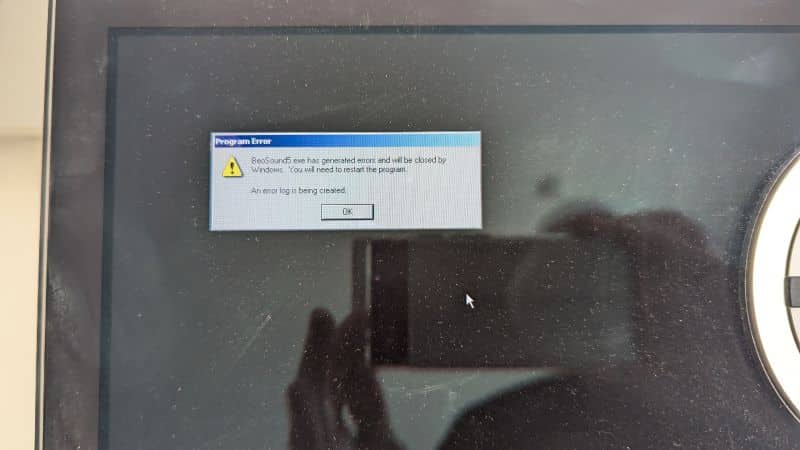
Suddenly today, this started happening:
I’ve restarted it a few times, and I’ve run a System Restore on it (twice), but I just keep getting this now. Any ideas?Location: Liverpool
My B&O Icons:
Thanks. I have made some progress since yesterday. I went into the Service Menu and ran the Windows network wizard, during which I turned file sharing on. I was then able to connect to the BS5 from my PC, which is on the same network, so I am now able to manage the music that’s stored on it. For some reason the music I am adding does now show any album artwork however.
It still has no internet connection, but at least I can now add my own music to it and remove the music from the previous owner.
I found this post which gives details on using the Service Tool. I have ordered a wired keyboard/trackpad from Amazon to connect to it, as it seems I’ll need one of those to use the service tool. The details in that post are mostly concerned with replacing the HDD, but it looks like I can also use it just to install the software. If that works, I might then also go on to replace the HDD with an SSD.
As far as I am aware, I should be able to get Spotify working on it too. Of course that would require the latest software, and also if I figure out how to get it connected to the internet, of course.
I have a couple of Beo6 remotes, so the next task after getting the software updated would be to try and get 2-way remote functionality with those, and I’m betting that will be complicated! I have found some other forum posts about hat though, so that should be useful
I’ll update here with progress.
Location: Liverpool
My B&O Icons:
-
AuthorPosts