Forum Replies Created
-
AuthorPosts
-
 GOLD Member
I’m thinking it might be that now. I’ll open it up, track where each wire is going from each pin, and use a multimeter to see if the connection is good.
I know these B&O DIN plugs are tightly packed inside and note easy to disassemble, so I’m hoping that’s not that!
Location: Liverpool
My B&O Icons:

Location: Liverpool
My B&O Icons:
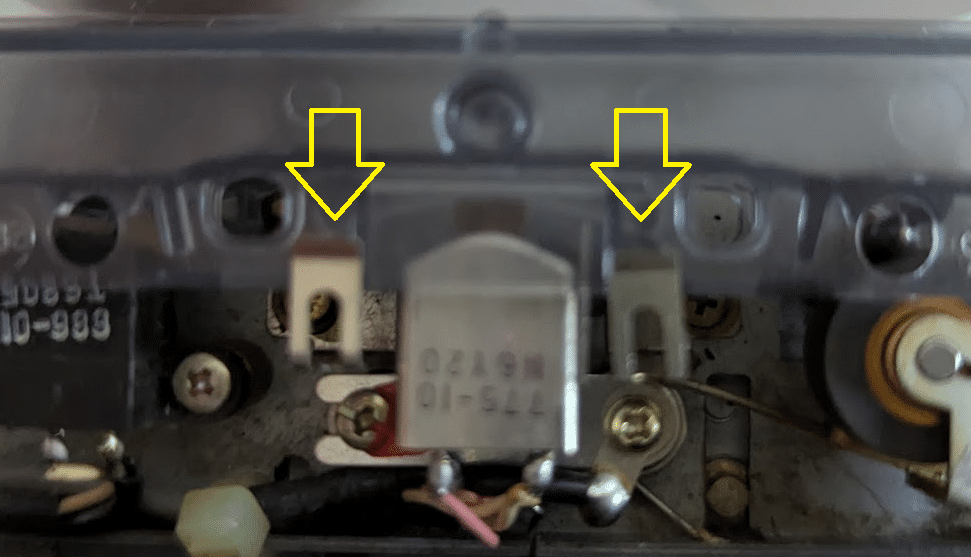
I figured it out. I noticed there were two little metal things either side of the central tape head, and when I looked closely, one of them didn’t seem to be lower than it should be. The function of these metal things is to hold the tape down into position – they can however easily be bent out of place. I bent it back into it was applying the right amount of pressure on the lower part of the cassette. This means the cassette is now sat exactly where it should be, and plays fine. The FF and RW also now work properly, and much faster, with less noise.
I was only a fraction of a millimetre, but it made all the difference. Picture added in case it’s any help to anyone else with a similar issue.
Location: Liverpool
My B&O Icons:
You were right about the play spindle @Dillen, it was cracked, I ordered a replacement from Danish Sound Parts and fitted it. I am still having trouble with my Beocord 3300 however!
If I play a tape, the play spindle only turns very briefly, then the Beocord stops, as though it’s the end of the tape. It also struggles to RW or FF – it will do it, but it will stop after a little while, before it’s reached the end of th tape, try to play, and then stop.
I gave it a very good clean inside (residue from the old tape belts) and everything is moving quietly and smoothly; with no tape in the machine Play, FF and RW work fine.
I have discovered something though – if I push down firmly on the bottom of the cassette with my thumb (on the raised bit of the cassette), it works. It moves only very slightly, but that seems to be enough. It’s as if the cassette isn’t quite seated correctly.
I’ve made sure everything is screwed firmly into place and everything seems to be exactly where it should be, but somehow, the tape seems to be sitting a tiny but too high. If anyone has any clues as to what might be causing this, I’d be very grateful for the help. If fixed a number of B&O tape decks and this is the only one so far that has me beaten!
Location: Liverpool
My B&O Icons:
…it only worked for a few minutes, then there was a puff of smoke out of the back and it failed again. The fuse has gone again, I also noticed that there is a pair of cylindrical things (capacitors, I assume) at the back behind the transformer, and one of those (only one of them though) was very hot to the touch. That is in the area where the smoke was coming from.
I think this definitely will be a job for John! I’ve emailed him for a quote, as he’s due to drop some other repairs back to me on Monday so might as well pick the BM6500 up then.
Location: Liverpool
My B&O Icons:
Update – 3 weeks have passed with my Beomaster 6500 working fine, but now the same fuse (T2A) has blown again. I am assuming therefore that there is some other underlying cause.
I have replaced it again and it’s working again, but I’ll have to monitor it.
If anyone happens to know what the cause might be please let me know, but otherwise if that same fuse blows again, I think I’ll have to get a professional in to look it over. John from Merlin AV has never let me down so far, so it may be another one for John.
Location: Liverpool
My B&O Icons:
Thanks for all of the advice on this thread. It seems a silly obsession but one way, somehow, I WILL get remote control of my Beogram turntable with my newer equipment!
I’m reasonably confident that my old ML Gateway (which I replaced with a Beolink Gateway) was able to trigger macros from source selection commands. It can also send HTTP commands via macros, which is useful for my Kramer HDMI matrix, which can be controlled by such commands.
I really wish I’d kept hold of my old ML Gateway now but didn’t think I’d have a use for it so I sold it on eBay along with some other older items in a bit of a clear-out. I’ll look for another one – they sometimes come up quite cheap on eBay and I’ll be worth it just to try it out.
Location: Liverpool
My B&O Icons:
I’ve been experimenting with this for a couple of days, and there doesn’t appear to be a solution. The closest I’ve come is if the Beosystem 3 is in Opt.2, Beosound 4 in Opt.0 and the Beolink Converter is in Opt.2.
Remember, what I’m trying to achieve is for my full system to go to A.Aux when I hit the Phono/N.Radio source.
In that setup I can select both audio and video sources and they work fine when they are activated, but then once activated, commands like up/down or number keys are duplicated. If for example I want to go to radio preset 2, it goes to 22. This, I have little doubt, is because both IR Eyes (Beosytem 3 and Beolink Converter) and receiving the IR signal, and so both are registered.
I’ve tried every other conceivable option setting but none of it works – I either get nothing, or limited functionality. It seems so strange the B&O would build IR mapping into the Beolink Converter, but not allow for the full setup to work via only that one IR Eye?
I also tried to achieve the same with my Beolink Gateway – I thought I might be able to get a macro to trigger when Phono/N.Radio was selected as source that changed the source to A.Aux, but I couldn’t create that macro. For some reason, the Beolink Gateway does not allow source selection to be used as a macro trigger. Sources can be selected as the result of a macro, but they cannot be the trigger for one. I don’t know why – I could have sworn my old MasterLink Gateway did allow sources to be the trigger for a macro, but I could be misremembering it (I no longer have an ML Gateway so cannot check).
If anyone has an old ML Gateway, could you check for me to see if source selection such as Phono/N.Radio can be used to trigger a macro? If so, I’ll buy one from eBay and see if I can achieve it with that!
Location: Liverpool
My B&O Icons:
I tried having both the BLC and the BS3 in Opt.1, but that way the BS3 only responds to Video sources, not Audio sources. My speakers need to be connected to the BS3 because I have a full set of surround speakers (front, surround, centre, sub).
What exactly do you mean by ‘Powerlink Switch’?
Location: Liverpool
My B&O Icons:
Unfortunately I no longer have it John. Good luck finding one.
Location: Liverpool
My B&O Icons:
But how are the A.aux command mapped in this situation? Or is that not going through the NL/ML converter?
Both N.Radio and A.Aux are mapped to A.Aux in the NL/ML Converter, which seems to work.
But what about N.radio? Is the BS5 not responding when you use that for the redcord player scenario?
It tries to, but my BM5 has no internet connection, so N.Radio appears on screen, but paused.
I have however experienced another issue. Because both my BS3 and the NL/ML Converter have IR eyes connected, both are responding to remote commands, so for example if I hit 1, I get 11. I tried setting the BS3 to Opt.0, but if it’s in Opt.0, it does not come out of standby at all when I select a source. If I set it to Opt.1, it only responds to video sources, not audio sources (My Beosound 4 is set to Opt.0, and I’m sure that’s the only right option to use there, as my speakers are connected to the BS3). This feels like something there should be a solution to, but I haven’t found it yet!
Location: Liverpool
My B&O Icons:
Yes you have guessed correctly. It did work, and now I’ll tell you why I did it. I now have full remote control of my Beogram turntable, on an Masterlink-era system!
I bought a Beomaster 7000 from eBay, and connected my Beogram 4500 to its Phono input. I then used a DIN-to-RCA cable to connect the Line In/Out of the BM7000 to the A.Aux input of my Beosound 4.
I set the Beolink Converter up in the way mentioned above. This means that when I select Phono/N.Music as a source on my remotes, the BLC’s IR Mapping function causes A.Aux to be selected as the source, but the BM7000 also responds to the same remote command, and selects Phono as it’s source.
This means that I can now start Phono, and control it, with my remotes! If you’ve seen some of my older posts you’ll know I’ve been trying to find a way to achieve this for about 3 years!
I also connected a Chromecast Audio to the TV/Aux input of the BM7000, so that if I do select A.Aux by remote, both the BS4 and the BM7000 go to A.Aux as a source and I can cast music from my phone or tablet. The BM7000 has therefore also allowed me to add an extra source too.
My Beomaster 5 remains connected (set as an audio slave) and it does not seem to have been adversely affected – it still responds to the N.Music command from my remotes.
The only one puzzling thing is that it doesn’t work with my Beoremote One. It works if I click Phono/N.Radio on my Beo4, Beo6, or Beolink 1000 remotes, but not my Beoremote One (which is set to use Beo4 commands). I added N.Radio as a source available via the Music button, but when I click it, my BS4 goes to N.Radio, rather than A.Aux, and the BM7000 doesn’t respond at all. I’m guessing that means that the N.Radio signal from a Beoremote One is different somehow?
Location: Liverpool
My B&O Icons:
Disregard – I solved it, but I don’t know how. I disconnected everything, reconnected everything, changed a few settings, and I’m pretty sure I ended up with the same as I started with, but now it’s working! Maybe I just had a loose connection somwhwre.
Location: Liverpool
My B&O Icons:
Update – I realised I can see the error in the system log, but I don’t understand it – it seems to be saying that an ML Audiomaster is not found, but my Beosound 4 is connected and working.
Sep 14 14:03:31 (none) BLC[1146]: [info]:Source selection for ML player A.AUX received with error: Player select error, ML Audiomaster doesn’t exist
Sep 14 14:03:35 (none) BLC[1146]: [info]:IR data: [18] 04 00 00 00 00 00 00 00 00 00 00 00 00 00 00 76 19 5d
Sep 14 14:03:35 (none) BLC[1146]: [info]:Player control ignored. No player connected to renderer = Audio renderer
Sep 14 14:03:36 (none) BLC[1146]: [info]:IR data: [18] 04 00 00 00 00 00 00 00 00 00 00 00 00 00 00 76 1a d2Location: Liverpool
My B&O Icons:
Thaks Bill, yes that was it. I also discovered that if you press GO TO, you can then hold down << or >> to manually search through stations, if you don’t know the frequency.
Location: Liverpool
My B&O Icons:
I downloaded the file from this thread before the file was deleted. I’m no expert in file sharing but I found this one called TransferNow and I think it works. I’m pretty sure the zipped folder you can download from this link will give you everything you need (it worked for me, anyway).
The link is valid for 7 days: https://www.transfernow.net/dl/20250912XYoEXA2c
Location: Liverpool
My B&O Icons:
I think you’re right – I just took a look at the reel and the spring-loaded part did appear to lock in the down position, if pushed down. The rewind reel doesn’t do this.
The description of the fault given on Danish Sound Parts also seems to match the problem I am having. I have some other parts I need to order from Danish Sound Parts anyway, so I might as well order it and try it.
Hopefully, disassembling and replacing it won’t be too difficult!
Thanks for the excellent advice, as always.
Location: Liverpool
My B&O Icons:
I didn’t find that, but as it turned out I didn’t have to – when I replaced the T2A fuse, I got power back! It’s been working since. I’m about to go on holiday but when I’m back, I’ll replace the belts in the Beocord, then my Beosystem 6500 will be in full working order.
Thanks for the answer anyway – you never know, I may need it some day.
Location: Liverpool
My B&O Icons:
I bought a Beoremote One (the IR version), and I have to say, I quite like it so far. It took me a while to figure out how to program it for all of my Masterlink-era products, but it’s working well. I have added my sources, programmed the ‘My Buttons’, and I like that unlike the Beo4, the display lights up and can be seen in the dark.
I will use it in my game/cinema room where it is often dark and that’s why I like my Beo6, but it’s nice to have a more traditional baton-shaped remote too. I don’t think I’ll have the same issues that Severed Hand had as I will use it mostly for a small number of key tasks – selecting a source, changing volume, skipping tracks, standby. All of that can be done in the dark I think without much hardship.
I now have 3 Beolink 1000, 3 Beo4, 2 Beo5, 2 Beo6, 1 MCP6500 and now a Beoremote One – I just had to complete the set!
Location: Liverpool
My B&O Icons:
23 August 2025 at 12:51 in reply to: SOLVED !! Beomaster 7000 has suddenly become very silent #69039Have you tried plugging your CX50s into the Speakers 2 outputs instead of Speakers 1? Let us know if they work that way.
Location: Liverpool
My B&O Icons:
-
AuthorPosts