-
AuthorSearch Results
-
20 October 2022 at 08:04 #39970
In reply to: Eclipse/Harmony/Theatre audio via Beolink
 NQVHNWIBRONZE Member
Hi, I thought I answered this as intended.
1. Devices (confirm Eclipse, not Theatre yet) need to be DNLA compliant
2. Audio devices have their radio but I think it is all shared via the BeoApp.
3. You can join TV sound to an A6 or Essence in other rooms via the App.
4. The Eclipse music player is in the LG Panel – not the sound bar. Sound bar is one part of the distribution,
5. I’m sure this is all more so with Mozart platform but 5he DLNA is the key in my opinion
20 October 2022 at 00:36 #39969In reply to: Eclipse/Harmony/Theatre audio via Beolink
SandybBRONZE MemberI think Andy’s question is different to music sharing across rooms.
Like me (unless I am sorely mistaken) the question is that if a BV Theatre setup is playing a video source (be that live TV, Netflix or whatever), can one chose a BS2 or A9 (for example) in a different room play / join the audio part of the video/live Tv playing elsewhere on the BV Theatre.
That is / was possible on BV10/11, BV12, Avant etc (i.e those on the BS4 platform) – those BVs have a menu setting for “share audio from video sources”.
Being still on an older BV, like myself, Andy is asking whether that functionality is available on the Theatre. I actually dont know whether it is available on the Eclipse / Harmony either, or whether that option was removed.
Its a use case I take advantage of reasonably often – for example if I’m watching the news, or the cricket etc on my living room BV12-65, I often go into the kitchen and just tap my BS2 which will then pick up the audio / sound from the BV12.
i.e Network Link took care of everything.
I’m popping in to my dealer on Friday, and will try and test out this specific scenario
19 October 2022 at 21:38 #39968In reply to: Eclipse/Harmony/Theatre audio via Beolink
NQVHNWIBRONZE MemberOk, Eclipse 65 owner. I run a Melco audiophile NAS as it is DNLA compliant. My Auralic systems and compatible Beosystems pick up on the Melco via my home network.
The Eclipse monitor (LG) has a built in media player that can connect to this NAS and things like your laptop if networking is shared.
18 October 2022 at 22:09 #39966In reply to: Eclipse/Harmony/Theatre audio via Beolink
SandybBRONZE Membergood question, I’ve asked this before, and never quite been confident in the answers given.
Part of the reason is that seemingly very few require the scenario you describe (although like you, I use that audio sharing reasonably often). Both of my current BV’s are on the same B&O platform version as yours.
When the Eclipse came out, and I asked this question, I was told by a couple of respondents that the older menu / settings option of “share audio from video sources” was not there anymore.
My dealer (though I havent asked the q again for a while) last said to me it was possible – but I’m hesitant. While he (if I remember) can get it to work in the store, I think that is for internal video sources (like a YT video from the Eclipse LG YT app) – but I’d want to see it also work for video sources connected via HDMI.
I’m popping in to my dealer on Friday, so I’ll see what I can test out myself on the newer BV’s.
18 October 2022 at 07:31 #39965Topic: Eclipse/Harmony/Theatre audio via Beolink
in forum BeoVisionandy_jsGOLD MemberI have a question for Eclipse/Harmony/Theatre owners: with my BV11 I can stream the audio from live TV around the house and it’s in sync; is it possible to do that with the newer sets?
As I understand it the Contour/Stage don’t support this at all, and I thought I’d read that the Eclipse could route audio over Beolink Multiroom but with a delay, though I don’t know if that’s specific to the MK1 set.
This feature was the reason I bought into the B&O ecosystem. If the newer sets don’t support it I’m going to start looking at alternatives.
15 October 2022 at 13:38 #37442In reply to: New product launch – beosound theatre?
Peter the BikerGOLD MemberTuesday 25th will be the delivery and installation day only interrupted by a partial solar eclipse at high noon. My dealer was wise enough to order a few units in advance.
Location: Eastwestfalia
My B&O Icons:
 12 October 2022 at 13:04 #39712
In reply to: Configuring my Beoremote One Bluetooth
NQVHNWIBRONZE MemberHi,
As indicated, I can only give you the Eclipse menu system and assume the Horizon is similar.
Try Home button >> Settings >> Sound & Beolink >> Sources or something similar
10
12 October 2022 at 12:10 #39710In reply to: Configuring my Beoremote One Bluetooth
NQVHNWIBRONZE MemberOK, I’ll assume the Horizon has the same menu system as the Eclipse.
In Sources, go into each BV listed Source. One by one.

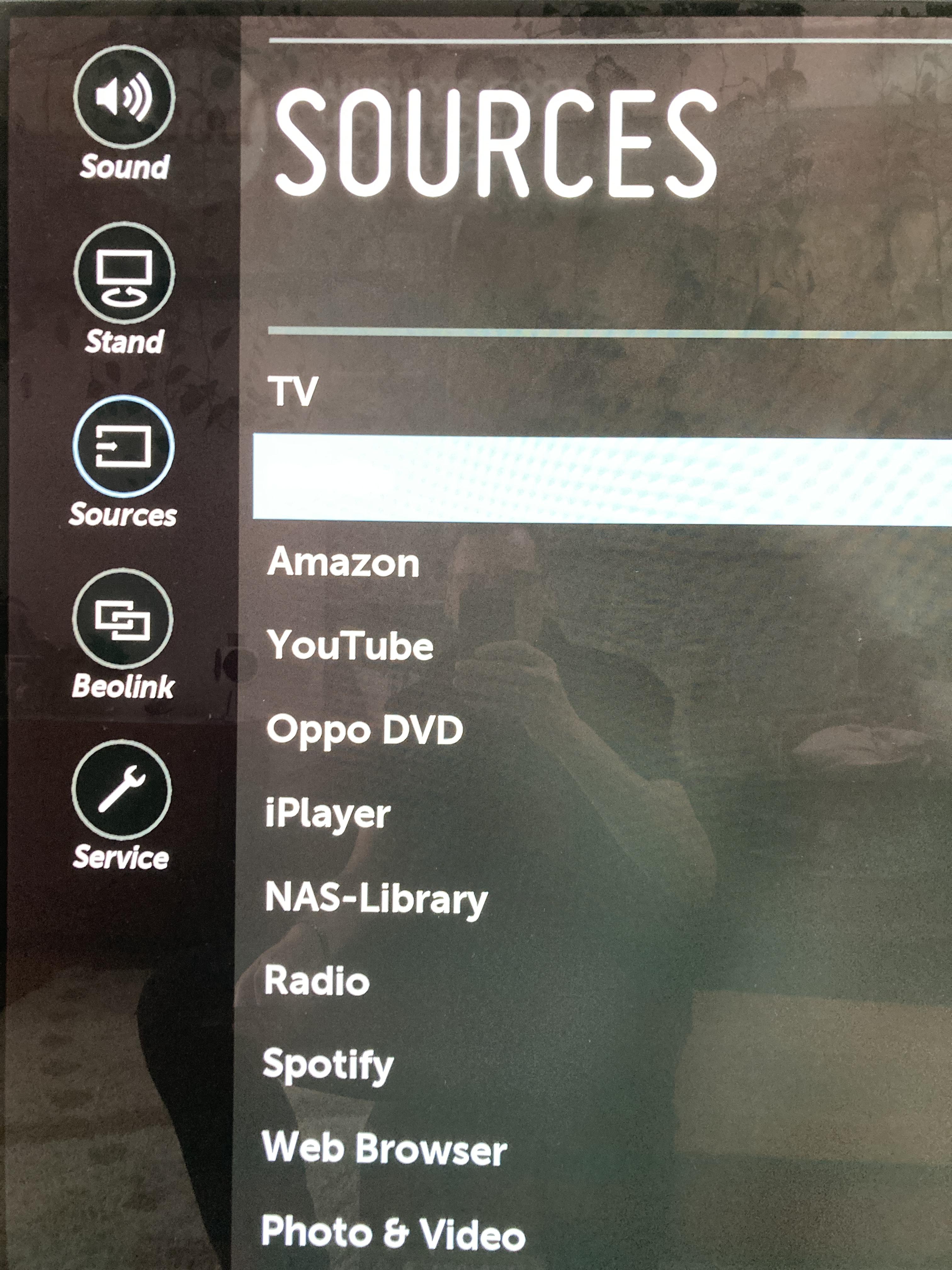
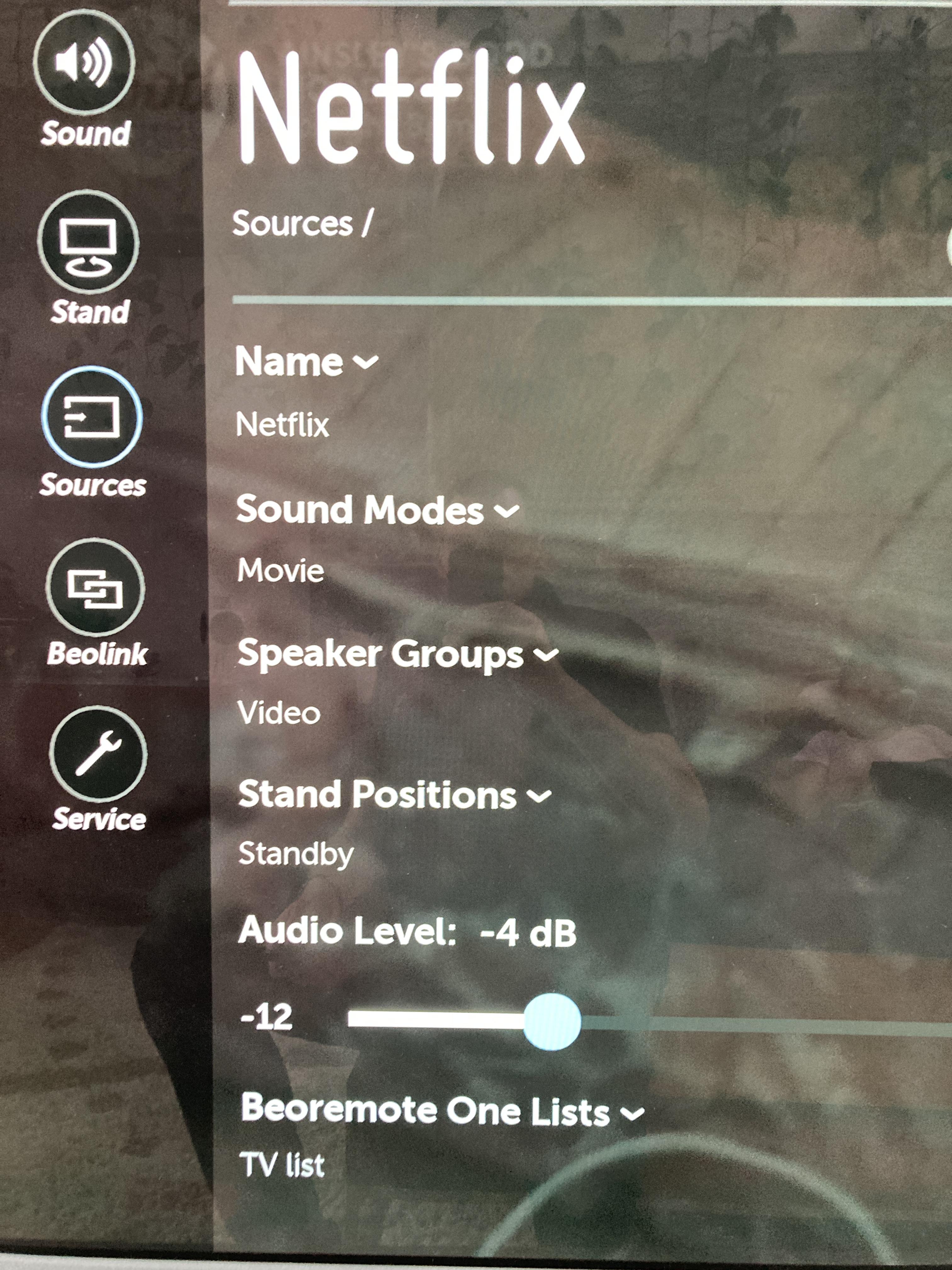
In each one, at the bottom of the specific source, you can assign the Source to “TV-List”, “Music-List” or “None”.
Hopefully, this answers what you require – or at least points you in the right direction?
12 October 2022 at 11:31 #39708In reply to: Configuring my Beoremote One Bluetooth
NQVHNWIBRONZE MemberHi,
There are many rabbit-holes with BR1. First….what TV are you using? I can only compare to eclipse but assume the workflow is the same in any BT-controlled TV?
10
9 October 2022 at 04:58 #39663In reply to: Request For Eclipse Assembly PDF or Video
Hi, Im putting out a request to see if anyone has either the Eclipse assembly instructions somewhere or links to YT training videos? This is the screen/soundbar pairing – not the stand pairing. Thank you 10
Presumably you’ll find it in here:
8 October 2022 at 04:31 #39662Topic: Request For Eclipse Assembly PDF or Video
in forum BeoVisionNQVHNWIBRONZE MemberHi,
Im putting out a request to see if anyone has either the Eclipse assembly instructions somewhere or links to YT training videos? This is the screen/soundbar pairing – not the stand pairing.
Thank you
10
7 October 2022 at 09:55 #37433In reply to: New product launch – beosound theatre?
NQVHNWIBRONZE MemberI went to see the Theatre in a store yesterday. The intent is to replace an Eclipse 65 Gen1 and hopefully have something that can “keep-up” with screen development. Having spent an hour and a half being demonstrated to me I would bullet point the following from my perspective.
- The sonic capabilities for visual playback are impressive. I think this BS/BL can be used as standalone without much complaint.
- It will be interesting to hear how this unit will hand-off and compliment my BL90s. I think it will take substantial load off them for visual material. Definitely not anywhere as “good” as the 90s but can see the argument that BL28s not required upfront as valid.
- I did not hear a room calibrated Theatre as the Dealer had basically butchered a Gen3 65 Eclipse to demonstrate the Theatre. Out of the box is good.
- I was blown away by the LG C2/G2 screen clarity. A lifetime away from the Eclipse Gen1 screen.
- Still dont like the LG menu setup. B&O need to get a grip here and have their APP completely skin-over the LG interface.
- The whole setup of the Theatre is done via the APP. I was told that the BL50/90 keep their own calibrations but the Theatre “manages” the DSP for visual playback. Music playback is not changed and relies on the BL90/50 calibration.
- I dont like the motorised floor stand – either design, price or functionality. It assists in consuming too much space for the TV.
- I dont like the oak lamella frets.
- The shape and material quality of the Theatre is very good.
- I made it clear I though B&O were taking a joke on the cost of add-ons. A motorised stand which is +£1300 more than the Eclipse stand, price of the wings and VESA mount etc….
- Also made it clear that B&O have to stop making products with specialist parts that have limited life (BS5 Encore power, Moment screens, Gen1 Eclipse Screens etc..). Its a big haircut to have a product binned and to repurchase. This has been heard loud an clear apparently.
Im sure however, this is a good solution for people with Gen1 Eclipse’s and they will sell many of them.
Expecting to order mine today.
4 October 2022 at 16:32 #37416In reply to: New product launch – beosound theatre?
beojeffBRONZE MemberThat’s the same as with the Eclipse and Harmony. The Beoremote One BT act as an 2 way remote. Options are send into the BR1BT. Under listing of TV/Music you will get the different sources. And under List you’ll get the different options/settings.
My biggest concern is that we get all of that 2-way functionality with the Beoremote One paired with the Theatre without an LG screen.
4 October 2022 at 16:11 #37415In reply to: New product launch – beosound theatre?
That’s the same as with the Eclipse and Harmony.
The Beoremote One BT act as an 2 way remote. Options are send into the BR1BT.
Under listing of TV/Music you will get the different sources. And under List you’ll get the different options/settings.Location: Utrecht
3 October 2022 at 13:19 #39529In reply to: Beosound Moment and Beolink Wireless
No need to go crazy – your 5’s seem to work great……with PL. A connection with a receiver 1 is – with the 5’s – not possible. At least I know of noone, who has made that possible. MM
A question which did came up last weekend.
B&O still sells these receiver 1’s.
The question is whether these receivers work with BL5’s and directly to let’s say a Harmony, Eclipse or Theatre with Wisa. I know that the BL5 needs the powerlink data to start. Otherwise they switch on but you will have no sound.
Are there different revisions made?Location: Utrecht
2 October 2022 at 10:41 #37405In reply to: New product launch – beosound theatre?
NQVHNWIBRONZE MemberThis is an interesting question. Im going to have a look soon at a Theatre to see if it is worth it. I dont like the stand options and I am still “burnt” from the uselessness of the Eclipse
- Specialised LG Panel which no longer available
- The LG Interface and operating parameters rather than pure B&O which could be more of the same.
- The Soundbar of the Eclipse cannot keep up with the BL90s. Better to mute the Soundbar and use BL90 phantom. Works much much better. Will Theatre keep up?
The marketing seems to suggest yes and seems to indicate it has a DSP which can maximise desirable sound dispersion. The question would have more to do with distance/direction and quality of the front loudspeaker vs the Theatre. I think a pair of BL90’s as fronts and 1.5-2m apart from either side of the Theatre should (according to marketing) interact better than say Bl4000/BL17/BL3, 0.5m apart from a Theatre.
1 October 2022 at 17:56 #39375In reply to: b&o disaster
NQVHNWIBRONZE Member(EDIT: Moved from theatre thread to avoid thread drift!)
355F,
I have had similar problems with an Eclipse Mk1. Under warranty, I had the internal HDMI cable replaced (the one in the impossible space between the screen and the sound bar. This seemed to work for awhile but soon started back up again to the disappointment of the Dealer.
I don’t know your circumstances, and what is connected to the BV, but by accident, I believe I found a cause. Our habit of traditional BVs and BSounds is to play say TV, then to flick to say CD or Video. The BV takes care of all the standby routines so only one source is active.
With LG app, music player can stay on all the time and I think this overworks the internal LAN receiver and causes a brief disconnect. The manifest is reduced BT control (both The BV and remote options) and a hard reboot, unplugging for 3 minutes etc is the only way it goes away for a while.
I have used the curser control to ensure the blue X is presses off in the LG music player app if ever used. (Because with LG, a number of sources can run concurrently). This seems to have eliminated the problem. I think this is an LG/B&O compatibility problem and something B&O should have sorted but it seems difficult to replicate somehow.
see if this helps?
30 September 2022 at 10:16 #37396In reply to: New product launch – beosound theatre?
NQVHNWIBRONZE MemberIm sure it is more complicated than this…..but what drives me nuts on the Eclipse (Gen1) is the LG interface, with the Beolink control of sound etc…..it is total cr@p and very un-B&O.
Therefore, the error with all B&O TVs and Soundbars is the lack of video engine and tuner. I thinking if they had done this, the monitor part would have been irrelevant and B&O would have full control and upgradability rather than have a product which is totally subservient to the 3rd party monitor.
The BS Theatre continues this approach as far as I can see with limited screen compatibilities. I wonder if the BS Theatre will work on an LG 65 G3 or G4? I’d wager it could have difficulties.
29 September 2022 at 19:12 #39374In reply to: b&o disaster
If it’s any consolation, the messages and problems you are experiencing sound almost identical to the problems we had with our Eclipse 65″ when we bought it a few years back. It came from B&O Winchester and it took a couple of visits from their engineer but they sorted it out in the end and it has behaved perfectly for the last three years (touch wood!)
What I’m saying is – keep try and don’t give up. Not only is the end worth it but this is a premium product so be polite but firm that you want it sorted out.
29 September 2022 at 09:01 #39370In reply to: b&o disaster
355fBRONZE MemberThank you Steve
I have been a B&O customer for many years buying the later products
RE: beolab 20
Participants: geoffmartin (Block), 355f355f
2 mins ago
Dear geoffThank you for your kind response.
I purchased the Eclipse only 5 months ago from Bang and Olufsen in Cambridge.
When purchasing it i was informed the MK2 had been developed to accept future LG panels for some considerable time- in fact four months later the MK 3 comes out, so clearly that was not correct
I contacted the CEO but never had a response!!
Since day one the eclipse would show a message indicated in the enclosed picture that HDMI2 had disconnected and almost immediately another banner stating it had reconnected ; unfortunately upon doing so one looses all sound and loss of control from remote and the app states the TV is offline.
The only way is to continue to remove the mains supply repeatedly until it operates again; increasingly now though all one gets is no picture or sound and a green flashing light on the front stand LED and a white flashing light at the back of the sound centre.
Most of the individuals i know who bought B&O in the past have deserted the brand; I however have stayed loyal to it but these issues are something i have never encountered in other products. I sold the Avant for this after having had three video boards replaced each time taking weeks and weeks to fix.
-
AuthorSearch Results
-
Search Results
-
I have a question for Eclipse/Harmony/Theatre owners: with my BV11 I can stream the audio from live TV around the house and it’s in sync; is it possible to do that with the newer sets?
As I understand it the Contour/Stage don’t support this at all, and I thought I’d read that the Eclipse could route audio over Beolink Multiroom but with a delay, though I don’t know if that’s specific to the MK1 set.
This feature was the reason I bought into the B&O ecosystem. If the newer sets don’t support it I’m going to start looking at alternatives.