Forum Replies Created
-
AuthorPosts
-
 BRONZE Member
Aha, of course! As with the Edge, my personal “hidden surface algorithm” failed to parse the rest of the box behind the tabletop. Thank you.
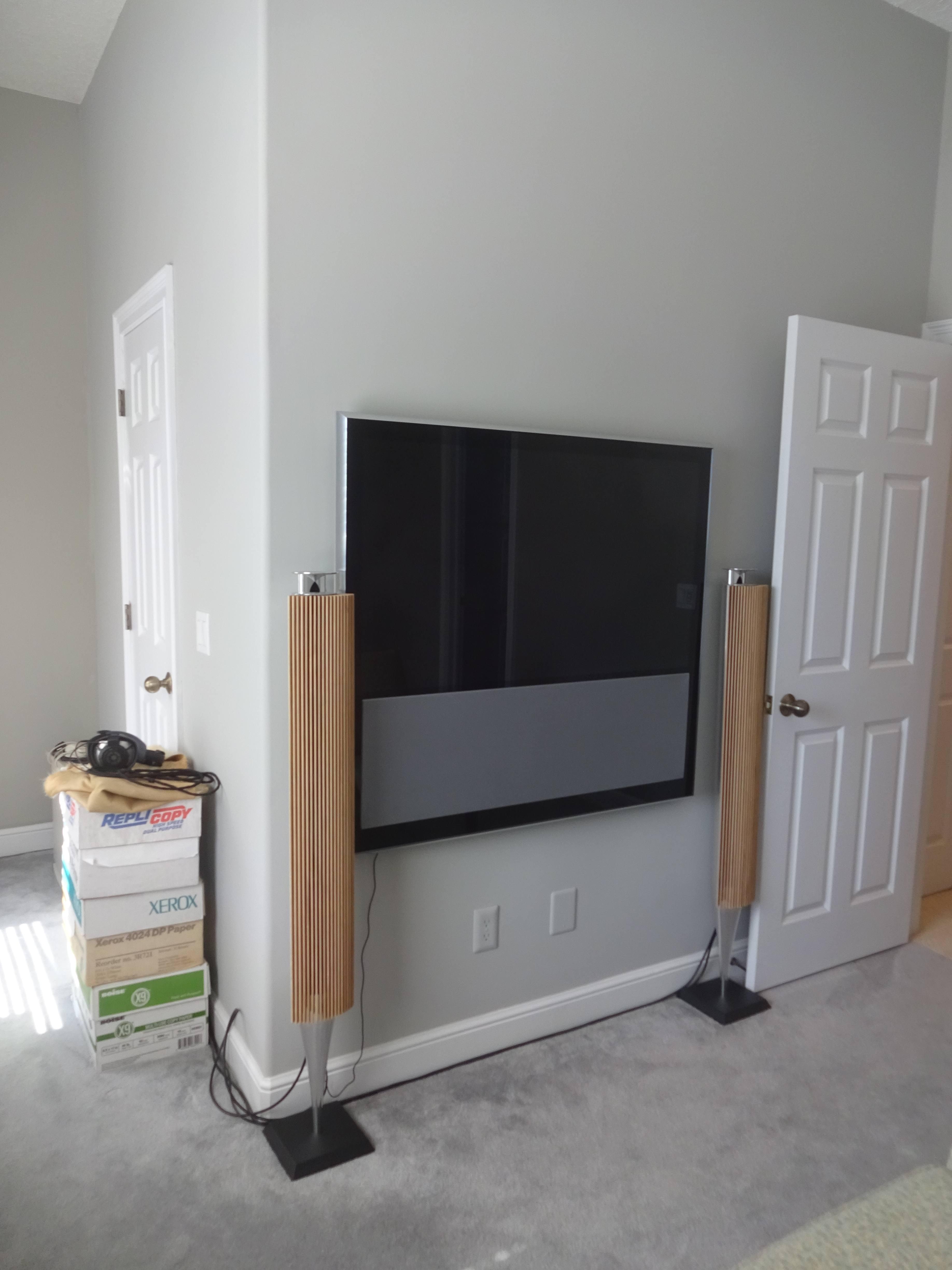
OK, here is another “hard-by” setup of Beolab 18s flanking a TV whose speakers are sub-par:

(Setup is “Speakers 2”, i.e. no center.) To my eternal cabling shame, note the diagonal Powerlink from the BV10 to the BL18. But it was temporary: the speakers are going elsewhere, leaving the TV as a “utility” set in the office. Now having fulfilled the purpose of this thread, ta-ta from yr servant, sincerely, etc. etc.
If similar would be the case for ’B&O drivers’, the company would soon be bankrupt.
Absolute LoL @MM! “You have a good sense of humor… for a foreigner, Monsieur Frank — like the French, sly wit: Just the right amount of flavor.” — Inspector Tarconi, “The Transporter”
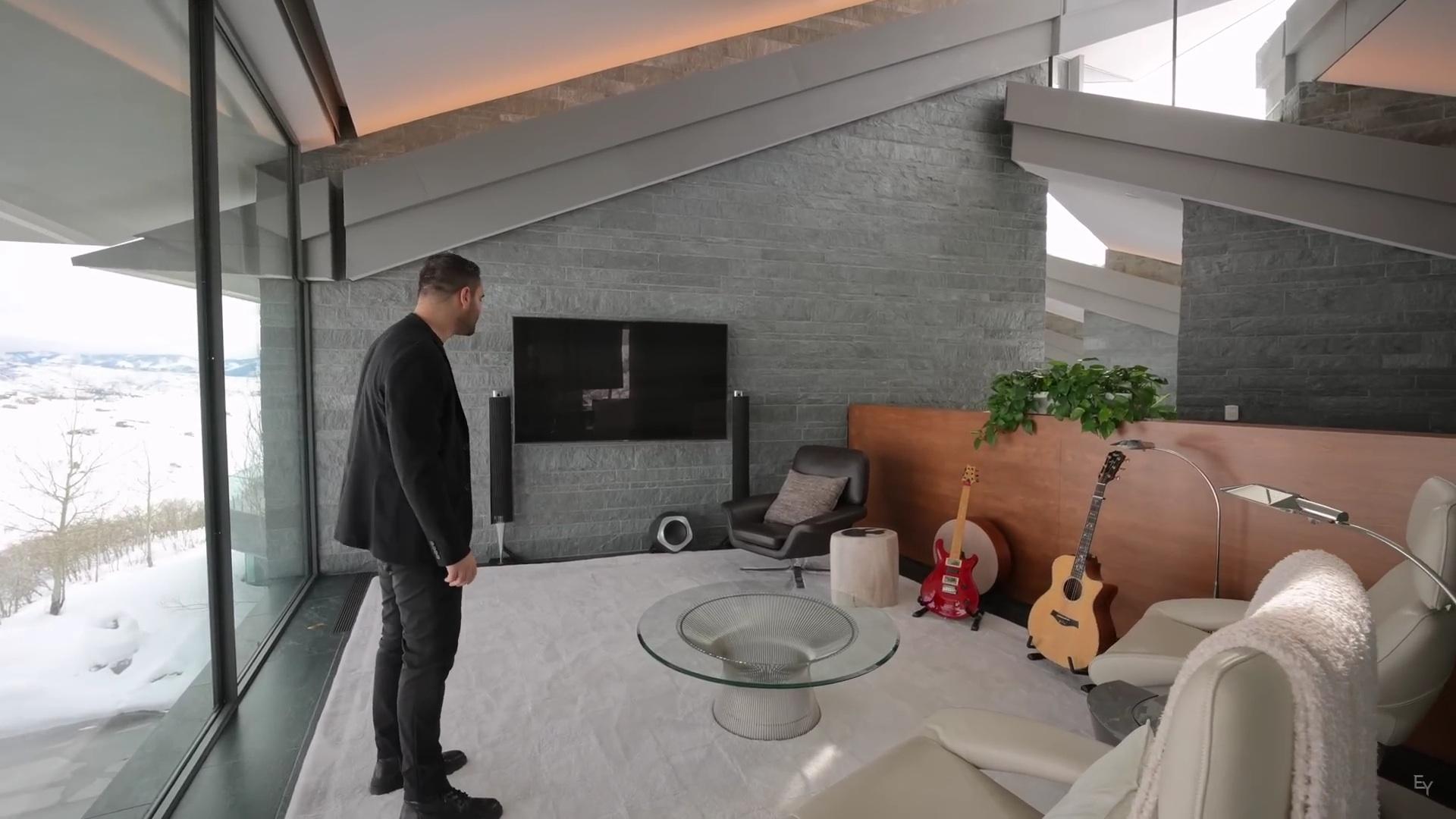
From the picture, also a Beosound Edge behind the red guitar ? I, personally don’t see the point of the TV with the two 18’s so close and the sub underneath. … … … In this picture I can see feti[s]hism … … …
I missed the Edge! Must take exception to your swipe, though: The Edge has a purpose, being used as the beautiful guitar amp! And placing the 18s hard-by the TV is because its own speakers stink, therefore off/muted and localization of sound & dialogue demands such placement of Front L/R given phantom CC. The reverse shot shows another piece of equipment I don’t recognize, underneath the Cedric Hartman lamp (which I do recognize: oooh, lamps!-). (“View Image” in your browser to see full-size.) Maybe a mixer, thus this is the mansion’s “music room”?

Yes, sorry to post a video screencap here in a thread that ought to be pictures of our own setups! But this thread is moribund, and the photos immediately above came from the same YouTube channel, which doesn’t rise to the level of Movies, nor even TV (IMO:-).
That same YouTube channel (Enes Yilmazer) just posted the Wallace Cunningham “Cascade” 2012 house in Park City, Utah with Beolab 18 & 19:

Oddly, it does not have speakers in the ceiling of every room, unlike most contemporary American mansions. (Maybe they’re all hidden mud-in speakers, but with sloped ceilings and glass and Serpentine Verde stone walls, it must be an audio echo nightmare.) A small theater room has a Beosound Stage. No B&O televisions. https://www.youtube.com/watch?v=c6JI1rmvqdU
Alas, a few of @matador’s additional photos didn’t survive in the archived forum, but here is a second thread, which describes the process:
https://archivedforum2.beoworld.org/forums/p/42927/311741.aspx
(Note if you try it yourself: Avery # 8960 sheets have the smaller die-cut center circle.)
I don’t remember whether BS3000 is the male or female jack, but beoparts-shop.com has both antennas: EP-096 and EP-097. Click on the photos of the end connectors, to choose the plug opposite sex to what you see on your BS3000. (They are even reasonably-priced, about the same as the ones you find on eBay or amazon.com.)
Correct, phones & PCs only support the 38kHz IR frequency everybody(!) else uses. A (used, now discontinued) Logitech “Harmony Hub”, using the old Harmony app, can shoot 455kHz by configuring it for whichever Beovision MX Logitech’s website supports. I used it with an MX5000. It’s annoying tapping on-screen buttons to change channels & volume, but they are there at least. But the MX5000 had a round red button on the lower right corner, which would power the TV on as well as off — provided you were satisfied to watch whatever it was last tuned to! Not on the MX1500?
I think you’re better off buying a used BeoLink 1000, than a Harmony Hub — or a Beo4, or even a new Beoremote 1 BT, though that’s awfully pricey just to save an old TV that will soon need power supply repairs.
30% off Beoplay A9, both website & dealers, thru 2/20/2023. Brings the price back to its 2012 release: USD2450 black / white, $2660 gold-tone. Presumably this signals that a Mozart’ed version is ready to ship! (Thanks to BeoBoston for doing the e-mail blast notice. Coyly, they also hint they may have leftover stock in some previous colors.)
1 February 2023 at 03:46 in reply to: Playlist across streaming services on B&O app or Sonos app? #43452Will I be able to stream from the Sonos app directly to Beolab 18/19
No.
or do I need some Sonos hardware for the Sonos app to work
Yes.
(Note, depending on whether the B&O speaker has a line-in, you could use the Sonos “Port” as a front-end so their app would work, yet still have the beauty & sound of B&O. Ask @SandyB, maybe also you could be satisfied with Roon as your front-end which will cross music services — just not the two you named! — and AirPlay the results to certain B&O speakers.)
The 20% off with code FLASHSALE is back for USA & Canada thru January 31, on Level and Balance in all variants. For the Balance, that brings it back to its release price in 2020 (which was USD2250(~CAD3000)), less a few bucks: $2200/2480/2720. For the Level, prices were only raised by $100 so it feels more like an actual sale: $1280/1480.
Upgrade BeoVision 5: To bring it into HDMI Full-HD, can you confirm that an upgrade to a BeoVision 10 Full-HD is a smart choice (no need for 4K res)?
SUMMARY: A smart choice? No. Your only choice? Yes, if MasterLink is to be maintained by itself. (BeoVision 10 –>BeoVision 11 was the switch from MasterLink to NetworkLink.)
DETAILS: My BeoVision 10 has worse sound than a BeoVision 11, and that is *much* much worse than most available separates (or a BeoSound Theatre). The fan on a BV10 isn’t silent when it’s wall-mounted. There are no spare screens for BV10 repair. The sound on mine dies after an hour of use (despite the fan), until power-off. (No repairs, no PUC updates etc. because no dealers nearby & dismount/transport of that monster is fraught.)
In one respect, it’s appropriate for you: The BV 10 sound is matched to your BeoLab 6000s. I tried mine as center channel with BeoLab 18s (“Speakers 3”) and it’s just awful. Turning off the TV sound (“Speakers 2”) and sitting in the center was the only acceptable solution. It’s my office TV too, so I just left it by itself as “utility grade” and took the BeoLabs elsewhere. You do label that room as “Home Cinema”. If so, your upgrade should be more grand (if you can afford it after buying a house). Or, get a BV10 for cheap and be prepared at some point to start trashing or giving away, and replacing what is now 10-, 20-, even 30-year-old equipment.
P.S. Despite my disheartened tone, I do love your lighted BeoLab 6000 plinths, and understand the appeal of customized glass bookcase panels for BeoSound 3200 and the fully linked whole-house speakers. Beolab 18s or maybe 28s would look just as good there if you ever do a “real” upgrade. But so would floral arrangements! (If you copied my capitulation to office-only, and moved the cinema experience down to the living room.)
This is unlikely, but it falls squarely into the “some setting I’m not aware of” category…
If your Wi-Fi network is using 5GHz rather than (or in addition to) 2.4GHz, make sure to configure it to select an individual channel, rather than allowing it to auto-scan for the quietest. WiSA uses the so-called “DFS” no-license-required channels, which include local airport radars among other things; therefore it has “scan and back-off” safety feature. Usually this works OK because WiSA pre-selects a secondary channel to shift to in case it hears someone else on its current channel. Might there be bugs in B&O’s implementataion? Maybe, but more likely is a router suddenly changing its own channel if it, too, is using the DFS channels — thus trampling on whatever WiSA had chosen as back-up. So pick an individual channel, like 36, 40, 44, 48, 149, 153, 157, or 161 (i.e. skipping over the DFS channels) for your router’s 5GHz. (Multiply by the number of neighbors using the same auto-select strategy, or super-wide bandwidth channels inside the DFS range.)
In the old forum, @riverstyx claimed “yes”:
https://archivedforum2.beoworld.org/forums/p/22895/189582.aspx#189582
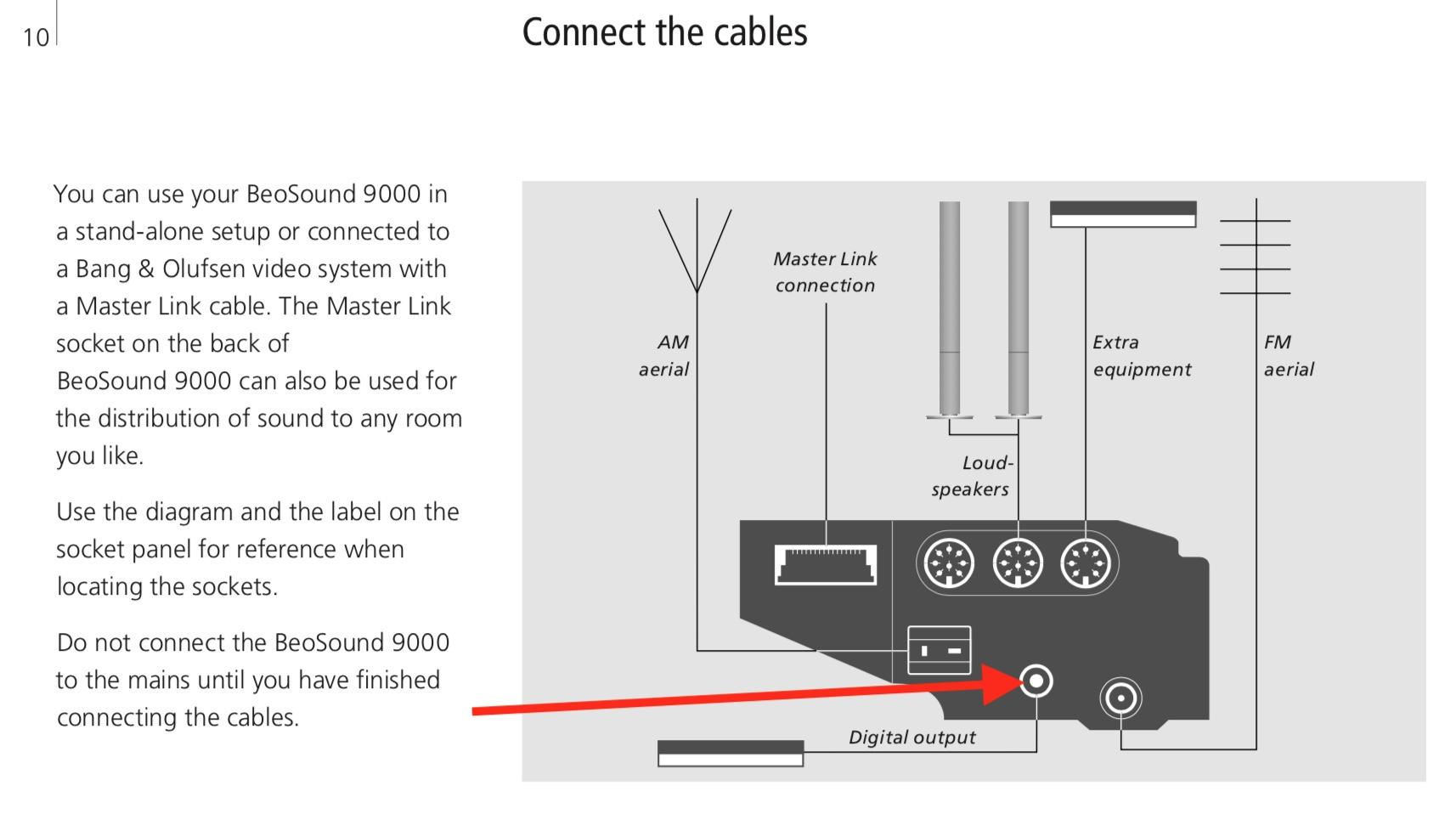
When you say digital output i believe the beosound 9000 only outputs in analogue via the following connectors:
No, AES/EBU also, i.e. SPDIF via coax. The O.P. was right to suspect oddness since that connector should be outputting whenever the CD data is reading (but not the tuner, of course). Viz:

I have a non-B&O setup with similar problems.
Summary: Switch back to 5GHz and move the router around as necessary to get acceptable signal despite its lower range. Turn off “airtime fairness” and select a single channel, not “auto”.
Details: (Pardon the long-winded-ness.) You want to choose 5GHz if you can, because more non-overlapping channels are available. But you get stuck using 2.4GHz because the 5GHz doesn’t reach as far. But on 2.4 you should only use channels 1, 6, & 11 — yet there’s always some moron neighbor who picks channel 3 (for example) and ruins it for 2 other people. So you look at the signal strength bars (actually looking at the RSSI & S/N is best) using your computer, to decide which channel to program your router to use. On 2.4GHz you do *not* want your router to be set to auto-select channels — do your own research, pick one, and stick with it. (On 5GHz, it’s less problematic because there are more channels and one might actually be quiet, whereas doing your own research takes a while, switching back and forth and comparing RSSI & S/N.) OK, then there are two “gotchas”: one is neighbors (or you, heaven forbid) still running gadgets using 802.11b — which the modern signalling methods have to back off and make time for. This can make a poorly buffered or bad IP stack implementation lose the connection, and re-establishing the connection takes a bit more time than merely asking for a retransmission of a packet that got “hit” by someone else. It’s worse because *anybody’s* router on that same channel with their 802.11b device wastes the airwaves, not just their own router has to back-off. The other thing is to turn off your router’s “airtime fairness” setting. For example, that’s a well-known failure on Sonos systems with Asus routers; maybe not B&O but why chance it if you’re having problems. So if at all possible, choose 5GHz. Except there’s WiSA, just another reason to pick a channel and hard-set your router to use it rather than dynamically selecting based on the *current* channel availability, if you know you’ll be using WiSA speaker connections — I forget which channels it uses but there’s a list somewhere: just avoid them by hard-setting a channel number in the router. Finally, mesh setups with auto-handoff complicate this, when a bag of water (you!) blocks the signal from one access point and it hands off the (stationary but nevertheless!) device to one of the access points that has a better signal — at the moment. More delays, and if the buffering and IP stack were perfect then it wouldn’t be a problem, but B&O surely just took whatever reference implementation was proffered by the vendor of the Wi-Fi chipset. No huge knock, but you know they aren’t going to fix it because it isn’t their forte. Well, OK, they can change the buffering but they can’t fix the wireless. So it’s up to you to provide the ideal conditions for your device.
The Winter Park, FL store finally put a message on their voice mail. “Still under construction. Hoping to open in January.” [Edit: updated to “mid-February”][Edit: updated to “March”][Edit: updated to “‘Soft open’ planned March 20”]
Vybe Systems is behind the store. (www.vybe.ai , formerly a design-only consultancy.) They told the Chamber of Commerce, “Our space will be a Bang & Olufsen retail space AND a showroom, showcasing Bang & Olufsen products as well as other high-end smart home products for local homeowners/builders/designers/custom integrators.”
Off-topic I know, but re: above: Detail: Done with RFID tags in the sleeves and a reader behind the paneling.
Missing Detail: @beojeff, who’s the integrator? Of did you DIY the reader mount too?
I said to BeoBoston what would be *truly* magical would be if there were a camera on the opposite wall (it’s pretty tight quarters right there at the entrance) matching the covers with discogs data. Or a shopping cart scanner on the back for UPC codes (you know, for all that modern stuffe). ¡¡¡Dream on!!!
[Which may need to be typed into primitive search boxes as “National Lampoon’s Christmas Vacation”.]
Blunt instrument method: Configure your router to block its internet access without blocking its local network access. No news = no pop-ups. Unless, like the Google microphone-off announcement, it pops up messages telling you it can’t contact the mothership? [Edit: Ah, and of course you must be using an AppleTV or similar to get streaming content so it doesn’t matter that your LG Apps don’t connect.]
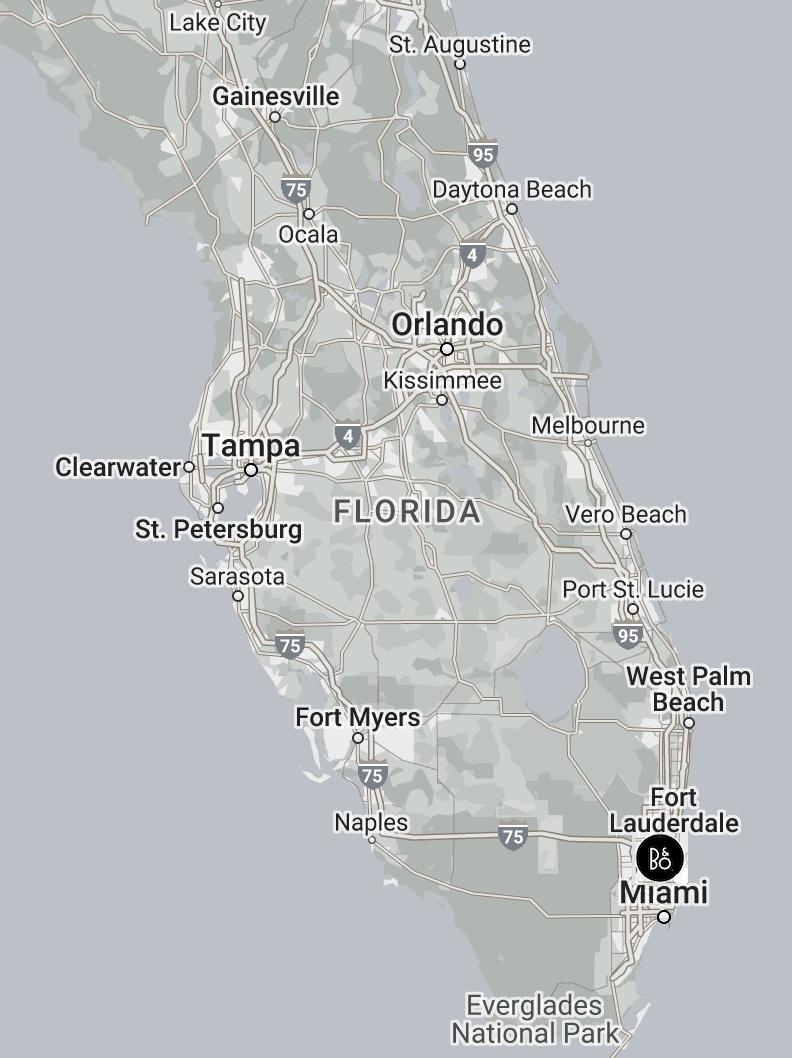
Bleagh. Define “lucky”. B&O threw away at least a half-dozen decent dealers a few years back. Here is a corrected map:

Write this post again when they *actually* open a store — or when any of those “custom integration partners” deign to talk to a retail customer. THAT is when the map can change.
- I believe so, yes.
- Previously answered, see above.
But if not the board’s sponsor’s product (why not, it’s even reasonably priced!?) then perhaps Almando Powerlink-Switch or MultiPlay boxes, though they are probably more than you need.
-
AuthorPosts