Forum Replies Created
-
AuthorPosts
-
27 June 2023 at 19:47 in reply to: Struer Visit June 26 – July 10 / 2023: Who to talk to at B&O? #47396
 BRONZE Member
I guess you all know that there is relatively little production going on in ‘the holy halls’ in Struer nowadays.
Surely it is interesting to see how they work with aluminium (and colours) in the Fab5/Fabrik 5.
However – if you are interested in the history of Bang & Olufsen – the Struer Museum should be the right place to go to (open on weekdays except for monday from 11-17).
That should be interesting enough for the whole family.If you want an insight in the current B&O, this video – that Steve made last summer – could be interesting.
MM
Location: Flensborg————Danmark
@Corolpa
Not that I would recomment anyone to set it up fresh with an Audiomaster, but Sia43 already has one…..so why not just leave that in the mix ?
Personally I find ‘a Line-in/M3 solution’ better, if someone wants to let go of ML in the long run.
MM
Location: Flensborg————Danmark
That should be possible – that is what the line-in connection there is for.
However – like if you’d connect to an M3 – there is no control of the turntable there.
P.S.
I find it cool to be able to control the Beogram remotely – why not just keep the 6500Master….you can hide it in a cupboard or so.MM
Location: Flensborg————Danmark
26 June 2023 at 14:35 in reply to: Struer Visit June 26 – July 10 / 2023: Who to talk to at B&O? #47388MM
Location: Flensborg————Danmark
The M3 is a NL device – it will show up in the beolink list, once configured/added to the app…assuming it is on the same home network as the other devices.
This is explained in danish – but I am sure you’ll be able to see how to.MM
Location: Flensborg————Danmark
If your problem is, that you can not find a button on the remote to do this (V-AUX), you can find this button by adding it to the List.
This way you just push List multiple times – or just one, if it can be moved to the first place there.Here is how to add items to the List on the Beo4:
MM
Location: Flensborg————Danmark
‘Is there any workaround around this?’
Best ‘workaround’ I can think of, is to try to get a Beoplay M3 (fairly cheap….if you can get hold on one) and set this up for distributing the sound of the Beogram using the line-in there.
MM
Location: Flensborg————Danmark
24 June 2023 at 20:52 in reply to: Conversion kit Beolab 4000 to Sonos electronics with Trueplay #47299The kit include an Ikea Symfonisk amplifier and electronics (which is made by Sonos). This consist of a very powerful DSP which will calibrate the Beolab 4000 speakers to a flat frequency spectrum and a multiroom wifi active two way speaker.
Did you test that?
As far as I understand DSP processing, you must know the characteristics of the used drivers/speaker units in order to let the DSP do it’s job.MM
Location: Flensborg————Danmark
As far as I remember, it is just like with the DVD players in the BV7’s…….you use the DVD command and the player detects which kind of disc is put in (like any other DVD player does) and starts playback.
Would be nice however, to have it confirmed!
MM
Location: Flensborg————Danmark
But that must be true for CD playback as well.
Nice CD player then…..who watches DVD’s nowadays?P.S.
Will be interesting to know if it turns on the BV11, when one starts playback manually on the BC2?MM
Location: Flensborg————Danmark
Question for those who have tried connecting the BC2 to a BV11 this way?
I suppose, that you’d only get the sound from a DVD or a CD this way – the sound from the radiotuner can not be distributed through the scart/mini socket, or???
MM
Location: Flensborg————Danmark
Hi OldJack,
did you get 4) to work yet? I struggle with this. I can only join an ML source via the converter but not activate it from the Theatre.
I can’t either – this is not (yet) possible.
A must have feature!MM
Location: Flensborg————Danmark
BBC RADIO 6 also plays fine on the Essence MK2….which is an ASE product.
Only the (old) radio platform on the V1 tv is having the problem.
(Not a big deal, since the V1 can join an Essence MK2 or start it directly as an connected/linked source….if configured so).MM
Location: Flensborg————Danmark
Via the Apple Music app I also get BBC RADIO 6 – obviously they use TuneIN

Also playing here using the native TuneIN app.
MM
Location: Flensborg————Danmark
BBC RADIO 6 playing on my Theatre (currently german ip) = B&O Radio.
MM
Location: Flensborg————Danmark
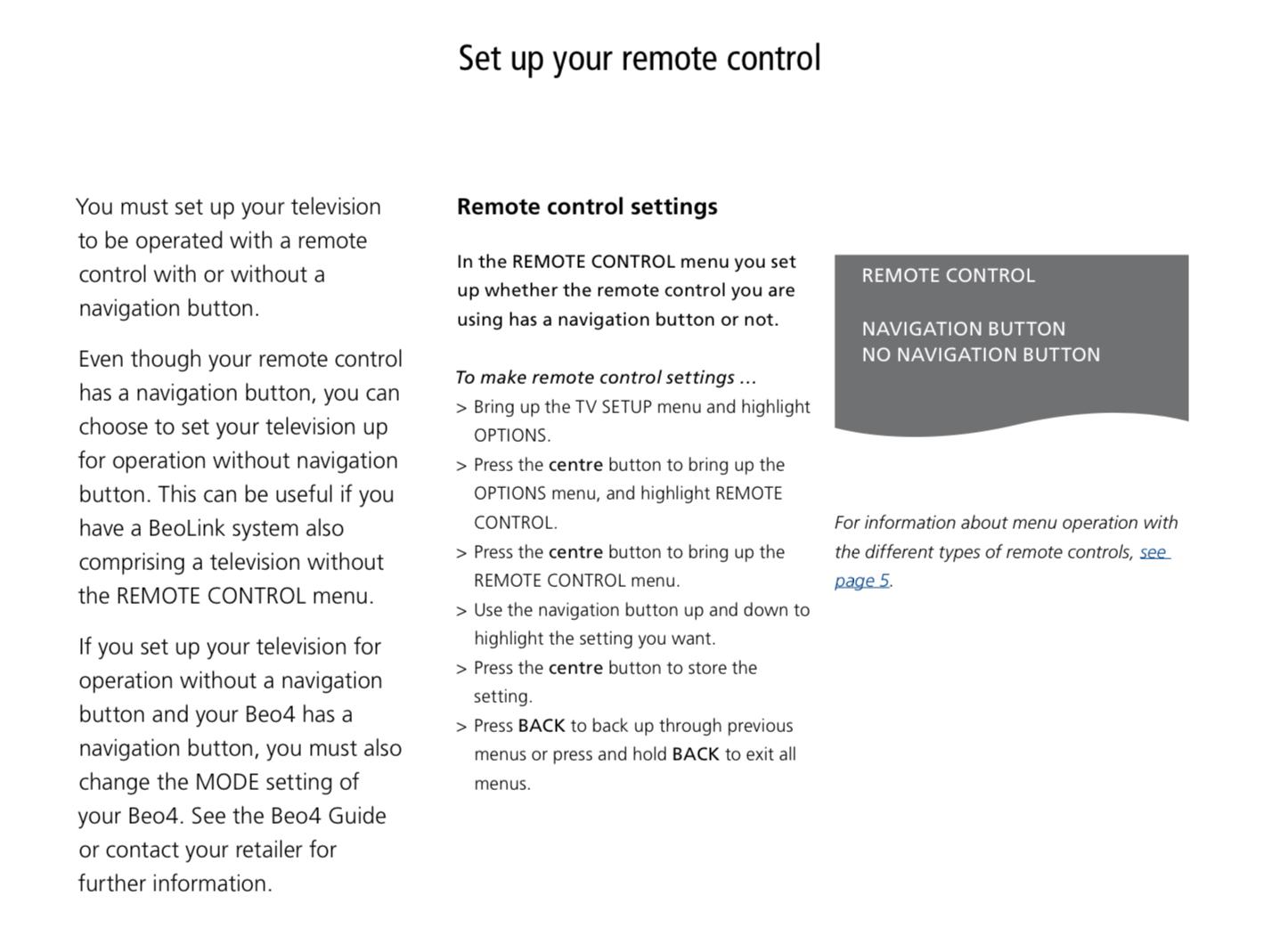
The BROne/IR works like the Beo4 with navi.
This means that you will have to set the remote version used to ‘navi’ in the menu of the BV7.
However, depending on the sw version older versions of the BV7 does not support the Beo4/navi.
Please have a look in the settings….should look like this:

MM
Location: Flensborg————Danmark
Which version of the Beo4 is it – with or without the navi button?
Which version is the BV7?
How is the setting in the menu of the BV7 for the remote?MM
Location: Flensborg————Danmark
Hi Leo
If you mean the BROne/IR, it should work out of the box.
If you however, mean the BROne/BT in ir mode, you will have to configure that for this.
The manual describes this from page 20 onwards.
MM
Location: Flensborg————Danmark
How would this be done?
Interesting question!
The ‘BV 12-65’ is basicly a dumb screen, when not connected to the Beosystem 3/4………a Panasonic, if I remember it correct.
The problem however, is that it can not turn on/off on it’s own – no CEC control there.
So, if that should work, you/someone must find a way to do this.Of course you will have to have your sources, such as tv-box, ATV, Chromecast, Google TV etc, connected to the BS Theatre, since there are no sources in that dumb screen.
And of course the built-in speaker won’t work, respectively it makes no sense to try to reuse it, if you have the powerfull BST.Will be interesting to hear, if you try it out and succeed.
IMO it only makes sense, if you already have the BV12 screen.As Mr10% wrote, the better solution would be to pair the Theatre with an LG tv for full support….and also because of the 4K resolution and HDR (and for the lower power consumption).
MM
Location: Flensborg————Danmark
Since it seems that you have some experience with the ML/NL Converter, you will not necessarily have to stick to a ML tv part!
If you want to maintain the ML there, you will need a BV10 (or a BV8-40 replacement).However, I would use the opportunity to go all in on NL (with the additional converter you already have) and look for a preused BV11.
Or rather – if funds allow – a BS Theatre and the LG tv!
As much as I also liked my BV8-40, I am sure you won’t regret that.MM
Location: Flensborg————Danmark
-
AuthorPosts