Forum Replies Created
-
AuthorPosts
-
 GOLD Member
Looking forward to Beoworld/the Beoworld Forum under the new ownership.
Hope it stays as open and accessible as of now.
A big thank you to Lee, Keith and all others involved in keeping Beoworld alive and kicking throughout many years.
MM
Location: Flensborg————Danmark
Thanks Madskp
That I overlooked!
The BS9000 has to be in A-Option 1 to be controlled remotely, when there is no BV anymore.
MM
Location: Flensborg————Danmark
Sorry for interfering once again.
But I am a proponent for simple solutions!Question – aren’t you going to install speakers in the room, where that link eye is supposed to be?
You wrote about BL5’s, that are going to be connected digital….if I understood that correct!
This would mean cable runs from the room where the Core is supposed to be located!
Not just for the ir eye and the digital connection, but also – in that case – for the required Powerlink cables.The Core is a rather small box – it should be rather easy to hide that in the actual room and thereby have less cable runs.
And it would be in reach of the BROne without any problems (or fancy solutions).Or is there still something that I missed?
MM
Location: Flensborg————Danmark
Hi George and welcome to the Beoworld Forum
Classic question – yes, you are in the right forum.
Since link/Masterlink is a unique B&O feature, there is no obvious solution.
Almost no new tv nowadays has some kind of analog L/R out for sound that could be used for connecting to the BS9000.
And the use of an eARC capable audio extractor often brings delay in sound.I guess you are not interested i a somewhat newer B&O tv, which could be linked – either on it’s own or using a B&O Converter.
If you want a modern tv like the LG C or G series, the only option you will have is the BS Theatre and the converter.
This is a rather expensive solution, I know – but in addition to the link possibility you would have the best sound, that B&O has ever made for a tv.If you have had external speakers connected to the BV7, you could still use these with a new tv, but that would require the use of some kind of A/V processor….and it would still not give you the link option, that you are used to.
Sorry – but you are not the only one facing this problem.
Maybe someone else has a solution, these often are rather DIY.
So stay tuned to the forum.MM
Location: Flensborg————Danmark
I do not understand the need/wish for an ir eye in this case.
You (he) would need to have the eye some where reachable for the Beo4 including cabling.
If someone want to hide a Core away, he IMO should go for a BROne/BT instead.Or is there something, that I don’t understand in the setup?
MM
Location: Flensborg————Danmark
The use of the Beo4 = ir is very limited compared to the use of a BROne.
If you basicly use the Core for Radio or to join in from other sources, it will be fine. Also with Spotify Connect to pause/skip etc and volume it will do the job.
Otherweise the BROne is the best choice…or the app.
MM
Location: Flensborg————Danmark
Ich bin für die Kombination vom iPad/iPhone und BROne ?

MM
Location: Flensborg————Danmark
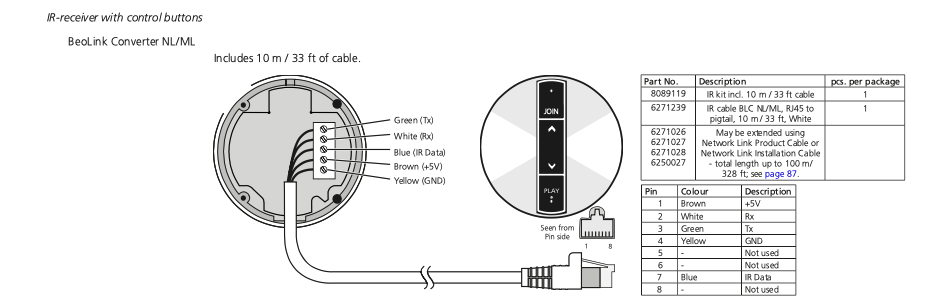
Which ‘beolink converter’ do you mean?
If you mean the ML/MCL Converter, the posted pic from sverreh is the right one.
In that case your ‘beolink converter’ – with the ir eye – is what usually is called a ‘Beolink Passive’.My post is for the ML/NL Converter.
MM
Location: Flensborg————Danmark
“…unveiling” of what?
MM
Location: Flensborg————Danmark

Is this what you are looking for?
MM
Location: Flensborg————Danmark
10 February 2024 at 19:26 in reply to: Resolving latency between Theatre and Beosound Core (Shape) #52477Have a look here – click the attachment. MM
MM – see the already attached file at my response from January 29th!
Oh – sorry…I did indeed overlook that.
Location: Flensborg————Danmark
10 February 2024 at 14:55 in reply to: Resolving latency between Theatre and Beosound Core (Shape) #52474Have a look here – click the attachment.
MM
Location: Flensborg————Danmark

Be prepared for a steep learning curve!
However, there are numerous thread on the forum about this.MM
Location: Flensborg————Danmark
Two ways to do this…
You either connect the output of the Core (using an adapter cable from the PL) to a spare input on the oldschool 7000/9000.
or
You connect the output of the 7000/9000 (again using an adapter cable from the PL – alternatively from the A.Tape of the 7000) to the input on the Core.
However in any case, you will only be able to control the Core part with the app/Beoremote One……not the 7000/9000!
The 7000/9000 must be controlled with the Beo4.One advantage of connecting the 7000/9000 to the Core is that the Core has autodetection of the incoming signal = it turns on when the 7000/9000 starts playing.
The other way ‘round the 7000/9000 will have to be turned on manually/Beo4.The Transmitter must be connected to where the actual sound output would be.
P.S.
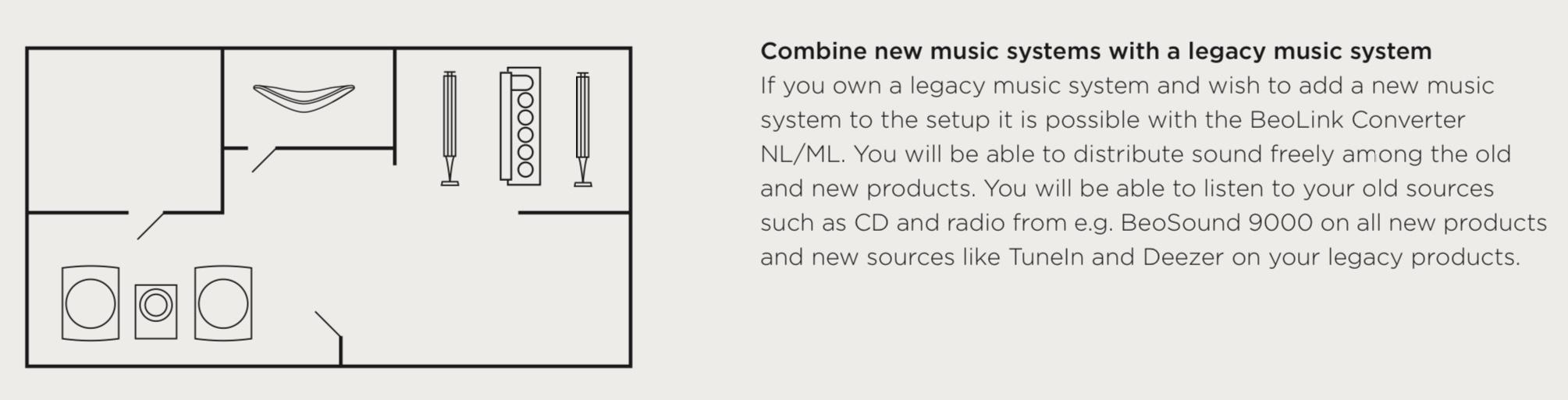
B&O has made a (now obsolete) ML/NL Converter for connecting these two device generations.
That would offer additional benefits in terms of controlling everything with the app/Beoremote One.MM
Location: Flensborg————Danmark
There hasn’t been any updates for ages.
Netradio runs on my V1 (and did on my old Avant 1st Gen), which is basically the same platform as the BV11.
I can not recall what I did….it is almost 10 years ago – it was no problem to get it running.
Let me think for a while – or maybe someone else can comment.MM
Location: Flensborg————Danmark
As far as I am aware all BV11’s were born with the Netradio function.
In the early-early days of the Beoplay V1 this had to be updated to get netradio.Might be a dumb question….but are you sure that the tv of your relative is connected to the homenetwork/internet?
MM
Location: Flensborg————Danmark
9 February 2024 at 09:50 in reply to: Resolving latency between Theatre and Beosound Core (Shape) #52473Ohhh – that is what you meant…..
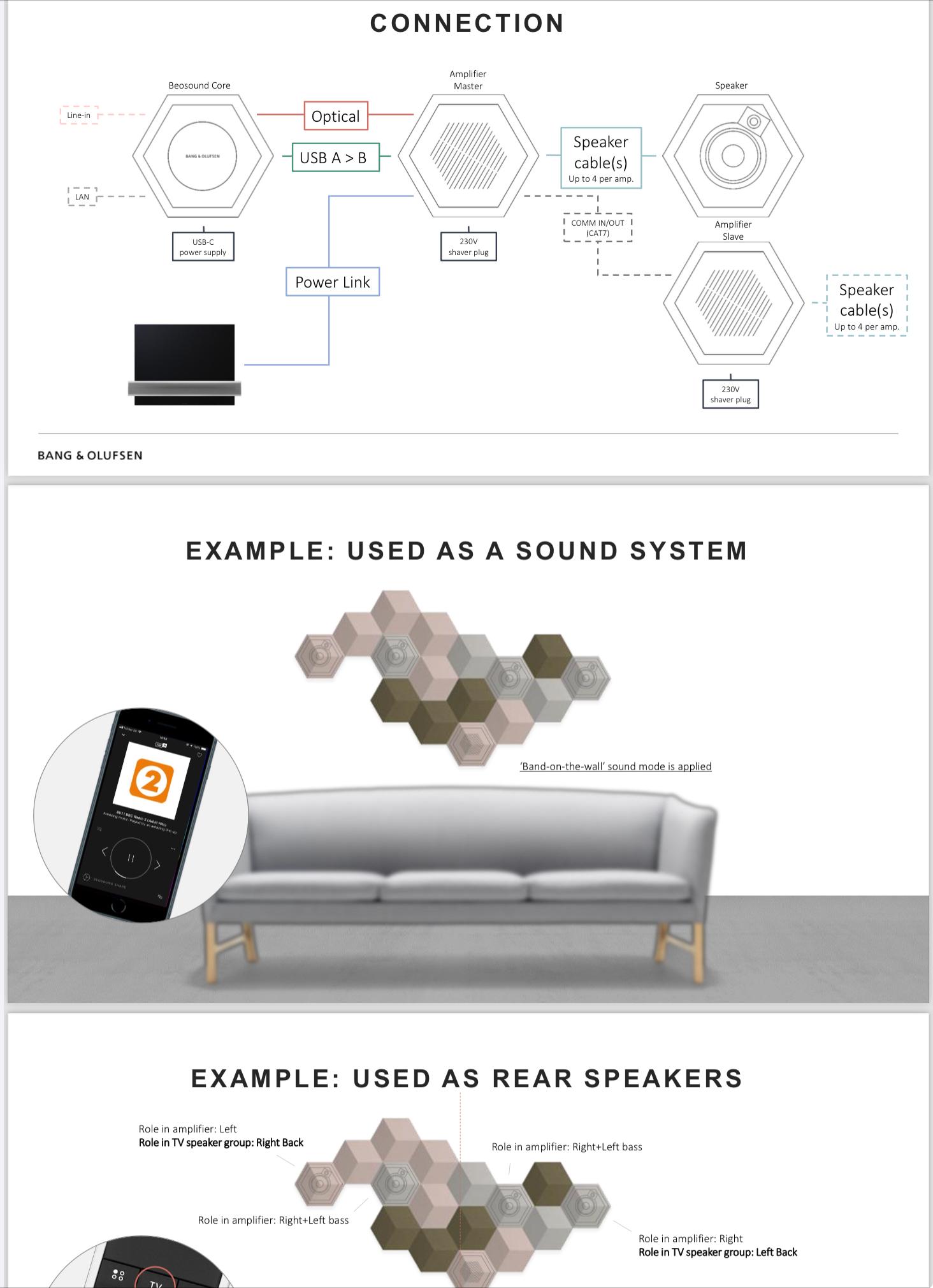
P.S.
I could not find a way to upload a PDF file that explains this.
So here is a part of it as a picture.
Location: Flensborg————Danmark
The ‘DPL’ port….the mysterious ‘DPL’ port ?
Noone really knows – or has revealed – what they thought of back then.
Most likely it is a port, that should support a digital output ( = no input port!), that could have been used, if they had developed further down that route.
DPL means digital powerlink – which is used on the BL90’s/50’s for the connection between both speakers.In an update, at some point it was converted into a port for an ir-eye.
This however, is rarely used, since all newer devices (including the Core) uses bluetooth for controlling.I guess we won’t see any changes there (for the Core as is) – the development of a newer version is rumoured.
MM
Location: Flensborg————Danmark
Is it possible to plug a non-B&O analogue source into a powerlink input with some kind of adaptor cable?
No, the PL is an output….for connecting the Beolabs.
MM
Location: Flensborg————Danmark
You probably mean the Deezer app in the SmartTV part of the Bsys4 (?)
As you may have noticed with the other apps there, this platform is obsolete….basicly no longer working.
In order to get Deezer to play on the BSys4, you will need an external device connected there with the Deezer app installed e.g. an AppleTV, a GoogleTV/Chromecast…….
Another way is to have a NetworkLinked B&O device in the setup, start playback of Deezer there and then Join in on the BSys4.
Using an Essence MK2 or the Core integrated with the BSys4 would even give you Deezer as a selectable source in the menu of the BSys4.MM
Location: Flensborg————Danmark
-
AuthorPosts