Forum Replies Created
-
AuthorPosts
-
 MadskpGOLD Member
Hello and thanks for the input.
I haven’t touched it since I made the post, but will try to investegate further based on your advice and post my findings
Location: Denmark
MadskpGOLD MemberHi all, A quick update on this. I finally have a working MCL connection between the BC9500 and BL3500, after some shenanigans and possibly killing some of the display on the BC9500 (see seperate post). It really was as simple as making a single cable from the 3-pin din MCL speaker plugs to the 8-pin din MCL plug, but as it was the first soldering I’ve done in about 30 years it did not go smoothly. Eventually I realised I had a short between the pink (DC) and yellow (left signal +ve) pins (via the metal DIN casing) and now the thing seems to work ok. As Mads pointed out the pink wire does nothing in the BL3500 so the fact that I broke the pink connection in the 8-pin DIN plug while trying to fix a loose green (right signal +ve) connection does not matter. All very much above my skill and dexterity levels, and I have new burns to prove it!
Great to hear you got it working. The 8 pin DIN plug is a pain in a.. with the thick MCL cable so fully understandable that it can cause problems. Sad to hear that it backfired on you BC9500
Location: Denmark
MadskpGOLD Memberyou will need a fully wired powerlink cable to activate the MCL2P. That will most likely be the problem
Location: Denmark
MadskpGOLD MemberOn question thought: did you manage to get the BL3500, working as it should with the WL1? That mean having it wirelessly connected to a master link master and having the WL1 starting the 3500?
I you refer to what is shown in the Bl3500 user manual I haven’t tried that setup as I gues it will work and is a little outside the scope of this thread.
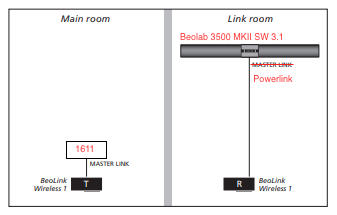
But to clarify the setup I tried I have modified the sketch from the user manual:

The Powerlink cable has to be fully wire for it to function as it needs both the normal powerlink on signal on pin 4, and the data signal that is on pin 6.
This setup works, but I can’t replicate it with powerlink outputs from BL active, MCL2AV or BS Ouverture, so the data signal from the W1 must be the key for this to work.
Location: Denmark
MadskpGOLD MemberAfter testing with the BL W1 I am now at the point where I have no further open ideas to test for the topic of this thread. Therefor any suggestions for further testing is very welcome..
Of course if I get any Ideas myself I will continue with them
Location: Denmark
MadskpGOLD MemberSo it might be a combination of the 5V on pin 4 and the datasignal on pin 6 that has to be present to turn the BL3500 on via powerlink, and that data signal must be different from whats comming from a BL Active, MCL2AV or any powerlink equipped BS, BM, BC
And just to be sure that both the Powerlink On signal on Pin 4 and the data signal on pin 6 in the powerlink connector is needed at the same time to activate the BL3500 MKII from the BL W1 I tried to make an adapter cable with only pin 4 and the 2 ground pins (2 and 7), and after that a cable with only pin 6 and the 2 ground pins.
I was not able to activate the BL 3500 with any of these cable configurations which supports my earlier statement that signals on both pin 4 and 6 are needed to activate the BL3500 MKII
Location: Denmark
MadskpGOLD MemberSome aditionel testing with Bl3500 MKII and BL W1.
The same setup as before with the BL3500 and BL W1 connected via powerlink. In addition I also connected the BL3500 to Masterlink and set ML to on via the submenu Menu, 0, 9, GO to see the Behaviour.
In this case I cannot activate the BL3500 via the BL W1 powerlink conenction
Location: Denmark
MadskpGOLD MemberTry pressing Menu, 0, 9, GO to see if Masterlink is on or off.
If it is off you can change the setting with up or down arrows and accept with GO
You can also try to see if there is a Masterlink error by pressing Menu, 0, 2, GO.
This will either show NO ML, ML ON or ML error 1-4
Location: Denmark
MadskpGOLD MemberOne odd thing I noticed when measuring voltages was that pin 1 on the BL W1 Powerlink connector was 12V which seems high, but the BL3500 MKII doesn’t seem to have anything connected to pin 1 so might not mean anything in relation to the BL3500
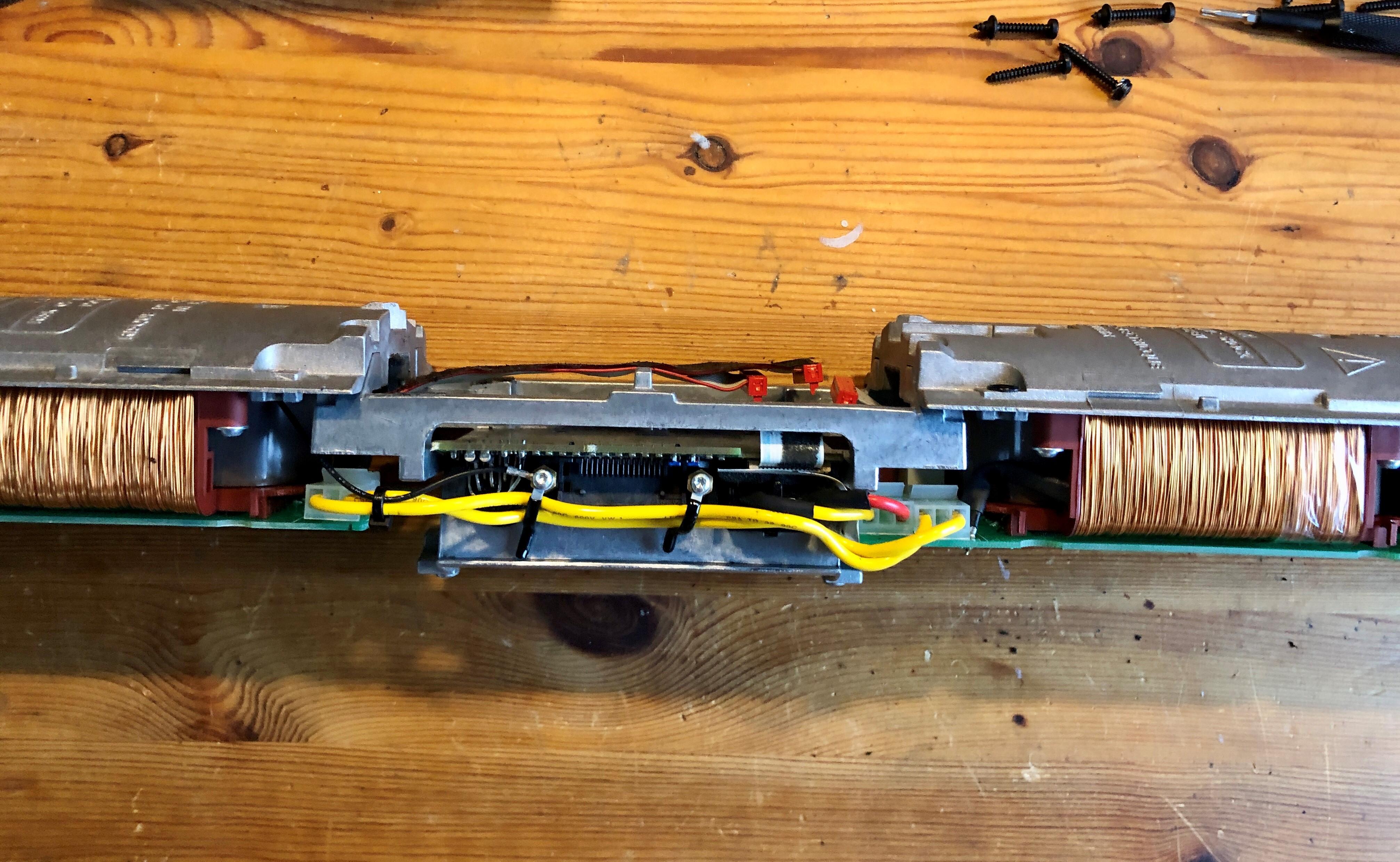
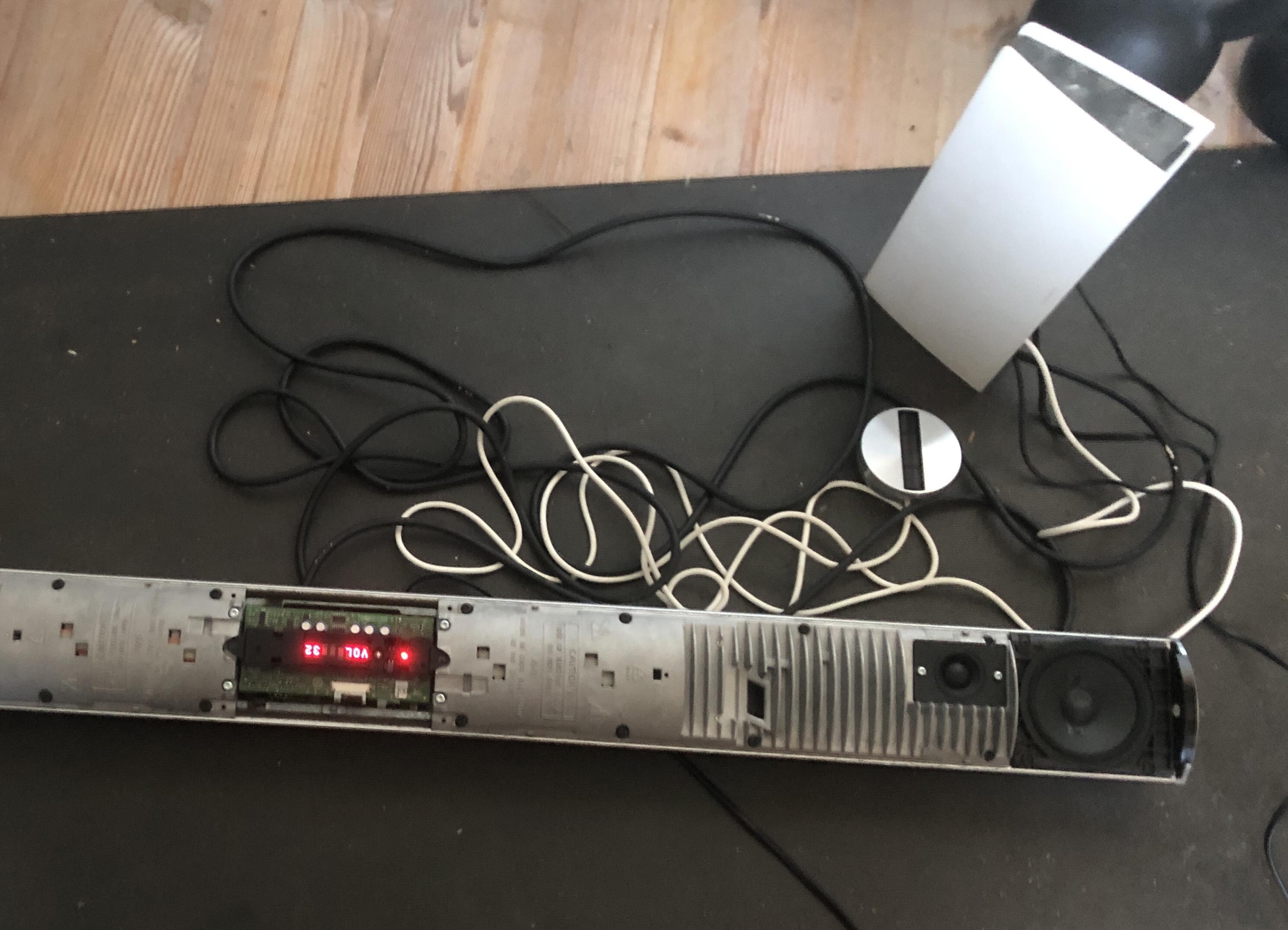
Just to be sure that PIN 1 in the powerlink connector is not used for turning the BL3500 MKII on I decided to disassemble the BL3500 so I could get full access to the plug PCB. I found out that most of the parts have to removed from the aluminum enclosure in one piece

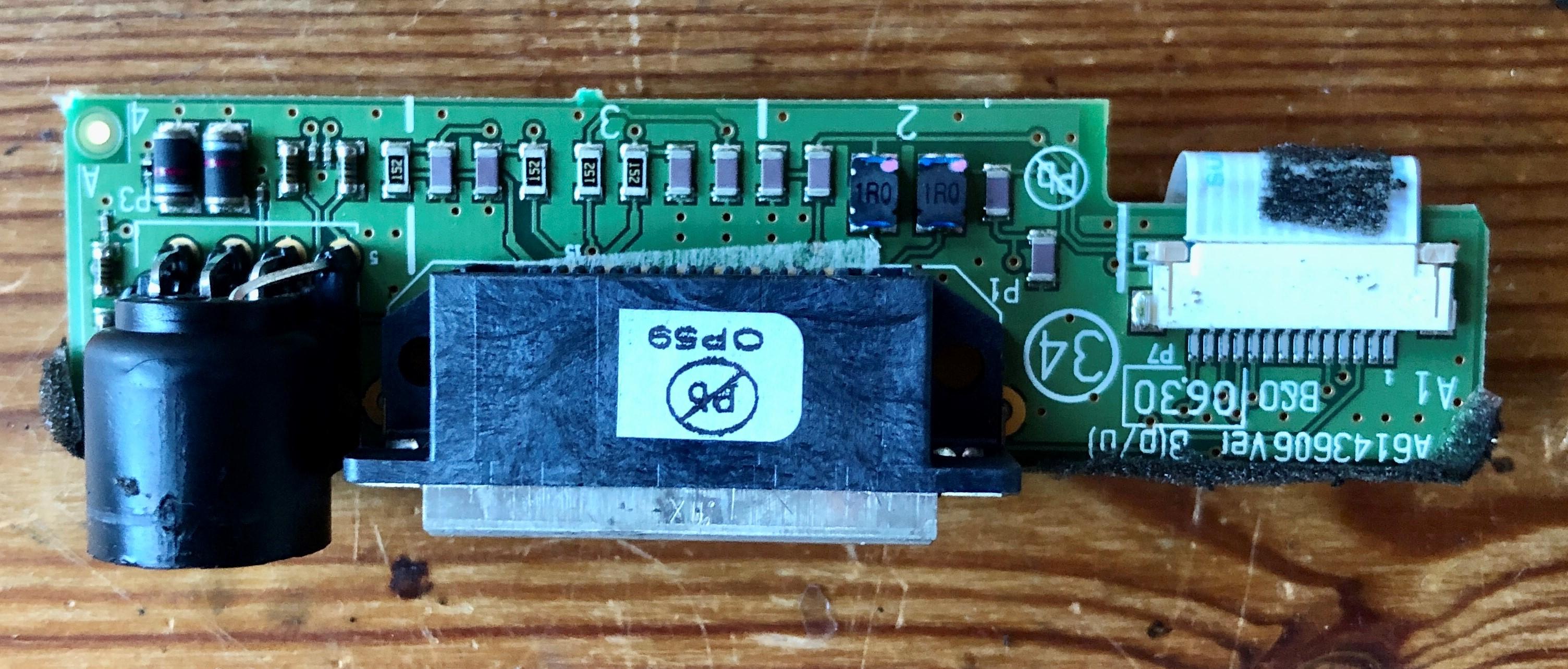
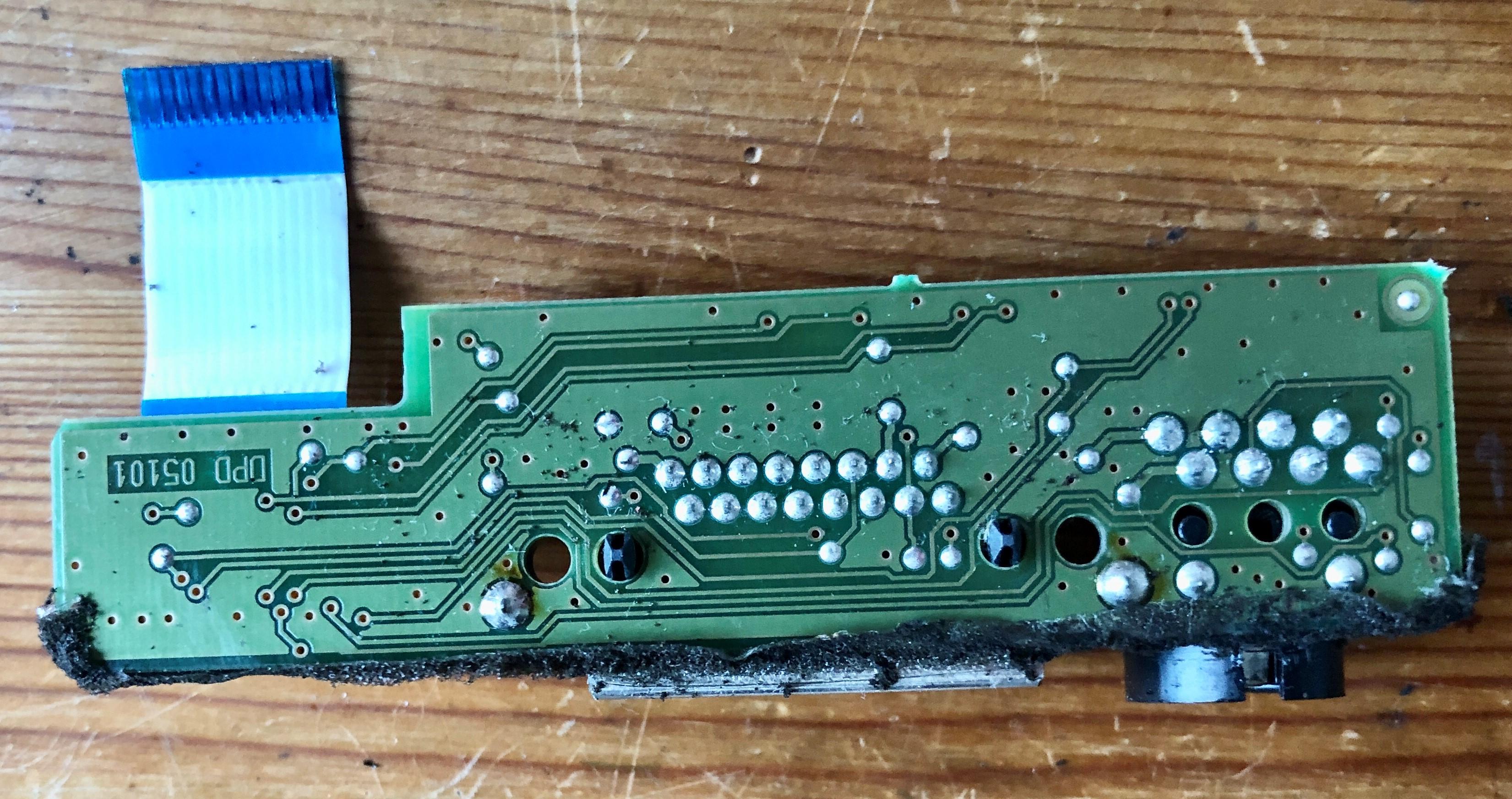
From there I could unscrew the plug PCB.


There is no sign of connections from pin 1 of the DIN connector on the PCB. To verify further I also tried to do continuity test from pin 1 to all other connections, test points and vias on the PCB, and found no place with connction. So I’m about 99.9% sure that Pin 1 has nothing to do with activating the BL3500 MKII via Powerlink.
Location: Denmark
MadskpGOLD MemberDid some more testing today measuring voltages as I turned on and off the system.
The BL3500 is recieving the 5V on its powerlink PIN 4 when a source is selected from the W1. Also the data signal on pin 6 seems to change in voltage when turning on and off.
I can also see a change in data signal voltage when changing volume.
For good measure I tried to apply 5V to pin 4 and 7 on the powerlink connector without anything else connected to the BL3500, but nothing happened.
So it might be a combination of the 5V on pin 4 and the datasignal on pin 6 that has to be present to turn the BL3500 on via powerlink, and that data signal must be different from whats comming from a BL Active, MCL2AV or any powerlink equipped BS, BM, BC
One odd thing I noticed when measuring voltages was that pin 1 on the BL W1 Powerlink connector was 12V which seems high, but the BL3500 MKII doesn’t seem to have anything connected to pin 1 so might not mean anything in relation to the BL3500
Location: Denmark
MadskpGOLD MemberI have no experience with the Essence myself, but I remembered this thread that might give you some info https://forum.beoworld.org/forums/topic/essence-mk1-vs-essence-mk2/
Location: Denmark
MadskpGOLD MemberI have now got three Beolink Wireless 1 for a price that was reasonable enough for testing purposes to continue this thread.
I have no idea what software level they are on but according to this thread https://archivedforum.beoworld.org/forums/p/37237/346020.aspx#346020 the serial numbers would indicate that the software level is at least 2.1.
Tried to set it up and test it with the BL3500 MKII SW 3.1 with powerlink connection.
I have setup the BL3500 MKII to no ML and in option 0 (no IR).
Connection is as follows:
BLC1611 (as audio master) – ML – BL W1 transmitter- wireless – BL W1 Reciever – powerlink – BL3500 MK2
The W1 reciever has an IR eye attached.

And it just works. when I choose a source the BL3500 turn on and I can regulate the volume. The source is not shown in the display though.
For good measure I tried to cover the IR reciver on the BL3500, and I can still control it, so it is actually being controlled from the BL W1 through powerlink.
Next I will dive a little futher into this trying to investegate what the W1 does that other powerlink output doesn’t
Location: Denmark
MadskpGOLD MemberI seen somewhere on the forum that beolink converter 1611 might be a solution? can you please educate me a bit what is this converter for and how does it works. Also would it help in my situation?
I would reccomend that you take a look at this post https://forum.beoworld.org/forums/topic/beolab-3500-and-1611-converter-settings/page/4/#post-14017
The 1611 converter can be used to make 2 inputs controlled by either audio or video commands.
In my opinion its a much better solution than the Menu, 0, 4, GO because its easier to activate and you can use the volume control from the BEO4 remote which is not possible in the other wayLocation: Denmark
MadskpGOLD MemberUnfortunately it does not react on any buttons. How to check if it actually sees remote?
It could be that it is in option 0 (not reacting to IR commands) or option 4 (only reacting to link commands).
Try to set it to option 2 as described in Guys post earlier in this thread https://forum.beoworld.org/forums/topic/beolab-3500-mk1-mcl-menu-0-4-go-help/#post-8004
Location: Denmark
MadskpGOLD MemberYou might wan’t to look in this thread where the servicetool is also available for download
https://forum.beoworld.org/forums/topic/beosound-5-beomaster-5-service-tool/
Location: Denmark
MadskpGOLD MemberOne problem I see with manuals for newer products is that software updates may changes how the products work. Even functions of buttons can be changed over a products lifetime.
Furthermore some products are dependent on third parties (Apple, Google, Spotify ect.) where the behaviour from these services also may change over time.
And then there is the interactions with linked products that also can affect the picture.
Therefore a manual for modern Audio streamer and/or TV is not a static document and need to be updated over time to reflect the current state of the product.
So guess it’s not that simple to implement a relevant user manual for modern products
Location: Denmark
MadskpGOLD MemberGreat to hear that you have solved it 🙂
Location: Denmark
MadskpGOLD MemberContinuing I noticed that the CPU cooler gets very hot. I have measure the CPU Vcore voltage which is around 1.0V. This doesn’t sound critical to me, but I don’t know what the correct voltage should be.
Also measure random voltages around the motherboard, and nothing looks suspicious.
Also did some checking for short circiuted caps, but that is not the case either.
I am a little interested to see if I can make the BS5 screen show some life. Does anyone know if it should be possible to make i show the picture from an other computer, provided power is supplied to the BS5 screen?
Or should it have some signal via the USB cable?
Location: Denmark
MadskpGOLD MemberFor masterlink to work, must pin 3 and 12 be connected to the masterlink plug?
Not quite sure I understand what you mean.
Pin 3 and 12 should be used in the masterlink plug end, but in the Rj45 end they can be spliced toghether.
You can see the pinout in the Beolink Handbook 1.9 at page 98 https://beoworld.org/beolink-handbook-version-1-9/
Location: Denmark
MadskpGOLD MemberThe CAT7 wire should have a shield that according to the Beolink Handbook should be connected to the three solid blank wires in the ML cable. This is the 9th wire.
hope this will help you
Location: Denmark
-
AuthorPosts