Forum Replies Created
-
AuthorPosts
-
 MadskpGOLD Member
it would allow me to add an interface from DL80/DL86 with an 8000 series with minimal effort, without needing the special box that B&O sold for that purpose
You will however need a IR transmitter to interface with the BM8000 as it does not have the data connections in the speaker plugs like the BM5000 and the MCL2 compatible systems. B&O had a device called MCL Beolab kit type 1006/1007 to interface between MCL82 and BM6000 and BM8000 with an IR transmitter.
Still looking for info similar to this for MCL82, so if you find anything related to that, I’m happy to receive it.
I do not have any other information than what you can find in the user and installation manuals that are available in the products section of this site.
However I have a couple of MCL82 link room boxes and trancievers. If you could use one of them so you can analyze the signals from it to the BM5000 you can get it for the price of postage. send me a PM if you are interested.
One interesting application for your findings could be a translator device for Beolink 1000 signals to control the BM5000. B&O made a code converter at one point that has been mentioned in a few older threads, but I guess it is very rare to find. It is mentioned in this old thread https://archivedforum2.beoworld.org/forums/t/714.aspx
Location: Denmark
MadskpGOLD MemberI haven’t seen a 4-way ML distr box before.
Me neither. Wondering if it is a B&O product or 3rd party.
Also first time I see the outside IR mounting box. Not a very B&O like product though
Location: Denmark
MadskpGOLD MemberIf it is the service manual you are looking for it is the product section.
no user guide there, but. Try to ask Multicare if needed. They are normally pretty quick to upload manuals they have available
Location: Denmark
MadskpGOLD MemberSometimes it’s hard to resist when a B&O LOT with lot of black boxes show up 😀
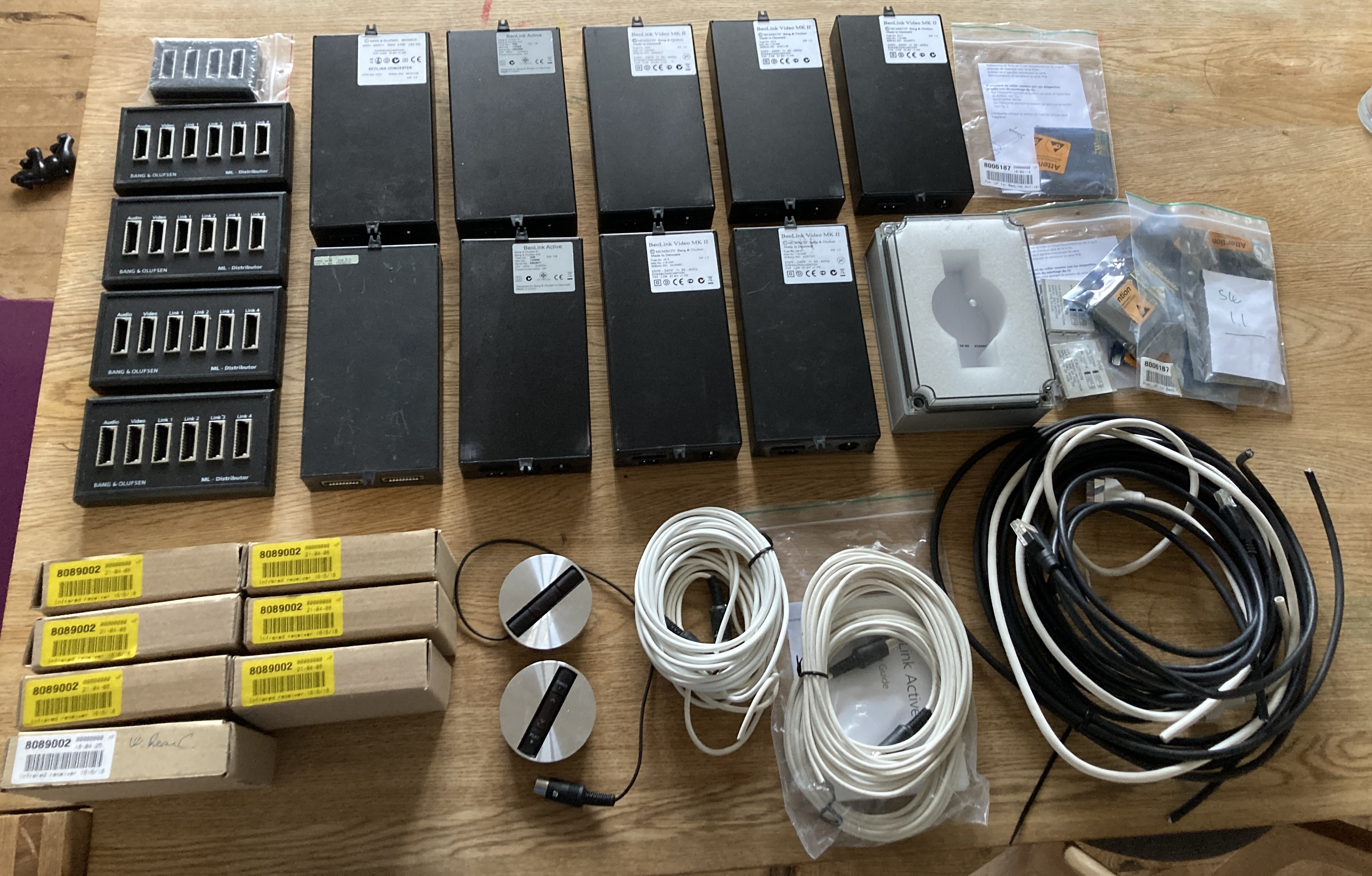
I guess this was from a B&O repair shop as there is several microcomputerboards, presumably for Beolink Active, 7 new in Box IR eyes, 2 used IR eyes, 1 Beolink Converter 1611, 1 AV 9000 Audio kit 1610, 2 Beolink Active 1636 SW1.6, 5 Beolink Video MKII SW 1.5, an outdoor mounting box for IR eyes, 5 Masterlink Distributors and some Masterlink cable.

Next up testing if everything works
Location: Denmark
MadskpGOLD MemberHello
The servicemanual for Beolab 3 only have block diagrams showing the connections between the boards, no component level schematics.
Your best bet might be to compare to the components in a working one, provided you have 2 Beolab 3 speakers
Location: Denmark
MadskpGOLD MemberMadskp wrote:
Beolink converter type 1614
Hi,This should now be available on the product page.
Thank you very much 🙂
Location: Denmark
MadskpGOLD MemberHi Mark
I am looking for a servicemanual for the Beolink converter type 1614 and was wondering if you have it among the scanned manuals?
It might be a servicemanual that covers both Beolink Converter type 1614, Beolink Video type 1615, AV9000 Audiokit type 1610 and Beolink Active type 1616, 1618
Thnaks in advance
Location: Denmark
MadskpGOLD MemberThanks for the info, I have made a couple of changes.
Hopefully this will resolve the issues.
Thanks, I will report back if the issue should persist
Location: Denmark
MadskpGOLD MemberI belive the hardware for the two way is there even though the software is not ready for it ( bonus info: instead the 1.6 SW will let the BM4500 work as a link room).
That said the two way functionality might still do something even though the software is not complete, which is prooved by your IR transmitter flashing (unless its because you actually have a newer software in it). And that might activate some signaling on the datalink part.
Regarding disabeling of the two way. As far as I know the BL7000 decides if it is one way or two way when you register components in the setup menu on it. How that works if the product is partly capabale of two way I dont know.
Location: Denmark
MadskpGOLD MemberI think I know the buzzing noise you are mentioning. When I have had issues with this it has been related to datalink issues, in some cases experimental cable connections.
So a hint could be to disconnect everything that is datalink connected (which also counts Powerlink and MCL connections) and check for loose connectors. Also maybe connect things one at a a time to see if a specific device trigger the buzzing.
Hope this can lead to a solution
Btw. you mention SW 1.6 in the BM4500, but to my best knowledge that should not work with two way remotes, but I might be wrong.
Location: Denmark
MadskpGOLD MemberSupplementing info. It looks like my post in the Bsys3 Bsys4 thread came thru after all but with the quotes not functioning correct, so something is wrong. Also in the above post I tried to link to that thread with the same error which is why I have not linked to the thread
Location: Denmark
MadskpGOLD MemberI have issues answering threads. I get a Error establishing Redis connection if I have links or quotes in the post
Location: Denmark
MadskpGOLD Member@Madskap: Thanks a lot for the link to the respective thread. I will check with my dealer, if this cable will be still available. If not, maybe Steve can help. From my experience, the DVD 2 needs both connections, HDMI and Scart. The BSys 3 seems to connect them together automatically, if you choose the right connection plugs (in my case HDMI-In 3 and Scart 3). I do not know, if the BSys 4 does put the mini-AV and HDMI „XY“ automatically together, very likely not.
I just tested on my Beoplay V1 (that is based on the Bsys 4 platform), and I am not able to setup a connection where I combine the AV socket with a HDMI socket, so I guess you would depend on using the analog video signal for the DVD2 if you want to be able to control it with the remote.
@Madskap: Thanks again for hinting me to the Beolink handbook. Did not think about that. The panel has a built in IR receiver, so I prefer to establish a direct connection between the BSys and the panel for IR control. There is also a specific cable for connecting the BSys 3 (Monitor control) and the panel. In this case I would need a rj-45 to DSUB9 cable for connecting to the BSys 4. I can find one from Panasonic on the internet, but it seems to be available on the Japanese market only, and I do not know, if it will be the right one.
Ok so does that mean that the IR has a separate cable between the BV4 and Bsys 3? In that case a converter cable could bed made, but probably as a DIY solution if the Pinout can be detected.
BeoMedia 1
The Beomedia 1 could probably be connected via a VGA to HDMI adapter. Note that there are simple cable adapter for the other way, but in this case It has to be one that converts the analog signal til digital. I can see that some of them also can get sound from the “PC” to HDMI.
For control as you mention yourself an external IR eye, and then setup the HDMI connection on the Bsys 4 to PC command. I guess that should work.
I am thinking of connecting the BSys 3 as external source to the HDMI-In of the BSys 4. The question will be, how to start the sources connected to the BSys 3, once it is selected via BSys 4?
If the Bsys 3 can be set in option 4 all commands will be Link + commands with will not interfere with the Bsys 4. That way you could control it, but not very user friendly.
For your Beolab. speakers you will also need some DIN to Rj45 adapters.
Also do you connect to a Masterlink Network? Then you will also need a NL/ML converter in the mix
with all these extra cables/adapters, and the risk of limitation on your sources you might have to consider what benefits you gain from the Bsys 4 compared to the Bsys 3. Is it worth the upgrade when you keep using the BV4?
If you just need it to be NL compatible you could add an NL/ML converter to your existing setup.
Location: Denmark
MadskpGOLD MemberGlad to hear you figured it out.
Testing stuff that is not fully assembled can sometimes introduce veird anomolies
Location: Denmark
MadskpGOLD MemberIn the Beolink Handbook ver. 2.1 (available in the Beotech section) the whirring for the IR eye for both Bsys 3 and 4 is shown for IR eye’s bot with and without auto contrast. From what I can you should be able to replace the existing cable in the IR eye with a standard network cable instead following the whirring diagrams in the Beolink handbook.
Also in the Beolink handbook is the part numbers for the two types of 9 pin mini DIN to start cable. There is both one with a Female and a male scart. part numbers in the screenshot below:
Location: Denmark
MadskpGOLD Member– Is it possible to connect my DVD 2 to the BSys 4 and how?
For connection of the DVD2 you will have to use the AV socket on the Bsys 4 in order to control the DVD2. B&O made a 9 Pin DIN to start start cable for this purpose. Not sure if that is available anymore. More info about this can be found in this thread https://forum.beoworld.org/forums/topic/beoplay-v1-connection-old-stuff/
Other old thread suggest that you can also use HDMI to connect the DVD2 to a TV, but you will still need the start connection in order to get control. Not sure how this is setup on the Bsys 4 connection menu.
Location: Denmark
MadskpGOLD MemberNot sure what it could be, but maybe a hint for fault finding. Does it do it both with the automatic function when you place it on a table, and when the manuel move on the setup menu is used?
If it is only in automatic mode it could maybe be related to the activation switches.
On another note belt size and tension can be very important. I was advised about the belt size in this post for reference: https://forum.beoworld.org/forums/topic/beolink-7000-belt/#post-66838
Location: Denmark
MadskpGOLD MemberAs ever, thanks for all the invaluable help, Madskp.
You are welcome, and glad to hear that it worked for you. I also became a little wiser about how this integration of the BS5 with an other audiomaster works. Till now I have thought of the option of Audimaster = 0 as the same as a link room, but it seems to be the way to integrate it with an other audiomaster, but you will loose the possibility for Spotify and A.AUX sources on it.
Location: Denmark
MadskpGOLD MemberJust did a little test with my Beossound 5 (AM = NO), Beocenter 2 (opt. 0) and Beocenter 6-23 Tv (opt. 2).
This seems to work, although the first time I selected N.music I had to activate it manually on the BS5 buttons after I had activated the source with the remote (which did activate the BC2, BC6 and got the picture showing on the BS5). The controls might not be optimal, and as mentioned earlier I have yet to see an official setup guide for this combination, so might not be a fully supported scenario.
One issue that came up while testing, and might only be related to a failure in my system: at one point the music started to be scratching like a bad radio signal and after that I never got the music playing again, although still having full control of the BS5 with the remote.
Location: Denmark
MadskpGOLD MemberBefore you tidy the wirering to much you might want to check how the BS4 and BS5 behave togheter with the overlapping commands
Location: Denmark
-
AuthorPosts