Forum Replies Created
-
AuthorPosts
-
 Moderator
Sorry, one other observation: When the Essence Mk2 was connected to the Passive, if I then used my little adaptor to route the Essence RJ45 pin 4 to the Passive’s PL pin 1 then there was a distinct ‘pop’ from the speakers when the Passive was activated. The ‘pop’ didn’t occur when the straight-through, fully wired RJ45 to PL cable was used.
Location: Warwickshire, UK
My B&O Icons:

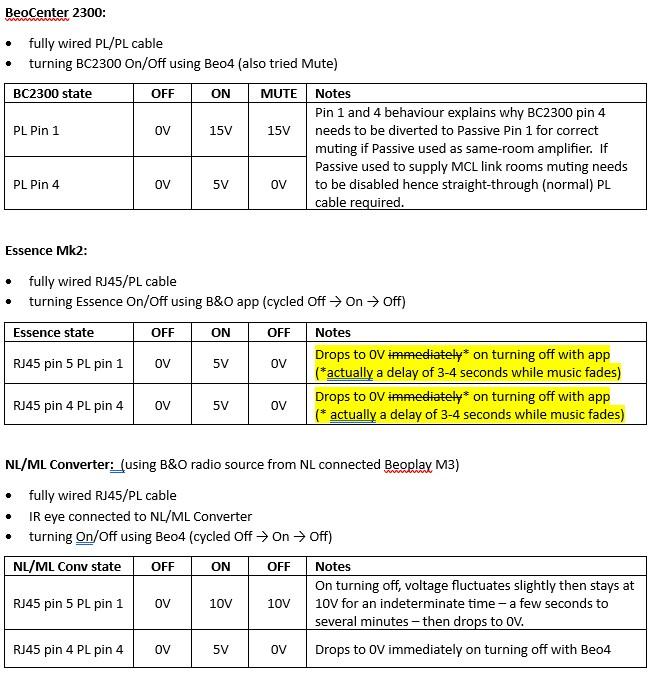
Here we go – all pin voltages are approximate and were tested while Beolink Passive was connected:

The only real surprise* from my limited testing above is for the NL/ML Converter and the fact that the Passive does not switch off reliably with the fully wired RJ45 to PL cable, due to the voltage remaining at the Passive’s PL pin 1 for a period (a few seconds to a few minutes). I used my little adaptor to move RJ45 pin 4 to pin 5 and it switched off reliably straight away.
* EDIT: I shouldn’t really have been surprised because you noted this delay in Note 4 of your table at the first post!!! 😀
No such problems with the Essence but I haven’t conducted a long term test.
I suspect that the Core behaves like the NL/ML Converter hence the requirement for a modified cable.
Finally, I didn’t really explore ‘muting’ for the Essence or NL/ML Converter – I think these mute internally rather than switching the amp off but cannot be sure how it would behave if for example the Essence was supplying a source to a linked NL device in another room. To be honest there are so many settings in the NL devices (integrated versus linked, local sources, etc) that it becomes confusing and is difficult to be sure what you are testing!
Location: Warwickshire, UK
My B&O Icons:
@Guy have you used the MCL2P with the Essence over a longer period of time?
Not really for a longer sustained period (like Steve suggests), but I have often used my Essence to power a Passive with a fully wired PL to RJ45, and never experienced problems turning on or off.
In support of that other thread, I did some quick comparisons today between the Pin 1 and 4 PL outputs on BeoCenter 2300, Essence Mk 2 and NL/ML Converter (obviously looking at RJ45 pins 5 and 4 respectively on the latter two). Let me just make up a table of the results and I will post back here. Might have to do a jpg as I can’t remember how to post a table!
Location: Warwickshire, UK
My B&O Icons:
One additional thought about your setup: If you are indeed using the Essence line-in for your TV sound input (from your hdmi arc extractor), then you will have to go into the Essence setup menu, go to the ‘Sound’, ‘Line-In’ setting and tick the little check box to ‘disable delay’.
The little note above the ‘disable delay’ box explains why you need to do this as follows: Sound from line-In connected sources is delayed in a Multiroom system. Therefore, when used with video content, picture and sound is not synchronized. The delay can be disabled, but sound from line-in can then not be distributed.
Location: Warwickshire, UK
My B&O Icons:
You should be fine with the following cable from one of the Essence’s RJ45 powerlink outputs to the BeoLab 7-2 Powerlink input, but please double check with Steve (at Sounds Heavenly) before ordering: https://soundsheavenly.com/bang-olufsen/31-325-rj45-to-powerlink-compatible-all-in-one-cable-convert-new-2013-ethernet-powerlink-to-traditional-8-pin-din-powerlink.html#/9-length-18m
(My understanding is that the BeoLab 7-2 triggers on/off from Powerlink pin 4, in which case the above cable should work fine.)
Location: Warwickshire, UK
My B&O Icons:
Many thanks Steve – that’s all useful to know and will hopefully help Christian if he decides to go down the Passive route!
But back to his questions …
Every cheap ceiling speaker will do Correct?
I suppose so, but if you are going to the trouble of cutting holes in your ceilings then it’s worth investing in a decent product. B&O did make some Passive ceiling speakers (search for Beovox 1 and 2) and even an in-wall speaker (IWS2000), but other makes will probably sound equally good and there will be a better selection available. Again, worth trialling with a Passive before committing to a big spend!
Are there any active ceiling speakers you are aware of, so that I can skip the Amplifier? My understanding is, no, as they would also need to speak “Powerlink”
Not that I am aware of from B&O, but if you were happy with the aesthetics your could mount Beolab 4000s up in the corners of your rooms – there are wall brackets available.
If I have multiple Speakers (say 2 as stereo pair in the kitchen, maybe 1 in the guest toilette and maybe 2 in the dining room, I would need several “main components”, see above. There is no solution where I can have only one “main component” like a Beoconnect Core and drive 3 areas independently, correct?
Ideally you want an NL-capable ‘main component’ (Essence Mk2, Core etc) per room – I think that this is the only way to get true independent operation with control from the B&O app. You could maybe get away with an NL/ML Converter in one of the rooms as this has a Powerlink output and should be able to play sources from other NL devices.
Location: Warwickshire, UK
My B&O Icons:
Are you sure that that is the right cable?
I was using one earlier today to power a Passive from my Essence Mk2 and it worked perfectly also, include on/off trigger.
However, for the cable that you linked I do see the note about Essence, Passive, etc on @Steve at Sounds Heavenly’s site, so perhaps he can comment?
My cable from Steve is fully wired, and I note that the Beolink Handbook has a note against the fully wired RJ45 to Powerlink to say ‘needed for Passive’. See attached jpg.
But let’s not over-complicate things for Christian – rest assured that he will be able to trigger a Passive from a Core, or an Essence!!!
Attachments:
You must be logged in to view attached files.Location: Warwickshire, UK
My B&O Icons:
Furthermore the BeoAmp 2 is also very expensive, more like 650 €. Therefore I tend for a 3rd party solution as it should be a budget solution. Its just for background music.
Don’t rule out the Beolink Passive – you can pick these up very cheaply second hand and they are easy to trigger (turn on) with the Powerlink output from the Core*. If you are using passive ceiling mounted speakers then at the very least trial a Passive and see how you get on. I suspect that this solution will be fine for background music.
* Using a cable like this: https://soundsheavenly.com/bang-olufsen/31-325-rj45-to-powerlink-compatible-all-in-one-cable-convert-new-2013-ethernet-powerlink-to-traditional-8-pin-din-powerlink.html#/9-length-18m
To keep costs under control, you may also want to consider the Beosound Essence Mk2 instead of the Core. Available second hand for £100-200 on UK eBay.
Location: Warwickshire, UK
My B&O Icons:
22 February 2025 at 09:43 in reply to: Understanding the Beomaster 3500/4500 touch panel display #63917Hi and welcome to Beoworld! Your BS3500 looks to be in excellent condition.
There is some info on this thread about touch panels and possibilities for repair: https://archivedforum.beoworld.org/forums/t/10070.aspx
But are you sure that the glass panel is touching the rubber nipple when assembled? There can be problems with the glass panel coming unstuck and lifting from the plastic surround.
I would probably stick with the BeoLink 1000 for the BS3500, but you could also use Beo4. The larger Master Control Panels (MCPs) would not work with the BS3500 because they are designed for use with two-way remote capabilities, which the BS3500 does not have.
EDIT: I also found these words on the old forum describing the way the BC9500 touch panel works – I assume that the BS3500 is similar:
The unfailing sensi-touch control of the Beocenter 9500 works through a condenser effect. A graphite area is printed on the underside of the glass panel, and charged with a high frequency current. Even the lightest touch of a finger will spark the reaction.
Location: Warwickshire, UK
My B&O Icons:
PS: Is is possible to close a thread or mark it as “found” or “sold” (in the for sale section)?
My moderator privileges allow me to edit the title, hence done!
Location: Warwickshire, UK
My B&O Icons:
18 February 2025 at 17:38 in reply to: How to add / use additional functions to Beo4 – manual instructions not helping #63883Great – I am glad it works!
I was a little confused about the SOUND function earlier because on later versions of the Beo4 SOUND is added to LIST as a discrete function, not part of the A SETUP sub-list. (eg. on my DTV Beo4, A SETUP just shows BASS, TREBLE, LOUDNSS, S.STORE).
Anyway, all sorted and I hope that you get your MCP fixed!
Location: Warwickshire, UK
My B&O Icons:
18 February 2025 at 16:17 in reply to: How to add / use additional functions to Beo4 – manual instructions not helping #63878@Guy, my Beo4 indeed has an AV button in the middle of row 2, however that doesn’t even make it display AV!
It’s not supposed to display AV – that function enables you to get Video audio through an Audio product and vice versa – I only asked about it to check what version of Beo4 you have.
Any clues where Balance might be hiding?
Try adding SOUND* to the list function and point at the Beomaster, press GO and observe the display.
* EDIT: Just realised that SOUND is already showing under your A.SETUP, hence I think that should work. Pressing OK whilst SOUND is displayed should cycle through sound control options (including balance) on the Beomaster’s display.
Location: Warwickshire, UK
My B&O Icons:
18 February 2025 at 11:14 in reply to: Beomaster 5500 Master Control – rotary control only works in one direction #63864From memory there’s also a little microswitch* next to the optical sensor. This is mechanically operated by the wheel and basically tells the system which way the wheel is turning. I would look at that in the first instance.
(* as opposed to a ‘big’ microswitch 😀)
EDIT2: This thread discusses the problem and has a useful photo of the switch: https://archivedforum.beoworld.org/forums/t/35687.aspx
Location: Warwickshire, UK
My B&O Icons:
18 February 2025 at 11:04 in reply to: How to add / use additional functions to Beo4 – manual instructions not helping #63862Pressing LIST takes me through a long list of options, none of which seem to take me to controlling balance / bass / treble.
As MM stated above, the option that you need to add is A SETUP. Once this is in your LIST, you select it and press GO, then BASS, TREBLE etc will be displayed.
(I think your Beo4 is the initial ‘AV’ version (with an AV button in the middle of the second row). This version does indeed display OPTION before ADD when you go to the setup mode. It is also quite an old remote so will not have as many functions as newer Beo4s. It should still have the A SETUP function though)
Location: Warwickshire, UK
My B&O Icons:
One observation: When I move the mouse pointer to the right edge of the screen it doesn’t automatically bring out the control buttons (Beo4-like display). I have to click on the ‘B&O’ icon in the notifications tray to open the controls. Strange – maybe something to do with my display settings.
Just wanted to add here that I solved this problem on the laptop by going into windows ‘settings’ ‘system’ ‘display’ and playing with the ‘scale’ settings (not the resolution). I reduced from the windows recommended 150% to 125% and restarted – the Beoport control panel now appeared via clicking the usual little triangle. I then returned to the recommended 150% and it still worked.
Location: Warwickshire, UK
My B&O Icons:
Hi and welcome to Beoworld!
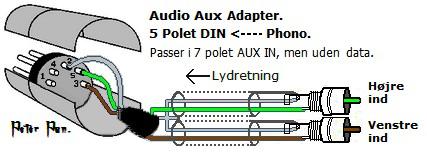
You need to make sure that your DIN to RCA connector sends the input to pins 3&5 of the DIN connector. Your lead is probably a DIN output using pins 1&4. (EDIT: You don’t need a 7-pin DIN, a 5-pin DIN will work)
The correct connections are as follows:

EDIT: And make sure that you connect to the AUX input of the Ouverture and not one of the Powerlink sockets!
Location: Warwickshire, UK
My B&O Icons:
The one that I used was downloaded from here (big blue ‘download now’ button in the centre): https://beoport.software.informer.com/download/
Location: Warwickshire, UK
My B&O Icons:
Hi and welcome to Beoworld!
Is it possible to mount it to a Beovision 7-32 floor stand?
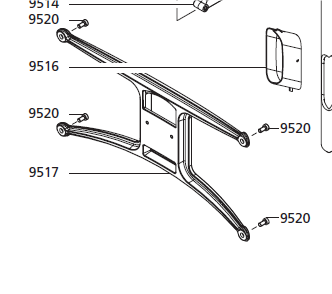
Possibly, but at the very least you’d need to fit the following BV10-40-specific part to the back of your TV before clipping it onto the BV7-32 stand interface. This would be as hard to find as the whole stand, and once on the BV7-32 it wouldn’t hang at the right angle because the geometry of the supporting bracket is wrong.

The TV is not designed to be leant against the wall, so do so at your own risk! I would be tempted to re-inforce the summerhouse wall with a large sheet of marine ply and use your wall mount.
Location: Warwickshire, UK
My B&O Icons:
I have Beoplayer and Beotray in my start up apps and it starts it up and is then always available via the right hand side of the screen. Didn’t work well under Windows 10, had to authorise the app every time.
I suspected a display compatibility problem with the laptop – especially as it has a touchscreen. I therefore connected the Win11 laptop to my PC’s 26inch Dell monitor and the Beoport control panel now appears on the right hand side as normal, including showing the ‘HOLD’ button.
Hence I would have no hesitation in installing Beoport/Beoplink PC2 on a Windows 11 PC in the future. (The only limitation is the strange muting on change of N RADIO channel, which has been a problem since Win7)
Location: Warwickshire, UK
My B&O Icons:
I have Beoplayer and Beotray in my start up apps
Same here, but the controls still won’t appear on the right hand side. Also, when I do click in the notifications tray to get the controls, the HOLD button is missing so I can’t keep it displayed!
The controls on the left side of the screen appear normally (eg when playing N MUSIC or N RADIO)
Location: Warwickshire, UK
My B&O Icons:
-
AuthorPosts