Forum Replies Created
-
AuthorPosts
-
 GOLD Member
Ah yes, now I think of it, the other inputs you want to add (the tapecorder and the internet box) don’t need to be controlled by your B&O remote, so a simple external tape switch box might be a better solution, such as this one with DIN connectors, or this one with RCA connectors. Connect your Beogram to the Phono/Tape 2 input, and your other devices (via the switch box) to the Aux input.
I used to have a tape switch box such as this myself, which I used so I could have my Beogram turntable an also a reel-to-reel tape deck connected to by Beosound 4 (because the Beosound 4 has only one aux input), and it worked fine.
Location: Liverpool
My B&O Icons:

I’ve never owned a 9300, but I do own a 8500, and have also owned a 9000 like you.
I did once look into getting a 9300 myself but decided against it as I was told that the amplifier was not as good as in the 8500 (and I use my 8500 with passive Beovox speakers, so the amp is important!).
When I researched the 9300 however, my understanding was that the Phono and Tape 2 input buttons would work dependent on what was connected to that input – if you had the Beogram 4500 connected to it, you would be able to control that by remote, and likewise if you had a B&O external tape deck connected instead.
One way to extend the inputs would be to add a B&O MCL2AV link room system which you would connect to the Aux input of the 9300. You could then connect your internet box and REVOX tapecorder to that, and switch to them using LINK room commands on your B&O remote. You could have your Beogram 4500 connected to the 9300’s Tape2/Phono input, which would have the advantage of allowing you to control the Beogram with remote too.
Location: Liverpool
My B&O Icons:
FYI, the crossover cables arrived, and they worked fine in the ‘dotless’ versions of the power/line adapters. I tested them with my Beocom 6000 pyramid base, Beoline PSTN base and Beotalk 1200, and they worked with all three.
Location: Liverpool
My B&O Icons:
Since posting the above, I have managed to get hold of a Beosystem 3 Mk2 quite cheap on eBay (they usually go for £400-£500 but I managed to get one for under £150), so I will also be trying that out when it arrives – connecting speakers, projector, and BV7 to the Beosystem 3 instead. I think this will work if I set the BV7 to Opt.4, the Beosystem 3 to Opt.2 and my Beosound 4 to Opt 0.
My only concern is that the Beosystem 3 might not be able to get its remote commands from the BV7 or the BS4. I do have a spare IR eye but don’t have the right cable to connect it to a Beosystem 3.
I’ll update this post with how I get on. If the Beosystem 3 turns out to be of little use to me, I’ll just sell it on eBay and go back to the original plan in the post above!
Location: Liverpool
My B&O Icons:
24 October 2024 at 16:37 in reply to: Adapting Ortofon OM-Series for SP Turntables – Small Batch Coming Soon #60426That is great news. I have three B&O turntables (Beogram 3000, 8500 and RX2), and I’ve replaced the MMC4s in the first two at quite some cost quite recently. They sound great, but the ability to get rebuilt MMC cartridges won’t last forever, so it’s good to see someone working on a longer-term solution. Great work.
Location: Liverpool
My B&O Icons:
24 October 2024 at 15:58 in reply to: Adapting Ortofon OM-Series for SP Turntables – Small Batch Coming Soon #60424I’m afraid I don’t really understand this. Do you plan to make an adapter that allows the use of Ortofon cartridges in B&O turntables?
Location: Liverpool
My B&O Icons:
I hadn’t actually noticed the white dot until you just mentioned it, thanks! I’ll continue my experiments when those crossover cables arrive.
Location: Liverpool
My B&O Icons:
Follow up – I’ve looked on eBay and I think what I need for the second type of adapter (with the pins close together) is a crossover 2 pin cable, like this one. I’ll buy them and test them.
Location: Liverpool
My B&O Icons:
Thaks Guy. You will have a different Beoline to me if yours does not need an adapter. Mine is the rectangular one that does need the adapter.
It seems to depend on the cable then – I looked at the main landline phone we have (not B&O) and checked the cable. On that one, only the two middle pins where present on the RJ11 plug. Using that cable, it was the other adapters that worked – the second one in my picture. The first ones did not work.
The cable I had originally tested with is one where all 4 pins are present, so it’s a combination of having the right cable working with the right adapter.
I’ll see if I can get hold of the correct cables for the other two adapters then. I dig a round in the garage might yield some results….
Location: Liverpool
My B&O Icons:
24 October 2024 at 10:01 in reply to: Beocom 6000 with Beoline PSTN Base – phone book not working? #60403FYI, I found website that listed the 10,000 possible 4-digit pins in order or popularity. I worked my way down that list… the PIN was number 903 on that list! I’ve changed it back to 0000 now.
This says more about my obsessive nature than you really need to know, but there it is – there is a solution, if you’re very patient.
Location: Liverpool
My B&O Icons:
I think I’m happy with it the way it is working now. The main purpose of it is to play digital music from my PC, and be able to control that with my Beo4.
The ability to use it as a ‘remote control’ for other sources is useful, I just have to be conscious that I have to select that source with the Beo4 first, before I can control it on the Beoport app.
I listen to a lot of Spotify too, so using N.Radio as a workaround to listen to Spotify when played on that PC is useful.
I’m still hoping that Hall Audio’s ML Streamer Kickstarter is successful so I can use that instead and control Spotify with my Beo4, but if it isn’t, I’ll be looking out for an Essence Mk2 on eBay (plus an NL/ML converter so I connect the Essence to my ML system).
Location: Liverpool
My B&O Icons:
Yes you were right! I tried plugging one of my Beolab Pentas into the PC2 direct, and I got sound. That was just for testing though – I have plugged the Pentas back into the BS4 now.
So, it seems that if my BS4 is in Opt.1 and the PC2 is in Opt.6, I can control everything with my Beo4. I can also control things with the Beoport app, but only if I have already selected that source with my Beo4 – for example if I select CD on the Beo4, I can then also select CD on the Beoport app, and control CD playback with the buttons in the Beoport app. I’ve tried that with the TV too – if I’m watching DTV on the BV7, I can select DTV in the Beoport app. and change channels, adjust volume and so on. I chose Opt.6 instead of Opt.0 on the PC2 as for some reason TV sources such as DTV and DVD are not available if using Opt.0.
This time, I have not bothered to add any N.Radio stations via the workaround earlier in this thread (most of them did not work anyway), and I have switched on the ‘Mix Sound’ option in the Beoport settings. This means that if I select N.Radio with my Beo4, no radio station plays as the list is empty, but I can then play Spotify on that new PC, and it plays through B&O system.
It’s not perfect, but it works! Thanks for your help.
Location: Liverpool
My B&O Icons:
I have revisited this post to remind myself how I managed to get my Beolink PC2 working, because it’s stopped working! At least, it’s not working fully.
I decided to get a tablet PC to use as a dedicated music PC (because my main PC is usually for gaming), so I connected the PC2 to that, installed the same Beoport software, and set the Beoport to Opt.0. My Beosound 4 remains in Opt.1.
It’s not working like it used to. It’s as if they are not communicating properly.
If I use my Beo4 to select any source, it all works (including N.Music and N.Radio). If I select N.Music or N.Radio with the Beo4, that source is highlighted in the Beoport app.
If I select any other source such as CD on my Beo4 however, it plays fine, but the Beoport app does not seem to recognise that the source has changed – it will continue to show N.Music or N.Radio, and that source will still be ‘playing’ on the PC.
If I try to use the Beoport app to control my system, it doesn’t really work at all. If my BS4 is in standby and I select a main source such as CD in the Beoport app, then the source displays on the BS4 display, the CD spins and plays, but my Beloab Pentas do not power up – there’s no sound. If I select a TV source such as DTV, then my BV7’s display shows that source in its display, but the screen does not come on, and no sound is heard. They will then only go into standby if I hold down the standby button on my Beo4, for the ‘All Off’ command.
If the BS4 is already switched on and playing either CD or Radio, then I can control that source via the Beoport app, but if I hit the Standby button within the Beoport app, the source ceases to display in the Beoport app, but the BS4 remains on, and continues playign that source.
If I try to play N.Music or N.Radio via the Beoport app rather than from the Beo4, the BS4 does nothing.
It used to work fine so this is a mystery! So far I have tried, without success:
- Reinstalling the BeoPort app
- Trying the BeoPort app in all other available Opt. settings (2, 4, 6)
- Trying the BS4 in Opt.2
- Trying a different ML cable, and connecting it direct to the BS4 without any junction boxes
- Restarting the PC
- Reconnecting it all back to my original PC
I get the same results no matter what I try. So frustrating considering it definitely used to work – I cannot understand why it has stopped working.
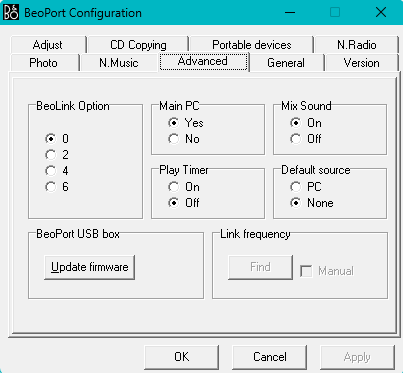
Here’s a screenshot of the Advanced tab in the settings:

Location: Liverpool
My B&O Icons:
Ah that is good to know, thanks. If Hall’s Kickstarter is not successful, I’ll look for an Essence Mk2, and an NL/ML Converter so I can connect it to my Beosound 4 (or possibly to my Beocenter 8500, using a 1611 converter).
Location: Liverpool
My B&O Icons:
14 October 2024 at 06:59 in reply to: Beocom 6000 with Beoline PSTN Base – phone book not working? #60129Thanks Guy. Yes I tried that; I reset the handset, pushed the button on the base, and put the handset in. The LED on the back of the handset continues to flash, and when you pick it up, it’s still asking for the PIN.
It’s my own fault – I should have reset that base before I de-registered the handset from it. It never crossed my mind that the PIN would have been changed.
I’ve got 10,000 possibilities to try then eh!?
I’m sure there’ll be a way of resetting it back to 0000 if you open it up, but I can’t find a service manual for it anywhere online.
Location: Liverpool
My B&O Icons:
13 October 2024 at 20:05 in reply to: Beocom 6000 with Beoline PSTN Base – phone book not working? #60119Having got the Beoline PSTN base working, I decided to connect one of the Beocom 6000 handsets to my original pyramid base. It asks for a PIN, and I add 0000, but then I get ‘***Error***’, and registration fails (I’ve never changed the PIN so the default should work, but I did buy it used, so maybe the original owner changed it). I know the handset is fine because it will connect to the Beoline PSTN base, but won’t connect to the pyramid base.
I know you can reset a base with dot 7 000 8 but you have to be registered to it to do that, and I can’t register to it! Does anyone know of a way to solve this?
Location: Liverpool
My B&O Icons:
13 October 2024 at 12:55 in reply to: Beocom 6000 with Beoline PSTN Base – phone book not working? #60112I bought a job lot that in fact included 5 handsets, but two of them don’t work. One of the ones that doesn’t work is a Mk2 but the battery had clearly leaked and done some damage, and there are bits rattling around inside. There’s another Mk1 that looks fine and no battery leakage, but it won’t take a charge (I added a new battery), so it must be shot.
Still, I got 3 charger bases and 5 handsets for very little money, and three of the handsets work, so not a bad deal!
Location: Liverpool
My B&O Icons:
I decided to have a play around inside this Beocenter 4000 in case I can get it working. If I can’t, I’ll just sell it for parts, but it’d be nice to get it going.
As I said in my previous post, I know the tape decks ‘work’ as I can record onto tape 1, then when I take that tape out and put it in my Beocenter 8500, it plays fine. Somehow, the sound is not making it from the tape decks to the amp. You can only hear a very quiet scratchy sound when playing either tape 1 or tape 2.
I poked around inside where I can see that the tape deck units connect to the PCBs, and every now and again I’d get a brief burst of playback for a second, or more often, a loud hum, so I’m thinking it could be a loose connection, dry solder connection or something, but I can’t seem to isolate it. If any of you have any experience of this, I’d be grateful of any help you can offer.
Location: Liverpool
My B&O Icons:
13 October 2024 at 12:16 in reply to: Beocom 6000 with Beoline PSTN Base – phone book not working? #60108It is already set to ‘Common’ and I have not changed it. I reset one of the handsets and at first it showed ‘Updating’ whenever I tried to access the phone book, but then I tried again after I’d had my lunch, and it worked. The 2 entries had disappeared, the phone book was empty, and I have been able to add entries to it, so it’s working.
Seems odd that resetting the handset rather than the base would fix it, but it worked, so thanks Guy! Great advice, again.
Location: Liverpool
My B&O Icons:
Agreed, but some of us (like me) will never move away from our CDs and vinyl – NEVER!
I have a house full of B&O now and it’s all Masterlink, or the older audio aux link.
I did consider getting an Essence MkII myself in fact, but I think I would also need an NL/ML converter to make that work, and it looked a bit complicated, and much more expensive than the ML Streamer. I’m also wary of how long the Essence MkII will continue to be supported, given its age already.
This is what I have, most of it Masterlink, so you can see why, for me, the ML Streamer would be useful:
- Beosound 4
- Beogram 3000
- Beocenter 8500
- Beogram 8500
- Beovision 7-32 with Beolab 7.1
- Beovision 8-40
- Beolab Penta MkIII
- Beolab 6000
- Beolink Passive with Beovox CX50
- Beolab 3500
- Beolab 2000 x 2
Then some extra bits:
- Beocom 1401, with the A/V base
- Beocom 6000 x 3
- Beotalk 1200
- Beo4 MkIV
- Beolink 1000 MkIII
- Beolink Converter 1611
- Beolink PC2
Then a few items currently unused:
- Beogram RX2
- Beogram CDX2
- Beocenter 4000 (a current restoration project)
- MCL2A
- MCL2AV
- Beolink Converter 1614
- Beolink Active
- HDR1
Location: Liverpool
My B&O Icons:
-
AuthorPosts