






Home › Forums › Product Discussion & Questions › BeoLab › BeoLink Converter 1611 Innovative Configurations
- This topic has 509 replies, 21 voices, and was last updated 2 months ago by
 Madskp.

-
AuthorPosts
-
17 November 2024 at 20:09 #60990
 Tobias ToftBRONZE Member
Hey folks. I’ve been following this thread closely (thank you!), and decided to give the 1611 a shot as a way to enable more input sources on my Beosound 4. Here’s what I got so far:

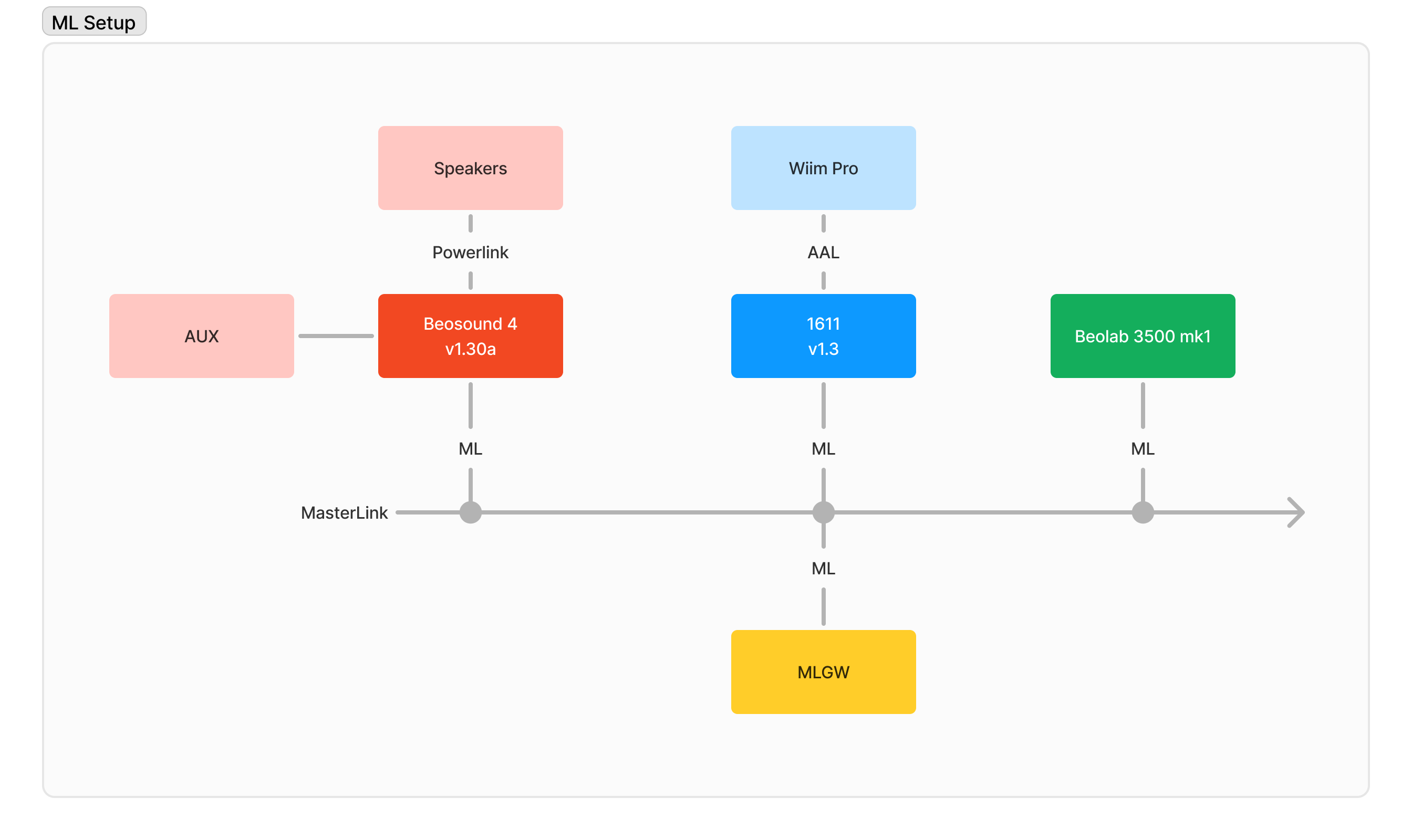
My Beosound 4 is set up as an audio master in Option 2, to enable the video inputs on the 1611. If I press any video source on the Beo 4 directed at my BS4, it works as expected, and it starts playing audio from the Wiim Pro via the 1611. Same with the Beolab 3500. However, I think my BS4 has a weird bug:
As soon as I adjust the volume on the BS4, either via the front panel or the Beo 4, the red stand by led comes on and the display freezes on “Volume XX”. I can turn the unit on and off, it responds to remote commands, and generally does what it needs to do, but the display never updates. The only thing that will refresh the display is if I press “Menu” on the front panel, which will allow me to traverse the menu system. However, when I exit out of the menu it clears the display and stays blank when I turn the unit on, off, select sources, adjust volume, etc. Unplugging the power and plugging it back will reset things, but as soon as I adjust the volume on a video source it freezes up again.
Has anybody seen this? Is it a known software bug on the early versions of the Beosound 4?
PS. Apologies if this is too off-topic for this thread, happy to start a new one if that’s preferred!
18 November 2024 at 17:16 #61022MadskpGOLD MemberHey folks. I’ve been following this thread closely (thank you!),
Great to hear that the thread is usefull 🙂
As soon as I adjust the volume on the BS4, either via the front panel or the Beo 4, the red stand by led comes on and the display freezes on “Volume XX”. I can turn the unit on and off, it responds to remote commands, and generally does what it needs to do, but the display never updates. The only thing that will refresh the display is if I press “Menu” on the front panel, which will allow me to traverse the menu system. However, when I exit out of the menu it clears the display and stays blank when I turn the unit on, off, select sources, adjust volume, etc. Unplugging the power and plugging it back will reset things, but as soon as I adjust the volume on a video source it freezes up again. Has anybody seen this? Is it a known software bug on the early versions of the Beosound 4?
I can’t say that I have much experience with the BS4. However I would suggest that you try to isolate the problem by removing the ML connection to for example the 1611 and the MLGW to see if the problem persist. Hope this is helpfull
Location: Denmark
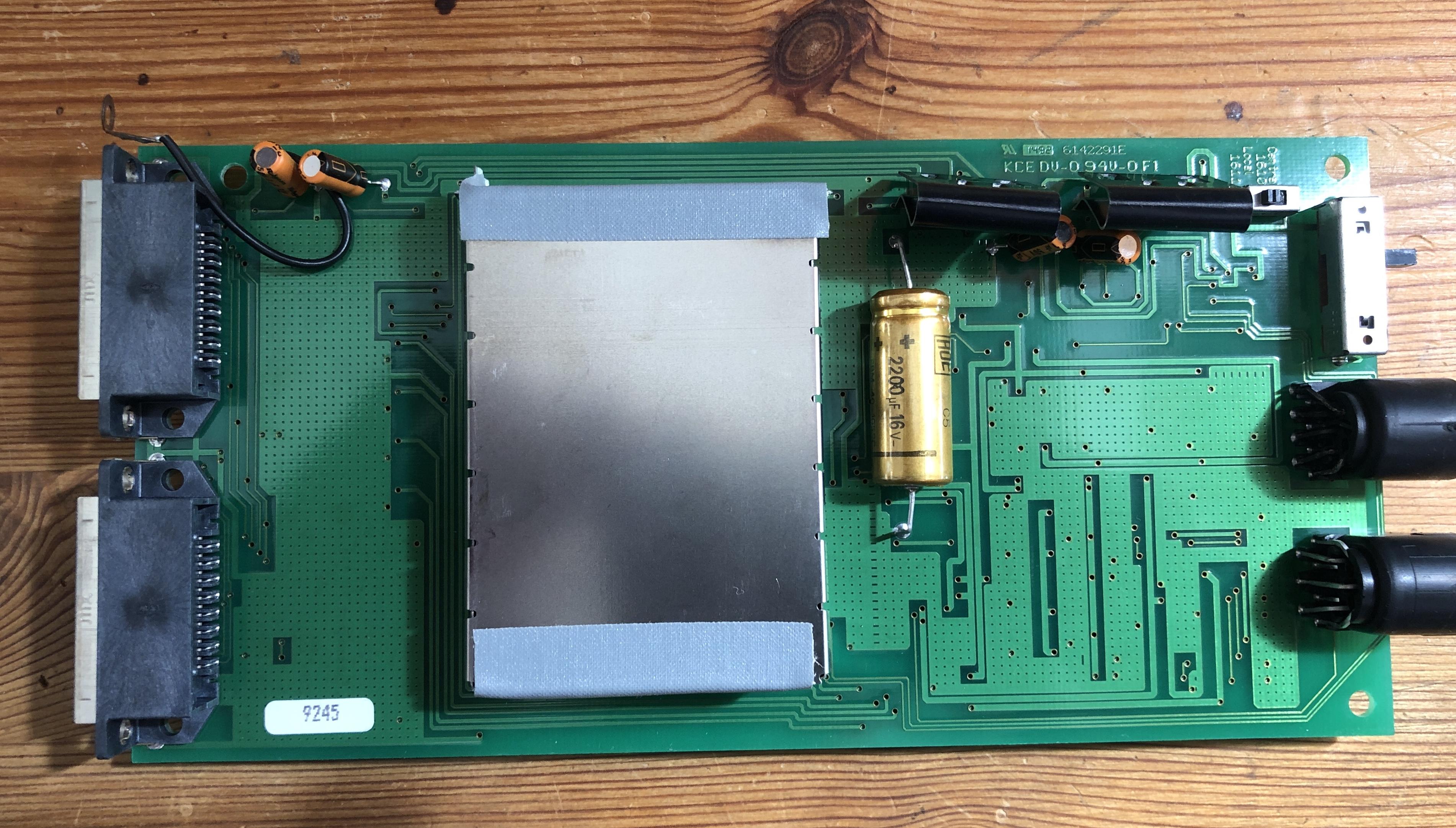
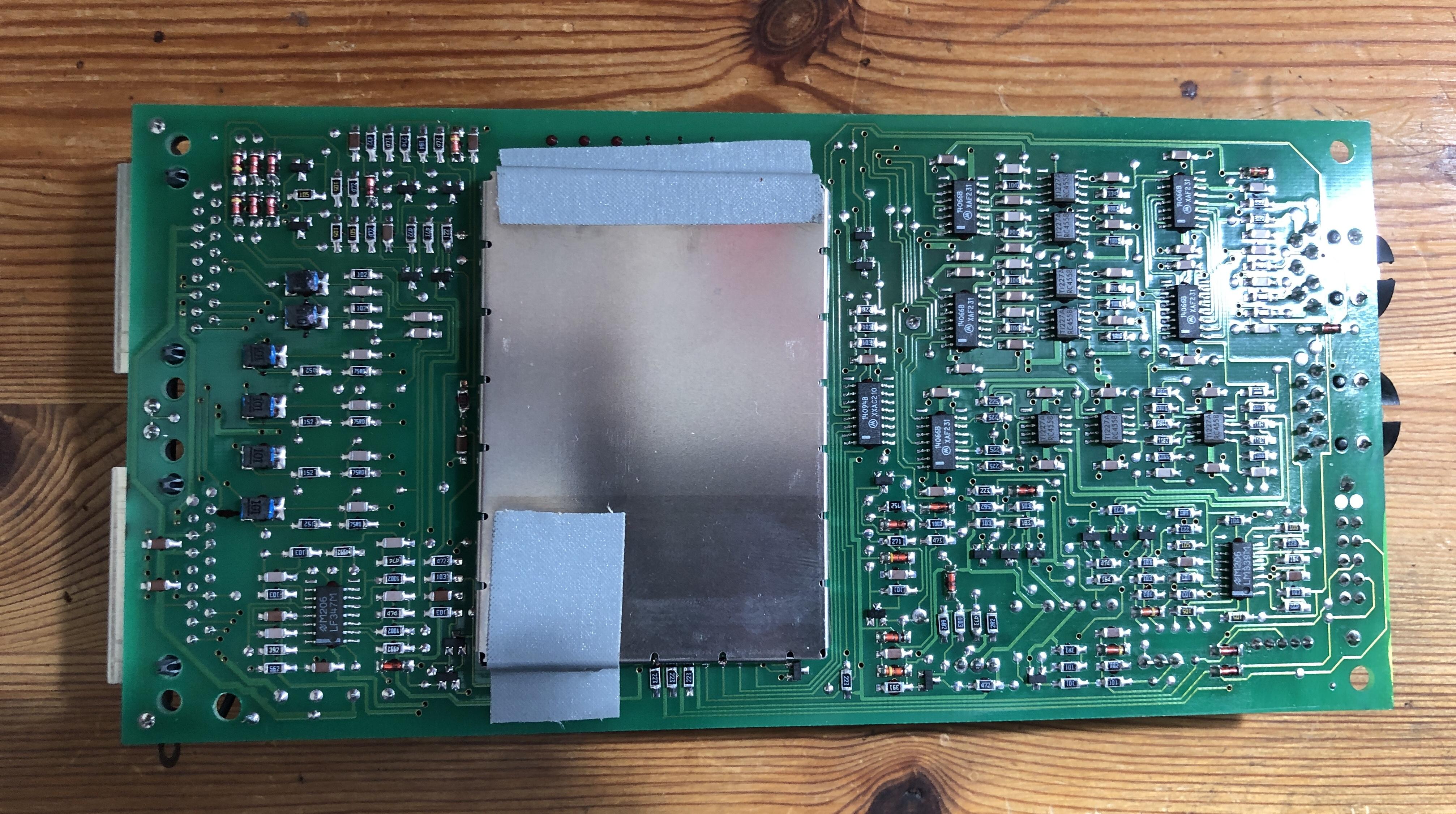
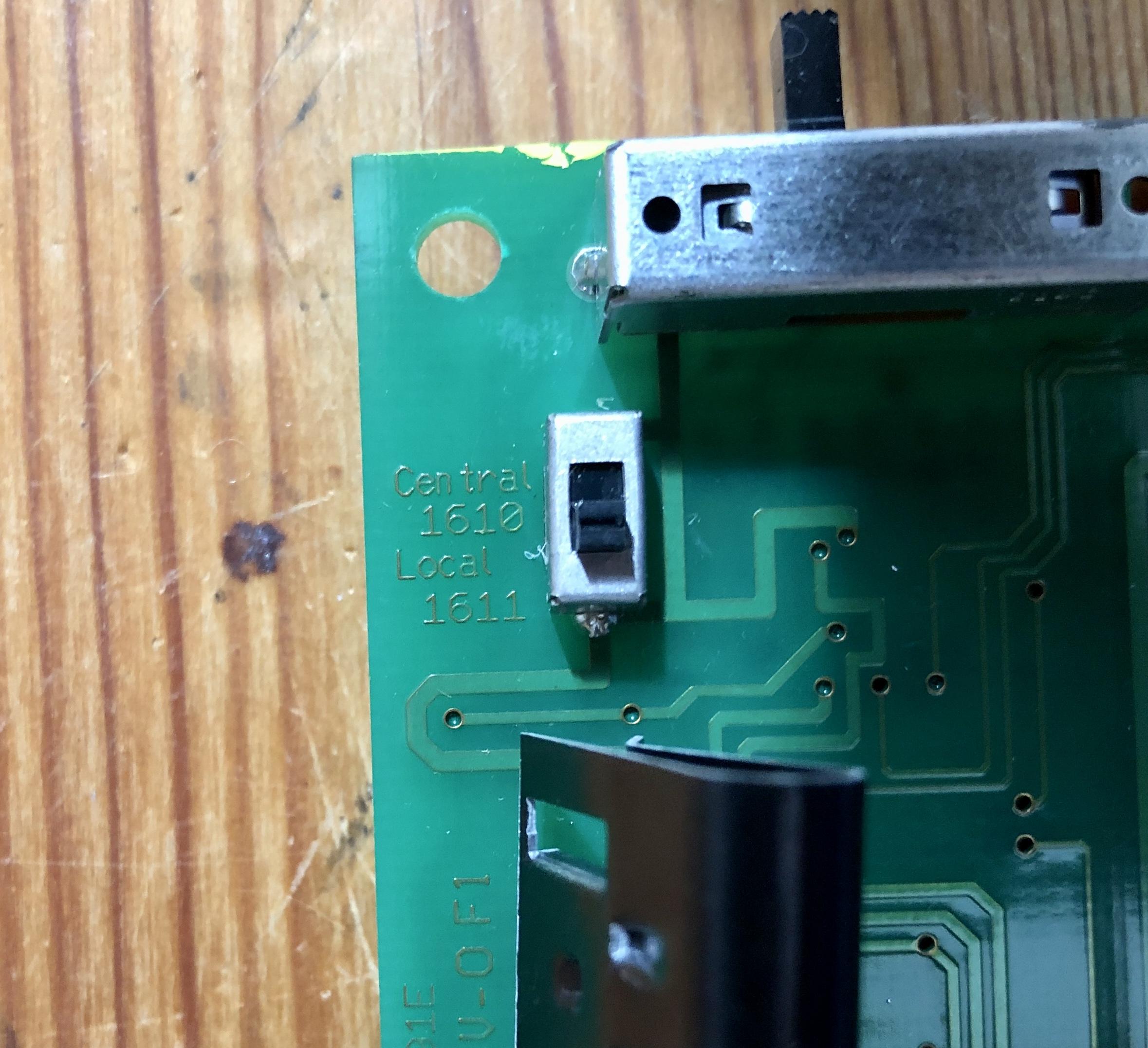
5 February 2025 at 18:57 #63445MadskpGOLD MemberWas a little curious about the BLC 1610 so I had to open one up to see what is ticking inside:

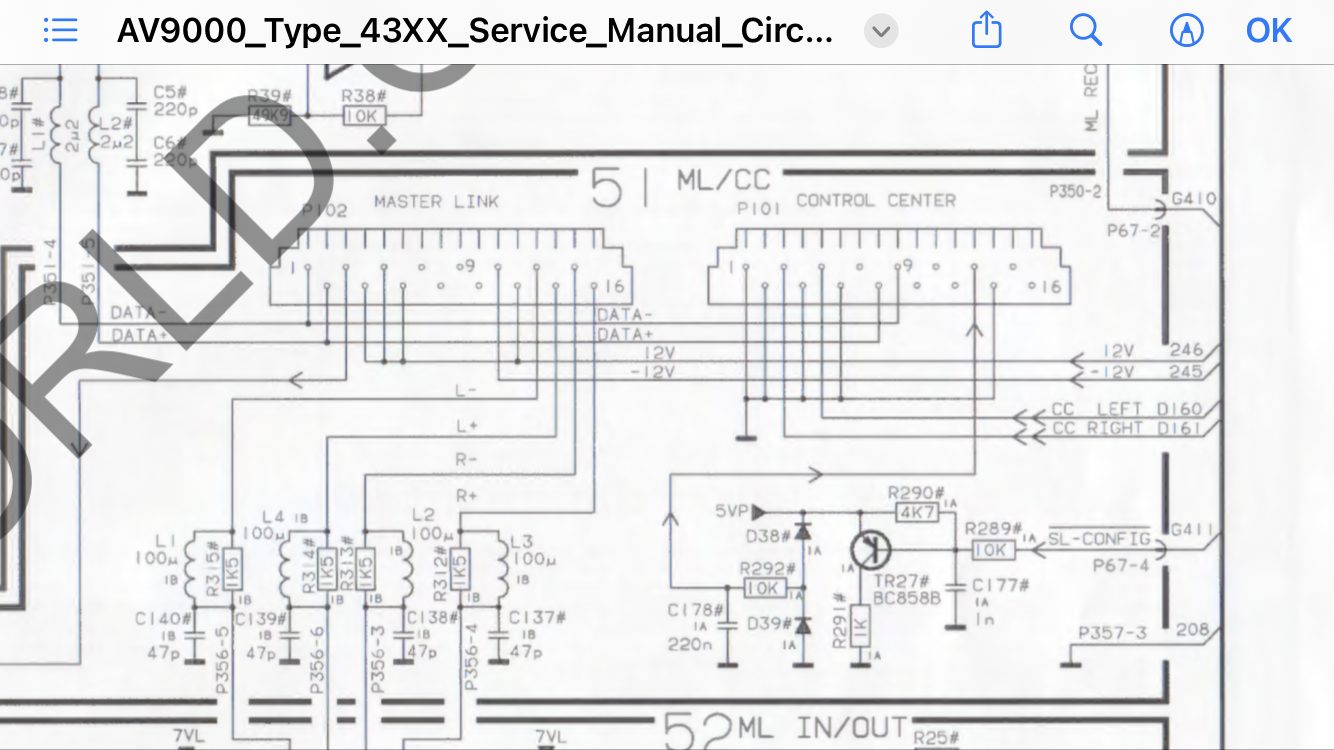
 All pins in use on the two ML connectors are wired in parallel, so just kind of an internal junction box. What is unusual with the ML connectors is that pin 3, 4, 5, 6 and 12 is all connected where pin 12 is supply voltage +, and most of the others are normally no used. This however explains where this box is getting power as the same pins are supplying +12V on the diagram for the AV9000
  One other curiosity is that next to the external 1-2-3 switch is an internal switch with 2 positions:
  These are named:
- Central 1610
- Local 1611
Not really sure if that means it will function like a 1611 if it is in that position. Might do some more testing around that at a later point.
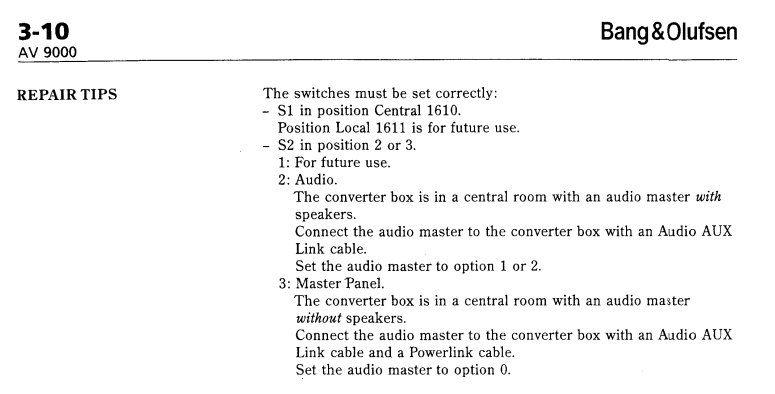
I found a MCL service manual on Archive.org that besides all the MCL2 stuff (also for the newer MCL2AV) also has the service documentation for the 1610 AV9000 Audio kit.
This reveals what both the internal and the external the switch do:

However a little disapointing for those settings where it is for future use.
With this knowlede I had to do a test to see if I could get it working. I have tried with my BC6-23 as Videomaster (V.opt 2) and my BC9300 as Audio system in A.Opt 0 and the 1610 with the external switch in position 3.
No result I could not get the TV to start the BC9300. Also tried to add more power from an external 12V power supply as the 1610 use som extra pins in the Masterlink connector for power, but still no result. I tried with 2 of the 1610 boxes I have with no luck.
And just to verifiy that the TV and the beocenter worked togheter I tested the connection between them with a Beolink Conveter 1614 in between and that worked flawlessly. I guess the 1610 boxes probably either only will work with the AV9000 ore are defective.
Location: Denmark
23 April 2026 at 03:11 #123355babBRONZE Member Hello B&O Experts,
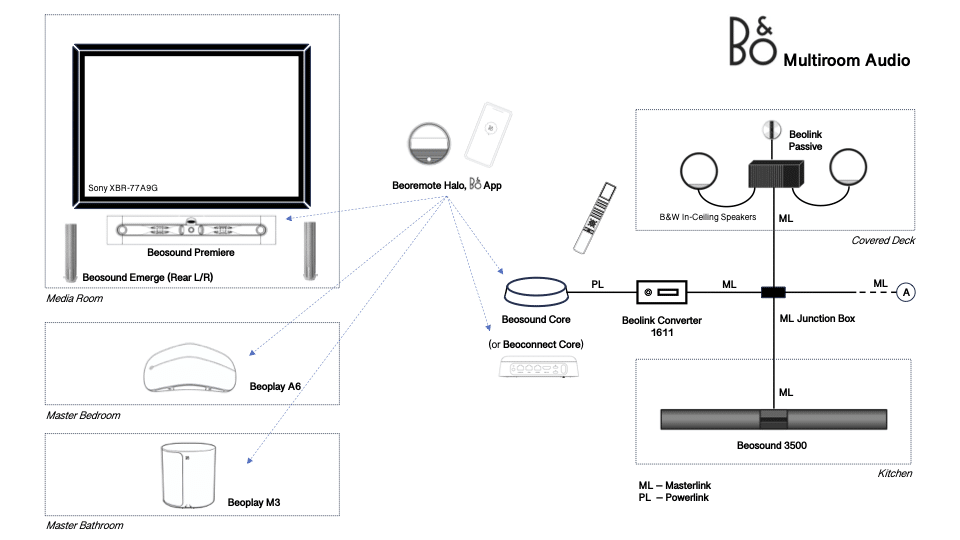
I’m looking for a way to bridge old and new B&O components to create a whole house synchronous audio system. In particular, I’d like to enable my old Masterlink setup to join newer products like the ones shown in the figure below. My question to you experts out there boils down to the following: can I connect a Beosound Core (or, alternatively a Beoconnect Core) to a Beolink Converter 1611(?) via Powerlink, and have the Beolink Converter distribute the audio to the existing Beosound 3500 and Beolink Passive + passive speakers via Masterlink? If this is not possible, alternative suggestions are welcome!
Thanks!
Attachments:
You must be logged in to view attached files.Location: Massachusetts
Favourite Product: Beosound Premiere
My B&O Icons:
23 April 2026 at 21:13 #123358Hello B&O Experts,
I’m looking for a way to bridge old and new B&O components to create a whole house synchronous audio system. In particular, I’d like to enable my old Masterlink setup to join newer products like the ones shown in the figure below. My question to you experts out there boils down to the following: can I connect a Beosound Core (or, alternatively a Beoconnect Core) to a Beolink Converter 1611(?) via Powerlink, and have the Beolink Converter distribute the audio to the existing Beosound 3500 and Beolink Passive + passive speakers via Masterlink? If this is not possible, alternative suggestions are welcome!
Thanks!
Yes I think that should work. In effect you will be using the Core’s PL output as an ‘aux’ output, hence it should be set to a fixed level in the Core menu. It should be connected to the BL1611’s Audio Aux Link (AAL) socket (not PL socket) according to the diagram given earlier in the thread (attached below). If connected to AAL pins 1 and 3 you will select from the ML rooms using a Video source on Beo4, but if connected to AAL pins 1 and 4 you will select using an Audio command on Beo4.
You should then be able to change volume in the ML rooms, but not alter the source or turn on/off.
EDIT: You haven;t said whether there is an existing audio- or video-master on the ML side of your system (eg TV or BeoSound) – I am not sure what the dotted line to the ‘A’ means in your diagram. If there is such a device, please say! Also, the ML speaker in your diagram is a BeoLab 3500, not BeoSound 3500!
-
This reply was modified 6 months ago by
Attachments:
You must be logged in to view attached files.Location: Warwickshire, UK
My B&O Icons:
24 April 2026 at 13:48 #123368MadskpGOLD MemberTo add to Guy’s answer the cable you would need has to be special made. You cannot use a standard Powerlink cable for this connection.
You should then be able to change volume in the ML rooms, but not alter the source or turn on/off.
As Guy say. The controls in this setup is limited. If you wan’t to be able to control the sources in the Masterlink link room you could add and NL/ML converter to the setup. The 1611 converter will still be useful to power the Masterlink network provided you do not have a Masterlink Music system in the setup already.
Location: Denmark
29 April 2026 at 01:16 #123403babBRONZE MemberHello Guy and Madsk,Thanks a lot for your insights! It’s great to know that what I had in mind should in principle be possible. I guess the PL socket on Beolink 1611 is an output only? Also, is there a particular variant of the 1611 that is required? One challenge might be to find a 110V version for the US. The ones I have seen for sale on European sites are all 220V only. Thanks also for highlighting the need for a special PL-to-AAL cable.bab wrote:
Hello B&O Experts,I’m looking for a way to bridge old and new B&O components to create a whole house synchronous audio system. In particular, I’d like to enable my old Masterlink setup to join newer products like the ones shown in the figure below. My question to you experts out there boils down to the following: can I connect a Beosound Core (or, alternatively a Beoconnect Core) to a Beolink Converter 1611(?) via Powerlink, and have the Beolink Converter distribute the audio to the existing Beosound 3500 and Beolink Passive + passive speakers via Masterlink? If this is not possible, alternative suggestions are welcome!
Thanks!
Yes I think that should work. In effect you will be using the Core’s PL output as an ‘aux’ output, hence it should be set to a fixed level in the Core menu. It should be connected to the BL1611’s Audio Aux Link (AAL) socket (not PL socket) according to the diagram given earlier in the thread (attached below). If connected to AAL pins 1 and 3 you will select from the ML rooms using a Video source on Beo4, but if connected to AAL pins 1 and 4 you will select using an Audio command on Beo4.You should then be able to change volume in the ML rooms, but not alter the source or turn on/off.
EDIT: You haven;t said whether there is an existing audio- or video-master on the ML side of your system (eg TV or BeoSound) – I am not sure what the dotted line to the ‘A’ means in your diagram. If there is such a device, please say! Also, the ML speaker in your diagram is a BeoLab 3500, not BeoSound 3500!
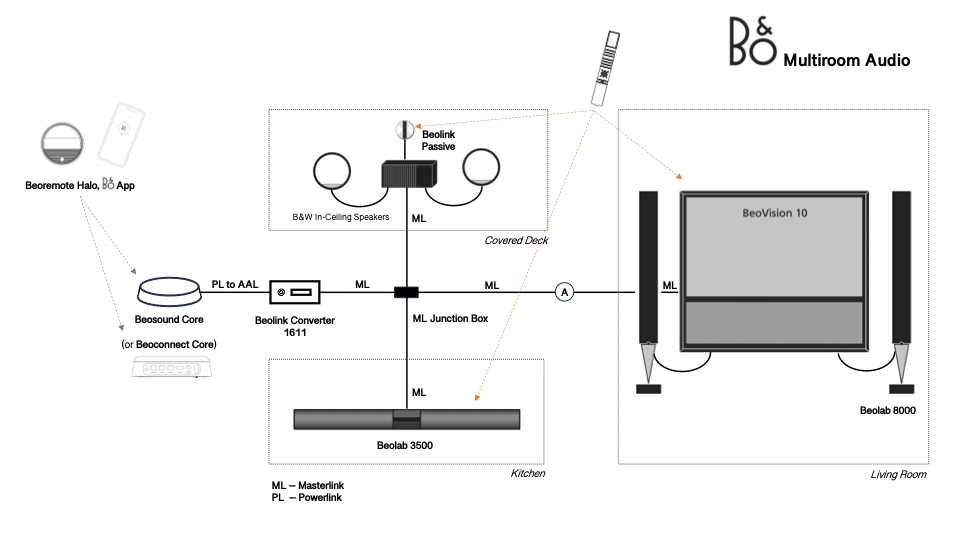
Now, to Guy’s question above: yes, there could potentially be additional devices to the right of the ‘A’ in the diagram, including a Beovision 10 with a set of connected Beolab 8000s – see the new diagram below. It would be really nice if I could activate the speaker section of the BV10 via ML. As you may have guessed, originally the BV10 was the audio master, distributing music to the Beolab 3500 and the Beolink Passive. In the new setup, it would be quite the opposite! Would this be possible? I assume the BV10 would need to be configured differently?
(and, yes, it’s obviously Beolab 3500, not Beosound 3500 – that was a brain fart!)
-
This reply was modified 5 months, 4 weeks ago by bab.
-
This reply was modified 5 months, 4 weeks ago by bab.
Location: Massachusetts
Favourite Product: Beosound Premiere
My B&O Icons:
29 April 2026 at 17:28 #123408MadskpGOLD MemberI guess the PL socket on Beolink 1611 is an output only?
Actually it is for enabling the use of buttons on the front panel of an audio master that is linked to a TV with the speakers connected, so no use in your case.
Also, is there a particular variant of the 1611 that is required? One challenge might be to find a 110V version for the US. The ones I have seen for sale on European sites are all 220V only.
The US version is called 1612, so you might wan’t to look after that.
t would be really nice if I could activate the speaker section of the BV10 via ML. As you may have guessed, originally the BV10 was the audio master, distributing music to the Beolab 3500 and the Beolink Passive. In the new setup, it would be quite the opposite! Would this be possible? I assume the BV10 would need to be configured differently?
You should stille be able to use the BV10 for distributing sound from the video sources like, TV, DVD, V.MEM, DTV etc. while also being able to get sources via the 1611 /1612 by using audio commands like, RADIO, CD, A.MEM etc. Only the audio source commands will all just activate the AAL port on the 1611/1612, so no difference in which commands you use.
Location: Denmark
23 August 2026 at 19:53 #125160babBRONZE MemberIt’s now August, and since April I have acquired a BL1611, a 110-220V step-up voltage converter (to enable me to use the 1611 in the US 😀), and a special PL-AAL cable from Steve @SoundsHeavenly. However, I am not able to hear any audio generated by the Beoconnect Core on the ML part of the system (as described in my original post; I simplified it by connecting the ML cable directly to the Beolab 3500). I am not convinced the 1611 is actually working since I bought it off a random website. Is there a simple test I can do to determine if it’s dead or alive?
I’m also unsure about the configuration of the Core, particularly how to set a fixed output level. In the app, under the “Connected speakers” menu, I selected “Add 3rd party speaker”. This only lets me check Power Link 1 Left and Right; I don’t see an option to set the output level. This may have something to do with how the Core senses the 1611…
All advice welcome!
Location: Massachusetts
Favourite Product: Beosound Premiere
My B&O Icons:
24 August 2026 at 09:29 #125169MadskpGOLD MemberIt’s now August, and since April I have acquired a BL1611, a 110-220V step-up voltage converter (to enable me to use the 1611 in the US 😀), and a special PL-AAL cable from Steve @SoundsHeavenly. However, I am not able to hear any audio generated by the Beoconnect Core on the ML part of the system (as described in my original post; I simplified it by connecting the ML cable directly to the Beolab 3500). I am not convinced the 1611 is actually working since I bought it off a random website. Is there a simple test I can do to determine if it’s dead or alive?
I’m also unsure about the configuration of the Core, particularly how to set a fixed output level. In the app, under the “Connected speakers” menu, I selected “Add 3rd party speaker”. This only lets me check Power Link 1 Left and Right; I don’t see an option to set the output level. This may have something to do with how the Core senses the 1611…
All advice welcome!
Depending on how the PL-AAL cable is configured you will have to choose either a Audio source (CD, A.MEM,RADIO etc.) or Video Source (TV, V.MEM, DVD etc.) to activate the Beolab 3500. Try to see if changing between an Audio and Video Source makes a difference.
If you have a minijack to DIN cable you can also try to check the 1611/BL3500 with an other analog audio source to see if it is getting through.
Location: Denmark
-
AuthorPosts



- You must be logged in to reply to this topic.