






Home › Forums › Product Discussion & Questions › BeoLab › BeoLink Converter 1611 Innovative Configurations › Reply To: BeoLink Converter 1611 Innovative Configurations
 bab
babbab wrote:
Hello B&O Experts,I’m looking for a way to bridge old and new B&O components to create a whole house synchronous audio system. In particular, I’d like to enable my old Masterlink setup to join newer products like the ones shown in the figure below. My question to you experts out there boils down to the following: can I connect a Beosound Core (or, alternatively a Beoconnect Core) to a Beolink Converter 1611(?) via Powerlink, and have the Beolink Converter distribute the audio to the existing Beosound 3500 and Beolink Passive + passive speakers via Masterlink? If this is not possible, alternative suggestions are welcome!
Thanks!
Yes I think that should work. In effect you will be using the Core’s PL output as an ‘aux’ output, hence it should be set to a fixed level in the Core menu. It should be connected to the BL1611’s Audio Aux Link (AAL) socket (not PL socket) according to the diagram given earlier in the thread (attached below). If connected to AAL pins 1 and 3 you will select from the ML rooms using a Video source on Beo4, but if connected to AAL pins 1 and 4 you will select using an Audio command on Beo4.You should then be able to change volume in the ML rooms, but not alter the source or turn on/off.
EDIT: You haven;t said whether there is an existing audio- or video-master on the ML side of your system (eg TV or BeoSound) – I am not sure what the dotted line to the ‘A’ means in your diagram. If there is such a device, please say! Also, the ML speaker in your diagram is a BeoLab 3500, not BeoSound 3500!
Now, to Guy’s question above: yes, there could potentially be additional devices to the right of the ‘A’ in the diagram, including a Beovision 10 with a set of connected Beolab 8000s – see the new diagram below. It would be really nice if I could activate the speaker section of the BV10 via ML. As you may have guessed, originally the BV10 was the audio master, distributing music to the Beolab 3500 and the Beolink Passive. In the new setup, it would be quite the opposite! Would this be possible? I assume the BV10 would need to be configured differently?
(and, yes, it’s obviously Beolab 3500, not Beosound 3500 – that was a brain fart!)
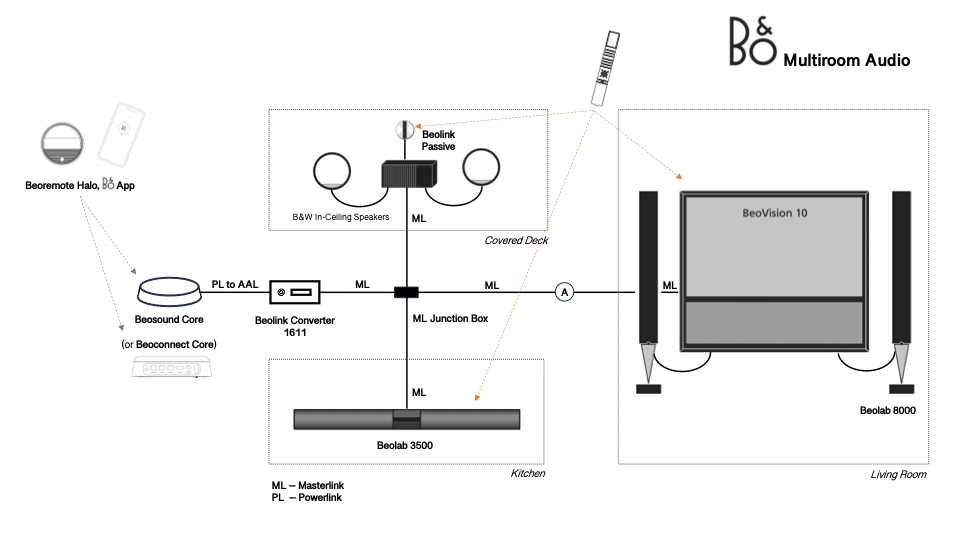
-
This reply was modified 5 months, 4 weeks ago by
 bab.
bab.
-
This reply was modified 5 months, 4 weeks ago by bab.
Location: Massachusetts
Favourite Product: Beosound Premiere
My B&O Icons:


