Forum Replies Created
-
AuthorPosts
-
 Bill LumberghBRONZE Member
A few of us here are Beta testers for B&O and then it is quite easy to give suggestions on new functionality or app modifications. Miki that runs the Discord channel I linked to also have the same problem with his cats. 😅 I think we have posted the suggestion to be able to turn of the touch panel for quite some time now, so don’t expect any quick fix from B&O for this cat problem.
-
This reply was modified 43 minutes ago by
 Bill Lumbergh.
My B&O Icons:
 Bill LumberghBRONZE Member
Hi Adrian. You wrote that you have connected the BL28s over DPL to socket 3 on the Theatre. I might have misunderstood you but are you saying that you have connected the BL28 daisy chained to the socket named PL3? The sockets named PL1-4 are used for analog PowerLink, not Digital PowerLink (DPL). To connect your speakers with DPL you need to use the sockets that are only named 1 and/or 2, not the ones starting with PL_.
I also started off with only BL28s and 6 months later got a Theatre. I initially connected the BL28s to the Theatre wired over PowerLink (analog). I had previously loved playing music on my BL28s, especially the pinpoint stereo imaging. However, after connecting them to the Theatre I noticed a clear downgrade in music quality, especially when it came to stereo imaging. The imaging became more “blurry”, not as detailed and accurate anymore. Even if I turned of bass management and played with Direct sound mode the imaging was clearly worse. Consequently I bypassed the Theatre and connected directly to the BL28s when I wanted to listen to music (when connected with analog PowerLink you can still see the BL28s as a speaker to connect to from the streaming apps). Though, a few months later I tried to wire my speakers over Digital PowerLink instead (each speaker directly to the sockets named 1 respectively 2, so not daisy chained). After that the detailed Imaging was back and the sound quality was identical to when I previously connected directly to the BL28. I tried the connections quite thoroughly and when I play a stereo signal with Direct sound mode the music sounds as great as before the Theatre. However, now I can choose to use bass management on or off, depending on what I prefer. I also have a set of BL8s as rear speakers and love playing music with a listening position that gives both the BL28s and BL8s the role as front L/R; gives a really room filling sound.
So please check if you have the speakers connected to the socket named 1 or 2. If they are connected to PL3, disconnected the speakers in the app and then move the cable (assuming it is CAT7 cable), and after that connect them in the app again. If they are connected with thinner PowerLink cable I would disconnect them in the same way but connect them with wireless Digital PowerLink. Thereafter you will need to rerun the Listening Positions.
In my case the bass gets a bit more controlled with bass mgmt ON, so could be worth trying that as well.
Btw, were the calibration run on the BL28s before connecting them to the Theatre? I think that is preferable.
-
This reply was modified 55 minutes ago by Bill Lumbergh.
My B&O Icons:
Bill LumberghBRONZE MemberCongratulations! I hope you will be very happy with it. I am with mine. 😃
The Theatre definitely has a lot of connection options for both older and newer speakers.
Don’t hesitate to ask here if you have any questions.
Please notice that this forum is very active on topics around older B&O equipment, but less active on the currently offered products (like the Theatre). A good place to use as complement to Beoworld forum is a group on Discord that is called BeoTalk. We are around 1200 very active B&O enthusiasts there that talk and support each other around B&O equipment, primarily the newer products. They also have a large knowledge thread about the Theatre, including documentation regarding preferred settings.
See it as a complement to Beoworld forum, not a replacement or competition.
My B&O Icons:
Bill LumberghBRONZE MemberIt is strange. The iPhone/iPad app did not work on my MacBook Pro M1 either for a long time, I tried reinstalling it several times without any luck. However, since spring it works flawlessly on my MacBook Pro. Not sure what made the difference, think it was after an update to MacOS but I’m not sure. Perhaps worth to try again.
I think the B&O app now is really good on my iPhone. not up to Sonos standard but significantly better than for example KEF’s app. The dependence of the app naturally depends on what B&O equipment you have and if you like to work with different sound profiles, or not.
My B&O Icons:
31 July 2026 at 22:34 in reply to: Apple TV remote wakes Theatre audio but not LG panel – Beovision Theatre LG G6 #124782Bill LumberghBRONZE MemberI also think my AppleTV changed the settings once after a tvOS update.
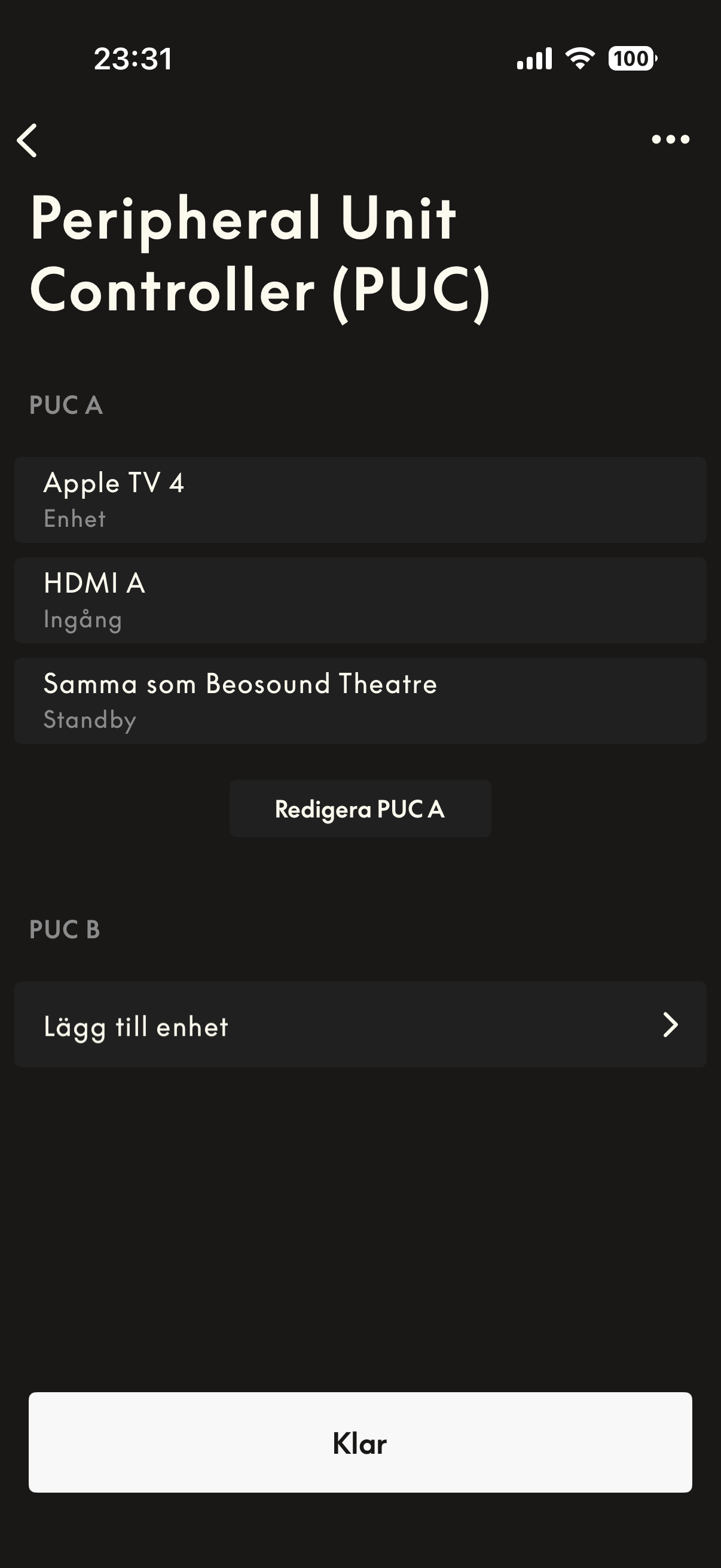
Let us start with securing that you have correct settings in AppleTV (unfortunately I have Swedish interface so my translations might be a bit wrong):
1) In Settings select “Remote controls and units”
2) Go to “Home cinema settings” In the bottom om the list
3) Secure that “Control TV and receiver” is set to “ON”, that “Volume control” is set to “Auto through HDMI (receiver)”, and finally that “Show volume at screen” is set to “Hide”.
Attached screenshot show my settings in the B&O app for the PUC. I don’t think there are any other settings in the B&O app that is related to this.
if you have your AppleTV and B&O set as above we can continue with LG. Though some of their settings are quite hidden.
-
This reply was modified 2 months, 3 weeks ago by Bill Lumbergh.
My B&O Icons:
31 July 2026 at 22:06 in reply to: Apple TV remote wakes Theatre audio but not LG panel – Beovision Theatre LG G6 #124779Bill LumberghBRONZE MemberAfter having to factory reset my Theatre once I got exactly your problem, but after some work with all settings I managed to get it to work. Though it was not obvious and took some time to sort out. Unfortunately I have forgotten exactly what solved it.
Do you have a PUC connection today between your Theatre and AppleTV?
-
This reply was modified 2 months, 3 weeks ago by Bill Lumbergh.
My B&O Icons:
31 July 2026 at 21:59 in reply to: Apple TV remote wakes Theatre audio but not LG panel – Beovision Theatre LG G6 #124777Bill LumberghBRONZE MemberI have my AppleTV connected to my Theatre and the Theatre connected to the TV with eARC.
I have PUC connection between the Theatre and AppleTV and LAN between Theatre and TV to get Beoremote 1 to work. My installer initially turned of CEC and had a CEC blocker box from the AppleTV, as I previously mentioned.
However, as I preferred using the AppleTV remote for most navigation I have thereafter turned on CEC and removed the blocker box. Now I use the Beoremote 1 for changing sound settings and start favourites but the Apple TV remote for most daily usage, the best of two worlds… 😁 So let us aim at replicating my setup as then both the AppleTV remote and Beoremote 1 (as you have one and it is good for sound settings) will work.
I also get Atmos from Apple Music in AppleTV. So you do not to rearrange your cables as I understand it you have your cables like me. Then it is just a question of settings. That we hopefully should be able to solve.
-
This reply was modified 2 months, 3 weeks ago by Bill Lumbergh.
My B&O Icons:
29 July 2026 at 17:21 in reply to: Apple TV remote wakes Theatre audio but not LG panel – Beovision Theatre LG G6 #124753Bill LumberghBRONZE MemberBrett: Have you got it to work?
For me it works like you want it to work. I can check my settings if you want to.
I also have it setup with PUC and the B&O app/network cable to my LG G4 panel so that my Beoremote 1 works. Though, I most often use my AppleTV remote for all TV navigation as it is so much more convenient compared to the Beoremote. Especially the touch functionality is really useful when fast forward/backward in videos. Both my TV and Theatre starts up when I klick the power or play button on my AppleTV remote. I have CEC activated and has removed the small CEC blocker box that my installer added when installing the Beovision Theatre initially. He mentioned that it was recommended to have that as the Theatre sometimes could behave badly due to CEC signals (eg start up in the middle of the night at high volume), but I have not had any issues with it since I removed the blocker more than a year ago.
-
This reply was modified 2 months, 4 weeks ago by Bill Lumbergh.
My B&O Icons:
Bill LumberghBRONZE MemberThanks for the clarification! Strange that B&O doesn’t add this on their websites under listed connectivity or in the product sheet.
My B&O Icons:
Bill LumberghBRONZE MemberGreat to hear! I’m sure yo will be happy with it. And please don’t hesitate to ask me any questions after you have received it.
I can also recommend you to join the Discord group BeoTalk.
https://discord.gg/Th8pCan2hit complements this forum but is much more active when it comes to new B&O products, like the Theatre and BL8. There are also a knowledge library and setup guides for e.g Theatre.
You are naturally welcome to ask any questions here as well. I was late into B&O buying the BL28 as my first B&O products, which I bought due to its sound and design. However, what really got me to ”invest into the brand” and get the Theatre, BL8 and BS2 was the great community around the brand, both here and especially on the Discord group (as I only have new Mozart products). The willingness to help each other is quite unique. This was not something I had experienced with my previously owned HiFi brands.
Congratulations to your purchase!
My B&O Icons:
Bill LumberghBRONZE MemberThanks for your detailed review and tips of the Ive Mendes song. A fantastic song that I hadn’t heard before! Sounds great on my BL8, and even better on my BL28. 😃
My B&O Icons:
Bill LumberghBRONZE MemberHi Dominik. Not sure if my answer to you got tagged as an answer. So please see my answer in my message above. 😀
My B&O Icons:
Bill LumberghBRONZE MemberSorry for late reply. I’m usually in the BeoTalk Discord group and does not visit the Beoworld forum that often as I only have new Mozart speakers. Beoworld is much more focused on the older B&O equipment while BeoTalk has a lot more activity for the newer stuff. The sites complement each others.
I have a Theatre with Beolab 28 as fronts and Beolab 8 as surround (plus a pair of BL8 in my bedroom and a Beosound 2 in my kitchen).
I started of with Beolab 28 for two years ago (my first B&O equipment after 30 years with typical HiFi brands like B&W, Dali, Onkyo, Nad, etc), and have now committed wholeheartedly to B&O.
The behaviour of the Beolab 8s connected to the Theatre (or any other Mozart based speakers) is dependent on how you connect them.
Old analog PowerLink (PL) cables or wireless WiSA:
• The external speakers are connected/committed to the Theatre first when you turn on the Theatre. Then they become dumb speakers and you cannot use their touch interface for controlling your Theatre setup.
• However, when the Theatre is turned off, your Beolab 8s are available as separate speakers from the B&O app or any streaming app. Then the touch interface also works and you can control them as stand-alone speakers (like you didn’t have any Theatre at all).
If you instead connect the speakers to your Theatre with either wireless or wired Digital PowerLink (DPL), they behave as follows:
• They become an integrated part of your Theatre-system. The touch controls are always available to control the whole Theatre-system.
• The speakers disappear as stand-alone options to connect to in the B&O app or your streaming app. To play stereo music from only your connected Beolab 8s you create a Listening Position for your Theatre where you only allocate roles (front L/R) to your connected speakers, not to any of the inbuilt speaker elements in the Theatre. You can then decide that your favourite buttons on your speakers should use that Listening Position so that when you start some music from them, only your BL8s are used.
Personally I originally had my front BL28 connected with wired analog PL (the traditional “old” PowerLink connection) and the surround BL8 over WiSA. Since 6-8 months I changed the connections to wired DPL to my BL28 and wireless DPL to my BL8, and I could not be happier with my choice.
There are two main reasons why I changed to use the “new” Digital PowerLink connection.
1st reason: When using traditional analog PowerLink, I heard a clear difference in sound quality when I played music through the Theatre to my BL28 compared to connecting to my BL28 directly without going through the Theatre. The main difference was related to stereo imaging. When playing the BL28 I got imaging that was very detailed, I could really pinpoint every instrument and singer’s voice in the stereo track. When playing the BL28 from the Theatre (with a Listening Position that only used the BL28 and a Sound Mode with Direct sound path) the sound stage become more blurry and diffuse. I could not point out each voice and instrument as accurately anymore. With Digital PowerLink I cannot hear any difference going through the Theatre compared to playing the Beolab 28 directly (though not possible anymore when connected with DPL). The imaging and stereo soundstage is now once again extremely good on my Beolab 28s. I believe one reason for this is that you basically remove two digital/analog conversions when changing to DPL compared to PL. The sound is processed digitally in the Theatre, and the Beolab 28/8 need to use a digital signal. With old PL connections the Theatre first converted the digital signal to analog, and transferred it to your Beolab speakers, then they had to convert it back to digital signal. With DPL you remove these digital-analog-digital conversions.
2nd reason: To be able to use the touch interface on my BL28s and BL8s to start up music from the favourite buttons, join music from other rooms, or just change volume when I want to play music from the living room system. With the old PL connections you could only use the touch interface on the Theatre, which in my case is located far less convenient compared to my external speakers that I walk by regularly.
So please try out Digital PowerLink if you haven’t done it yet.
The BL8 works fantastic as surround speakers for my setup. However, initially I thought they were too expensive for what surround channels provide in most film. I also listen 60-70% on music and 30-40% watching TV/movies. Nor does the regular setup in the Theatre use the surround speakers especially much when playing music (plus I often prefer listening to dedicated music in Direct mode, only using my Beolab 28). However what really created value for me was to setup a new Listening Position that I call 2*Stereo where I setup both the BL28s and BL8s as front L/R speakers and leave out the Theatre from any roles (though set the front BL28 slightly higher to still get the voices in front of me when sitting in my sofa). That is fantastic for creating an enveloping sound with same volume and sound from both front and rear of the room. And the BL8 and BL28 have such similar sound profiles that the transition when walking in the room is very seamless. I have programmed my favourite buttons to use this Listening Position when I want to start listening to music spontaneously.
For dedicated music listening I still prefer just using the regular 5.0 setup in Direct Mode so that only my Beolab 28s are used (except sometimes I allow bass management from the other speakers). However, in most of the cases (70-80%) I use this 2*Stereo Listening Position when listening to music. After finding this out I’m 100% happy that I invested in the BL8 as surround/rears.
Don’t hesitate to get back with other questions regarding the Theatre or connected speakers to it. I’m happy to help!
-
This reply was modified 3 months, 1 week ago by Bill Lumbergh.
-
This reply was modified 3 months, 1 week ago by Bill Lumbergh.
-
This reply was modified 3 months, 1 week ago by Bill Lumbergh.
My B&O Icons:
Bill LumberghBRONZE MemberHi People. I am completly new here. Not with B&O but this forum so I am sorry in advance if asking something I could find but the search didn’t find anything (or I used it wrong). Anyhow;
Having a
Samsung The Frame 55″ MY 2019
4x BeoLab 6000
1x BeoLab 7-1
1x BeoLab 11
Almando Amp thingNot happy with the setup. When running the test on the Almando all speakers work. When watching a movie (streaming) or doing a simple 5.1 YouTube test it doesn’t work well or simply not.
I tought the Premiere didn’t support the old speakers but Chat said otherwise. So I think this is the best place to ask; Can I use the Premiere with all my old stuff (except the BeoLab 7-1 because that would be silly).
Thnx!
Arjé
Hi Arjé, your AI search gave you an incorrect answer. The Premiere only works with up to 4 Mozart platform speakers. So basically Beolab 8 and 28, Beosound 2, Balance, Level, A5 and Emerge.
My B&O Icons:
Bill LumberghBRONZE MemberSorry for late answer. I understand you are using the inbuilt app in the LG TV for Apple Music. If you have the LG TV connected with an ethernet cable to the Theatre (so that you e.g. can control it with Beoremote One) then you can adjust the volume for Apple Music, relative to other sources, in your B&O app on your mobile/tablet.
1) Choose your Theatre in your B&O app (the left bottom icon).
2) Enter “Sound” settings > select “Sources” under source managed sound settings > select “Source behaviour” under TV-sources > select “Apple Music”
3) Here you can select default Listening Position, Sound Mode and relative volume adjustment. So in your case you can boost the volume from Apple Music by setting the volume adjustment (in thr bottom of the page) on some positive value.
My B&O Icons:
Bill LumberghBRONZE MemberReally strange. No version of the B&O app has worked on my MacBook in the last 15 months…
I will have to dig around and try different settings, but I have to my knowledge never changed any of the standard settings. I have installed some windows management apps as I have a 40” monitor, but the B&O app doesn’t work either if plugged into the external monitor or in laptop mode.
My B&O Icons:
Bill LumberghBRONZE MemberVery strange. Work fine for some but not for others, all with M-processors. Especially strange that it works on one Mac Mini A4 and not on another…
I have tried to delete and download the latest version of the B&O app, plus running MacOS on latest version. Though, it has never worked for me (have tried for a year).My B&O Icons:
Bill LumberghBRONZE MemberThe default set-up is to have them deactivated when you have front L/R-speakers included, like your BL50. I have a 5.0 set-up with BL28 as front L/R and BL8 as surround, and the side-firing speakers in the Theatre are deactivated. I tried to add them in another listening position, but preferred them diactivated.
My B&O Icons:
Bill LumberghBRONZE MemberAre you referring to the built in app in the LG TV? I do not like that app, and also got very low volume when playing Atmos content. I instead use an Apple TV and play music from that, much better interface and usability. And the sound had better volume. Well worth the 150 EUR. The only benefits with the in-built LG apps that I can find is that you can start them from Beoremote 1, but the remote to the Apple TV is so quick to use so I prefer that anyway (even if I can use the Beoremote 1 for my Apple TV). I can really recommend in investing in a Apple TV, both for music playing and for streaming TV/video.
My B&O Icons:
Bill LumberghBRONZE MemberThe strange thing is that on my Mac (16 inch MacBook Pro M1 Max) the iPad app only shows an animation (see attached screenshot) on most of the window, and then there is a white field on the right side of the window. No menus/buttons available. I have tried to reinstall the app, but without any success. Same animation shows.
Han anyone else had the same problem with running the iPad app on a Mac, and managed to get the app to work?
Attachments:
You must be logged in to view attached files.My B&O Icons:
-
This reply was modified 43 minutes ago by
-
AuthorPosts