Forum Replies Created
-
AuthorPosts
-
 BRONZE Member
Hallo Dark_Aqua
Wenn die BS Moment und der BV11 mehr oder weniger im selben Raum stehen, würde es sich anbieten die BL18 an den BV anzuschliessen (geht ja auch via WPL).
Der Moment kann so eingerichtet werden, daß er die Lautsprecher des BV’s nutzt, wenn man den benutzt.
Hier/BV11 kann man auch mehrere ‘Lautsprecher-Gruppen’ einrichten – so z.B nur die BL18 für Musik und die BL18 als R/L Kanal und die Lautsprecher im BV11 als Center für Filme usw.
Man könnte auch eine Gruppe mit nur TV-Lautsprecher (so wie jetzt) für spätabentliches Gucken oder wenn andre nicht so sehr gestört werden sollen.
Diese Gruppen können einzelne Quellen zugeordnet werden, damit das meiste automatisiert ist.Wenn die 18 doch lieber beim Moment bleiben sollen, hilft jedoch nichts andres als neue/andre LS zu kaufen.
Die BL 17 würden sich da empfehlen – aber da setzt eigentlich nur das Budget des Hauses die Grenzen…..und der Geschmack.MM
Location: Flensborg————Danmark
If anyone wants a more technical explanation of this, let me know and I’ll start writing a blog post. ?
I would – but don’t do it ‘just for me’ ?
MM
Location: Flensborg————Danmark
A number of very credible people interested in the site, so please don’t lose hope ? Let’s wait and see.
Great to hear ?
Meanwhile let us hope that the users of this unique forum will see the worth of keeping it alive.
Although important, it is not just about, who owns or finances such a forum.
It is about the daily applicability of the forum and about people using it….and participating in the threads.
Too many former users have already run away to other platforms and spend their time and – maybe even knowledge – there.
Even if some sort of ‘diversity’ is good – it will still be a challenge for the Beoworld (Forum).MM
Location: Flensborg————Danmark
Hallo Frank
Es ist zwar mehr wie 25 Jahre her, daß ich mit diesem (für seine Zeit) brilliantes Koncept zu tun hatte.
Aber wenn ich mich richtig erinnere, gibs es hinten zwei Hebel mit denen das Oberteil sich vom Unterteil trennen läßt.
Wieder….wenn ich mich recht erinnere, läßt sich dann der Videorecorder relativ leicht entfernen.Vielleicht hilft das?
Vom Reparieren habe ich keine Ahnung.
Vielleicht findet sich hier etwas nützliches:https://beomanuals.com/manuals/Beosystem/Beosystem%20AV%209000/
Gegenfalls meldet sich jemand anderes, der mehr Ahnung hat – einfach abwarten und zwichendurch hier ‘reinschauen.
Es empfielt sich übrigens einen englischen Thread dazu zu machen!
MM
Location: Flensborg————Danmark
The lenght will not matter!
Each PL output on the Eclipe carries two signals – normally used as L/R.
This means that your Eclipse easily can send sound to a 6.2 setup of external speakers – if you count the speakers on the tv in and this is setup as the center channel, you can have a 7.1 with the Eclipse.
Note!
You can go even further, if you also use the WiSA connections there to compatible speakers.Please have a look here
and here , if you want a deeper explanation behind the technology behind the way B&O televisions handles speaker connection/setup.By the way….you will probably not benefit much from adding a BL2 to these two powerfull sets of speakers – both have even more ‘bass capacity’ than a single BL2.
But you can do it, if you please.MM
Location: Flensborg————Danmark
In this case (the Rotel 1570) the Delay settings is located in the Main Menu….
…..and not – as one might think – as a sub menu in the Speakers Menu.
I hope you get your settings right and will enjoy the BL18’s.MM
Location: Flensborg————Danmark
I will try the output of the TNT box into the aerial sockets to chech if the output is readable by the tv — any idea(s)?
If you connect a device via the scart connection, must activate the used port (e.g. V.Aux according to how it is setup).
The builtin tuner of the tv/the aerial is not used here.
The antenna must be connected to the device/the TNT box itself (antenna in).
You control that with the remote that came with it.MM
Location: Flensborg————Danmark
@Lee
Sad news indeed, although this does not come unexpected.
First and foremost a big thank you to you and to Keith (and the moderators, too).
I certainly hope that site will contininue in one form or another.
And I hope that someone (or maybe a group) will ‘buy into’ new opportunities and challenges…..they certainly will need some courage too.One thing (amongst others) that I like about the Beoworld Forum is that it basicly is accessable for everyone with an interest in the World of B&O without obligations – you can Google Search the themes.
I hope this can continue so – in one form or another – even if that means investing.
The wish for some kind of ‘monetising’ is legitimate…..after all there is a lot of work to do running such a site.All the best for you….and Beoworld.
MM
Location: Flensborg————Danmark
Hallo Dark_Aqua
Generel ein sehr schönes Setup.
Wäre interessant zu wissen welche Lautsprecher an Moment bzw an Essence angeschlossen sind und in welchen Räumen die Geräte verteilt sind.
Daraus könnten sich eventuel einige Empfehlungen ergeben.Ja, BS Moment ist ein Auslaufgerät – daran wird bestimmt nicht mehr gearbeitet…..es ist aber immer noch möglich ‘Ersatteile’ zu bekommen….ganz vergessen ist es von Seiten der B&O nicht.
Es ist was es ist – manche benutzen es immer noch gerne.
Es gibt keinen direkten Nachfolger davon.Essence MK2 ist die Generation 2, ja!
Im Gegensatz zu MK1 ist diese 2. Generation Beolink/Multiroom-fähig und wird immer noch mit Updates versorgt.
Ich habe zu Hause mehrere MK2’s in Betrieb……möchte sie nicht missen.
Der Nachfolger davon ist BS Core, aber der Unterschied zu Essence MK2 is nicht gross. Ein Austausch lohnt sich meiner Meinung nach nicht.
BS Core ist jetzt auch schon etwas älter – ein Nachfolger davon ist nicht in Sicht (man weiß aber nie mit B&O ?).Die Beovision 11-46 ist immer noch ein sehr schöner (und nützlicher) Fernsehen….mit einer Fülle von Möglichkeiten.
Es lohnt sich durchaus zwei (oder gar mehrere) Beolabs daran anzuschliessen.
Eigentlich eignen sich alle – es kommt auf den Geschmack, die Möglichkeit diese vernünftig im Raum zu plazieren, der Wunsch nach wie viel mehr ‘Klang’ und nicht zuletzt von dem Budget an.
Es müssen keine neuen Beolabs sein, können einige vom Second Hand Market sein.
Nicht zuletzt weil diese dann für Netradio, Spotify/Airplay-Streaming genutzt werden könnten, wäre es sinnvoll extra LS an BV11 zu haben……vorausgesetzt natürlich, daß der BV11 in das Heimnetzwerk eingebunden ist.
Um Empfehlungen zu geben, muß man mehr über deine/eure Wünsche etc wissen.MM
Location: Flensborg————Danmark
If “this is not used anymore since airplay 2 was introduced” was true, the app (in this case the Apple Music app) would have indicated, that it was sending to multiple devices…..that is how AP2 works.
However, that was not the case….it was sending to (one of) my Essence boxes. From there the stream was distributed through the B&O Multiroom network.
Otherweise it would never have reached my V1 tv, which certainly does not has support for AP2!!!Airplay 2 has been supported on the B&O devices for several years now.
This is good for people prefering that – essential for people with non-B&O devices, that they also want to play to via AP2.
But that certainly does not mean, that AP over B&O Multiroom/Beolink is “not used anymore”.MM
Location: Flensborg————Danmark
Virker Volume kontrol egentligt fint med ARC forbindelse til Hall devicen?
Ja!
Yes, I did not notice any problems there.
Just use the remote of the tv.MM
Location: Flensborg————Danmark
There must be some kind of misunderstanding there – probably on the side of the ‘support’.
No problems here either – works as usual, as intended.
Honestly….this would be a deep cut into the B&O Multiroom experience.See picture – this morning I started airplaying from the Apple Music app to an Essence, then joined in on my V1 (with Beo4), then expanded via the app to multiple devices (one of which is a Mozart product/BS Theatre).
All perfect and in sync.If you have further conversation with ‘the support’ please direct the guys to this thread.
Should there be any changes coming for this, I expect an official explanation/an announcement from B&O….not just something, that someone in ‘the support’ writes!

MM
Location: Flensborg————Danmark
@Guy
Oh sorry, my bad ?It really is about the 7-32.
All I found was this….

….but that does not seem to work with the 7-32 of Stotty.There might be differences in the different versions of that tv.
It is too long ago that I had to deal with those BV….I do not remember anymore.MM
Location: Flensborg————Danmark
I guess those are questions for ‘Rotel’ experts…
You do not need to be an expert (a Rotel expert) for setting up the speakers.
Looking through the manual of the 1570 (page 41-44) reveals a pretty basic/normal/manual setup procedure like you find in many (older) A/V processors (no fancy automatic sw like Audyssey or Dirac Live there).You set up the speakers as ‘small, big….’, you can determine a specific crossover frequency for the sub and you have a section with a test tone generator (best used with an SPL meter) – that is all.
MM
Location: Flensborg————Danmark
Anyone with a BV10-32 at home….please comment!
MM
Location: Flensborg————Danmark
Hi millemissen There is no audio master in the system that is why I wanted to upgrade the older Apple to a newer 4K mk2 that way they have they can watch all the tv shows and movies, and then play music via AirPlay to the main tv, but listen to the music on the passive kits they have round the house ?
Ok…..
……another option would be – after you have the new ATV installed and ready – to keep the old one (which has toslink out).
You can connect that via HDMI and use the toslink out to a converter to RCA.
The RCA (L/R) from the converter can then be connected to the analog input of the tv and this configured as a source.
This means that you will have sound, that is distributable on the ML, if you activate it (play to via Airplay) and push the choosen command on the Beo4.
This command should also activate the sound from the old ATV in the linkroom/s.By the way – you do not need the newest ATV version, an ATV/HD (if you can get one) will do the job on a BV10.
MM
Location: Flensborg————Danmark
I can assure you that the Hall device ‘sounds good’ – I have set up a few of those.
I still have the one I originally bought for testing – although no need for it at the moment, I will keep it…..just in case.Just use a splitter cable – which can be ordered with the device, if you’d need one.
Basicly, adding a sub like the BL2 needs a bit of experimenting to find the right spot in the room in order to minimize room mode problems.
MM
Location: Flensborg————Danmark
You must be talking a ‘very’ old ATV……assuming that one has a toslink out.
Is there an Audiomaster in the setup?
If yes, that old ATV could be used as an Airplay receiver connected to the Audiomaster (using a toslink to analog/RCA adapter)……for distributing the sound over ML.And replace the ‘very’ old ATV with a newer – version 3 – ATV for video content on the BV10.
MM
Location: Flensborg————Danmark
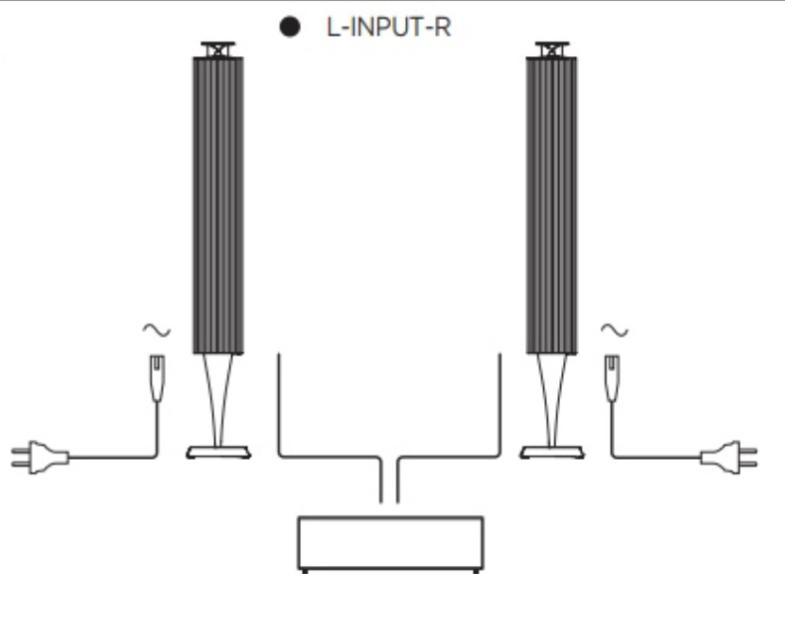
The Beolab 18 are – as you say – powered speakers, but must be connected to a volume controlled line out of the amplifier/preamp.

That should not be a problem, if you want to use them for 2 channel listening.
I suppose you also aim at using them as the fronts in a multichannel setup.
This will require a good deal of calibration of the system (adjusting the output level for all channels etc), but should be doable.The BL18 have a wireless option, but they are not ‘smart speakers’ in the sense, that you can play directly to them – you will need a player (with volume regulated line-outs) or a device connected like you already do with your existing devices.
The wireless option is for transmitting sound from a WiSA enabled sender (like that in the B&O tv products or from 3rd party).
Please note!
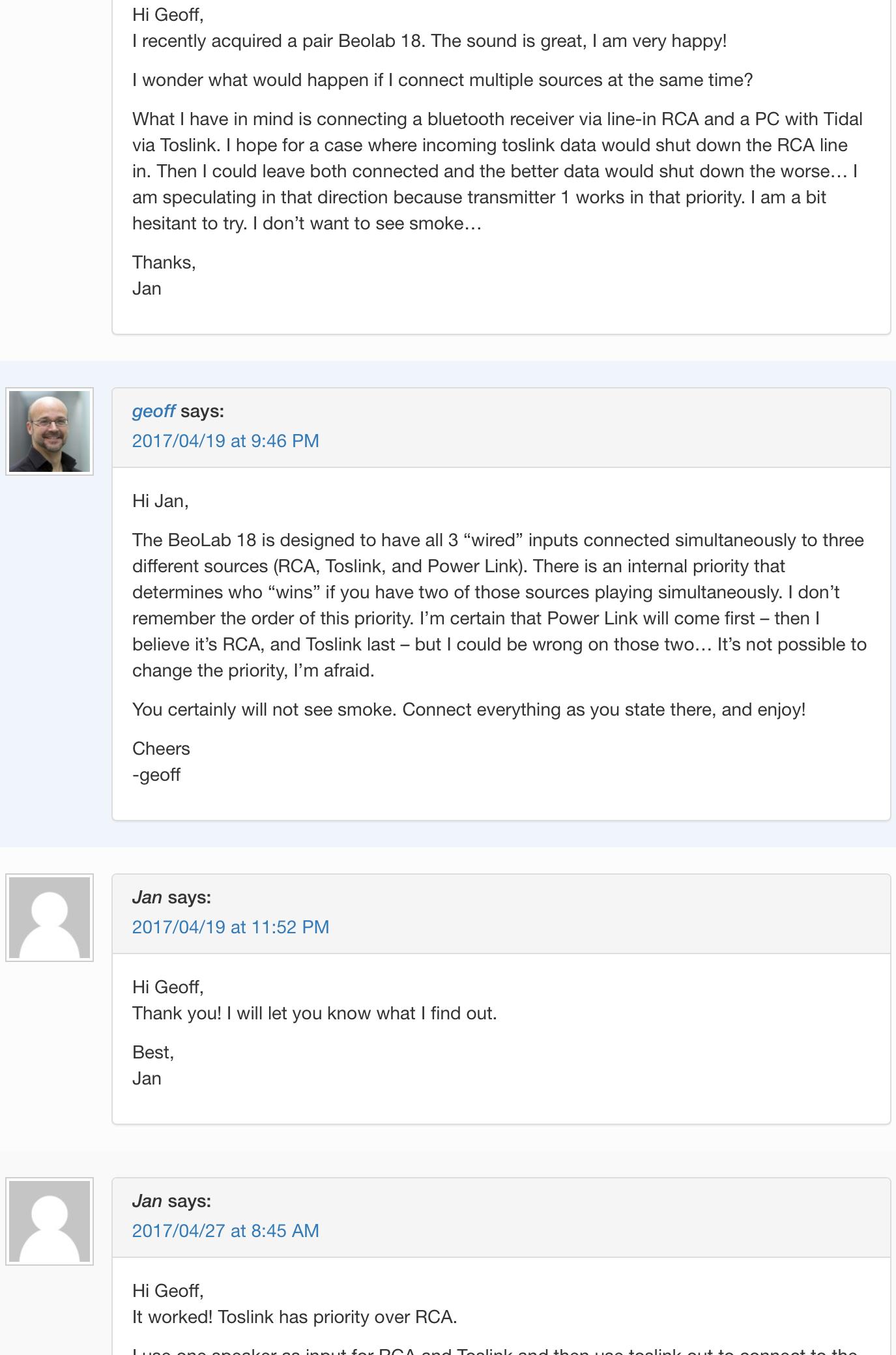
The BL18 have 3 wired input connection – these can all be used……there is a priority.
This way you could have your preamp connected via RCA and run a toslink connection from a (volume regulated) 2 channel source (for streaming e.g. Spotify).Please have a look at this Q and A on this website (you will find that there by scrolling a bit).

MM
Location: Flensborg————Danmark
Hi, What are the best options to connect Beolab 18 to LG C1 TV?
Wired or wireless???
MM
Location: Flensborg————Danmark
-
AuthorPosts