Forum Replies Created
-
AuthorPosts
-
 MadskpGOLD Member
CharlieWednesday wrote:
I do have one question – I like a bit or retro gaming and I would like to connect my old Nintendo GameCube to it. I have a S-VHS cable for the GameCube but found that it does not fit into the little round AV socket on the BV11. Could anyone tell me what kind of plug that AV socket takes?It’s a mini DIN 9-pin connector. Sounds Heavenly sell a cable but that may just be for audio input – worth checking with Steve.
EDIT: From the service manual:
Also have a look in this thread regarding the AV mini DIN connector and the official B&O scart adapter
Location: Denmark
MadskpGOLD MemberAt first glance, the answer seems to be NO. If I connect the speakers to BV powerlink, I cannot also connect them to the Core powerlink, and vise versa (or can I? Two powerlink ports on the 6000s after all…).
FIrst. Do not connect two sources to the same speaker. The intended use for the two powerlink ports on the BL6000 is to be able to daisychain to another speaker.
But there are solutions to your issue.
The official B&O solution is a Beolink Converter NL/ML which can translate between Netlink used on the Core, and Masterlink on the BV10. Not sure how seamless it works when the TV is Masterlink, I have only tried it the other way around, but maybe other members can chime in on that subject.
Another solution is a device that can switch between two powerlink inputs and let them share the same speaker. There are different products on the market that can do that:
OneRemote has a product called Powerlink Switch
Almando has a product called Powerlink Switch and a more advance version called Multiplay stereo. Both have bluetooth built in as a source, and multiplay can also take digital audio sources as input.
Hope this is helpfull
Location: Denmark
25 November 2025 at 17:36 in reply to: Masterlink issues: Beovision MX8000 – Beosound Ouverture for DVD audio #71542MadskpGOLD Memberon some points raised, yes the MX8000 is equipped with the Master Link module.
It is however not connected directly to the Ouverture, instead there is a 4-way ML Junction box sitting between the TV, Ouverture and a Beolab 2000 (link room).
Idid install the junction box myself, but checked continuity across all links in the junction box, can access TV audio from the BL2000 module, and play CDs/Radio on the Tv as Yann described.
The junction box should not matter as long as you can get the sorces between the units.
Following the instructions for DVD audio on the Ouverture, AV + DVD puts it into V.AUX mode, and the speakers switch on. Volume is adjustable without interfering with the TV, but alas, no audio.
Maybe double check the audio connections to the Ouverture in the junction box (red/red-white and orange/orange-white wires).
If I put the DVD player/TV into standby mode, the Ouverture doesn’t follow suit, and instead is active until shut down.
Try to hold down the standby button for a few seconds to shut down the whole system.
Location: Denmark
MadskpGOLD MemberHej igen Henrik
Godt at høre at der kom styr på det.
og du er velkommen til at skrive hvis der er mere. Der er som regel en her på forummet der kan hjælpe med et problem. Specielt i den engelsksprogede del af forummet.
Location: Denmark
21 November 2025 at 17:34 in reply to: Masterlink issues: Beovision MX8000 – Beosound Ouverture for DVD audio #71453MadskpGOLD MemberFor the most user friendly operation speakers connected to the MX8000 in option 2 and then the Ouverture in option 0 is recommended.
Else you will have to have both in option 1 and control it like Yann suggest.
PS: is the MX directly connected the Ouverture or is there a black box (converter) between the 2 products?
The MX8000 has the possibility to have en optional ML module which I guess is the case here as the MX8000 does not have and Audio Aux Link connector as previous models.
Location: Denmark
MadskpGOLD Memberved at fjerne PL kabel mellem bs3 & 6500 forsvinder information i penta display, hvorfor?
Der er vist noget med at der er en lille omskifter ved stik panelet på Beolab Penta hvor man kan vælge mellem Audio og Video. Den skal stå på video når de er tilsluttet til BS3. Grunden til at du fik display før var at signalet blev ført over via Powerlink kablet, men det er ikke meningen det skal den vej.
endvidere tænker jeg om menu punket LINK hvor der kan stilles en frekvens har betydning for mit set-up som er i samme rum.
Det er kun hvis man vil kunne føre billedet fra BS3 til et TV i et andet rum via antenne kabel. Det er en funktion der nok ikke giver så meget mening med moderne video kilder.
er bekendt med jeg spørger meget, B&O er helt ny verden for mig og den er stor opsætningsmæssigt.
Ja der er en del specielle ting at holde styr på, men når det så er sat rigtigt op er brugeroplevelsen normalt også rigtig god
Location: Denmark
MadskpGOLD MemberHej igen Henrik
Det er korrekt at der ikke skal et powerlink kabel mellem BS3 og BM6500, så det vil jeg anbefale at du fjerner
Location: Denmark
MadskpGOLD MemberJeg har fået styr på det og lyden er i alle højtalere,
Det lyder godt. Dejligt at det det lykkedes.
nu hvor 6500 ikke modtager signalet fra fjernbetjening, hvilken kommando får det tilbage er det samme procedure.
Ja, hvis du igen vil betjene den selvstændigt er det option settings med Audio igen, og så med 1 i stedet for (det får B6500 til at modtage audio kommandoer).
En ekstra info til dit setup. Hvis du har andre komponenter i Beosystem 6500 (f.eks. CD, plade eller bånd) og gerne vil starte en kilde direkte med knapperne på den så skal der også sættes et Powerlink kabel mellem en a Powerlink udgangene på BM6500 og Powerlink stikket på converteren.
Location: Denmark
MadskpGOLD MemberHej igen Henrik
Jeg har desværre lidt begrænsede muligheder ud over svar på forum lige for tiden, men prøv at beskrive hvad det er du oplever.
En hurtig tanke herfra er om kablet mellem converteren og Beomaster 6500 er sat i det rigtige stik på Beomaster 6500 (TV/AUX)
Location: Denmark
MadskpGOLD MemberI only get output from one speaker channel, swapped speakers etc.
Are the speakers set to left and right on the switches on the speakers?
Location: Denmark
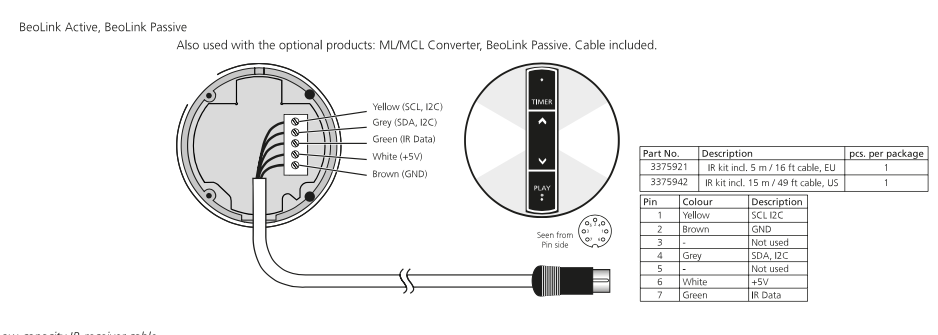
MadskpGOLD MemberOut of curiosity, why do you use a Beolink Passive with an IR eye in the same room as the BS9000?
That also crossed my mind. Potentially the Beolink passive can also work as and amplifier connected via Powerlink to the BS9000 and no IR eye connected. The Powerlink cable has to be a MK2 fully wired Powerlink for it to work though.
Location: Denmark
MadskpGOLD MemberYes I think the motor windings must be connected to the three solder pads. You might be able to see some of it in some of the photos in this thread https://archivedforum2.beoworld.org/forums/t/628.aspx?PageIndex=4
Which wire should connect to which winding might not be clear though
Location: Denmark
MadskpGOLD MemberWhen I initially set up I had the beolabs playing by using the remote and then pressed play on the ir eye. After I disconnected the beloabs I used the remote to control the ir eye.
Just to be sure about the setup: Is it correct that you do not have any speakers connected directly to the Beosound 9000?
Only two things occurred between it working and not. I used the remote to turn on a non-b&o tv, and an electrician changed a dimmer switch.
Hard to say if these things could have affected anything, but anything is possible.
The IR eye had a loose connection so I replaced the lead for a new one. I
Did you replace the lead with an original one with the same color coding? If so did you double check that all the wires are connected correctly and that there is no strain from any of the wires touching anything than its dedicated screw terminal in the IR eye?
Link to connection drawing here https://forum.beoworld.org/wp-content/uploads/beoworld_images/19037/5tq0lkuk2cjvunxl14bj3g0zpr5wz9e0.png
find it odd how the IR eye is receiving a signal from the remote (it blinks when I hold the OFF button or blinks when I follow the process you showed above) but cannot process a proper command.
I think that the IR eye might be able to react if just ground and 5V is connected, but if there is an issue with the data wire the signals might not be passed, so it is possible that there can be an issue with connections as mentioned before.
I am tempted to purchase another masterlink cable to see if it is the problem?
Also worth a try, but I would suggest to check the above first
Location: Denmark
MadskpGOLD MemberCould you try to post a picture of the place where you do not see a connection. Just to understand what the issue is
Location: Denmark
MadskpGOLD MemberQ2 Assuming that I can get these connectors off how do I clean it, do I just dunk it in IPA overnight or some such or is there a special procedure?
As far as I remember I just wiped the motor shaft with a cloth soaked in IPA.
Q3 The motor also seems to be pressed into a metal plate, is it best practice to press it off before cleaning?
Not quite sure about this, but Maybe my pictures or those in the linked thread can give you some answers
Location: Denmark
MadskpGOLD MemberYou might find some inspiration for disassembely of the motor in this thread where I disassembled the motor
https://forum.beoworld.org/forums/topic/boegram-cd50-carrige-slow/#post-66138
Feel free to ask if you need any clarification and I will try to refresh my memory on the subject
Location: Denmark
MadskpGOLD MemberSorry a bit of confusion. There is no BV8 in the equation as this is toehold TV that has been replaced by a Samsung!
My bad. I meant that I do not see a need for Masterlink between BC2 and BS3 in this usecase.
I tried your trick of removing the Masterlink for the BS3 but it made no difference.
You might try to redo the option settings for the Beossytem 3:
- Be sure that the entire system is in standby
- Hold down standby + list on the BEO4
- The text in the display should change.
- Press the list button until OPTION is shown in the display and press GO
- Press list until VIDEO is shown in the display, then press 2 and GO
- The red LED on the IR eye should blink once to confirm it has received the change
This should make sure that the Beosytem 3 receives both VIDEO and Audio commands as it should.
Location: Denmark
MadskpGOLD MemberCan you explain how you used them independently. If you were to play a CD for example. I asume you would have to use an other command for one of the zones?
Location: Denmark
MadskpGOLD MemberOne other note for information. DVD sound is tranfered via SCART between BC2 and BV8
Location: Denmark
MadskpGOLD MemberOk. I do not see the need for Masterlink between the Bv8 and the BC2 (and also it will make conflict between BC2 and BS9000) with this usecase, so I would suggest you try to unplug Masterlink from the BC2 (power down all devices before you do that)and see if anything changes
Location: Denmark
-
AuthorPosts