
Forum Replies Created
-
AuthorPosts
-
 GOLD Member
I got a bit intrigued by this. I only have Emerge from the Mozart platform, but I have Google Home setup. @Lundmark: You refer to “Home Assistant” and “HACS”. Is that applications that is supposed to run on a server in the network?
Location: Sweden
My B&O Icons:

Well… off to find that tiny tool so I can take the remote apart into 5 pieces to change a battery…
I love my BeoremoteOne ? A paperclip will do for opening the remote ?
Location: Sweden
My B&O Icons:
Someone asked in another/a subthread this: “Would like to understand more how home integration is a part of Theatre. Sound great. Could you share some more details on how that is achieved?”. Any Theatre user who has experience with this or any comments there? Would be interesting to have these in this main Theatre thread. MM
Good thinking. Thanks for lifting the question here.
Location: Sweden
My B&O Icons:
For all the discouragement you’ll get from B&O’s support for wanting to tinker yourself with installation however, the complete opposite is true for other parts of the Theatre experience: there’s an official Home Assistant integration to get it and the BeoRemote into your smart home, and it’s great. It’s a tinkerers ultimate dream and setting my BeoRemote One up to control my Hue lights and IKEA blinds was a breeze. I’ve even mapped a button to pause my dishwasher when it gets noisy during a movie. Controlling lights with the remote is something I’ve wanted to do for decades ever since I saw a Beo4 control lighting in the 90s, but it previously required bespoke hardware and professional installation, none of which appealed to me. Now it just works with market leading open-source software out of the box and B&O itself is behind the development. This was totally unexpected and I respect them so much for doing this. Truly great to see.Would like to understand more how home integration is a part of Theatre. Sound great. Could you share some more details on how that is achieved?
Location: Sweden
My B&O Icons:
Simple search at the shows webpage shows no sign of B&O
Location: Sweden
My B&O Icons:
Hi fellow B&O lovers,
I have the theatre for a couple of weeks now, very keen with it and combined with a pair of beolabs 9 for the front and 6000 mk2 for the back it’s a real gamechanger.
however I’ve found quite a big bug it seems. When switching from listening modes for some strange reason the theatre itself always becomes louder. It changes back to the right settings when you touch the “db” meter for whichever speaker you select. Just a quick tap on it seems to fix it.
This is quite annoying seeing every single time i startup my Apple TV / soundbar and tv i need to go into the settings of the app and tap on the listening position and tap on one of the “db” levels.
Anyone having the same strange problems. My setup is; beolabs 9 as front, theatre as center channel so left and right speakers combined with the center itself. 6000MK2 as left and right side surround.
Edit: Seems I’ve found the problem. When recalibrating the theatre disables left and right front firing and only uses the center and height channels from the soundbar. After that the problem disappears. However when putting right and left front firing in the center mode the problem occurs once again when switching listening positions. When adjusting “db” from whichever speaker it works again.
So a pretty big bug in the software. For now I’m only using the center channel from the theatre the left and right tweeter + midrange completely disabled. Still sounds awesome but would be nice to see this getting fixed.
Please report to B&O support
Location: Sweden
My B&O Icons:
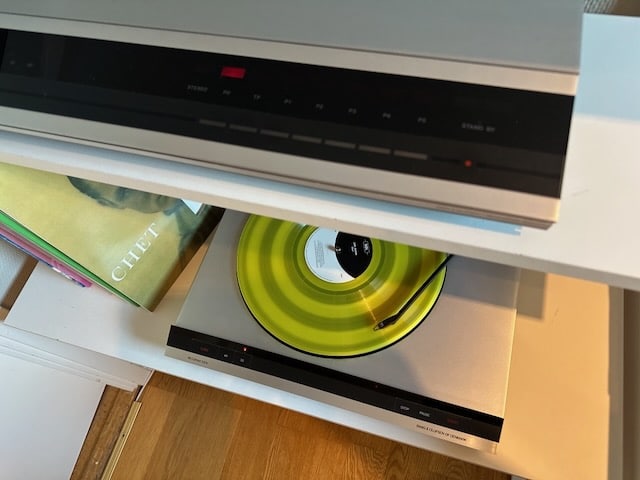
8 January 2023 at 11:50 in reply to: So how’s the Beosound Theatre working out for B&O so far? #42187I am very glad I ordered my Theatre early. My dealer told me that the gold Theatres would probably arrive in late November but I got mine shortly after the release. My theatre has 18’s up front and 17’s in the rear along with a 19. I couldn’t be more happy with the sound of the entire system. I have a Beogram 8002 connected and it has been a joy to listen to vinyl with it. I haven’t experienced any real problems with it, it seems to switch sources seamlessly. When I watch tv it is only with the Theatre, so when I want to listen to music via AppleTV or watch a 4k blu-ray movie, both of which are connected to the tv, I have to switch the listening position to the full system. Every other source uses the entire system. That’s typically my only interaction with the Theatre not counting volume control. I am not a complicated user so for me it’s been perfect.
I would love to see your gold Theatre! Can you please post pictures?
Location: Sweden
My B&O Icons:
@Hiort Was that an update just for your BS1 or is it a general one? MM
Not sure.
I would guess it’s just for mine.Location: Sweden
My B&O Icons:
Update: B&O support informed me that an update was triggered for my BS1 to cure the problem. 2.1.51694 is now in BS1 and I can change channel as I used before ?
Location: Sweden
My B&O Icons:
Shall add that if I put everything in stand at and then start up again it does not work to change channel again.
Location: Sweden
My B&O Icons:
Hello Hiort, sounds like the same issue that Rolf2 and I have, see here: https://forum.beoworld.org/forums/topic/bo-radio-migration-available-now/page/4/#post-12269.
We found that after changing station once in the app, then changing stations with the remote works as normal again.
Regards, Johan
Thanks Johan!
That worked for me as well. The drawback is that the Beosound 1 the goes from mute to playing. I have submitted the question to B&O support. I will revert back in this thread with what they say.Location: Sweden
My B&O Icons:
Probably something related to the rather strange initiative to publish NFT art.
I was under the impression the NFT market was dead.Location: Sweden
My B&O Icons:
Hi,
Why it’s not “Dolby Atmos” too in audio codec?
I dont understand.
The audio codec name is “Dolby TrueHD”. Atmos is metadata, that include information on what should be played in e.g hight channels. In Stage that is the hight channels Stage emulate.
So the app rightly display the audio codec used and that Atmos metadata is received.
Location: Sweden
My B&O Icons:
It does take some attention to settings of a device to get Dolby Atmos being sent. I just sat through the James Bond movie “No Time to Die” and though the sound was amazing. However, when I checked what the sound was on the B&O app, it showed 7.1 True HD PCM. I had the output on the Sony UHD player set correctly to “Auto.” However, I needed to turn the setting for “Secondary audio” to “off.” This wasn’t really very intuitive. After doing so, I got “Dolby Atmos” shown on the B&O app. I went back and re-watched a few scenes and was blown away by the difference. BTW, the Theatre really shows the difference between compressed and uncompressed audio. On a lesser quality speaker, streaming might seem fine. However, with a UHD you get to realize the full potential of B&O speakers with the lossless sound.
Beojeff, I assume your post relate to Theater and not Stage, right?
Location: Sweden
My B&O Icons:
Here are all the install videos https://support.bang-olufsen.com/hc/en-us/articles/9396520485777-Beosound-Theatre-Installation-videos
I find these installation videos oddly satisfying to watch 🙂 Amazing attention to detail B&O have put into the motorised wall bracket. Its a sturdy piece of kit.
Location: Sweden
My B&O Icons:
Those are certainly not up to date. Mine are on ver. 2.1.50400.
As YannChris said, make sure to add the products to the app by tapping the plus icon up to the right in the startscreen of the app.
Your devices that appear to be on your network should then appear.
Make sure your phone (if you use the app on there) are on the same network as the M5.Let us know your progress.
/Claes
Location: Sweden
My B&O Icons:
Thanks for the review ?
Never consider an Edge, but I was quite impressed when I listened at my dealer when it was launched.
Could imagine it to be a conversation piece when you have a party ?
Location: Sweden
My B&O Icons:
Very clever and good looking microphone included in the package 🙂
Location: Sweden
My B&O Icons:
French guy looking at the product in the flesh.
Talks with Kresten Krab-Bjerre
Location: Sweden
My B&O Icons:
Hefty price for sure, but its the beovision for the future with all the connectivity one would expect.
Happy to see that it is available with a motorized wall bracket.
So it will be a bit under 100K SEK for a complete 55″ Beovision experience with the possibility to swap screen when panel technology evolve. Not too bad,Location: Sweden
My B&O Icons:
-
AuthorPosts


