Forum Replies Created
-
AuthorPosts
-
 GOLD Member
Never experienced….
Dont think you can fix that. You can buy the “electronics part” of the remote as a separate item from B&O. Then you can keep the metal part.
Location: Sweden
My B&O Icons:

I just did some tests, and now everything works as expected, playing Airplay to a speaker and extending to my BV11. Have not made any changes.
Not sure what caused the initial problems, but all good now.
Location: Sweden
My B&O Icons:
Noticed just now that you wrote “connected”. Its not possible with physical connection. BS1 has no Line in / Out.
Location: Sweden
My B&O Icons:
You are able to use them simultaneous, using Beolink. Meaning you start the source on e,g Beosound 1 and then add Stage to that play (ideally using the B&O app). They will play in sync.
Both need to be on the same network.
(I assume your Beosound 1 is the conic aluminium speaker 🙂
Location: Sweden
My B&O Icons:
Thanks MM.
The initial (and quite quick) reply from Support was some suggestions for trouble shooting.
So from that my conclusion is that the feature is still there.
This is the reply from Support that mentioned Airplay over multiroom:
“Thank you for your patience while we work on your case. We’ll be happy to provide an update.
We have checked with out technical team regarding your issue and they stated the network delay setting seems to be out of spec.
They have provided the following instructions:
Choose one of the products in the B&O app.
Choose settings > configure > settings > beolink > sound synchronization
Set wired to 200ms and wireless to 1000ms and try with these settings first
If still dropouts change the wireless delay to 1500 or more.
*If enabled the option “activate multiroom for airplay” then please disable as this is not used anymore since airplay 2 was introduced.”Not sure what they mean with “not used anymore”
Location: Sweden
My B&O Icons:
Hmmm… I have to do some additional testing in my setup.
I have also sent an email to B&O support.
Moment has native Airplay support, right?
Location: Sweden
My B&O Icons:
Glad to help.
Location: Sweden
My B&O Icons:
I have set the powersaving so that the TV have quickstart everyday between 6am and midnight.
Then the B&O Logo is not showing and the TV starts much quicker. May be that is the reason to why you have the long startup and no “curtain”.
Check out the manual here for options.
Location: Sweden
My B&O Icons:
Yes. HDMI 1.
I have done a videoclip showing the startup that you can watch hereI have programmed one of the “My Buttons” to startup the AppleTV source.
Location: Sweden
My B&O Icons:
My ATV is 4K version (model 1842) first gen.
Location: Sweden
My B&O Icons:
This might be a good advice for a ‘non HDR compatiple’ tv like the BV11.
However, those with a modern 4K (LG) tv should always leave ‘Match Dynamic Range’ ‘On’ in order to ensure the automatic switching between ‘non-HDR’ and ‘HDR’ content.
MM
Absolutely.
My advice clearly relate to a Beovision 11.Location: Sweden
My B&O Icons:
Check the setting you have in the AppleTV.
Go to Settings > Video and Audio > Match Content > Match Dynamic RangeHere I have the setting “No”.
Having “yes” may add the delay you have.Location: Sweden
My B&O Icons:
My ATV is set to be always on. I guess if you have the ATV set to power off each time, the curtain will open prior to the ATV and you will not see that effect.
Location: Sweden
My B&O Icons:
0 second blank delay.
Location: Sweden
My B&O Icons:
Not sure what you wanted to see here. Is the “opening scene” the Bang & Olufsen text?
I have disabled powersaving on my BV11 setup so when I press my shortcut button on my Beoremote 1 that I have mapped to the AppleTV source, it opens up with the curtain and reveal the AppleTV screen.Location: Sweden
My B&O Icons:
You can access service manual if you become paying member on this site.
The bezel is fixed to the glass, if that is what you mean, so you swap the whole thing if you want another bezel.
Location: Sweden
My B&O Icons:
Have you tried to connect A9s cabled to see if the problems remain? (assuming they are on Wifi now)
Location: Sweden
My B&O Icons:
Thanks!
This has been fixed now.Location: Sweden
My B&O Icons:
I have done yet another factory reset of my M5 including removing from app and adding again.
Now its seems actually to work as expected i.e “releasing” the BS1 after everything is put to standby. I have to do some additional tests to finally verify.Location: Sweden
My B&O Icons:
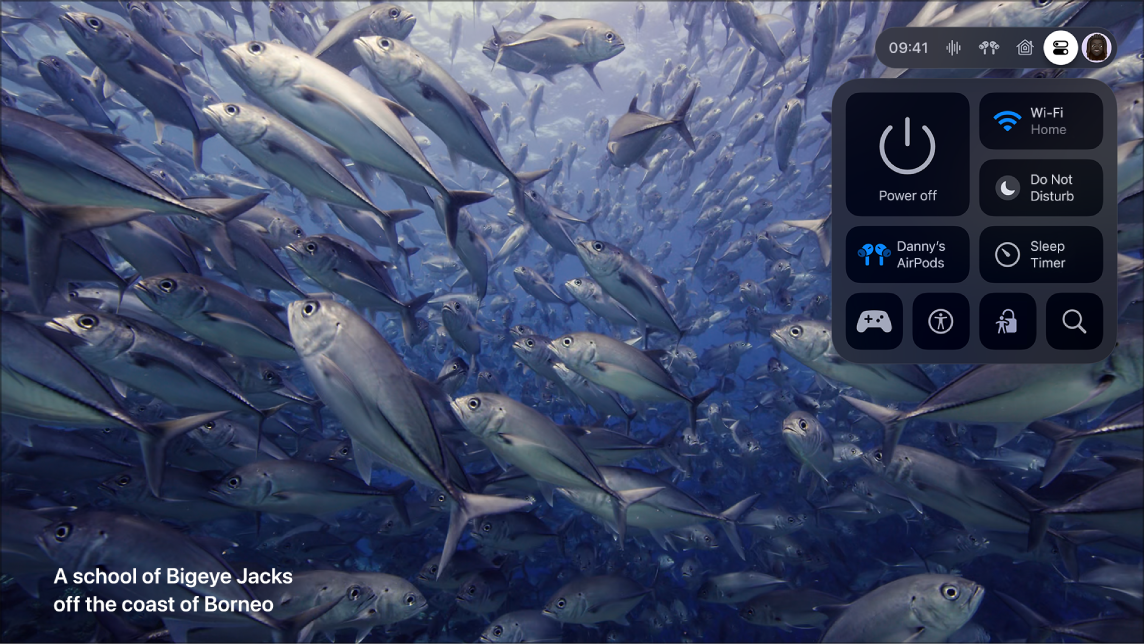
According to Apple, Control Centre is the settings menu top right here:

Exactly. I dont understand why B&O cannot add that to the PUC codes
Location: Sweden
My B&O Icons:
-
AuthorPosts