






Home › Forums › Product Discussion & Questions › BeoLink › Master Control Link (82) compatible with Beomaster 5500 and Beolink 1000?
- This topic has 16 replies, 5 voices, and was last updated 2 months, 3 weeks ago by
 Madskp.

-
AuthorPosts
-
16 July 2026 at 20:53 #124560
 Gustav MSILVER Member
Hi Beoworld!
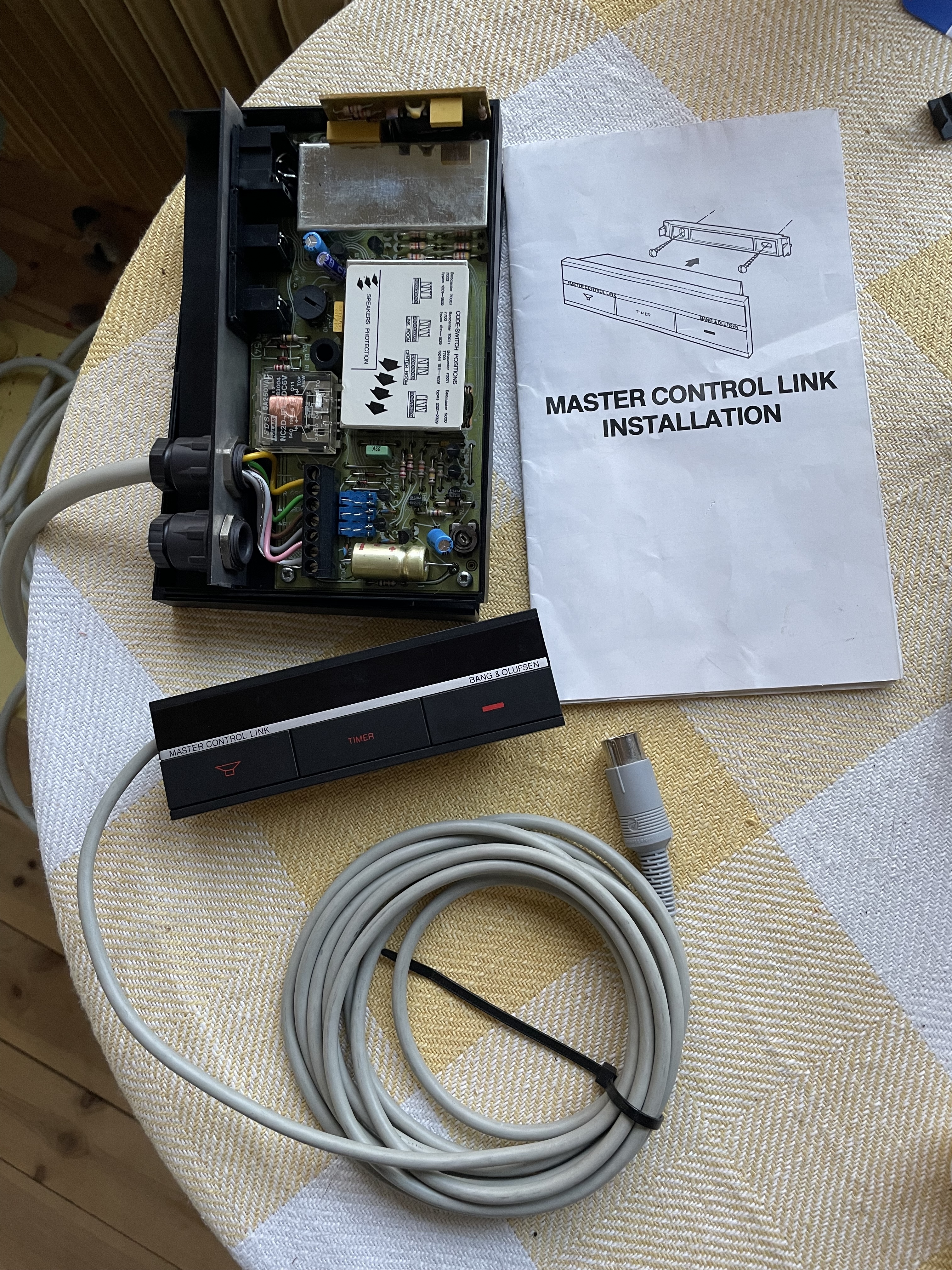
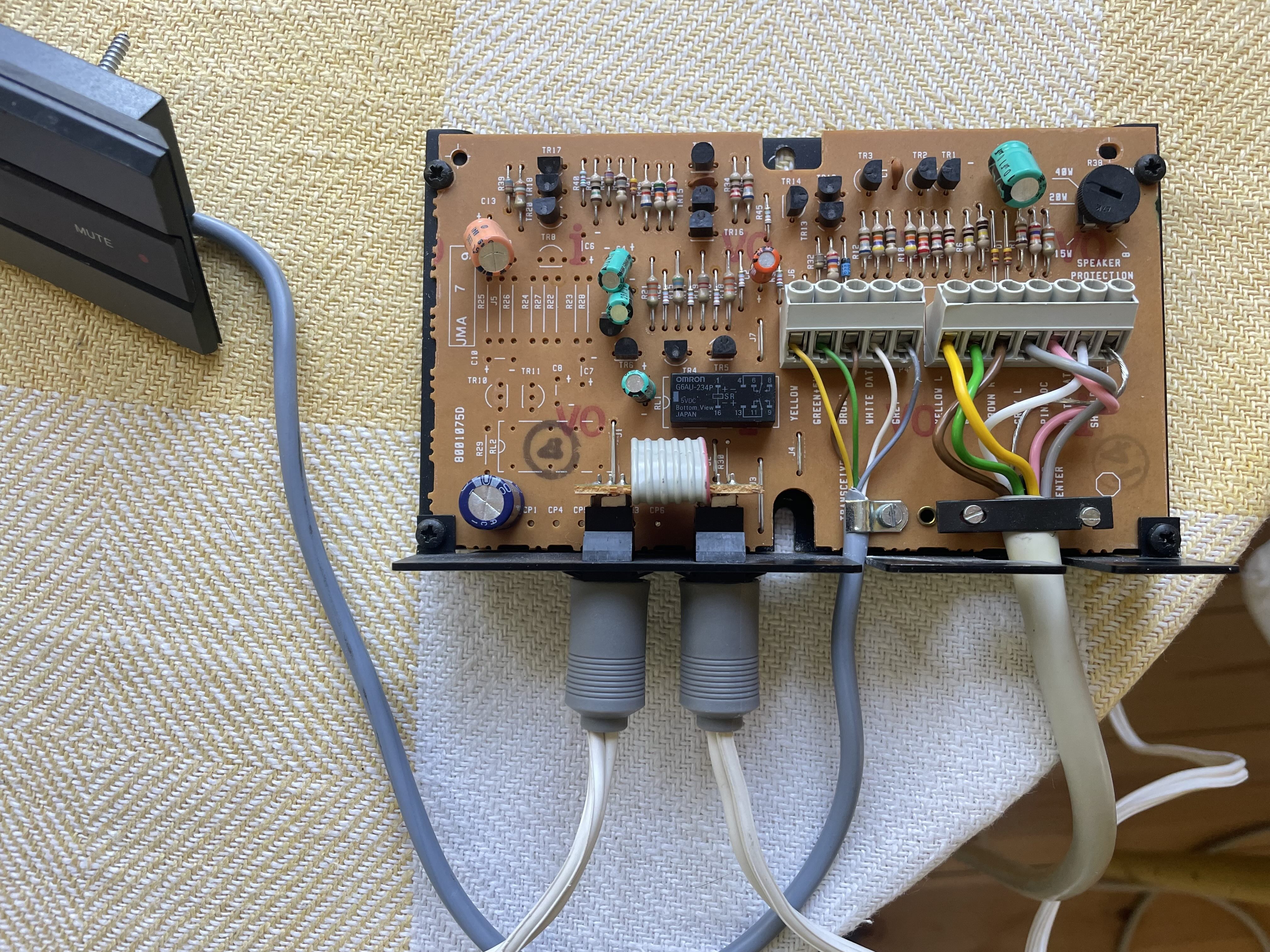
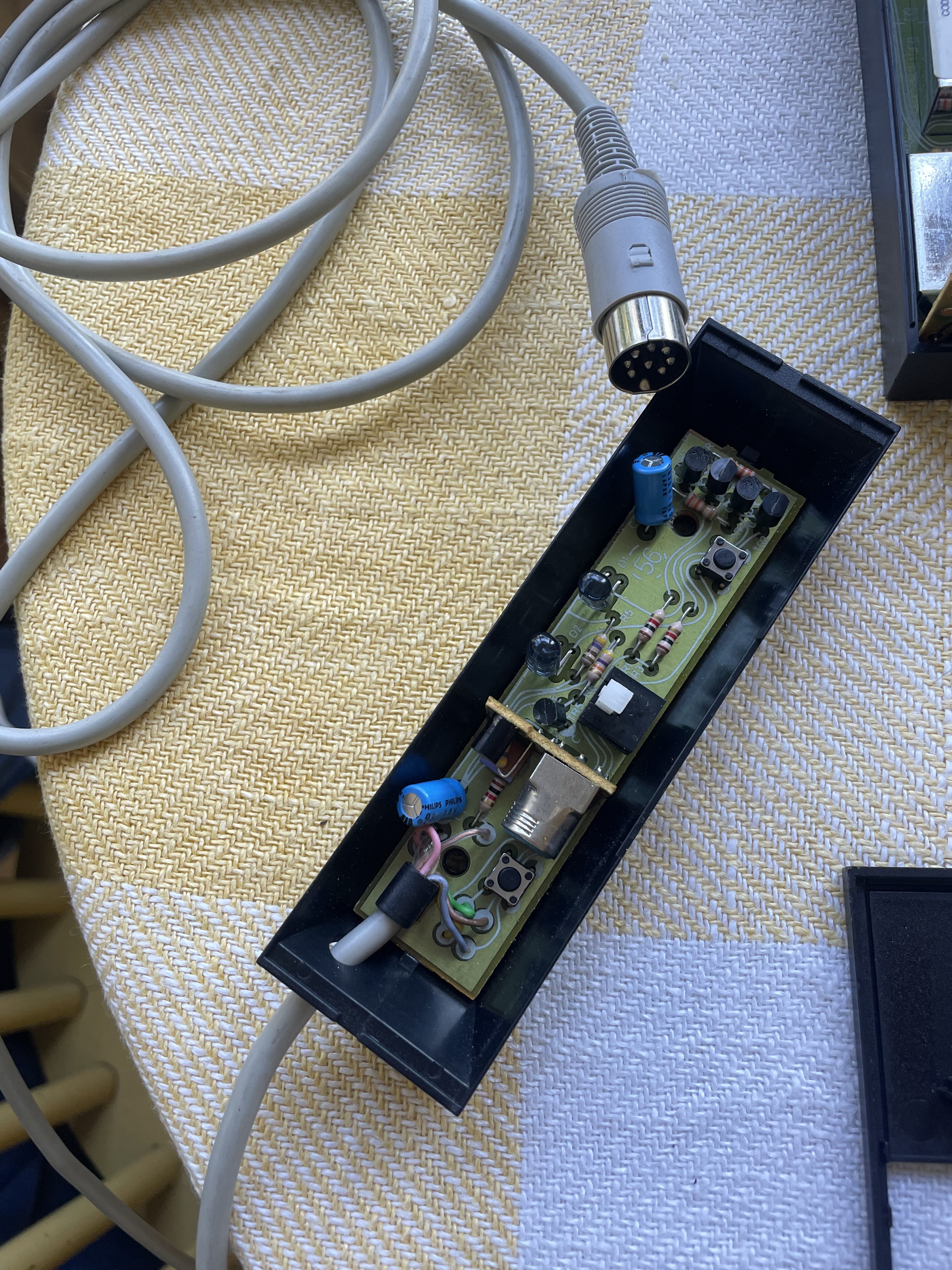
A few years ago I purchased a Beomaster 5500 receiver that came with a bunch of Master Control Link stuff (several relay boxes and transceivers) that seems to be of the MCL82 type. I’ve now tried to set up a link system for another room with two passive Beovox CX50 speakers and an IR transceiver connected to a relay box (which is connected to the second speaker inputs of the Beomaster). I got the sound to work alright in the other room but the transceiver doesn’t seem to be responding to any remote control signals (e.g. from the beolink 1000). It works to press the left-hand button on the transceiver to turn the sound in the other room on and off (pressing the other buttons doesn’t lead to anything noticeable though) so it’s not completely dead. On the other hand there’s no red light or anything indicating that the transceiver is on standby to receive signals from a remote control.
Is it supposed to work to control the Beomaster 5500 through a MCL82 system using the Beolink 1000? Only the Beomaster 5000 is listed as supported in the manual but that’s presumably because the 5500 had not yet been released at that time.
Gustav
 16 July 2026 at 21:13 #124561
It is my understanding that the MCL82 is only for the Beomaster 5000 or the Beocenter 7*** range. These were made before the Beolink standard that the Beolink 1000 (and all later B&O IR remotes) were built to.
I think you would need the later model MCL2a, also sold as the ‘X-tra Speaker Kit’, along with the compatible transceiver.
As far as I know the MCL cable you have already (with the 3-pin speaker plugs) should work with an MCL2a, so hopefully you’ll be able to find one, with a transceiver, cheap on eBay. There don’t appear to be any listed now but one will come up I’m sure.
Sold without an MCL cable, you should only have to pay about £20-£30 for it.
Location: Liverpool
My B&O Icons:
17 July 2026 at 11:04 #124565Gustav MSILVER MemberThanks!
I should be able to find an MCL2a somewhere. It’s just too bad that I have two MCL82 relay boxes and three transceivers that I can’t use, at least not with the Beolink 1000. Do you think it could work with some other, older B&O remote, provided the Beomaster 5500 could interpret the signal?
17 July 2026 at 17:56 #124572MadskpGOLD MemberDo you think it could work with some other, older B&O remote, provided the Beomaster 5500 could interpret the signal?
Yes and no.
The MCL82 can be controlled with a remote for a Beomaster 5000 or a Beocenter 7xxx as mentioned by Charlie.
The Beomaster 5500 can however not interpret those remote signals so the only function you would get is to activate the relay in the MC82 boxes just like when you press the button on the transceiver and make the music already started on the Beomaster 5500 be played in the speakers. All other functions like volume control, and play, stop, forward and rewind and source selection will not work.
So like Charlie I will also suggest you go for at MCL2A box and the try to sell of the MCL82 to someone who has a compatible system.
One thing worth mentioning about the MCL2A is that the volume will follow that on the main speakers, so if you raise the volume in the main room the link room volume will also be raised and vice versa.
If you wan’t individual volume control you should go for a MCL2AV, but that will also require a Beolink passive amp if you want to use passive speakers with it. If you want to know more about this please let me know and I will try to explain the needed setup
Location: Denmark
18 July 2026 at 12:28 #124575Gustav MSILVER MemberThanks, I’ve managed to buy an MCL2A (relay box +transceiver) online for a good price so will try this out when I receive it.
Noted on the volume control of the MCL2AV: I saw this in one of the MCL 2 Owner’s manuals. This could be a nice feature in one of my possible linked rooms. So if I understand it correctly, I could either connect two passive speakers such as my CX50s to an MCL2AV (in which case I need to get a Beolink passive to go between) or two active ones directly to the MCL2AV? If I manage to find an MCL2AV without the transceiver, would the MCL2A transceiver that I bought also support the independent volume control?
I’m hoping to connect two rooms linked to the main room: first the one mentioned above with either the MCL2a or the MCL2AV, and then another one on the other side which may not need its own remote control ability since there’s only a glass door in between which is most often open. In this case I can maybe use the old MCL82 relay box just to hook up the additional speakers (passive ones). But how do I set up this as a “star” network, i.e. splitting the MCL cable from the Beomaster in the main room and one cable going left and another right to each of the linked rooms? In the owner’s manual there is mention of a “connection box” for this purpose but I can’t seem to find this online. Or is there an MCL cable splitter that could be used for this purpose?
18 July 2026 at 14:46 #124576So if I understand it correctly, I could either connect two passive speakers such as my CX50s to an MCL2AV (in which case I need to get a Beolink passive to go between) or two active ones directly to the MCL2AV? If I manage to find an MCL2AV without the transceiver, would the MCL2A transceiver that I bought also support the independent volume control?
Yes to all the questions that you have asked in this paragraph. Be aware that the MCL2AV requires a 15v power supply so ideally look for that when you purchase. If you can find one, the predecessor to the Beolink Passive was known as an MCL2P, and had the advantage of a built in 15v power output designed to power the MCL2AV.
I’m hoping to connect two rooms linked to the main room: first the one mentioned above with either the MCL2a or the MCL2AV, and then another one on the other side which may not need its own remote control ability since there’s only a glass door in between which is most often open. In this case I can maybe use the old MCL82 relay box just to hook up the additional speakers (passive ones). But how do I set up this as a “star” network, i.e. splitting the MCL cable from the Beomaster in the main room and one cable going left and another right to each of the linked rooms? In the owner’s manual there is mention of a “connection box” for this purpose but I can’t seem to find this online. Or is there an MCL cable splitter that could be used for this purpose?
Don’t worry about a specific ‘connection box’, as a simple terminal block will be fine to run parallel MCL circuits from the main room to two link rooms. I would be a bit wary of using the old MCL82 in parallel with the newer MCL2A (or AV) as there may be conflicts; it is however probably worth a try, especially if you are only using the MCL82 as an on/off switch in one of the rooms.
-
This reply was modified 3 months, 1 week ago by
Location: Warwickshire, UK
My B&O Icons:
18 July 2026 at 15:24 #124580MadskpGOLD MemberYes to all the questions that you have asked in this paragraph. Be aware that the MCL2AV requires a 15v power supply so ideally look for that when you purchase. If you can find one, the predecessor to the Beolink Passive was known as an MCL2P, and had the advantage of a built in 15v power output designed to power the MCL2AV.
Actualle I have tested that a 12V power supply can also be used. However be avare that the polarity on the connector is reverse to what is common (+ is on the outside of the connector and minus is on the inside), so if you do no use an original power supply be sure to find one where the tips can switch position in order to change polarity.
Location: Denmark
18 July 2026 at 23:21 #124589Guy wrote:
Yes to all the questions that you have asked in this paragraph. Be aware that the MCL2AV requires a 15v power supply so ideally look for that when you purchase. If you can find one, the predecessor to the Beolink Passive was known as an MCL2P, and had the advantage of a built in 15v power output designed to power the MCL2AV.
Actualle I have tested that a 12V power supply can also be used. However be avare that the polarity on the connector is reverse to what is common (+ is on the outside of the connector and minus is on the inside), so if you do no use an original power supply be sure to find one where the tips can switch position in order to change polarity.(1) Of course if you have a ‘normal’ 12v power supply it’s easy enough to cut the wire and switch round the +ve and -ve with a terminal strip, crimps, solder or whatever.
(2) Madskp and Guy have suggested elsewhere that the 15v power supply is only vital if you have a MCL2AV which also has passive speaker outputs and you want to use it (effectively) as an MCL2A. I’m not sure if there’s any real bonus to doing this (rather than just an MCL2A) as I don’t think it gives you independent volume control. Most MCL2AVs don’t have the passive speaker ports anyway.
(3) MCL2 is a pretty good system. In my experience (detailed here) it’s much easier to set up an MCL2 system that works as you’d like than with Masterlink (ML), especially with older kit like yours. In theory the sound quality is better with ML but you’d need good ears to tell. ML has the additional advantages of volume control on the IR-eye transceivers and the option for standard CAT6/7 cabling and RJ45 plugs though.
(4) MCL cable is hard to come by nowadays but there are fairly straightforward options if you’re happy for something a bit less neat than real 7-core MCL cable. The 7 conductors are left speaker + and -, right speaker + and -, low-voltage trigger power, data signal, and a shield around that data signal. The trickier bit is the shielded data cable but something like this should work fine for pence per metre. The other five conductors you can fudge from real speaker cable, or 240v power cable (with and without earth), or a fairly neat and cheap option is five-core cable like this, about a pound a metre. The colours are all wrong of course but that’s easy to figure out. This is what I’ve been using with the shielded data cable wound around the outside. It all functions fine and the 0.75mm2 cable carrying the amplified audio signal is pretty similar to the original MCL cable.
Location: UK
Favourite Product: Beolab 3000
My B&O Icons:
19 July 2026 at 11:12 #124590MadskpGOLD Member(2) Madskp and Guy have suggested elsewhere that the 15v power supply is only vital if you have a MCL2AV which also has passive speaker outputs and you want to use it (effectively) as an MCL2A. I’m not sure if there’s any real bonus to doing this (rather than just an MCL2A) as I don’t think it gives you independent volume control. Most MCL2AVs don’t have the passive speaker ports anyway.
Just to clarify, the MCL2AV will need an external power supply for powering it in all uses cases whether it is acting as a MCL2A or a MCL2AV since the pink wire with power in the MCL cable is not connected internally. I am not sure about the reference about this, but it might be a misinterpretation of what was meant.
(3) MCL2 is a pretty good system. In my experience (detailed here) it’s much easier to set up an MCL2 system that works as you’d like than with Masterlink (ML), especially with older kit like yours. In theory the sound quality is better with ML but you’d need good ears to tell. ML has the additional advantages of volume control on the IR-eye transceivers and the option for standard CAT6/7 cabling and RJ45 plugs though.
Just to add to this: It is possible to ad Masterlink zones to the Beomaster 5500 by use of a Beolink converter type 1611. This might give some other options for link rooms with independent volume control.
Location: Denmark
19 July 2026 at 20:40 #124591Gustav MSILVER MemberThanks guys for all your replies, it helps a lot.
@Guy: Regarding the connection box/terminal block, could you give some more details on how this would work as I’m not that experienced in wiring? I guess one wire in and two wires out for each of the seven wires of the MCL, right? What kind of terminal block would you recommend? I’ve got a rather long MCL cable with the speaker plugs in one end that I connect to the Beomaster. Not sure if it’s possible to cut some of this at the other end for the shorter connections. Otherwise need to find another MCL or make as suggested by speedsixdave (very good suggestions there!)
@speedsixdave & @Madskp: speedsixdave, are you saying that independent volume control wouldn’t work with passive speakers connected to a MCL2AV? I got the impression from the others and also elsewhere that this would work regardless if using passive or active speakers, but I may certainly be wrong. Currently I don’t have a MCL2AV, just a MCL2A (soon) that I will try first to see if works to control the Beomaster via the beolink 1000. I could also look into the Beolink converter option as suggested by Madskp.@All: good points regarding powering the MCL 2AV. If I end up getting one I will probably get the MCL2P as well and hook up two Beovox CX50 since this would be the cheaper option compared to getting Beolab speakers.
20 July 2026 at 08:36 #124597@Guy: Regarding the connection box/terminal block, could you give some more details on how this would work as I’m not that experienced in wiring? I guess one wire in and two wires out for each of the seven wires of the MCL, right? What kind of terminal block would you recommend? I’ve got a rather long MCL cable with the speaker plugs in one end that I connect to the Beomaster. Not sure if it’s possible to cut some of this at the other end for the shorter connections. Otherwise need to find another MCL or make as suggested by speedsixdave (very good suggestions there!)
You can just use relatively cheap terminal block like this: https://www.screwfix.com/p/essentials-16a-12-terminal-strips-10-pack/91532
… and to connnect just use the MCL cable (connected to your Beomaster’s speaker 2 sockets) and split out the 7 individual wires into one side, with then two wires from each connection the other side (one to each room or zone). You can put the terminal block inside some kind of box if you want to hide it.
And if you use the MCL2AV with passive speakers (connected directly to the MCL2AV’s loudspeaker sockets) you will not have independent volume control (the crcuit diagram of the MCL2AV just shows a relay in the loudspeaker circuit). To achieve independent* volume you need to add a Passive (or MCL2P) connected to one of the MCL2AV’s Powerlink sockets.
* Note the volume control will not be strictly independent – see the following text from the MCL Handbook:
This volume control permits you to reduce the volume in the link room without
affecting the volume in other rooms. The volume can be increased by 12
dB in the link room without affecting the volume in other rooms. If the
volume is increased further, the volume in other rooms will be increased
comparatively.-
This reply was modified 3 months, 1 week ago by
Location: Warwickshire, UK
My B&O Icons:
20 July 2026 at 17:34 #124608Gustav MSILVER MemberGreat, sounds pretty straight-forward. I should be able to get one of those terminal blocks easily from a local store.
Thanks also for clarifying how to get independent volume control for the MCL2AV using passive speakers, this clarifies things.
20 July 2026 at 22:41 #124610speedsixdave wrote:
(2) Madskp and Guy have suggested elsewhere that the 15v power supply is only vital if you have a MCL2AV which also has passive speaker outputs and you want to use it (effectively) as an MCL2A. I’m not sure if there’s any real bonus to doing this (rather than just an MCL2A) as I don’t think it gives you independent volume control. Most MCL2AVs don’t have the passive speaker ports anyway.
Just to clarify, the MCL2AV will need an external power supply for powering it in all uses cases whether it is acting as a MCL2A or a MCL2AV since the pink wire with power in the MCL cable is not connected internally. I am not sure about the reference about this, but it might be a misinterpretation of what was meant.Sorry, my fault for not being clear. Late night post as usual! Agreed, an MCL2AV needs external power to work. The official B&O power supply was 15V either from a plug-in transformer or from an MCL2P, but if you’re connecting Beolab active speakers or a Beolink Passive to the MCL2AV via powerlink, a more common 12V supply seems to work fine. As I understand it the 15V supply is needed to drive the internal relay if you’re connecting passive speakers direct to the MCL2AV and using it as an MCL2A. I thought it was @madskp or @guy that had demonstrated that but I’m not sure. The odd thing is a simple MCL2A works fine as a relay without an external power supply, using only the power carried by the pink wire (7.5V?) in your MCL cable.
Agreed also that to get independent volume control with passive speakers you need an MCL2P or Beolink Passive amplifier between the MCL2AV and the speakers. It’s less neat than active Beolabs but you can pick up a used Passive for about UKP30 so pretty cheap, especially if you already have those CX50s. Be aware you would also need a length of powerlink cable with the 8-pin DIN plugs on each end to go between the MCL2AV and the Passive / MCL2P, and I think it has to be ‘fully wired’ (Mk2).
For more cheap fun, from your terminal block you can run another length of MCL cable out to a Beolab 3500 Mk1 active link room speaker and you’ve got volume- and tone-controlled Beolab sound in another room. I bought a BL3500 for £2.30 off ebay once, and it’s working happily in our conservatory even as I write this. The BL3500 is the bargain of the century.
-
This reply was modified 3 months, 1 week ago by
Location: UK
Favourite Product: Beolab 3000
My B&O Icons:
22 July 2026 at 08:23 #124623Gustav MSILVER Member@speedsixdave: thanks for the additional clarifications. Agreed that it sounds odd that the MCL2AV needs an additional power supply even if it’s only used as a MCL2A and connecting passive speakers directly. But it seems this is the case. It’s possible to buy a variable mains adaptor 5-24V DC (2.4A at 15V) here with various plugs that could work, but I guess it would be easier to get an MCL2P/Beolink Passive (though it adds quite a bit of bulk) for not that much more or just get active speakers and a cheaper 12v adaptor. I haven’t decided what to do yet but I might get an MCL2AV anyway just to try it out.
I got the MCL2A yesterday by the way and it works great with the Beolink 1000! The only issue is that the cable for the transceiver is very short. Do you think it would be possible to repurpose one of the longer cables that I have for the MCL82 transceivers for the MCL2A? The difference seems to be that seven cables (like MCL) are used for the MCL82 transceiver but only five for the MCL2A.
22 July 2026 at 09:34 #124625Any decent cable with 5+ cores should be fine to extend the transciever cable – the MCL82 cable should be fine. The installation instructions do say that it should be no more than 10m long. (The cable originally supplied is 5m). Be aware that the cable is soldered at the transciever end, so you will be best just extending from the current bare wires – you could use another short piece of terminal block, or solder and wrap the wires for a neater join.
-
This reply was modified 3 months, 1 week ago by
Location: Warwickshire, UK
My B&O Icons:
1 August 2026 at 16:05 #124797Gustav MSILVER MemberFor more cheap fun, from your terminal block you can run another length of MCL cable out to a Beolab 3500 Mk1 active link room speaker and you’ve got volume- and tone-controlled Beolab sound in another room. I bought a BL3500 for £2.30 off ebay once, and it’s working happily in our conservatory even as I write this. The BL3500 is the bargain of the century.
@speedsixdave: Would the set up with the BL3500 require the MCLAV, given that it’s an active speaker? How would you rate the sound of this speaker? It seems you can still find them quite cheap.4 August 2026 at 08:38 #124824MadskpGOLD MemberWould the set up with the BL3500 require the MCLAV, given that it’s an active speaker? How would you rate the sound of this speaker? It seems you can still find them quite cheap.
You do not need the MCL2AV for this. The Beolab 3500 is a link room speaker with built in IR eye and can work both as a Masterlink or an MCL2 (only for the MK1 version of the Beolab 3500) speaker. To use it in the MCL 2 system you will need to connect it via it’s 8 PIN din connector which has a special pinout. You can find a wirring diagram for this a little over half way down this page https://beoworld.org/wiring-diagrams/
Alternativly you can connect a Beolab 3500 to a Beolink converter type 1611 via Masterlink, and then use a 7Pin Din cable from the Beolink converter to the Beomaster 5500 TP2/AUX connection
Location: Denmark
-
This reply was modified 3 months, 1 week ago by
-
AuthorPosts




- You must be logged in to reply to this topic.