Forum Replies Created
-
AuthorPosts
-
 tb59427BRONZE Membertb59427BRONZE Member
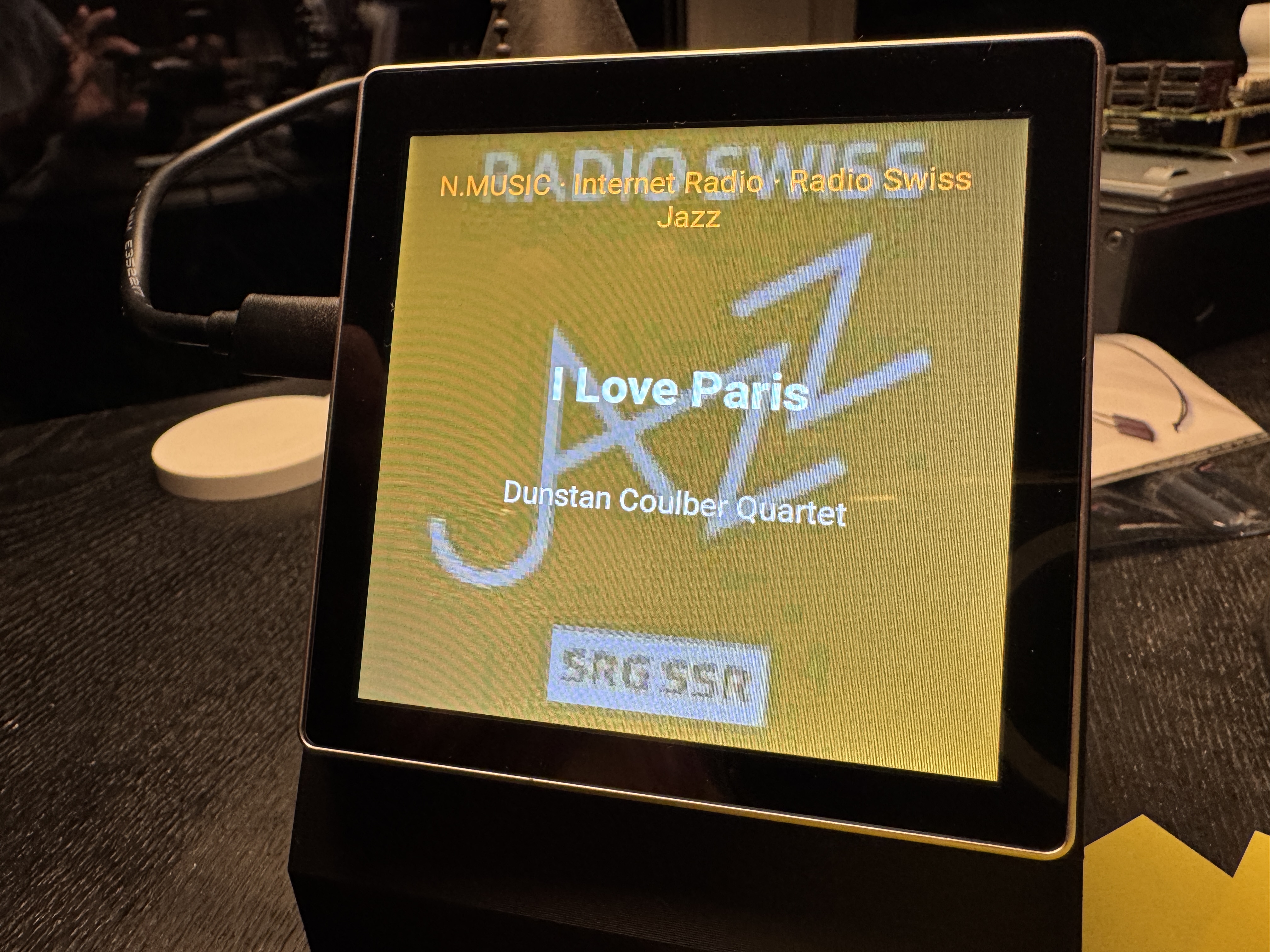
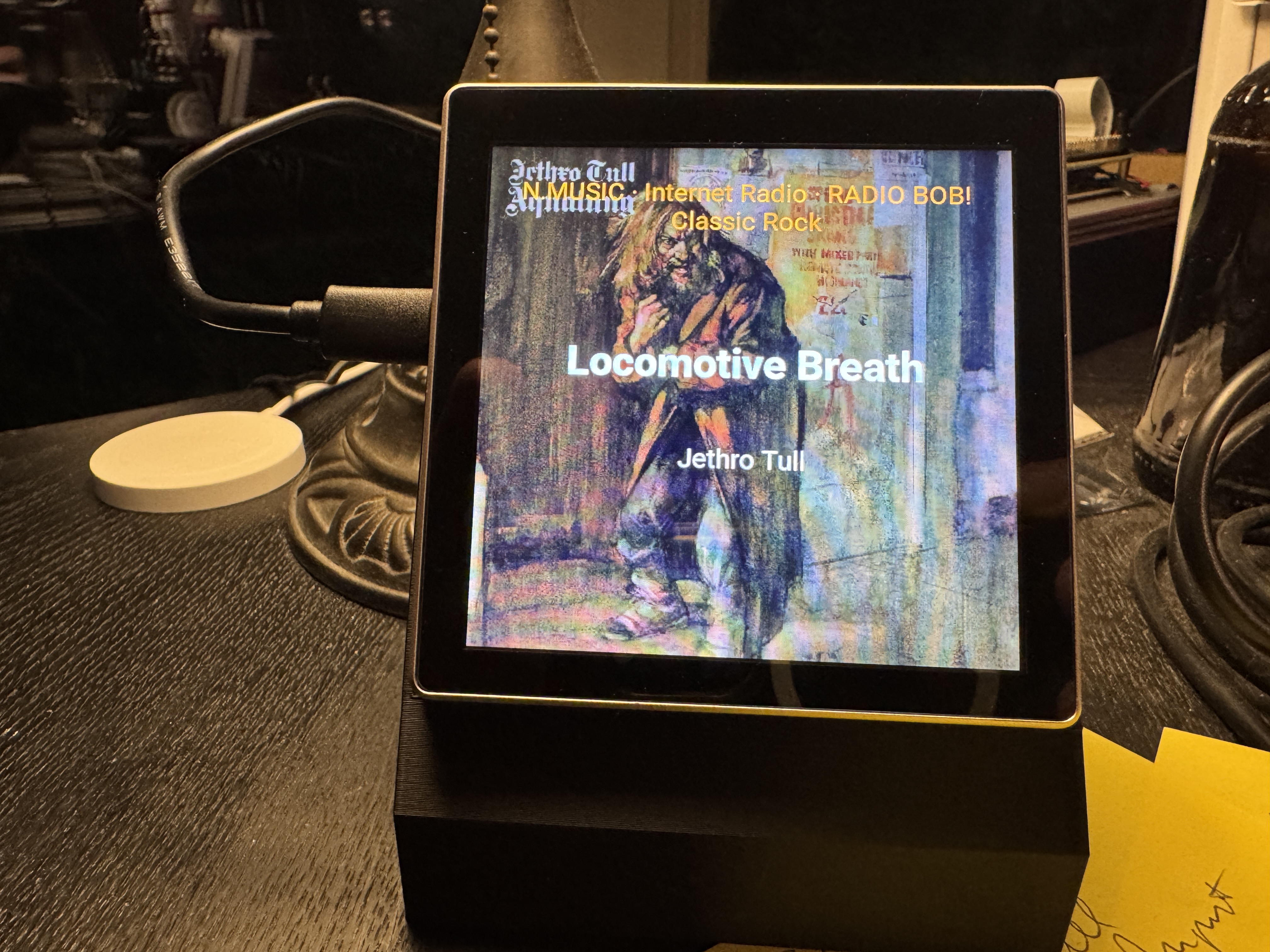
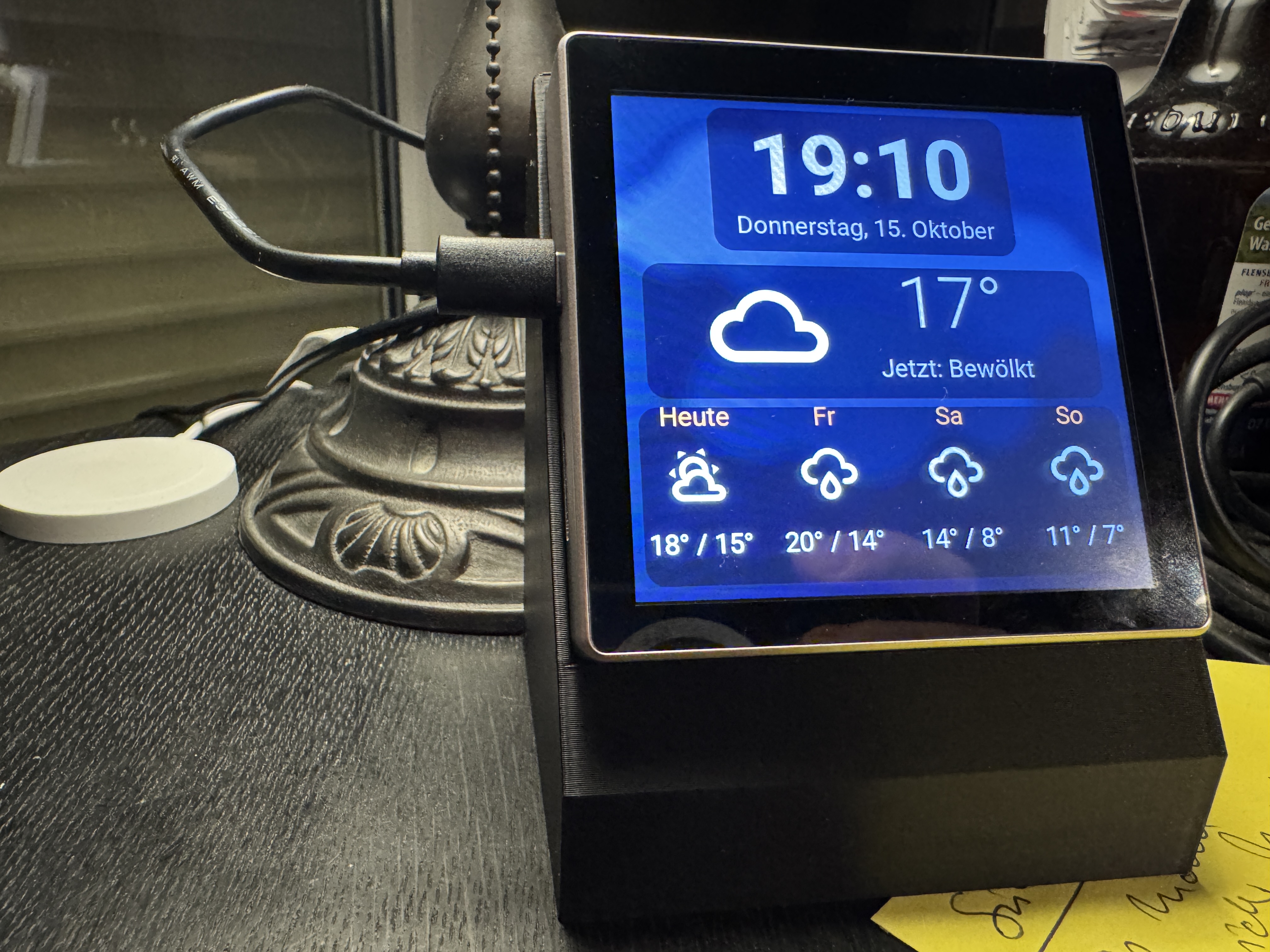
Following up on my integration of MDTV into my Homeassistant / Masterlink setup, I built a little display (4”) that either show’s what’s playing (CD, PHONE, N.MUSIC,A.TAPE usually in my case – with music recognition for all sources). The prototype is shown below:
 The power connection will move to the back (waiting for the Chinese to ship me the appropriate plug). If nothing is playing it shows the weather (which is also visible if you tap on the display if something is playing). These displays are less than EUR 30 and can easily be connected to Homeassistant (via ESPHome). In Homeassistant you can tell the display which room it is in and it will only display music info, if players in the room are playing. I intend to have a few scattered around the house. Adding player control is easy and I may add that soon. If you want to play with it, the code is here.
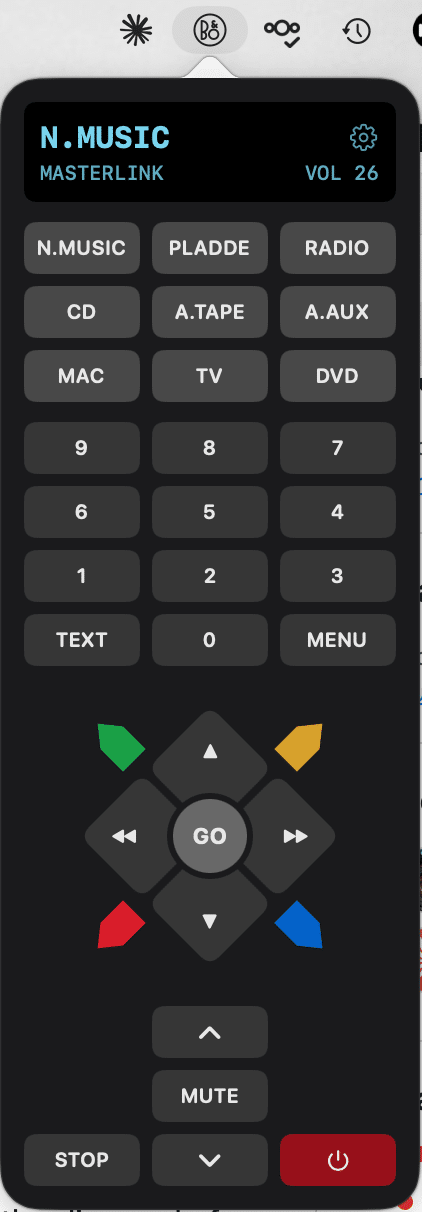
Also improving my BeoBar front end for BeoControl. Looks like this now:
If you want to try it, feel free. All code repos are linked. Beware: requires a little bit of Homeassistant and Unix/MacOSX know how. Works beautifully in my house – may fail miserably where you live 🙂My B&O Icons:
11 October 2026 at 14:22 in reply to: BeoCenter 9500 No response, no Boot and no standby light after normal use #125839tb59427BRONZE MemberHi,
can’t give you any advice on the issue at hand. But I recommend Radio Fernbach in Grefrath (west of Krefeld). They fixed my BeoGram 7000 and a friend’s BC 9000. No relations to them, just happy customer.
cheers
Torsten
My B&O Icons:
tb59427BRONZE MemberRS232 should be relatively straight forward with the board. All the information is there – just need to add a piece that talks to some serial port (or USB using a converter)
My B&O Icons:
tb59427BRONZE MemberMy project is progressing. My ML based setup is now fully integrated into Homeassistant. Sources / Devices can be controlled via Beo4 or Homeassistant or both. Using Philip Voigts MDTV2 board I have a reliable connection now between Homeassistant and MasterLink. I have heavily changed Philip’s software and cloned it to a separate repo. Most importantly I have added
- sendspin (Music Assistant default streaming protocol) and MPD as music receivers
- the ability to map more than one streaming protocol to a B&O source (e.g. sendsping and airplay to N.MUSIC)
- a logic that stops the currently playing source if MDTV2 receives a new music stream (e.g. playing something from Music Assistant and then deciding to stream something from your iPhone)
- MasterLink Gateway functionality to the extent that the MasterLink Gateway integration for Homeassistant recognises MDTV2 as an MLGW – this allows extensive automation and control both ways between homeassistant and Masterlink (e.g. close the shutters in the living room with LIGHT + Down)
- added album / now playing info to be sent to Homeassistant so that whatever source is playing (not limited to e.g. N.MUSIC and N.RADIO) can be displayed in Homeassistant
- added music recognition to Masterlink Sources PHONO (N.RADIO) and CD – in other words, if you play a record or a CD and shazam can recognise the music, album and title information gets sent to Homeassistant
- Built a tailored media_player card for Homeassistant to display all of this
- … tons of other shit 😅
Once I got into the flow, I thought why not get your old Beolink PC2 working again. Stumble accross Wolfgang’s (@SWO here on Beoworld) fantastic Beocontrol package which luckily (for me) runs on a Mac, too. But since Mac people love GUIs (BeoControl has a really nice webfrontend basically projecting a Beo4 or Beo1000 and allows controlling stuff on ML this way) I added BeoBar – a little piece of SW that adds a Mac MenuBar item allowing you to control your Masterlink and of course a BeoLink PC2 connected to the Mac. It requires Beocontrol and really only is a kind of remote control for BeoControl. In order to get this working I had to change some bits in BeoControl. If Wolfgang decides to integrate these changes, you can (and should) use his version of BeoControl. While this is not the case, I have set up a copy of it on github containing my changes.
Currently working on a small ESP32 based 4″ display that shows what’s playing (or shows the weather if nothing is playing). Once this runs well, I’ll post a follow up here.
The whole stuff works well in my Masterlink network. Your mileage may vary. If you feel comfortable setting up a pi, installing packages on Linux and enjoy playing with code that connects cleverly designed 1980s 1990s technology to todays music world: give it a try. I have tried to document as much as I thought would be needed (which is probably still not enough).
Added a few screenshots displaying how it all looks…
cheers
Torsten
Attachments:
You must be logged in to view attached files.My B&O Icons:
tb59427BRONZE MemberI have had Philip Voigt‘s fantastic MDTv2 for some weeks now (no, not related to him, just a happy customer). I have since started to add a some functionality to the software driving the box. Most importantly:
- added sendspin (e.g. Music Assistant) and MPD as audio providers
- added the option to use several providers per B&O source — e.g. Sendspin and AirPlay sharing N.MUSIC, whoever starts last plays
- added music recognition for the turntable: identifies what’s on the record via Shazam (shazamio) from the audio alone and shows title, artist, album and cover – yeah, I know, one could get up from the couch and look at the record cover. This way it‘s more fun, though 🙂
- created Home Assistant integration: the Pi reports what each source plays (including AirPlay straight from an iPhone, with cover art, and the recognized record), plus HA automations and one dashboard card for it all (relies partially on the Masterlink Gateway integration – see below)
- built a small web UI: configure sources, providers, turntable, Home Assistant and LIGHT keys in a browser — validated by the bridge, comments in the config kept
- implemented MasterLink Gateway emulation: the Pi can replace a B&O MLGW for Home Assistant’s mlgw integration — devices, Beo4 commands, ML events. I reverse engineered the functionality from the Masterlink Gateway integration for Homeassistant – so pretty sure it only implements a fraction of MLGW. But enough for homeassistant‘s Masterlink Gateway integration to recognise it as an MLGW.
All of this definitely not for the faint at heart. People familiar with Linux and Homeassistant should be able to get it working, though.
-
This reply was modified 2 weeks, 5 days ago by
 tb59427.
-
This reply was modified 2 weeks, 5 days ago by tb59427.
-
This reply was modified 2 weeks, 5 days ago by tb59427.
My B&O Icons:
tb59427BRONZE MemberYes, I am using MDTv2. Not sure about not using lite OS.
I have it running on a dedicated Pi (I mean, they still cost next to nothing). I have made extensive additions to Philips original code base (if you like, you can check them in my clone of Philips repo). I have added:
- Sendspin (e.g. Music Assistant) and MPD as audio providers
- several providers per B&O source — e.g. Sendspin and AirPlay sharing N.MUSIC, whoever starts last plays
- Music recognition for the turntable: identifies what’s on the record via Shazam (shazamio) from the audio alone and shows title, artist, album and cover — optional, recognize = true (funny feature – most songs really are recognised really quickly)
- Home Assistant integration: the Pi reports what each source plays (including AirPlay straight from an iPhone, with cover art, and the recognized record), plus HA automations and one dashboard card for it all. So, regardless whether music comes from MusicAssistant (Homeassistant’s front end to most streaming services with tight integration into homeassistant) or it comes directly from e.g. your iPhone a mediaplayer in homeassistant displays what’s playing
- Web UI: configure sources, providers, turntable, Home Assistant and LIGHT keys in a browser — validated by the bridge, comments in the config kept
- MasterLink Gateway emulation: the Pi can replace a B&O MLGW for Home Assistant’s mlgw integration — devices, Beo4 commands, ML events. This means, you can control all your streaming stuff from e.g. a Beo4 but you can also control all your B&O gear (with few exceptions) from homeassistant. E.g. when my alarm goes off in the morning on my iPhone, internet radio starts playing on my BL passive in the bathroom and 15min later, all the blinds open in the house and music also starts on the BL2000 in the kitchen. Essentially this way ML has arrived in 21st century
Especially the latter one may be flawed. I have used an MLGW to connect ML to my Homeassistant house automation. Using the Masterlink Gateway integration I reverse engineered the functions this integration uses. I am pretty sure that the original MLGW may provide more functions I am not aware of. Right now, though, MDTv2 has been replacing my original MLGW without any issues.
-
This reply was modified 2 weeks, 6 days ago by tb59427.
My B&O Icons:
tb59427BRONZE MemberI have it – works reasonably well (if you know what your are doing). Some small issues still. In conjunction with homeassistant and the masterlink plugin I can now stream radio, tidal, … using my old B&O stuff all controlled via Beo4. Very nifty. But clearly not a consumer product – more a product for the technically interested and inclined….
My B&O Icons:
tb59427BRONZE MemberAlso, just in case you might control your lights (and home for that matter) via homeassistant: there’s a cool plugin for homeassistant that effectively receives all the traffic on the ML bus. Each event on the ML bus creates a trigger in homeassistent. With this you can easily program actions in homeassistant which catch beo4 key presses and trigger whatever you want in homeassistant.
cheers
-tb
My B&O Icons:
tb59427BRONZE MemberThe more you guys write about these converters the more fascinating it gets. One thing that struck me (but maybe dillutes the topic and needs to go in separate thread): if the 1615 can translate ML audio into more digestible DL/AAL formats, couldn’t we attach an AD converter with AUX in to it and use it as a poor man’s “stream any ML source to modern speakers” device?
Will probably get a 1611 next week and then I’m gonna start my BeoGram (and now BeoCord, too – my old tape deck mysteriously still works well 🙂 ML adventure
My B&O Icons:
tb59427BRONZE MemberIt hasnt been tested in this thread, but Guy concluded based on the servicemanual that it is only One way ML->AAL https://forum.beoworld.org/forums/topic/beolab-3500-and-1611-converter-settings/page/9/#post-14356 So I guess you better look out for the 1611
Interesting – so if I wanted to connect a BeoGram record player to my ML network (I don’t have any product that can control the BeoGram anymore, would I be able to remote control it via the 1611/1615? Or would a 1611/14 converter be insufficient as it still needs a beomaster talking properly to the turntable?
My B&O Icons:
tb59427BRONZE MemberQuick question for the “1611 creative use SWAT team” 🙂
I can get my hand on a 1615. Now this box obviously only has the AUX port. But other than that: would this box allow my similar stunts to what you guys are pulling with the 1611?
cheers
Torsten
My B&O Icons:
6 March 2023 at 15:45 in reply to: Was taugt der Detoma B 800 Subwoofer (im Set mit den Beolab 8000)? #44350tb59427BRONZE MemberHi,
ich hab den bestimmt 20 Jahre in der Combo mit meinen BL8000 gehabt. Ohne klingen die BL8000 schon etwas flach. Ich hab den in der Combo gern genutzt. Jetzt steht er unter meinem Schreibtisch und hilft meinen BL4000, die am Mac angeschlossen sind, zu eine ordentlichen Fundament. Ich find den gut.
Gebrauchte Preise wirst Du in den einschlägigen Portalen leicht finden.
Gruß
Torsten
My B&O Icons:
tb59427BRONZE Member….just do a search for it. And…..if you want to connect more than one device, you’d need some kind of switch too.
As for the 2nd question – I remember back in the days, that I had a stock external USB drive connected….so yes that should work! I would however, not recommend it – it will be much easier to use a PC/Mac for this, because you will have to tag the files properly in order to have these searchable and showing coverpics etc on the BS5. MM
Thanks for both hints. Found my old USB CD drive and hooked to the Mac. Still works 🙂 So that should be easier. Agreed.
My B&O Icons:
tb59427BRONZE Member…
The setup would look something like this: BM5 -ML- 1611 -7 pin Datalink- MCL2AV – Beogram/Beocord
Yeah, I’ve been following this thread with a mixture of amusement, fascination and sheer respect for the amount of knowledge present in this community. I have started to put out searches in ebay classifieds to see whether I can source the components at reasonable prices to also build such a setup.
My B&O Icons:
-
AuthorPosts