Forum Replies Created
-
AuthorPosts
-
 BRONZE Member
And you can ‘expand’ to other Network Linked devices using the B&O app.
MM
Location: Flensborg————Danmark
That is for the built-in DVB Tuner.
Sort of an afterthought, since it/that version originally only had an analog tuner.MM
Location: Flensborg————Danmark
Hallo Frostnase (das paßt ja zum heutigen Wetter hier bei uns).
Nein – es gibt nichts zum einbauen!
Was es mal gab ist längst gekauft und eingebaut – viele Länder haben lange vor Deutschland FM Radio abgeschaltet.Das Koncept vom BS Moment war zwar gut, aber die Hardware zeigte sich anfällig und die meisten meiden diesen Beosound.
Ausserdem unterstützt der nur Internetradio durch TuneIn, welches die Sache kompliziert.
Alle andere – Netradio-basierte – B&O Geräte haben umgestellt auf das hauseigene Bang & Olufsen Radio.
Der BS5 wäre natürlich eine Lösung, erfordert aber etwas an Kenntnisse über Netzweranschluß etc etc.
Und wie lange hält das Gerät noch?Es gibt aber auch Lösungen wie die Radioadapter vom OneRemote oder das Neoradio.
Eine weitere Möglichkeit wäre eine Ankupplung eines Alexas……..oder – noch besser – eines BS Core oder BS Essence MK2 (vom Secondhand Markt).
Die letzten bieten dann auch andere Vorteile – wie Spotify Connect, Airplay2 etc….Von B&O gibt es – und wird es geben – bei den neueren Produkten nur Internetradio (B&O Radio).
Damit ist es aber ganz leicht mit einem Knopfdruck – auf der Beoremote One – Zugriff auf mehr oder wenig jeden gewünschten Radiosender zu haben.MM
Location: Flensborg————Danmark
The PIN codes can easily be deactivated in the setup menu of both tv’s.
If they are both working for time being, just deactivate….and activate again after the reset.
Imo there is no need for a PIN these days for these old tv’s – but that is up to you to decide.If you do not have the PIN code (and can not turn on the tv), the only way is to get a Master PIN code from a dealer.
Hereafter you can give it a PIN of your own choice….if neeeded.MM
Location: Flensborg————Danmark
This might be a good advice for a ‘non HDR compatiple’ tv like the BV11.
However, those with a modern 4K (LG) tv should always leave ‘Match Dynamic Range’ ‘On’ in order to ensure the automatic switching between ‘non-HDR’ and ‘HDR’ content.
MM
Location: Flensborg————Danmark
Is this setting ‘on’ or ‘off’?

MM
Location: Flensborg————Danmark

MM
Location: Flensborg————Danmark
Ich würde sagen, nein!
Ausser dem, was sich vom Ersetzen von eventuellen kaputten ‘speaker membranes’ und Entfernung von ‘foam rot’ ergeben könnteHier findest du einen thread, das gewissermaßen alle Fragen beantwortet.
MM
Location: Flensborg————Danmark
Try rebooting both – means power both units off, wait a couple of minutes and then connect both again to power.
P.S.
Are you sure, that the tv responded to the V.option 2 command?MM
Location: Flensborg————Danmark
27 December 2023 at 12:03 in reply to: How do you live with the Bang & Olufsen app and the music? #51112Mojn JPTINGLEV
But why do you need FM Radio?
MM
Location: Flensborg————Danmark
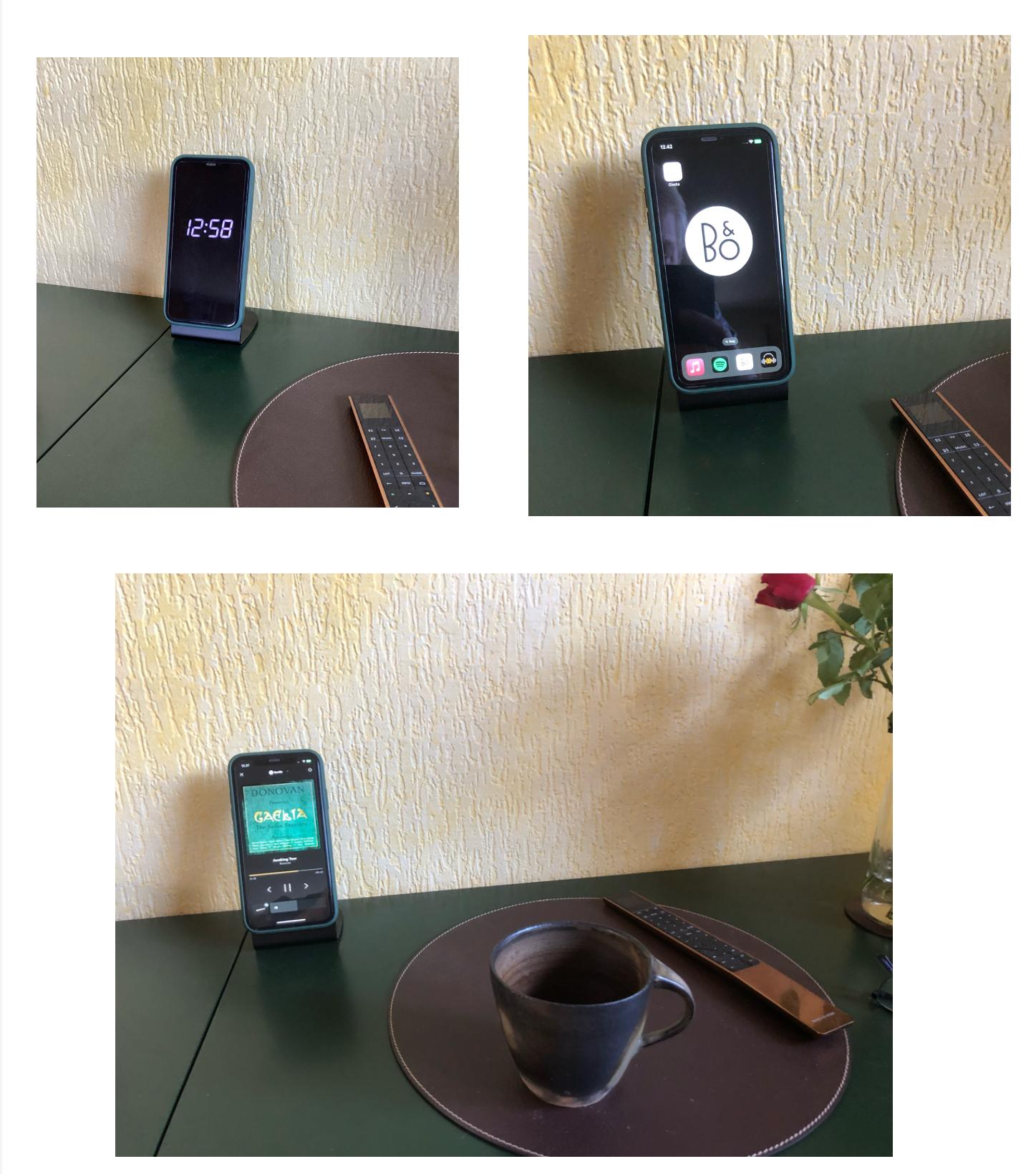
26 December 2023 at 21:35 in reply to: How do you live with the Bang & Olufsen app and the music? #51110The iPad that I permanently had in my main living room on a stand was getting lame and old.
So I though I would replace it like I did in the kitchen.This older iPhone sits on a Magsafe charger ready to be picked up, if needed…..for deeper searching of music.
Mostly I just swipe up from the ‘Clocks screen’ to access the B&O app.Here are 3 pictures.
1: When not in use
2: When ready for being used – with my main apps at a glance
3: When playing (on the Theatre set up in a 2 channel listening position for music).
MM
Location: Flensborg————Danmark
If possible you could hardwire the device to your local network/to your router.
This way you will be able to see the device in the app or read the ip adress from there or by using the Beotool app (I guess that should still be available from the app store).
The ip adreess typed in to a browser ill give you access to the configuration.N.B.
Be sure to update the device, if needed before you unplug it from the network.This way you may be able to set up a connection to the wireless network.
P.S.
If in any way possible, use a wired connection – the MK1 will work better with this.MM
Location: Flensborg————Danmark
Basicly it is the Master, that will determine the difference.
I’d say….you can mix ‘n’ match the 6500 and the 7000 elements as you please/are able to.
MM
Location: Flensborg————Danmark
and maybe also do a few videos of cool things one could do with the MasterDataTool.
One of such cool things attached. Will later show the the title info from Spotify / AirPlay / etc.
That really sounds promising.
I guess a lot of us need some daily life examples and maybe videos of what can be done….in order to understand what this is about.MM
Location: Flensborg————Danmark
Amazing!
MM
Location: Flensborg————Danmark
Congrats to every winner – enjoy.
MM
Location: Flensborg————Danmark
MM!!!!
Location: Flensborg————Danmark
Waiting ?♂️
MM
Location: Flensborg————Danmark
Thanks!
There are major differences in how we use ‘our B&O’
I guess a single headphone user will have no need for the MyButtons (if he/she ever opens the app).
On the other side I have no need at all for the ‘Beosonic circus’ – never used it, I run my devices as ‘flat’ as possible.I see a problem when/if they want to make the app ‘one shoe fits all’.
Looking forward to the next sessions ?
MM
Location: Flensborg————Danmark
@Miki What a weird ending…..why? MM
We had an hour and lost track of time, sorry about that. Did we go over enough otherwise? He’ll be back, so we can go for round two and do more Q&A
Thanks – but that seemed like ‘being cut off’.
Anyway, if you can do another round, that would be great.Generally….it was nice – even if I personally already knew it – to hear how much efford they put into it – with the myriad of devices, product generations and the wish to be backwards compatible etc.
Especially it was nice to hear that they will not drop support for the NL/ML Converter.However, there were many ‘everyday questions’ not asked.
I saw several in the chat for the first halv hour, that I managed to see live.
N.B. No chat available, when you watch the video later!?I’d like to know who they cater for….the guy with a set of headphones or a BT device or the costumer, who has had a 10 piece – or more – setup for years and who still buy new products?
Who should be prioritized here, when creating a functional app.
Those with one set of headphones/a BT speaker will hardly ever use the app!Recently I talked to a guy with an M5 – he did not even know, that that device has a built-in netradio function. He just used it for airplaying stuff….no need for the Bang & Olufsen app there.
I guess there are many out there like him.So, why not focus on those with an otherweise well (hmmmm!) functioning setup of products and make an app, that matches the quality and handling of the B&O devices?
We want to know more of prioritizing the users and of the roadmap, which function we may expect becoming reality etc.
When will they clean up (!) the mess of sources in the Source List?
Something that should have been done right away…..before the official release of the app.
Why am I forced to have/to use a physical remote in order to have an easy access to my radio stations or to my 4 favourites/the MyButtons, when that could be done from within the app?
Why not prioritize that kind of stuff?I’d like to know, why we can not access legacy products (via NL/ML Converter) from the Mozart platform just like it is possible with the ASE products?
I know that this might be a product issue, but it certainly also is an app issue…..this is about handling our stuff/our setup on a daily basis.
We have had Mozart products for a while now – still not solved.
That is a thing that can keep me from investing in Mozart products for my setup (except of course for the BST ?).Enough to talk about, enough questions to be asked….and maybe answered.
MM
Location: Flensborg————Danmark
-
AuthorPosts