

Forum Replies Created
-
AuthorPosts
-
 MadskpGOLD Member
and maybe some kind of add’s even though its wonderfull with a part of the internet without it. But if that can keep the boat floating im fine with it.
An option for add’s could also be that paying members would not see the add’s
Location: Denmark
MadskpGOLD MemberBL3500 in L.OPT 1, 2, 5 or 6/MCL2AV in L.OPT 2.5 or 2.6 I can select and play SHIFT RADIO 6 from the BL3500 room (this doesn’t start the PL speakers connected to the MCL2AV).
If you had and Audio master instead of the MCL2AV I guess you would have the same behaviour when you start the music from a link room.
However, after selecting/controlling the BL3500 I cannot then select or control anything within the MCL2AV room. Even Mute or Volume don’t work, even though the IR receive LED is flashing on the MCL2AV’s IR sensor. Also the IR sensor MUTE button has no response. The MCL2AV room will only work again if I turn the system off and re-set the MCL2AV option settings.
However this doesn’t sound like something that would happen with an audiomaster.
BL3500 in L.OPT 1, 2, 5 or 6/MCL2AV in L.OPT 1.5 or 1.6 Independent control in both rooms is possible (has to be same MCL2AV source in each room). Can switch on (or mute) independently from either room, and ‘join’ by pressing just vol or mute in MCL2AV room (but you have to press the full SHIFT RADIO 6 to ‘join’ in the BL3500 room). The MCL2AV IR sensor’s MUTE switch works to join or mute once sound is already playing in the BL3500 room. A good useable outcome!
This sound like a great use case, especially if you have a datalink compatible unit, and also want other sources connected. The Beolab 3500 should still be able to access the Video source in the 1611 I guess?
If the MCL2AV/BL1611 combination is in the same room as another ML device (with a built-in IR sensor), disconnecting the IR sensor from the MCL2AV simplifies control. Unfortunately, you cannot then activate any PL speakers connected to the MCL2AV.
If used with a Beolab 3500 or a TV with speakers (internal or external) I dont see much use for the PL port in the same room, so this might be ok.
I will be interested to see if similar results are obtained with a BeoVision instead of the BL3500.
I will for sure be looking in to this and report back
Guy wrote:
Anyway, enough for today – apparently the ML cable across the landing is a ‘trip hazard’ and the BeoLab 3500 needs moving from our bed!Hehe, yes it’s not always easy to make these experiments when you have other people in the house. My setup is in an attic room where I can just let it be when I’m finished without worrying about anyone tripping. only downside is that the access is through the room where our little boy is sleeping which makes experimenting in the evening hours not an option.
Location: Denmark
MadskpGOLD MemberIf you use the TV to select the MCL2AV’s TAPE input using SHIFT MENU 6, and then press MENU to turn on the TV screen, does it show that the TV is receiving an A.AUX source or A.TAPE source?
Had a little time for testing this today. tried it with different setups and commands:
BC6 opt. 2 +1611 + iphone
Activating with audio command (Radio/CD/A.tape). No text on tv about source. Menu can be selected, but source is not in the headline of the menu as it is for the video sources.
BC6 opt. 2 +1611 + MCL2AV opt. 2.5 + iphone
Activating with Shift + Radio + 6 command. No text on tv about source. Menu can be selected, but source is not in the headline of the menu as it is for the video sources.
BC6 opt. 2 +1611 + MCL2AV opt 2.5 + BC3500.
Activating with A.tape command. No text on tv about source. Menu can be selected, but source is not in the headline of the menu as it is for the video sources.
So at least for my setup the TV won’t show the audio source. Don’t know if it’s different with a proper audiomaster connencted.
BL3500 in L.OPT 1, 2, 5 or 6/MCL2AV in L.OPT 0 BL3500 plays TAPE input sound whatever audio source is selected on remote – there is no separate selection/control of TAPE or CD inputs.
BC6 opt. 2 +1611 + MCL2AV opt 0 + BC3500.
No control of BC3500, and music started manually on the BC3500’s button music is playing regardless which audio command I use to activate the BC6 (A.tape/cd/radio/shift+Radio 6 or 7), so sounds like some of the same behaviour you are experiencing.
Looking at the MCL2 handbook, option 0 is mentioned for the MCL2AV, but no use case is mentioned. Our experiments seems to show that it just opens the audio ports and passes sound through in this option setting.
Location: Denmark
MadskpGOLD MemberHello Lee. I have been a Gold member at least since 2009 acording to my mail history, but probably longer since I switched Email provider at one point. But have been looking arround Beoworld since the early days. Don’t remember why I started being a gold member, but for one thing I think the price draw was a tipping point at that time, and I also won two times some years back.
Now however the prize draw is not the main point for me. I just want to support the site, and all the work that’s being done to keep it running. Thanks Keith.
A bonus is of course acces to the user and service manuals which is gold worth for people who are reparing and/or tinkering with B&O gear, and as a mean to get some og the threads running.
I can however see how people who come with a specific question for example regarding cabling to get their equipment runnning, and then dont need more information, because their setup just works, dont see the benefit for the gold membership.
Reduction of prize draws is fine with me. The number of prizes per draw could also be limited to maybe one. The chances of winning is still high. At the very end you should not pay for it yourself.
Other than that i think as other also has suggested that more visibility about the benefits of gold member ship on the front page, and a more visible donation button, and maybe some kind of add’s even though its wonderfull with a part of the internet without it. But if that can keep the boat floating im fine with it.
Location: Denmark
MadskpGOLD MemberWhilst thinking about the OneRemote, I did revisit the MCL2AV circuit diagram: I think we have noted before that the diagram is incorrect: it shows TAPE and CD datalink wired to pin 6, when it must actually be to pin 7. For the AUX input, the AAL is correctly shown to pin 6.
I am aware of this and think it just might be an error on the diagram, both because the Beocord 3500. works as it should and also because it wouldn’t make much sense.
You may have finished testing now so I could be too late! I’d be interested to hear how your setup behaves with the IR sensor removed from the MCL2AV. Or in two-rooms if you have a long enough ML cable! If you use the TV to select the MCL2AV’s TAPE input using SHIFT MENU 6, and then press MENU to turn on the TV screen, does it show that the TV is receiving an A.AUX source or A.TAPE source?
Actually I haven’t had the time for further testing. I have another project in my House that takes longer than expected (these kind of things always take longer that you like to think 🙂 ), and the yesterday i had planned to make a longer ML cable, but then realised that my plan to extend it with network cable wouldn’t work because it needs to have 9 wires (or 8 and a shield), and I dont have that available.
But form some of the tests I already have performed I can tell you that the TV wouldn’t show the menu (our the source when activating it), so I haven’t been able to see what source it actually was on the TV. I don’t remember if this is also the case with only the 1611 connected to the TV, but I will test both scenarios next time I work on it and report back. I will also test the Beaviour without the IR sensor (and in another room when I get a longer ML cable)
Location: Denmark
MadskpGOLD MemberFirst, great testing notes even though the results may be disapointing for now.Basically with the BL3500 in L.OPT 1, 2, 5 or 6 it was possible to use SHIFT RADIO 6 or 7 to select correct MCL2AV input (TAPE or CD). It was not possible to select these inputs directly using CD or TAPE on the remote. EDIT: Input selection via the BL3500 did not switch on the PL speaker attached to the MCL2AV.
I had some thoughts about this input selection, and it ocured to me that when the MCL2AV is used in a MCL system it will allways have an audio master with the CD and A.Tape sources available (even if nothing is connected to those connections on the Audiomaster). Therfore the MCL2AV has to register if a Datalink device is available locally, and if not it should use the Audiomaster’s source instead. This might explain the Behaviour we are seeing.
Guy wrote:
So I think that the MCL2AV doesn’t recognise the OneRemote radio as ‘proper’ Datalink and therefore won’t keep the TAPE (or CD) input open – the data receive light on the OneRemote flashes randomly even when MCL2AV is at stand-by, as if it is being interrogated and failing!But weird that the OneRemote radio wont work the proper way here when it is working in other situations.
EDIT: Input selection via the BL3500 did not switch on the PL speaker attached to the MCL2AV.
I think one of the paragraphs about option settings mentions that option 2 is used when the TV (in your case the BL3500) reproduces all the sounds, and after that there is the note about defaulting to option 2 when no IR eye is connected.
Next I tried numerous combinations of L.OPTs on both MCL2AV and BL3500. Basically I was trying to select the TAPE and CD inputs from the BL3500 using SHIFT RADIO 6 and 7. This resulted in lots of system lockups during testing, even when I tried the MCL2AV in L.OPT 0. Although it sometimes worked as expected there was no consistency of results and it became very frustrating! I often had to unplug/power-down everything to clear the system. I was using all the eqpt in one room, shielding IR sensors when inputting Option settings to a single device.
It would seems as the 2 IR sensors introduce some kind of confussion in the system. But then again this was probably inteded to be used with either the IR sensor or the TV’s IR eye.
I will see if I can get on with my testing tomorrow. Let me know if there are situations you like to have tested with the Beocord 3500 on datalink
Location: Denmark
MadskpGOLD MemberI think I will also use a longer ML cable to put one of the devices in a separate room. I think that I will need to do this because using L.OPT 0 (IR-off) or L.OPT 4 (link-only) may change other behaviour.
I’am also thinking that maybe I should make an extension for my 1.5m ML Y cable just to be able to get distance between the IR receivers.
I’ll also try the OneRemote Radio and my DVD1 with modified SCART to Aux cable as inputs into the MCL2AV to see if they can be controlled either directly or via the BL1611/BL3500.
I think you already tried the DVD1 with the MCL2AV in this thread https://archivedforum2.beoworld.org/forums/p/45162/327485.aspx#327485, and on the Aux port of your BC9500. In both cases it’s is Audio Aux Link, so it might be communicating with that which makes sense as its a video product and should use Audio link. However as fas as I can see you didn’t have luck controlling it via direct connection with the 1611 here https://forum.beoworld.org/forums/topic/beolab-3500-and-1611-converter-settings/page/8/#post-14333
Could be fun to see if the Shift + Radio + 4 command is activating it on the MCL2AV’s Aux port though.
Good luck with the BeoSound 1 test!
Thanks. Did try it today, but no luck, no control of the Beocord 3500, even though the command is A.MEM from the remote to activate the Aux of the BS1. It might be that the BS1 was just over engineered hardware wise, but never got the proper software to support this hardware.
Location: Denmark
MadskpGOLD MemberGreat to hear. Allways better with som ping pong about it.The next thing I noticed is that the MCL2 Handbook has the SHIFT RADIO 6 and SHIFT RADIO 7 the wrong way around. SHIFT RADIO 6 is the TAPE input and SHIFT RADIO 7 is CD.
Ok, didn’t notice that, but it is also correct stated in the MCL user manual, so that must have been there I noted it in the first place. Btw. do you remember what commands you used when you had the stand alone stup with your computer? Was it the same you used?
I too have already experienced this from both CD and A.TAPE. It seems as if the MCL2AV will play it for a while until is realises that there is no datalink-compatible product connected.
Somehow glad to hear that you have the same experience. I was beginning to think if my MCL2AV had other defects than the one in the power circuit. It may be that it is waiting for some kind of handshake with the datalink source. Could also be related to the MCP comptability where it needs some information back to the remote.
I didn’t get to test anything today, but I started up on a preview for test scheme in a spreadsheet. I attached it to this post. There are many combinations with the different options, but some may be ruled out beforehand as no go. I am open for inputs and corrections.
For one thing I didn’t take the link option 6 in it as it seems to have something to do with VCR in the main room.
I probably won’t make any tests on this setup tomorrow as I go to visit my parents. But that also means I get to test the Beocord 3500 with their Beosound 1 to see if there is any hidden link capability there. If there is I will start a new thread on that subject.
Location: Denmark
MadskpGOLD MemberI think that would be the case depending on your setup and goal. My knowledge of the ML/NL converter is limited, so my answer is for the ML part.
in the linked thread it was tested with both Beolab 2000 and 3500 as well as different Beovisions and a Beport without other components in the Masterlink chain.
Location: Denmark
MadskpGOLD MemberTodays testing was with mixed results
I have read up on the option settings in the Masterlink handbook, both the older one called System Manual 89 90 Master Control Link 2, and the newer Master Control Link handbook.
Did you try various option settings? I see from the MCL Handbook that older versions of the MCL2AV have double option settings: You set L.OPT 0, 1 or 2 and then L.OPT 5 of 6 in addition. These are then expressed in the manual as L.OPT 1.5 etc, with factory (default) being L.OPT 2.5.
This was only mentioned in the older of the 2 manuals. In the newer one option programming of MCL2AV wasn’t even mentioned, even though it is shown in setups with af TV. But i might be because the Option 2.5 covers most use cases as it also defaults to option 2 when the IR eye is not present (which might be true in many cases when a TV is also present in the same room).
I tried a little back and forth with option settings with mixed results. I think I will have to to a more controlled testing where I take notes for the different scenarios.
What I really cant figure is if the TV should have option 5 as a Link TV or option 2, as it’s not a link TV in this setup. I haven’t had any luck with the TV in option 1. It seems like I loose all control, but will try it again in next test being sure that both the MCL2AV and the TV is in option 1.
I am not sure how relevant it is, but the ‘SHIFT RADIO’ followed by a number (or AUX followed by a number), is also used by other B&O eqpt to select various aux inputs. For instance, or my BC9500 I can select the following from its front panel: AUX 1 – TV AUX 2 – V.TAPE AUX 3 – SAT (or DTV) AUX 4 – CDV (or DVD) AUX 5 – V.TAPE.2 AUX 8 – MICROPHONE
It’s highly relevant. In one of my test’s today (dont remember the option settings, have to take notes) I could use AV + TV to turn on the PL output of the MCL2AV and Shift + Radio + 7 to switch back to sound on only TV.
Location: Denmark
MadskpGOLD MemberIf I understand you correct it might be the 1611 Beolink converter you are looking for. Take a look in this rather long thread
https://forum.beoworld.org/forums/topic/beolab-3500-and-1611-converter-settings/page/4/
it will give both a audio and a video source availeble on Masterlink.
Meaning you can from a Beovision with masterlink press any audiosource button and the 1611 Beolink converter will activate the correct input pins (1, 4 and 2 for audio) in its datalink connector.
Also see Matadors very informative drawing where it is used with a Beolab 3500 as a stand alone solution https://forum.beoworld.org/forums/topic/beolab-3500-and-1611-converter-settings/page/4/#post-14017
Location: Denmark
MadskpGOLD MemberDid you try various option settings? I see from the MCL Handbook that older versions of the MCL2AV have double option settings: You set L.OPT 0, 1 or 2 and then L.OPT 5 of 6 in addition. These are then expressed in the manual as L.OPT 1.5 etc, with factory (default) being L.OPT 2.5.
Seems I will have to dive deeper into these option settings. only read about it in the MCL2 installation manual, but he MCL handbook might have more info.
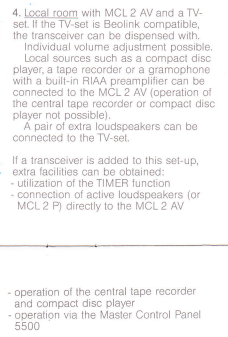
I find this a bit strange because I have seen setups in the manual where PL speakers are connected direct to the MCL2AV and there is also a linked TV. Also the last note in the paragraph from the manual said that addition of a sensor would allow operation via MCP. Did you try the TV in V.OPT 0 so you don’t need to cover the sensor (and this might make the TV behave differently.) Again you could try different Options on the MCL2AV.
I didn’t try the TV in option 0, but will defenetly try that for my next test run. And you are right about the thing with the MCP, but could it be that it will only react to commands from that? As far as I know it only works with certain products.
If SHIFT is pressed first (or showing on Beo4 display) then then is a single SHIFT RADIO IR transmission (the same command as A.AUX), so it looks like the TV is responding to this, but not the digit that follows (6 or 7).
Got that sorted out. our answers crossed each other.
It all looks straightforward when just connecting boxes together, but when you look at all the permutations of software levels, option settings and remote button sequences it all gets a bit complicated! I am looking forward to having a play next week, probably sing my OneRemote Radio as a datalink source connected to MCL2AV TAPE or CD socket.
No there are many quirks. I am happy though that it worked as a proof of concept on my first try so I didn’t gave up on it too early
Location: Denmark
MadskpGOLD MemberA little more testing today. I didn’t know what option setting the MCL2AV had, so tried to set it to option 1 and now the Shift + Radio + 6 or 7 works for activation the tape and CD input when a datalink source isn’t present. For some reason once in a while I am able to activate the CD input with the CD button, but sound will only come through for 5-10 seconds and the cut out. Don’t know what that is about, but is shouldn’t work at all according to the documentation.
Also tried the AV + TV command described in the MCL2 user manual. According to that it should shift the sound from the TV speakers to the powerlink outputs of the MCL2AV and vice versa.
In my case the TV speakers are default. when I press the AV + TV combination the sound will play on both the TV speakers and the powerlink outputs of the MCL2AV. Pressing it again does nothing. So not really working as described for some reason.
When the MCL2AV is stand alone without the connection to the 1611 and the TV the AV+TV command open the AUX/TV input for sound.
In my
Location: Denmark
MadskpGOLD MemberHi guys, I’m still there following in the dark, but you’re now far beyond what I understand from dark protocols. Godspeed.
Great to hear that you are still on board with this thread 🙂
I don’t know the inner workings of these protocols either, but I think I am getting more of an idea as to when which connections and protocols are used for what.
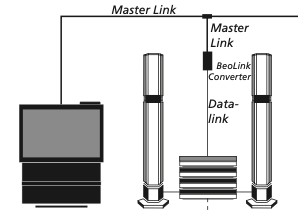
This setup I made can actually be compared to this scenario for the ML Handbook

Just in this case the Beomaster in the stack has been replaced by the MCL2 AV. The connection between the Beolink converter 1611 and the Aux/TV connector on the Beomaster/MCL2AV is 7 Pin datalink (the Audio Aux link version of it), and the connection between the Beomaster/MCL2AV and the components (CD, TAPE, PHONO) is 7 Pin datalink (the Audio link version of it).
I think you can compare the MCL2 AV to a stripped down Beomaster with no power amplifier, no radio, and no fancy shell, but with the added capability to receive MCL2 signals from a Beomaster and transform them to Line out signals for Powerlink.
Hope I didn’t confuse you more
Location: Denmark
MadskpGOLD MemberGuy wrote: Perhaps if you also add a PL cable from MCL2AV to BL1611 you could activate the TV by pressing play on the Beocord? You may have to change option settings to make this work, if indeed it is possible!
Today I tried to connect a powerlink cable from the MCL2AV to the 1611 as well as the datalink cable. Pressing play on the Beocord didn’t make the TV turn on.
And I wonder if connecting an IR sensor and PL speakers to the MCL2AV will allow you to control and listen to the BC6?
It seem that the IR sensor on the MCL2AV is disabled when a connection with a TV is made on the Aux socket. Having the IR sensor connected to MCL2AV I tried blocking the TV’s IR sensor resulting in no control. When I removed the blocking all control was there again. When I use the MCL2AV stand alone the IR sensor work fine. This result corrospond fine with the description from the MCL2 installation Manual.

And don’t you have a Beo4 to which you can add SHIFT to in order to test the non-datalink input selections?
Yes, I probably have the shift function on one of my BEO4’s. Just didnt think of it as I have never really used this on a BEO4.
Also tried this combination, bot with my Beolink 1000 with a semi clean battery compartment (all funtcions seems to work) and also with a Beo4. No way was I able to get any sound through when using the key combinations either in stand alone mode or when connecetd to the BC6. I both scenarios I tried both the Shift Radio 6 and 7 on both the Tape and the CD connector but no go. The BC6 is starting up when I use the combination, but dont know if its just taking the Radio command and open the right connections in the 1611.
Hopefully to be continued….
Location: Denmark
MadskpGOLD MemberVery interesting – so effectively using the MCL2AV to convert between Datalink and Audio Aux Link so that it can be connected to an ML system using the BL1611.
Yes it might be on of the most versatile of the “Black” boxes even though its grey 🙂 I wonder when people with ML/NL converters are going to join the Thread and see how many layers of B&O protocols can be used throughout the control chain
I have often thought that the fact that the MCL2AV’s DIN sockets are line outputs as well as inputs would be useful, but never got around to testing anything like that, especially also making use of data.
For the data part of it only the AUX socket is and Audio Aux Link which can communicate with Beovision MX and LX TV’s with AUX socket and like this also the 1611 which also has the Audio Aux Link in its AAL socket. Probably also with your DVD player with the special cable?. Both the CD and Tape sockets on the MCL2 AV are Audio Link and will only communicate with CD, Tape and Record players with datalink capabilities.
Perhaps if you also add a PL cable from MCL2AV to BL1611 you could activate the TV by pressing play on the Beocord? You may have to change option settings to make this work, if indeed it is possible!
Sound like an easy test, so will try that out. That will also maybe give me the answer regarding the function of the powerlink port on the 1611. I wonder if the powerlink outputs are active when the aux port is in use as the use case in the MCL2 manuals are that the internal speakers of the TV is used in the link room. But I will give it a try.
And I wonder if connecting an IR sensor and PL speakers to the MCL2AV will allow you to control and listen to the BC6?
That could be interesting to try too. Just need a controllable source for the BC6, but I will probably get and ATV3 next week that could be controlled via PUC. Also I will have to find out how the remote will not trigger both the TV and the MCL2AV. But maybe the TV should just be put in option 0?
PS: I like the power supply ‘workaround’ after the fault diagnosed in the other thread!
Yeah couldn’t wait. Sometimes I fell like a little child when I have an idea like this that I have to try out 🙂
EDIT: And don’t you have a Beo4 to which you can add SHIFT to in order to test the non-datalink input selections?
Yes, I probably have the shift function on one of my BEO4’s. Just didnt think of it as I have never really used this on a BEO4.
Location: Denmark
MadskpGOLD MemberOk gentelmen. I don’t think this thread deserves to die yet.
When Steve commented this:
(I’m also hoping to use this converter to get my Beogram 3500 visible in the B&O app and maybe even get it working via Siri, but that will be a topic for a new thread once I get my Beolink Converter and my new NL/ML Converter working).
It got me thinking, how will he achieve that in the datalink part of the system?
I also remembered Steves video about controlling Beograms from the Bathtub where a MCL2 AV was used. How can this be combined i thought. MCL data signals probably wont be compatible with the 1611. I looked though all the documentation I could find on Beoworld regarding the MCL2 system, and looking at the scenarios where an MX tv is connected to the AUX port of the MCL2 AV. Looking at the schematics for the MCL2 AV got me thinking could you actually connect the 1611 to the Aux port of the MCL2 AV instead of an MX tv?
I bought and MCL2 Av on Ebay, unfortunately defective, but I found a fix until I get spare parts. A litlle about that in this thread https://forum.beoworld.org/forums/topic/mcl2-av-no-55v/
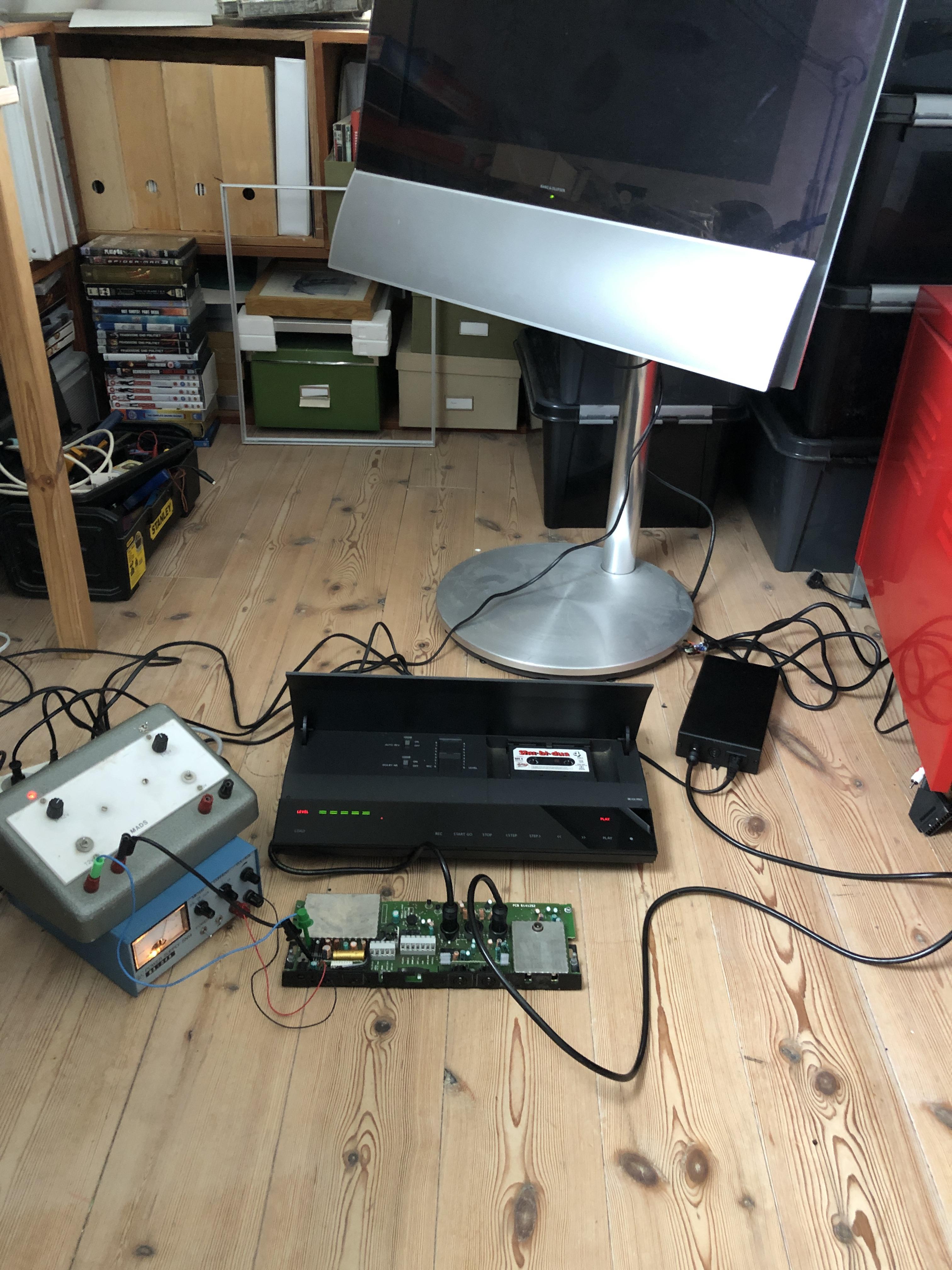
Today I tried out my idea with a Beocord 3500 connected to the tape input of MCL2 AV. A standard datalink cable from the AUX port of the MCL2 AV to the Aal port on the 1611. A Masterlink cable from the 1611 to my BC6. No IR eye connected to the MCL2 AV. The setup looks a little wild as the MCL2 AV gets power from 2 bench supplies until I get the spare parts for it.

And what will you know. It works. I can turn on and control the Beocord 3500 via the MCL2 AV, and will probaly also be able to control either a Beogram record or CD player through it. In my case I cant use the video source through the 1611, but they should still be available via a Beolab 3500.
Sources without datalink requires that you use a key combination shift Radio 6 (for tape input) or 7 (CD input) according to the MCL2 documentation but I didn’t get to test that in this test as my Beolink 1000 Remote with a shift button needs some service in the battery compartment.
Hope this is usefull to you
Location: Denmark
MadskpGOLD MemberOk, tried a little back and forth with the MCL2AV, but have only got small timeslots to work with it.
Carefully applying higher voltage did not change anything. Guess under normal circumstances it will work within a certain voltage range as all input voltage either goes through the voltage regulator IC21 or to activating a relay switch.
I then have controlled most of the Caps in the power circuit, soldered the out and tested the with a component tester and all seems to be within range still after all these years.
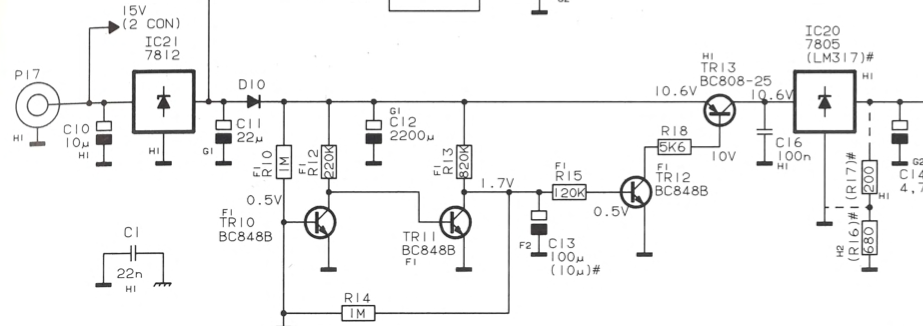
As mentioned earlier I suspected a transistor, and ended up testing TR10, TR11, TR12, TR13. TR13 is the only one of the who fails the test. It only shows up as a diode on the tester.

To further test the unit I tried to apply 10.6V after this transistor before IC20 as shown on the diagram in the servicemanual, and the the unit was alive. Could control a Beocord 3500 with remote and get sound out on powerlink.
So hopefully replacing TR13 will make it work fully again. Ordered a bunch of the on Ebay, and gotta get practicing on my SMD soldering skills with hot air.
Will update when I have the new part.
Location: Denmark
MadskpGOLD MemberOk thats interesting. I will try that when I have the time to sit with it again
Location: Denmark
MadskpGOLD MemberThanks again. Mine is type 2020 and has a lot more going on
 guess the same applies to the bottom og the PCB.
but great to have some sort of reference.
I had some corrospondance with the seller and he tells me it didnt work with a power supply for him, but it did connected tol the MCL2P.
cant really see what difference that should make?
Location: Denmark
-
AuthorPosts
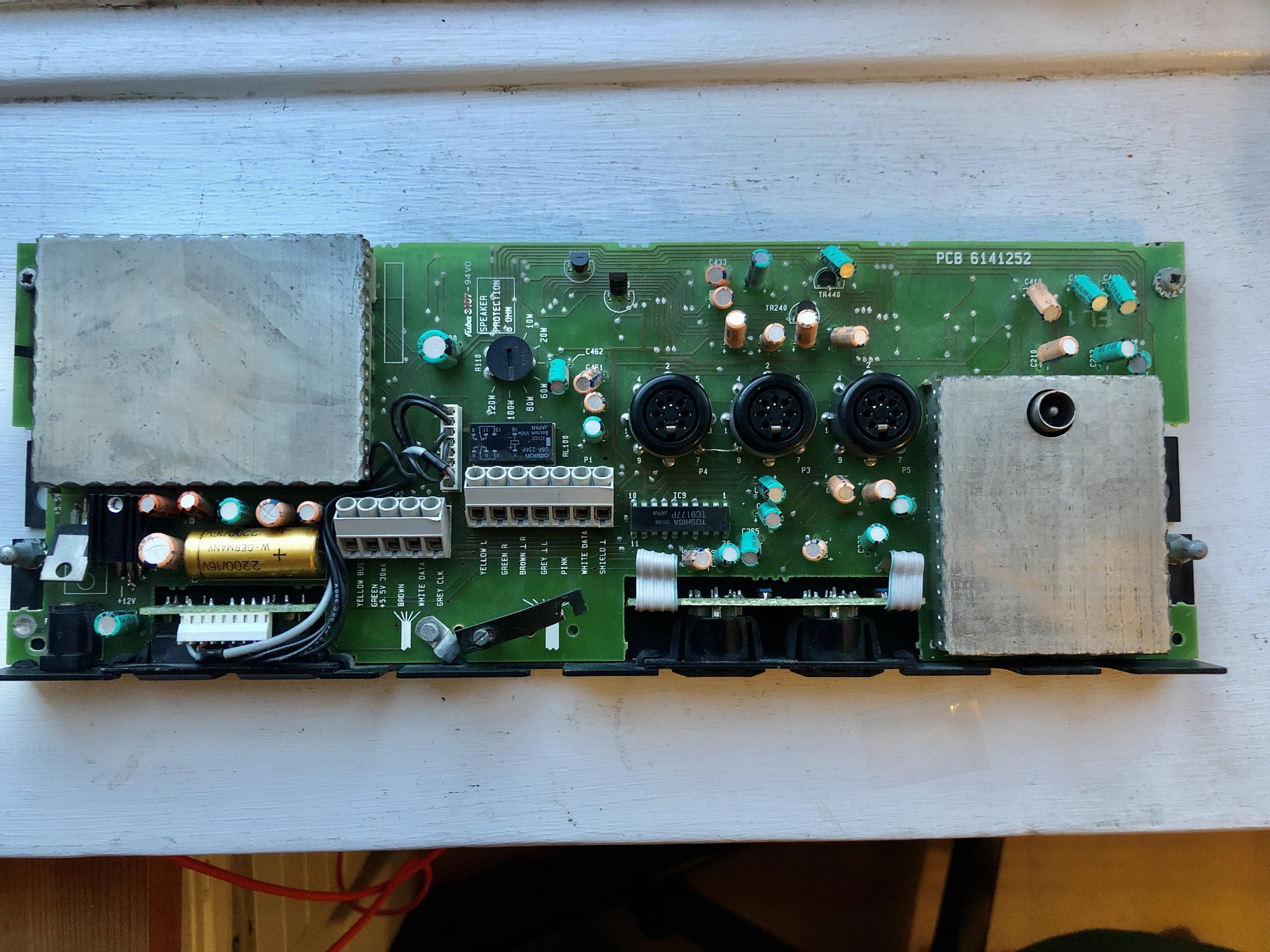 guess the same applies to the bottom og the PCB.