Forum Replies Created
-
AuthorPosts
-
 MadskpGOLD Member
So I just did some testing with some of my equipment:
Beocenter 9300 – 7 pin datalink cable – 1611 – masterlink cable – Beolab 3500 MK1 both with, and without a powerlink cable between the BC9300 and the 1611.
Beosound Ouverture – Masterlink cable – Beolab 3500 MK1
In bot cases I get the same behaviour as you describe even when I start the music from the master system.
Now what I expected. I will see if I have time to look more into this today
Location: Denmark
MadskpGOLD MemberJust some extra notes to be clear:
Do you start the music from the main system or from one of the link rooms, and do you also have the speakers in the main room in use in these scenarios?
I belive if the music is started from a link room the behaviour is correct as long as the main room is not in play.
I will see if I can verify this on one of my systems today.
Location: Denmark
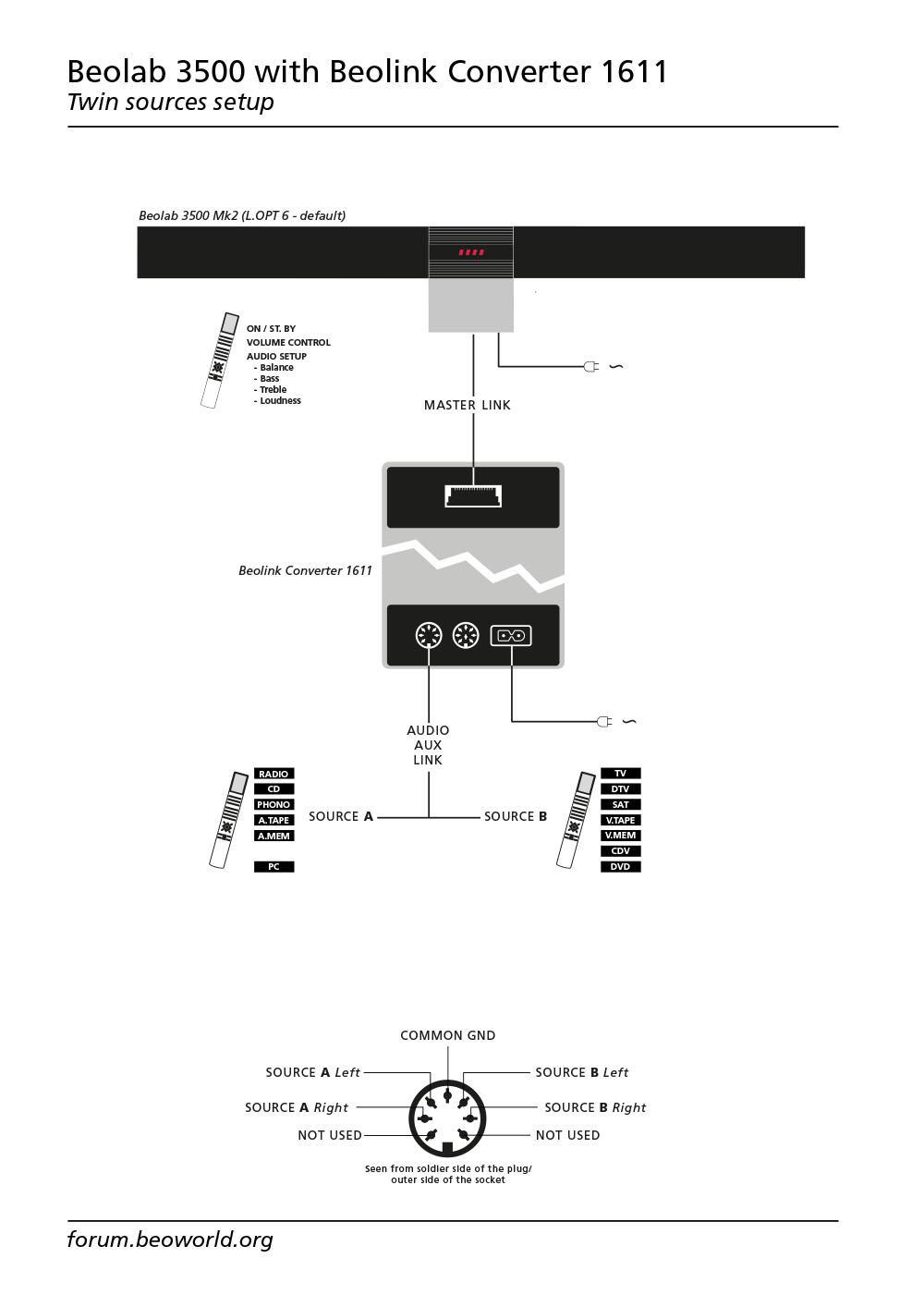
MadskpGOLD MemberTo explain your observations about the 1611 it csn work as a stand alone audio and video masterthus allowing for two selectable sources on any ML link room product. This was tested very throughly in another thread which among other things resulted in this great sketch made by Matador https://beoworld.org/wp-content/uploads/beoworld_images/24903/fpsantcr1nreqhki1h7n4w2zt2x2471h.jpg
Location: Denmark
MadskpGOLD MemberJust a few more inputs based on your post.urrently running it without. 1611 is connected to the Aux port on the BM6500, it doesn’t seem to work at all in Tape which would have been my preference.
The datalink86 bus that is needed for connection to the 1611 is only available in the AUX connector.
try the Active at the same time as the Passive, possibly with the BL2000 too, all connected through my RJ45 distributor. If I have sufficient bits of cable.
What about the active have you tried if that works the same as the passive?get the BM33oo out of the shed and try that connected to the 1611. Not sure if this will work but if it does with the same behaviour it would suggest it’s my 1611 that’s the problem
The BM3300 does not have datalink86, so is not able to work with the 1611.
Also if the Beolab 2000 works fine in the setup the 1611 should be OK.
maybe try with the BL3500 via ML, though this might be more destruction than I have time and space for.
Maybe just try to disconnect the MCL part of the system (remember to turn it all of before you do so), just to rule out if that has any effect on it. MCL shares the same datalink bus as the datalink 86 in the AUX conecetor of the BM6500, so there is a possibility that something could disturb each other
Let us know how your testing goes. Maybe that can make for new inputs to the mystery
Location: Denmark
MadskpGOLD MemberNice project to look into. I have e few inputs to your Powerlink thoughtsI’m also not sure how “overload” is implemented, so there’s some research required there.
Not sure it was ever used in many powerlink speakers. Looking at the schematics for Beolab Penta and Beolab 3000/5000 it seems that pin 8 is not conencted to anything other than the two DIN connectors in the speakers.

and it looks like I’ll snatch L&R output as well.
But is that volume regulated?
Location: Denmark
MadskpGOLD MemberThank you Guy and Madskp for your input and links.
Where can I download and purchase Linkplayer 1 and Linkplayer 2 please? I have searched and cannot find this.You can not purchase it anymore. The deveopment of thissoftware ended over 10 years ago and i belive the developer dropped the project and moved on with other things
Location: Denmark
MadskpGOLD MemberI think it depends on how the individual cables are shielded.
If you can fin the Beolink Handbook (available for paying members on Beoworld In the Biotech section) you can see the cable drawings with pinouts. For the RJ45 Powerlink cables the wire collars are the same as n a network cable, so I will assume it can be used. I did use I Believe CAT6A network cables to make some short RJ45 to 8 Pin DIN adapters at some point, and they work fine. But might be different for longer cable runs.
Location: Denmark
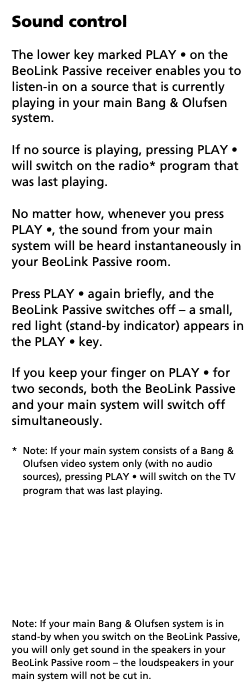
MadskpGOLD MemberThis does sound weird. according to the user manual this should only happen when you do a long press:
Only other place I have found mention of shut-in the whole system of with a single press is in and older manual for the MCL system where you could make a solder connection inside it to get that behaviour. I have not seen mention of this for the ML system components.Have you tried to power up the devices in different order to see if that affects the behaviour? Or do you maybe have an other IR eye you could try with?Location: Denmark
MadskpGOLD MemberRegarding BM-Link. The official website for the project is this http://www.odlund.se/bmlink/download.html
Newest release was developed for OS X 10.6 Snow Leopard, so might be hit and miss how much newer version it will work on.
I do not think that either the official Beoport software or BM link will show metadata. There was another project called Link player that maybe did show some metadata on some systems, but you might have to research that further searching on the archived forums. I believe there are threads about it on both of the two archived forums.
Linkplayer was, I believe developed as a paid software, so you would need a license key to make it work today, and that might also only work on older version of Mac OS.
For both BM-Link and Linkplayer they are using iTunes as the internal player on the Mac.
Location: Denmark
MadskpGOLD MemberCongrats, really nice project! Well done!
Hey great to see you here on Beoworld again 🙂 try to take a look at TK’s threads about datalink, maybe something there you can chime in on.
General failures on the BS5/BM5 has been, to the best of my knowledge the HDDs and the motherboard. None of which that are reused. So hopefully this can revive a few dead units.
Motherboards indeed. On my BM5 there was no life in the motherboard whenI aquired it, so I replaced it with another of the same type. The issue is probably due to bad capacitors on the VIA Epia EX motherbaord. I have yet to try to recap the original board to see if that will bring it to life again.
Location: Denmark
MadskpGOLD MemberThanks for the extra info. This just got on my todo list for when I have some of the other projects I am working on finished
Location: Denmark
MadskpGOLD MemberVery impressive project, look very interesting.
If I understand it correctly the Beosound 5C will works as a controller for Sonos devices? That could be very useful for me as I have Sonos devices in the house, but am missing an alternative to a phone/tablet for controlling the Sonos devices.
If it also works with the Beo4 remote control to play/pause, skip tracks and change volume for the Sonos devices that is even better 🙂
Is it correct to assume that this will also work with the Beoport if the display is powered separately and the IR is connected to the Beoports IR in port?
Location: Denmark
MadskpGOLD MemberFinally fixed the CD skipping on my Beosound 2300, and I’m embarrassed to say it was simpler than I thought: dried or non-existant grease on the transport rails. Drove me crazy because the skip happened at a very certain point on a CD, down to the second each time. So I thought it was a scratch in the CD — but a new copy of that same CD skipped in nearly the same place. Obviously it was that particular area of the rail that was either blocked by gunk or too dry.
Oh well, I got a CDM12 controller board re-cap out of it… (and all these SMD’s seen below tested within spec after removal, of course! 🙂
Great you got it working, and great info for other owners. I might try to go back to my Ouverture that need’s two CD presses before starting. Maybe the rails can have somthing to say in this ( I have cleaned and relubricated the gears).
Location: Denmark
MadskpGOLD MemberHello and congrats on your Beolab 2500 Speakers.
The speakers were part of Beosound set. Speakers came with two power cables and two 5 pin powerlink cables. Are those the right cables? Can I use them?
So just to be sure to not mess up please advise me if I l am thinking right about connecting them to MX4000.
Powerlink from speaker into power link on TV (left+right). Speaker independently into power outlet. PL on TV on.
This should be the correct way to do it yes. Powerlink cables are often 8 Pin, but the extra pins are not needed for the Beolab 2500 speakers (my own Beolab 2500 also have 5 Pin connectors on the cables).
Any other settings on TV? Will the built in speaker also remain working?
According to the user manual you will get a new menu called speaker in the sound menu when you connect powerlink speakers. There you should be able to select 1 for internal speakers, 2 for external speakers and 3 for both internal and external speakers.
Hope this will get you some extra sound for your gaming
Location: Denmark
MadskpGOLD MemberThanks again. I now have a repaired and working Beomedia.
Great to hear 🙂
I took a ghost image of the installation and also a copy to another hard disk for back-up, upgraded the RAM to 1GB and put a larger 500gb SATA hard drive inside the unit, using an IDE to SATA converter. If you get Microsoft DART V5 you can create a bootable USB and use Ghost 11.5 to make a copy of the installation.
Thanks for the input. I might look into putting an SSD in to it instead. I think there is some inspiration in some Beosound 5 threads about preparing the SSD for correct allignment.
If yours is the same main board as mine, look at this manual for power supply options: https://theretroweb.com/motherboard/manual/um-epia-mii-162-63cd39724e43c965057015.pdf
Nice. I also came up with another idea to use an ATX extender cable and just move the existing power supply to another location in the case (it will need some sort of mounting bracket) as there is lots of space in the case
Ironically there is no reason the whole system could not be ported to a different PC.
I had the same thought. The connections you were i doubt of is digital sound, so a motherboard with that will be needed. Also there might be some drivers issues, but I wonder if it is more or less like a PCI version of the Beoport which has prooven to work under windows 10, and therefor should be possible to use in anothjer system. But that is a test for another time
Location: Denmark
29 January 2026 at 17:23 in reply to: Beocenter 9000 Audio, CD, Cassette Player and Beolab Penta speakers guidance #72950MadskpGOLD MemberHi Mark and welcome to Beoworld!
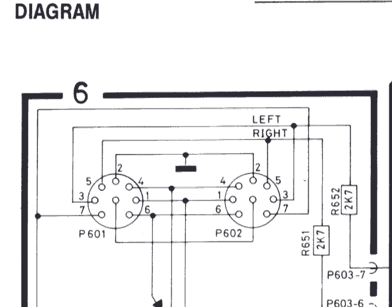
The BC9000 speaker 1 sockets will accept 4-pin DIN cables like the ones available from Steve. The extra two pins on the BC9000 speaker 1 sockets are to provide data to the Penta speakers. This enables the display on the Pentas to show Volume and Source. Speakers without displays should work fine without the two extra connections.
A workarround might be to use the 2 pin speaker cables, and get the data and ground connection from the AUX connector on on the BC9000 (Pin 6 is data, Pin 2 is ground) and if your penta have powerlink connect data to pin 6 and ground to pin 7 in that end.
Location: Denmark
MadskpGOLD Memberbut your pictures are exactly what I need, so thank you
Great to hear that they are usefull, and hopefully that will get it going again
To get the power supply off you need a very long but narrow flat headed screwdriver to gently push the clip that hold in outwards. You can then gently rock and pull the powersupply off.
Thanks. I will try to see if I can do that without to much damage. I wonder if another ITX power supply with a cable can be used instead. That would make future service much easier
Location: Denmark
MadskpGOLD MemberAnd some more
Location: Denmark
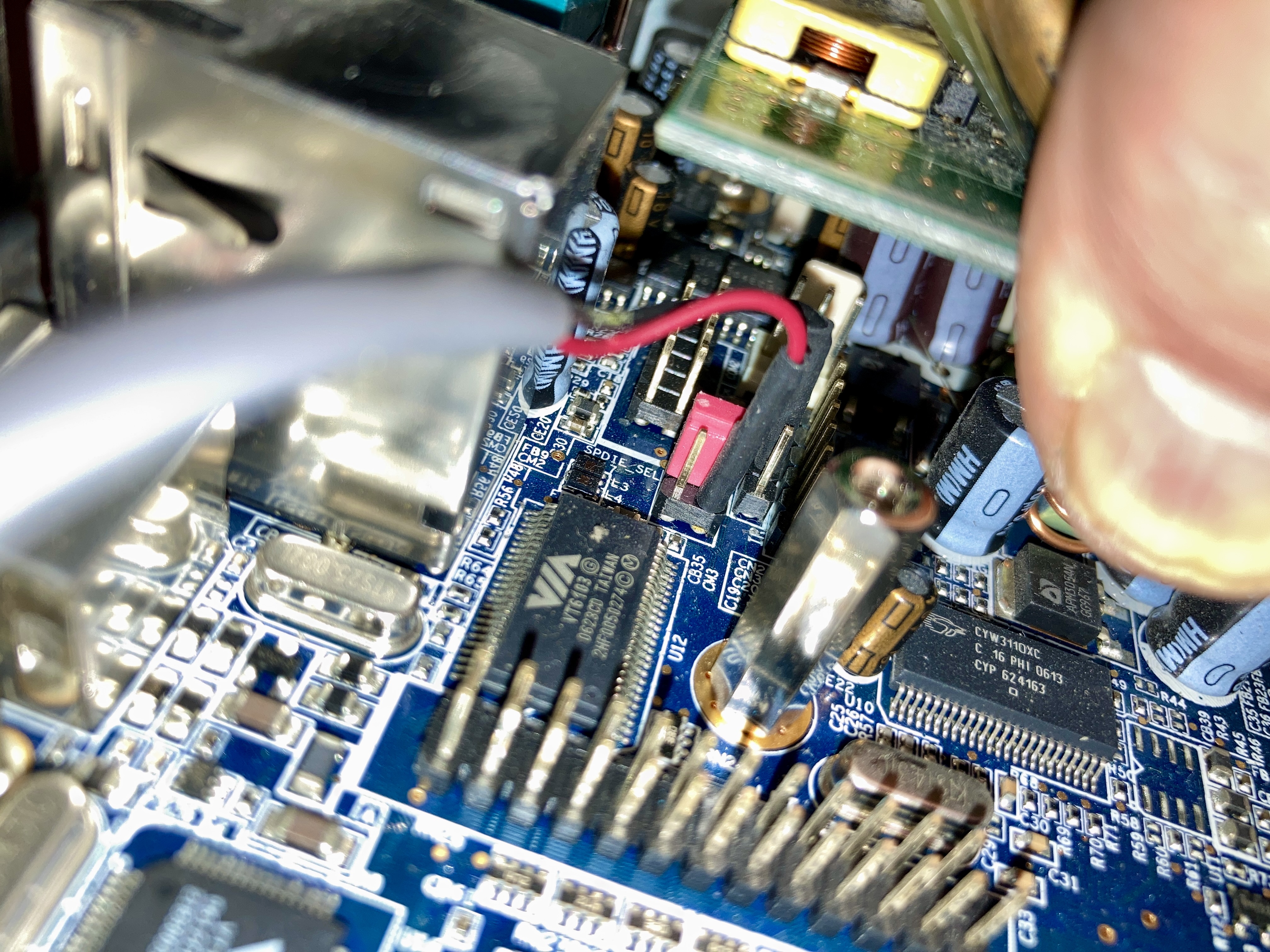
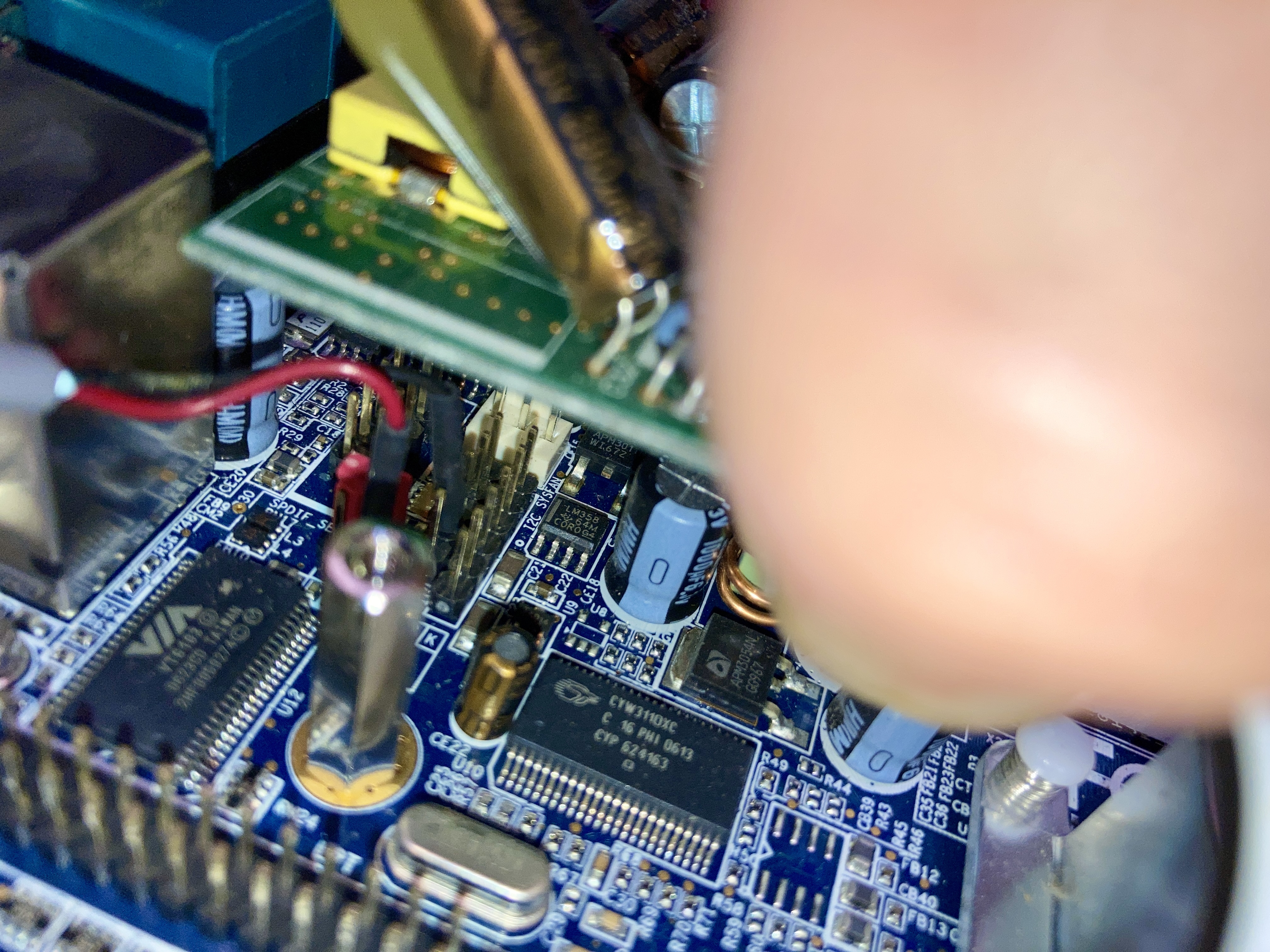
MadskpGOLD MemberI have no opened up my Beomedia 1. The engieneers that desinged this did not have servicability as the main priority for sure. Man this thing is cramped, and I can,t belive the amount of hot glue used.
I have not yet been able to take the power supply of the ATX conencter. Maybe you have a hint for that?
But I have taken these pictures for now that might helt you placing the wires
Location: Denmark
MadskpGOLD MemberTry to take a look in this old thread that has some pictures of the inside of the Beomedia 1 https://archivedforum2.beoworld.org/forums/t/16279.aspx
Hopefully that can help you locate it. If that is not enough to locate the connection point I have a Beomedia 1 that I can open up when I am home again
Location: Denmark
-
AuthorPosts