Forum Replies Created
-
AuthorPosts
-
 Moderator
Follow up – I’ve looked on eBay and I think what I need for the second type of adapter (with the pins close together) is a crossover 2 pin cable, like this one. I’ll buy them and test them.
The requirement for a ‘crossover’ or ‘straight through’ RJ11 cable is yet another variable that I have never got a handle on! The RJ11 to RJ11 cable that I was using with the non-white dot adaptor was a ‘straight through’ version. And of course all this assumes that the BT socket is wired correctly!
Maybe buy two cables and have a play!
I actually bought one of these to experiment with various RJ11/BT permutations – very useful for making bespoke telephone leads: https://www.amazon.co.uk/Professional-Telephone-Ratchet-including-BT431a/dp/B073VNDPTD
Location: Warwickshire, UK
My B&O Icons:

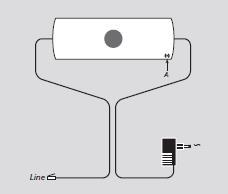
You will have a different Beoline to me if yours does not need an adapter. Mine is the rectangular one that does need the adapter.
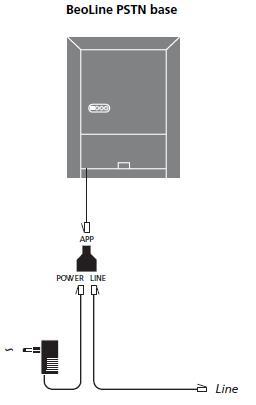
Yours will be the Beoline PSTN: (I have one of these in a box, together with the ISDN version that I am still trying to think of a use for!)

Whereas I am now using the Beoline EU Mk2 (specifically the type number 1130GB):

The older PSTNs (like yours and the pyramid version) actually have better compatibility across the BeoCom phone range. For example, my newer Beoline EU Mk2 will not update the time on my Beocom 2 (Mk1), whereas my previous pyramid PSTN did)
Location: Warwickshire, UK
My B&O Icons:
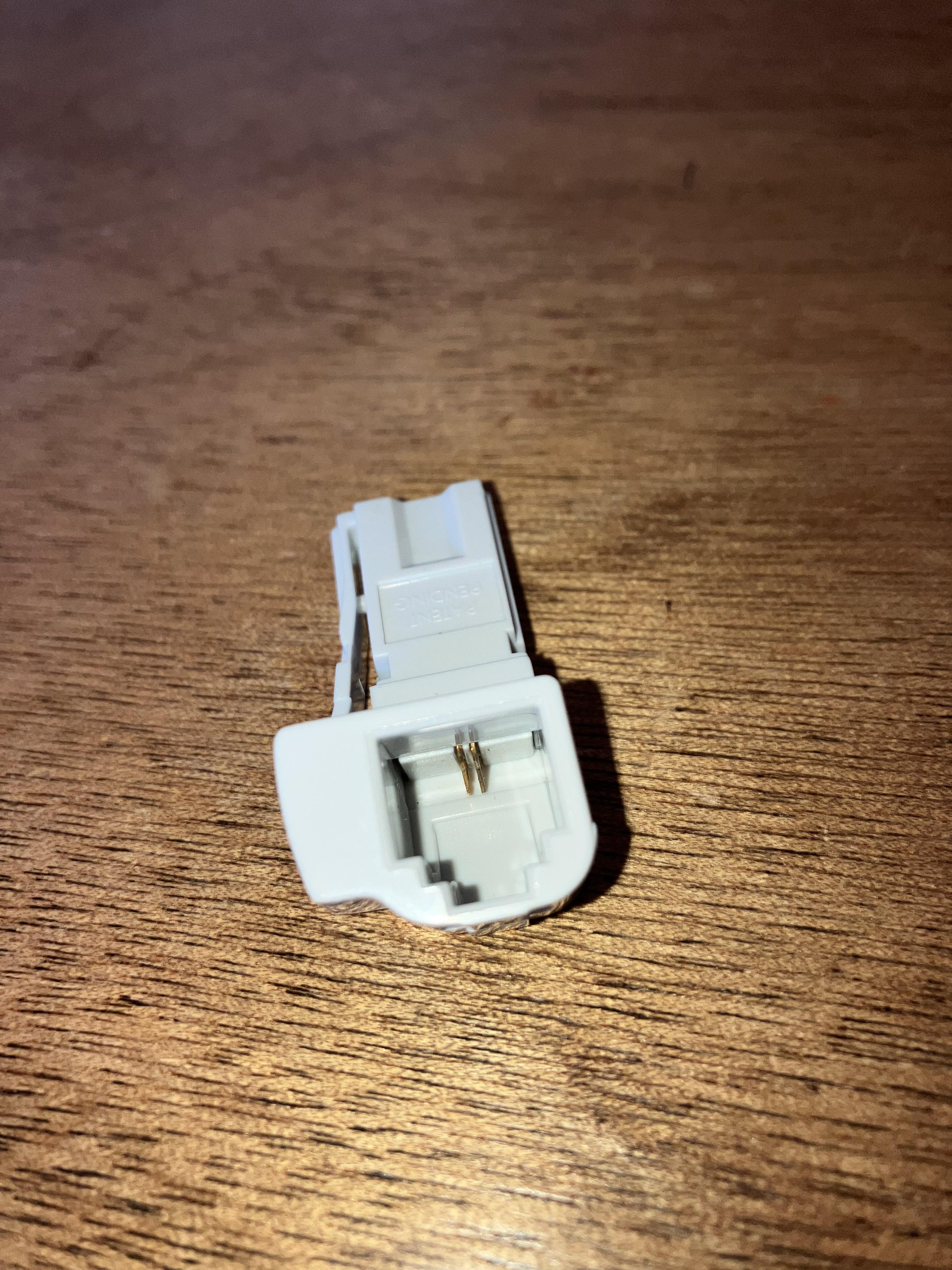
Further to the above, I have just this week changed my phone setup from a BC6000 pyramid PSTN to a Beoline PSTN. The Beoline doesn’t need an adaptor, but I just checked the one that I was using before and it is the right hand one without the white dot (pins close together). However, below is the RJ11 to BT Plug adaptor that was at the BT-socket end, which changes RJ11 pins 3/4 to BT pin 2/5 hence gives the same eventual connection:

EDIT: I just checked and the Beoline PSTN also uses the RJ11 centre pins (3 & 4) with a similarly wired adaptor at the BT socket.
Location: Warwickshire, UK
My B&O Icons:
I have a mixture of the two, and I suspect that they are designed to work with different countries’ line connections. UK BT plug uses pins 2 and 5, so this logically connects to RJ11 pins 2 and 5 – the left hand adaptor. However, I have purchased and used Beocoms in UK, Denmark, Germany and Romania and usually ended up simply switching between cables and adaptors until it works!
You could simply make an RJ11 adaptor to use the right hand one, but I think you can also open them up (they unclip) and carefully move the connectors outwards one position.
Location: Warwickshire, UK
My B&O Icons:
24 October 2024 at 10:14 in reply to: Beocom 6000 with Beoline PSTN Base – phone book not working? #60405Excellent news – I admire your patience! And you are lucky that there isn’t a time delay imposed upon each unsuccessful attempt! 😀
Location: Warwickshire, UK
My B&O Icons:
for some reason TV sources such as DTV and DVD are not available if using Opt.0.
Perhaps when in Opt. 0 the Beoport looks for a ‘local’ video signal on one of the PC video cards that was compatible with Beoport, rather than looking on masterlink. If you try to select a video source in Opt.0 does the Beoport default back to the PC input?
I am not sure, but I think that the same problem may have been experienced in this very old thread which could be worth a read: https://archivedforum.beoworld.org/forums/t/6440.aspx
When in Opt 6 the Beoport could be acting as a normal ‘link room’ and getting the video audio via your (controllable) BS4 audiomaster.
But it’s a while since I played with my Beoport and I could be confused!
Location: Warwickshire, UK
My B&O Icons:
Remove the lower glass and check the security of the ribbon cables to the lower panel (connector P63), and the ribbon connectors to the left and right side of the panels. Check also all those cables/cnnections that are being disturbed when rotating the Beocenter top panel into the service position.
Do you have a service manual/multimeter? If so, I would start by checking power to those lower panels for which you need to refer to service manual. There is also a Test Mode but this is initiated by short circuiting two pins on the lower panel so it may not work, and I doubt that it would tell you much.
Anything more than that and you are going beyond my knowledge, but let’s hope it’s just a loose connection!
Location: Warwickshire, UK
My B&O Icons:
I have the same problem! I have definitely read somewhere on Beoworld that they unscrew but can’t find the reference; I think it was mentioned by Lee (former site owner). I have tried several times (every house move) but cannot get them apart. Maybe WD40, or application of cold/heat, or percussive shock??? Good luck!!
Location: Warwickshire, UK
My B&O Icons:
21 October 2024 at 22:24 in reply to: Making a short conversion lead for use with Beovision tv’s #60351Similar discussion (and copy of rectangular plug connections) in this old thread: https://archivedforum2.beoworld.org/forums/t/36445.aspx
Location: Warwickshire, UK
My B&O Icons:
21 October 2024 at 22:15 in reply to: Making a short conversion lead for use with Beovision tv’s #60350Hi Tony,
I have just answered your PM and attached this from the BV6 manual: (I think you already have the 8-pin connection list?)

But have you considered buying a purpose built lead from here? https://shop.oneremote.dk/shop/69053-oneremote/4172-tv-stand-converter-snut/
I know from experience that the BV10-32 will fit onto the BV7-32 stand, but there is a problem with the geometry of the stand components versus the Centre of Gravity of the BV10-32.
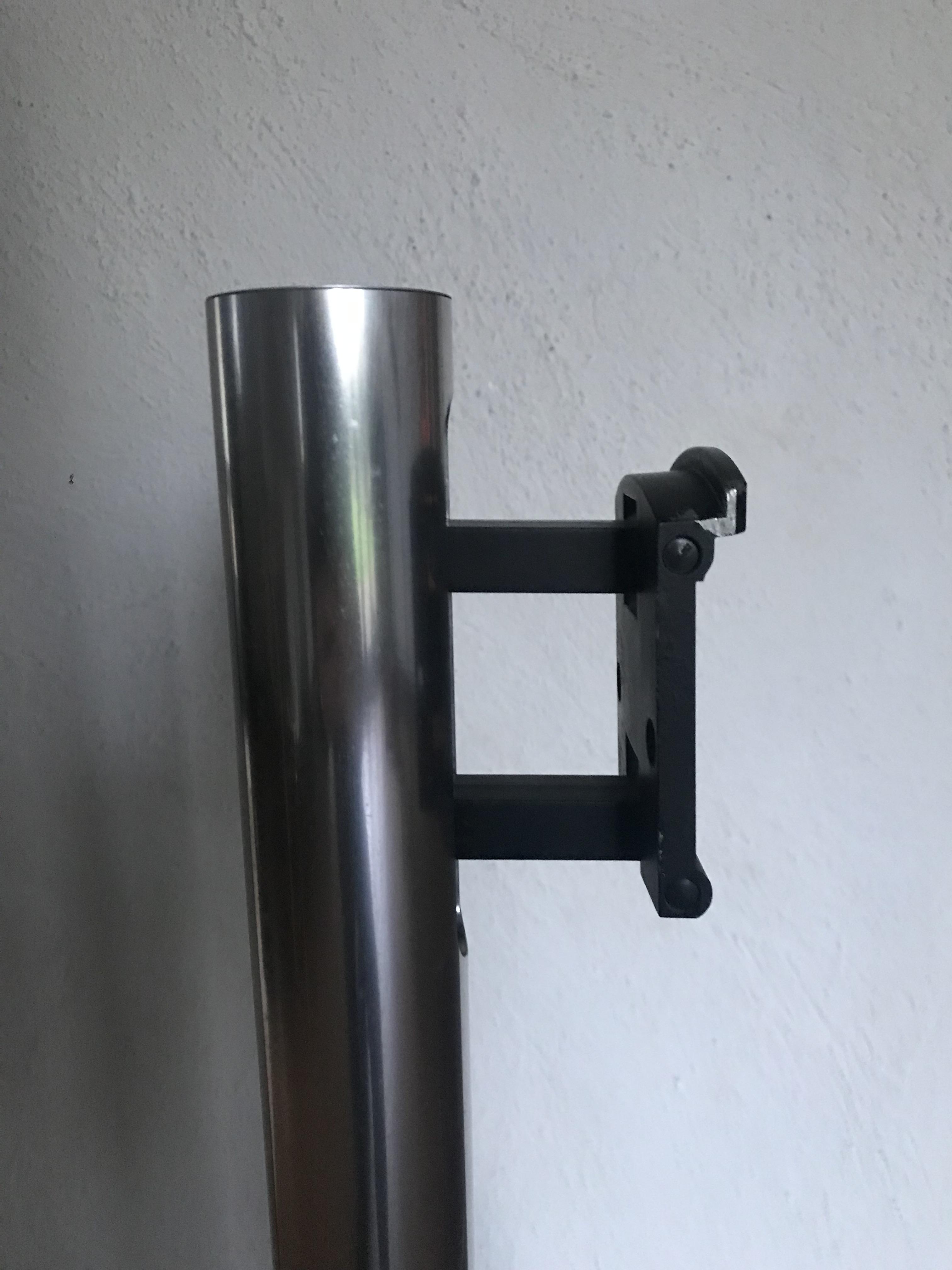
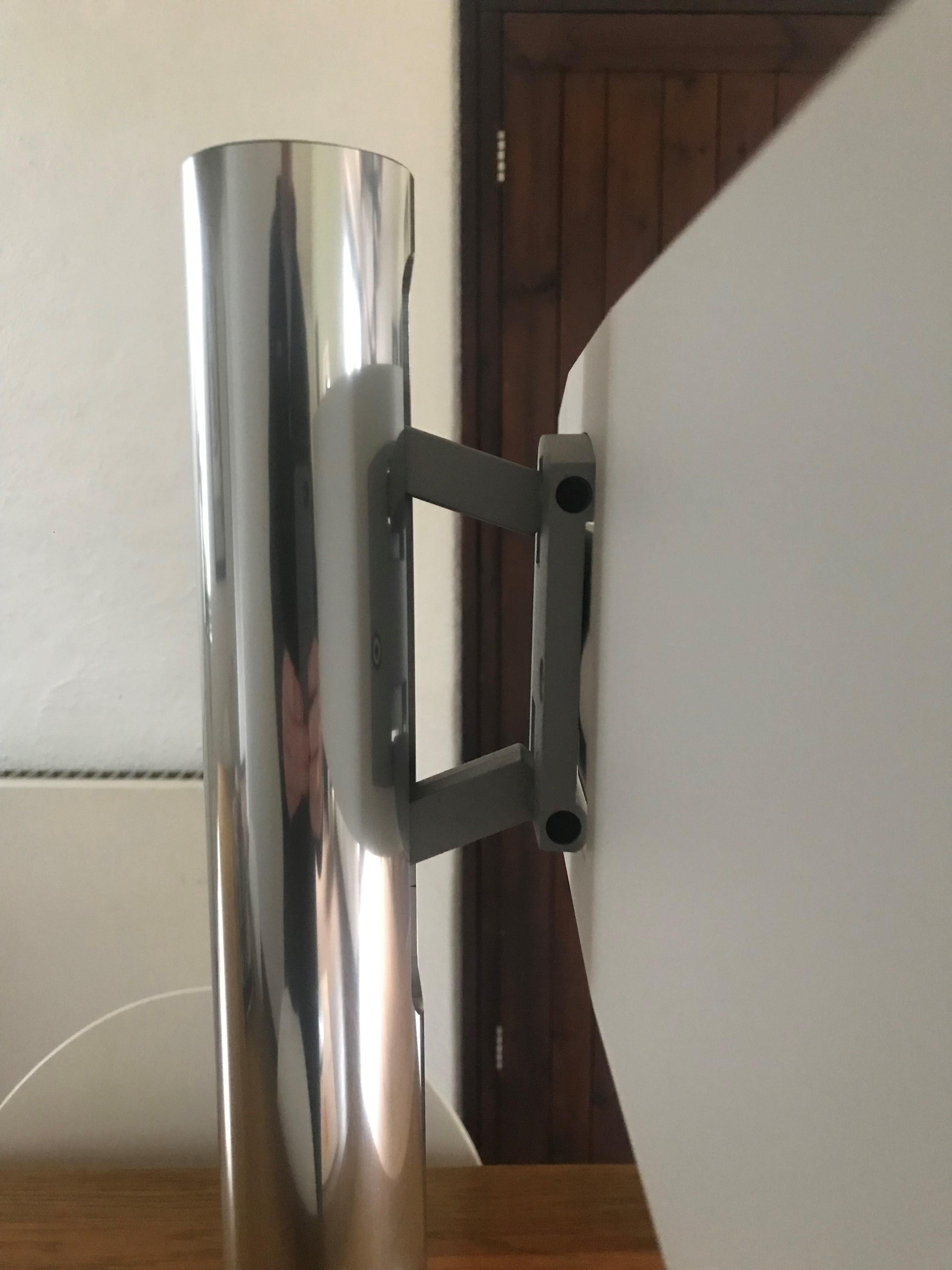
Here’s a side view of the BV7 stand:
And a side view of the proper BV10-32 stand:
When you put a BV10 on the BV7 stand, the TV drops all the way downwards and tilts fully upwards due to the orientation of the two (near parallel) cross members. The different orientation/geometry of the BV10 stand hold the TV (stops it dropping) let allows you to tilt the screen up or down. The entire mechanism appears stiffer and more controllable.
When I temporarily used a BV7 stand for my BV10-32, I wedged a rectangular piece of rubber in the gap between the supports to stop the TV dropping downwards.
Location: Warwickshire, UK
My B&O Icons:
Are you 100% secure that the lower panel is re-fitted properly and that the glass itself is fully secured in its plastic surround (it often comes unglued)? The glass only needs to be slightly raised above the little rubber contacts and it will not function.
Alternatively, can you operate the controls with the glass panel removed, by lightly touching the little rubber contacts that would normally press against the bottom of the glass panel?
Can you fully control the BC9000 with the remote?
(EDIT: I moved your photo from the other duplicate thread, which I will now delete)
Location: Warwickshire, UK
My B&O Icons:
Any major differences in the diagram from the 7-pin?
No. Just delete/ignore pins 6 and 7.
Location: Warwickshire, UK
My B&O Icons:
Is this it?
https://beoworld.org/?a=download&key=5c07b40d58508a2bc346c5c43b03bc54
EDIT: In case that link doesn’t work, I got it from the bottom of this page by selecting the Type 2402 manual (which I though is the -2 version) – there is also a circuit diagram listed separately: https://beoworld.org/beomaster-3000-1969/
Location: Warwickshire, UK
My B&O Icons:
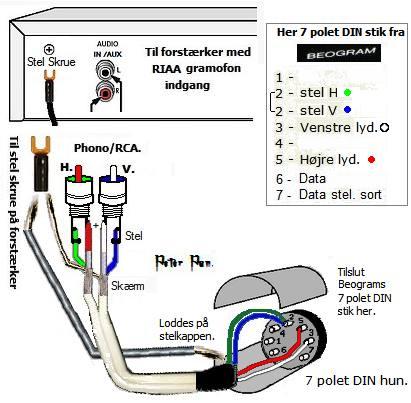
Here’s one of Peter Pan’s diagrams that should be useful: (from https://www.hifi4all.dk/forum/forum_posts.asp?TID=32157&PN=1)
(However he seems to have ‘mirror imaged’ the solder side of the DIN socket: Red connection should be to what he has labelled as 4, and white to 1)

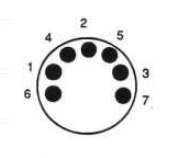
EDIT: For clarity, here is the correct pin numbering when viewing the solder side of a 7-pin DIN plug, or viewing into the ‘open’ side of a corresponding socket:

Location: Warwickshire, UK
My B&O Icons:
There is no speakerphone capability on the BeoCom 2, so you will have to think of a different solution if you need a speakerphone.
Maybe look for a Beocom 5.
Location: Warwickshire, UK
My B&O Icons:
Thanks @madskp. Yes I have seen the notes about adjusting trimmers – I have also read several posts that say to replace the capacitor and leave the trimmers alone, so that’s what I am hoping to get away with!
To be honest the BC2300 CD is playing quite well now that I am testing it daily. My ‘study’ BeoSound 1 CD, however, is misbehaving and I keep having to run that ‘CD Test Mode’ procedure to ‘clear’ the fault – it seems to work every time.
So I am not sure which to tackle first and I have yet to place a capacitor order. I probably need to strip down the BeoSound 1 first to see if I need parts for that too. I actually swapped CD mechanisms between all three of my BS1s, so I can’t now remember which model of mechanism is fitted in each!
Location: Warwickshire, UK
My B&O Icons:
It’s not strictly ‘B&O in movies’ but every time I see this M&M advert (currently showing on UK TV) I have a minor panic as I think my BeoVision* is powering down of its own accord!
* Mine’s a BV10-32 – not sure if all newer BeoVisions have the famous B&O curtain effect.
Location: Warwickshire, UK
My B&O Icons:
There’s a video explaining how to dismantle the BS Century here:
And if you go to about 9 mins 30 secs you will see the little display board being removed. It is only connected by a little white 9-pin connector, so perhaps this has come loose or has a bad/corroded contact? I would avoid spraying any more IPA because this could easily cause problems elsewhere.
If the connector is not at fault, you may be able to strip down the display/button board further, or look for a replacement.
EDIT: Sometimes these videos can be a little ‘hit and miss’. The Service Manual is available on Beoworld to Gold/Silver forum members but I had a look and it is of limited help in this instance, except to identify components.
Location: Warwickshire, UK
My B&O Icons:
I may look to replace the suspect capacitor in slower time.
After extensive research, and reading this 14 year old post from JoeyBoyGolf, I think I will try the Vishay 138 AML series 47uF 25V listed here: https://cpc.farnell.com/vishay/mal213836479e3/cap-47uf-25v-alu-elec-axial/dp/CA08777
Location: Warwickshire, UK
My B&O Icons:
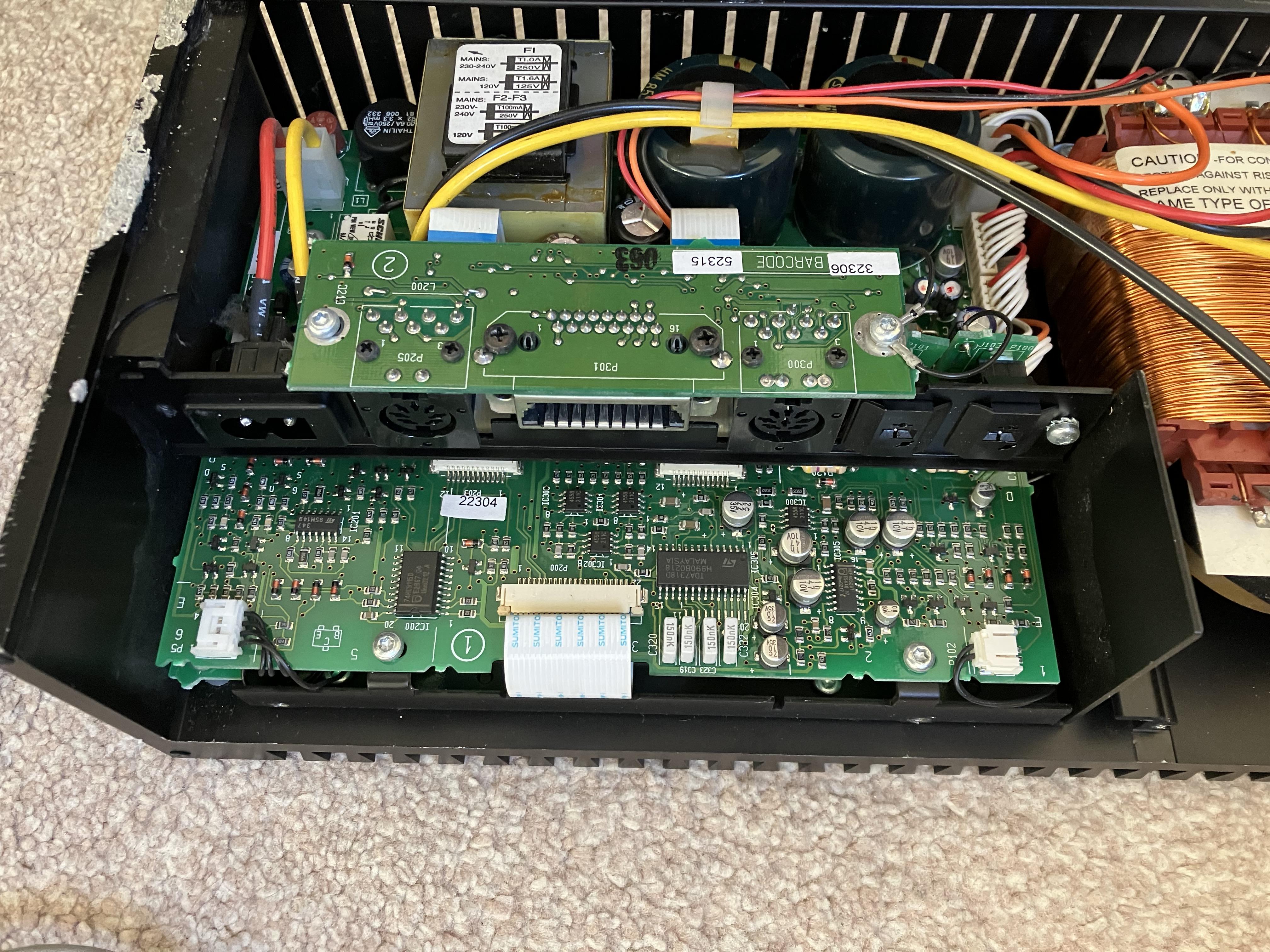
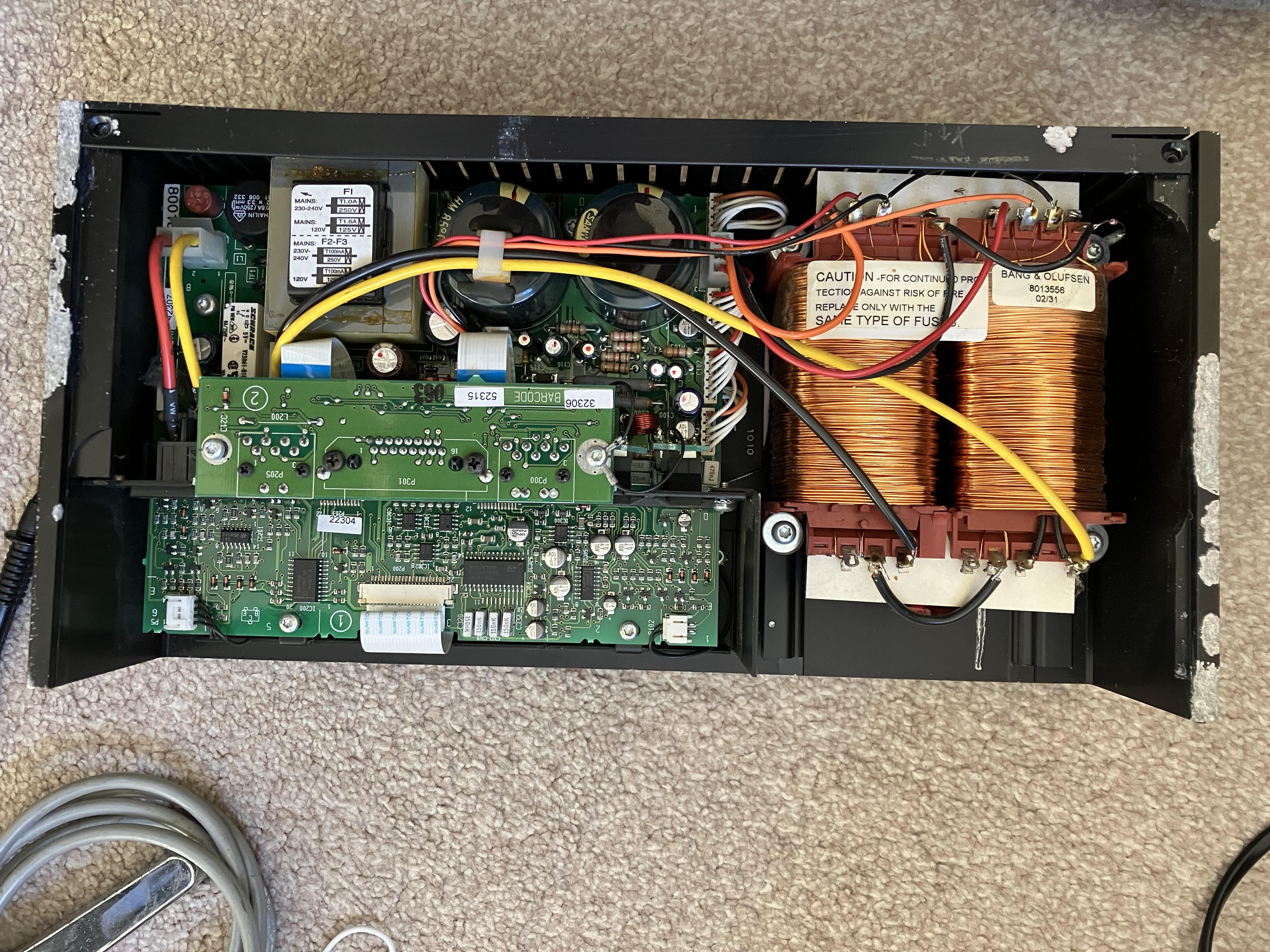
And as an aside, if anyone has ever wonder what the inside of a Passive looks like, here’s one from my album (I had to strip it down to fix a loose connection panel). There’s lots of good solid engineering in there, which is a good thing because this particular Passive has suffered some abuse or neglect in its past:

And another full width:
Location: Warwickshire, UK
My B&O Icons:
-
AuthorPosts