Forum Replies Created
-
AuthorPosts
-
16 April 2025 at 05:12 in reply to: A.Aux Link, Masterlink and Network Link – 3 B&O generations together? #65148
 BRONZE Member
you´re right, stupid thinking from this side. But doesn´t the Moment have a way to stop accepting IR commands?
it is sometime ago, but my Moment was standing in a room with several other devices, and it didn´t response to IR commands, whereas the BL35 was.
14 April 2025 at 14:40 in reply to: A.Aux Link, Masterlink and Network Link – 3 B&O generations together? #65134What I’d really like to do is have all of it linked together using both converters, but I can’t find a way to do that. If I have the Beocenter 9500 as an A Master, then the Beolink Converter NL/ML cannot also be an A Master, and the Moment only plays through the speakers connected to my TV if the converter is set as A Master.
The one workaround I have been able to come up with is this – I disconnected the ML/NL Converter entirely, and connected the RJ45 Powerlink output on the Moment to the Tape 2 input of the Beocenter (using 3 cables interconnected in total!). I then changed the Moment’s Speaker settings to Line, and connected the Beocenter to the TV using the 1611 converter. I am then able to listen to the Moment if I select Tape 2 as the source on the Beocenter. The problem with that setup is that both the Beocenter and the Moment are trying to respond to the same IR commands from my Beo4 and Beo6 remotes – if I hit Radio the Moment plays TuneIn and the Beocenter plays Radio. If I hit A.Mem the Moment plays Deezer and the Beocenter plays Tape.
If anyone can think of a better solution, please let me know!
2 solutions to try:
1. as described here above. Maybe an idea to put the Moment in option 0. To start the moment on ML side give the Tape2 command and use your phone/tablet to access the Moment.2. Make a chain like this one:
BC9500 – T1611 – BLC1 (ASlave or VMaster) – Moment – BLC2 (AMaster) – BV7 – BL3500 – BL2000.
Set the Source visible in ML and Experience mapped to NL of both accordantly.Weet iemand of er een mogelijkheid is om de instellingen (zoals Deezer user/wachtwoord) in te stellen op de Besound Moment zonder gebruik van de tablet? Het scherm doet namelijk niets meer en batterij zal wel voor de zoveelste keer kapot zijn. Gebruike de laatste tijd alleen het Soundheart en dat gaan prima totdat je bij de instellingen moet komen. Lukt niet via de App.
Precies, HET probleem van de Moment. Indien de tablet defect is kun je hem uitsluitend gebruiken zoals ingesteld. Wijzigingen zijn niet meer mogelijk.
only when the BLC has to be set as Source Centre in the NL system the BS9000 has some sw limitation.
in this case: BV11-BLC-BS9000 (speakers attached to BV11) the BLC is set as ASlave. So no dependancy to BS9000 sw version and/or BS9000 type.
presumably is the sw version in this Beolink NL/ML converter the cause of this phenomenon.
the latest sw version = 1.4.3.19864
no auto software update of a BLC available anymore, so you have to go to a dealer to update!
16 February 2025 at 11:39 in reply to: Masterlink A.MEM to play Airplay 2 from Essence MKII (through NL/ML Converter) #63828Problem: How can I join / play the Airplay source (from Beosound Essence) in the Masterlink rooms?
Did you checked the box in the BS Essense set-up pages to allow Airplay to be distributed in a Beolink multiroom situation?
8 February 2025 at 18:25 in reply to: BV11-BNC-BS9000 – small issues & question about BeoLab 5000 integration #63591Thanks for the tip! Issue: I have set A.Slave on the BLC, and the BeoSound 9000 turns on and off automatically as expected. However: When I press a button on the BeoSound 9000, the TV with the connected surround speakers does not turn on automatically.
If set as ASlave, the BS9000 is becoming a source on NL side, so it is expected to be handled from NL-side.
Question about multiroom setup: If I connect the BeoLab 5000 and the IR eye in another room directly to the BLC, it should also work with A.Slave, right?
That’s long ago I tested this one…. but I expect it will work. Note: the info shown on the BL5000 will not be 100% correct (I do not remember exactly which one is incorrect, but I think it is the source)
You can’t use the Halo to do this. A compromise! Simple as that!
@Carolpa: Can I just ask your understanding of the limitation here? For example, if I connect my BLC to my BV10-32 by masterlink, set the BLC as an A Master, and set the ‘Product Controlled by apps’ to ‘ML Videomaster’ I can use the B&O app for full control of the TV (turn on/off, change channels, control volume, change sources). But with the BLC connected to my BC2300 by ML/BL1611/AAL, setting the BLC as a V Master, if I then set the ‘Product Controlled by apps’ to ‘ML Audiomaster’ I have no control whatsoever over the BC2300.
BS3000 ML connected to BLC – set as VMaster no speakers attached – BS Shape linked – ‘Product Controlled by apps’ is set to ‘ML Audiomaster’ :
Tested CD and Radio both accept Next and Previous (also sources)
Note: as stated before in these posts, if my BS3000 would have speakers attached, one could control the BS3000 the same, but it would not start the speakers (just like a ML link room) at NL side commands. Still I would expect a unmute or source command on the ML side, will result in sound from the attached speakers.BS7000 PL and DL connected to T1611 – ML connected to BLC – set as ASlave (thus no speakers)
Next and Previous, Sources are acceptedBS9000 ML connected to BLC – set as ASlave no speakers attached – BS Shape linked – ‘Product Controlled by apps’ is set to ‘ML Audiomaster’:
source CD: Digits 1 to 6 on Halo; BS9000 goes to appropiate CD, Previous and Next skip to appropiate directionI presume you did set the sources in the BLC page “experience mapped to NL”?
If I change the ‘Product Controlled by apps’ to ‘Beolink Converter NL/ML’ then I can use the app to start and control the BC2300, but in a muted state as described earlier. So I am guessing that the BLC enables full app control of a product when connected by ML only, and that the BL1611 introduces limitations (possibly due to the use of AAL). If the BLC was connected to an ML equipped audiomaster would full control (volume etc) be possible?
So your experience with your setting is not coherent with my findings of my system. Additional info: with both the Beoliving app and the B&o app I can adjust the volumes on the BS3000 set up as described above.
Note: because I will move to another house I’m dismanteling my B&o system, so for the moment I can’t check this on the BS7000 .
(EDIT: I don’t know anything about Halo, but am I right in saying that if the B&O app can control something on ML via BLC, then Halo should also be able to control?)
In principle correct.
I would say the ‘Product Controlled by apps’ is not defining how the BLC reacts. It was a way to set the Beoliving & B&o app’s correct but doesn’t seem to have many impact of the behaviour anymore.
Beolab 4500 and/or 5000 with ICE power amps and build-in Mozart streamer with new BLxx00 displays (higher resolution, more info + control of streamer)
It works just great. But there is a marked reduction in sound quality. I heavily suspected this would happen.
PL connect the BL50 to the Beosystem 7000.
Start a Beosystem 7000 source with your remote.You can’t use the Halo to do this. A compromise! Simple as that!
I think I was suffering from finger trouble with the Beo4? Sources need to be selected first. With the Beolink 7000 it knows the source… the Beomaster 7000 tells it. I will bear your suggestion of an I/R sensor in mind but I am not sure about having the main connection between Beomaster 7000 and Beolab 50 going through multiple conversions and cables and units. I feel much more comfortable having a direct powerlink from the master to the speakers. But it may be an option? The Beolab 50’s have multiple inputs. I am currently using 3 of them… Wired powerlink from the 7000. Wireless powerlink from a Beovision 11 and USB C from a Connectcore. Previously I was using optical also. They automatically switch between sources and have a priority so I am not worried about 2 sources being fed simultaniously. The speakers work that out and illiminate all bar one. On the face of it as long as the internal wiring of the adapter I have ordered is correct it should work? Then again, I was saying that 3 weeks ago when this started. ???
Connect core? Do you mean A Beoconnect Core?
If so you should, as asked before, tell us? This is another ballgame!
If so you have these NL products: BV11, Beoconnect Core and BLC, presumably in the same network. You already have the BL50 connected to the Beoconnect Core, Correct?Then the easiest way to add the Beosystem 7000 is:
Beosystem 7000 – DL/PL connected to T1611 – ML connect to BLC (set as VMaster)Add the Core, BLC and Halo to the B&o app. Add the Core and the BLC to be controlled by the Halo. Start a Beosystem 7000 source on the BLC with the Halo then link the Core. The music should start on your BL.
If you do as @Carolpa suggests, I understand that you also want IR control of the BM7000, hence I think you could put the BM7000 in A.OPT 0 (to stop it responding to IR) and add an IR receiver to the BLC to give both IR control and app/Halo control.
I just tried this with my setup: BC2300 in A.OPT 0. Added IR sensor to BLC and moved speakers (Passive etc) from BC2300 to BLC also. It works fine. I can start BC2300 using app and/or Beo4 remote. The only loss of functionality is the volume display on the front of the BC2300 (because the BLC is controlling the volume). EDIT: One other limitation: As described is this thread, I cannot start the BC2300 FM Radio source using the app, but I can using the Beo4 remote. As mentioned later in that thread, it is possible to add the FM radio source as an ML source on other NL devices, such as Beosound Essence.
What if you redirect the FM Radio command in the IR mapping of the BLC to another source?
7 February 2025 at 18:29 in reply to: BV11-BNC-BS9000 – small issues & question about BeoLab 5000 integration #63548Hey everyone, I have my BeoSound 9000 connected to my BV11 via BNC, and overall, the control works fine, no matter which audio option I choose. However, I’ve noticed a few things: When I switch the source on the BV11 from BeoSound 9000 to TV, the BeoSound 9000 stays on.
Presumably the Beolink NL/ML converter (BLC) is set as VMaster. Then this reaction of the NL system is correct, because it is not aware if other ML devices are also linked to the BS9000.
Try to set it as ASlave (if the BS9000 is the only ML device connected to the BLC and/or no spreakers are attached)When I turn on the BeoSound 9000 using the built-in buttons, the BV11 does not turn on. I remember this used to work in a pure ML network. Any ideas on why this is happening?
Same kind of argument. If set as VMaster and a button is pressed on the BS9000 the system/NL doesn’t know should it start the BV11 or is it intended for the BS9000 with spearkers attached.
Also, the BV11 only shows the track number but not the CD number – a bit disappointing.
it looks like the BS9000 cd does not know which cd is playing, so it only communicate the tracknumber (also in B&o app, Halo). Still I’m in the impression the B&o app is designed to solve this in the future like it is solved with the use of the Beoconnect Encore….. see what the future brings….
Is there a workaround for this?
Not to my knowledge
Question about BeoLab 5000 integration: I want to reintegrate my old BeoLab 5000 speakers in another room using an IR eye. Ideally, I’d like the volume and track info to be displayed on the BeoLab 5000 screen. What’s the best way to set this up? Connect them directly to BNC? Or better to BeoSound 9000 as a secondary room product? Or do I need a BeoLink Active module to stay within the ML environment? Looking forward to your tips!
All options are possible, but not all option will show all the correct info on the BL5000. Be aware that extending the ML will make the VMaster option almost a necessity (see above).
😊 Best regards, Horst
No that doesn’t help. The Beoconverter NL/ML I have just purchased new. It came sealed in it’s box. It has had no previous owner. However I have reset it and started again. All to no avail! There is no 7000 option. But regardless of this I have tried every conceivable combination of setup options and the best I can do is controlling all the 7000 functions except volume. There is none! The display on my Beolink 7000 shows speakers muted but if I “unmute” them with I/R it does not work. So yes it all works except all I hear is silence!
okay, so you want to control the Beomaster 7000 on the NL side to start the system solemnly on the ML side. This was/is not the function of a Beolink NL/ML converter (BLC).
You could disconnect the Beolabs from the Beomaster 7000. Set the BLC as VMaster. Connect the BL to the BLC.
Then try to start the Beosystem 7000 sources on the BLC with the Halo or B&o app.Does the BLC start the Beosystem 7000 source with music reproduced on the BLC connected BL?
Hej Carolpa. Thanks for the advice. Here are the issues… There is no Beosystem 7000 as an option in “experienced mapped”. I have selected Beosound 9000 as the nearest option. Everything is being controlled through the Halo but there is no sound. The powerlink is not active from the 7000. On the app settings page I have to select “with speakers” or it will not even control. The only other option is ML Audiomaster. I am wondering if the software needs to be updated on the BC? It is running 1.4.3.19611 and I know there is an update but updates are no longer supported. Any ideas?
In “expierenced mapped” there is no dropdown to chose a product. If you see BS9000 it appears to be a setting of the previous owner. Best way is to factory reset the Beolink NL/ML converter (BLC).
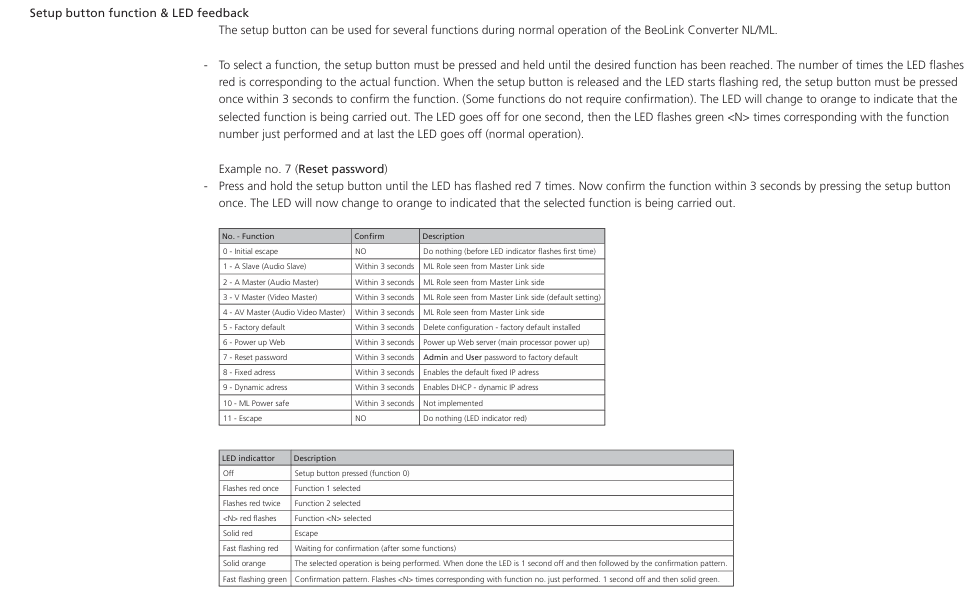
To factory setup the BLC see below: the button sit aside the small light in the bottum of the hole.

After resetting the BLC, set it up as previous described.
All I am trying to do is control the 7000 via NL so I can use the Halo with it. But I must maintain the I/R control alongside. I am almost there. I just need to sort out speaker connections. I would prefer not to use the powerlink on the BC and just keep the powerlink on the 7000. Is this possible?
set the Beolink NL/ML converter (BLC) to V.Master
set the “experience mapped”, check the boxes of the Beosystem 7000 soPL connect the BL to the Beosystem 7000
Set the option of the Beomaster 7000 to 1 or 2add the BLC and the Halo to the B&o app
add the BLC as product to be controlled by the HaloStill I have no clue what you want to achieve
Until now you only stated you want to connect/have connected a BS7000 to a BLC and you have BL50 connected to the BLC or the BS7000 (note: as Guy discribed do not connect the BL50 to both at the same time). So what is the advantage of a BLC in your setup?
I am trying to connect a Beolink Converter NL/ML to a Beosystem 7000. I have programmed the converter and then tried it out on a Beocentre 2 connected via ML. It worked just fine. But I need a converter to connect to the 7000 system? ML-DL? I had a 1614 converter that I know works just fine historically but this would not convert these signals. So I have just purchased a 1611 as this is the required converter. Still no joy! I have swapped out power leads and datalink leads and powerlink leads. I have tried putting the 7000 into every mode. Still nothing! ‘Anyone have any ideas?
Am I correct: the NL system-BLC-BC2 (ML connected) does work correctly?
Though NL system-BLC-T1611-BS7000 doesn’t work? Were all devices unplugged from the mains when connecting the T1611? Did you connect every device to the mains and let the device completely startup, before you plugged the mains to the T1611?How is the BLC set (AMaster/VMaster/ASlave….)? Can you describe your complete setup?
FYI: I have a Beosystem 7000 DL and PL connected to a T1611, which is ML connected to a BLC. The BLC is setup as ASlave (because the Beosystem the only “ML device” (through the T1611) connected. The Beosystem 7000 can be started on all NL devices using BLI .
Thank you for sharing, I think the difference between the 18s and 28s could lie within the stereo pairing. I feel the 18s may be paired via your theatre whereas the 28s pair themselves. Maybe I can break the pairing and force the eclipse to view them individually.
I’m under the impression it is a sound-setup “issue” in the Eclipse. The Eclipse will find the bass capabillities of the BL28 superior to the BL19. So the bass will be re-directed to the BL28. Somewhere in the sound settings this can be changed.
And no, no need to break the pairing. As long the BL28 are connected to the Eclipse the PL/WISA connection, these connections are in favour over the paired BL28’s.
28 January 2025 at 18:50 in reply to: BeoSound Essence + Beolink Converter NL/ML + ML system : unexpected shutdown… #63162there is something very odd in your both pictures of the settings of the BLC (Beolink NL/ML converter).
- the first picture says the BLC is set as AMaster
- but if it is set as AMaster, you can not get the second picture. These setting option is only available when the BLC is set as VMaster.
On the ML side there only can be one A.Master and one V.Master. So the BLC can’t be either!
On the ML side: there can only be one global source (a source of a AMaster or VMaster). So only one N.Music (=A.Tape2), one PHONO (=N.Radio), one CD, etc. so there could be a limitation.
-
AuthorPosts