Forum Replies Created
-
AuthorPosts
-
 BRONZE Member
carolpa wrote:
Skip the primary and secundairy connection altogether. All my BLC’s are set primary and secondary to themselve! This will make the operation unnessecary complex.But is the BL3500 BLC still set as ASlave? If so, then this is incorrect! ASlave is used if a sole ML device without speakers connected, adds sources to NL. The BLC should be set as AVmaster.
You should be able to play Deezer on the Moment and JOIN a BLC. But how to start Deezer on the BL3500 then? A question to be cracket.
I’ve changed the configuration so that the BLC-BL35 points to itself. This allows it to pull both InTune (via IR commands for RADIO and CD). If I leave the primary and secondary fields empty, it behaves the same way. However, there’s still an issue with getting N.MUSIC (Deezer) – Choosing N.MUSIC just makes a click noise from the speaker and indicates N.MUSIC but stills plays either RADIO (InTune) and if I play CD (from BS9000) and choosing N.MUSIC but no audio.
Just to clearify: with a remote you give the BL3500 the N.Music command? Maybe someone else can clearify is Deezer can be expanded to ML products?
If I understand correctly, adding a primary would make a specific BLC act as a “slave” to another BLC. How should the secondary connection be interpreted? Is it simply meant to allow a BLC to be linked to two specific units it should communicate with? I just want to understand the intended usage of the primary and secondary connections. I’ve browsed the NL Handbook but can’t say that I found anything specific talking about the roles and explaining; or I just missed it.
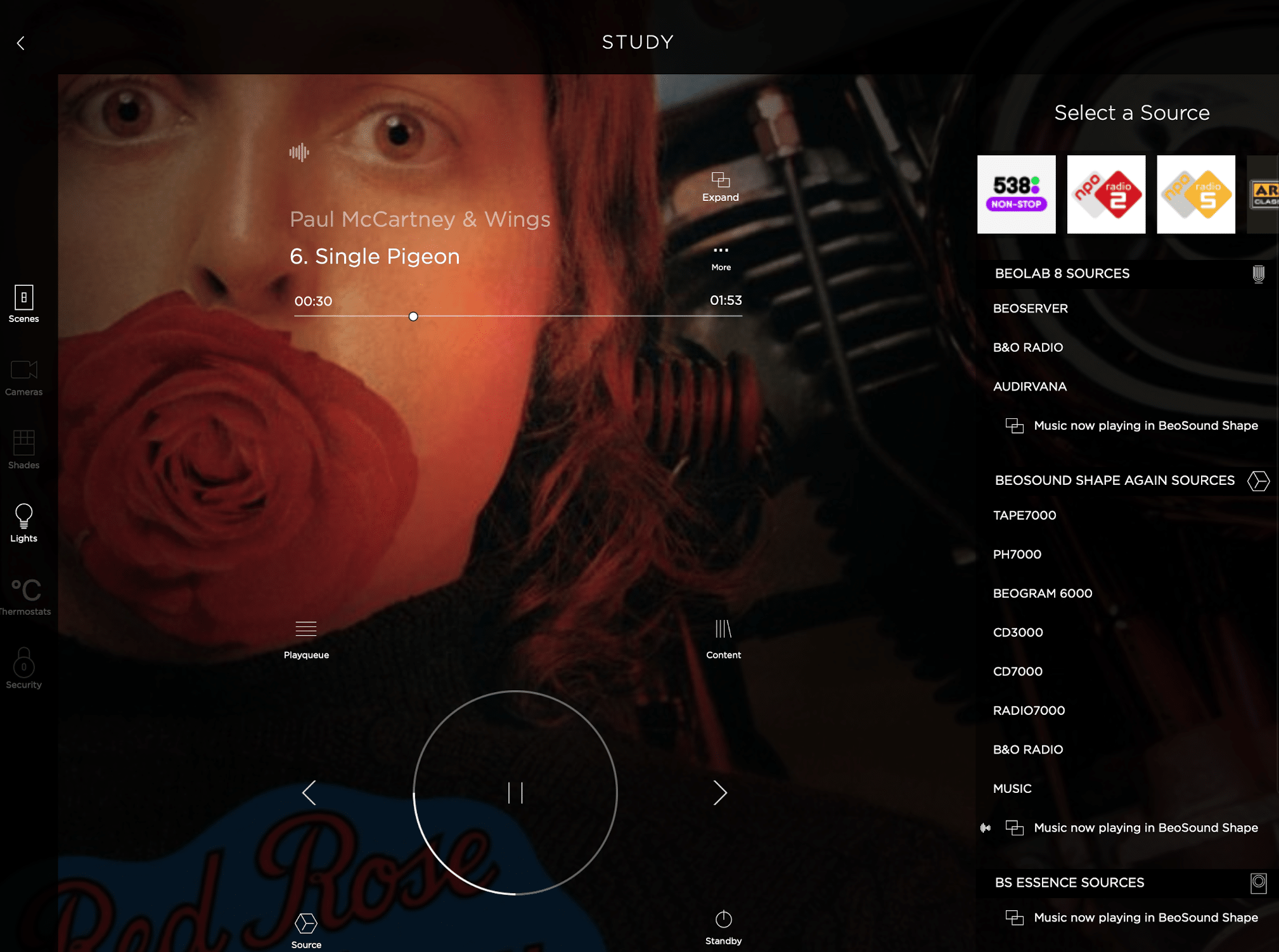
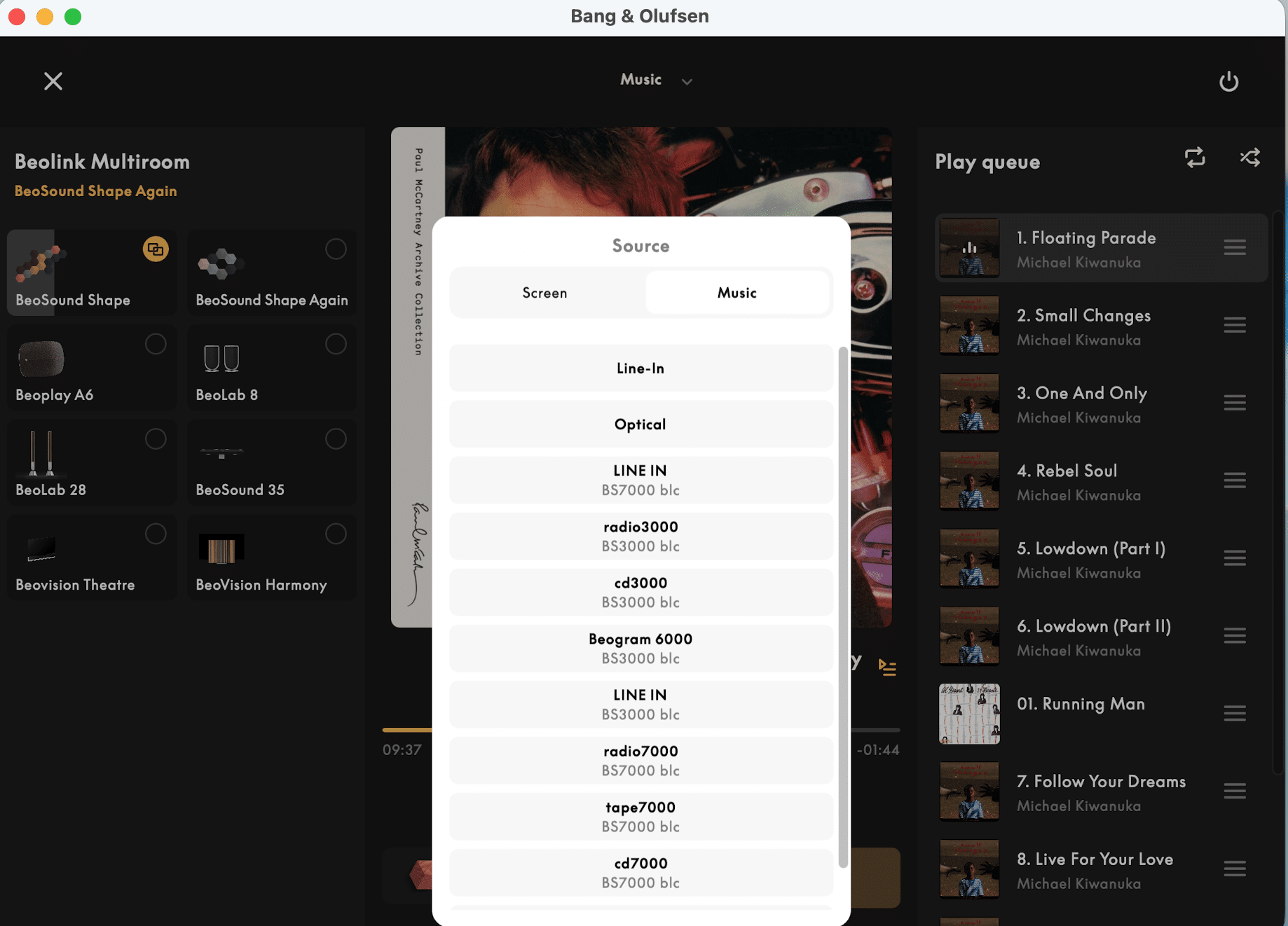
Primary/secundary – the sources of the, primary/secondary linked, NL product are shared with the linked to product. For example I set the BS7000 BLC as primary linked and the BS3000 BLC as secondaty to my BS Shape. Now the sources of the BS7000 and the BS3000 are local sources of my Shape; see picture.
 In principle your Moment should be able to do this also (but with all the sw issues in the past I’m not sure it still does).
No, for now I’ve set the BLC-BL35 as A.Master and what would the different be to set it AV.Master?
Technical speaking because the ML-string on this BLC doesn’t have a A.Master nor a V.Master you want to access ALL NL connected (and made available), thus as well audio as video sources. Then you have to set the BLC as AVMaster.
For now, beside getting certain multi-room effect but not getting the B&O app to play along was a bummer. Just wondering if it ever worked?
It worked fine. But since the latest changes not everything is working as before, but still………..

@carolpa: Yes, the BL3500 BLC set is still in place so nothing has changed. How would you deploy and setup the various BLC’s ti allow the NL be the central – not sure I understand how it would be possible to connect in a different way, or?Should I understand that I make my BLC-BV10 the primary unit and then change so that the primary connection is set to the BLC-BV10 and the seconday BLC to whatever would be of interest for the specific BLC. Something like this then for the BLC-BL35:
Doing so I’m able then to play both CD (BS9000) and InTune (Moment) but neither able to get it to play N.MUSIC or pulling the normal audio from the TV-tuner. Unfortunate when I try to use the B&O App to play Deezer I get a brief error message saying – “This product does not support Deezer in the Bang & Olufsen App. To use this product with Deezer, use the Deezer app.”. What does work is that I can start N.MUSIC to the BL3500 via a for example Beo4 remote which I then able to see that is playing in the B&O App indicating that the source is Music from Beosound Moment and can’t control anything, meaning I can’t init play, pause or stop the music, only able to see what is being played from the Moment including that I can see device menu that music is being played on the BLC-BL35.
So to me it seems that it’s not possible to use setup a multi-room using a BLC and BL3500 since the B&O App won’t support it.
Skip the primary and secundairy connection altogether. All my BLC’s are set primary and secondary to themselve! This will make the operation unnessecary complex.
But is the BL3500 BLC still set as ASlave? If so, then this is incorrect! ASlave is used if a sole ML device without speakers connected, adds sources to NL. The BLC should be set as AVmaster.
You should be able to play Deezer on the Moment and JOIN a BLC. But how to start Deezer on the BL3500 then? A question to be cracket.
With my questions I was searching for conflicts.
Your response learned me that you should “re-think” your setup. Let NL be central and ML attached sources.
How is your BL3500 BLC set? is the above setting s still in place?
Your NL network:
- Moment
- BLC – BV10 connected. set as AMaster
- BLC – BS9000 connected, set as VMaster (or ASlave if no speakers are connected)
- BLC – T1611 – BS6500 connected. set as VMaster (or ASlave if no speakers are connected)
this is correct?
Does iTunes on the Moment start on a N.Radio command or on the Radio command?
Could you confirm the IR mapping on all BLC are the same and correct?
Be aware that in the whole system you only can have one CD, one A.Tape, one Radio, etc. to be started with a remote. That’s the one programmed in the BLC. If another BLC has also a CD player connected, then it should be programmed as another source. If you have two BLC’s with different CD sources IR programmed as CD, which you want to start with a remote, and you give the CD c0mmand. you’ll end up with a conflict.
On the otherhand if you’re using the B&o app this limitation doesn’t occur.
For example: with the app or my Halo’s I can start a BS9000, Beosystem 7000 (all sources), the Beocenter 2, my BS3000 and a Beosystem 4500 (all seperate connected to a different BLC).This is possible because 1) ML products are primary and secondary linked to BS Core’s or BS Essense’s mkII, 2) BeoLiving Intelligence.
I have my Kaleidescape player using the “TV” source on the Beovision 10. The NL/ML Converter is in the same room with it’s IR eye near the BV10 so it’s getting the same IR commands. I don’t have speakers connected to the NL/ML Converter.
The BLI macro is using the trigger of CONTROL + PRESS + CONTROL.
- AI in BL says CONTROL doesn’t work on a BLC😕
- If no source is set on on your BLC when giving the Control_Press_Control, no command, and specific this one, is passed through …… Or am I missing something… please add your thougths on this.
I used the “monitor” feature of the BLI and found that the correct command to use for the center button is “CONTROL”. The Global Cache IP2IR is a pretty useful device. I have another one that I use in another room to be able to change the inputs of a TV connected to a Beosystem 4 to take advantage of 4K.
I was curious and made a little setup myself.
What I mis above is the source you call first on the BLC before pressing the “button”.Did you try to use LIGHT instead of CONTROL?
of course you have to use the light command on the remote…. but just to see what happens
I think it’s the same battery at the BC9500. I use these which fit perfectly as they have the correct pin spacing: https://uk.farnell.com/renata/cr2450-nfh-lf/cell-lithium-button-2pin-3v/dp/1319731
As you can see both pins solder on the same side (other side from the physical battery).
EDIT: After replacing the battery you may need to adjust the FM/AM offset in Test Mode as explained on page 7-3 of the service manual. (That’s assuming you have FM/AM stations in your area with known frequencies)
Thx for the link. I ordered one.
The Beomaster had an ordinary CR2450 Cell Battery cable soldered to the PCBBLC-BV10: 1st BLC (ML Role: A-Master) device used to connect the Beosound Moment with BV10.
BLC-Bs6: 2nd BLC added to get the Beosystem 6500 connected to the ML-network via Beolink 1611.
BLC-BS9: 3rd BLC (ML Role: A-Slave) to connect the Beosound 9000 to avoid having two A-Masters.
BLC-BL3: 4th BLC (ML Role: A-Slave) to be used for the BL3500.Guy and Madskp are right.
the essence is your misinterpretation of the “A.Master” and “A.Slave” setting of a BLC.On the NL-side there are NO differenses between devices, so all devices are equal, no masters no slaves.
On ML side there, you must have or a V.Master, A.Master or both.
That said, the master and slave settings for the BLC´s are for the ML connected devices of THAT BLC.So setting a BV10 as V.Master on one BLC doesn’t mean your complete system (NL & ML) has a V.Master. It means de ML string connected to that BLC sees the BLC acts as V.Master in that ML string.
Thus to have the BL3500 working correctly you should follow up one of the proposed solutions.
I’ve only carried out the procedure on a couple of BC9500s, but no-one else has replied.
For me, a new battery solved the problem – I think I had to carry out the COdE procedure again after battery replacement, but there have been no further problems since with either system.
In my experience, if you keep the system connected to mains power the problem may not re-occur – my mother-in-law’s system failed early because she switched it off at the wall every night. However, if the battery is flat then it may be close to leaking, hence worth replacing.
I’m currently debating changing the battery in a BS3000 that I have taken apart for door/CD belt changes – will probably do so to give it a longer lifespan.
thx
Is the battery on the “minus” side also soldered as the plus side is? It looks like the battery is stuck on the PCB. I opened “the box” also on the opposite side, but it was unclear to me where it was soldered on the PCB (maybe I shoud re-examine it), any help would be appreciated.
How about MOTS?
with large collections it will take a long time to complete!
so I would first switch of MOTS (if applicable) and see what happens.
And changes in the music collection or every restart interrupt the completion of MOTS.
info:
BS3000 – BLC – NL : start cd with button on BS3000 – NL source doesn’t start
BS9000 – BLC – NL : start cd with button on BS9000 – NL source doesn’t start
BS7000 – BLC – NL : start cd with button on BG CD7000 – NL source doesn’t start this evening (but I’m not sure this was the same before I powered everything down this afternoon, but forgot the Beosystem 7000 and the T1611 (which I restarted later on))I will do a proper reset lateron.
Did a reset on the Beosystem 7000. Nothing has changed.
There is one difference though. The BLC’s are primary linked to BS Core’s (Shape’s)
info:
BS3000 – BLC – NL : start cd with button on BS3000 – NL source doesn’t start
BS9000 – BLC – NL : start cd with button on BS9000 – NL source doesn’t start
BS7000 – BLC – NL : start cd with button on BG CD7000 – NL source doesn’t start this evening (but I’m not sure this was the same before I powered everything down this afternoon, but forgot the Beosystem 7000 and the T1611 (which I restarted later on))I will do a proper reset lateron.
Hi,
I have Beosound 9000 connected to a BeoVision 11 via an NL/ML converter, all in the same room. Only the TV has speakers. I can select link->CD on the TV and play CDs and use the Beoremote remote to control the 9000.
Question is: with the TV off, and I start CD playback from the 9000 directly (via a button), can I have the TV turn on to provide the speakers? Seems like this should work.
Not possible to my knowledge!
And somehow understandable. Because in principle the ML side doesn’t know which “Master” it should start and on the NL-side there is no “Master”.
Presumably this could be overcome by reprogramming the BLC. Though the last BLC update date published is from December 2015! So I would say low/no chance!Still I checked this morning. Pushing a start CD button didn’t result in playback of this cd on the BS Shape (the BS9000 BLC is primary linked).
my BL18 are hanging about 15cm from the ground
deleted – incorrect
I actually had a technician from B&O do the setup. Really expensive, and he had did not connect the speakers to the BV.
The cable from the BL3500 upstairs is spliced with the Masterlink that goes into the T1611. The other end of that Masterlink goes in the BV7.
I was wrong about the other two linkrooms downstairs; the kitchen and bedroom are spliced together and go in the MCL sockets in the Beomaster. So not speaker 2.
I am not sure what you mean by “Data en Powerlink”.
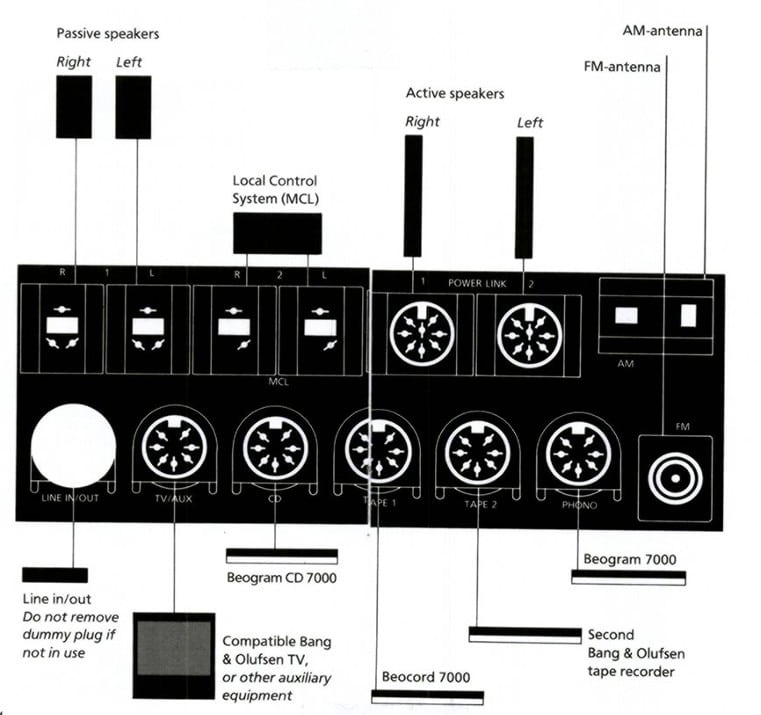
Powerlink: is the connection from Audio or Vidiomasters to send audio signals (left and right in the same cable) with (opptional) communication info to the amplifiers of the active B&o speakers; Beolab (8pin plugs). The way you connected your Penta’s to the BV7.
Datalink: is the connection including communication, between sources such as CD players, record players, etc and Beomasters/Beosound; but also direct connection between Beomaster/Beosound and Beovision (7pin plugs). The way the Beogram 7000 or Beogram CD 7000 is connected to a Beomaster 7000 for example.
The MCL socket should be the same as the Speaker 2 connections of the Beomaster 7000. Could you indicate were they are connected?
The T1611 is also connected to your BM7000 I presume? How is it connected?
There are no speakers connected to your Beomaster 7000 (just to be sure)?
Hi Joris, see maybe this thread: https://archivedforum2.beoworld.org/forums/t/46773.aspx
I am sure there are more threads that you can find by hard googling :-). Using a tag editor can help you out. Album cover images should not be too large.
Let us know your progress!
Regards,
Johan
Niet te groot = max. 1000*1000 pix
Yes, Beolink room 1 upstairs: BL3500 Masterlink is parallel connected to the BV7 via the T1611.
Downstairs kitchen: Beovox Cona and Beovox CX50 with MCL2A-IR.
Downstairs bedroom: Beolab 4500, with MCL2A-IR.
Those two units are also connected to the T1611 in a splice box.
In the bedroom, I alsop have a light control that does not respond to the remote, but only to touch.
At the moment, I have the loudspeaker DIN-cables connected to the PowerLink sockets on the BV7, and the sound from the BV7 is good. On the right side of the BV7 (seen from behind) there is a block of six DIN sockets. Two of those, the topmost right and the bottom right, are for speakers, but I am not sure how to use those.
Let me just clarify that the Pentas are the only loudspeakers in the living room; there is no center speaker on the BV7.
.
How are the MCL connected to the T1611? If you try to connect MCL directly to ML then for sure you will end up in problems.
The T1611 is designed to connect non-ML Audio or Videomasters to a ML Video or Audiomaster. So in your setup to connect a BM7000 (non ML Audiomaster) to the BV7 (ML Videomaster).To my knowledge your set up should be:
BV7 – ML connected to T1611 – Data en Powerlink connected to your BM7000
BL3500 is parallel ML connected to the BV7
Both MCL2A’s are parallel connected to speaker 2 of your BM7000 -
AuthorPosts