Forum Replies Created
-
AuthorPosts
-
 BRONZE Member
No, Deezer has not been working as part of the BV11/V1 for quite a while.
MM
Location: Flensborg————Danmark
Why not just use the built-in Netradio of the BV11/V1?
At least for radio listening that should be easier.MM
Location: Flensborg————Danmark
Go for it – why not!
MM
Location: Flensborg————Danmark
Try rebooting the Core.
To be sure that you actually are on the latest sw, try turning off automatic update (which you should turn on again afterwards), try to update manually.
This worked for me on a stubborn M3.MM
Location: Flensborg————Danmark
Christian today posted a bunch of articles / links on the Discord server, explaining all the changes to functionality (explains change in my Buttons, alarms, one touch operation etc etc) Here are a few of them, though its probably easier to read his long Discord post. https://support.bang-olufsen.com/hc/en-us/articles/8716445177745 https://support.bang-olufsen.com/hc/en-us/articles/9940012232081 https://support.bang-olufsen.com/hc/en-us/articles/9940005580689 https://support.bang-olufsen.com/hc/en-us/articles/10855168034833 https://support.bang-olufsen.com/hc/en-us/articles/10275507993489
Thanks for pointing towards the explanation, that helps to understand. Unfortunately I cannot operate according to the hints how to toggle between radio services, because it is not available in my app.
Rolf
———
This setting is also not available in my app either!
I have read what is in the links to the B&O pages.
For those of us, who are not on Discord, what is in the Christian posting there, that is not part of what the B&O pages explain?
Anything important?MM
Location: Flensborg————Danmark
Today I got a response to my mails about these issues from Support.
Well, at least they are aware of my – and our – troubles…….…they are working on it.
Please keep on posting your findings here.
MM
Location: Flensborg————Danmark
Could you post the exact number of the sw version…..or just say, if it is identical with the one I posted here?
MM
Location: Flensborg————Danmark
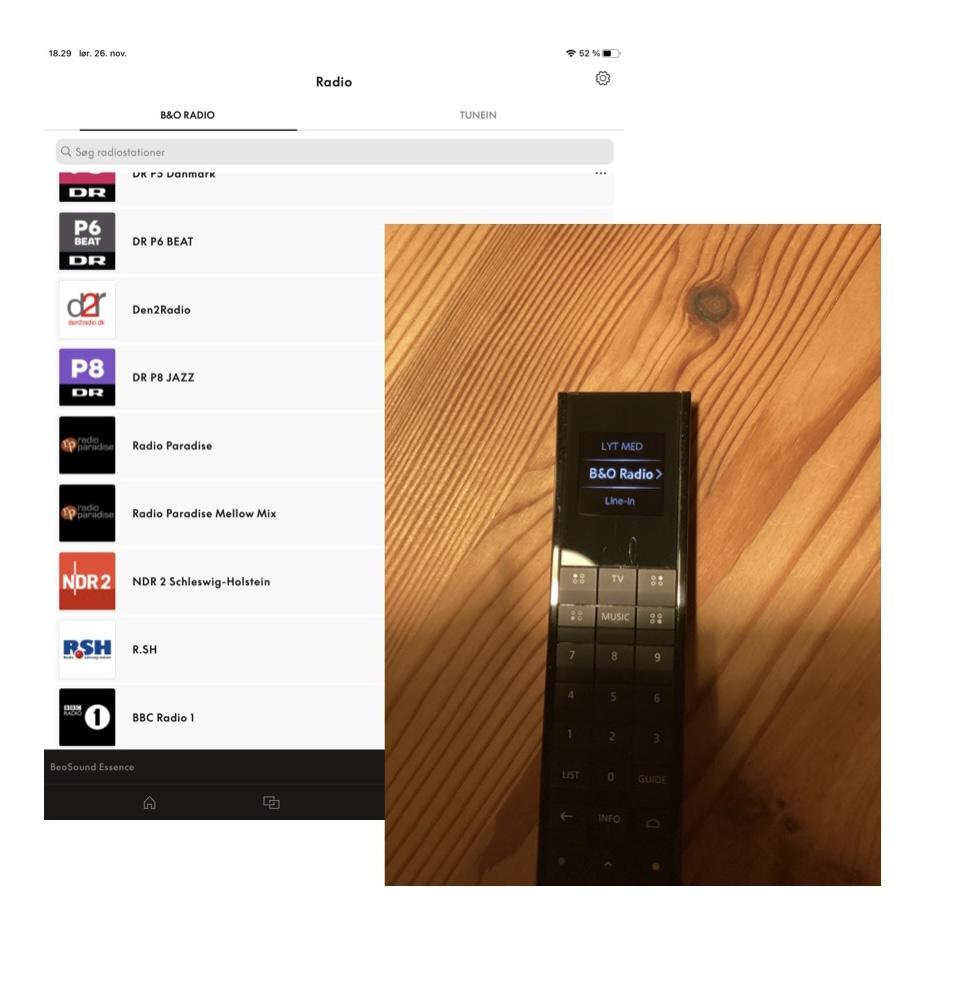
Millemissen, how did you add B&O radio on your BR1? Have a nice sunday, Yann.
———
I did not do anything.
The remote got the new information from the device (in this case a Essence MK2).MM
Location: Flensborg————Danmark
That you’d have to trigger the proces in each device, was what I tried to explain in a previous post.
Please try rebooting each of your devices (can be done from within the app).
If your ASE devices are at the latest sw (see my post above with my version) it should work afterwards.MM
Location: Flensborg————Danmark
However, the B&O Radio is not yet supported in the A6 (I doubt it ever will be?).
———
I’d be very surpriced, if that would not support B&O Radio.
My 4 ASE products (two of which are Essence MK2) have all support for B&O Radio.
You must however, be sure that it is updated to latest SW.
Mine are all running the version 2.1.50867.22855122MM
Location: Flensborg————Danmark

MM
Location: Flensborg————Danmark
Kind regards,
Rolf
———
It is a somewhat funny update!
It is unfortunately so that every device (read: every ASE device) will get the same information from the app – there is no way to exclude any of them.However, they need to be fully sw updated. Otherweise they won’t play from the B&O Radio station list, but will still from the TuneIn list as before.
Meaning: if all devices are updated, you only get B&O Radio, after you have migrated…..even if the TuneIn list in the app is still there.
So either keep the devices at a previous not supporting sw (which I would not do permanently) or do not migrate.If you migrate and then see your previous station list as a mess, you will have to delete all, start over and add the stations you want there.
Beware, there is no option (yet) for reordering – you will have to add them in the order, that you want them to be.
(That is what I had to do again, after updating the firmware of the device, that did not autoupdate).My advice = make a copy of the TuneIn list/a screenshot, if you want to recreate your previous list.
But know that when you add, you add from the end – you will have to add the station, that you want at the first place as the last one added.
This indeed is a bit awkward!However, once you have done the migration and the reordering, the B&O Radio works well….I have no complaints there.
MM
Location: Flensborg————Danmark
It works on a M5 too, I can play Beoradio
———
And was your new list just like the old TuneIn list???
MM
Location: Flensborg————Danmark
Honestly….I’d wait a while.
This does not seem to be 100% working yet.
I did this a couple of weeks ago (beta update), when it was offered.
See this thread: https://forum.beoworld.org/forums/topic/bo-radio-2/One of my devices however, had not been automaticly updated, so I had to do this manually today.
After that I again was prompted to migrate (although I already had done that back then and my other devices were working well with the B&O Radio).The first time I did it, my stations were completely mixed up – I had to delete all and build the list from scratch again.
Naive as I am, I thought they had sorted this issue, so I did it once again……….with the same result as the first time.
Because the list in the app is global for all (supported) devices, I now have to build the list once again ?So, not saying that one should not do it now.
But you should be aware that you may face the same problems and that you maybe will have to spend time recovering the list in the new B&O Radio afterwards.I am very interested in hearing about the experience of other users….maybe this is just so in my case ?
MM
Location: Flensborg————Danmark
-The speaker roles are noticeably limited when compared with what’s available on the Beosystem 4. For example, I was going to add more speakers for the Wide roles, but Wide is not an option for external speakers. Also, there is no role for middle hight speakers — only front and back height. The Dolby Atmos setup diagrams provide for the additional “left and right surround 1” roles — a back counterpart to the front “wide” roles. However, those roles are not options.
———
Which are the possible ‘Speaker Roles’ at time being?
Can you set up the system (the speaker connections) manually and make a micophone calibration after that?MM
Location: Flensborg————Danmark
Thanks – I am also for the simple (round) table stand.
I’d like my tv solution to be as close to the wall as possible…..without having to hang it there.
Also I like the looks of the Theatre with the tv mountedon top better, because you only see the front half of it.
From a design point of view it seems a more balanced solution to me…..the soundbar is rather big on its own.MM
Location: Flensborg————Danmark
That is always the problem ?
You look and look for the right solution….and can’t find it.
Then you go for something temporary……..which stays so untill you again make a change in the setup ?
That said – I hope that you/Mr10% find something better soon, because that solution in the picture certainly does not do the Theatre and the 90’s justice.
Question @Mr10% – you went for the table stand.
Is that made far or near (dependent on how the platter is turned)?
How far from the wall is the backside of the LG tv?MM
Location: Flensborg————Danmark
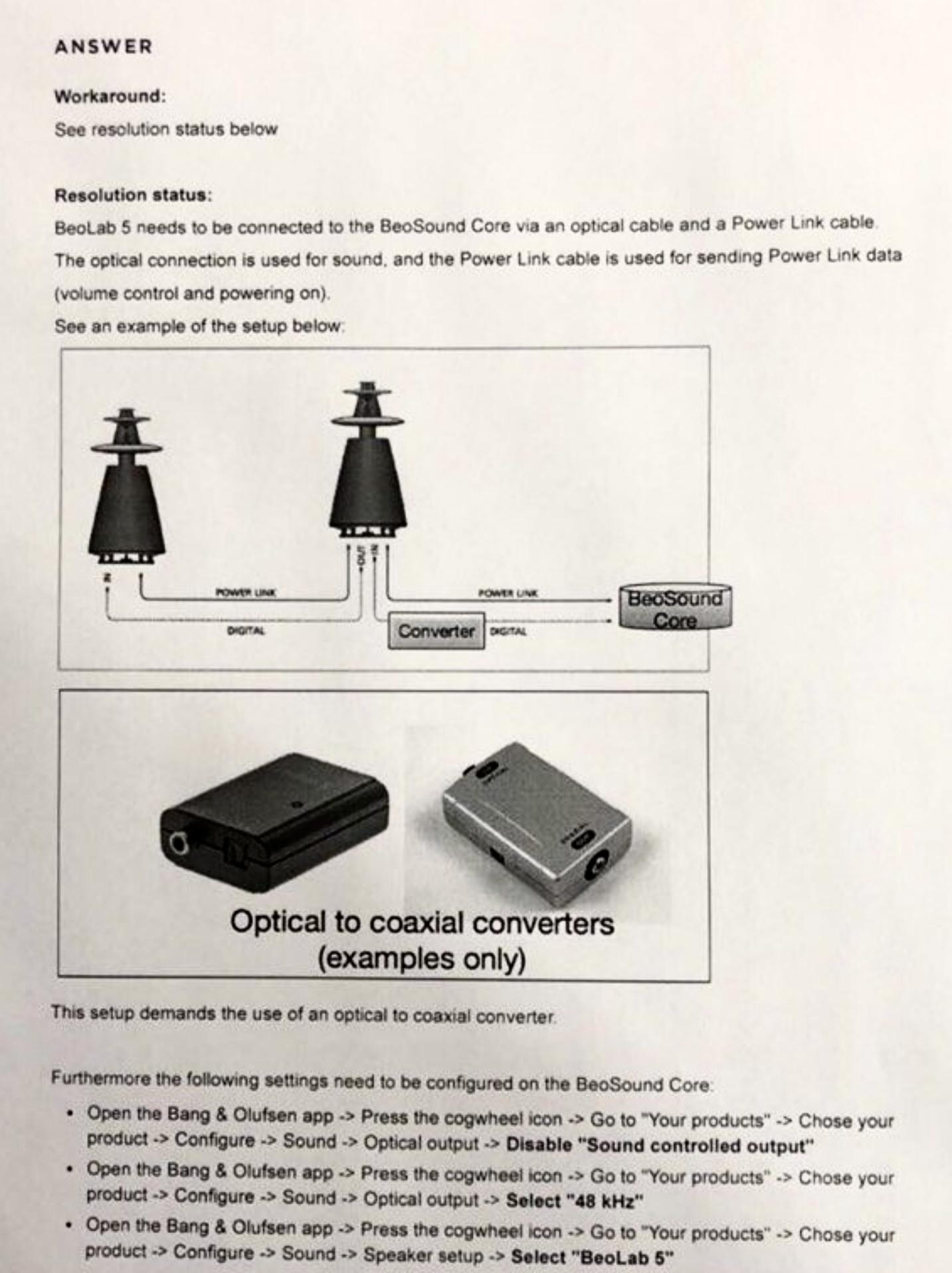
Maybe this can help you
https://bogoda.custhelp.com/app/answers/answer_view/a_id/0013319
Location: Flensborg————Danmark
Maybe this helps…

MM
Location: Flensborg————Danmark
Oh sorry – you’re right!
My mistake ?
MM
Location: Flensborg————Danmark
-
AuthorPosts