Generic selectors
Exact matches only
Search in title
Search in content
Post Type Selectors

Millemis

Forum Replies Created

Viewing 20 posts - 461 through 480 (of 1,236 total)
  • Author
    Posts
  • Millemis
    GOLD Member

    p.s. I am interested in the App Feature Request thread in Discord mentioned by MM. How do I access that?

    Actually it was Sandyb, who mentioned that.
    Discord is a closed forum, which has an area for all things B&O.
    It seems that a lot of people, who previously were into Beoworld, have changed focus to the B&O threads on Discord.
    You’ll need an invite to get in – maybe Sandyb (or someone else) can give you one and/or explain more.

    Personally I do not spend much time there – just pop in from time to time. It is too convoluted for my taste and I do not like the fact, that the ‘wisdom’ you might find there, is not public and searchable through google (or another websearch engine).

    Stay tuned – Sandyb usually posts here.

    By the way….how do you (re)install the previous app versions on a Mac?
    I guess some of us might want to learn more about that.

    MM

    Location: Flensborg————Danmark

    Millemis
    GOLD Member

    I sure know which one I prefer to look at in my rooms/home. MM

    What an immense difference …….. with in my opinion more objective pictures. It shows an evolution in three generations of the B&o app. To me the latest UI is the easiest to operate……whereas the first is the most complex but very nice even after all these years.

    I get your point – the second one looks nice when playing.
    My ‘problem’ – maybe – is that I hardly ever see the app on my iPhone.
    I was talking about an app, that – like mine on iPads – can represent a missing display for the actual devices.

    I do not use the app much for controlling….and do not carry my iPhone with me, when I am at home.
    And even if – I do not agree with you that the latest UI is the best for navigating….it is still too unfinished imo.
    I add/remove rooms with my BROnes respectively on the device.
    For me the multiroom section in the new app is way too present.

    Again – this might be just me and my use case.
    Others might carry their phone with them all the time and do not have/use a BROne or the Essence Remote.

    MM

    Location: Flensborg————Danmark

    Millemis
    GOLD Member

    P.S.
    No secret….it is not the newest app version that is my favourite ?

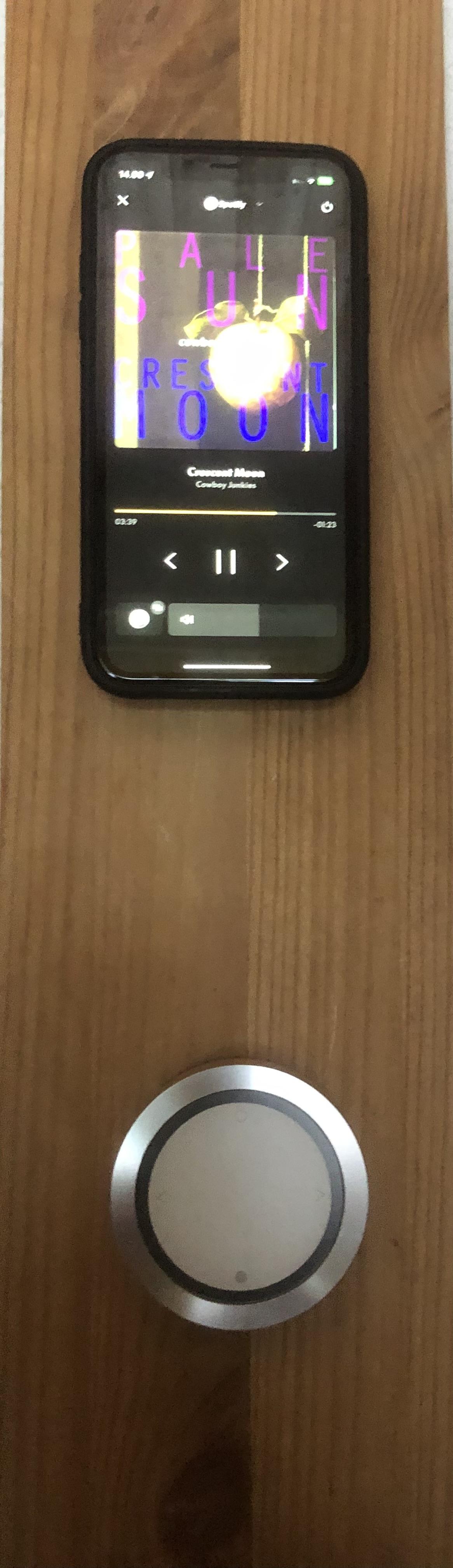
    (When in standby mode) I actually like the first one with the minimalistic graphic design of the Essence (Remote).
    If a picture, I would prefer if you could place a picture of my own setup/room there – the picture of the ‘wheely’ is too bulky imo.


    The only thing, I would miss there, are the 4 dots/the My Buttons.

    I fail to understand why they are not a part of the app!
    They are present on the BeoRemote One and on the new B&O devices.

    IMG_0749IMG_0748

    IMG_0750

    In my opinion all B&O products have to have a consistant and easily recognisable design language….including the app.
    Is this the case with the new app version?

    Just thinking out loud – it would be nice, if the designer of the newer B&O devices/NOTO Design/André Poulheim could comment on this.


    But maybe this is just me – maybe the majority of the (newer) B&O don’t give a sh*t about these things ?

    MM

    Location: Flensborg————Danmark

    in reply to: A new YouTube review of the BS3200 #50524
    Millemis
    GOLD Member

    Maybe interesting for those who want to dig a bit deeper into the thought behind the remote controls from B&O.

    I feel sorry for this guy who waited 25 years to experience a B&O device from yesteryears…..who had to admit that it actually was quite good, once he got used with the philosophy behind it.


    The ‘red dot’/standby is a very logical concept.

    Since the late 80’s the Bang & Olufsen remotes were made to control several different products (in the B&O ekosystem) – the A/V Terminal and then the Beolink 1000.
    Where other had to have several remotes, one for each product, B&O had one, where you could turn on/switch to the wanted source directly by using the source button and turn the device off with one button (the red/standby button) – this was also used for turning off the entire system by a long press (later as the first multiroom systems from B&O came).

    And only unlogical for those who prefered to have multiple different remote controls for their devices.

    A ‘Go’ button for accepting the choices one has made, when setting up things in menus, with several steps is unavoidable – how would you do it without?


    In the end it is this:

    IMG_0751
    ….or that:

    IMG_0752

    I surely would have to adapt to the UI of these monster remotes.

    Please give me a clean, nice looking remote, where you can control all basic features of several devices intuitively.

    I have a feeling that this classic hifi guy wants it complicated – after all it is his hobby and – probably – also his bread and butter.

    MM

    Location: Flensborg————Danmark

    in reply to: Need help linking NAS with BeoLab 5+9 #50172
    Millemis
    GOLD Member

    Of course he suggests the Core – and there is nothing wrong with that!

    However, you wrote in your initial post: “My dream would be to have 9000 in same room with Beolab 5 to play cd’s and Beocenter2 in room with Beolab 9.

    That is what I have related my suggestions to.

    With a Core you could still have the 9000 (and the BC2) to play CD’s – but you’d have to deal with the Beo4 for that….no option of controlling that with the app.
    You’d use the line-in of the Core for connecting.

    (This said….there is a way to have both and control all with the app.
    But that would require the use of the NL/ML Converter.
    Not many (at least not the younger) guys in a B&O shop know how to deal with that).

    In a previous post you wrote about the B&O Hub (which you use with your tv).
    This Hub and the Beosound Core are two different devices….just for the record!

    If you’d use a BS Core, you must control that with the Bang & Olufsen app (and/or the newer Beoremote One)….the BlueSound app has no role here.

    One reason not to use the Core might be the support for DLNA servers.
    Whilst the Core does support NAS/DLNA playback, the user interface for accessing the files/the music does not appeal to everybody.
    This – I guess – is one of the reasons why others suggest the use of other streamers with more sophisticated UI for the DLNA playback.

    MM

    Location: Flensborg————Danmark

    in reply to: How to disassemble the essence remote #40177
    Millemis
    GOLD Member

    Old thread, I know!

    Has anyone else had this problem (and what did they do)…….the wheel of the Essence Remote is not turning smooth (anymore)?

    I got me a (secondhand) remote, that I wanted to wall mount, but this is by far not as buttery smooth when regulating the volume.

    It does not seem, that any fluid was spilled on it.
    I did try the tip from Beozip – but with no results.

    I’d be gratefull for any information – how many remotes suffer from this, if any?

    I had to replace it with one of my other ‘wheelys’ – but I like that you can see the Bang & Olufsen logo, that you only have on the wall version.

    MM

    Location: Flensborg————Danmark

    in reply to: AirPlay 2 and B&O Speakers Not Working #50061
    Millemis
    GOLD Member

    Did you have a look at the setting in the app on your iPhone/iOS17, that I was pointing to (‘require password on/off’)?

    MM

    Location: Flensborg————Danmark

    in reply to: AirPlay 2 and B&O Speakers Not Working #50059
    Millemis
    GOLD Member

    Can you airplay to the other devices from that same iphone?
    Maybe the LG screen gives you the code, when trying to airplay to it.

    Do you use the Home app?
    Passcode setting there: on/off?
    Do you see something like this there?

    IMG_0747

    MM

    Location: Flensborg————Danmark

    Millemis
    GOLD Member

    Done!

    MM

    Location: Flensborg————Danmark

    in reply to: Need help linking NAS with BeoLab 5+9 #50166
    Millemis
    GOLD Member

    Yes, you will always have to turn on the 9000/push the A.Aux, before you hear what you have selected on the streamer.
    The 9000/Aux does not have auto sense like the newer B&O devices have (called Line-in there).
    There is no better way, when you are using the BS9000 (or the BC2 for that matter)!


    The BL3’s should be fine in a smaller room.
    However, if you’d have a B&O tv, it would make sense to have both sets connected, since the B&O tv can handle multichannel sources (and therefore multiple speakers).

    If you have one of these sets in the studio, you will also need something (a streamer and/or a B&O audio device) to connect these to.
    Hard to say how your network options are there…..but running a network cable to the studio should solve that.
    And whether you’l need the B&O speakers or a simple Sonos solution in that room, only you can know.
    Please consider that it is possible to connect either the 3’s or 9’s to a Sonos Port (you might need adapter cables for that)…….if you’d prefer the Sonos way of doing things.

    MM

    Location: Flensborg————Danmark

    in reply to: Bang & Olufsen App – Beta version 5.x.x. #49189
    Millemis
    GOLD Member

    Yes that is progress. But there is still a long way to go before we are able to do, what we could in the previous (regular) version.

    You’re never going to see B&O Radio, Music an Deezer again in that list, no matter how long you wait or pray

    You may be right, but that will not keep me from pointing my finger on this issue.
    I fail to understand why all the sources, that I use should not be available in one unified ‘source list’.
    I do not see the difference in starting e.g. (a linked) cd source or the B&O Radio…..why do I have to change to a different page just to change to a radio program?

    These are things that keep me away from using the app and instead use my Beoremote One.
    Maybe they want people to buy the remote ?
    Why not use the same logic that we have there: a MUSIC and/or a TV button with the available sources.

    Furthermore – they should tell us, whether we will get direct access to linked sources in the BST (via app or remote)……or not.

    Only an official statement about how the plan is, can keep me from ‘waiting or praying’!

    MM

    Location: Flensborg————Danmark

    in reply to: Bang & Olufsen App – Beta version 5.x.x. #49187
    Millemis
    GOLD Member

    Yes that is progress.

    But there is still a long way to go before we are able to do, what we could in the previous (regular) version.

    IMG_0742

    Why shouldn’t we be able to access the internal sources (such as B&O Radio……) from Source List?

    Would be nice to know if that is coming (again) in time….
    ……or if these will be left out for good in the future app versions!

    But it is nice to be able to start e.g. CD from there – something (by the way) that we still miss on the BST.

    MM


    MM

    Location: Flensborg————Danmark

    Millemis
    GOLD Member

    I can’t see how i would be able to integrate that into the B&O app (i curently cannot seem to get the app to work reliably either). I did try to find out how/ where/ a beolink network system might integrate, but honestly i got rather confused and i could not really see a way the 5500 main system would work with it.

    You can not integrate anything into the B&O app, because you have no NetworkLink products.
    The A8 may appear there – but only for somebasic setup functions.
    The 5500 system can be integrated with a B&O tv from the same era (using the Aux) – that’s about it.

    With your components you can create a WiiM based network respectively an Airplay2 based network.
    But these can not appear in a Beolink network/be visible in the B&O app.

    However, that should not worry you….as long as you can play the music like you want it (using AirPlay2 or the connected turntable).

    MM

    Location: Flensborg————Danmark

    in reply to: Bang & Olufsen App – Beta version 5.x.x. #49185
    Millemis
    GOLD Member

    Same here.

    Sources incomplete.

    MM

    Location: Flensborg————Danmark

    in reply to: beosound 9000 setup Beolink4 Beolink / Masterlink Gateway #50457
    Millemis
    GOLD Member

    The BS9000 must in this case – when it is connected to a tv with the speakers – be in A.Option 0.
    However a BS9000 does this automatically, when there are no speakers connected to the PL output.

    The described procedure with the Beo4 does not change the remote – it is only meant for changing options of the audio product.

    Can’t really help further….apart from the fact that this can not be caused by the Beo4 – must be something else.

    MM

    Location: Flensborg————Danmark

    in reply to: Need help linking NAS with BeoLab 5+9 #50163
    Millemis
    GOLD Member

    @Hockey44

    1:
    It is actually pretty simple.
    The 9000 is set up as normal and the streamer is connected to the A.Aux input there using the analog output of the streamer – most streamers have analog outputs.
    You’l need an adapter cable for that – probably a male L/R RCA to a male 5 pin DIN.

    The A.Aux on the 9000 must be activated/turned on using the Beo4 – the music must be choosen and controlled via an app (according to the streamer) – the volume control is best done with the Beo4/the 9000.

    You must connect the streamer to your home network (where your NAS also is connected).
    This can – with most streamers – be done either wireless or using a network cable.
    I’d prefer a wired connection, if possible.
    The streamer must be setup according to the user guide.

    Enjoy CD’s or streamed music from the speakers/the 5’s ?

    Note!
    You can not connect directly to the speakers/the BL5 with a network cable!

    2:
    Since it seems that there is no need for connecting both B&O systems (using a ML cable), I’d suggest running these independently and add another streamer to the BC2 just like with the 9000.
    Both setups can then be used in similar ways – which might be important to other family member….what they do in one room is also how you do it in the other.

    As I understand it, you already have (and use) a B&O Connection Hub – the socalled S8 hub.
    Probably with a tv now and the BL3’s (?).

    With this hub you have different options – see this picture:

    IMG_0741

    This means that you can connect different audio sources there (only one will play, the other must be turnded off).

    You could use the optical in for the sound from a 3rd party tv (that is maybe what you do now).
    And use the Powerlink input for the BC2.
    In this case there would be no speakers connected to the BC2 itself, but to the hub….these could be the 5’s.
    This way you’d have sound from CD, streaming device and tv using the same pair of speakers.
    Enjoy ?

    The (spare pair of) BL3’s could be used as additional speakers somewhere in the big room, if needed.
    However, you might want to use the BC2 and the tv/hub setup indipendently.
    In that case connect the 9’s to the BC2 and the 3’s to the hub (or vice versa).
    It all depends on your needs, your use habits.

    3:
    Yes, you can access what you have on your NAS with the Sonos devices.
    Please read here.

    There might be other ways to set up your systems – however, here I have tried to describe a rather simple way to do this.

    Feel free to ask again if needed.

    MM

    Location: Flensborg————Danmark

    in reply to: Beolit 23/24? #50355
    Millemis
    GOLD Member

    10 minute job with a few small torx bits buying a Beolit 17 replacement battery from Amazon.

    ?

    MM

    Location: Flensborg————Danmark

    in reply to: TV Recommendation #50308
    Millemis
    GOLD Member

    You can use the (e)ARC HDMI from the tv to a free HDMI input on the BSys3…..that will have to be configured and activated with the B&O remote, when you want to listen with the speakers connected there.
    Also the volume is controlled with the B&O remote.

    Personally I find this a bit fiddly, but it is doable.

    MM

    Location: Flensborg————Danmark

    in reply to: Bang & Olufsen App – Beta version 5.x.x. #49182
    Millemis
    GOLD Member

    @trackbeo

    This is definitely not the case with my old beta version.

    My local library is on an older Synology NAS and shows up pretty quick in the app, almost instantly.

    Same for the new beta.

    MM


    Location: Flensborg————Danmark

    in reply to: Need help linking NAS with BeoLab 5+9 #50160
    Millemis
    GOLD Member

    Basicly you can have two sets of Beolabs connected to the BC9000.
    (And you can have the WiiM or so streamer connected to the A.Aux-in there).
    But you will need to run Powerlink cables to both sets…which in your case may be a long run for one of the sets.
    Furthermore both sets would be playing, when you start playback.

    The better solution would be to connect the 5’s to the 9000 in one room.
    Please note – if you also connect via digital from the 9000, you will only get sound from the CD part and not from the A.Aux.
    You can not connect two different devices to the 5’s.
    In order to get the sound from the 9000’s (including the A.Aux connected WiiM) you will have to run a Masterlink cable to a Beolink Active, to where the additional speakers are/the 9’s.
    This assures independent use and control of the volume for each set of speakers.

    The NAS is on the home network and can be accessed from everywhere using the user interface/an app on a mobile phone/tablet.
    The WiiM is only the transport.

    P.S.
    What you mean by: “I already have the BO hub and using digital optical cables am able to link the LG tv with the BL3”, I do not know!
    What is ‘the BO hub’?
    And you can not connect the BL3’s using optical cables to the LG tv.
    They need an analog connection….which is not available on an LG tv (unless that is a rather old one).

    MM

    Location: Flensborg————Danmark

Viewing 20 posts - 461 through 480 (of 1,236 total)