






Home › Forums › General Discussion & Questions › General Discussion & Questions › Beo4 for BV11
- This topic has 22 replies, 4 voices, and was last updated 1 month, 1 week ago by


-
AuthorPosts
-
6 September 2026 at 10:19 #125400
 Liviu OjogaBRONZE Member
Hi all!
I have a BV11 which was driven by a beoremote 1 till now, when vol- button became responsive.
I am trying to use an old beo4 that I have but I cannot use the joystick in menu mode to scroll up/down.
I tried to set it up in MODE 1 but I don’t have a MODE or RESET option on it.
Maybe it has been setup in a special way, I bought it with a beosund 9000 from a cruise ship, so probably these options were removed from simple menus in order not to be accused accidentally.
Can anyone guide me how to reinstall MODE in order to put it in MODE 1?
Thank you!
-
This topic was modified 1 month, 1 week ago by
6 September 2026 at 11:03 #125402Johnny T DepBRONZE MemberI have x3 Beo 4 remotes (I have bought various B&O items used, all with remotes), I recently acquired a used BV7 and none of the three remotes would allow me to scroll up/down in the TV set up options (they ALL allow up/down scroll with my other BV7 TV). I researched how to resolve this and the ‘mode’ option came up in many searches but none of my remotes allow this option.
This leads me to believe the issue is with the TV set up, not the remote!
Sorry if this doesn’t help but it may not be directly the fault of the remote being disabled.
Location: johnny.thedep@gmail.com
6 September 2026 at 11:36 #125404Liviu OjogaBRONZE MemberThanks!
I setup BV11 to be used with beo4, but the problem is that I cannot find MODE on my beoremote4.
did you put the remotes in mode1 and tv set to be used w b4?
6 September 2026 at 11:41 #125405For the navi remote (with joystick)
> Press and hold the standby button down.
> Press LIST to get access to the Beo4 setup function.
> Let go of both buttons. ADD? appears in the display.
> Press LIST or ^ to display ZONE?, CONFIG? or MODE? on Beo4.
> Press the centre button to select the setup you want.
> Press up or down arrow to display the setting you want on Beo4.
> Press the centre button to store the configuration.
> STORED appears, indicating that the configuration has been stored.
Long press on BACK will leave the setup.Location: Warwickshire, UK
My B&O Icons:
 6 September 2026 at 11:52 #125406
Having re-read your first post I think thatyou have an early Beo4 without a navi button (joystick).
As far as I am aware. the BV11 is designed to be used with the Beo4 with navi button only. (Unless there was a sw version that allowed you to go into the settings an chose ‘no navigation button’, as there is in older TVs)
A possible workaround: If your BV11 is connected to your home network you could try using the B&O app to control the tv.
-
This reply was modified 1 month, 1 week ago by
Location: Warwickshire, UK
My B&O Icons:
6 September 2026 at 12:03 #125408Johnny T DepBRONZE MemberIs this considered to be the Beo 4 ‘with’ a navi button/joystick?
Location: johnny.thedep@gmail.com
6 September 2026 at 12:35 #125409Liviu OjogaBRONZE MemberFor the navi remote (with joystick)
> Press and hold the standby button down.
> Press LIST to get access to the Beo4 setup function.
> Let go of both buttons. ADD? appears in the display.
> Press LIST or ^ to display ZONE?, CONFIG? or MODE? on Beo4.
> Press the centre button to select the setup you want.
> Press up or down arrow to display the setting you want on Beo4.
> Press the centre button to store the configuration.
> STORED appears, indicating that the configuration has been stored.
Long press on BACK will leave the setup.I did this but Zone and Mode doesn’t appear!
6 September 2026 at 12:40 #125410Johnny T DepBRONZE MemberGuy wrote:
For the navi remote (with joystick)> Press and hold the standby button down.
> Press LIST to get access to the Beo4 setup function.
> Let go of both buttons. ADD? appears in the display.
> Press LIST or ^ to display ZONE?, CONFIG? or MODE? on Beo4.
> Press the centre button to select the setup you want.
> Press up or down arrow to display the setting you want on Beo4.
> Press the centre button to store the configuration.
> STORED appears, indicating that the configuration has been stored.
Long press on BACK will leave the setup.
I did this but Zone and Mode doesn’t appear!Yes, same for me. I tried all 3 remotes (same as in my pic above) and none had the option for Zone / Mode
Location: johnny.thedep@gmail.com
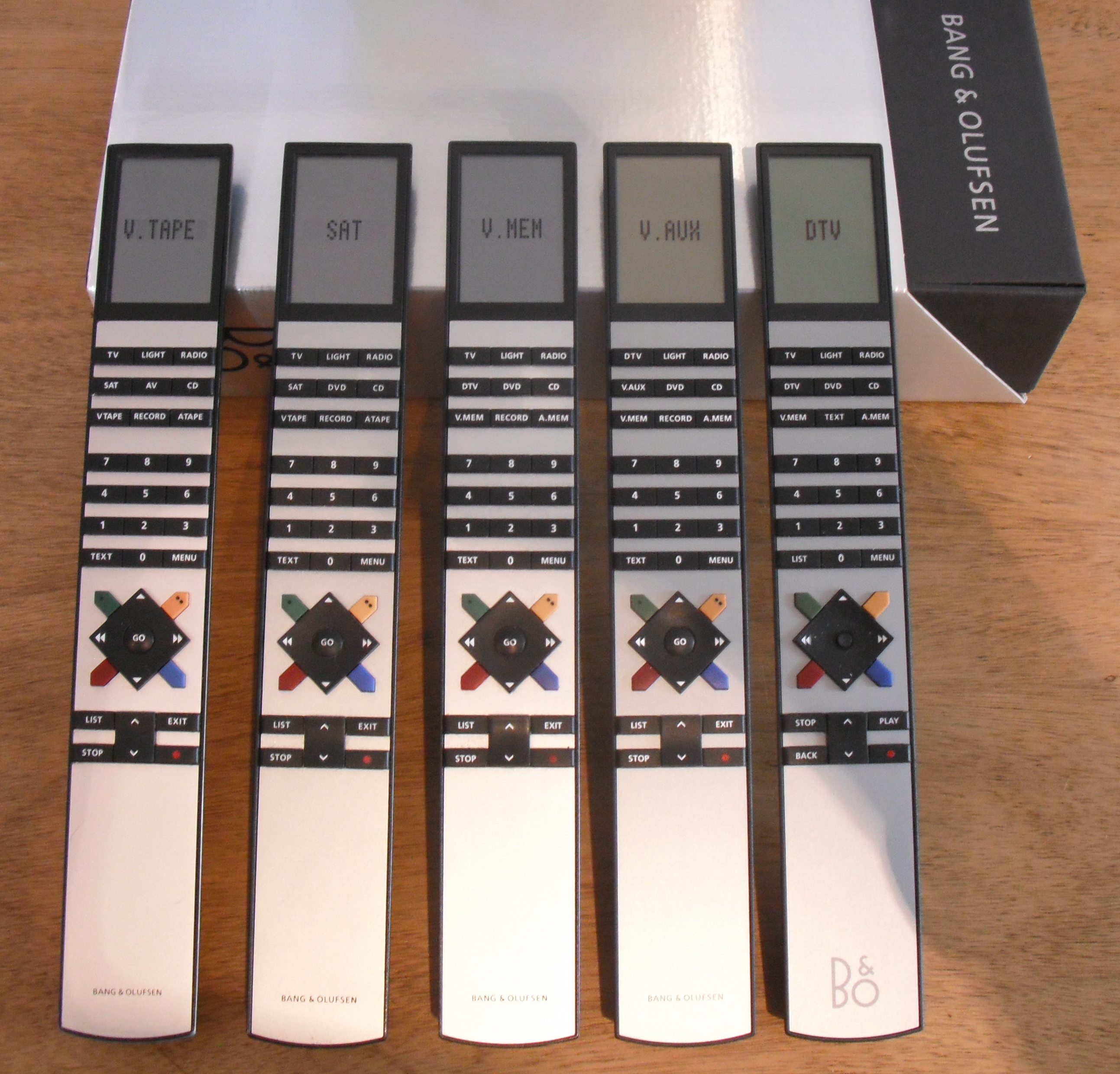
6 September 2026 at 12:59 #125412Is this considered to be the Beo 4 ‘with’ a navi button/joystick?
No, that’s an earlier version.
The navi one is the only Beo4 that you can set to Mode 1, and is on the far right of this picture: (click to enlarge – you can see the ‘joystick’ in place of the GO button of the earlier versions)
-
This reply was modified 1 month, 1 week ago by
-
This reply was modified 1 month, 1 week ago by
Location: Warwickshire, UK
My B&O Icons:
6 September 2026 at 20:24 #125427Liviu OjogaBRONZE MemberSo, the only remote to control bv11 is the joystick one?
In this case, did someone replace the beoremote one screen or do you advice to buy a new now?
I have seen here an offer for 177GBP just for the screen.
7 September 2026 at 04:52 #125428So, the only remote to control bv11 is the joystick one?
In this case, did someone replace the beoremote one screen or do you advice to buy a new now?
I have seen here an offer for 177GBP just for the screen.
No, all Beo4, Beolink 1000 and Beoremote One can actually control the BV11.
It all depends on how the BV11 is setup. Look in the setup for the option to select the correct type of Beo4.
7 September 2026 at 05:46 #125429Liviu OjogaBRONZE MemberI tried to setup BV11 to be controled by beo4….then tried 1 and 2 and 4 ….Beware that when you choose 4 both remotes (beo4 and beoremote1) became “dead”.
It was a full story to recover access to bv11:)
7 September 2026 at 07:45 #125431I tried to setup BV11 to be controled by beo4….then tried 1 and 2 and 4 ….Beware that when you choose 4 both remotes (beo4 and beoremote1) became “dead”.
It was a full story to recover access to bv11:)
Strange, there seems to be another problem!
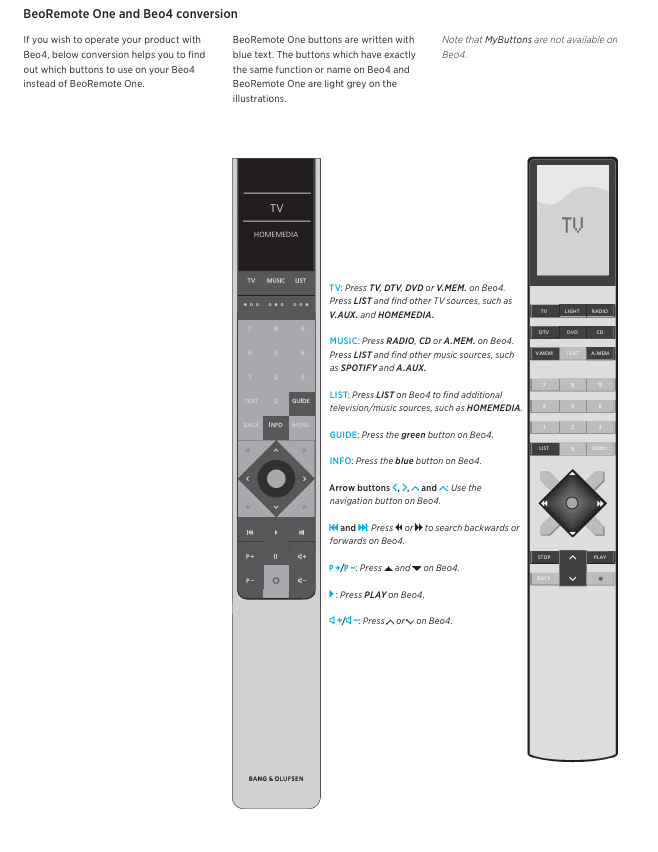
I used to haven 2 BV11 and I could control them with all 3 mentioned remotes. And that should be the normal behaviour!What do you mean with “remotes became dead”?
From the BV11 manual:
-
This reply was modified 1 month, 1 week ago by
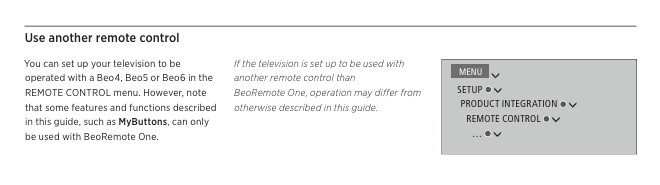
7 September 2026 at 07:57 #125435Suddenly I understood what you meant:
You are setting the BV11 options to 1, 2 or 4.
With 4 they are not dead but they should give a additional “LINK” command. The remotes should be set to do this.
You should go, to choose the right Beo4, to the second picture of my previous post.
Leave the option of the tv in option 1 or 2!
7 September 2026 at 09:39 #125439No, all Beo4, Beolink 1000 and Beoremote One can actually control the BV11.
It all depends on how the BV11 is setup. Look in the setup for the option to select the correct type of Beo4.
I too thought that, but found this in a BV11-40 manual:
Note that your Beo4 remote control
must be set to mode 1. For more
information, see the Beo4 online guide.
You cannot use a Beo4 remote control
without navigation button.So perhaps some SW versions did not have the facility to chose remotes with/without navi button.
Location: Warwickshire, UK
My B&O Icons:
7 September 2026 at 09:52 #125441Liviu OjogaBRONZE MemberAfter changing BV11 from beoremote1 to beo 4 you have another tab active, with 3 options : 1,2 and 4.
i thought that they ar eequivalent of Modes of beoremote so I tried all of them in order to match the beo4 mode (that I cannot find in setup to change)
When I selected 4, both remotes became unresponsive….I couldn’t change anything in bv11
i will paste what chatgpt instructed me to do, and it worked:
● + LIST → OPT? → GO → V.OPT → 1
7 September 2026 at 09:54 #125442Liviu OjogaBRONZE MemberIt control it (start/stop/vol/etc), but if I open menu or program list I cannot scroll
7 September 2026 at 10:12 #125443Have you tried my suggestion about controlling the TV using the B&O app? Your TV will need to be connected to a network for this to work.
If you do manage to connect to a network with internet access, you may be able to download a SW update for your TV that will then allow you to choose a ‘no navi button’ remote control option.
Location: Warwickshire, UK
My B&O Icons:
7 September 2026 at 10:36 #125444Liviu OjogaBRONZE MemberYes, I can control BV11 on BO app, but wife is not happy with phone controls:)
I assume new beoremote1 displays with 4 buttons can be matched with old aluminum frames….I am still thk if I should buy a new beoremote 1 or just the display/buttons panel
7 September 2026 at 12:56 #125446Yes, I can control BV11 on BO app, but wife is not happy with phone controls:)
I assume new beoremote1 displays with 4 buttons can be matched with old aluminum frames….I am still thk if I should buy a new beoremote 1 or just the display/buttons panel
Have you searched the BV11’s menus for something that allows you to select a noo-navi remote? (as suggested by carolpa)
Also, have you tried to update the TV’s software/firmware using the B&O app?
Location: Warwickshire, UK
My B&O Icons:
-
This topic was modified 1 month, 1 week ago by
-
AuthorPosts



- You must be logged in to reply to this topic.