






Home › Forums › Product Discussion & Questions › BeoSound › Besound Moment battery replacement
- This topic has 27 replies, 14 voices, and was last updated 2 months, 3 weeks ago by
 RR.
RR.

-
AuthorPosts
-
30 January 2025 at 08:47 #63213
 ChrisBRONZE Member
Hi,
had exactly the same issue of B&O logo boot loop on jukebox. Changed battery but same issue remained. Close to be using the jukebox as a wooden tray. After a bit of search came across the post in here https://www.reddit.com/r/BangandOlufsen/comments/rwpr1l/beosound_moment_firmware_issue/?rdt=62235
where you short circuit the Vol-(+) GND and RESET GND pairs simultaneously (I just realised that the post by guileukow above is exactly what I refer to).Had tried the same before but not been successful. Tried the same again trying a couple of times selecting different pairs (i.e, Vol- GND and RESET GND vs Vol+ GND and RESET GND) and …jukebox went into reset mode (see attached image). After a couple of minutes was back on initialisation page and now functions as when bought.
Attachments:
You must be logged in to view attached files.30 January 2025 at 08:50 #63215ChrisBRONZE MemberAs response to #58633
Many thanks.
This worked for me after almost a year on this issue of B&O logo boot loop.
As a side note, I did not have to wait and keep short circuited Vol- GND all the way to completion of rebooting. As soon as the reboot ‘wheel’ appeared I placed the jukebox on its soundheart base and waited. After about 10 mins I got the initialisation screen and a functioning jukebox.
30 January 2025 at 22:03 #63242guileukowBRONZE MemberMany thanks, Chris, for your feedback; it is very much appreciated!
I’m pleased to know that this worked for you too! I posted it on Reddit as well, in case it could help with other issues, as I wish we could save as many Beosound Moments as possible despite its bad reputation.
I didn’t know the exact procedure, so thanks to your feedback, we now know that it is not required to maintain Vol- to GND until it reboots!
Mine has been working flawlessly since I did this. Of course, I changed the battery and the mini battery (on the PCB as well, even if I can’t tell if it improved something for the latter), and the tablet never overheated again :).
19 June 2026 at 17:06 #124077Hi, I recently managed to acquire 3 Beosound Moments that are no longer working.
Number 1 keeps restarting repeatedly after the logo appears.
Numbers 2 and 3 continue after the logo, but then the screen starts flickering. I have already removed the backs of the tablets to connect the reset+GRD and Volume+GRD using two screwdrivers. Unfortunately, no result yet. The base station is visible in the B&O app when connected with a UTP cable. The software is up to date.
The next step is to replace the battery and see if that is the cause. I am trying to repair these Beosound Moments and save them for a second life.
Any other suggestions?26 June 2026 at 18:23 #124189Hi,
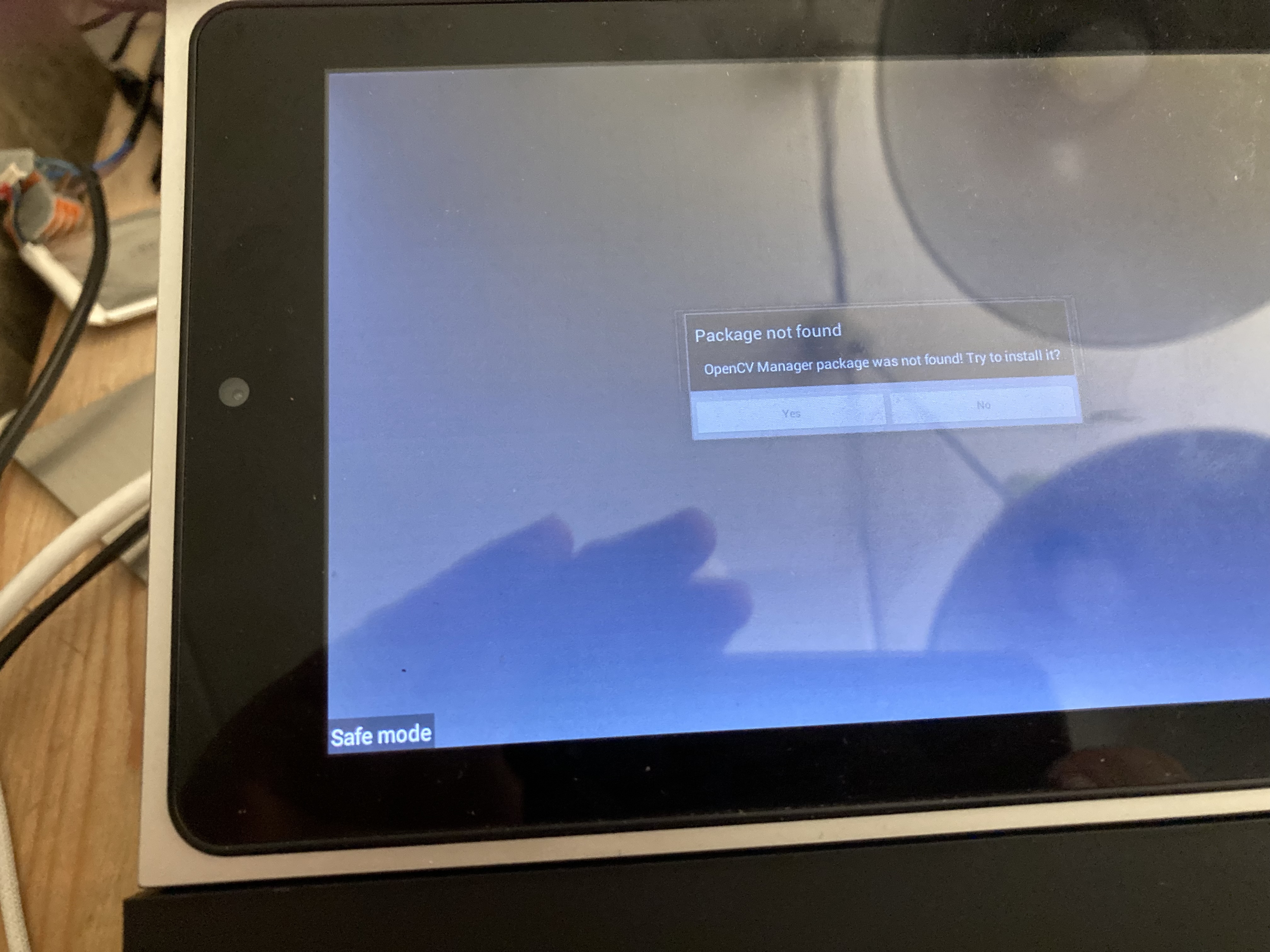
I managed to get it into Safe Mode, but now the screen is flickering. See the photo. Does anyone have any ideas on what to do next? How to chose Yes? It’s the one where, after the boot logo appears and some color shows up, the screen starts flickering.
 27 June 2026 at 16:37 #124236
The screen is working after a lot of tapping on Yes. But still no result. I think I’ll need the service tool to get it working again. I have sent a message to B&O support. Maybe they will respond.
Hello,
I currently own three Beosound Moments, and I am aware that support for them has ended. All of them are stuck in a loop, and I would like to get them working again so an enthusiast can give them a second life. Two of them proceed to the logo screen, after which the display starts flickering. One remains stuck in a loop at the logo. I believe I need the service tool to resolve this, but unfortunately, it is nowhere to be found. Can you help?
Regards, Jan Stegeman.27 June 2026 at 19:04 #124243guileukowBRONZE MemberHello Jan, you did lots of progress, congrats!
Unfortunately, the weakness of these devices is the FW. As soon as something goes corrupted, it’s a gamble. I never got the screen that you had: doing the vol- + GND trick was enough to restart my device (which still works after two years). In your case, it looks like something is missing or corrupted. Maybe try again?
Good luck with it 🤞And keep us posted like you do.
cheers,
Guileukow
14 July 2026 at 20:29 #124546RRBRONZE MemberHello Jan, you did lots of progress, congrats!
Unfortunately, the weakness of these devices is the FW. As soon as something goes corrupted, it’s a gamble. I never got the screen that you had: doing the vol- + GND trick was enough to restart my device (which still works after two years). In your case, it looks like something is missing or corrupted. Maybe try again?
Good luck with it 🤞And keep us posted like you do.
cheers,
Guileukow
Hi @guileukow or @chris,
My Beosound Moment has the same problem with the screen flickering after re-boot (I see the B&O logo and the screen starts flashing). I really like the device and would like to use it. Are there any pics or any guidance you can provide to help solve this problem. I was able to successfully open the device removing the wood panel. Can you share some photos or a guide on how you got it to work. I’m a bit confused on how the Vol- + GND procedure works. I’ve tried it, but no luck, I’m sure I’m doing something wrong.
Any guidance will be great. Thank you
-
AuthorPosts

- You must be logged in to reply to this topic.