Home › Forums › Product Discussion & Questions › BeoRemote › BEO4 assign button nradio to radio
Tagged: Beo4
Hi Experts
How can I please assign the beo4 radio button to nradio?
Juergen kress wrote: How can I please assign the beo4 music button to nmusic
How can I please assign the beo4 music button to nmusic
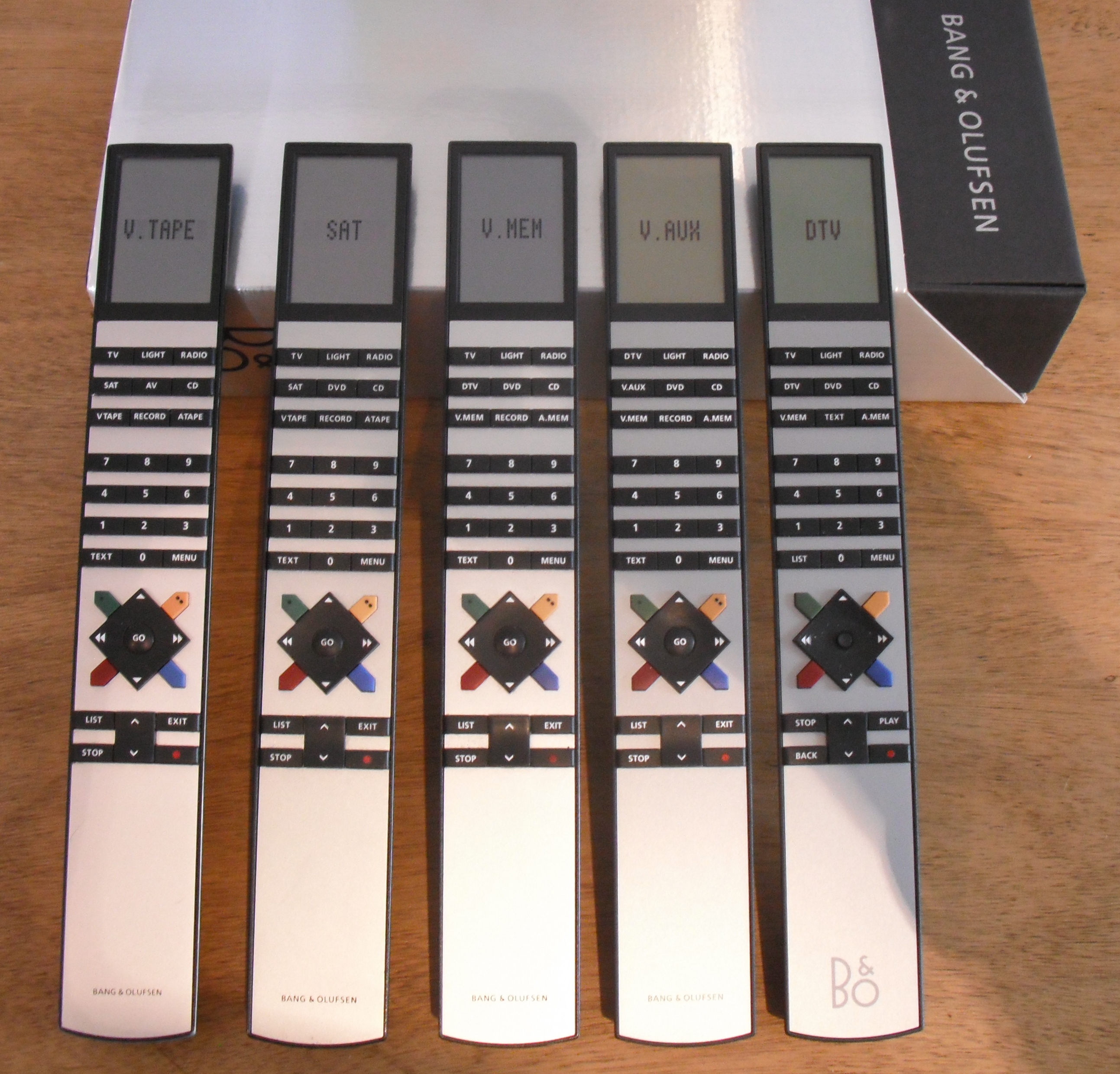
The normal Beo4s do not have a ‘music’ button. I assume you have a ‘hotel’ version – is N.MUSIC available in LIST?
Normal versions are as shown below – note button labels:
Location: Warwickshire, UK
My B&O Icons:
Sorry correction the radio function. Thanks.
There is no way to re-assign the labelled buttons, but in some newer B&O systems it is possible to get the RADIO remote command to start N.RADIO.
What B&O equipment are you controlling with your Beo4.
Alternatively you could get an older BL1000 remote with a phono button – the PHONO remote command is the same as N.RADIO.
EDIT: The older AUDIO TERMINAL also has a PHONO button, as does BL5000.
Enter the destination URL
Or link to existing content