






Home › Forums › Product Discussion & Questions › BeoLink › Advice needed on NL/ML setup
- This topic has 11 replies, 4 voices, and was last updated 3 months ago by


-
AuthorPosts
-
30 November 2025 at 11:42 #71592
 GOLD Member
After prevaricating for a while on getting a big TV, I decided my office is too small for a really big TV, so I have bought a Beovision 11-46, which I will collect in a few days, and I will continue to use my projector for the cinema experience when needed. I am off work this coming week too so plan to reorganise my office ready for its arrival, so hopefully I can plug it straight in and link it together with my other equipment when I get the TV here. I will have:
- Beovision 11-46
- Beosound 9000 Mk2, with Beogram 4500 connected as Aux
- Beosound 5 (set as an audio slave)
- Beolink Converter NL/ML
- Beolab 3000 as front surround speakers
- Beolab Penta as rear surround speakers
- Beolab 3 as subwoofer
- Potential (if it’s possible) Beolab 7.4 as a cinema centre speaker when using projector
- A Kramer HDMI Matrix which will allow me to connect my HDMI sources to both the TV and the projector
The only thing I am missing is some adapters to connect my older Powerlink Mk2 cables to the BV11’s newer Powerlink sockets – I have one adapter but think I’ll need 3 more.
I’m assuming that if I connect the speakers to the BV11, then connect the BS9000 and BS5 via the Beolink ConverterNL/ML , I should be able to hear everything via the speakers connected to the TV; am I right in that assumption?
I’m also assuming that the BV11 Powelink cables will still drive the displays on my BL3000 and BL Penta speakers – does anyone know if this is the case?
Note that if using a BS5 as an audio slave might be too complicated via an NL/ML converter, I also have a BS Moment, but I still prefer the BS5 over it.
If I can get all this set up and I’m happy with it, I might finally stop buying stuff and reorganising my office over and over again!
Location: Liverpool
My B&O Icons:
 1 December 2025 at 09:40 #71605
After prevaricating for a while on getting a big TV, I decided my office is too small for a really big TV, so I have bought a Beovision 11-46, which I will collect in a few days, and I will continue to use my projector for the cinema experience when needed. I am off work this coming week too so plan to reorganise my office ready for its arrival, so hopefully I can plug it straight in and link it together with my other equipment when I get the TV here. I will have:
Beovision 11-46
Beosound 9000 Mk2, with Beogram 4500 connected as Aux
Beosound 5 (set as an audio slave)
Beolink Converter NL/ML
Beolab 3000 as front surround speakers
Beolab Penta as rear surround speakers
Beolab 3 as subwoofer
Potential (if it’s possible) Beolab 7.4 as a cinema centre speaker when using projector
A Kramer HDMI Matrix which will allow me to connect my HDMI sources to both the TV and the projectorThe only thing I am missing is some adapters to connect my older Powerlink Mk2 cables to the BV11’s newer Powerlink sockets – I have one adapter but think I’ll need 3 more.
I’m assuming that if I connect the speakers to the BV11, then connect the BS9000 and BS5 via the Beolink ConverterNL/ML , I should be able to hear everything via the speakers connected to the TV; am I right in that assumption?
Correct. But a second BLC will make things easier for the BS5. So the setup could be something like this: BV11 – NL – BLC BS9000 – NL – BLC BS5 – NL – Moment.
I’m also assuming that the BV11 Powelink cables will still drive the displays on my BL3000 and BL Penta speakers – does anyone know if this is the case?
Yes/No. You will see some info, but sources will not be shown correct.
Note that if using a BS5 as an audio slave might be too complicated via an NL/ML converter, I also have a BS Moment, but I still prefer the BS5 over it.
I would connect both in a NL setup.
If I can get all this set up and I’m happy with it, I might finally stop buying stuff and reorganising my office over and over again!
If the virus has caught you……….. there will be no stopping 😏
1 December 2025 at 10:19 #71607Thanks carolpa. It hadn’t crossed my mind to connect both the BS5 and the Moment, but I suppose I might as well. They both do the same job – play my music stored on a NAS drive, but the Moment does have the advantage of Deezer too, for which I have a premium account, so that will be useful.
I know the sources won’t show correct on my speakers, but I’ve already learned to live with that – I know that N.Music shows as Tape 2 and DVD/Blu-Ray shows as CDV. I’m glad to hear the displays will work though; it would be a shame to have them and not use them.
I only have one Beolink Converter, I’ll see how I get on using only one, but you can get them quite cheap on eBay these days so if it doesn’t work quite right, I’ll get another.
Right, I’ll start moving things around and routing the cables, ready for the TV pickup on Friday!
Location: Liverpool
My B&O Icons:
13 December 2025 at 15:33 #71893I now have the TV, I was short a couple of Powerlink (RJ45 to DIN) adapters and they arrived today, so finally it’s all set up.
I’m happy to say it all works. The Beosound 5 is set as an audio slave, the Beosound 9000 is set in Opt.0, and both are connected to a ML junction box, which in turn is connected to the Beolink Converter NL/ML, and that is connected to the Beovision 11-46 TV.
All speakers are connected to the TV (Beolab 3000 front, Beolab Penta surround, and Beolab 2 sub).
It all seems to work – everything works via the remote (I use a Beo4, Beo6 and Beoremote 1), and if I start to play either the BS9000 or BS5 direct from the unit itself, it also works.
The only oddities I have found are:
- If I use the Beosound 5’s own standby button, it stops playing, but it does not put the whole system into standby, whereas the Beosound 9000 standby button does put the whole system into standby.
- Although I do have Mk2 Powerlink converters, the displays on my BL3000 and BL Penta only show ‘TV’ and the volume, no matter what source is playing. Oddly, the speaker displays only work if set to Audio rather than Video – I’m assuming this is just a restriction of the BV11, being much newer that the speakers.
- My BV11 came with a Panasonic Blu-ray player which is mounted rather nicely on the back. I have set it up with the PUC cable but for some reason, it powers on whenever I power on the system, rather than only powering on when I set that source. It also does not power off when I put the system into standby, even though I have set it to do that in the BV11 settings.
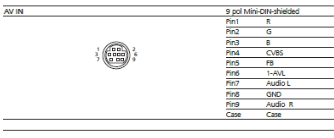
I do have one question – I like a bit or retro gaming and I would like to connect my old Nintendo GameCube to it. I have a S-VHS cable for the GameCube but found that it does not fit into the little round AV socket on the BV11. Could anyone tell me what kind of plug that AV socket takes?
Location: Liverpool
My B&O Icons:
13 December 2025 at 16:21 #71894My BV11 came with a Panasonic Blu-ray player which is mounted rather nicely on the back. I have set it up with the PUC cable but for some reason, it powers on whenever I power on the system, rather than only powering on when I set that source. It also does not power off when I put the system into standby, even though I have set it to do that in the BV11 settings.
Can you try selecting a different model of Panasonic Blu-ray to control? I haven’t used the downloadable PUC commands on a BV11 or newer, but on the older PUC system you sometimes had to experiment with different models to get the behaviour that you want.
I do have one question – I like a bit or retro gaming and I would like to connect my old Nintendo GameCube to it. I have a S-VHS cable for the GameCube but found that it does not fit into the little round AV socket on the BV11. Could anyone tell me what kind of plug that AV socket takes?
It’s a mini DIN 9-pin connector. Sounds Heavenly sell a cable but that may just be for audio input – worth checking with Steve.
EDIT: From the service manual:
Location: Warwickshire, UK
My B&O Icons:
14 December 2025 at 13:38 #71910MadskpGOLD MemberCharlieWednesday wrote:
I do have one question – I like a bit or retro gaming and I would like to connect my old Nintendo GameCube to it. I have a S-VHS cable for the GameCube but found that it does not fit into the little round AV socket on the BV11. Could anyone tell me what kind of plug that AV socket takes?It’s a mini DIN 9-pin connector. Sounds Heavenly sell a cable but that may just be for audio input – worth checking with Steve.
EDIT: From the service manual:
Also have a look in this thread regarding the AV mini DIN connector and the official B&O scart adapter
Location: Denmark
14 December 2025 at 19:07 #71932Also have a look in this thread regarding the AV mini DIN connector and the official B&O scart adapter
@Madskp Your link didn’t show, but you may have meant this thread (V1 has the same input): https://forum.beoworld.org/forums/topic/beoplay-v1-connection-old-stuff/Location: Warwickshire, UK
My B&O Icons:
14 December 2025 at 19:09 #71933MadskpGOLD MemberMadskp wrote:
Also have a look in this thread regarding the AV mini DIN connector and the official B&O scart adapter
@Madskp Your link didn’t show, but you may have meant this thread (V1 has the same input): https://forum.beoworld.org/forums/topic/beoplay-v1-connection-old-stuff/Yes that was the one 😀 thanks for picking up on it
Location: Denmark
16 December 2025 at 07:08 #71966Thanks for all the help. I’ll keep an eye out on eBay in case one of those official B&O SCART adapters ever comes up, as that would be useful to have.
Steve does sell a cable but it’s audio only, so I found one on eBay which is 9 PIN Mini-AV to 3xRCA (left, right, video), and I have a GameCube cable that will connect to that. Hopefully that will work – I’ll post here when it arrives.
Location: Liverpool
My B&O Icons:
1 January 2026 at 16:34 #72239Update – I received the cable from eBay (9 PIN Mini AV to 3 RCA – Yellow, Red, White) and tried to connect my GameCube to the BV11 with that cable but it didn’t work. All I got was a buzzing noise and a blank screen when I switched the GameCube on. I’ll have to keep looking for the official B&O SCART adapter.
Location: Liverpool
My B&O Icons:
1 January 2026 at 17:56 #72245MadskpGOLD MemberUpdate – I received the cable from eBay (9 PIN Mini AV to 3 RCA – Yellow, Red, White) and tried to connect my GameCube to the BV11 with that cable but it didn’t work. All I got was a buzzing noise and a blank screen when I switched the GameCube on. I’ll have to keep looking for the official B&O SCART adapter.
You might have to get the official cable (or get one made). Probably none of the other cables you can buy are made for use as an AV input cable for a few B&O TV models. It seems that the mini din among other things has been used as an output connector on Sega Genesis consols and the pinout used for them is different (even between models) https://tms-rgb.com/guideOutput.html, so if the cables you can buy are intended for that use they might be no good as B&O AV input.
Location: Denmark
2 January 2026 at 10:59 #72271Thanks – I tried it again today but I unplugged the yellow composite video RCA and left only the red and white audio RCAs connected – the sound came through fine, so it seemed that the composite video (yellow) RCA was the one that wasn’t wired correctly.
So, out of curiously I connected the red plug from the GameCube to the Yellow plug of the adapter, and I still got sound! Same if I connect the White to Yellow. It seems that all 3 plugs on the adapter are connecting to the audio of the TV, so clearly it is not wired the same as the official B&O adapter.
I would buy an HDMI adapter for the GameCube, but all of my HDMI sockets on the BV11 are taken, plus I used to have such an adapter for my old Wii, and the picture quality was awful.
If anyone knows where I could get hold of an official B&O Mini DIN to SCART adapter please let me know. In the meantime I’ll save a search for one on eBay.
Location: Liverpool
My B&O Icons:
-
AuthorPosts





- You must be logged in to reply to this topic.