






Home › Forums › Product Discussion & Questions › BeoRemote › Beolink 5000 batteries
- This topic has 10 replies, 4 voices, and was last updated 2 months ago by


-
AuthorPosts
-
30 June 2026 at 09:04 #124293
Will seem a silly question, but which way do the batteries go into a Beolink 5000!? I have got hold of one which is in great cosmetic condition, but not working. The screen has come loose, and the battery cover is missing. I want to test it to see if there is any function at all but the phone-camera-test is not showing any blink from the IR blaster.
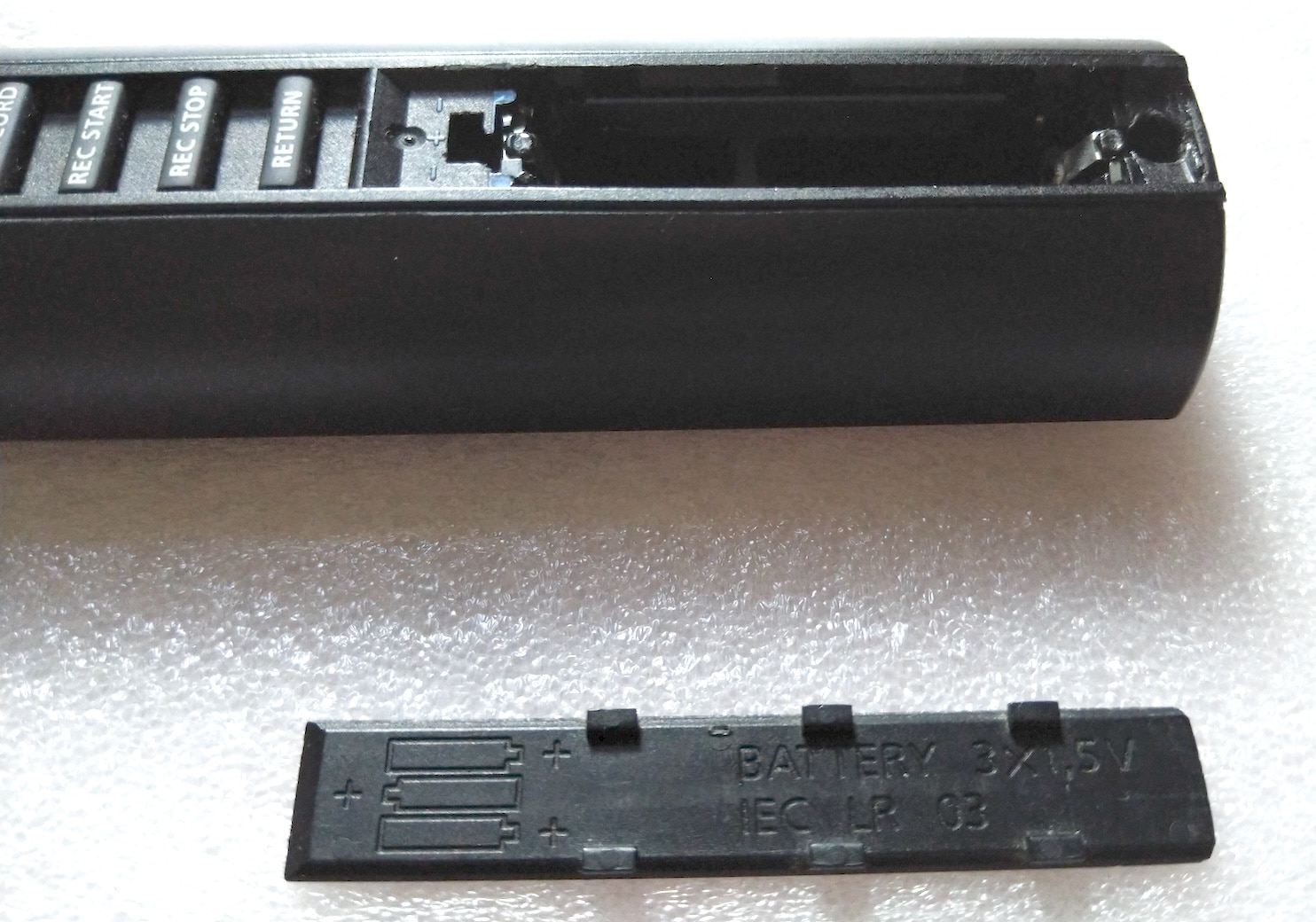
I’m assuming I have the batteries in the right way (two facing down, then the middle one facing up) but is that right? I assume the diagram to show how the batteries should be inserted is on the missing battery cover!
I have a Beocenter 9500 and have never had a working Beolink 5000 to go with it, so here’s hoping.
Location: Liverpool
My B&O Icons:
 30 June 2026 at 14:51 #124302
 SILVER MemberThe diagram is on the cover, but there should also be – + – on the remote’s frame (perhaps it is not on all versions):
The battery holder of the BL5000 is very brittle and if even slightly damaged will not make good contact. I am hoping that Danish sounds parts would someday produce a remake (like they have done for almost all BL1000 parts).
SILVER MemberThe diagram is on the cover, but there should also be – + – on the remote’s frame (perhaps it is not on all versions):
The battery holder of the BL5000 is very brittle and if even slightly damaged will not make good contact. I am hoping that Danish sounds parts would someday produce a remake (like they have done for almost all BL1000 parts).Location: Helsinki - Finland
My B&O Icons:
30 June 2026 at 18:10 #124309Thank you – I did have them in the right way after all then. It’s not working, so I’ll have to have a more detailed look at it.
Location: Liverpool
My B&O Icons:
30 June 2026 at 18:19 #124310Two facing down, middle facing up is correct. The battery cover slides on downwards, and is removed upwards – some people get this wrong.
I just checked my ‘remote spares’ box and have a spare BL5000 battery cover – top left tab (lausvi’s photo) only has broken off but it should still work. PM me your address and I’ll stick it in the post.
Location: Warwickshire, UK
My B&O Icons:
30 June 2026 at 18:22 #124311That’s very kind Guy – I’ll do that.
Location: Liverpool
My B&O Icons:
30 June 2026 at 18:32 #124313Ah – there appears to be a glitch in the PM thingy – if I search for user ‘Guy’, you are the fourth one down, and your name is partially hidden by the text box formatting buttons:
Because of this, I can’t click your name. Maybe you could PM me, and I can reply?
Location: Liverpool
My B&O Icons:
30 June 2026 at 18:40 #124314Message sent – hopefully you can reply!
Location: Warwickshire, UK
My B&O Icons:
3 July 2026 at 09:21 #124359Hi All,
I’ve been renovating +25 BL5K and my experience with the batteries is to use rechargeable batteries like the Ikea LADDA as they have a larger minus contact pad than normal batteries.
/steffen
Attachments:
You must be logged in to view attached files.My B&O Icons:
4 July 2026 at 09:20 #124390Thanks for the advice skolesen, I might try that.
And also thanks Guy – the battery cover arrived.
I now have two Beolink 5000s, one does not seem to work at all (although it could be the battery contacts – I haven’t investigated further yet), the other one does appear to be working from the phone camera test, but I haven’t yet got my Beocenter 9500 out of storage to test it fully. My Beomaster 6500 does appear to pick up some signals from it, but not many, and not always the one that corresponds to the button pressed!
Both are in great cosmetic condition but both have loose displays which come fully out of the housing, and I know they displays will probably have dead pixels anyway. I know that the two-way communication is often faulty on these too.
Does anyone know where I can get these repaired, or at least one of them? I don’t believe Multicare repair these, but correct me if I’m wrong.
Location: Liverpool
My B&O Icons:
4 July 2026 at 10:18 #124392I can fix it, but I’m living in Denmark. New display ribbon and recap of the IR PCB. As previously said I’ve done +25 BL5K renovations and have some extra display- and IR-PCBs on stock.
I even made a custom version to complete my white BS6500.
For inspiration you can look here:
https://forum.beoworld.org/forums/topic/beolink-5000-finally-a-solution/
/steffen
Attachments:
You must be logged in to view attached files.My B&O Icons:
4 July 2026 at 11:21 #124396If I were to send you both of mine, would you be prepared to fix one, and you can keep the other? If you could PM me with an approximate price for that, I’d be grateful.
Location: Liverpool
My B&O Icons:
-
AuthorPosts








- You must be logged in to reply to this topic.