






Home › Forums › Product Discussion & Questions › BeoSound › Theatre › Apple TV remote wakes Theatre audio but not LG panel – Beovision Theatre LG G6
- This topic has 16 replies, 4 voices, and was last updated 2 months, 3 weeks ago by
 Brett Collinson.

-
AuthorPosts
-
9 May 2026 at 16:59 #123525
 Brett CollinsonBRONZE Member
Title: Apple TV remote wakes Theatre audio but not LG panel – Beovision Theatre / G6 setup
Setup: Beosound Theatre soundbar paired with an LG G6 OLED, integrated via the B&O LG app and the dedicated Ethernet link – the “Beovision Theatre” bundle. Apple TV connected to Theatre HDMI A. Theatre’s eARC HDMI feeds the LG’s HDMI 2. Beoremote One as the supplied remote.
Goal: single-remote operation using the Apple TV Siri remote – press it, both soundbar and panel wake to the Apple TV source. I’m trying to get to a place where the Theatre and LG quietly recede and it just feels like an Apple TV.
Current behaviour: pressing the Apple TV remote wakes the Theatre and routes audio – I can hear the tvOS menu navigation sounds clearly – but the LG panel stays black. To get picture I have to pick up the Beoremote One and manually select HDMI 2 on the TV and HDMI A on the Theatre. After that everything works fine until the next standby cycle, when the same thing happens again.
What I’ve verified: – In the B&O app: HDMI A is set up as a source named “Apple TV” with CEC Enabled, Movie sound mode. – On the LG: SIMPLINK (HDMI-CEC) on, Quick Media Switching on. – On the Apple TV: Settings → Remotes and Devices → Home Theater Control → Control TV and Receiver = on.
Question: is the Theatre supposed to wake the LG panel automatically when CEC activates the HDMI A source, and if so, is there something specific to check on the integration side – Ethernet link, B&O LG app, firmware version – that could be stopping the panel-wake command from propagating? Or is this the LG integration instability others have reported, where the practical answer is a periodic mains cycle?
Happy to add Theatre firmware version, tvOS version, or anything else useful.
My B&O Icons:
 10 May 2026 at 09:05 #123528
In case you a aiming at not using the BROne at all, why not just plug the ATV in to the LG tv directly.
The ethernet cable (between Theatre and the tv) should not be needed at all.Activating CEC on ATV and the tv should be sufficient.
The BS Theatre is – in that case – just a soundbar.Also have a look here:
https://support.apple.com/en-gb/guide/tv/atvbbe2477c9/tvosMM
Location: Flensborg————Danmark
10 May 2026 at 17:22 #123530Brett CollinsonBRONZE MemberIt feels like I should be able to make this work via B&O’s suggested connection setup.
Here are more precise details of my setup and behavior as I’ve tested it more…
<b>Core Issue:</b>* New Beosound Theatre & LG G6* Only input is Apple TV* Turning on TV with Apple TV Remote doesn’t activate Apple TV connection properly<b> </b><b>Setup</b>* Beosound Theatre – running latest software: 6.1.0.17* LG G6 – running latest software: 43.10.69 (2026-05-08)* B&O app on iPad – running latest version: 7.5.1* Apple TV – running latest version: 26.4<b>Connections</b>* B&O & LG integration: LAN cable connected, eARC HDMI connected to HDMI 2 on TV* B&O app running on TV* Apple TV HDMI connected to HDMI A on Theatre* SimpLink (LG’s HDMI-CEC implementation) activated, and CEC enabled on HDMI A source in B&O app* No other input sources on Theatre or TV<b>First Time Experience → Ideal</b>* Theatre restart from B&O App (via Troubleshooting menu)* Turn on via Apple TV Remote* Theatre and TV wake from standby* TV displays brief HDMI 2 Loading screen* Apple TV shown<b>Subsequent Experience using Beoremote One</b>* Turn off via Apple TV Remote or Beoremote One* Turn on via Beoremote One and using HDMI A source* Theatre and TV wake from standby* No HDMI 2 Loading screen* Apple TV shown, but it takes considerably longer to appear from the blank screen than during the First Time Experience<b>Desired: Subsequent Experience using Apple TV Remote</b>* Turn off via Apple TV Remote or Beoremote One* Turn on via Apple TV Remote* Theatre and TV wake from standby* Nothing is shown on screen* If I press Settings button on Beoremote One or any button on LG remote, Apple TV shown→ Problem: Can’t just use Apple TV Remote to start TV<b>Other things I’ve tried:</b>* Reset TV to Initial Setting – no different to First Time Experience and then Subsequent Experience* Turning on and off various Quick Start+ and Always Ready settings on TVMy B&O Icons:
10 May 2026 at 18:35 #123531Why use the apple 🍏 remote?
why not the Beoremote 1?
with the right PUC set, you will have full control
10 May 2026 at 19:45 #123532I considered asking that question too.
However, many people ask for the use of the Siri remote because of the Siri button and the option of getting the control center on the screen (for account switching and such)….so I did not ask.Personally I’d use the Beoremote (and PUC) anyday.
MM
Location: Flensborg————Danmark
10 May 2026 at 20:52 #123533Brett CollinsonBRONZE MemberWhy not just use the Beoremote?
With the Apple TV being my only input source, the Apple TV Siri Remote is perfectly suited to the job. All the buttons are relevant (as compared to the Beoremote where the vast majority of buttons aren’t needed) and it has a scroll wheel and track surface for navigating menus and playback controls – which are more useful for those jobs than the standard Beoremote buttons (even those the Beoremote itself is a beautiful object).
My B&O Icons:
11 May 2026 at 05:50 #123535I considered asking that question too.
However, many people ask for the use of the Siri remote because of the Siri button and the option of getting the control center on the screen (for account switching and such)….so I did not ask.Personally I’d use the Beoremote (and PUC) anyday.
MM
Correct
Siri, was/is the sole reason to prefer a ATV remote! But it is not mentioned in the post above.
But anyway I would also prefer the BR1 – PUC solution.29 July 2026 at 17:21 #124753Bill LumberghBRONZE MemberBrett: Have you got it to work?
For me it works like you want it to work. I can check my settings if you want to.
I also have it setup with PUC and the B&O app/network cable to my LG G4 panel so that my Beoremote 1 works. Though, I most often use my AppleTV remote for all TV navigation as it is so much more convenient compared to the Beoremote. Especially the touch functionality is really useful when fast forward/backward in videos. Both my TV and Theatre starts up when I klick the power or play button on my AppleTV remote. I have CEC activated and has removed the small CEC blocker box that my installer added when installing the Beovision Theatre initially. He mentioned that it was recommended to have that as the Theatre sometimes could behave badly due to CEC signals (eg start up in the middle of the night at high volume), but I have not had any issues with it since I removed the blocker more than a year ago.
-
This reply was modified 2 months, 4 weeks ago by Bill Lumbergh.
My B&O Icons:
31 July 2026 at 14:26 #124766Brett CollinsonBRONZE MemberHey Bill – thanks for checking in, and good to hear it’s clean on your G4 setup!
Quick update on mine: the audio side works just like you describe – Apple TV remote wakes the Theatre and routes sound no problem.
The holdup is the LG G6 panel itself. Rather than switching to the Apple TV feed, it often wakes showing its own TV volume overlay – so it hasn’t actually picked up the HDMI A trigger at all. I have to manually cycle the source (or grab the Beoremote) to get it onto the right input.
I went back and forth with B&O support on this for a while. Disabling CEC on the Theatre’s HDMI A does fix the source-switching handoff – but it breaks the Apple TV remote’s ability to power the Theatre off. So more of a trade-off than an actual fix.
Their first response was basically “just use the Beoremote One.” I pushed for a technical escalation, but that’s where it’s landed for now – no further movement expected from support.
My best guess is it’s a firmware gap between the Theatre’s LAN integration and the G6 specifically. A few of B&O’s own documented setup steps (Auto Device Detection, for one) don’t even exist anymore on current webOS.
Also – no CEC blocker box on my install, so that’s not the variable for me.
Will update here if anything changes!
My B&O Icons:
31 July 2026 at 16:07 #124768Do you have the ATV connected to the LG tv directly?
Do you (still) have a lan cable between the Theatre and the tv?
Have you have enabled CEC in all devices?
MM
Location: Flensborg————Danmark
31 July 2026 at 16:37 #124770Brett CollinsonBRONZE MemberATV is connected via Theatre – not LG TV directly. I tried that, but it introduced it’s own problems and I seemed to be fighting against the system.
Lan cable still connected between Theatre and TV.
CEC turned on everywhere.
My B&O Icons:
31 July 2026 at 21:26 #124774Sorry to say it,
but the ‘normal’ procedure with what you are aiming at, is to connect the ATV via one of the HDMI ports to the tv and connect the soundbar/the theatre via the HDMI/e-ARC port to the tv.
With CEC enabled everywhere!You do not need the LAN connection from the Theatre to the LG TV….since you are not controlling the tv with the B&O remote.
You do not need the B&O app on the tv either!As I understand it, you want to control the ATV, let that turn on the LG TV to a specific HDMI port (with the ATV connected there) and also the Theatre.
As I understood your post you are not interested in controlling the tv, the built in sources there etc etc, nor do you want to choose/control any of the built-in sources of the Theatre.
(Should you want to do that, you can use the Bang & Olufsen app e.g. to choose a netradio station).This is a straight forward procedure for any combination of modern tv’s, soundbars and an AppleTV controlled with the SIRI Remote.
If you want the full B&O experience, you should connect the ATV to the Theatre, connect a PUC cable also, connect the Theatre via HDMI/(e-ARC), install the B&O app on the LG TV and also the LAN cable and turn off any CEC….
…..and then control everything with a BeoRemote One.MM
-
This reply was modified 2 months, 3 weeks ago by
Location: Flensborg————Danmark
31 July 2026 at 21:33 #124776Brett CollinsonBRONZE MemberThanks. I might try it again to see if it works. What I hadn’t done before is disconnect the LAN cable.
One of the reasons I didn’t do with this setup in the past is that I want Apple Music Dolby Atmos sound to play through my Theatre via the Apple TV. Do you know if it will do that if the path is ATV > LG > Theatre?
My B&O Icons:
31 July 2026 at 21:59 #124777Bill LumberghBRONZE MemberI have my AppleTV connected to my Theatre and the Theatre connected to the TV with eARC.
I have PUC connection between the Theatre and AppleTV and LAN between Theatre and TV to get Beoremote 1 to work. My installer initially turned of CEC and had a CEC blocker box from the AppleTV, as I previously mentioned.
However, as I preferred using the AppleTV remote for most navigation I have thereafter turned on CEC and removed the blocker box. Now I use the Beoremote 1 for changing sound settings and start favourites but the Apple TV remote for most daily usage, the best of two worlds… 😁 So let us aim at replicating my setup as then both the AppleTV remote and Beoremote 1 (as you have one and it is good for sound settings) will work.
I also get Atmos from Apple Music in AppleTV. So you do not to rearrange your cables as I understand it you have your cables like me. Then it is just a question of settings. That we hopefully should be able to solve.
-
This reply was modified 2 months, 3 weeks ago by Bill Lumbergh.
My B&O Icons:
31 July 2026 at 22:06 #124779Bill LumberghBRONZE MemberAfter having to factory reset my Theatre once I got exactly your problem, but after some work with all settings I managed to get it to work. Though it was not obvious and took some time to sort out. Unfortunately I have forgotten exactly what solved it.
Do you have a PUC connection today between your Theatre and AppleTV?
-
This reply was modified 2 months, 3 weeks ago by Bill Lumbergh.
My B&O Icons:
31 July 2026 at 22:34 #124782Bill LumberghBRONZE MemberI also think my AppleTV changed the settings once after a tvOS update.
Let us start with securing that you have correct settings in AppleTV (unfortunately I have Swedish interface so my translations might be a bit wrong):
1) In Settings select “Remote controls and units”
2) Go to “Home cinema settings” In the bottom om the list
3) Secure that “Control TV and receiver” is set to “ON”, that “Volume control” is set to “Auto through HDMI (receiver)”, and finally that “Show volume at screen” is set to “Hide”.
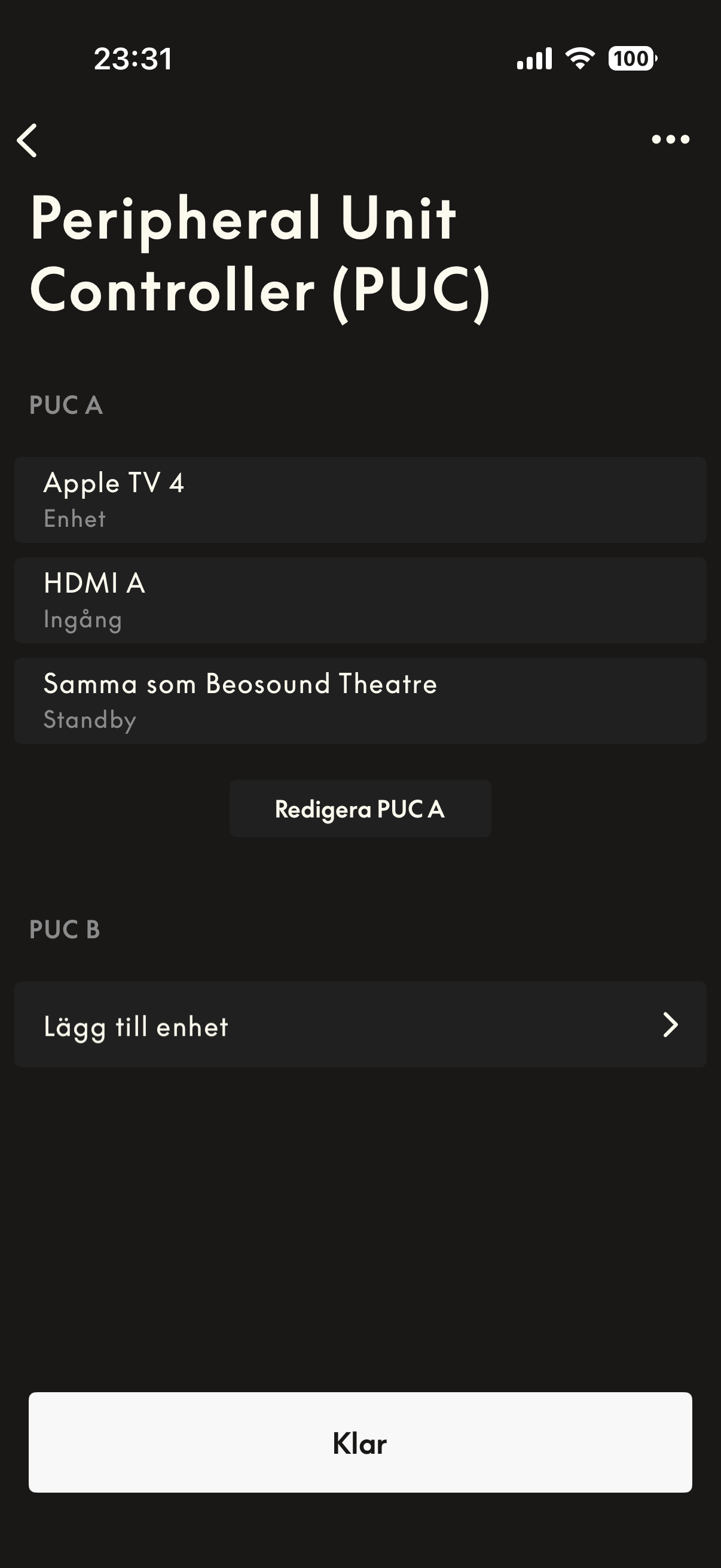
Attached screenshot show my settings in the B&O app for the PUC. I don’t think there are any other settings in the B&O app that is related to this.
if you have your AppleTV and B&O set as above we can continue with LG. Though some of their settings are quite hidden.
-
This reply was modified 2 months, 3 weeks ago by Bill Lumbergh.
My B&O Icons:
1 August 2026 at 13:59 #124796Brett CollinsonBRONZE MemberSOLVED – I went back and tried Apple TV > LG > Theatre, rather than Apple TV > Theatre > LG and that works just fine. I didn’t need to disconnect the Theatre<>LG LAN, so the Beoremote works if I need to control the TV settings, but for everyday use, I can just and only use the Apple TV Remote, including the correct power-on behavior.
Thanks Bill for the prompt to try this again.
My B&O Icons:
-
This reply was modified 2 months, 4 weeks ago by
-
AuthorPosts


- You must be logged in to reply to this topic.