






Home › Forums › General Discussion & Questions › Home Automation › Send Beo4 commands from Home Assistant through an IR proxy
- This topic has 7 replies, 4 voices, and was last updated 2 weeks, 5 days ago by
 tom.pegg.

-
AuthorPosts
-
9 October 2026 at 11:22 #125812
 cklitModerator
I recently bought one of these gadgets to play around with the new IR proxy feature in Home Assistant. Place it in the area you want to use IR control, connect it to wifi, and it automatically shows up under devices in HA. Could not be any easier. https://www.athom.tech/blank-1/esphome-rf433-ir-remote-controller
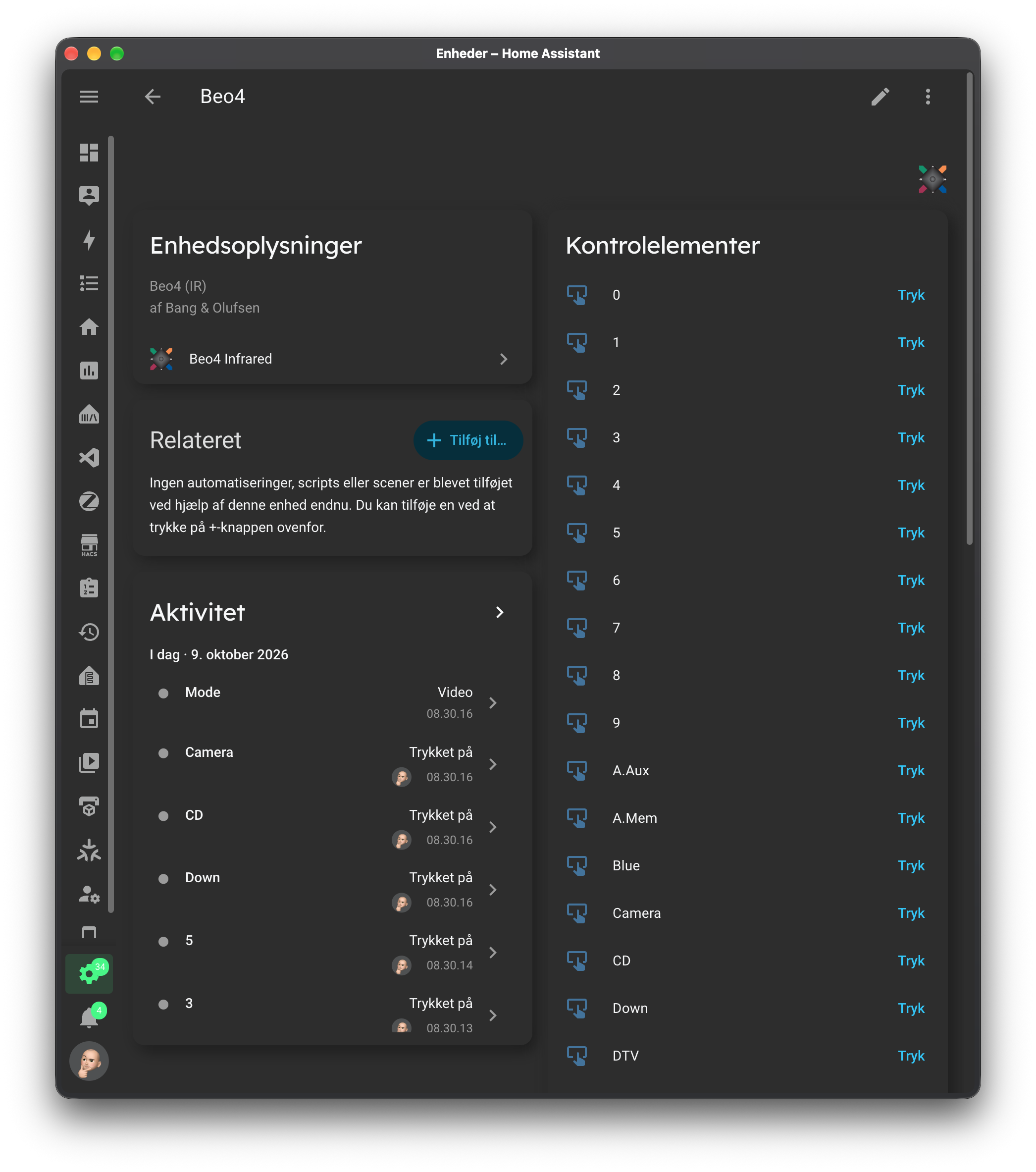
Turns out it’s also really good at sending Beo4 commands. So my “French buddy” and I have put together a custom integration that makes the most common Beo4 commands available as buttons in Home Assistant. When you press a button, the command is sent over the network to the IR gadget above, which then sends out the IR command. In terms of range, I can confirm it works perfectly at 5m range, but since I have already stuck if under a shelf with 3M tape, I can’t test how much further it goes 🙂
It’s one-way control of course, but it opens up some interesting possibilities. For example, if you have an Audio Master connected to the line-in of a Core, you can have it turn on when line-in is selected.
You can find the integration here: https://github.com/cklit/ha-beo4-infrared
Hope someone finds it useful 🙂
 10 October 2026 at 10:31 #125820
Hello cklit, thanks for sharing this with the forum!
I really like the idea to use still very well working older audio gear with today’s super-connected technology.
Regards,
Johan
Location: Netherlands
My B&O Icons:
10 October 2026 at 10:35 #125821Hi cklit,
Interesting feature.
If I well understood, once placed near a vintage receiver, the Athom device would send infrared commands to the unit through a Home Assistant dashboard or automation? Am I right?
My idea would be to control a Beocenter 9500 through Home Assistant, in order to feed a wiim Ultra connected via USB to BL50s placed in another room.
Another point, I have question about your other HA blueprint but cannot find where to contact you. How to do? Answer by PM is welcome.
Have a nice week-end,
Yann.
-
This reply was modified 3 weeks, 1 day ago by
Location: Brittany, France
My B&O Icons:
11 October 2026 at 10:02 #125837tom.peggSILVER MemberWhat an interesting and perhaps (for me) timely post
My husband recently got a ‘toy’ Magicians Wand which you can programme with IR commands to turn on TV, etc… Only to be disappointed when I told him it wouldn’t work with our Horizon!
We already have HA running with some of the mentioned beo additions. We’ve also a BLGW and BLI, so perhaps there’s a way of using HA to receive IR commands to then send as NL to turn on the Horizon, etc?
My B&O Icons:
12 October 2026 at 08:09 #125856cklitModeratorHi! Yes, through a HA dashboard or an automation 🙂
Would you be open to contacting me on Discord? You can find me in here as ChristianK https://discord.gg/bKBNnewMEt
12 October 2026 at 08:13 #125857cklitModeratorYes, in that case you could use the IR thingy as a 38kHz IR receiver and send a different command out 🙂 In this case you wouldn’t get far with Beo4 commands though, since Horizon uses Bluetooth. But I believe that the beoplay integration https://github.com/giachello/beoplay will control the Horizon – if not, then you can pass it to your BLI, which definitely can 🙂
12 October 2026 at 21:26 #125866Thank you Christian.
Location: Brittany, France
My B&O Icons:
13 October 2026 at 09:53 #125870tom.peggSILVER MemberGreat, I’ll get the thingy and have an experiment!
That was my thought, to have HA use its beoplay integration to control the Horizon. A very round about way of adding IR to the Horizon, but it’ll make him happy to have his gimmick Magicians Wand turn it on!
My B&O Icons:
-
This reply was modified 3 weeks, 1 day ago by
-
AuthorPosts





- You must be logged in to reply to this topic.