






Home › Forums › General Discussion & Questions › General Discussion & Questions › Masterlink from Beomaster 7000 via 1614 3500
Tagged: Masterlink cabling
- This topic has 3 replies, 4 voices, and was last updated 3 weeks ago by


-
AuthorPosts
-
18 March 2026 at 17:07 #87941
 lenhiBRONZE Member
I am attempting to connect the Beolab 3500 at the other end of the house to my Beomaster. The Masterlink cable runs upinto the attic, where I am trying to connect both ends in that little white box, using the appropriate tool and everything. Sometimes I get the 3500 to respond when I press RADIO, but no sound comes out of the speakers. So I change the setting of the wires, and retry, and the 3500 does not respond at all. I have been at it for a forthnight, off and on, using chatGPT and Grok.
The guy who installed the 3500 some years ago, used a cable with eight leads. Four of those are white, and then there is a brown, a blue, a green, and an orange one, and he connected this to the little white junction box, together with the leads to the Beovision and the 1614. I have tried to chart and map the leads, but so far, nothing works. Do I really have to pull both leads out of the attic again and test them, again, or is there som sort of standard setup? I get different input from different AI. And why are there just eight leads in the cable?
Attachments:
You must be logged in to view attached files.Location: Scania, Sweden
My B&O Icons:
 18 March 2026 at 19:03 #88249
Hi lenhi,
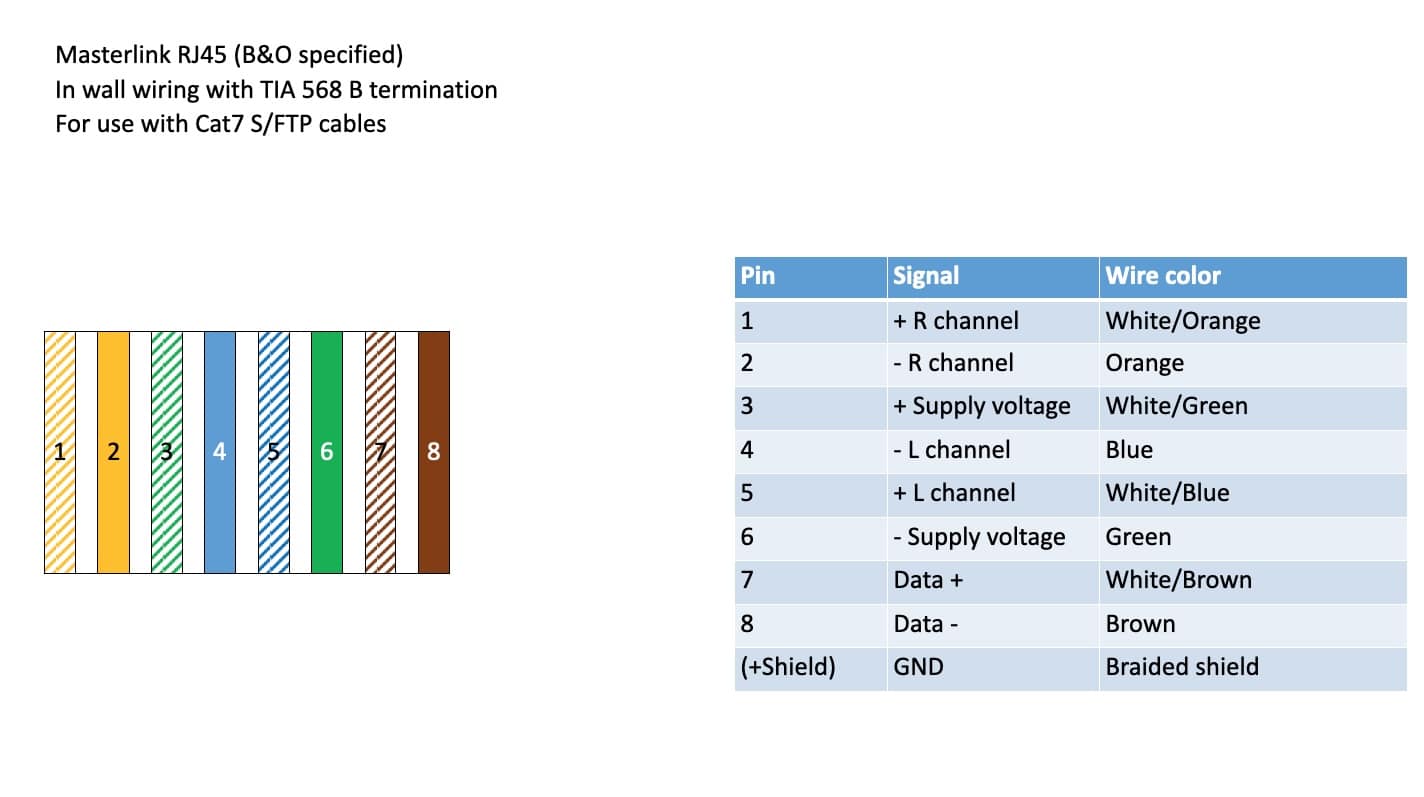
The 8 lead cable with the brown/blue/green/orange should be a shielded CAT7 S/FTP cable, normally used for ethernet connections. The white leads are twisted with one of the colored leads. It is perfectly possible to use CAT7 cables for MasterLink connections: try to find a BeoLink handbook (best is to be come silver/gold member of course, for access to manuals!).
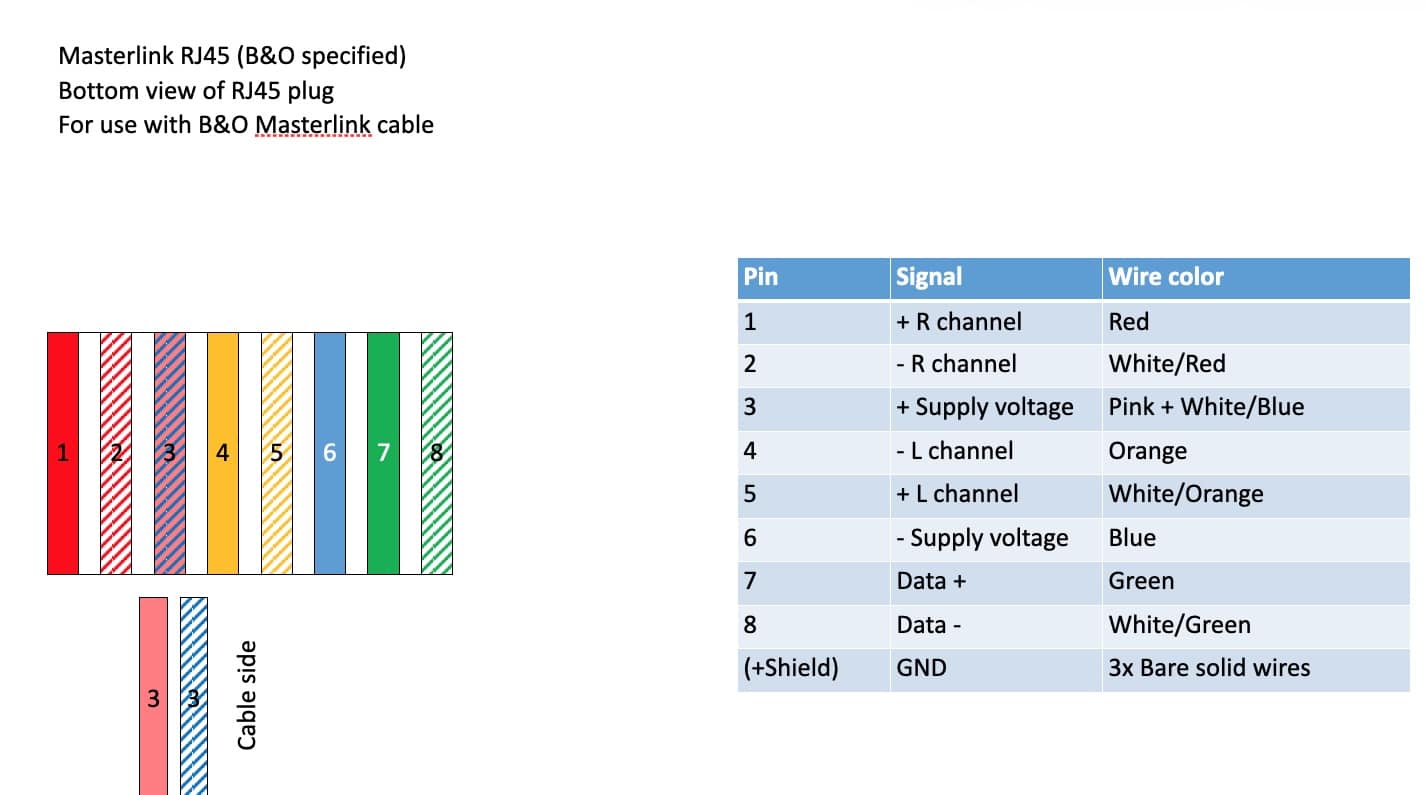
Some time ago I made such charts for my own cabling needs:
Maybe the tables can help to redo the connections in your junction boxes.Hope this helps.Regards,JohanLocation: Netherlands
My B&O Icons:
19 March 2026 at 05:43 #90376MadskpGOLD MemberBased on the attached pictures i looks like there are som of the wires from the ML cable that is not connected on the network cable side in the junction boxes.
I am especially worried about the missing ground connections (the bare wires), but also the missing connection of the pink and Blue/white wire in one of the cases.
If these wires are not connected this could be one of the reasons for it not working.
Location: Denmark
19 March 2026 at 10:09 #90935Just to add to the above advice, if you are not happy using the B&O junction box (which is quite fiddly) then replace it with something easier to connect, maybe like this: https://www.amazon.co.uk/GTSE-Electrical-Connector-Blocks-Terminal/dp/B08LNWMMHQ?th=1
I have even used car cable crimps in the past to join two ML cables.
After all, it’s in the attic and doesn’t need to look nice. Just make sure that there is some form of strain relief to stop the cable pulling out of the connectors.
Location: Warwickshire, UK
My B&O Icons:
-
AuthorPosts





- You must be logged in to reply to this topic.