






Home › Forums › General Discussion & Questions › General Discussion & Questions › BeoVision 6-26, Beoremote One IR and Apple TV
- This topic has 30 replies, 5 voices, and was last updated 3 weeks, 2 days ago by
 Giorgione.

-
AuthorPosts
-
1 January 2026 at 12:59 #72234
 GiorgioneBRONZE Member
Happy New Year
I’m actually successfully using the following setup:
BV6-26, Beoremote 4, Apple TV (via PUC) cable
Now, I’d like to integrate a Beoremote One MKII to also control a Beosound Core MKII. I’d stick to the BR4 if it weren’t for the – IMHO ugly – IR Eye 🙂
I’ve managed to add the BR-4 Video function, assign the right TV-Input (DVI). The TV switches on showing the Apple TV screen, the motorised stand, clock, picture off, all is working but I cannot control the Apple TV anymore.Personally, I’d switch to a BV11-40 but my wife is still whining about the loss of her beloved MX4000 and finally accepted the still tiny BV6.
Thanks for your help!
My B&O Icons:
 1 January 2026 at 14:54 #72236
Happy New Year Giorgione!
I use a BR1 (BT) in IR mode with a BeoSystem 3/PUC/AppleTV and that works allright.
I tested your ‘case’ with my BV7-32 and confirm the BR1 does not control the AppleTV through PUC.
In the BeoSystem 3 there is this option to set the TV: “You must set up your television to be operated with a remote control with or without a navigation button.” The 7-32 does not have that option, I expect the problem to lie there (but do not have a solution right now).
Can you pair the BR1 with the AppleTV via Bluetooth? I believe there are some Beoworld threads for this.
Regards, Johan
Location: Netherlands
My B&O Icons:
1 January 2026 at 16:30 #72238Update – out of curiosity I paired the BR1 with the AppleTV and can easily control it. The downside is that for volume control etc you will need to toggle (between BV6 and AppleTV).
Regards, Johan
Location: Netherlands
My B&O Icons:
1 January 2026 at 20:23 #72256GiorgioneBRONZE MemberHi Johan,
Thanks for your help. Unfortunately, I don’t own a BS3. It would be a slight overkill anyway. And yes, the BR1 works with the ATV via BT, you can pair it with other remotes too. But switching between BT and IR is a little bit annoying, right? 🙂
Oddly, our some 20 years old BS6 reacts to the motorised stand “arrow” commands left/right, mute etc. coming from the BR1 but does not seem to forward the PUC signals, unlike the BR4. That doesn’t make much sense to me and my limited sense of logic.
Regards, Giorgione
My B&O Icons:
2 January 2026 at 09:38 #72266Hello Giorgione,
Yeah, to toggle the remote all the time is not ideal.
My remark for the BeoSystem 3 was more to determine where the issue is: I think that the BR1 (and also the Beo4 ‘navi’) use somewhat different IR signals (than a regular Beo4), for the left/right/up/down/confirm commands. And so your PUC does not recognize them.
How do you listen to the Core? A potential solution could be to connect the speakers to the BV6, use a BLC (NL/ML converter) between the Core and the BV6, and control your Core (and sources) with your good old Beo4 (given your BV6 has a surround sound option). No toggling whatsoever.
Regards, Johan
Location: Netherlands
My B&O Icons:
2 January 2026 at 09:55 #72267Toggling between modes on the BROne/bt is a pia….
….not much WAF in that.“BLC (NL/ML converter) between the Core and the BV6”.
That is exactly what the converter is/was made for – for bridging between old and new Beolink….in order to make controlling simple.
The only thing to consider there is, that the BLC needs a wired network connection!Another option would be to push a little further to get the wife to accept a BV11-40….
…..I am sure that in the end she will be happy with that 🤗MM
Location: Flensborg————Danmark
2 January 2026 at 10:06 #72269Hi MM – good idea! Or change the wife? 🤔
Could a dealer (still) make a dedicated BR1 PUC? That could be a hard way to get there too (however still toggling between BV6 & Core).
I like the BV11 route better I guess :-).
Regards, Johan
Location: Netherlands
My B&O Icons:
2 January 2026 at 13:04 #72273GiorgioneBRONZE MemberSure, to me, the BV11 even looks better, fortunately not as good as my wife, though. And it’s huge compared to the BV6. Besides that, the BV6 sounds darn good compared with my BV11-46. Last but not least I really dislike disposing still working gear and B&O gear just seems to last forever. Tried my Beo4 w. joystick, works flawlessly.
My setup is a little bit unusual. The BV6 -26 is used in stereo mode only, for watching old series or Youtube. In the same room there’s a BM8000/BG4002/BL 120 combo. The BM8000 needs an overhaul and since I have a Core and a also Beoamp 2 at hand, I’d like to hook my BG along with the BL120 (eventually 150s) up to these. Or at least give it a try. I normally use the Core along with another BG4002 and BL3s. You see, if I eventually end up with the BL150s, there’s even less space for a BV11-40 left.
I guess, I’d have to find a descreet place for an IR-Eye…
My B&O Icons:
2 January 2026 at 13:41 #72274I guess, I’d have to find a descreet place for an IR-Eye…
The Beo4 remotes are so powerful that the IR-eye can probably sit hidden behind another object and still work perfectly. The IR signal will most likely bounce off the walls to reach the sensor.
EDIT: And on the Beo4 with navi button you can adjust the IR power as follows:
Access the service menu by pressing Stby (red dot) + LIST at the same time, and then MENU + (joystick) at the same time. Press ^ several times until the display reads IRPWR: X. Again, 1 is the lowest and 7 is the max IR signal strength (default is 4)
Location: Warwickshire, UK
My B&O Icons:
2 January 2026 at 14:58 #72279GiorgioneBRONZE MemberThanks, Guy! I’ll give it a try as soon as I got hold of an IR-Eye. I guess I’d have to find one with a RJ45 plug – or perhaps convert one like shown here):
https://doc.oneremote.dk/Vejledninger/31108001-2i1.pdf
My B&O Icons:
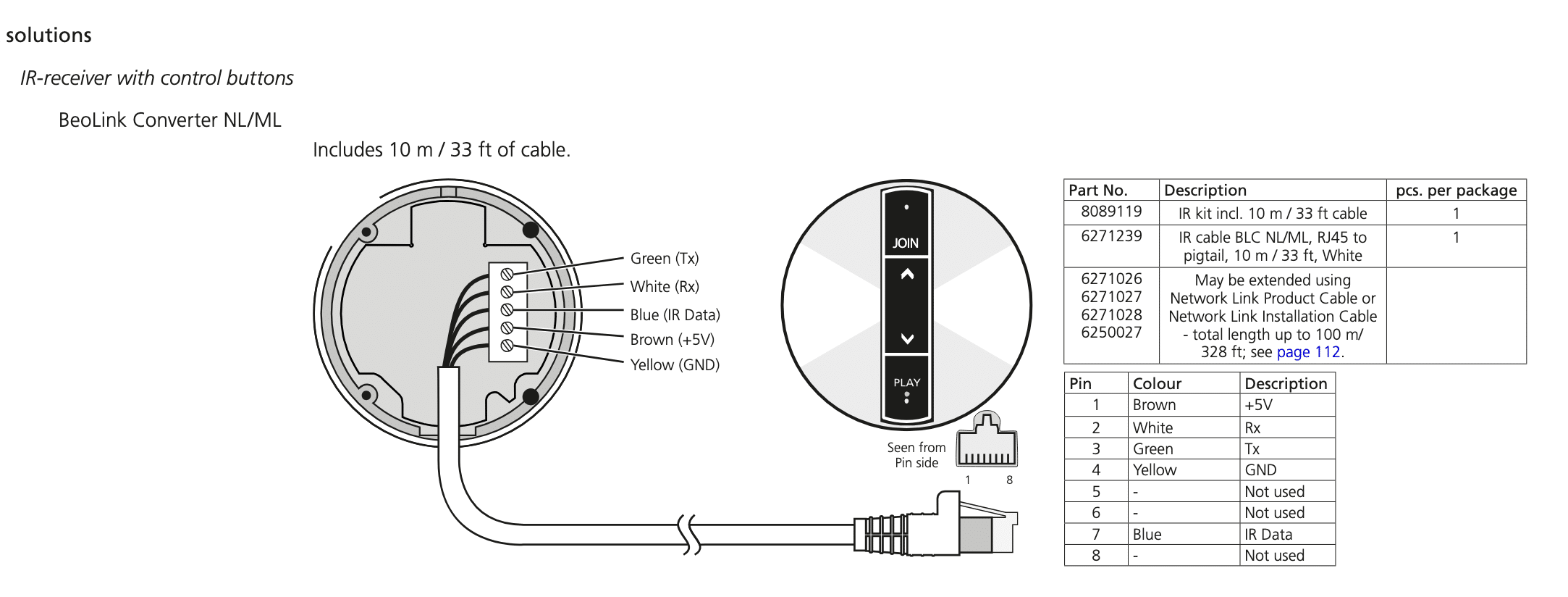
10 January 2026 at 14:36 #72478GiorgioneBRONZE MemberMeanwhile, I’ve ordered the IR Eye. Can anbody now help me getting the right cable to connect it with the Core? Or can I just take one of my many unused RJ45 cables and somehow follow this diagram? Never cut one yet. Thanks!
My B&O Icons:
11 January 2026 at 08:25 #72489Hi Giorgione, nice!
You can cut the end of a normal RJ45 patch cable, see also the note to ‘extend’ the cable. You only need to puzzle the correct wire colors.
Good luck, let us know!
Regards,
Johan
Location: Netherlands
My B&O Icons:
11 January 2026 at 12:18 #72492GiorgioneBRONZE MemberThanks, Johan. Will keep you updated. I wonder whether I’ll be able to hear any difference between the analogue and the analogue-digital setup. Maybe I’ll give my hibernated BL9s another chance although I don’t think they’ll match the BV 120 resp. 150. Digital and processed stuff comes in nice and handy but – as a nearly digital-native and early enthousiast – I’ve come to the conclusion that digital vs. analogue is like fast food vs. home cooking. Rather a matter of time/situation than of taste.
My B&O Icons:
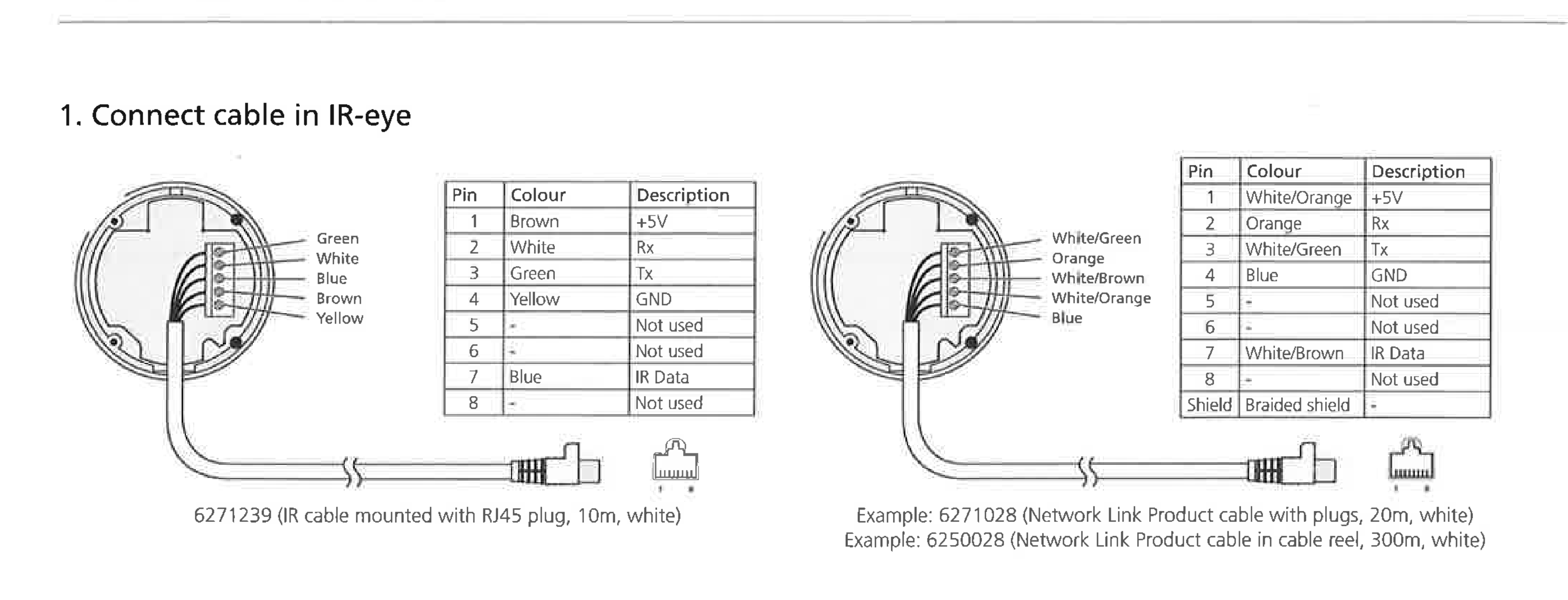
17 January 2026 at 18:49 #72654GiorgioneBRONZE MemberOk, received the IR Eye today and I guess I’ll need some help again. I cut a RJ45 cable and connected the wires to the terminal as follows:
Tx = green/white
Rx = orange
IR data = brown/white
+ 5V = orange/white
GND = blue
Like also shown here:
I guess all the RJ45 cables are wired the same? However, mine is like:
1=orange/white, 2=orange, 3=green/white, 4=blue, 5=blue/white, 6=green, 7=brown/white, 8=brown
I plugged the other end of the cable into the DPL port, switched the Core on, removed the BR1 in the settings (from my previous setup) and followed these steps:
Point the Beo4 remote control at the IR-receiver of the audio system.
– While holding down the • button, press LIST.
– Let go of both buttons.
– Press LIST repeatedly until OPTION? is shown in the Beo4 display and press GO.
– Press LIST repeatedly until A.OPT is shown in the Beo4 display and then press the number button 1.…but nothing seems to happen, no light switching on on the IR Eye (should there be any?) and when I press LIST the options appearing are the same as before (STAND, CLOCK in my case)
Where did I go wrong? Any ideas? Thanks!My B&O Icons:
17 January 2026 at 19:39 #72658Hello Giorgione,
Wiring T568B (more common) uses Orange/White (Pin 1), Orange (Pin 2), Green/White (Pin 3), Blue (Pin 4), Blue/White (Pin 5), Green (Pin 6), Brown/White (Pin 7), Brown (Pin 8). That should be fine.You will have to add commands to LIST yourself (JOIN, A.AUX), see this note: https://support.bang-olufsen.com/hc/en-us/articles/360041742571-How-do-I-activate-sources-using-BeoRemote-One-or-Beo4.
Did you try RADIO already (button available on your remote)? To see if the Core reacts to the Beo4? Assuming you programmed radiostations to the Core.
Regards, Johan
Location: Netherlands
My B&O Icons:
17 January 2026 at 23:15 #72666GiorgioneBRONZE MemberHi Johan,
Thanks, of course just setting A.OPT 1 is not enough, I’ll add JOIN/LINE IN etc. 🙂
And yes, I tried Radio, but since I have no speakers attached yet I couldn’t verify that. I guess I could do that with the App, which is showing the current status?
However, the wiring seems to be correct, correct? Can you confirm that there’s no visual response signal coming from the IR Eye? No LED on that thingy?
Regards,
GiorgioneMy B&O Icons:
18 January 2026 at 09:51 #72678Hello Giorgione, frustrating!
Yes the cable should be OK (trusting your Core is a Mk2, the IR eye is good, the cable is not damaged, you ensured there is a good electrical connection in the screw sockets, your remote is not in ‘link mode’ etc.).
I read in some older threads that there is LED response normally, for instance from volume change: “I can press it turn volume up and down, but no command on beo 4 or beo 1. Maybe something in the settings? It does blink when using the remote but nothing happens?” https://archivedforum2.beoworld.org/forums/t/26336.aspx?PageIndex=1
Not sure how I could help you more now. Let us know how you go, this should work.
Regards, Johan
Location: Netherlands
My B&O Icons:
18 January 2026 at 19:35 #72695GiorgioneBRONZE MemberMy bad, the Beo4 was set on LINK from the previous setup. It’s working now, although the buttons on the IR Eye do not. Blinking neither. Odd but not crucial as I will keep it hidden.
Just tested with BL3s now, Beoamp and Bevoxes will be tested next weekend 🙂One doubt: As the Core is set on IR and the BR1 consequently won’t work anymore, will the app still do? For e.g. updates, program radio stations etc.
But so far, really happy, thanks for the help!
My B&O Icons:
21 January 2026 at 21:29 #72756😋
Glad you got some life into it! The app will work.
Regards, Johan
Location: Netherlands
My B&O Icons:
25 January 2026 at 11:15 #72811GiorgioneBRONZE Member
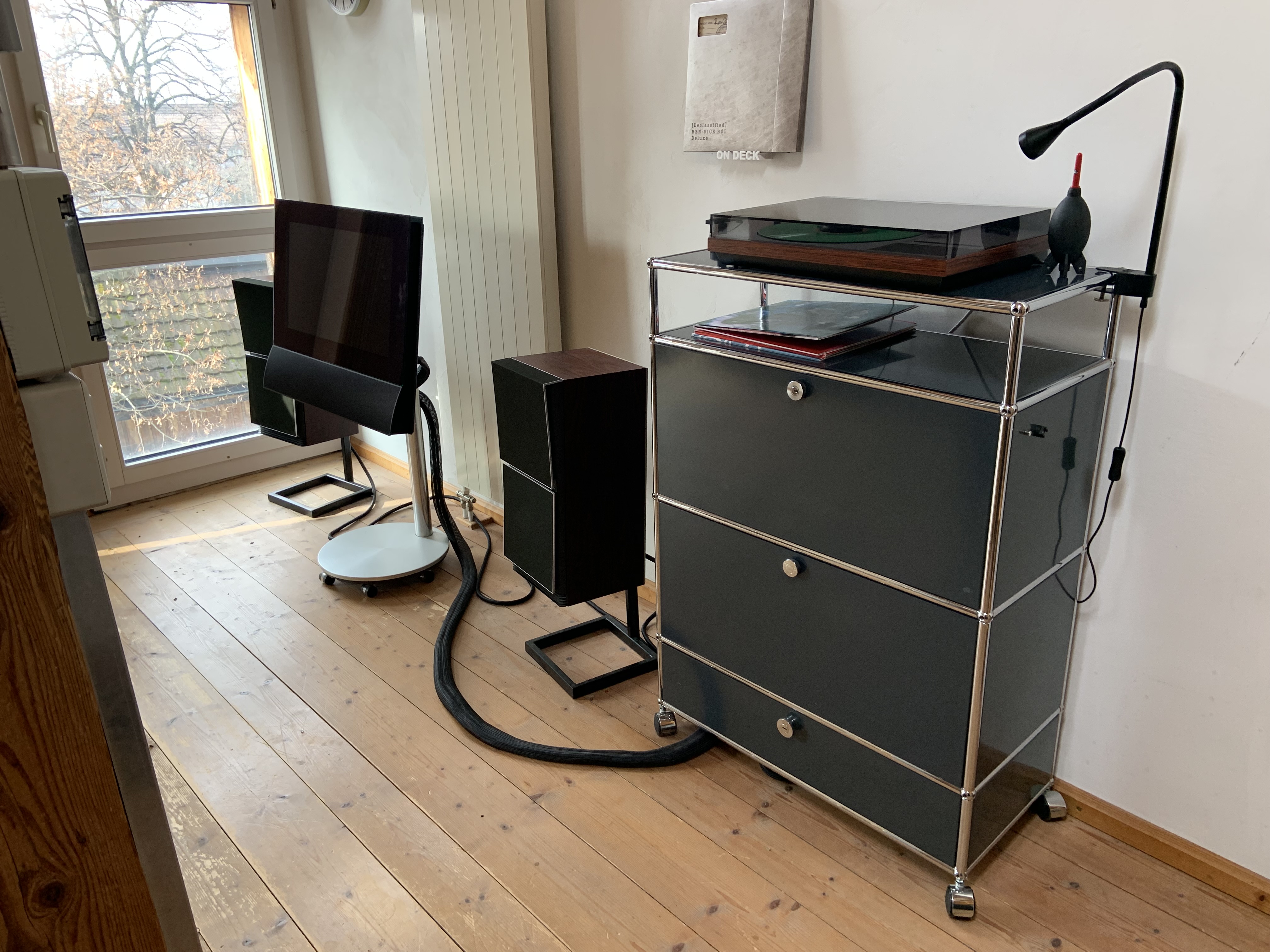
Well, everything is up and running perfectly now. The huge BM8000 occupied the space below the platter before. Miss him a bit but the setup looks tidier and more spartan now – and I dig that. The Beoamp 2 seems to do a good job, very clean and powerful. Plan to fiddle a bit with the volume gain for the Core’s line-in, though. The signal seems a bit low in comparison to other sources. Anyone already found a recommendable setting?
My preferred radio station/app is one with paid subsription option, so I’m forced to use my phone and BT to avoid ads. I wonder if B&O will ever manage to implement this function. As a member of the Beta Testing Program I already lodged that request, but there seems to be low demand for this. Not using Spotifiy, Tidal, Apple Music etc.
As a side note: I just re-watched the movie “War Games” and I think I spotted a BM8000 or 6000 with matching record deck in the mad professor’s luxury island-cabin.
I still have to test the MS150s but I’m not in a hurry as the 120s sound so great. Again, thanks for all the help! This is just a great community for an amazing brand. I mean, the versatility of the Beo4 is still surprising me after 25 years!My B&O Icons:
-
AuthorPosts


- You must be logged in to reply to this topic.