






Home › Forums › Product Discussion & Questions › BeoVision › Beovision 11, No Picture
- This topic has 6 replies, 3 voices, and was last updated 5 months, 2 weeks ago by
 Mick Russell.

-
AuthorPosts
-
9 March 2026 at 05:27 #76214
 SILVER Member
Hi,
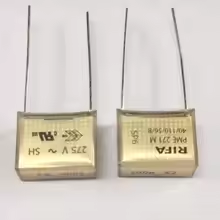
My Beovision switches on and there is sound but no display. As soon as I opened the back it became evident that the 2 safety capacitors have been burned out on PCB04(power supply BCB).
Surprisingly they are RIFA capacitors notoriously known for their failures. I would like to replace them with a more reliable brand.
Would anybody know the specification for these capacitors?
9 March 2026 at 07:33 #76229 MadskpGOLD Member
<hr />
Take a look at this thread where the Rifa capacitors was blown in a Beoplay V1.
https://forum.beoworld.org/forums/topic/beoplay-v1-40-smoked-power-supply/
The bBV11 and the V1 is built on the same platform, so there is a good chance the capacitors are the same.
Location: Denmark
9 March 2026 at 23:43 #76348Hi, Madskp,
Thanks very much for your help.
10 March 2026 at 05:38 #76390Hi,
Anybody who is looking for the same capacitors will find them at the web address bellow:

Attachments:
You must be logged in to view attached files.21 March 2026 at 07:42 #99543Hi,
So, I got and installed the new capacitors but it made no difference – there still is no display (picture).
Is there a way I could test power supply PCB 04 while it is out of the TV on its own ?
After I replaced the capacitors, I had PCB 04 assembled to the TV and using the service manual diagnostic flow chart (for symptom: No Picture) I did the checks and ended up with the conclusion that PCB 01 should be replaced. However, I am still not sure after those checks if PCB 04 is in fact OK or NOT OK. The service manual does not offer any test methods to determine if a particular PCB circuit functions OK or NOT OK.
Could someone help me with this please?
27 April 2026 at 20:16 #123393Mick RussellBRONZE MemberHi,
I have the same problem with mine. Sound but black screen. I don’t know which board has what designation so I will decribe.
I have tested all voltages on the power board, and all were ok except the one marked P12v T_con. this was mv level.
I then checked T_con board voltages and at the fuse I have mv level not 12v.
After speaking with a TV repair shop they were puzzled why T_con board was not getting 12v and suggested taking the supply connector off and checking voltage levels at the connector in case something was draggng the voltage down. It was still in the mv level.
This now suggests the issue is with the main video board with the processors on.
I don’t know what the issue is yet, or if it can be repaired. I doubt if these boards are available anymore.
But I would be good to see if you have the same voltage levels.
Location: London South East
30 April 2026 at 17:25 #123421Mick RussellBRONZE MemberHi, Update to the black screen.
I have found the service manual now. I have gone through the flow chart and the issue did stop at the video engine board, PCB 01. Sure enough the tested voltages were lower than spec.
So testing PCB01 revealed 5 caps have gone short circuit. So I have ordered caps from DigiKey and expect delivery this Friday. Once fitted I will post if this fix was successful.
Location: London South East
-
AuthorPosts

- You must be logged in to reply to this topic.