
Home › Forums › General Discussion & Questions › General Discussion & Questions › Beomaster 5500 upgrade to BM 6500 ports
- This topic has 9 replies, 3 voices, and was last updated 6 days, 13 hours ago by
 TK.
TK.
-
AuthorPosts
-
17 February 2026 at 07:56 #73912TKBRONZE Member
This topic has been discussed before by several individuals. So now it’s my turn to offer a solution that I have not seen discussed yet. Please feel free to comment if my search skills are lacking.
By happenstance, I’ve got 2 BM5500s in my shop, sitting and waiting for a second life. The shortcomings that I can immediately spot in the design are the lack of Powerlink ports, and a dedicated AUX port. Signals for both of these features appear to be readily available utilizing a series of cables/extra equipment/internal modifications/etc, and there have been a few threads over the years by users who have prescribed various solutions. I thought I’d take a stab at it myself, and see if I can make my own companion plug-and-play “super dongle”.
Looks to me like almost all the information I’d need lies within the available external ports on the BM5500. I have L&R, Power On (via the sensor, I think!), DL80, DL86, and Ground available.
TP2 & AUX : Using a tiny Arduino controller reading DL86 updates, I can monitor for source changes, and mux Tape2 and Aux inputs into the BM via a relay. That effectively creates 2 independent ports from the single TP2/AUX. TP2 will carry the DL80 signal from pin 7, and AUX will carry the DL86 channel from pin 6.
Powerlink: I’ve got most everything I need, but I may also need to rely on DL86 to poll for the Mute bit to trigger speaker-on, and if the Sensor hack doesn’t suffice for “Power On”, then I’ll need to monitor DL86 for “Zone on” as well. I’m also not sure how “overload” is implemented, so there’s some research required there. DL86 comes again from the TP2/AUX pin 6, and it looks like I’ll snatch L&R output as well.
I’ve already written the code to decipher and send DL86, so much of the work is in the circuit design. Alas, I’m not a competent circuit designer, so this project may ultimately be added to the long line of incomplete projects I seem to embark on until I get distracted by something else. Hopefully an enthusiast with downtime out there can be inspired to assist me. Any takers?
17 February 2026 at 18:21 #73930 Moderator
This sounds intriguing, exciting and a really worthwhile project.
But also way beyond my level of experience or expertise 😵💫I hope you find a suitable partner in project-crime.
Location: Kent, UK
Favourite Product: Beosystem 6500
My B&O Icons:


 17 February 2026 at 19:56 #73939MadskpGOLD MemberNice project to look into. I have e few inputs to your Powerlink thoughts
I’m also not sure how “overload” is implemented, so there’s some research required there.
Not sure it was ever used in many powerlink speakers. Looking at the schematics for Beolab Penta and Beolab 3000/5000 it seems that pin 8 is not conencted to anything other than the two DIN connectors in the speakers.
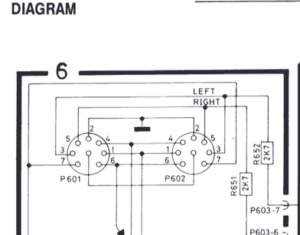
and it looks like I’ll snatch L&R output as well.
But is that volume regulated?
Location: Denmark
18 February 2026 at 03:21 #73944TKBRONZE MemberTP2/AUX pins 1 & 3 are line-level, from what I know. Those pins are directly connected to the 5500 line-out L&R pre-volume control, so the RCA outputs would be another place to hookup if need be. I’d probably prefer to just use the Din-7 plug for minimal # of connections (2, at this point: TP2/AUX, and SENSOR), unless there’s a stumbling block I hadn’t considered.
A cursory look at the schematic indicates that SENSOR also carries a DL86 bus, so that’s another connection option. It also might make sense to have a SENSOR pass-thru on the dongle, so all function is retained. I wonder if I can just power off of this plug? There’s no dedicated ground pin – only the casing – so that’s something to consider.
19 February 2026 at 17:12 #74087TKBRONZE MemberCourtesy of some input from Madskp offline, I’ve considered a few more design alternatives. Instead of a specific TP2/AUX splitter, it could be made into a TP/BG/AUX-TV selector, configurable to be selectable using any of the 32 B&O sources. This would make the dongle more useful in other environments. There’s a bit more management and tracking of state that has to happen, software-wise. And if we swap out the SENSOR input for a USB charging port and external power, and instead rely on DL86 for system state for Powerlink, the dongle should work in other environments. If I’m thinking about this correctly, its similar to a software-configurable MCL2AV device, tied to and controlled by outputs from the Master.
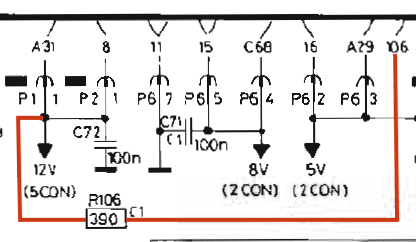
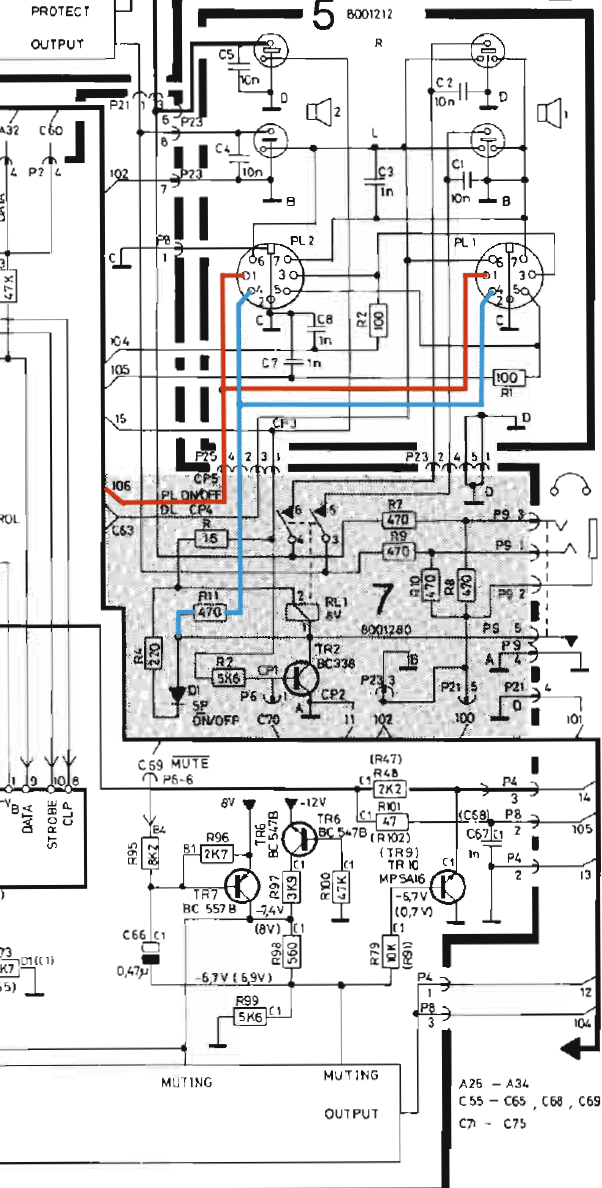
5 October 2026 at 05:56 #125746TKBRONZE MemberJust for kicks, I spent an hour today tracing some of the signals for Pin 1 (PL On/Off) and Pin 4 (Speaker Relay). Pin 1 piggybacks off a pre-existing +12v power-on and a 390 ohm resistor. Pin 4 connects to the SP On/Off logic via a 470 ohm resistor. I’m still thinking that I could use the 5500 Sensor Pin 1 (which has a 470 ohm resistor) as the input for Powerlink pin 1, as the voltage drop difference between the two resistor values is probably negligible. I don’t think there is an externally accessible speaker on/off relay available via an external pin, so that is still a work in progress.
[EDIT] Just thinking this morning that the sensor 12V output may not be switched with power up, as it also needs to power sensor circuitry. I should do a bit of testing.
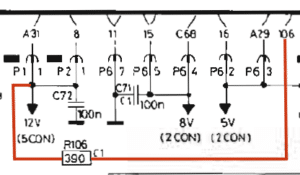
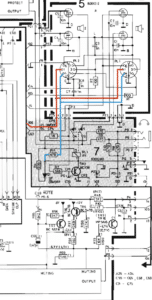
-
This reply was modified 2 weeks, 5 days ago by TK.
18 October 2026 at 05:07 #125977TKBRONZE MemberI’ve spent the last few days doing some cleanup work on several BM5500s that have been waiting for a little TLC, focusing only on refreshing PCB4 (Controller/CPU) and PCB9 (Display). I was reminded of a thread posted months ago by @martin-lundholm. He attempted to use a BM6500 PCB4 in a BM5500 chassis, and reported mixed success with getting it working, with some issues getting the MCP to wake up the system. I decided to take a stab myself and duplicate his experiment, since I was already swapping out the PCB4/9s.
First things first, an analysis of PCB9 Display boards shows that there were small changes around the time the BM7000 came into being, but the BM6500 Display I had must have been an earlier unit, because the board layout and component values appeared identical to my BM5500 boards. That being said, I decided to forge ahead and do a refreshtoration on the BM6500 boards, and then do some board swapping to see what would happen.
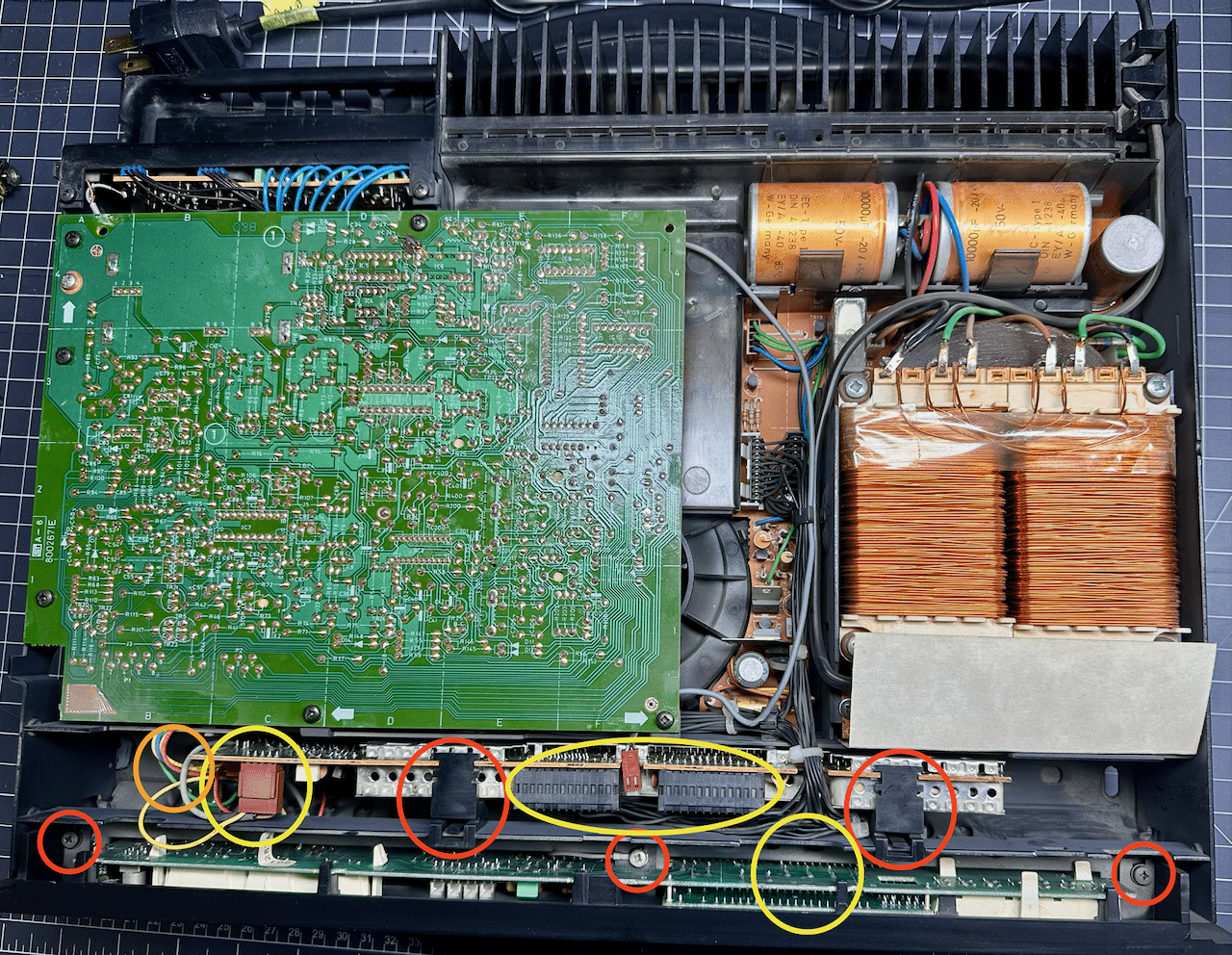
This will be review for some, but here is how I got the two boards out. The red circles show the 5 clips and screws which must be removed, and the yellow circles show the 5 connectors which need to be disconnected. The orange circle indicates where the external IR port is attached to the BM5500 PCB4. The holes for the external IR are present on the BM6500, but the traces are missing, so it would take a bit of work to add an external IR to this CPU in a backwards-compatible way (but not impossible). Once the display is unscrewed, you can simply lean it forward from the top, and it will hinge downward and pull out. Then you can disconnect the black connector easily.
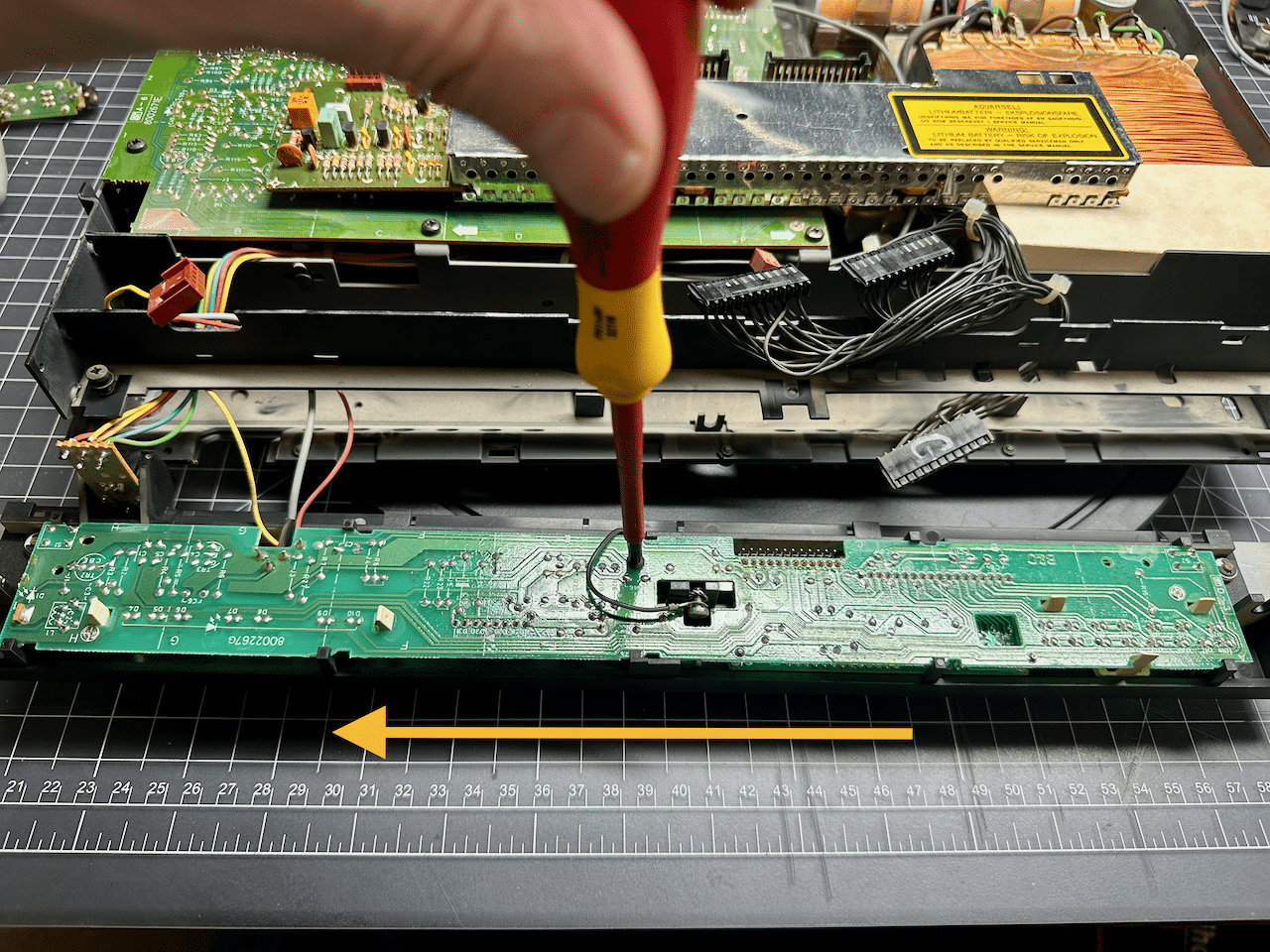
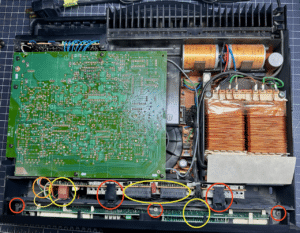 If you choose, you can use an 8mm socket to free the entire display from the BM, but I opt instead to simply unscrew the single set screw in the middle of PCB9, and carefully slide the entire board abput 4-5mm in the direction of the arrow to free it from its retaining clips. It’s finicky work, but with gentle prodding, it will come out. At this point, sometimes the red filter for the 2-segment display will fall off, and sometimes it stays attached to the board. If it falls off, just make a note of its position, and remember to put it back prior to re-inserting the board.
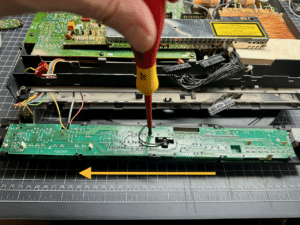 18 October 2026 at 05:31 #125981TKBRONZE Member
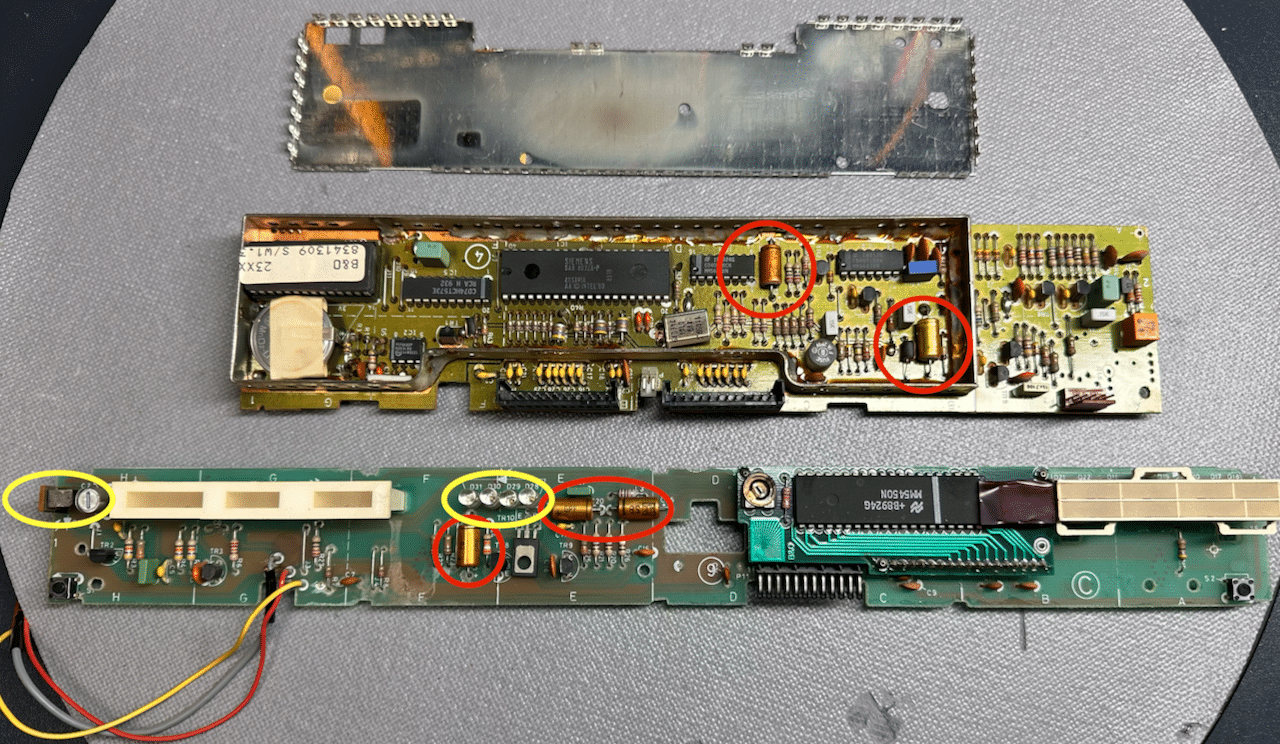
The BM6500 PCB4/9 that I have appear almost identical to the BM5500 boards I’ve been working on, with some noted exceptions – the afformentioned missing external IR logic, and a bigger battery, as well as a larger ROM/memory access package. Importantly, the 5 caps I’ve circled in red have identical values. Of the 12 boards I’ve worked on (6 of each type) in the last 2 days, only a SINGLE board out of the 12 had all of its capacitors reading within spec! Many, MANY tested open-circuit, and others with incredibly high ESRs in the double digits. If you have one of these older units, I highly recommend replacing all of these caps, and while you’re at it, the battery too.
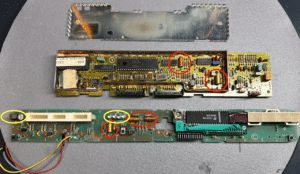 The yellow circles show the Send/Receive diodes. I cleaned off about four decades of accumulated dust with IPA and tested for reliability. The four sending diodes should test in the 1.24V range with a continuity test. I’ve only measured a reading of about 8V on the receiving unit, so I’ll assume thats within tolerance, because they all worked fine after reinstall. There was some discussion in an earlier thread about how to dial in this receiving component, but I’d have to stop what I was doing to learn how to measure it properly, and my impatience led me to skip this maintenance step. Also, I didn’t have the correct spare battery, so I will need to order some up to replace it. The installed one still tested 3V, but I might as well change it out soon, for the next 40 years of service.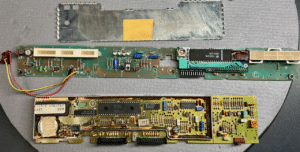
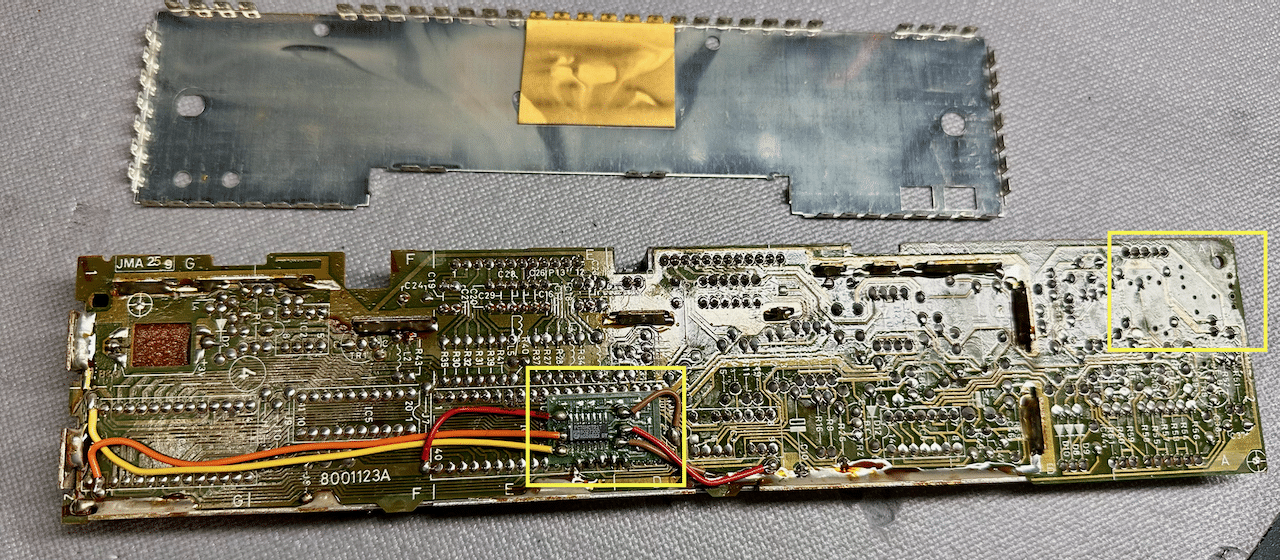
As mentinoed, the 6500 contains a new memory access chip on the back of the board, which allows the board to address the larger memory space provided for the 6500 EPROM. This is a key component on today’s PCB-swap, because it enables the CPU to respond properly to a BL7000, with the enhanced Datalink protocol. If I’m going to have a true BM5500 to 6500 upgrade path, I may want to consider this retrofit (which appears to be “hand-made”, if I do say so myself) as part of the upgrade path.
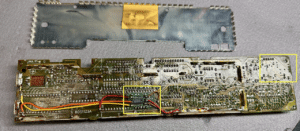 18 October 2026 at 05:48 #125984TKBRONZE Member
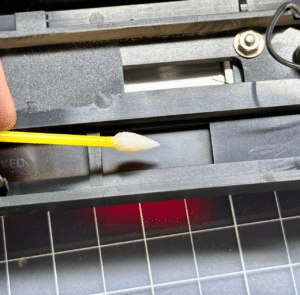
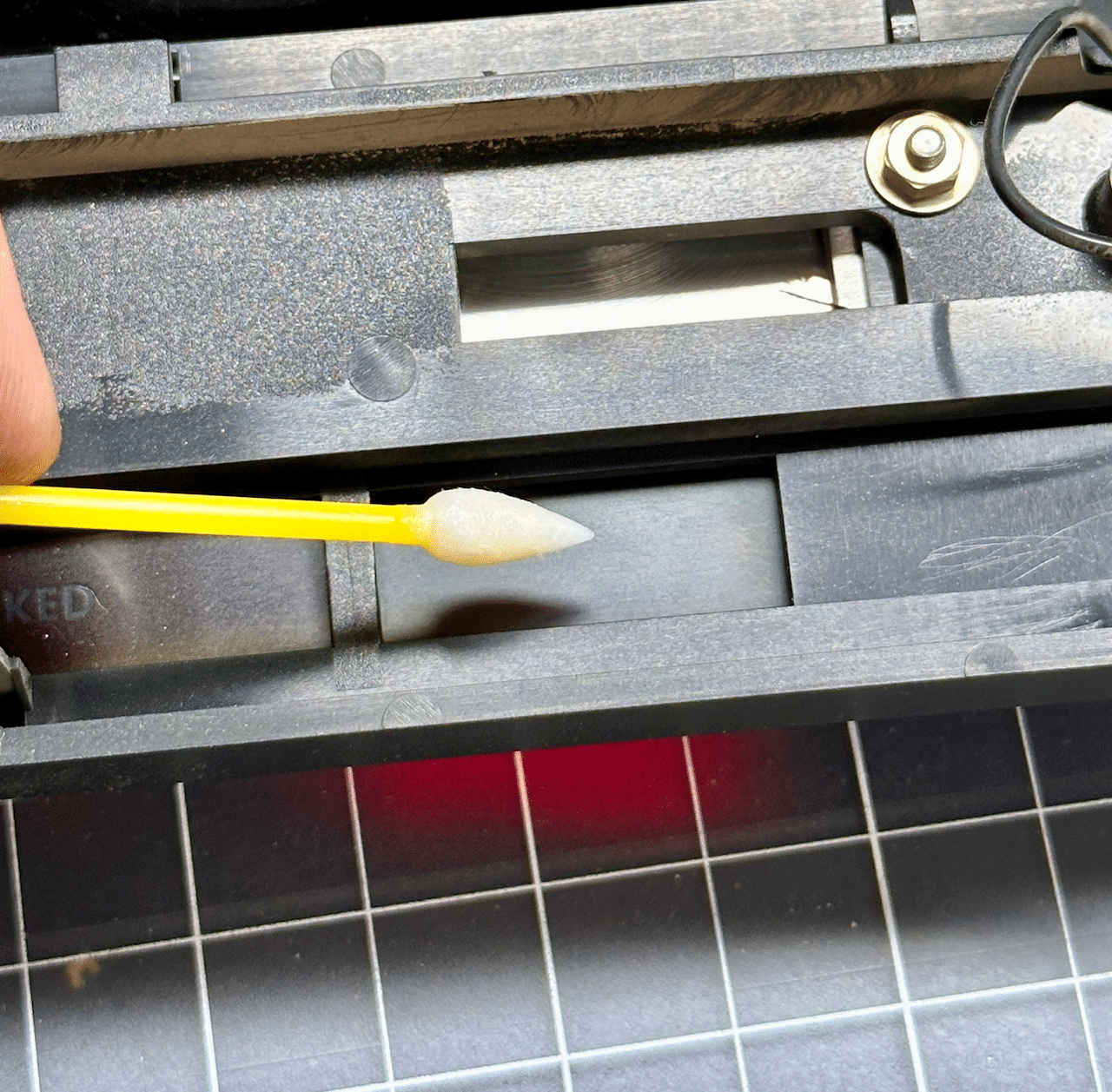
Before reinstalling the display board, I always wipe down the inside of the red plastic cover, sometimes with a swab, and sometimes with a soft cloth. I’ve used IPA on this surface before with mixed results – sometimes I’ve noted that the red coloring comes off with the use of liquid, so I more frequently have resorted to a dry cloth.
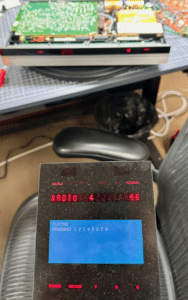
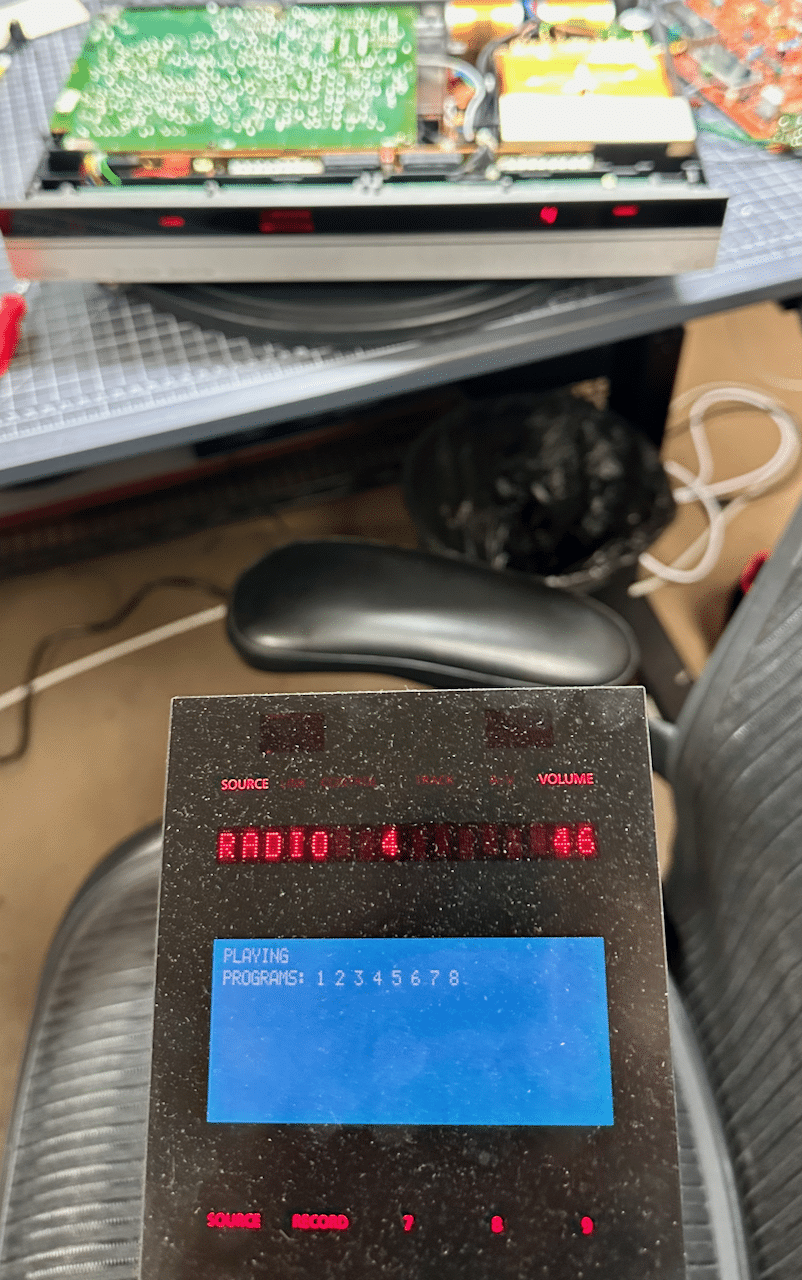
 With that, I swapped the BM6500 PCB4 into an otherwise unmodified BM5500 with stock PCB9, took a deep breath, and plugged it in. Whew, no smoke. So . . . did it work?Yes. The BM5500 responded to BL7000 commands, and sent status data back to the BL7000, enabling 2-way communications, as far as my 3-minute bench test showed. I’ll have to hook this up to BeoBabble to verify that all the Datalink data was identical to what the 6500/7000 was sending, but it appears to be functioning as expected. More testing will need to be done later to verify everything is working normally.
 19 October 2026 at 00:14 #125995TKBRONZE Member
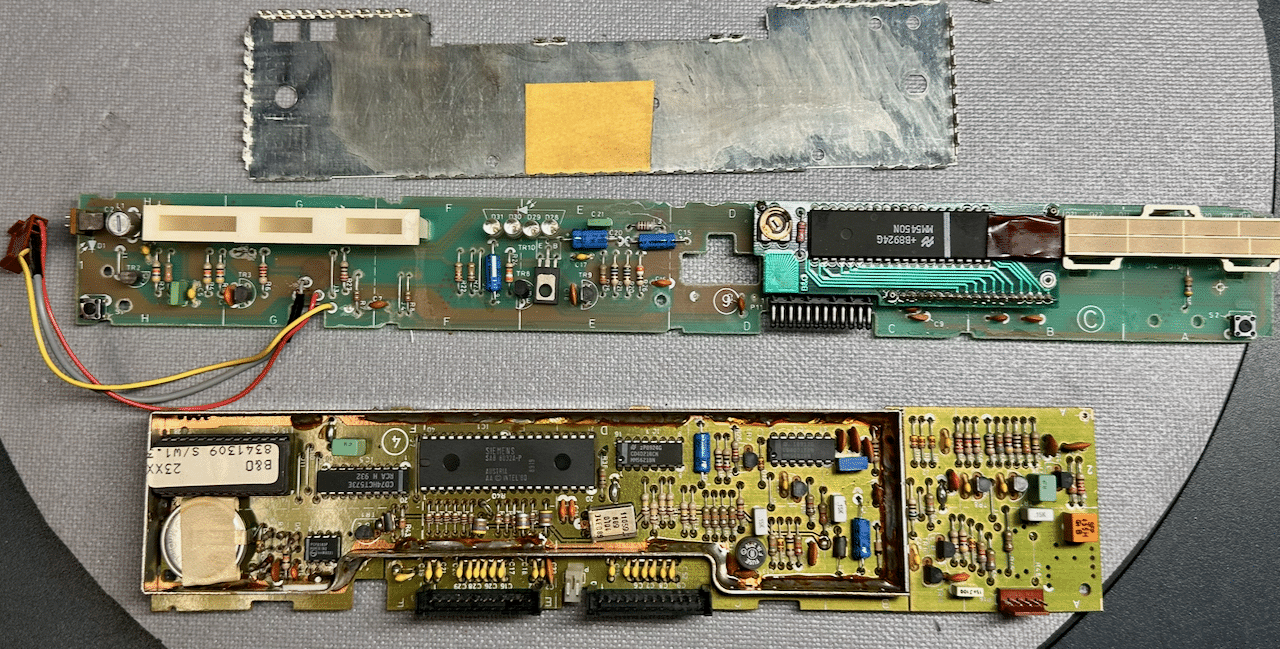
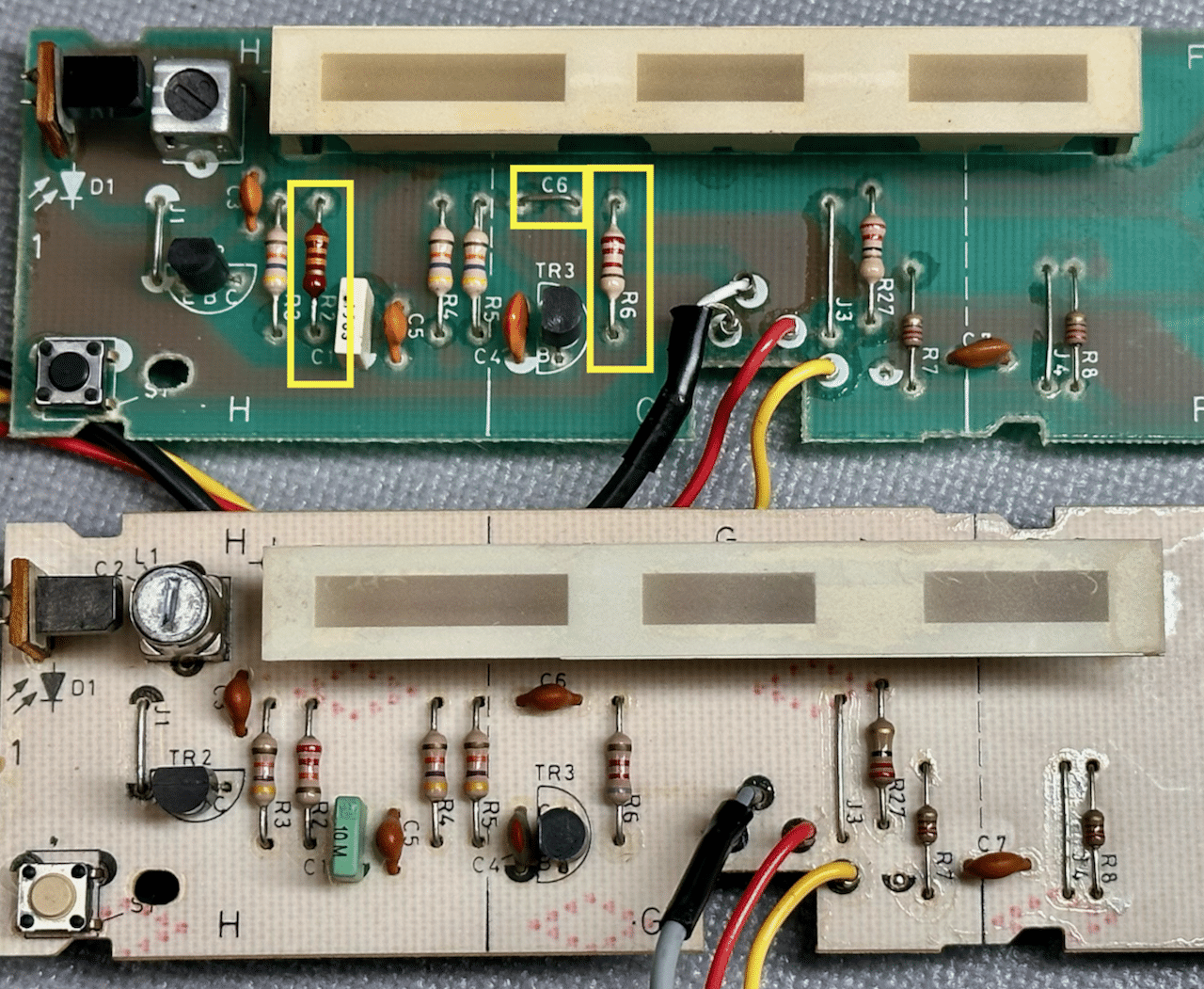
I was in a bit of a rush yesterday, so I took a few moments to re-examine the differences between the PCB9 from the 5500 and the 6500. It turns out there are a few changes, which compensate for the now-missing IR circuitry on the 6500 PCB4. R2 is changed from 22K to 33K; R6 from 8ohm to 2ohm, and in-line C6 is deleted.
BM6500 PCB9 (Top) and BM5500 (Bot):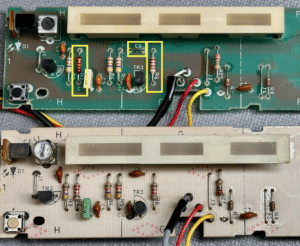
It’s possible that the 6500 CPU and the 5500 display combination worked anyways simply because I was right up next to it. Perhaps if I had been across the room, the receiver would have difficulty picking up the signal.
The 6500 PCB9 has a sticker over the board number, labelling it as 001283A.
-
This reply was modified 2 weeks, 5 days ago by
-
AuthorPosts


- You must be logged in to reply to this topic.