Generic selectors
Exact matches only
Search in title
Search in content
Post Type Selectors

Home › Forums › Product Discussion & Questions › BeoLab › Beolab 8000 mk1 pcb question

Viewing 4 posts - 1 through 4 (of 4 total)
  • Author
    Posts
  • #49269
    Beonoob9000
    BRONZE Member

    Hi all,

    Like my username suggests I’m a bit of a noob, but still willing to learn.

    My beolab stopped working overnight and doesn’t recognize any input, stuck on a standby light. I tried switching around all cables and decided to open it up.

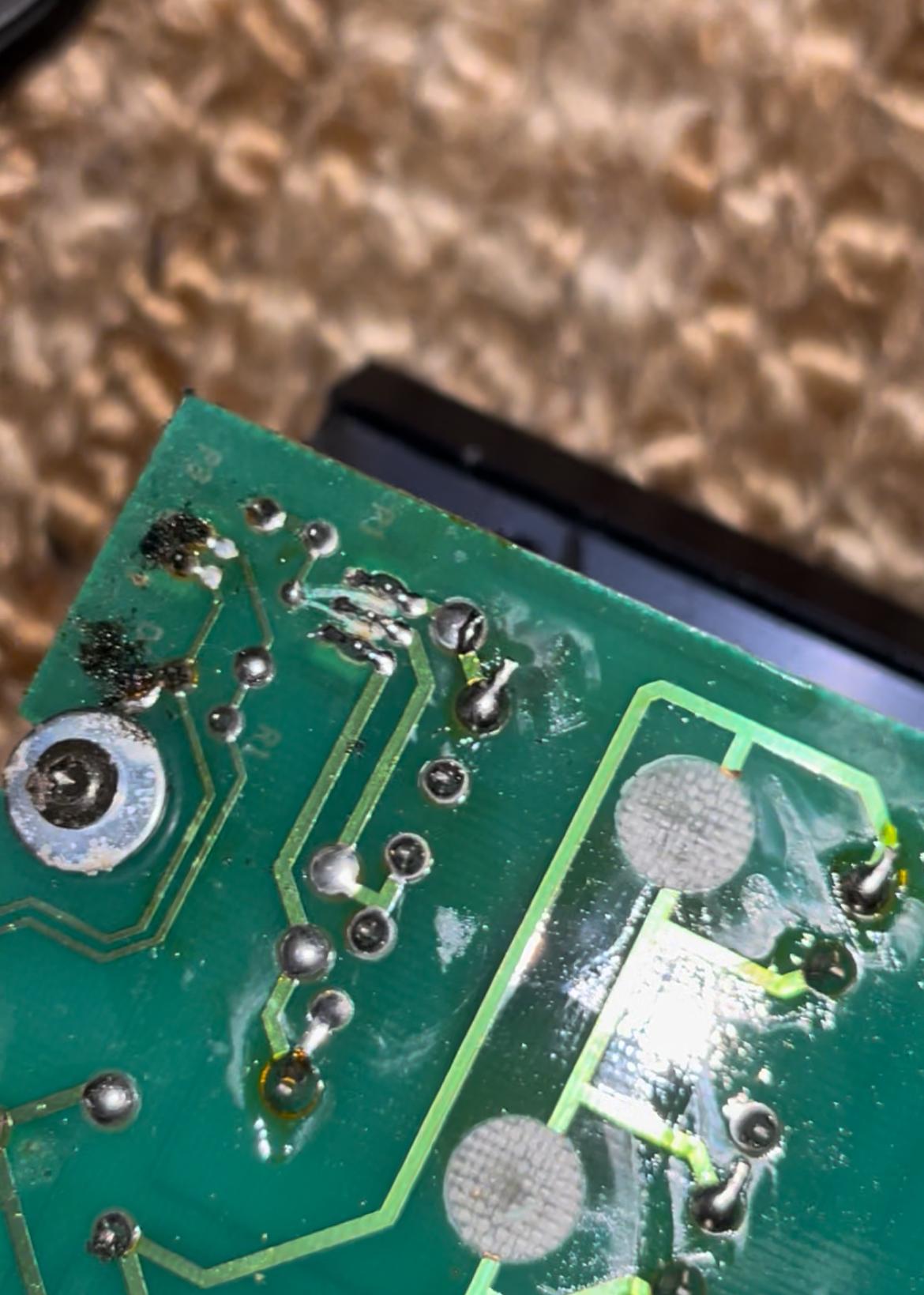
    I think I found the issue already, I have yet to clean the pcb’s tho but at first glance I saw this.

    IMG_0947

    Now if anyone could tell me what got shorted on the upper left corner of the image @ those 3 pins, and if there is still hope.

    Also, if there is anyone that has a good source for replacement foam or schematics to cut them myself that would be perfect!

    greetings

    David

    #49270
    Die_Bogener
    BRONZE Member

    Somebody cleaned it with a knife. OK, not very professional…

    The black foam has done it’s work with acid. The board has acid defects and corrosion.

    Clean it with isopropanol and a good looking glass for acid…

    The bL8000 needs the foam. There are white foam offers in Ebay.

    #125769
    Knupps
    BRONZE Member

    This is how it looks like if foam rot acid has done “its job”.

    Attachments:
    You must be logged in to view attached files.

    Location: Germany

    Favourite Product: Beolab 5

    #125772
    Die_Bogener
    BRONZE Member

    Clean the copper tracks, remove carefully the green protection paint with a round knife and solder a thin wire on the copper track.

    That’s all…

Viewing 4 posts - 1 through 4 (of 4 total)
  • You must be logged in to reply to this topic.