






Home › Forums › General Discussion & Questions › General Discussion & Questions › 8000 MK1 speaker “fried” pls help test
Tagged: 8000
- This topic has 11 replies, 2 voices, and was last updated 2 months, 1 week ago by
 Christian Skina.

-
AuthorPosts
-
2 June 2026 at 15:51 #123820
 Christian SkinaBRONZE Member
First, Im a 65 yo man, got some “electrotechnical” classes in secondary school (late 60s …) Im not knowledgeable but not an idiot, I got this far (dismantling the speaker) just by watching vids and support from AI.
If you can help, lower yourself to my level, thanks.Beolab 8000 MK1 bought 20 years ago in the USA, moved to EU. Used it all this time with a transformer, speakers plugged in an extension. Last week I cleaned the house (I cleaned it before, thx) but when plugging in 1 speaker, by accident I did so in a 220 plug. And the speakers were not adapted, hence the transformer.
The red light still turns on.
I removed the parts, went to a specialized center here in the Netherlands (by bike). The conversation was friendly but hilarious. Maybe I’ll write a book on that…Both the AI I consulted and videos I found, helped me understand 2 scenarios: 1) some little fuse is burned or 2) some bigger fuse is burned.
My question is, can someone point me to where I should measure to see that? I already have one of those small oscilloscopes(?) measuring thing but the guy at the repair center I visited was trying to sell me new speakers or, when I refused, to go home and clean the speaker because “the burned foam bla bla). Maybe he was right but Id like a second opinion.
Here’s the stuff I photographed. Help greatly appreciated, I love my speakers (and the music they help me listen to)Attachments:
You must be logged in to view attached files.2 June 2026 at 16:05 #123822Hi Christian,
The fact that the red LED still comes on is actually encouraging. If the main fuse had completely blown, I would normally expect the speaker to be completely dead.
Since the speaker was accidentally connected to 220V while still configured for 110V, I suspect the standby power supply may still be working, but another part of the power supply could have been damaged.
My suggestion would be to start with the basics:
- Check the mains fuse with a multimeter (power disconnected).
- Post clear photos of both sides of the power supply board.
- If you are comfortable using a multimeter, measure the secondary supply voltages coming from the power supply.
Also, did you hear a pop, smell anything burning, or see any smoke when it happened? And does the other speaker still work normally?
Those details may help narrow down the fault considerably.
Good luck, and don’t give up on them yet — the fact that the LED still lights up is a positive sign.
Location: The Netherlands
Favourite Product: BeoSound 9000
My B&O Icons:
 2 June 2026 at 16:56 #123841Christian SkinaBRONZE Member
hello KolfMaker
and thanks for the reply! when one is in the dark, even hearing a voice is reassuring.
Answers:
didnt hear pop, saw smoke and just sniffed around, doesnt smell of burned electronics.
I didnt try the speakers just yet but got them out, vacuumed the dead foam and they look very well there.
I attach here the images you suggested, I hope they’re clear enough. If you mean I should measure smth, pls try to describe which points. If that helps, I could mark each one with a number, in the pix.
I also attach a pic of the thing I have to measure “life”. Pls excuse the mess around the parts themselves, Im a painter and my house is a mess…Attachments:
You must be logged in to view attached files.2 June 2026 at 16:58 #123859Christian SkinaBRONZE Memberrest of pix
Attachments:
You must be logged in to view attached files.3 June 2026 at 08:38 #123893Thanks Christian, for posting the photos.
I don’t immediately see any obviously burnt components, damaged tracks or leaking capacitors, which is hopeful. Before measuring anything complicated, can you tell us exactly what the speaker does? (When connected via PowerLink/Line-IN and starting music):
- Does the LED stay red permanently?
- Does it change from red to green when a signal is present?
- Do you hear any clicks from inside the speaker, when music is started?
- Does the other speaker still work normally?
Let us know your findings.
Location: The Netherlands
Favourite Product: BeoSound 9000
My B&O Icons:
3 June 2026 at 10:20 #123896Christian SkinaBRONZE Memberthank you for not giving up on me!
It could be a simple thing but when I went to the B&O “repair center” here in The Hague/Netherlands the guy, though I had the amplifier urnit with me, said it has to be send to a lab and that will cost 350 euros. On top of that will come the part that needs to be replaced and spare parts are rare to come by. That’s why I felt so discouraged, that’s why Im happy when anyone wants to assist me.The led turns green when I turn the power on (the 110 volts from the transformer).
I hear a click in the first part pictured in the photos, there some transformer it (judging with my knowledge from the many copper wires in pic 2 and 3)
If nothing else happens, after a while I hear another click and the lamp turns red.
It’s the same behavior I got in the past, when I didnt play music but left the speakers plugged in electricity.
(the other speaker works fine, I didnt force 220 on it)
The speakers themselves do not give any music when I play, just the click I described above, when it turns from red to green.Patiently waiting 🙂
3 June 2026 at 10:27 #123897Hi Christian,
One important question that may help us narrow this down: How exactly are you testing the speaker?
Are you using:
- PowerLink from a B&O source?
- The RCA input?
- Something else?
You mentioned that the LED turns green when you power the speaker on. Does it also stay green while music is actually playing?
Knowing how the speaker is being driven is important, because it helps us determine whether the amplifier is receiving an audio signal at all, or whether we should focus on the audio input stage first.
The fact that the LED goes green and the relay clicks is still encouraging, as it suggests that a large part of the electronics is functioning normally.
Location: The Netherlands
Favourite Product: BeoSound 9000
My B&O Icons:
3 June 2026 at 11:55 #123899Christian SkinaBRONZE MemberI had to google what’s powerlink, rca and my conclusion is “something else”.
Maybe there’s a better way to connect the speakers to my old pioneer amplifier but I was happy as it was.yes, the led stays green as long as I play smth, when music stops, after +/- 30 secs it turns to red.
I suppose what you call amplifier is the 2 parts electronics inside the speaker, one with the copper coil and above (as the speaker stands) is the one with more electronics.
In the shop the guy showed me 2 little black fuses (under the traf board) and measured them, saying they were all right.Attachments:
You must be logged in to view attached files.3 June 2026 at 12:54 #123904Thank you, the photos help understanding.
A few things are still unclear to me:
- During your test with the Pioneer headphone output, approximately where was the volume control set?
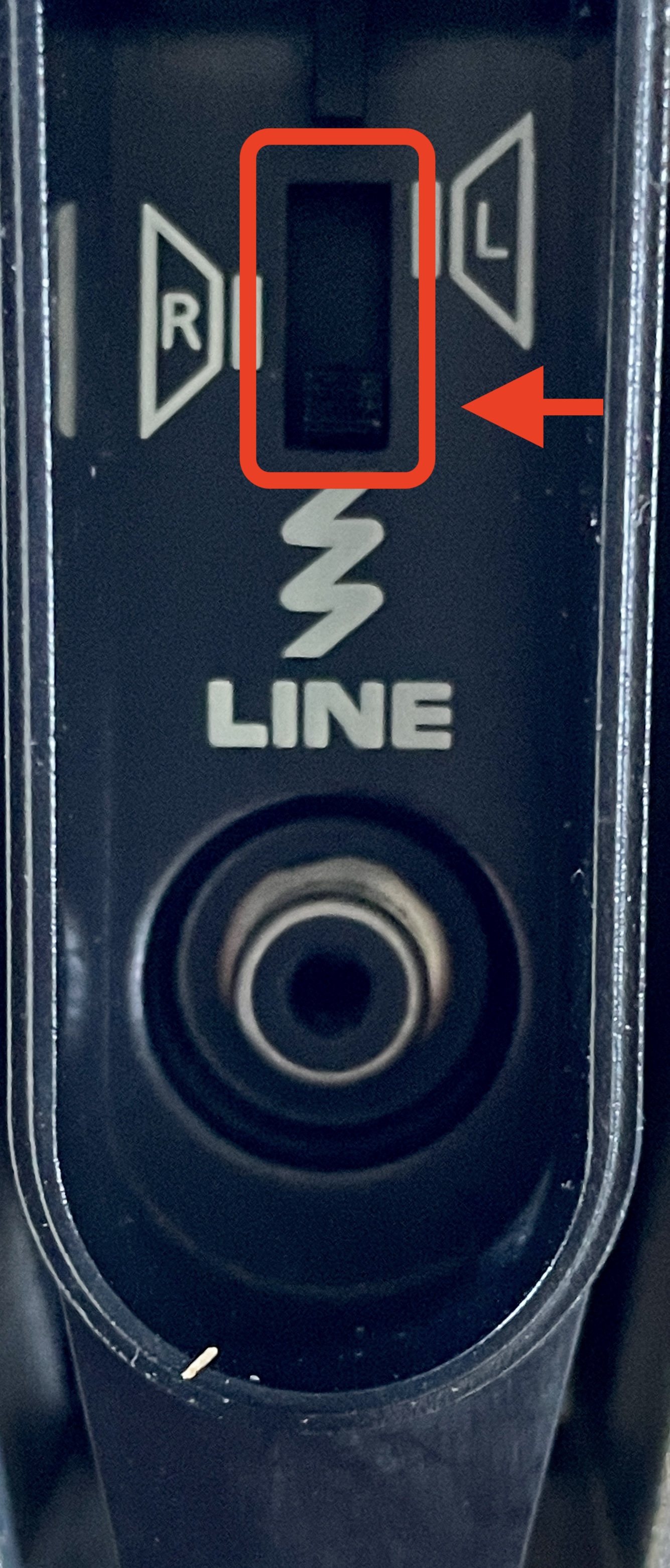
Very low, medium, or normal listening level? - For your tests, did you put the small switch on the bottom of the BeoLab 8000, to the lower position (LINE – see picture) when using the RCA input: yes/no? (The speaker may not work correctly from the RCA input when the switch is in the PowerLink position)
- Can you connect the working BeoLab 8000 using exactly the same setup:
- same Pioneer amplifier
- same cable
- switch in the lower (LINE) position
- same volume setting
- Can you share the results of this check?
- Also, when the faulty speaker LED is green, do you hear absolutely nothing at all?
No hiss from the tweeter, no hum, no clicks from the drivers?
This information will help narrow the fault down considerably.
Location: The Netherlands
Favourite Product: BeoSound 9000
My B&O Icons:
3 June 2026 at 18:22 #123906Christian SkinaBRONZE Memberproblem solved! 🙂
a friend just came over and saw the speaker on the floor. He took it with him because his partner is an electronics wizard.I thank you again for your support!
4 June 2026 at 08:49 #123914Great to hear you have practical helping hands to support you. Good for you!
For the interest of others reading this topic, please come back when your issue has been resolved. And ask your friend to write a short summary of the cause and how he solved it.
Location: The Netherlands
Favourite Product: BeoSound 9000
My B&O Icons:
19 August 2026 at 14:03 #125077Christian SkinaBRONZE Memberhello again (3 months later)
I had my speaker repaired by a guy. it turned out that the whole transformer part (im not technical, I type what I remember he told me) was fried. He had to find a new one somewhere, he did.
So if anyone looks for a similar problem as described in the thread, this could be the reason your speaker is not working anymore. You connected a 110 volts to a 200 plug. Lessons cost money, I paid mine 🙂On another subject, where was that video that helped me dismantle the speaker? I need to re-assemble it back. The foam around the frame was pulverized but I hope it will allow the speaker to still work. Im not such a hifi guy, I got it 20 years ago because I could purchase it for a reasonable price. And sounds good 🙂
thanksPS, I found the video, here for reff Bang & Olufsen Beolab 8000 Disassembly, cleaning and new isolations material installment process
-
This reply was modified 2 months, 1 week ago by Christian Skina.
-
AuthorPosts


- You must be logged in to reply to this topic.