






Home › Forums › General Discussion & Questions › General Discussion & Questions › Wiim Ultra with BeoSound5/Beomaster5?
Tagged: Beosound5 1611
- This topic has 11 replies, 4 voices, and was last updated 5 months, 4 weeks ago by
 lechatsurletoit.

-
AuthorPosts
-
4 April 2026 at 14:56 #123197
 Allan QueenSILVER MemberHi all ,Has anyone tried connecting a Wiim Ultra to a Beomaster5 and did you use the USB audio connection?I have a Beosound/Beomaster5 set up for audio & I currently use a USB Behringer UCA222 SoundCard connected to the Beomaster5 USB input & a stereo audio switch connected to the soundcard to switch input from either a Chromecast Audio for Spotify or a Rega turntable. It works but its a bit clunky.I am considering “upgrading” to a Wiim Ultra to clean up the input side of my set up, connecting the turntable to the Wiim RCA inputs and using the Wiim Ultra’s inbuilt Spotify capabilities. But it only makes sense if I can connect directly to the Beomaster5 through the USB audio input. Can this be done? I read somewhere that the BM5 had a firmware update to be compatible with the Behringer plus the “USB Out” option in the WiiM Home app only appears when a compatible, powered-on USB DAC is connected to the USB port.Has anyone gone down this route? Any thoughts would be appreciated.4 April 2026 at 19:56 #123199
 BRONZE Member
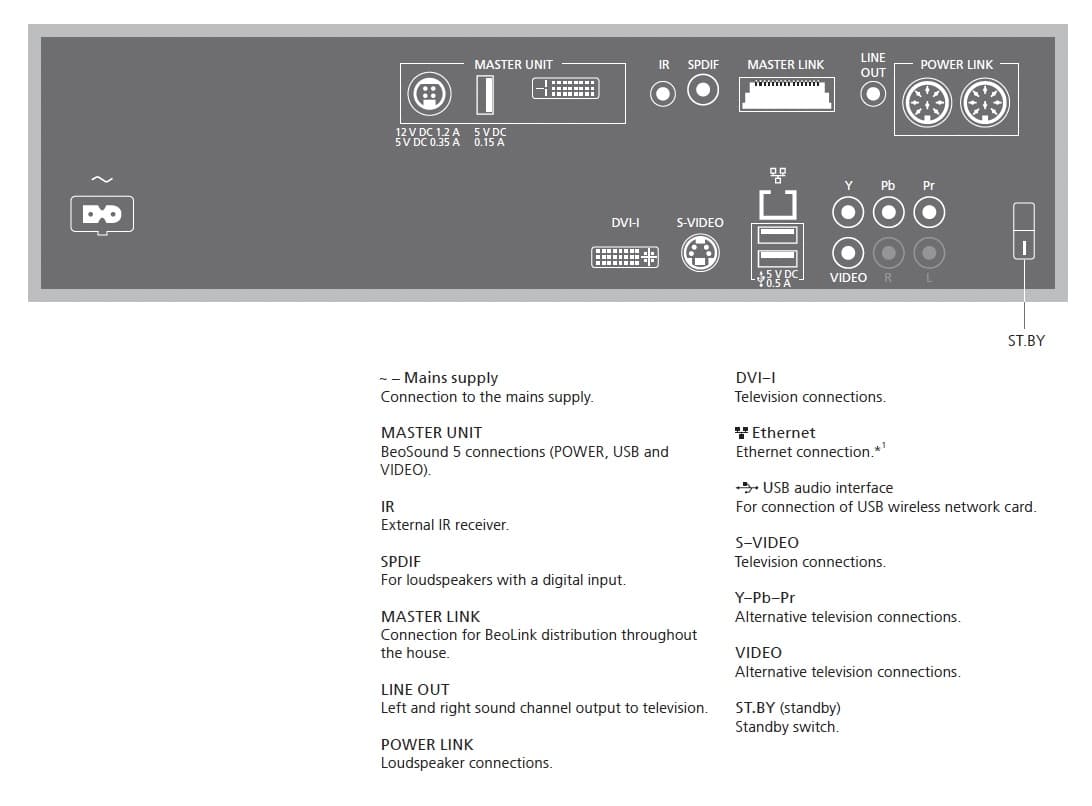
Since the USB on the BM5 can only be used for the external soundcard/the Behringer, you will have to use the analog L/R input for connecting the WiiM via the L/R output there.
To my knowledge there is no way to connect directly via the USB.
However, I did not try it – nor have I heard anyone else do that.
Why not try it yourself and report back here.P.S.
What is wrong with using the L/R’s for connecting the WiiM/what are your concerns there?
MM
Location: Flensborg————Danmark
4 April 2026 at 23:42 #123201Allan QueenSILVER MemberMany thanks for the response Millemis,I am not sure if I understand you correctly. I could obviously get a signal out from the RCA L/R plugs on the Wiim, but the only way of simply getting that signal into the BS5/BM5 is through the USB socket. There is no L/R as an input option on the BS5/BM5. I could send the signal back through the USB Behringer UCA222 SoundCard, but I was rather hoping to simplify the signal chain, especially since it looks like the Wiim Ultra can, under certain circumstances, send an audio out signal through its USB port, and its got a more modern DAC?The one other option I have thought of would be to use a special cable & a 1611 converter but thats a whole other rabbit hole to source & connect.The Wiim Ultra sounds good but I didnt really want to spend the £350 without knowing how it might work with my current set up.From what you are saying, it sounds like thats not an option though.RegardsAllan5 April 2026 at 09:31 #123203
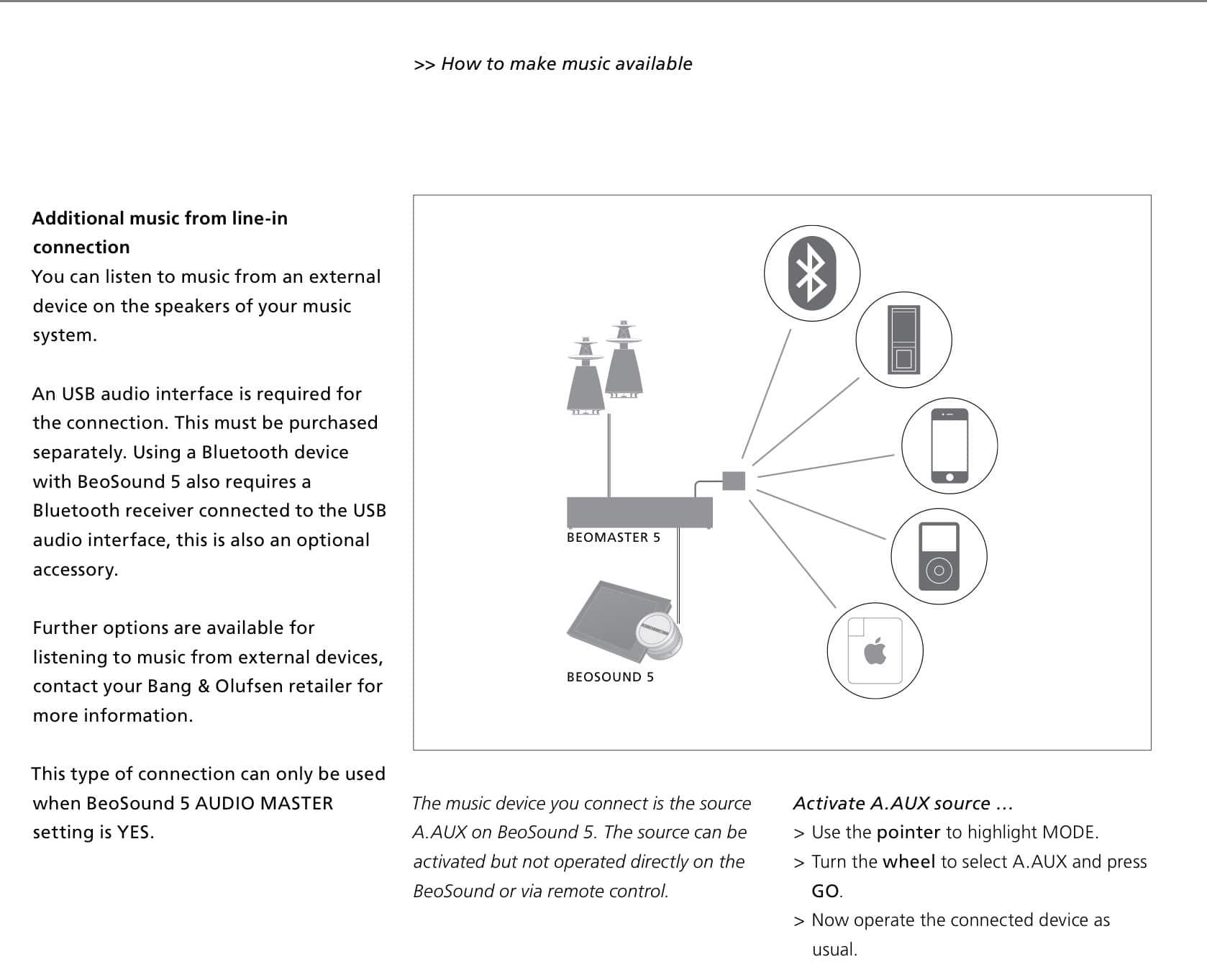
This is how it is described in the User Guide
…and that is how I have done it several times (most people want a turntable connected).Plug in the Behringer to the USB of the Master 5 – connect L/R of your choosen device (the WiiM)…..Why go for the WiiM Ultra, why not just the cheaper WiiM Pro??That will offer you all that you need….and in addition AirPlay 2 (if you need that).As you probably already know…you can easily order the WiiM device via Amazon and send it back, if you don’t like how it works.
No risk there.MMLocation: Flensborg————Danmark
5 April 2026 at 11:11 #123205MadskpGOLD MemberJust a few thought about this topic.
The Beomaster 5 is just a normal PC from that era with the addition of a breakout board to supply some connections to the screen and make masterlink and powerlink available.
It has WIndows XP embedded installed, and my best guess why the Behringer UCA222 is probably the only one that works is that windows XP needs a driver for it to function, and the Beosound 5 software needs to communicate with that driver in order to be able to select that as an input instead of the “integrated” digital sources.
My best guess would therefor be that in order for the Wiim Ultra to be able to work via USB you would need a Windows XP driver, and reconfigure the BS5 software to choose that soundcard driver instead of the Behringer.
But since I can not confirm that, the best thing would be to try it out.
Regarding the 1611 converter, that is also possible, and can works a VIDEO source input, but then you will just have the converter instead of the Behringer
Location: Denmark
5 April 2026 at 12:52 #123207Allan QueenSILVER MemberThanks for the inputs both, That makes sense on the driver front for the Behringer, but tinkering with the BS5 software for the Wiim is a few hundred levels above my capability. Any thoughts on what would give the best audio quality? – e.g. assuming I went with a Wiim product would Wiim device -> Behringer -> USB input versus Wiim device -> 1611 converter -> Masterlink connection be better from an audio viewpoint? Does the Masterlink connection treat the sound differently to the USB on the BS5/BM5?
regards
Allan
6 April 2026 at 07:32 #123210lechatsurletoitBRONZE MemberHello,
I’ve be operating my beomaster 5 with a 1611 and a chromecast audio for many years flawlessly. I’ve decided last year to upgrade with a beolink converter NL/ML and added 2 beoplay M3 in rooms where I was using beolink wireless setups. I don’t regret this choice, and the overall cost was pretty low.
Location: Düsseldorf
My B&O Icons:
6 April 2026 at 16:37 #123220Allan QueenSILVER MemberThanks Lechatsurletoit, Your success with the 1611 and a chromecast audio is good to hear. I think this is the direction I will go.
regards
Allan
7 April 2026 at 05:34 #123221lechatsurletoitBRONZE MemberAll you need to do is plug in the 1611 in the masterlink network, then plug in the mains of the 1611. Hit TV on a beoremote and you are there.
Location: Düsseldorf
My B&O Icons:
8 April 2026 at 23:36 #123242Allan QueenSILVER MemberThanks for the input everyone. I have sourced a 1611 and have ordered a few cables to connect it all and I will let you know how it goes.
regards
Allan
15 April 2026 at 20:54 #123305Allan QueenSILVER MemberOk, after a little bit of tinkering, and changing the Beosound 5 from AM Option 1 to AM Option 2, I have the turntable going through the 1611 and the Spotify/Chromecast going through the Behringer/A.Aux. Success!
So my next question is how do can I choose the DVD/1611 signal through the BS5 Head without using the BEO4 remote & vice versa how can I choose the A.Aux/Chromecast signal through the BEO4 remote without using the BS5 Head. That is be able to access all audio sources eiether through the head unit or the remote
I also have a BEO6 remote somewhere with a flat battery that I could resurrect if that would give me more control options?
Thanks for all the assistance everyone.
16 April 2026 at 07:45 #123306lechatsurletoitBRONZE MemberHi,
I don’t think this is possible without a beoremote.
I went the NL/ML converter route to increase the functionalities, this is mainly achieved through the B&O app on my phone or via beosound essence remotes I have in each rooms.
I can play the sound from my TVs on the beoplay M3 (cable connection or casting), or stream through the M3 then play that sound on my masterlink network via the BLC.
Location: Düsseldorf
My B&O Icons:
-
AuthorPosts



- You must be logged in to reply to this topic.